How to Build a PIN Unlock Screen with a Shake Animation in Flutter (Full Code + Preview)
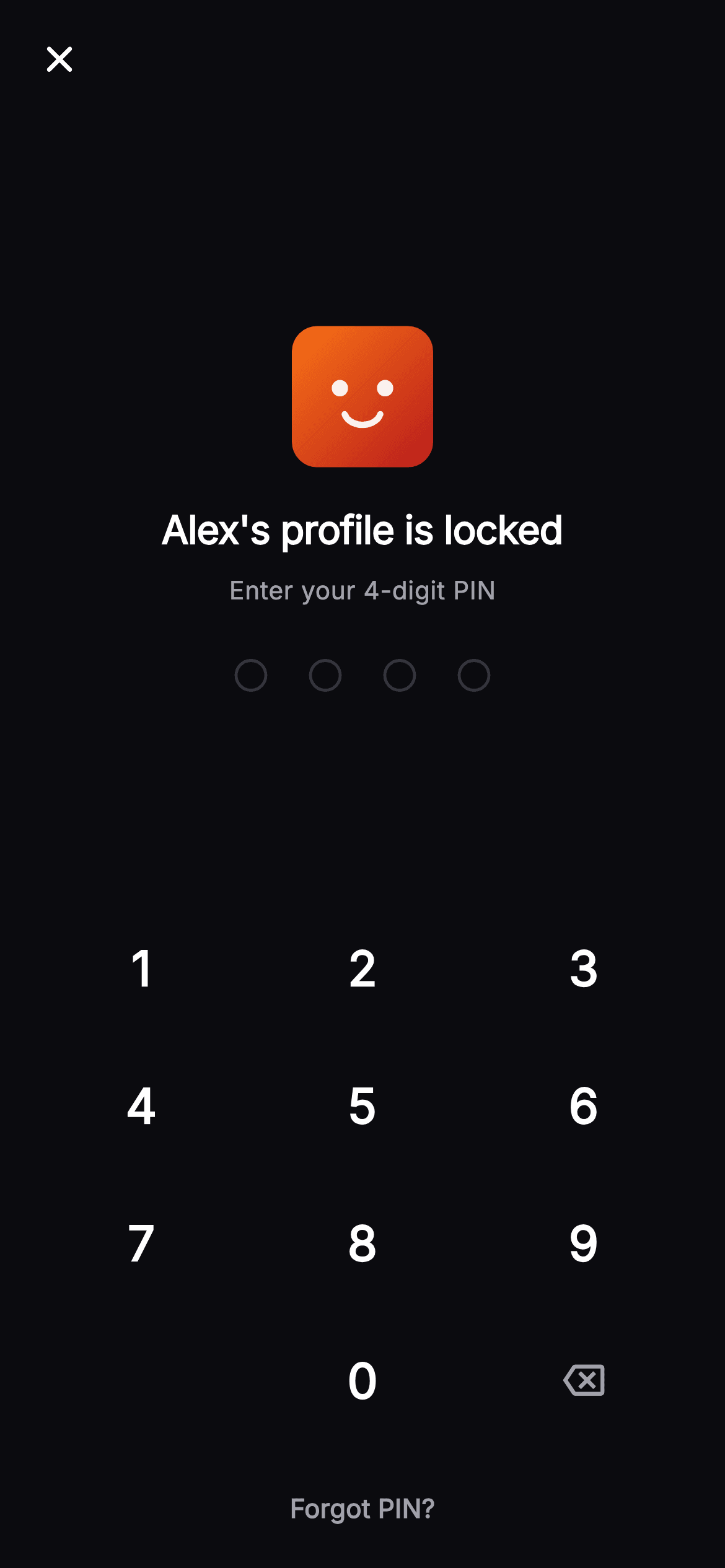
A locked profile is a five-second interaction that has to be unambiguous: the right code opens it, the wrong one says so and gets out of the way. This gate shows whose profile is locked, four painted dots that fill as digits land, and a wrong entry that shakes them, floods all four red, then clears itself half a second later so the next attempt starts clean. You'll build the damped shake from one sine wave, and a forgot-PIN escape for the person who genuinely cannot remember.
Watch the Flutter UI walkthrough
A short screen recording of Cineo · Enter PIN running, if you'd rather see it before you read the code. The written tutorial below covers everything in it.
Can't see the video? Watch it on YouTube.
What you'll build
- ✓A damped horizontal shake driven by a single sine expression
- ✓An AnimatedBuilder that moves its child without rebuilding it
- ✓A failure state that turns every dot red, not just the ones typed
- ✓A self-clearing error: the entry resets after a delay, with a mounted guard
- ✓A keypad that knows nothing about PINs and simply emits the key pressed
Step-by-step build
Create the file
Add a new file at lib/stream_profile_pin_enter/stream_profile_pin_enter_screen.dart in your Flutter project.
Register the bundled fonts
No external packages — this is pure Flutter. It does bundle its design font (Inter), so drop the font file into fonts/ and declare it in pubspec.yaml:
flutter:
  fonts:
    - family: Inter
      fonts:
- asset: fonts/Inter-Regular.ttfBuild it, piece by piece
Here's how the screen goes together. Each block below is a real slice of the code with a plain-English explanation — paste them in order, or grab the whole file from the next section.
A demo code and a shake controller
import 'dart:math' as math;

import 'package:flutter/material.dart';

/// Enter PIN — the unlock gate for a locked **Cineo** profile. Shows the profile
/// avatar, a painted 4-dot PIN indicator that shakes red on a wrong code, a
/// numeric keypad, and a "Forgot PIN?" email-reset link. Self-contained per
/// CONVENTIONS.md (pure Flutter, bundled Inter, own dark theme, painted art).
class StreamProfilePinEnterScreen extends StatefulWidget {
  const StreamProfilePinEnterScreen({
    super.key,
    this.onBack,
    this.onUnlocked,
    this.onForgot,
  });

  final VoidCallback? onBack;
  final VoidCallback? onUnlocked;
  final VoidCallback? onForgot;

  @override
  State<StreamProfilePinEnterScreen> createState() =>
      _StreamProfilePinEnterScreenState();
}

class _StreamProfilePinEnterScreenState
    extends State<StreamProfilePinEnterScreen>
    with SingleTickerProviderStateMixin {
  static const String _font = 'Inter';
  static const Color _bg = Color(0xFF0B0B0F);
  static const Color _brand = Color(0xFFE50914);
  static const Color _text = Color(0xFFFFFFFF);
  static const Color _muted = Color(0xFFA1A1AA);

  // The demo's correct code.
  static const String _correct = '1234';

  String _pin = '';
  bool _error = false;
  late final AnimationController _shake;

  @override
  void initState() {
    super.initState();
    _shake = AnimationController(
      vsync: this,
      duration: const Duration(milliseconds: 420),
    );
  }

  @override
  void dispose() {
    _shake.dispose();
    super.dispose();
  }
The screen exposes three callbacks — `onBack`, `onUnlocked` and `onForgot` — and hard-codes `static const String _correct = '1234'` so the demo is playable; in a real app that comparison moves behind whatever stores the profile's PIN. `initState` creates a 420ms `AnimationController` and, notably, does *not* start it: this controller exists to be fired on demand by a wrong entry, unlike a looping decorative animation. `dispose` releases it, which matters here because the widget can be popped the instant the PIN is accepted.
Verifying, and recovering from a wrong code
  void _tap(String d) {
    if (_pin.length >= 4) return;
    setState(() {
      _pin += d;
      _error = false;
    });
    if (_pin.length == 4) {
      if (_pin == _correct) {
        widget.onUnlocked?.call();
      } else {
        setState(() => _error = true);
        _shake.forward(from: 0);
        Future<void>.delayed(const Duration(milliseconds: 500), () {
          if (mounted) setState(() => _pin = '');
        });
      }
    }
  }

  void _back() {
    if (_pin.isEmpty) return;
    setState(() => _pin = _pin.substring(0, _pin.length - 1));
  }
`_tap` appends the digit and clears `_error` first, so the red message disappears as soon as the user starts retyping. Once four digits are in, a match calls `onUnlocked`. A miss does three things in sequence: sets `_error`, fires `_shake.forward(from: 0)` — `from: 0` is what allows a second failure to replay the animation instead of finding the controller already at its end — and schedules a 500ms `Future.delayed` that blanks `_pin`. The `if (mounted)` guard inside that callback is essential; without it, a user who taps back during the delay would hit `setState` on a disposed widget. The half-second pause is deliberate: clearing instantly would look like the taps were never registered.
Saying whose profile this is
  @override
  Widget build(BuildContext context) {
    return Theme(
      data: ThemeData.dark(useMaterial3: true),
      child: Scaffold(
        backgroundColor: _bg,
        body: SafeArea(
          child: Column(
            children: <Widget>[
              _TopBar(onBack: widget.onBack),
              const Spacer(),
              const _ProfileAvatar(variant: 0, size: 76),
              const SizedBox(height: 18),
              const Text(
                "Alex's profile is locked",
                style: TextStyle(
                  fontFamily: _font,
                  fontSize: 21,
                  fontWeight: FontWeight.w800,
                  letterSpacing: -0.3,
                  color: _text,
                ),
              ),
              const SizedBox(height: 8),
              Text(
                _error ? 'Incorrect PIN. Try again.' : 'Enter your 4-digit PIN',
                style: TextStyle(
                  fontFamily: _font,
                  fontSize: 13.5,
                  fontWeight: FontWeight.w400,
                  color: _error ? _brand : _muted,
                ),
              ),
Above the dots sit a 76px painted avatar and the line "Alex's profile is locked". Naming the profile is the point of this screen — a household picks from several, and someone who tapped the wrong tile needs to know that before they start guessing at a PIN. The status line underneath does double duty, reading 'Enter your 4-digit PIN' normally and 'Incorrect PIN. Try again.' in brand red when `_error` is set, with both strings occupying the same slot so nothing below them moves.
The shake, in one line of trigonometry
              AnimatedBuilder(
                animation: _shake,
                builder: (BuildContext context, Widget? child) {
                  final double dx =
                      math.sin(_shake.value * math.pi * 6) * 12 * (1 - _shake.value);
                  return Transform.translate(
                    offset: Offset(dx, 0),
                    child: child,
                  );
                },
                child: SizedBox(
                  height: 18,
                  child: CustomPaint(
                    painter: _PinDotsPainter(filled: _pin.length, error: _error),
                    size: const Size(132, 18),
                  ),
                ),
              ),
              const Spacer(),
              _Keypad(onDigit: _tap, onBack: _back),
              const SizedBox(height: 8),
              TextButton(
                onPressed: widget.onForgot,
                child: const Text(
                  'Forgot PIN?',
                  style: TextStyle(
                    fontFamily: _font,
                    fontSize: 14,
                    fontWeight: FontWeight.w600,
                    color: _muted,
                  ),
                ),
              ),
              const SizedBox(height: 8),
            ],
          ),
        ),
      ),
    );
  }
}
The whole animation is `math.sin(_shake.value * math.pi * 6) * 12 * (1 - _shake.value)`. The sine term completes three full oscillations as the controller runs 0→1, `* 12` sets the maximum travel in logical pixels, and `(1 - _shake.value)` is the damping envelope that shrinks each swing so the dots settle at exactly zero instead of stopping mid-shudder. Note the `AnimatedBuilder`'s `child:` parameter: the `CustomPaint` is passed in as `child` and returned inside `Transform.translate`, so it is built once and only repositioned each frame. Below the keypad, 'Forgot PIN?' is a quiet `TextButton` in muted grey — available without competing with the digits.
Why every dot turns red
class _PinDotsPainter extends CustomPainter {
  const _PinDotsPainter({required this.filled, required this.error});

  final int filled;
  final bool error;

  @override
  void paint(Canvas canvas, Size size) {
    const int count = 4;
    const double r = 8;
    const double gap = 24;
    final double totalW = count * (r * 2) + (count - 1) * gap;
    double x = (size.width - totalW) / 2 + r;
    final double cy = size.height / 2;
    final Color on = error ? const Color(0xFFEF4444) : const Color(0xFFE50914);
    for (int i = 0; i < count; i++) {
      final bool isFilled = i < filled || error;
      canvas.drawCircle(
        Offset(x, cy),
        r,
        Paint()
          ..style = isFilled ? PaintingStyle.fill : PaintingStyle.stroke
          ..strokeWidth = 1.6
          ..color = isFilled ? on : const Color(0xFF33333D),
      );
      x += r * 2 + gap;
    }
  }

  @override
  bool shouldRepaint(covariant _PinDotsPainter oldDelegate) =>
      oldDelegate.filled != filled || oldDelegate.error != error;
}
This painter is nearly the one from the PIN-setup screen, with one meaningful change: `final bool isFilled = i < filled || error;`. On a failure, all four dots fill regardless of how many digits remain in `_pin`, and the fill colour switches to `0xFFEF4444`. That is what makes the rejection read as a single event on the whole code rather than a comment on individual digits — combined with the shake, it is the visual equivalent of the code being handed back. The dots are then cleared by the delayed callback, so the red state lasts exactly as long as the animation.
A keypad that knows nothing
class _Keypad extends StatelessWidget {
  const _Keypad({required this.onDigit, required this.onBack});

  final ValueChanged<String> onDigit;
  final VoidCallback onBack;

  @override
  Widget build(BuildContext context) {
    return Padding(
      padding: const EdgeInsets.symmetric(horizontal: 40),
      child: Column(
        children: <Widget>[
          for (final List<String> row in <List<String>>[
            <String>['1', '2', '3'],
            <String>['4', '5', '6'],
            <String>['7', '8', '9'],
            <String>['', '0', '⌫'],
          ])
            Padding(
              padding: const EdgeInsets.symmetric(vertical: 7),
              child: Row(
                mainAxisAlignment: MainAxisAlignment.spaceBetween,
                children: <Widget>[
                  for (final String key in row)
                    _Key(label: key, onDigit: onDigit, onBack: onBack),
                ],
              ),
            ),
        ],
      ),
    );
  }
}

class _Key extends StatelessWidget {
  const _Key({required this.label, required this.onDigit, required this.onBack});

  final String label;
  final ValueChanged<String> onDigit;
  final VoidCallback onBack;

  @override
  Widget build(BuildContext context) {
    if (label.isEmpty) {
      return const SizedBox(width: 72, height: 60);
    }
    final bool isBack = label == '⌫';
    return SizedBox(
      width: 72,
      height: 60,
      child: Material(
        color: Colors.transparent,
        borderRadius: BorderRadius.circular(16),
        child: InkWell(
          borderRadius: BorderRadius.circular(16),
          onTap: () => isBack ? onBack() : onDigit(label),
          child: Center(
            child: isBack
                ? const Icon(Icons.backspace_outlined,
                    size: 22, color: _StreamProfilePinEnterScreenState._muted)
                : Text(
                    label,
                    style: const TextStyle(
                      fontFamily: _StreamProfilePinEnterScreenState._font,
                      fontSize: 26,
                      fontWeight: FontWeight.w600,
                      color: _StreamProfilePinEnterScreenState._text,
                    ),
                  ),
          ),
        ),
      ),
    );
  }
}
`_Keypad` takes a `ValueChanged<String>` and a `VoidCallback` and has no idea what a PIN is — it reports the label pressed and lets the parent decide what that means. That is why the same component drops unchanged into both this screen and the setup flow, where the identical keypress starts a completely different state machine. All the rules — four digits maximum, when to verify, what a failure does — live in `_tap` above, not in the keys. Each key is a 72×60 target, comfortably past the 48px minimum, with the empty label rendering an invisible spacer so the bottom row keeps its grid alignment.
Full code
The complete, ready-to-paste source. Free to use in your projects — one click copies it all.
import 'dart:math' as math;

import 'package:flutter/material.dart';

/// Enter PIN — the unlock gate for a locked **Cineo** profile. Shows the profile
/// avatar, a painted 4-dot PIN indicator that shakes red on a wrong code, a
/// numeric keypad, and a "Forgot PIN?" email-reset link. Self-contained per
/// CONVENTIONS.md (pure Flutter, bundled Inter, own dark theme, painted art).
class StreamProfilePinEnterScreen extends StatefulWidget {
  const StreamProfilePinEnterScreen({
    super.key,
    this.onBack,
    this.onUnlocked,
    this.onForgot,
  });

  final VoidCallback? onBack;
  final VoidCallback? onUnlocked;
  final VoidCallback? onForgot;

  @override
  State<StreamProfilePinEnterScreen> createState() =>
      _StreamProfilePinEnterScreenState();
}

class _StreamProfilePinEnterScreenState
    extends State<StreamProfilePinEnterScreen>
    with SingleTickerProviderStateMixin {
  static const String _font = 'Inter';
  static const Color _bg = Color(0xFF0B0B0F);
  static const Color _brand = Color(0xFFE50914);
  static const Color _text = Color(0xFFFFFFFF);
  static const Color _muted = Color(0xFFA1A1AA);

  // The demo's correct code.
  static const String _correct = '1234';

  String _pin = '';
  bool _error = false;
  late final AnimationController _shake;

  @override
  void initState() {
    super.initState();
    _shake = AnimationController(
      vsync: this,
      duration: const Duration(milliseconds: 420),
    );
  }

  @override
  void dispose() {
    _shake.dispose();
    super.dispose();
  }

  void _tap(String d) {
    if (_pin.length >= 4) return;
    setState(() {
      _pin += d;
      _error = false;
    });
    if (_pin.length == 4) {
      if (_pin == _correct) {
        widget.onUnlocked?.call();
      } else {
        setState(() => _error = true);
        _shake.forward(from: 0);
        Future<void>.delayed(const Duration(milliseconds: 500), () {
          if (mounted) setState(() => _pin = '');
        });
      }
    }
  }

  void _back() {
    if (_pin.isEmpty) return;
    setState(() => _pin = _pin.substring(0, _pin.length - 1));
  }

  @override
  Widget build(BuildContext context) {
    return Theme(
      data: ThemeData.dark(useMaterial3: true),
      child: Scaffold(
        backgroundColor: _bg,
        body: SafeArea(
          child: Column(
            children: <Widget>[
              _TopBar(onBack: widget.onBack),
              const Spacer(),
              const _ProfileAvatar(variant: 0, size: 76),
              const SizedBox(height: 18),
              const Text(
                "Alex's profile is locked",
                style: TextStyle(
                  fontFamily: _font,
                  fontSize: 21,
                  fontWeight: FontWeight.w800,
                  letterSpacing: -0.3,
                  color: _text,
                ),
              ),
              const SizedBox(height: 8),
              Text(
                _error ? 'Incorrect PIN. Try again.' : 'Enter your 4-digit PIN',
                style: TextStyle(
                  fontFamily: _font,
                  fontSize: 13.5,
                  fontWeight: FontWeight.w400,
                  color: _error ? _brand : _muted,
                ),
              ),
              const SizedBox(height: 28),
              AnimatedBuilder(
                animation: _shake,
                builder: (BuildContext context, Widget? child) {
                  final double dx =
                      math.sin(_shake.value * math.pi * 6) * 12 * (1 - _shake.value);
                  return Transform.translate(
                    offset: Offset(dx, 0),
                    child: child,
                  );
                },
                child: SizedBox(
                  height: 18,
                  child: CustomPaint(
                    painter: _PinDotsPainter(filled: _pin.length, error: _error),
                    size: const Size(132, 18),
                  ),
                ),
              ),
              const Spacer(),
              _Keypad(onDigit: _tap, onBack: _back),
              const SizedBox(height: 8),
              TextButton(
                onPressed: widget.onForgot,
                child: const Text(
                  'Forgot PIN?',
                  style: TextStyle(
                    fontFamily: _font,
                    fontSize: 14,
                    fontWeight: FontWeight.w600,
                    color: _muted,
                  ),
                ),
              ),
              const SizedBox(height: 8),
            ],
          ),
        ),
      ),
    );
  }
}

class _PinDotsPainter extends CustomPainter {
  const _PinDotsPainter({required this.filled, required this.error});

  final int filled;
  final bool error;

  @override
  void paint(Canvas canvas, Size size) {
    const int count = 4;
    const double r = 8;
    const double gap = 24;
    final double totalW = count * (r * 2) + (count - 1) * gap;
    double x = (size.width - totalW) / 2 + r;
    final double cy = size.height / 2;
    final Color on = error ? const Color(0xFFEF4444) : const Color(0xFFE50914);
    for (int i = 0; i < count; i++) {
      final bool isFilled = i < filled || error;
      canvas.drawCircle(
        Offset(x, cy),
        r,
        Paint()
          ..style = isFilled ? PaintingStyle.fill : PaintingStyle.stroke
          ..strokeWidth = 1.6
          ..color = isFilled ? on : const Color(0xFF33333D),
      );
      x += r * 2 + gap;
    }
  }

  @override
  bool shouldRepaint(covariant _PinDotsPainter oldDelegate) =>
      oldDelegate.filled != filled || oldDelegate.error != error;
}

class _Keypad extends StatelessWidget {
  const _Keypad({required this.onDigit, required this.onBack});

  final ValueChanged<String> onDigit;
  final VoidCallback onBack;

  @override
  Widget build(BuildContext context) {
    return Padding(
      padding: const EdgeInsets.symmetric(horizontal: 40),
      child: Column(
        children: <Widget>[
          for (final List<String> row in <List<String>>[
            <String>['1', '2', '3'],
            <String>['4', '5', '6'],
            <String>['7', '8', '9'],
            <String>['', '0', '⌫'],
          ])
            Padding(
              padding: const EdgeInsets.symmetric(vertical: 7),
              child: Row(
                mainAxisAlignment: MainAxisAlignment.spaceBetween,
                children: <Widget>[
                  for (final String key in row)
                    _Key(label: key, onDigit: onDigit, onBack: onBack),
                ],
              ),
            ),
        ],
      ),
    );
  }
}

class _Key extends StatelessWidget {
  const _Key({required this.label, required this.onDigit, required this.onBack});

  final String label;
  final ValueChanged<String> onDigit;
  final VoidCallback onBack;

  @override
  Widget build(BuildContext context) {
    if (label.isEmpty) {
      return const SizedBox(width: 72, height: 60);
    }
    final bool isBack = label == '⌫';
    return SizedBox(
      width: 72,
      height: 60,
      child: Material(
        color: Colors.transparent,
        borderRadius: BorderRadius.circular(16),
        child: InkWell(
          borderRadius: BorderRadius.circular(16),
          onTap: () => isBack ? onBack() : onDigit(label),
          child: Center(
            child: isBack
                ? const Icon(Icons.backspace_outlined,
                    size: 22, color: _StreamProfilePinEnterScreenState._muted)
                : Text(
                    label,
                    style: const TextStyle(
                      fontFamily: _StreamProfilePinEnterScreenState._font,
                      fontSize: 26,
                      fontWeight: FontWeight.w600,
                      color: _StreamProfilePinEnterScreenState._text,
                    ),
                  ),
          ),
        ),
      ),
    );
  }
}

class _TopBar extends StatelessWidget {
  const _TopBar({this.onBack});

  final VoidCallback? onBack;

  @override
  Widget build(BuildContext context) {
    return Padding(
      padding: const EdgeInsets.fromLTRB(8, 8, 8, 8),
      child: Row(
        children: <Widget>[
          IconButton(
            onPressed: onBack,
            icon: const Icon(Icons.close_rounded,
                color: _StreamProfilePinEnterScreenState._text),
          ),
          const Spacer(),
        ],
      ),
    );
  }
}

/// Painted seeded profile avatar — vivid gradient rounded-square + friendly
/// geometric face. [variant] (0–5) selects colour + expression.
class _ProfileAvatar extends StatelessWidget {
  const _ProfileAvatar({required this.variant, required this.size});

  final int variant;
  final double size;

  static const List<List<Color>> _palettes = <List<Color>>[
    <Color>[Color(0xFFF97316), Color(0xFFB91C1C)],
    <Color>[Color(0xFF14B8A6), Color(0xFF0F766E)],
    <Color>[Color(0xFFA855F7), Color(0xFF6D28D9)],
    <Color>[Color(0xFF3B82F6), Color(0xFF1D4ED8)],
    <Color>[Color(0xFFEC4899), Color(0xFFBE185D)],
    <Color>[Color(0xFFF5C518), Color(0xFFD97706)],
  ];

  @override
  Widget build(BuildContext context) {
    final List<Color> pal = _palettes[variant % _palettes.length];
    return Container(
      width: size,
      height: size,
      decoration: BoxDecoration(
        borderRadius: BorderRadius.circular(size * 0.18),
        gradient: LinearGradient(
          begin: Alignment.topLeft,
          end: Alignment.bottomRight,
          colors: pal,
        ),
      ),
      child: CustomPaint(
        painter: _AvatarFacePainter(variant: variant % _palettes.length),
      ),
    );
  }
}

class _AvatarFacePainter extends CustomPainter {
  const _AvatarFacePainter({required this.variant});

  final int variant;

  @override
  void paint(Canvas canvas, Size size) {
    final double w = size.width;
    final double h = size.height;
    final Paint ink = Paint()
      ..color = Colors.white.withValues(alpha: 0.92)
      ..style = PaintingStyle.fill;
    final Paint stroke = Paint()
      ..color = Colors.white.withValues(alpha: 0.92)
      ..style = PaintingStyle.stroke
      ..strokeWidth = w * 0.045
      ..strokeCap = StrokeCap.round;

    final double eyeY = h * 0.44;
    final double eyeDx = w * 0.16;
    final double eyeR = w * 0.058;
    final Offset le = Offset(w * 0.5 - eyeDx, eyeY);
    final Offset re = Offset(w * 0.5 + eyeDx, eyeY);
    canvas.drawCircle(le, eyeR, ink);
    canvas.drawCircle(re, eyeR, ink);
    final Rect mouth = Rect.fromCenter(
        center: Offset(w * 0.5, h * 0.6), width: w * 0.26, height: h * 0.2);
    canvas.drawArc(mouth, 0.25, 2.64, false, stroke);
  }

  @override
  bool shouldRepaint(covariant _AvatarFacePainter oldDelegate) =>
      oldDelegate.variant != variant;
}
Plus bundled 1 binary asset (fonts/images). The CLI and MCP install those for you automatically.
Two faster ways to add it
Copy-paste works, but you can skip it entirely.
1. FlutterKit CLI
One command drops this screen — and its fonts — straight into your project.
$ flutterkit add stream-profile-pin-enter2. AI agent (MCP)
Connect FlutterKit's MCP server in Claude or Cursor and just ask your agent to install stream-profile-pin-enter — it fetches and writes the files for you.
FAQ
How do I check the PIN against a stored value instead of '1234'?
Replace the `_pin == _correct` comparison with a call into your own store — hash the entered digits and compare against the hash you saved when the lock was set. Keep the rest of `_tap` as it is; the failure branch does not care where the verdict came from.
How do I limit the number of attempts?
Add an attempt counter alongside `_error`, increment it in the failure branch, and once it passes your threshold disable the keypad and show a wait period. Because every rule already lives in `_tap` rather than in the keypad, that is a change to one method.
Why pass the dots through the AnimatedBuilder's child parameter?
Because the artwork does not change during the shake — only its position does. Passing it as `child` means it is built once outside the builder, and each of the ~25 animation frames just wraps that existing widget in a new `Transform.translate` instead of rebuilding the painter.
Does it need any packages or fonts?
No packages. `dart:math` supplies the sine for the shake and the avatar's geometry, and both are part of the SDK. Inter ships bundled with the screen — register it under `fonts:` in your pubspec.
Which Flutter version does this need?
Flutter 3.22 or newer, because the painted avatar uses `Colors.white.withValues(alpha: 0.92)`. On an older SDK replace it with `withOpacity(0.92)` and rewrite the `super.key` constructors as `{Key? key, ...}) : super(key: key)`.


