How to Build a Manage Profiles Roster Screen in Flutter (Full Code + Preview)
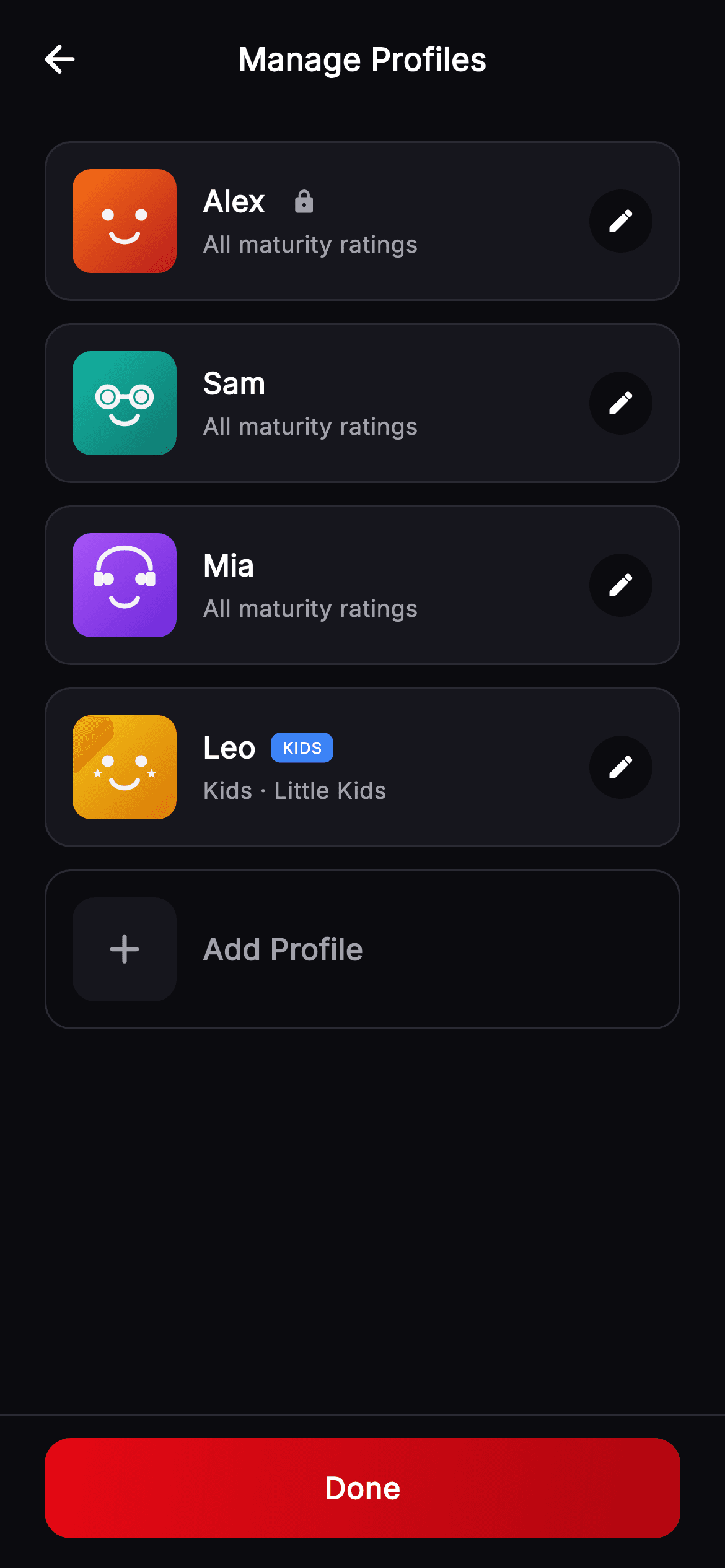
Every streaming account ends up with a profile nobody can name — a kid's account, a shared one, an old one with the wrong maturity rating. This roster screen is where that gets fixed: four profiles, each with a painted avatar, a KIDS badge or a lock where it applies, a maturity line and an edit target, plus an outlined Add Profile row and a pinned Done. You'll build rows that describe themselves from two bools, and see how a variant index gives every profile a stable painted face.
Watch the Flutter UI walkthrough
A short screen recording of Cineo · Manage Profiles running, if you'd rather see it before you read the code. The written tutorial below covers everything in it.
Can't see the video? Watch it on YouTube.
What you'll build
- ✓A profile roster where two bools drive the badge, the lock and the subtitle text
- ✓An Add Profile row styled as an outline so it reads as empty rather than occupied
- ✓Row taps that report which profile was chosen through a ValueChanged<int>
- ✓Painted gradient avatars keyed by a stored variant index — no image files
- ✓A pinned Done bar separated from the list by a single hairline
Step-by-step build
Create the file
Add a new file at lib/stream_profile_manage/stream_profile_manage_screen.dart in your Flutter project.
Register the bundled fonts
No external packages — this is pure Flutter. It does bundle its design font (Inter), so drop the font file into fonts/ and declare it in pubspec.yaml:
flutter:
  fonts:
    - family: Inter
      fonts:
- asset: fonts/Inter-Regular.ttfBuild it, piece by piece
Here's how the screen goes together. Each block below is a real slice of the code with a plain-English explanation — paste them in order, or grab the whole file from the next section.
A roster, and a callback that says which
import 'dart:math' as math;

import 'package:flutter/material.dart';

/// Manage Profiles — the profile roster for the **Cineo** streaming app. Each
/// row shows a painted avatar, name, kids/lock badges and an edit pencil; an
/// "Add Profile" row and a pinned "Done" button round it out. Self-contained per
/// CONVENTIONS.md (pure Flutter, bundled Inter, own dark theme, painted avatars).
class StreamProfileManageScreen extends StatelessWidget {
  const StreamProfileManageScreen({
    super.key,
    this.onBack,
    this.onEdit,
    this.onAdd,
    this.onDone,
  });

  final VoidCallback? onBack;
  final ValueChanged<int>? onEdit;
  final VoidCallback? onAdd;
  final VoidCallback? onDone;

  static const String _font = 'Inter';
  static const Color _bg = Color(0xFF0B0B0F);
  static const Color _surface = Color(0xFF16161D);
  static const Color _brand = Color(0xFFE50914);
  static const Color _brandDark = Color(0xFFB00610);
  static const Color _text = Color(0xFFFFFFFF);
  static const Color _muted = Color(0xFFA1A1AA);
  static const Color _hairline = Color(0xFF2A2A33);

  static const List<_P> _profiles = <_P>[
    _P('Alex', 0, locked: true),
    _P('Sam', 1),
    _P('Mia', 2),
    _P('Leo', 5, kids: true),
  ];
The screen is stateless — it edits nothing itself, it routes. Note the type of `onEdit`: `ValueChanged<int>?` rather than a bare `VoidCallback`, because the host needs to know *which* profile was tapped to open the right editor. The four `_P` records use optional named flags with defaults, so a plain profile is just `_P('Sam', 1)` while the special cases read as `_P('Alex', 0, locked: true)` and `_P('Leo', 5, kids: true)`. The second positional argument is the avatar variant, and it is stored per profile so a face never changes between visits.
Rows, then an outline that means 'empty'
  @override
  Widget build(BuildContext context) {
    return Theme(
      data: ThemeData.dark(useMaterial3: true),
      child: Scaffold(
        backgroundColor: _bg,
        body: SafeArea(
          child: Column(
            children: <Widget>[
              _TopBar(title: 'Manage Profiles', onBack: onBack),
              Expanded(
                child: ListView(
                  padding: const EdgeInsets.fromLTRB(24, 12, 24, 24),
                  children: <Widget>[
                    for (int i = 0; i < _profiles.length; i++) ...<Widget>[
                      _ProfileRow(
                        profile: _profiles[i],
                        onTap: () => onEdit?.call(i),
                      ),
                      const SizedBox(height: 12),
                    ],
                    GestureDetector(
                      onTap: onAdd,
                      child: Container(
                        padding: const EdgeInsets.symmetric(
                            horizontal: 14, vertical: 14),
                        decoration: BoxDecoration(
                          borderRadius: BorderRadius.circular(14),
                          border: Border.all(color: _hairline),
                        ),
                        child: Row(
                          children: <Widget>[
                            Container(
                              width: 56,
                              height: 56,
                              decoration: BoxDecoration(
                                color: _surface,
                                borderRadius: BorderRadius.circular(12),
                              ),
                              child: const Icon(Icons.add_rounded,
                                  color: _muted, size: 26),
                            ),
                            const SizedBox(width: 14),
                            const Text(
                              'Add Profile',
                              style: TextStyle(
                                fontFamily: _font,
                                fontSize: 16,
                                fontWeight: FontWeight.w600,
                                color: _muted,
                              ),
                            ),
                          ],
                        ),
                      ),
                    ),
                  ],
                ),
              ),
              Container(
                padding: const EdgeInsets.fromLTRB(24, 12, 24, 16),
                decoration: const BoxDecoration(
                  border: Border(top: BorderSide(color: _hairline)),
                ),
                child: _PrimaryButton(label: 'Done', onTap: onDone),
              ),
            ],
          ),
        ),
      ),
    );
  }
}
The list is a collection-for spreading each `_ProfileRow` with a 12px gap, then the Add Profile row. That row is deliberately built differently from the profiles above it: same 14px padding and same 56px leading tile, but `border` only — no `color` on the outer decoration — and a grey plus glyph on a `_surface` square instead of a gradient avatar. An outline with nothing filled in is the visual grammar for a slot that is available, so it never gets mistaken for a fifth profile. The Done button sits outside the `ListView` in a container with a top hairline, pinned regardless of list length.
The row, and two bools that describe it
class _P {
  const _P(this.name, this.variant, {this.kids = false, this.locked = false});

  final String name;
  final int variant;
  final bool kids;
  final bool locked;
}

class _ProfileRow extends StatelessWidget {
  const _ProfileRow({required this.profile, this.onTap});

  final _P profile;
  final VoidCallback? onTap;

  @override
  Widget build(BuildContext context) {
    return GestureDetector(
      onTap: onTap,
      child: Container(
        padding: const EdgeInsets.symmetric(horizontal: 14, vertical: 14),
        decoration: BoxDecoration(
          color: StreamProfileManageScreen._surface,
          borderRadius: BorderRadius.circular(14),
          border: Border.all(color: StreamProfileManageScreen._hairline),
        ),
        child: Row(
          children: <Widget>[
            _ProfileAvatar(variant: profile.variant, size: 56),
            const SizedBox(width: 14),
            Expanded(
              child: Column(
                crossAxisAlignment: CrossAxisAlignment.start,
                children: <Widget>[
                  Row(
                    children: <Widget>[
                      Text(
                        profile.name,
                        style: const TextStyle(
                          fontFamily: StreamProfileManageScreen._font,
                          fontSize: 16,
                          fontWeight: FontWeight.w700,
                          color: StreamProfileManageScreen._text,
                        ),
                      ),
                      const SizedBox(width: 8),
                      if (profile.kids) const _Badge('KIDS', Color(0xFF3B82F6)),
                      if (profile.locked)
                        const Padding(
                          padding: EdgeInsets.only(left: 6),
                          child: Icon(Icons.lock_rounded,
                              size: 14, color: StreamProfileManageScreen._muted),
                        ),
                    ],
                  ),
                  const SizedBox(height: 3),
                  Text(
                    profile.kids ? 'Kids · Little Kids' : 'All maturity ratings',
                    style: const TextStyle(
                      fontFamily: StreamProfileManageScreen._font,
                      fontSize: 12.5,
                      fontWeight: FontWeight.w400,
                      color: StreamProfileManageScreen._muted,
                    ),
                  ),
                ],
              ),
            ),
            Container(
              width: 34,
              height: 34,
              decoration: BoxDecoration(
                color: StreamProfileManageScreen._bg,
                shape: BoxShape.circle,
              ),
              child: const Icon(Icons.edit_rounded,
                  size: 16, color: StreamProfileManageScreen._text),
            ),
          ],
        ),
      ),
    );
  }
}
`_ProfileRow` puts the name in a `Row` with its markers immediately after: `if (profile.kids)` adds a blue KIDS pill and `if (profile.locked)` adds a small padlock, so a profile can carry both, one, or neither without a nested conditional. The subtitle is derived rather than stored — `profile.kids ? 'Kids · Little Kids' : 'All maturity ratings'` — which keeps the data model to a single bool instead of a free-text field that could contradict the badge above it. The trailing 34px circle is filled `_bg`, darker than the `_surface` row it sits on, so the pencil reads as a recessed target on the card.
The badge and the shared top bar
class _Badge extends StatelessWidget {
  const _Badge(this.text, this.color);

  final String text;
  final Color color;

  @override
  Widget build(BuildContext context) {
    return Container(
      padding: const EdgeInsets.symmetric(horizontal: 6, vertical: 2),
      decoration: BoxDecoration(
        color: color,
        borderRadius: BorderRadius.circular(5),
      ),
      child: Text(
        text,
        style: const TextStyle(
          fontFamily: StreamProfileManageScreen._font,
          fontSize: 8.5,
          fontWeight: FontWeight.w800,
          letterSpacing: 0.5,
          color: Colors.white,
        ),
      ),
    );
  }
}

class _TopBar extends StatelessWidget {
  const _TopBar({required this.title, this.onBack});

  final String title;
  final VoidCallback? onBack;

  @override
  Widget build(BuildContext context) {
    return Padding(
      padding: const EdgeInsets.fromLTRB(8, 8, 8, 8),
      child: Row(
        children: <Widget>[
          IconButton(
            onPressed: onBack,
            icon: const Icon(Icons.arrow_back_rounded,
                color: StreamProfileManageScreen._text),
          ),
          const Spacer(),
          Text(
            title,
            style: const TextStyle(
              fontFamily: StreamProfileManageScreen._font,
              fontSize: 17,
              fontWeight: FontWeight.w700,
              color: StreamProfileManageScreen._text,
            ),
          ),
          const Spacer(),
          const SizedBox(width: 48),
        ],
      ),
    );
  }
}
`_Badge` is a two-argument widget — text and colour — sized down to 8.5px `w800` with `letterSpacing: 0.5` and only 6px of horizontal padding. At that size the tracking is what keeps four capital letters readable rather than a blur. `_TopBar` centres its title using two `Spacer()` widgets plus a trailing `SizedBox(width: 48)`; the spacers split the leftover space evenly while the fixed 48 cancels out the `IconButton`, so the title lands on true centre rather than the midpoint of the remaining gap.
Done, and the avatar keyed by number
class _PrimaryButton extends StatelessWidget {
  const _PrimaryButton({required this.label, this.onTap});

  final String label;
  final VoidCallback? onTap;

  @override
  Widget build(BuildContext context) {
    return SizedBox(
      width: double.infinity,
      height: 54,
      child: Material(
        color: Colors.transparent,
        borderRadius: BorderRadius.circular(14),
        child: InkWell(
          onTap: onTap,
          borderRadius: BorderRadius.circular(14),
          child: Ink(
            decoration: BoxDecoration(
              borderRadius: BorderRadius.circular(14),
              gradient: const LinearGradient(
                begin: Alignment.topLeft,
                end: Alignment.bottomRight,
                colors: <Color>[
                  StreamProfileManageScreen._brand,
                  StreamProfileManageScreen._brandDark,
                ],
              ),
            ),
            child: Center(
              child: Text(
                label,
                style: const TextStyle(
                  fontFamily: StreamProfileManageScreen._font,
                  fontSize: 16,
                  fontWeight: FontWeight.w700,
                  letterSpacing: 0.3,
                  color: Colors.white,
                ),
              ),
            ),
          ),
        ),
      ),
    );
  }
}

/// Painted seeded profile avatar — vivid gradient rounded-square + friendly
/// geometric face. [variant] (0–5) selects colour + expression.
class _ProfileAvatar extends StatelessWidget {
  const _ProfileAvatar({required this.variant, required this.size});

  final int variant;
  final double size;

  static const List<List<Color>> _palettes = <List<Color>>[
    <Color>[Color(0xFFF97316), Color(0xFFB91C1C)],
    <Color>[Color(0xFF14B8A6), Color(0xFF0F766E)],
    <Color>[Color(0xFFA855F7), Color(0xFF6D28D9)],
    <Color>[Color(0xFF3B82F6), Color(0xFF1D4ED8)],
    <Color>[Color(0xFFEC4899), Color(0xFFBE185D)],
    <Color>[Color(0xFFF5C518), Color(0xFFD97706)],
  ];

  @override
  Widget build(BuildContext context) {
    final List<Color> pal = _palettes[variant % _palettes.length];
    return Container(
      width: size,
      height: size,
      decoration: BoxDecoration(
        borderRadius: BorderRadius.circular(size * 0.18),
        gradient: LinearGradient(
          begin: Alignment.topLeft,
          end: Alignment.bottomRight,
          colors: pal,
        ),
      ),
      child: CustomPaint(
        painter: _AvatarFacePainter(variant: variant % _palettes.length),
      ),
    );
  }
}
The Done button is unconditional — there is no validation to pass, because each row's edits are committed in its own editor, so this screen only needs a way out. Below it, `_ProfileAvatar` turns a number into a face: `variant % _palettes.length` indexes one of six two-colour gradients, drawn as a rounded square at `size * 0.18` radius, with a `CustomPaint` face on top. Because the variant is stored on the profile, avatars are stable, take no storage, need no upload flow and cost nothing to render at any size — the same trick that lets a new profile get a distinct look the moment it is created.
One face routine, six expressions
class _AvatarFacePainter extends CustomPainter {
  const _AvatarFacePainter({required this.variant});

  final int variant;

  @override
  void paint(Canvas canvas, Size size) {
    final double w = size.width;
    final double h = size.height;
    final Paint ink = Paint()
      ..color = Colors.white.withValues(alpha: 0.92)
      ..style = PaintingStyle.fill;
    final Paint stroke = Paint()
      ..color = Colors.white.withValues(alpha: 0.92)
      ..style = PaintingStyle.stroke
      ..strokeWidth = w * 0.045
      ..strokeCap = StrokeCap.round;

    final double eyeY = h * 0.44;
    final double eyeDx = w * 0.16;
    final double eyeR = w * 0.058;
    final Offset le = Offset(w * 0.5 - eyeDx, eyeY);
    final Offset re = Offset(w * 0.5 + eyeDx, eyeY);

    switch (variant) {
      case 1:
        canvas.drawCircle(le, eyeR * 1.7, stroke);
        canvas.drawCircle(re, eyeR * 1.7, stroke);
        canvas.drawLine(Offset(le.dx + eyeR * 1.7, eyeY),
            Offset(re.dx - eyeR * 1.7, eyeY), stroke);
        break;
      case 2:
        final Rect band = Rect.fromCenter(
            center: Offset(w * 0.5, h * 0.34), width: w * 0.5, height: h * 0.4);
        canvas.drawArc(band, math.pi, math.pi, false, stroke);
        canvas.drawRRect(
          RRect.fromRectAndRadius(
            Rect.fromCenter(
                center: Offset(w * 0.25, h * 0.44),
                width: w * 0.09,
                height: h * 0.14),
            Radius.circular(w * 0.03),
          ),
          ink,
        );
        canvas.drawRRect(
          RRect.fromRectAndRadius(
            Rect.fromCenter(
                center: Offset(w * 0.75, h * 0.44),
                width: w * 0.09,
                height: h * 0.14),
            Radius.circular(w * 0.03),
          ),
          ink,
        );
        break;
      case 3:
        final Path ears = Path()
          ..moveTo(w * 0.3, h * 0.28)
          ..lineTo(w * 0.36, h * 0.14)
          ..lineTo(w * 0.44, h * 0.28)
          ..moveTo(w * 0.7, h * 0.28)
          ..lineTo(w * 0.64, h * 0.14)
          ..lineTo(w * 0.56, h * 0.28);
        canvas.drawPath(ears, stroke);
        break;
      case 4:
        canvas.drawRRect(
          RRect.fromRectAndRadius(
            Rect.fromCenter(
                center: Offset(w * 0.5, eyeY),
                width: w * 0.46,
                height: h * 0.14),
            Radius.circular(w * 0.04),
          ),
          ink,
        );
        break;
      case 5:
        _star(canvas, Offset(w * 0.24, h * 0.56), w * 0.05, ink);
        _star(canvas, Offset(w * 0.76, h * 0.56), w * 0.05, ink);
        break;
      default:
        break;
    }

    if (variant != 4) {
      canvas.drawCircle(le, eyeR, ink);
      canvas.drawCircle(re, eyeR, ink);
    }

    final Rect mouth = Rect.fromCenter(
        center: Offset(w * 0.5, h * 0.6), width: w * 0.26, height: h * 0.2);
    canvas.drawArc(mouth, 0.25, 2.64, false, stroke);
  }
`_AvatarFacePainter` builds two `Paint`s up front — a fill and a stroke, both white at `alpha: 0.92` so the face sits slightly *into* the gradient rather than on top of it — then switches on the variant to add accessories. The composition logic is what makes it look designed rather than random: every face gets the same mouth arc at the end, drawn from `Rect.fromCenter` at `h * 0.6`, and every face gets the two round eyes *except* variant 4, which is guarded by `if (variant != 4)` because its visor already occupies that space. Stroke width is `w * 0.045`, a fraction of the box, so the same painter is crisp at 56px in this list and at full size in a grid.
Full code
The complete, ready-to-paste source. Free to use in your projects — one click copies it all.
import 'dart:math' as math;

import 'package:flutter/material.dart';

/// Manage Profiles — the profile roster for the **Cineo** streaming app. Each
/// row shows a painted avatar, name, kids/lock badges and an edit pencil; an
/// "Add Profile" row and a pinned "Done" button round it out. Self-contained per
/// CONVENTIONS.md (pure Flutter, bundled Inter, own dark theme, painted avatars).
class StreamProfileManageScreen extends StatelessWidget {
  const StreamProfileManageScreen({
    super.key,
    this.onBack,
    this.onEdit,
    this.onAdd,
    this.onDone,
  });

  final VoidCallback? onBack;
  final ValueChanged<int>? onEdit;
  final VoidCallback? onAdd;
  final VoidCallback? onDone;

  static const String _font = 'Inter';
  static const Color _bg = Color(0xFF0B0B0F);
  static const Color _surface = Color(0xFF16161D);
  static const Color _brand = Color(0xFFE50914);
  static const Color _brandDark = Color(0xFFB00610);
  static const Color _text = Color(0xFFFFFFFF);
  static const Color _muted = Color(0xFFA1A1AA);
  static const Color _hairline = Color(0xFF2A2A33);

  static const List<_P> _profiles = <_P>[
    _P('Alex', 0, locked: true),
    _P('Sam', 1),
    _P('Mia', 2),
    _P('Leo', 5, kids: true),
  ];

  @override
  Widget build(BuildContext context) {
    return Theme(
      data: ThemeData.dark(useMaterial3: true),
      child: Scaffold(
        backgroundColor: _bg,
        body: SafeArea(
          child: Column(
            children: <Widget>[
              _TopBar(title: 'Manage Profiles', onBack: onBack),
              Expanded(
                child: ListView(
                  padding: const EdgeInsets.fromLTRB(24, 12, 24, 24),
                  children: <Widget>[
                    for (int i = 0; i < _profiles.length; i++) ...<Widget>[
                      _ProfileRow(
                        profile: _profiles[i],
                        onTap: () => onEdit?.call(i),
                      ),
                      const SizedBox(height: 12),
                    ],
                    GestureDetector(
                      onTap: onAdd,
                      child: Container(
                        padding: const EdgeInsets.symmetric(
                            horizontal: 14, vertical: 14),
                        decoration: BoxDecoration(
                          borderRadius: BorderRadius.circular(14),
                          border: Border.all(color: _hairline),
                        ),
                        child: Row(
                          children: <Widget>[
                            Container(
                              width: 56,
                              height: 56,
                              decoration: BoxDecoration(
                                color: _surface,
                                borderRadius: BorderRadius.circular(12),
                              ),
                              child: const Icon(Icons.add_rounded,
                                  color: _muted, size: 26),
                            ),
                            const SizedBox(width: 14),
                            const Text(
                              'Add Profile',
                              style: TextStyle(
                                fontFamily: _font,
                                fontSize: 16,
                                fontWeight: FontWeight.w600,
                                color: _muted,
                              ),
                            ),
                          ],
                        ),
                      ),
                    ),
                  ],
                ),
              ),
              Container(
                padding: const EdgeInsets.fromLTRB(24, 12, 24, 16),
                decoration: const BoxDecoration(
                  border: Border(top: BorderSide(color: _hairline)),
                ),
                child: _PrimaryButton(label: 'Done', onTap: onDone),
              ),
            ],
          ),
        ),
      ),
    );
  }
}

class _P {
  const _P(this.name, this.variant, {this.kids = false, this.locked = false});

  final String name;
  final int variant;
  final bool kids;
  final bool locked;
}

class _ProfileRow extends StatelessWidget {
  const _ProfileRow({required this.profile, this.onTap});

  final _P profile;
  final VoidCallback? onTap;

  @override
  Widget build(BuildContext context) {
    return GestureDetector(
      onTap: onTap,
      child: Container(
        padding: const EdgeInsets.symmetric(horizontal: 14, vertical: 14),
        decoration: BoxDecoration(
          color: StreamProfileManageScreen._surface,
          borderRadius: BorderRadius.circular(14),
          border: Border.all(color: StreamProfileManageScreen._hairline),
        ),
        child: Row(
          children: <Widget>[
            _ProfileAvatar(variant: profile.variant, size: 56),
            const SizedBox(width: 14),
            Expanded(
              child: Column(
                crossAxisAlignment: CrossAxisAlignment.start,
                children: <Widget>[
                  Row(
                    children: <Widget>[
                      Text(
                        profile.name,
                        style: const TextStyle(
                          fontFamily: StreamProfileManageScreen._font,
                          fontSize: 16,
                          fontWeight: FontWeight.w700,
                          color: StreamProfileManageScreen._text,
                        ),
                      ),
                      const SizedBox(width: 8),
                      if (profile.kids) const _Badge('KIDS', Color(0xFF3B82F6)),
                      if (profile.locked)
                        const Padding(
                          padding: EdgeInsets.only(left: 6),
                          child: Icon(Icons.lock_rounded,
                              size: 14, color: StreamProfileManageScreen._muted),
                        ),
                    ],
                  ),
                  const SizedBox(height: 3),
                  Text(
                    profile.kids ? 'Kids · Little Kids' : 'All maturity ratings',
                    style: const TextStyle(
                      fontFamily: StreamProfileManageScreen._font,
                      fontSize: 12.5,
                      fontWeight: FontWeight.w400,
                      color: StreamProfileManageScreen._muted,
                    ),
                  ),
                ],
              ),
            ),
            Container(
              width: 34,
              height: 34,
              decoration: BoxDecoration(
                color: StreamProfileManageScreen._bg,
                shape: BoxShape.circle,
              ),
              child: const Icon(Icons.edit_rounded,
                  size: 16, color: StreamProfileManageScreen._text),
            ),
          ],
        ),
      ),
    );
  }
}

class _Badge extends StatelessWidget {
  const _Badge(this.text, this.color);

  final String text;
  final Color color;

  @override
  Widget build(BuildContext context) {
    return Container(
      padding: const EdgeInsets.symmetric(horizontal: 6, vertical: 2),
      decoration: BoxDecoration(
        color: color,
        borderRadius: BorderRadius.circular(5),
      ),
      child: Text(
        text,
        style: const TextStyle(
          fontFamily: StreamProfileManageScreen._font,
          fontSize: 8.5,
          fontWeight: FontWeight.w800,
          letterSpacing: 0.5,
          color: Colors.white,
        ),
      ),
    );
  }
}

class _TopBar extends StatelessWidget {
  const _TopBar({required this.title, this.onBack});

  final String title;
  final VoidCallback? onBack;

  @override
  Widget build(BuildContext context) {
    return Padding(
      padding: const EdgeInsets.fromLTRB(8, 8, 8, 8),
      child: Row(
        children: <Widget>[
          IconButton(
            onPressed: onBack,
            icon: const Icon(Icons.arrow_back_rounded,
                color: StreamProfileManageScreen._text),
          ),
          const Spacer(),
          Text(
            title,
            style: const TextStyle(
              fontFamily: StreamProfileManageScreen._font,
              fontSize: 17,
              fontWeight: FontWeight.w700,
              color: StreamProfileManageScreen._text,
            ),
          ),
          const Spacer(),
          const SizedBox(width: 48),
        ],
      ),
    );
  }
}

class _PrimaryButton extends StatelessWidget {
  const _PrimaryButton({required this.label, this.onTap});

  final String label;
  final VoidCallback? onTap;

  @override
  Widget build(BuildContext context) {
    return SizedBox(
      width: double.infinity,
      height: 54,
      child: Material(
        color: Colors.transparent,
        borderRadius: BorderRadius.circular(14),
        child: InkWell(
          onTap: onTap,
          borderRadius: BorderRadius.circular(14),
          child: Ink(
            decoration: BoxDecoration(
              borderRadius: BorderRadius.circular(14),
              gradient: const LinearGradient(
                begin: Alignment.topLeft,
                end: Alignment.bottomRight,
                colors: <Color>[
                  StreamProfileManageScreen._brand,
                  StreamProfileManageScreen._brandDark,
                ],
              ),
            ),
            child: Center(
              child: Text(
                label,
                style: const TextStyle(
                  fontFamily: StreamProfileManageScreen._font,
                  fontSize: 16,
                  fontWeight: FontWeight.w700,
                  letterSpacing: 0.3,
                  color: Colors.white,
                ),
              ),
            ),
          ),
        ),
      ),
    );
  }
}

/// Painted seeded profile avatar — vivid gradient rounded-square + friendly
/// geometric face. [variant] (0–5) selects colour + expression.
class _ProfileAvatar extends StatelessWidget {
  const _ProfileAvatar({required this.variant, required this.size});

  final int variant;
  final double size;

  static const List<List<Color>> _palettes = <List<Color>>[
    <Color>[Color(0xFFF97316), Color(0xFFB91C1C)],
    <Color>[Color(0xFF14B8A6), Color(0xFF0F766E)],
    <Color>[Color(0xFFA855F7), Color(0xFF6D28D9)],
    <Color>[Color(0xFF3B82F6), Color(0xFF1D4ED8)],
    <Color>[Color(0xFFEC4899), Color(0xFFBE185D)],
    <Color>[Color(0xFFF5C518), Color(0xFFD97706)],
  ];

  @override
  Widget build(BuildContext context) {
    final List<Color> pal = _palettes[variant % _palettes.length];
    return Container(
      width: size,
      height: size,
      decoration: BoxDecoration(
        borderRadius: BorderRadius.circular(size * 0.18),
        gradient: LinearGradient(
          begin: Alignment.topLeft,
          end: Alignment.bottomRight,
          colors: pal,
        ),
      ),
      child: CustomPaint(
        painter: _AvatarFacePainter(variant: variant % _palettes.length),
      ),
    );
  }
}

class _AvatarFacePainter extends CustomPainter {
  const _AvatarFacePainter({required this.variant});

  final int variant;

  @override
  void paint(Canvas canvas, Size size) {
    final double w = size.width;
    final double h = size.height;
    final Paint ink = Paint()
      ..color = Colors.white.withValues(alpha: 0.92)
      ..style = PaintingStyle.fill;
    final Paint stroke = Paint()
      ..color = Colors.white.withValues(alpha: 0.92)
      ..style = PaintingStyle.stroke
      ..strokeWidth = w * 0.045
      ..strokeCap = StrokeCap.round;

    final double eyeY = h * 0.44;
    final double eyeDx = w * 0.16;
    final double eyeR = w * 0.058;
    final Offset le = Offset(w * 0.5 - eyeDx, eyeY);
    final Offset re = Offset(w * 0.5 + eyeDx, eyeY);

    switch (variant) {
      case 1:
        canvas.drawCircle(le, eyeR * 1.7, stroke);
        canvas.drawCircle(re, eyeR * 1.7, stroke);
        canvas.drawLine(Offset(le.dx + eyeR * 1.7, eyeY),
            Offset(re.dx - eyeR * 1.7, eyeY), stroke);
        break;
      case 2:
        final Rect band = Rect.fromCenter(
            center: Offset(w * 0.5, h * 0.34), width: w * 0.5, height: h * 0.4);
        canvas.drawArc(band, math.pi, math.pi, false, stroke);
        canvas.drawRRect(
          RRect.fromRectAndRadius(
            Rect.fromCenter(
                center: Offset(w * 0.25, h * 0.44),
                width: w * 0.09,
                height: h * 0.14),
            Radius.circular(w * 0.03),
          ),
          ink,
        );
        canvas.drawRRect(
          RRect.fromRectAndRadius(
            Rect.fromCenter(
                center: Offset(w * 0.75, h * 0.44),
                width: w * 0.09,
                height: h * 0.14),
            Radius.circular(w * 0.03),
          ),
          ink,
        );
        break;
      case 3:
        final Path ears = Path()
          ..moveTo(w * 0.3, h * 0.28)
          ..lineTo(w * 0.36, h * 0.14)
          ..lineTo(w * 0.44, h * 0.28)
          ..moveTo(w * 0.7, h * 0.28)
          ..lineTo(w * 0.64, h * 0.14)
          ..lineTo(w * 0.56, h * 0.28);
        canvas.drawPath(ears, stroke);
        break;
      case 4:
        canvas.drawRRect(
          RRect.fromRectAndRadius(
            Rect.fromCenter(
                center: Offset(w * 0.5, eyeY),
                width: w * 0.46,
                height: h * 0.14),
            Radius.circular(w * 0.04),
          ),
          ink,
        );
        break;
      case 5:
        _star(canvas, Offset(w * 0.24, h * 0.56), w * 0.05, ink);
        _star(canvas, Offset(w * 0.76, h * 0.56), w * 0.05, ink);
        break;
      default:
        break;
    }

    if (variant != 4) {
      canvas.drawCircle(le, eyeR, ink);
      canvas.drawCircle(re, eyeR, ink);
    }

    final Rect mouth = Rect.fromCenter(
        center: Offset(w * 0.5, h * 0.6), width: w * 0.26, height: h * 0.2);
    canvas.drawArc(mouth, 0.25, 2.64, false, stroke);
  }

  void _star(Canvas canvas, Offset c, double r, Paint p) {
    final Path path = Path();
    for (int i = 0; i < 5; i++) {
      final double a = -math.pi / 2 + i * (2 * math.pi / 5);
      final double x = c.dx + r * math.cos(a);
      final double y = c.dy + r * math.sin(a);
      if (i == 0) {
        path.moveTo(x, y);
      } else {
        path.lineTo(x, y);
      }
      final double a2 = a + math.pi / 5;
      path.lineTo(
          c.dx + r * 0.45 * math.cos(a2), c.dy + r * 0.45 * math.sin(a2));
    }
    path.close();
    canvas.drawPath(path, p);
  }

  @override
  bool shouldRepaint(covariant _AvatarFacePainter oldDelegate) =>
      oldDelegate.variant != variant;
}
Plus bundled 1 binary asset (fonts/images). The CLI and MCP install those for you automatically.
Two faster ways to add it
Copy-paste works, but you can skip it entirely.
1. FlutterKit CLI
One command drops this screen — and its fonts — straight into your project.
$ flutterkit add stream-profile-manage2. AI agent (MCP)
Connect FlutterKit's MCP server in Claude or Cursor and just ask your agent to install stream-profile-manage — it fetches and writes the files for you.
FAQ
How do I load real profiles into this roster?
Swap the `_profiles` constant for a list passed into the widget. Keep an integer variant on each record — it is what selects the avatar, and storing it beside the name means the face survives a reinstall without an image upload.
Why does onEdit take an int instead of being a plain callback?
Because the row reports its index: `onTap: () => onEdit?.call(i)`. The host uses that to open the correct profile editor. A `VoidCallback` would tell you a pencil was tapped but not whose, which is exactly the information you need.
Can a profile show both the KIDS badge and the lock?
Yes. They are two independent `if` statements inside the name row, so a locked kids profile renders both markers side by side. The subtitle only reads the `kids` flag, so a lock changes the badges without rewriting the maturity line.
Does it need any packages or fonts?
No packages — the avatars are painted with `CustomPainter` and `dart:math`, both from the SDK, so there are no profile images to bundle or fetch. Inter is bundled with the screen and registered under `fonts:` in your pubspec.
Which Flutter version does this need?
Flutter 3.22 or newer, since the face painter uses `Colors.white.withValues(alpha: 0.92)`. On an older SDK use `withOpacity(0.92)` and expand the `super.key` constructors into the `{Key? key, ...}) : super(key: key)` form.


