How to Build a Subscription Payment Screen with a Card Preview in Flutter (Full Code + Preview)
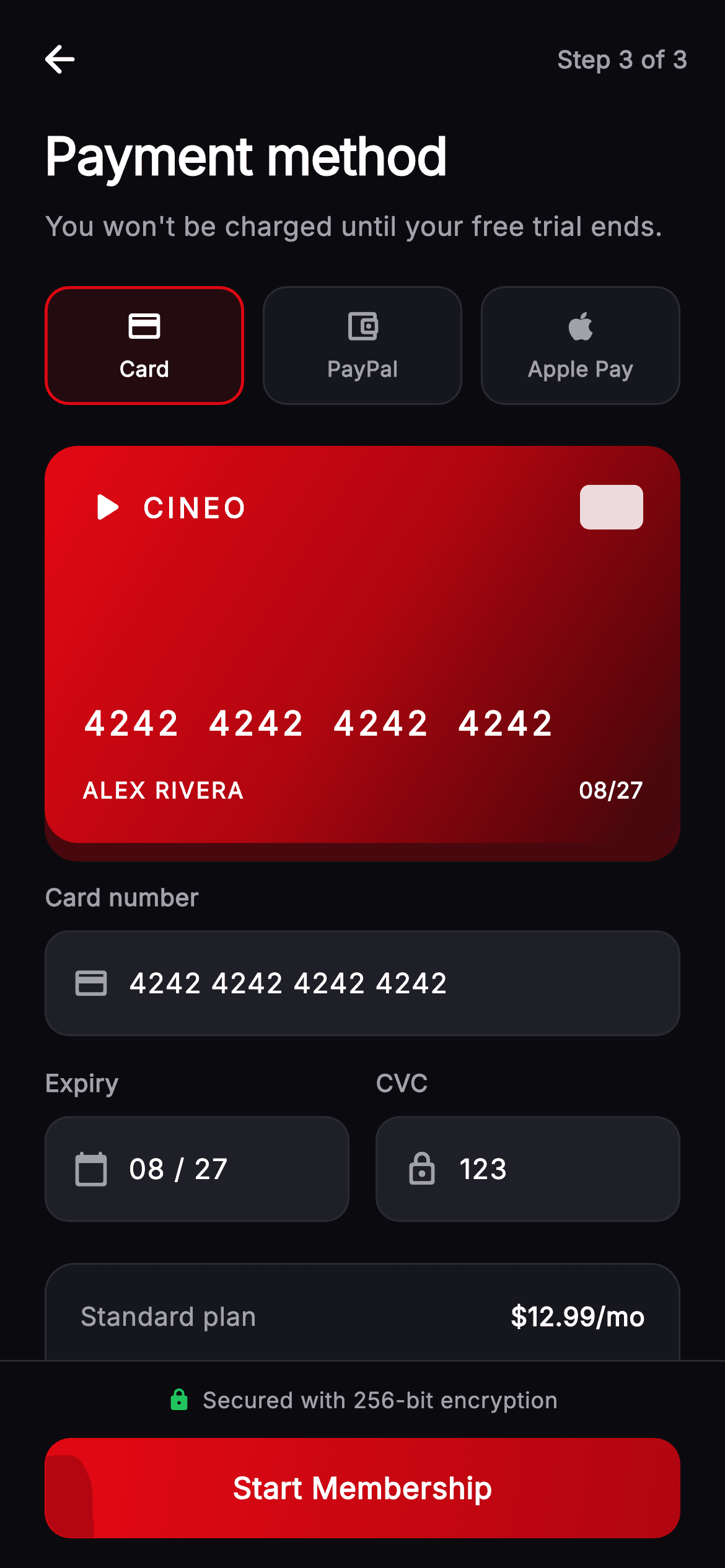
Asking for card details during a free trial means the screen has to reassure as much as it collects. This tutorial builds it in Flutter: three payment-method chips backed by an `enum`, a card form that swaps out for a redirect note when PayPal or Apple Pay is chosen, a gradient card preview with a coloured glow shadow, and a billing summary that shows the trial credit cancelling the charge to leave '$0.00 due today'.
Watch the Flutter UI walkthrough
A short screen recording of Cineo · Payment Method running, if you'd rather see it before you read the code. The written tutorial below covers everything in it.
Can't see the video? Watch it on YouTube.
What you'll build
- ✓An `enum`-backed method selector — three chips, one exhaustive state
- ✓A form that swaps entirely for a redirect note when a wallet method is picked
- ✓A gradient card preview held at 1.6 by `AspectRatio`, with a brand-tinted glow
- ✓A billing summary where the trial credit visibly cancels the first charge
- ✓A `_row` helper with `bold` and `highlight` flags instead of three near-identical widgets
- ✓Expiry and CVC side by side as two `Expanded` columns
Step-by-step build
Create the file
Add a new file at lib/stream_auth_payment/stream_auth_payment_screen.dart in your Flutter project.
Register the bundled fonts
No external packages — this is pure Flutter. It does bundle its design font (Inter), so drop the font file into fonts/ and declare it in pubspec.yaml:
flutter:
  fonts:
    - family: Inter
      fonts:
- asset: fonts/Inter-Regular.ttfBuild it, piece by piece
Here's how the screen goes together. Each block below is a real slice of the code with a plain-English explanation — paste them in order, or grab the whole file from the next section.
An enum for the payment method
enum _Method { card, paypal, applePay }

class _StreamAuthPaymentScreenState extends State<StreamAuthPaymentScreen> {
  static const String _font = 'Inter';
  static const Color _bg = Color(0xFF0B0B0F);
  static const Color _surface = Color(0xFF16161D);
  static const Color _surfaceAlt = Color(0xFF1F1F28);
  static const Color _brand = Color(0xFFE50914);
  static const Color _brandDark = Color(0xFFB00610);
  static const Color _text = Color(0xFFFFFFFF);
  static const Color _muted = Color(0xFFA1A1AA);
  static const Color _hairline = Color(0xFF2A2A33);
  static const Color _success = Color(0xFF22C55E);

  _Method _method = _Method.card;
`enum _Method { card, paypal, applePay }` with a single `_Method _method = _Method.card` field. Using an enum rather than an `int` or a `String` is the right call for a fixed, mutually exclusive set: the analyser knows the complete list of values, comparisons like `_method == _Method.paypal` can't be typo'd, and adding a fourth method surfaces every place that needs updating. Everything else on this screen is derived from that one field.
The method chips
  @override
  Widget build(BuildContext context) {
    return Theme(
      data: ThemeData.dark(useMaterial3: true),
      child: Scaffold(
        backgroundColor: _bg,
        body: SafeArea(
          child: Column(
            children: <Widget>[
              _TopBar(onBack: widget.onBack),
              Expanded(
                child: ListView(
                  padding: const EdgeInsets.fromLTRB(24, 4, 24, 24),
                  children: <Widget>[
                    const Text(
                      'Payment method',
                      style: TextStyle(
                        fontFamily: _font,
                        fontSize: 28,
                        fontWeight: FontWeight.w800,
                        letterSpacing: -0.5,
                        color: _text,
                      ),
                    ),
                    const SizedBox(height: 8),
                    const Text(
                      "You won't be charged until your free trial ends.",
                      style: TextStyle(
                        fontFamily: _font,
                        fontSize: 14.5,
                        height: 1.4,
                        fontWeight: FontWeight.w400,
                        color: _muted,
                      ),
                    ),
                    const SizedBox(height: 22),
                    Row(
                      children: <Widget>[
                        _MethodChip(
                          label: 'Card',
                          icon: Icons.credit_card_rounded,
                          selected: _method == _Method.card,
                          onTap: () => setState(() => _method = _Method.card),
                        ),
                        const SizedBox(width: 10),
                        _MethodChip(
                          label: 'PayPal',
                          icon: Icons.account_balance_wallet_outlined,
                          selected: _method == _Method.paypal,
                          onTap: () => setState(() => _method = _Method.paypal),
                        ),
                        const SizedBox(width: 10),
                        _MethodChip(
                          label: 'Apple Pay',
                          icon: Icons.apple_rounded,
                          selected: _method == _Method.applePay,
                          onTap: () =>
                              setState(() => _method = _Method.applePay),
                        ),
                      ],
                    ),
Three `_MethodChip`s in a `Row` with 10px gaps. Each is told `selected: _method == _Method.x` and sets the enum on tap, so the selection is derived rather than stored per chip — the previous one deselects itself with no extra code. The header copy above them leads with the reassurance, "You won't be charged until your free trial ends", which on a payment screen matters more than any label below it.
Swapping the whole form on method
                    const SizedBox(height: 22),
                    if (_method == _Method.card) ...<Widget>[
                      const _CardPreview(),
                      const SizedBox(height: 20),
                      const _FieldLabel('Card number'),
                      const SizedBox(height: 8),
                      _InputField(
                        controller: TextEditingController(
                            text: '4242 4242 4242 4242'),
                        hint: '1234 5678 9012 3456',
                        icon: Icons.credit_card_rounded,
                        keyboardType: TextInputType.number,
                      ),
                      const SizedBox(height: 16),
                      Row(
                        children: <Widget>[
                          Expanded(
                            child: Column(
                              crossAxisAlignment: CrossAxisAlignment.start,
                              children: <Widget>[
                                const _FieldLabel('Expiry'),
                                const SizedBox(height: 8),
                                _InputField(
                                  controller:
                                      TextEditingController(text: '08 / 27'),
                                  hint: 'MM / YY',
                                  icon: Icons.calendar_today_rounded,
                                  keyboardType: TextInputType.number,
                                ),
                              ],
                            ),
                          ),
                          const SizedBox(width: 14),
                          Expanded(
                            child: Column(
                              crossAxisAlignment: CrossAxisAlignment.start,
                              children: <Widget>[
                                const _FieldLabel('CVC'),
                                const SizedBox(height: 8),
                                _InputField(
                                  controller:
                                      TextEditingController(text: '123'),
                                  hint: 'CVC',
                                  icon: Icons.lock_outline_rounded,
                                  keyboardType: TextInputType.number,
                                ),
                              ],
                            ),
                          ),
                        ],
                      ),
                    ] else
                      _RedirectNote(
                        method: _method == _Method.paypal
                            ? 'PayPal'
                            : 'Apple Pay',
                      ),
                    const SizedBox(height: 22),
                    _SummaryCard(),
                  ],
This is the screen's main conditional: `if (_method == _Method.card) ...<Widget>[preview, fields…] else _RedirectNote(...)`. A collection-`if`/`else` with a spread lets one branch contribute *many* widgets and the other contribute one, which a ternary in a `children` list can't do cleanly. When a wallet method is selected, the card preview and all three fields are never built at all. Expiry and CVC sit side by side as two `Expanded` columns, each carrying its own label — pairing them in one row reflects how they're printed on the card itself.
The painted card preview
class _CardPreview extends StatelessWidget {
  const _CardPreview();

  @override
  Widget build(BuildContext context) {
    return AspectRatio(
      aspectRatio: 1.6,
      child: Container(
        decoration: BoxDecoration(
          borderRadius: BorderRadius.circular(18),
          gradient: const LinearGradient(
            begin: Alignment.topLeft,
            end: Alignment.bottomRight,
            colors: <Color>[
              _StreamAuthPaymentScreenState._brand,
              _StreamAuthPaymentScreenState._brandDark,
              Color(0xFF3A0509),
            ],
          ),
          boxShadow: <BoxShadow>[
            BoxShadow(
              color: _StreamAuthPaymentScreenState._brand
                  .withValues(alpha: 0.28),
              blurRadius: 24,
              offset: const Offset(0, 10),
            ),
          ],
        ),
        child: Padding(
          padding: const EdgeInsets.all(20),
          child: Column(
            crossAxisAlignment: CrossAxisAlignment.start,
            children: <Widget>[
              Row(
                children: <Widget>[
                  const Icon(Icons.play_arrow_rounded,
                      color: Colors.white, size: 26),
                  const SizedBox(width: 6),
                  const Text(
                    'CINEO',
                    style: TextStyle(
                      fontFamily: _StreamAuthPaymentScreenState._font,
                      fontSize: 15,
                      fontWeight: FontWeight.w800,
                      letterSpacing: 2,
                      color: Colors.white,
                    ),
                  ),
                  const Spacer(),
                  Container(
                    width: 34,
                    height: 24,
                    decoration: BoxDecoration(
                      color: Colors.white.withValues(alpha: 0.85),
                      borderRadius: BorderRadius.circular(5),
                    ),
                  ),
                ],
              ),
              const Spacer(),
              const Text(
                '4242  4242  4242  4242',
                style: TextStyle(
                  fontFamily: _StreamAuthPaymentScreenState._font,
                  fontSize: 18,
                  fontWeight: FontWeight.w600,
                  letterSpacing: 2,
                  color: Colors.white,
                ),
              ),
              const SizedBox(height: 14),
              Row(
                children: const <Widget>[
                  Text(
                    'ALEX RIVERA',
                    style: TextStyle(
                      fontFamily: _StreamAuthPaymentScreenState._font,
                      fontSize: 12,
                      fontWeight: FontWeight.w600,
                      letterSpacing: 1,
                      color: Colors.white,
                    ),
                  ),
                  Spacer(),
                  Text(
                    '08/27',
                    style: TextStyle(
                      fontFamily: _StreamAuthPaymentScreenState._font,
                      fontSize: 12,
                      fontWeight: FontWeight.w600,
                      color: Colors.white,
                    ),
                  ),
                ],
              ),
            ],
          ),
        ),
      ),
    );
  }
}
`AspectRatio(aspectRatio: 1.6)` is what makes this responsive: the card keeps credit-card proportions at any width without a hard-coded height. The fill is a three-stop gradient (brand → brandDark → near-black #3A0509) so the corner falls off into shadow, and the `BoxShadow` uses `_brand.withValues(alpha: 0.28)` with a 24px blur offset 10px down — a *coloured* glow rather than black, which is what makes the card look lit rather than merely elevated. The chip is a plain 34×24 rounded rectangle at 85% white, and `Spacer()` between the brand row and the number pushes them to opposite ends however tall the card renders.
A summary where the trial cancels the charge
class _SummaryCard extends StatelessWidget {
  const _SummaryCard();

  @override
  Widget build(BuildContext context) {
    return Container(
      padding: const EdgeInsets.all(18),
      decoration: BoxDecoration(
        color: _StreamAuthPaymentScreenState._surface,
        borderRadius: BorderRadius.circular(16),
        border: Border.all(color: _StreamAuthPaymentScreenState._hairline),
      ),
      child: Column(
        children: <Widget>[
          _row('Standard plan', '\$12.99/mo'),
          const SizedBox(height: 12),
          _row('7-day free trial', '-\$12.99', highlight: true),
          const Padding(
            padding: EdgeInsets.symmetric(vertical: 14),
            child: Divider(
                color: _StreamAuthPaymentScreenState._hairline, height: 1),
          ),
          _row('Due today', '\$0.00', bold: true),
          const SizedBox(height: 10),
          const Text(
            'Then \$12.99/month starting Jul 14. Cancel anytime before to '
            'avoid charges.',
            style: TextStyle(
              fontFamily: _StreamAuthPaymentScreenState._font,
              fontSize: 11.5,
              height: 1.4,
              fontWeight: FontWeight.w400,
              color: _StreamAuthPaymentScreenState._muted,
            ),
          ),
        ],
      ),
    );
  }

  Widget _row(String label, String value,
      {bool bold = false, bool highlight = false}) {
    return Row(
      mainAxisAlignment: MainAxisAlignment.spaceBetween,
      children: <Widget>[
        Text(
          label,
          style: TextStyle(
            fontFamily: _StreamAuthPaymentScreenState._font,
            fontSize: bold ? 15 : 14,
            fontWeight: bold ? FontWeight.w700 : FontWeight.w500,
            color: bold
                ? _StreamAuthPaymentScreenState._text
                : _StreamAuthPaymentScreenState._muted,
          ),
        ),
        Text(
          value,
          style: TextStyle(
            fontFamily: _StreamAuthPaymentScreenState._font,
            fontSize: bold ? 16 : 14,
            fontWeight: bold ? FontWeight.w800 : FontWeight.w600,
            color: highlight
                ? _StreamAuthPaymentScreenState._success
                : _StreamAuthPaymentScreenState._text,
          ),
        ),
      ],
    );
  }
}
Three `_row` calls tell the whole billing story: the plan at \$12.99, the trial as a green `-\$12.99` credit, then after a divider 'Due today \$0.00' in bold. Showing the credit as a line item rather than just printing \$0.00 is what makes the free trial legible — the shopper can see *why* it's zero. `_row` takes two optional flags, `bold` and `highlight`, which switch size, weight and colour, so one 30-line helper covers all three variants instead of three near-duplicate widgets. The fine print below names the exact date the charging starts.
Method chips, fields, and the secure footer
class _MethodChip extends StatelessWidget {
  const _MethodChip({
    required this.label,
    required this.icon,
    required this.selected,
    required this.onTap,
  });

  final String label;
  final IconData icon;
  final bool selected;
  final VoidCallback onTap;

  @override
  Widget build(BuildContext context) {
    return Expanded(
      child: GestureDetector(
        onTap: onTap,
        child: Container(
          height: 64,
          decoration: BoxDecoration(
            color: selected
                ? _StreamAuthPaymentScreenState._brand.withValues(alpha: 0.12)
                : _StreamAuthPaymentScreenState._surface,
            borderRadius: BorderRadius.circular(13),
            border: Border.all(
              color: selected
                  ? _StreamAuthPaymentScreenState._brand
                  : _StreamAuthPaymentScreenState._hairline,
              width: selected ? 1.6 : 1,
            ),
          ),
          child: Column(
            mainAxisAlignment: MainAxisAlignment.center,
            children: <Widget>[
              Icon(
                icon,
                size: 20,
                color: selected
                    ? _StreamAuthPaymentScreenState._text
                    : _StreamAuthPaymentScreenState._muted,
              ),
              const SizedBox(height: 5),
              Text(
                label,
                style: TextStyle(
                  fontFamily: _StreamAuthPaymentScreenState._font,
                  fontSize: 11.5,
                  fontWeight: FontWeight.w600,
                  color: selected
                      ? _StreamAuthPaymentScreenState._text
                      : _StreamAuthPaymentScreenState._muted,
                ),
              ),
            ],
          ),
        ),
      ),
    );
  }
}

class _FieldLabel extends StatelessWidget {
  const _FieldLabel(this.text);

  final String text;

  @override
  Widget build(BuildContext context) {
    return Text(
      text,
      style: const TextStyle(
        fontFamily: _StreamAuthPaymentScreenState._font,
        fontSize: 13,
        fontWeight: FontWeight.w600,
        color: _StreamAuthPaymentScreenState._muted,
      ),
    );
  }
}

class _InputField extends StatelessWidget {
  const _InputField({
    required this.controller,
    required this.hint,
    required this.icon,
    this.keyboardType,
  });

  final TextEditingController controller;
  final String hint;
  final IconData icon;
  final TextInputType? keyboardType;

  @override
  Widget build(BuildContext context) {
    return Container(
      decoration: BoxDecoration(
        color: _StreamAuthPaymentScreenState._surfaceAlt,
        borderRadius: BorderRadius.circular(13),
        border: Border.all(color: _StreamAuthPaymentScreenState._hairline),
      ),
      child: Row(
        children: <Widget>[
          Padding(
            padding: const EdgeInsets.only(left: 14, right: 10),
            child: Icon(icon,
                size: 20, color: _StreamAuthPaymentScreenState._muted),
          ),
          Expanded(
            child: TextField(
              controller: controller,
              keyboardType: keyboardType,
              cursorColor: _StreamAuthPaymentScreenState._brand,
              style: const TextStyle(
                fontFamily: _StreamAuthPaymentScreenState._font,
                fontSize: 15,
                fontWeight: FontWeight.w500,
                color: _StreamAuthPaymentScreenState._text,
              ),
              decoration: InputDecoration(
                isCollapsed: true,
                contentPadding: const EdgeInsets.symmetric(vertical: 16),
                border: InputBorder.none,
                hintText: hint,
                hintStyle: const TextStyle(
                  fontFamily: _StreamAuthPaymentScreenState._font,
                  fontSize: 15,
                  fontWeight: FontWeight.w400,
                  color: _StreamAuthPaymentScreenState._muted,
                ),
              ),
            ),
          ),
          const SizedBox(width: 14),
        ],
      ),
    );
  }
}
`_MethodChip` returns an `Expanded` from its own `build`, so the parent just lists three of them and they divide the row evenly — a slightly unusual choice, but it keeps the call site clean. Selection shows three ways: a 12%-alpha brand fill, a 1.6px brand border (up from 1px), and icon plus label lifting from muted to white. `_InputField` pairs `isCollapsed: true` with an explicit `contentPadding` of 16px vertical — `isCollapsed` removes Material's built-in padding so that value alone defines the field's height, which keeps it growing correctly if the user scales up text size. The footer pairs a green lock with 'Secured with 256-bit encryption' above the CTA, putting the reassurance where the thumb already is.
Full code
The complete, ready-to-paste source. Free to use in your projects — one click copies it all.
import 'package:flutter/material.dart';
/// Payment Method — checkout for the **Cineo** streaming app. Payment-method
/// selector (card / PayPal / Apple Pay), a card form with a painted brand card
/// preview, a billing summary, a free-trial note and a pinned "Start Membership"
/// bar. Self-contained per CONVENTIONS.md (pure Flutter, bundled Inter, own dark
/// theme, painted card art, real states).
class StreamAuthPaymentScreen extends StatefulWidget {
const StreamAuthPaymentScreen({
super.key,
this.onBack,
this.onStart,
});
final VoidCallback? onBack;
final VoidCallback? onStart;
@override
State<StreamAuthPaymentScreen> createState() =>
_StreamAuthPaymentScreenState();
}
enum _Method { card, paypal, applePay }
class _StreamAuthPaymentScreenState extends State<StreamAuthPaymentScreen> {
static const String _font = 'Inter';
static const Color _bg = Color(0xFF0B0B0F);
static const Color _surface = Color(0xFF16161D);
static const Color _surfaceAlt = Color(0xFF1F1F28);
static const Color _brand = Color(0xFFE50914);
static const Color _brandDark = Color(0xFFB00610);
static const Color _text = Color(0xFFFFFFFF);
static const Color _muted = Color(0xFFA1A1AA);
static const Color _hairline = Color(0xFF2A2A33);
static const Color _success = Color(0xFF22C55E);
_Method _method = _Method.card;
@override
Widget build(BuildContext context) {
return Theme(
data: ThemeData.dark(useMaterial3: true),
child: Scaffold(
backgroundColor: _bg,
body: SafeArea(
child: Column(
children: <Widget>[
_TopBar(onBack: widget.onBack),
Expanded(
child: ListView(
padding: const EdgeInsets.fromLTRB(24, 4, 24, 24),
children: <Widget>[
const Text(
'Payment method',
style: TextStyle(
fontFamily: _font,
fontSize: 28,
fontWeight: FontWeight.w800,
letterSpacing: -0.5,
color: _text,
),
),
const SizedBox(height: 8),
const Text(
"You won't be charged until your free trial ends.",
style: TextStyle(
fontFamily: _font,
fontSize: 14.5,
height: 1.4,
fontWeight: FontWeight.w400,
color: _muted,
),
),
const SizedBox(height: 22),
Row(
children: <Widget>[
_MethodChip(
label: 'Card',
icon: Icons.credit_card_rounded,
selected: _method == _Method.card,
onTap: () => setState(() => _method = _Method.card),
),
const SizedBox(width: 10),
_MethodChip(
label: 'PayPal',
icon: Icons.account_balance_wallet_outlined,
selected: _method == _Method.paypal,
onTap: () => setState(() => _method = _Method.paypal),
),
const SizedBox(width: 10),
_MethodChip(
label: 'Apple Pay',
icon: Icons.apple_rounded,
selected: _method == _Method.applePay,
onTap: () =>
setState(() => _method = _Method.applePay),
),
],
),
const SizedBox(height: 22),
if (_method == _Method.card) ...<Widget>[
const _CardPreview(),
const SizedBox(height: 20),
const _FieldLabel('Card number'),
const SizedBox(height: 8),
_InputField(
controller: TextEditingController(
text: '4242 4242 4242 4242'),
hint: '1234 5678 9012 3456',
icon: Icons.credit_card_rounded,
keyboardType: TextInputType.number,
),
const SizedBox(height: 16),
Row(
children: <Widget>[
Expanded(
child: Column(
crossAxisAlignment: CrossAxisAlignment.start,
children: <Widget>[
const _FieldLabel('Expiry'),
const SizedBox(height: 8),
_InputField(
controller:
TextEditingController(text: '08 / 27'),
hint: 'MM / YY',
icon: Icons.calendar_today_rounded,
keyboardType: TextInputType.number,
),
],
),
),
const SizedBox(width: 14),
Expanded(
child: Column(
crossAxisAlignment: CrossAxisAlignment.start,
children: <Widget>[
const _FieldLabel('CVC'),
const SizedBox(height: 8),
_InputField(
controller:
TextEditingController(text: '123'),
hint: 'CVC',
icon: Icons.lock_outline_rounded,
keyboardType: TextInputType.number,
),
],
),
),
],
),
] else
_RedirectNote(
method: _method == _Method.paypal
? 'PayPal'
: 'Apple Pay',
),
const SizedBox(height: 22),
_SummaryCard(),
],
),
),
Container(
padding: const EdgeInsets.fromLTRB(24, 12, 24, 16),
decoration: const BoxDecoration(
border: Border(top: BorderSide(color: _hairline)),
),
child: Column(
mainAxisSize: MainAxisSize.min,
children: <Widget>[
Row(
mainAxisAlignment: MainAxisAlignment.center,
children: const <Widget>[
Icon(Icons.lock_rounded, size: 13, color: _success),
SizedBox(width: 6),
Text(
'Secured with 256-bit encryption',
style: TextStyle(
fontFamily: _font,
fontSize: 12,
fontWeight: FontWeight.w500,
color: _muted,
),
),
],
),
const SizedBox(height: 12),
_PrimaryButton(
label: 'Start Membership',
onTap: widget.onStart,
),
],
),
),
],
),
),
),
);
}
}
class _CardPreview extends StatelessWidget {
const _CardPreview();
@override
Widget build(BuildContext context) {
return AspectRatio(
aspectRatio: 1.6,
child: Container(
decoration: BoxDecoration(
borderRadius: BorderRadius.circular(18),
gradient: const LinearGradient(
begin: Alignment.topLeft,
end: Alignment.bottomRight,
colors: <Color>[
_StreamAuthPaymentScreenState._brand,
_StreamAuthPaymentScreenState._brandDark,
Color(0xFF3A0509),
],
),
boxShadow: <BoxShadow>[
BoxShadow(
color: _StreamAuthPaymentScreenState._brand
.withValues(alpha: 0.28),
blurRadius: 24,
offset: const Offset(0, 10),
),
],
),
child: Padding(
padding: const EdgeInsets.all(20),
child: Column(
crossAxisAlignment: CrossAxisAlignment.start,
children: <Widget>[
Row(
children: <Widget>[
const Icon(Icons.play_arrow_rounded,
color: Colors.white, size: 26),
const SizedBox(width: 6),
const Text(
'CINEO',
style: TextStyle(
fontFamily: _StreamAuthPaymentScreenState._font,
fontSize: 15,
fontWeight: FontWeight.w800,
letterSpacing: 2,
color: Colors.white,
),
),
const Spacer(),
Container(
width: 34,
height: 24,
decoration: BoxDecoration(
color: Colors.white.withValues(alpha: 0.85),
borderRadius: BorderRadius.circular(5),
),
),
],
),
const Spacer(),
const Text(
'4242 4242 4242 4242',
style: TextStyle(
fontFamily: _StreamAuthPaymentScreenState._font,
fontSize: 18,
fontWeight: FontWeight.w600,
letterSpacing: 2,
color: Colors.white,
),
),
const SizedBox(height: 14),
Row(
children: const <Widget>[
Text(
'ALEX RIVERA',
style: TextStyle(
fontFamily: _StreamAuthPaymentScreenState._font,
fontSize: 12,
fontWeight: FontWeight.w600,
letterSpacing: 1,
color: Colors.white,
),
),
Spacer(),
Text(
'08/27',
style: TextStyle(
fontFamily: _StreamAuthPaymentScreenState._font,
fontSize: 12,
fontWeight: FontWeight.w600,
color: Colors.white,
),
),
],
),
],
),
),
),
);
}
}
class _RedirectNote extends StatelessWidget {
const _RedirectNote({required this.method});
final String method;
@override
Widget build(BuildContext context) {
return Container(
padding: const EdgeInsets.all(18),
decoration: BoxDecoration(
color: _StreamAuthPaymentScreenState._surface,
borderRadius: BorderRadius.circular(14),
border: Border.all(color: _StreamAuthPaymentScreenState._hairline),
),
child: Row(
children: <Widget>[
const Icon(Icons.open_in_new_rounded,
size: 20, color: _StreamAuthPaymentScreenState._muted),
const SizedBox(width: 12),
Expanded(
child: Text(
"You'll be redirected to $method to authorise your "
'membership securely.',
style: const TextStyle(
fontFamily: _StreamAuthPaymentScreenState._font,
fontSize: 13.5,
height: 1.4,
fontWeight: FontWeight.w500,
color: _StreamAuthPaymentScreenState._muted,
),
),
),
],
),
);
}
}
class _SummaryCard extends StatelessWidget {
const _SummaryCard();
@override
Widget build(BuildContext context) {
return Container(
padding: const EdgeInsets.all(18),
decoration: BoxDecoration(
color: _StreamAuthPaymentScreenState._surface,
borderRadius: BorderRadius.circular(16),
border: Border.all(color: _StreamAuthPaymentScreenState._hairline),
),
child: Column(
children: <Widget>[
_row('Standard plan', '\$12.99/mo'),
const SizedBox(height: 12),
_row('7-day free trial', '-\$12.99', highlight: true),
const Padding(
padding: EdgeInsets.symmetric(vertical: 14),
child: Divider(
color: _StreamAuthPaymentScreenState._hairline, height: 1),
),
_row('Due today', '\$0.00', bold: true),
const SizedBox(height: 10),
const Text(
'Then \$12.99/month starting Jul 14. Cancel anytime before to '
'avoid charges.',
style: TextStyle(
fontFamily: _StreamAuthPaymentScreenState._font,
fontSize: 11.5,
height: 1.4,
fontWeight: FontWeight.w400,
color: _StreamAuthPaymentScreenState._muted,
),
),
],
),
);
}
Widget _row(String label, String value,
{bool bold = false, bool highlight = false}) {
return Row(
mainAxisAlignment: MainAxisAlignment.spaceBetween,
children: <Widget>[
Text(
label,
style: TextStyle(
fontFamily: _StreamAuthPaymentScreenState._font,
fontSize: bold ? 15 : 14,
fontWeight: bold ? FontWeight.w700 : FontWeight.w500,
color: bold
? _StreamAuthPaymentScreenState._text
: _StreamAuthPaymentScreenState._muted,
),
),
Text(
value,
style: TextStyle(
fontFamily: _StreamAuthPaymentScreenState._font,
fontSize: bold ? 16 : 14,
fontWeight: bold ? FontWeight.w800 : FontWeight.w600,
color: highlight
? _StreamAuthPaymentScreenState._success
: _StreamAuthPaymentScreenState._text,
),
),
],
);
}
}
class _MethodChip extends StatelessWidget {
const _MethodChip({
required this.label,
required this.icon,
required this.selected,
required this.onTap,
});
final String label;
final IconData icon;
final bool selected;
final VoidCallback onTap;
@override
Widget build(BuildContext context) {
return Expanded(
child: GestureDetector(
onTap: onTap,
child: Container(
height: 64,
decoration: BoxDecoration(
color: selected
? _StreamAuthPaymentScreenState._brand.withValues(alpha: 0.12)
: _StreamAuthPaymentScreenState._surface,
borderRadius: BorderRadius.circular(13),
border: Border.all(
color: selected
? _StreamAuthPaymentScreenState._brand
: _StreamAuthPaymentScreenState._hairline,
width: selected ? 1.6 : 1,
),
),
child: Column(
mainAxisAlignment: MainAxisAlignment.center,
children: <Widget>[
Icon(
icon,
size: 20,
color: selected
? _StreamAuthPaymentScreenState._text
: _StreamAuthPaymentScreenState._muted,
),
const SizedBox(height: 5),
Text(
label,
style: TextStyle(
fontFamily: _StreamAuthPaymentScreenState._font,
fontSize: 11.5,
fontWeight: FontWeight.w600,
color: selected
? _StreamAuthPaymentScreenState._text
: _StreamAuthPaymentScreenState._muted,
),
),
],
),
),
),
);
}
}
class _FieldLabel extends StatelessWidget {
const _FieldLabel(this.text);
final String text;
@override
Widget build(BuildContext context) {
return Text(
text,
style: const TextStyle(
fontFamily: _StreamAuthPaymentScreenState._font,
fontSize: 13,
fontWeight: FontWeight.w600,
color: _StreamAuthPaymentScreenState._muted,
),
);
}
}
class _InputField extends StatelessWidget {
const _InputField({
required this.controller,
required this.hint,
required this.icon,
this.keyboardType,
});
final TextEditingController controller;
final String hint;
final IconData icon;
final TextInputType? keyboardType;
@override
Widget build(BuildContext context) {
return Container(
decoration: BoxDecoration(
color: _StreamAuthPaymentScreenState._surfaceAlt,
borderRadius: BorderRadius.circular(13),
border: Border.all(color: _StreamAuthPaymentScreenState._hairline),
),
child: Row(
children: <Widget>[
Padding(
padding: const EdgeInsets.only(left: 14, right: 10),
child: Icon(icon,
size: 20, color: _StreamAuthPaymentScreenState._muted),
),
Expanded(
child: TextField(
controller: controller,
keyboardType: keyboardType,
cursorColor: _StreamAuthPaymentScreenState._brand,
style: const TextStyle(
fontFamily: _StreamAuthPaymentScreenState._font,
fontSize: 15,
fontWeight: FontWeight.w500,
color: _StreamAuthPaymentScreenState._text,
),
decoration: InputDecoration(
isCollapsed: true,
contentPadding: const EdgeInsets.symmetric(vertical: 16),
border: InputBorder.none,
hintText: hint,
hintStyle: const TextStyle(
fontFamily: _StreamAuthPaymentScreenState._font,
fontSize: 15,
fontWeight: FontWeight.w400,
color: _StreamAuthPaymentScreenState._muted,
),
),
),
),
const SizedBox(width: 14),
],
),
);
}
}
class _TopBar extends StatelessWidget {
const _TopBar({this.onBack});
final VoidCallback? onBack;
@override
Widget build(BuildContext context) {
return Padding(
padding: const EdgeInsets.fromLTRB(8, 8, 8, 4),
child: Row(
children: <Widget>[
IconButton(
onPressed: onBack,
icon: const Icon(Icons.arrow_back_rounded,
color: _StreamAuthPaymentScreenState._text),
),
const Spacer(),
const Text(
'Step 3 of 3',
style: TextStyle(
fontFamily: _StreamAuthPaymentScreenState._font,
fontSize: 13,
fontWeight: FontWeight.w600,
color: _StreamAuthPaymentScreenState._muted,
),
),
const SizedBox(width: 12),
],
),
);
}
}
class _PrimaryButton extends StatelessWidget {
const _PrimaryButton({required this.label, this.onTap});
final String label;
final VoidCallback? onTap;
@override
Widget build(BuildContext context) {
return SizedBox(
width: double.infinity,
height: 54,
child: Material(
color: Colors.transparent,
borderRadius: BorderRadius.circular(14),
child: InkWell(
onTap: onTap,
borderRadius: BorderRadius.circular(14),
child: Ink(
decoration: BoxDecoration(
borderRadius: BorderRadius.circular(14),
gradient: const LinearGradient(
begin: Alignment.topLeft,
end: Alignment.bottomRight,
colors: <Color>[
_StreamAuthPaymentScreenState._brand,
_StreamAuthPaymentScreenState._brandDark,
],
),
),
child: Center(
child: Text(
label,
style: const TextStyle(
fontFamily: _StreamAuthPaymentScreenState._font,
fontSize: 16,
fontWeight: FontWeight.w700,
letterSpacing: 0.3,
color: Colors.white,
),
),
),
),
),
),
);
}
}
Plus bundled 1 binary asset (fonts/images). The CLI and MCP install those for you automatically.
Two faster ways to add it
Copy-paste works, but you can skip it entirely.
1. FlutterKit CLI
One command drops this screen — and its fonts — straight into your project.
$ flutterkit add stream-auth-payment2. AI agent (MCP)
Connect FlutterKit's MCP server in Claude or Cursor and just ask your agent to install stream-auth-payment — it fetches and writes the files for you.
FAQ
Is this payment screen free to use?
Yes. The complete Dart source on this page is free for personal and commercial apps. Copy it from the code block, install it with the FlutterKit CLI (flutterkit add stream-auth-payment), or add it through an AI agent over MCP.
Does it process real payments?
No — this is the UI layer only. Wire onStart to your payment SDK (Stripe, Braintree, or in-app purchase). Never send raw card numbers to your own server; use your provider's tokenisation so the digits never touch your backend.
Why are the controllers created inline in build?
They're demo values that keep the screen self-contained. In production, hoist them to State fields, create them in initState and dispose them — a controller constructed inside build is recreated on every rebuild and loses selection and undo history.
How do I add another payment method?
Add a value to the _Method enum, a fourth _MethodChip, and a branch for it in the conditional. Because the state is an enum rather than an int, the analyser will point you at any switch or comparison that needs updating.
Which Flutter version does it target?
Flutter 3.27+ with Dart 3. The withValues(alpha:) calls — the card's glow shadow and the selected chip's fill — are the only recent APIs; change them to withOpacity(x) to build on an older SDK. The enum, the collection-if/else and Ink have all been available far longer.


