How to Build a Pull-to-Refresh Feed State in Flutter (Full Code + Preview)
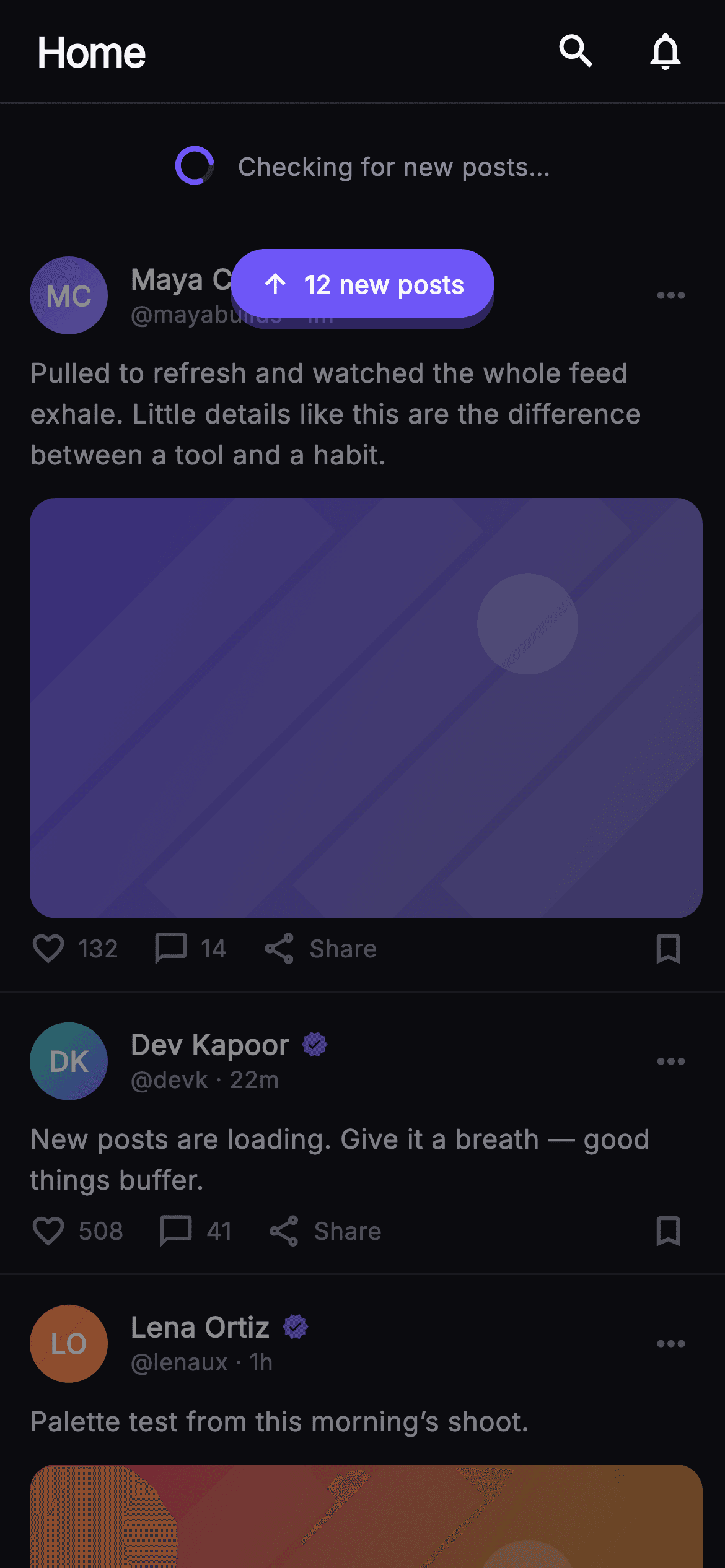
The moment a social feed reloads is easy to get wrong: the old posts vanish, a bare spinner sits on a blank screen, and the reader loses their place. This tutorial builds the Pulse home feed frozen mid-refresh in Flutter. A `_SpinnerPainter` draws a hairline track with a rounded indigo arc, spun by a repeating 900ms `AnimationController`; the existing posts stay visible under `Opacity(0.55)`; and a floating '12 new posts' pill hovers over the feed. Pure Flutter, no packages, with painted media instead of network images.
Watch the Flutter UI walkthrough
A short screen recording of Pulse · Pull to Refresh running, if you'd rather see it before you read the code. The written tutorial below covers everything in it.
Can't see the video? Watch it on YouTube.
What you'll build
- ✓A `_SpinnerPainter` CustomPainter: a `#26262F` track circle plus a 1.55π indigo arc whose start angle is driven by `_spin.value`
- ✓A 66px refresh reveal row that pairs the 22px animated spinner with a muted 'Checking for new posts…' caption
- ✓A feed `ListView` dimmed to 55% opacity inside a `Stack`, with a `Positioned` `_NewPostsPill` floating above it
- ✓A `_PostCard` with a gradient `_Monogram` avatar, computed initials, a 16:10 `_MediaPainter` image and an `_ActionBar` with a `_fmt` count helper
- ✓Four nullable callbacks — `onShowNew`, `onSearch`, `onNotifications`, `onPost(id)` — so the screen stays backend-agnostic
Step-by-step build
Create the file
Add a new file at lib/social_feed_refresh/social_feed_refresh_screen.dart in your Flutter project.
Register the bundled fonts
No external packages — this is pure Flutter. It does bundle its design font (Inter), so drop the font file into fonts/ and declare it in pubspec.yaml:
flutter:
  fonts:
    - family: Inter
      fonts:
- asset: fonts/Inter-Regular.ttfBuild it, piece by piece
Here's how the screen goes together. Each block below is a real slice of the code with a plain-English explanation — paste them in order, or grab the whole file from the next section.
A stateful screen with a palette and four callbacks
import 'dart:math' as math;

import 'package:flutter/material.dart';

/// Pull-to-Refresh State — the Pulse home mid-refresh: a painted spinner reveal
/// under the top bar, the current feed dimmed beneath it, and a floating
/// "new posts" pill over the feed. The spinner animates but is drawn as a long
/// arc so it still reads as loading in a single static frame. Self-contained per
/// CONVENTIONS.md: pure Flutter, bundled Inter font, own dark theme, SafeArea,
/// overflow-proof.
class SocialFeedRefreshScreen extends StatefulWidget {
  const SocialFeedRefreshScreen({
    super.key,
    this.onShowNew,
    this.onSearch,
    this.onNotifications,
    this.onPost,
  });

  final VoidCallback? onShowNew;
  final VoidCallback? onSearch;
  final VoidCallback? onNotifications;
  final ValueChanged<String>? onPost;

  static const String _font = 'Inter';
  static const Color _bg = Color(0xFF0B0B0F);
  static const Color _brand = Color(0xFF6E56F7);
  static const Color _hairline = Color(0xFF26262F);
  static const Color _textHi = Color(0xFFF4F4F7);
  static const Color _muted = Color(0xFF8A8A99);

  @override
  State<SocialFeedRefreshScreen> createState() =>
      _SocialFeedRefreshScreenState();
}
`SocialFeedRefreshScreen` is a `StatefulWidget` for exactly one reason: the spinner needs an `AnimationController`, and a controller needs a `TickerProvider`. Everything else on the screen is static. The constructor takes four nullable callbacks — `onShowNew` for the floating pill, `onSearch` and `onNotifications` for the top-bar icons, and `onPost` typed as `ValueChanged<String>` so a tap on a card hands back the post id rather than an index. The Pulse palette is declared as `static const` colours on the widget class so the private helper widgets below can reference them as `SocialFeedRefreshScreen._brand` without a theme lookup: `#0B0B0F` near-black background, `#6E56F7` indigo brand, `#26262F` hairline, `#F4F4F7` high text and `#8A8A99` muted. `dart:math` is imported as `math` purely for the arc geometry in the painter.
Three posts as const data, and a repeating 900ms controller
class _SocialFeedRefreshScreenState extends State<SocialFeedRefreshScreen>
    with SingleTickerProviderStateMixin {
  late final AnimationController _spin;

  static const List<_Post> _posts = <_Post>[
    _Post(
      id: 'r1',
      name: 'Maya Chen',
      handle: 'mayabuilds',
      time: '1m',
      colorA: 0xFF6E56F7,
      colorB: 0xFF9B8CFF,
      body:
          'Pulled to refresh and watched the whole feed exhale. Little details '
          'like this are the difference between a tool and a habit.',
      likes: 132,
      comments: 14,
      hasMedia: true,
    ),
    _Post(
      id: 'r2',
      name: 'Dev Kapoor',
      handle: 'devk',
      time: '22m',
      colorA: 0xFF34D399,
      colorB: 0xFF6E56F7,
      body: 'New posts are loading. Give it a breath — good things buffer.',
      likes: 508,
      comments: 41,
      hasMedia: false,
    ),
    _Post(
      id: 'r3',
      name: 'Lena Ortiz',
      handle: 'lenaux',
      time: '1h',
      colorA: 0xFFF4476B,
      colorB: 0xFFFBBF24,
      body: 'Palette test from this morning’s shoot.',
      likes: 274,
      comments: 19,
      hasMedia: true,
    ),
  ];

  @override
  void initState() {
    super.initState();
    _spin = AnimationController(
      vsync: this,
      duration: const Duration(milliseconds: 900),
    )..repeat();
  }

  @override
  void dispose() {
    _spin.dispose();
    super.dispose();
  }
The state class mixes in `SingleTickerProviderStateMixin` because there is only one ticker to own. `_posts` is a `static const List<_Post>` of three entries; each carries two ARGB ints, `colorA` and `colorB`, rather than `Color` objects so the list can be fully const — the ints are wrapped in `Color(...)` later at the point of use. Those pairs drive both the avatar gradient and the painted media, so a post's picture and its author's monogram share a colour family. The `hasMedia` flag on the middle post is `false`, which gives the feed a text-only card between two photo cards. In `initState` the controller is created with a 900ms duration and immediately chained with `..repeat()`, so `_spin.value` cycles 0→1 forever; `dispose` tears it down so the ticker does not outlive the screen.
The refresh reveal row and the dimmed feed
  @override
  Widget build(BuildContext context) {
    return Theme(
      data: ThemeData.dark(useMaterial3: true),
      child: Scaffold(
        backgroundColor: SocialFeedRefreshScreen._bg,
        body: SafeArea(
          child: Column(
            children: <Widget>[
              _TopBar(
                onSearch: widget.onSearch,
                onNotifications: widget.onNotifications,
              ),
              // Refresh reveal.
              Container(
                height: 66,
                alignment: Alignment.center,
                child: Row(
                  mainAxisSize: MainAxisSize.min,
                  children: <Widget>[
                    SizedBox(
                      width: 22,
                      height: 22,
                      child: AnimatedBuilder(
                        animation: _spin,
                        builder: (BuildContext context, Widget? child) {
                          return CustomPaint(
                            painter: _SpinnerPainter(turns: _spin.value),
                          );
                        },
                      ),
                    ),
                    const SizedBox(width: 12),
                    const Text(
                      'Checking for new posts…',
                      style: TextStyle(
                        fontFamily: SocialFeedRefreshScreen._font,
                        fontSize: 13.5,
                        fontWeight: FontWeight.w500,
                        color: SocialFeedRefreshScreen._muted,
                      ),
                    ),
                  ],
                ),
              ),
              Expanded(
                child: Stack(
                  children: <Widget>[
                    Opacity(
                      opacity: 0.55,
                      child: ListView(
                        padding: EdgeInsets.zero,
                        children: <Widget>[
                          for (final _Post p in _posts)
                            _PostCard(
                              post: p,
                              onTap: () => widget.onPost?.call(p.id),
                            ),
                          const SizedBox(height: 24),
                        ],
                      ),
                    ),
                    Positioned(
                      top: 12,
                      left: 0,
                      right: 0,
                      child: Center(
                        child: _NewPostsPill(onTap: widget.onShowNew),
                      ),
                    ),
                  ],
                ),
              ),
            ],
          ),
        ),
      ),
    );
  }
}
`build` forces `ThemeData.dark(useMaterial3: true)` via a `Theme` wrapper so the screen looks identical whatever the host app's theme is. Under the `_TopBar` sits a 66px `Container` centred with `Alignment.center` holding a min-width `Row`: a 22×22 `SizedBox` around an `AnimatedBuilder` that rebuilds only the `CustomPaint` each tick, passing `turns: _spin.value` into `_SpinnerPainter`, then 12px of space and the 13.5px `w500` muted caption 'Checking for new posts…'. The important choice is what happens below: the feed goes inside an `Expanded` `Stack`, and the `ListView` of `_PostCard`s is wrapped in `Opacity(opacity: 0.55)`. The old posts stay readable but visibly recede, telling the user the content is stale without hiding it. A `Positioned` at `top: 12` spanning left-to-right centres the `_NewPostsPill` over the first card. Each card's `onTap` calls `widget.onPost?.call(p.id)` so the parent learns which post was tapped.
The floating 'new posts' pill
class _NewPostsPill extends StatelessWidget {
  const _NewPostsPill({this.onTap});
  final VoidCallback? onTap;

  @override
  Widget build(BuildContext context) {
    return GestureDetector(
      onTap: onTap,
      child: Container(
        padding: const EdgeInsets.symmetric(horizontal: 16, vertical: 9),
        decoration: BoxDecoration(
          color: SocialFeedRefreshScreen._brand,
          borderRadius: BorderRadius.circular(24),
          boxShadow: <BoxShadow>[
            BoxShadow(
              color: SocialFeedRefreshScreen._brand.withValues(alpha: 0.35),
              blurRadius: 18,
              offset: const Offset(0, 6),
            ),
          ],
        ),
        child: const Row(
          mainAxisSize: MainAxisSize.min,
          children: <Widget>[
            Icon(Icons.arrow_upward, size: 16, color: Colors.white),
            SizedBox(width: 8),
            Text(
              '12 new posts',
              style: TextStyle(
                fontFamily: SocialFeedRefreshScreen._font,
                fontSize: 13.5,
                fontWeight: FontWeight.w700,
                color: Colors.white,
              ),
            ),
          ],
        ),
      ),
    );
  }
}
`_NewPostsPill` is a `GestureDetector` around a `Container` filled with the `_brand` indigo, padded 16×9 and rounded to 24px so it becomes a true capsule at its natural height. What makes it float rather than sit flat on the dimmed feed is the single `BoxShadow`: the brand colour itself at `withValues(alpha: 0.35)`, blurred 18px and offset 6px downward, which reads as a coloured glow instead of a grey drop shadow — a grey shadow would disappear against the `#0B0B0F` background. The content is a `const Row` with `mainAxisSize: MainAxisSize.min` — an `arrow_upward` icon at 16px, 8px gap, and '12 new posts' in 13.5px `w700` white. The count is hard-coded here; it is the obvious value to lift into a parameter once you connect a real feed.
A 56px top bar with two icon actions
class _TopBar extends StatelessWidget {
  const _TopBar({this.onSearch, this.onNotifications});
  final VoidCallback? onSearch;
  final VoidCallback? onNotifications;

  @override
  Widget build(BuildContext context) {
    return Container(
      height: 56,
      padding: const EdgeInsets.fromLTRB(20, 0, 8, 0),
      decoration: const BoxDecoration(
        border: Border(
          bottom: BorderSide(color: SocialFeedRefreshScreen._hairline),
        ),
      ),
      child: Row(
        children: <Widget>[
          const Text(
            'Home',
            style: TextStyle(
              fontFamily: SocialFeedRefreshScreen._font,
              fontSize: 22,
              fontWeight: FontWeight.w800,
              letterSpacing: -0.8,
              color: SocialFeedRefreshScreen._textHi,
            ),
          ),
          const Spacer(),
          IconButton(
            onPressed: onSearch,
            icon: const Icon(Icons.search,
                size: 24, color: SocialFeedRefreshScreen._textHi),
            splashRadius: 22,
          ),
          IconButton(
            onPressed: onNotifications,
            icon: const Icon(Icons.notifications_none,
                size: 24, color: SocialFeedRefreshScreen._textHi),
            splashRadius: 22,
          ),
        ],
      ),
    );
  }
}
`_TopBar` is a fixed-height 56px `Container` with asymmetric padding — 20px on the left so 'Home' aligns with the card text below, but only 8px on the right because `IconButton` already carries its own 48px touch target and would otherwise look inset. The bottom edge is a `Border(bottom: BorderSide(color: _hairline))` rather than a `Divider`, so the line belongs to the bar and does not add a widget to the column. The 'Home' title is 22px `w800` with `letterSpacing: -0.8` for the tight display look, a `Spacer` pushes both icons to the trailing edge, and each `IconButton` sets `splashRadius: 22` so the ripple hugs the 24px glyph instead of spreading the full Material default. `onPressed` receives the nullable callbacks directly — passing `null` simply disables the button.
The post model and the card layout
// ── post card ───────────────────────────────────────────────────────────────
class _Post {
  const _Post({
    required this.id,
    required this.name,
    required this.handle,
    required this.time,
    required this.colorA,
    required this.colorB,
    required this.body,
    required this.likes,
    required this.comments,
    required this.hasMedia,
  });
  final String id;
  final String name;
  final String handle;
  final String time;
  final int colorA;
  final int colorB;
  final String body;
  final int likes;
  final int comments;
  final bool hasMedia;
}

class _PostCard extends StatelessWidget {
  const _PostCard({required this.post, this.onTap});
  final _Post post;
  final VoidCallback? onTap;

  String get _initials {
    final List<String> p = post.name.trim().split(RegExp(r'\s+'));
    if (p.length == 1) return p.first.characters.first.toUpperCase();
    return (p.first[0] + p.last[0]).toUpperCase();
  }

  @override
  Widget build(BuildContext context) {
    return GestureDetector(
      onTap: onTap,
      behavior: HitTestBehavior.opaque,
      child: Container(
        padding: const EdgeInsets.fromLTRB(16, 16, 12, 12),
        decoration: const BoxDecoration(
          border: Border(
            bottom: BorderSide(color: SocialFeedRefreshScreen._hairline),
          ),
        ),
        child: Column(
          crossAxisAlignment: CrossAxisAlignment.start,
          children: <Widget>[
            Row(
              children: <Widget>[
                _Monogram(
                  initials: _initials,
                  colorA: Color(post.colorA),
                  colorB: Color(post.colorB),
                ),
                const SizedBox(width: 12),
                Expanded(
                  child: Column(
                    crossAxisAlignment: CrossAxisAlignment.start,
                    children: <Widget>[
                      Row(
                        children: <Widget>[
                          Flexible(
                            child: Text(
                              post.name,
                              overflow: TextOverflow.ellipsis,
                              style: const TextStyle(
                                fontFamily: SocialFeedRefreshScreen._font,
                                fontSize: 15,
                                fontWeight: FontWeight.w700,
                                color: SocialFeedRefreshScreen._textHi,
                              ),
                            ),
                          ),
                          const SizedBox(width: 6),
                          const Icon(Icons.verified,
                              size: 15, color: SocialFeedRefreshScreen._brand),
                        ],
                      ),
                      Text(
                        '@${post.handle} · ${post.time}',
                        style: const TextStyle(
                          fontFamily: SocialFeedRefreshScreen._font,
                          fontSize: 12.5,
                          color: SocialFeedRefreshScreen._muted,
                        ),
                      ),
                    ],
                  ),
                ),
                const Icon(Icons.more_horiz,
                    color: SocialFeedRefreshScreen._muted, size: 22),
                const SizedBox(width: 6),
              ],
            ),
            const SizedBox(height: 10),
            Text(
              post.body,
              style: const TextStyle(
                fontFamily: SocialFeedRefreshScreen._font,
                fontSize: 14.5,
                height: 1.5,
                color: Color(0xFFDDDDE6),
              ),
            ),
            if (post.hasMedia) ...<Widget>[
              const SizedBox(height: 12),
              ClipRRect(
                borderRadius: BorderRadius.circular(14),
                child: AspectRatio(
                  aspectRatio: 16 / 10,
                  child: CustomPaint(
                    painter:
                        _MediaPainter(Color(post.colorA), Color(post.colorB)),
                    child: const SizedBox.expand(),
                  ),
                ),
              ),
            ],
            const SizedBox(height: 6),
            _ActionBar(likes: post.likes, comments: post.comments),
          ],
        ),
      ),
    );
  }
}
`_Post` is a plain const data class — ten required fields, no methods — which keeps the `_posts` list const-constructible. `_PostCard` derives the avatar initials in a getter: it trims and splits the name on `RegExp(r'\s+')`, returns a single uppercased first character for one-word names (using `characters.first` so a multi-code-unit glyph is not split), otherwise first-of-first plus first-of-last. The card is a `GestureDetector` with `HitTestBehavior.opaque` so taps on the padding count, padded 16/16/12/12 and closed with a bottom hairline so cards separate without a card surface. The header `Row` puts the name in `Flexible` with ellipsis so a long name yields space to the 15px indigo `verified` icon, followed by an '@handle · time' line at 12.5px muted. Body text is 14.5px at `height: 1.5` in a slightly dimmer `#DDDDE6`. When `hasMedia` is true, a spread inserts a 12px gap and a `ClipRRect(14)` around a 16:10 `AspectRatio` whose child is a `CustomPaint` running `_MediaPainter` over `SizedBox.expand()`.
Action bar with a count formatter
class _ActionBar extends StatelessWidget {
  const _ActionBar({required this.likes, required this.comments});
  final int likes;
  final int comments;

  String _fmt(int n) => n >= 1000 ? '${(n / 1000).toStringAsFixed(1)}k' : '$n';

  @override
  Widget build(BuildContext context) {
    return Row(
      children: <Widget>[
        _Action(icon: Icons.favorite_border, label: _fmt(likes)),
        const SizedBox(width: 18),
        _Action(icon: Icons.chat_bubble_outline, label: _fmt(comments)),
        const SizedBox(width: 18),
        const _Action(icon: Icons.share_outlined, label: 'Share'),
        const Spacer(),
        const Icon(Icons.bookmark_border,
            size: 21, color: SocialFeedRefreshScreen._muted),
        const SizedBox(width: 8),
      ],
    );
  }
}

class _Action extends StatelessWidget {
  const _Action({required this.icon, required this.label});
  final IconData icon;
  final String label;

  @override
  Widget build(BuildContext context) {
    return Row(
      children: <Widget>[
        Icon(icon, size: 20, color: SocialFeedRefreshScreen._muted),
        const SizedBox(width: 6),
        Text(
          label,
          style: const TextStyle(
            fontFamily: SocialFeedRefreshScreen._font,
            fontSize: 13,
            fontWeight: FontWeight.w500,
            color: SocialFeedRefreshScreen._muted,
          ),
        ),
      ],
    );
  }
}
`_ActionBar` takes raw ints for likes and comments and runs them through `_fmt`, a one-line helper that returns the number as-is under 1000 and otherwise divides by 1000 with `toStringAsFixed(1)` and a 'k' suffix — so 508 stays '508' while 1120 would become '1.1k'. Three `_Action` widgets follow — `favorite_border`, `chat_bubble_outline` and `share_outlined` — each 20px muted icon plus a 13px `w500` label with a 6px gap, separated by 18px `SizedBox`es rather than `MainAxisAlignment.spaceBetween` so the group stays clustered on the left. A `Spacer` then throws the 21px `bookmark_border` to the trailing edge with an 8px inset. `_Action` is deliberately a display-only `Row` with no tap handling; wiring like/comment taps is left to the host, which already receives `onPost` for the card as a whole.
Monogram avatar, spinner geometry and painted media
// ── monogram + painters ─────────────────────────────────────────────────────
class _Monogram extends StatelessWidget {
  const _Monogram({
    required this.initials,
    required this.colorA,
    required this.colorB,
  });
  final String initials;
  final Color colorA;
  final Color colorB;

  @override
  Widget build(BuildContext context) {
    return Container(
      width: 42,
      height: 42,
      decoration: BoxDecoration(
        shape: BoxShape.circle,
        gradient: LinearGradient(
          begin: Alignment.topLeft,
          end: Alignment.bottomRight,
          colors: <Color>[colorA, colorB],
        ),
      ),
      child: Center(
        child: Text(
          initials,
          style: const TextStyle(
            fontFamily: SocialFeedRefreshScreen._font,
            fontSize: 15,
            fontWeight: FontWeight.w700,
            color: Colors.white,
          ),
        ),
      ),
    );
  }
}

class _SpinnerPainter extends CustomPainter {
  _SpinnerPainter({required this.turns});
  final double turns;

  @override
  void paint(Canvas canvas, Size size) {
    final Offset center = size.center(Offset.zero);
    final double radius = size.width / 2 - 2;
    final Rect rect = Rect.fromCircle(center: center, radius: radius);
    canvas.drawCircle(
      center,
      radius,
      Paint()
        ..style = PaintingStyle.stroke
        ..strokeWidth = 3
        ..color = SocialFeedRefreshScreen._hairline,
    );
    final double start = -math.pi / 2 + turns * 2 * math.pi;
    canvas.drawArc(
      rect,
      start,
      math.pi * 1.55,
      false,
      Paint()
        ..style = PaintingStyle.stroke
        ..strokeWidth = 3
        ..strokeCap = StrokeCap.round
        ..color = SocialFeedRefreshScreen._brand,
    );
  }

  @override
  bool shouldRepaint(covariant _SpinnerPainter old) => old.turns != turns;
}

class _MediaPainter extends CustomPainter {
  _MediaPainter(this.colorA, this.colorB);
  final Color colorA;
  final Color colorB;

  @override
  void paint(Canvas canvas, Size size) {
    final Rect rect = Offset.zero & size;
    canvas.drawRect(
      rect,
      Paint()
        ..shader = LinearGradient(
          begin: Alignment.topLeft,
          end: Alignment.bottomRight,
          colors: <Color>[
            colorA.withValues(alpha: 0.85),
            colorB.withValues(alpha: 0.65),
          ],
        ).createShader(rect),
    );
    final Paint streak = Paint()
      ..color = Colors.white.withValues(alpha: 0.06)
      ..style = PaintingStyle.stroke
      ..strokeWidth = size.width * 0.14;
    for (int i = -1; i < 4; i++) {
      final double x = size.width * (0.22 * i);
      canvas.drawLine(Offset(x, size.height), Offset(x + size.height, 0), streak);
    }
    canvas.drawCircle(
      Offset(size.width * 0.74, size.height * 0.30),
      size.height * 0.12,
      Paint()..color = Colors.white.withValues(alpha: 0.18),
    );
  }

  @override
  bool shouldRepaint(covariant _MediaPainter old) =>
      old.colorA != colorA || old.colorB != colorB;
}
`_Monogram` is a 42px circle whose `BoxDecoration` carries a top-left to bottom-right `LinearGradient` of the post's two colours, with initials centred in 15px `w700` white. `_SpinnerPainter` is the heart of the screen. It computes `radius = size.width / 2 - 2` so the 3px stroke never clips the 22px box, draws a full `_hairline` track circle, then an arc on the same `Rect.fromCircle`. The start angle is `-π/2 + turns * 2π` — twelve o'clock, rotated by one full turn per controller cycle — and the sweep is a long `π * 1.55`, roughly 280°, with `StrokeCap.round`. That long arc is why the frozen frame still reads as 'loading': a short arc looks like a static ring gap. `shouldRepaint` compares `turns`, so it repaints only when the value changes. `_MediaPainter` fills a diagonal gradient of the two colours at 0.85 and 0.65 alpha, then draws five diagonal streaks in a loop from `i = -1` to `3` at 6% white with a stroke 14% of the width, and a soft sun disc at 74%/30% with radius 12% of the height — an image with no asset file.
Full code
The complete, ready-to-paste source. Free to use in your projects — one click copies it all.
import 'dart:math' as math;
import 'package:flutter/material.dart';
/// Pull-to-Refresh State — the Pulse home mid-refresh: a painted spinner reveal
/// under the top bar, the current feed dimmed beneath it, and a floating
/// "new posts" pill over the feed. The spinner animates but is drawn as a long
/// arc so it still reads as loading in a single static frame. Self-contained per
/// CONVENTIONS.md: pure Flutter, bundled Inter font, own dark theme, SafeArea,
/// overflow-proof.
class SocialFeedRefreshScreen extends StatefulWidget {
const SocialFeedRefreshScreen({
super.key,
this.onShowNew,
this.onSearch,
this.onNotifications,
this.onPost,
});
final VoidCallback? onShowNew;
final VoidCallback? onSearch;
final VoidCallback? onNotifications;
final ValueChanged<String>? onPost;
static const String _font = 'Inter';
static const Color _bg = Color(0xFF0B0B0F);
static const Color _brand = Color(0xFF6E56F7);
static const Color _hairline = Color(0xFF26262F);
static const Color _textHi = Color(0xFFF4F4F7);
static const Color _muted = Color(0xFF8A8A99);
@override
State<SocialFeedRefreshScreen> createState() =>
_SocialFeedRefreshScreenState();
}
class _SocialFeedRefreshScreenState extends State<SocialFeedRefreshScreen>
with SingleTickerProviderStateMixin {
late final AnimationController _spin;
static const List<_Post> _posts = <_Post>[
_Post(
id: 'r1',
name: 'Maya Chen',
handle: 'mayabuilds',
time: '1m',
colorA: 0xFF6E56F7,
colorB: 0xFF9B8CFF,
body:
'Pulled to refresh and watched the whole feed exhale. Little details '
'like this are the difference between a tool and a habit.',
likes: 132,
comments: 14,
hasMedia: true,
),
_Post(
id: 'r2',
name: 'Dev Kapoor',
handle: 'devk',
time: '22m',
colorA: 0xFF34D399,
colorB: 0xFF6E56F7,
body: 'New posts are loading. Give it a breath — good things buffer.',
likes: 508,
comments: 41,
hasMedia: false,
),
_Post(
id: 'r3',
name: 'Lena Ortiz',
handle: 'lenaux',
time: '1h',
colorA: 0xFFF4476B,
colorB: 0xFFFBBF24,
body: 'Palette test from this morning’s shoot.',
likes: 274,
comments: 19,
hasMedia: true,
),
];
@override
void initState() {
super.initState();
_spin = AnimationController(
vsync: this,
duration: const Duration(milliseconds: 900),
)..repeat();
}
@override
void dispose() {
_spin.dispose();
super.dispose();
}
@override
Widget build(BuildContext context) {
return Theme(
data: ThemeData.dark(useMaterial3: true),
child: Scaffold(
backgroundColor: SocialFeedRefreshScreen._bg,
body: SafeArea(
child: Column(
children: <Widget>[
_TopBar(
onSearch: widget.onSearch,
onNotifications: widget.onNotifications,
),
// Refresh reveal.
Container(
height: 66,
alignment: Alignment.center,
child: Row(
mainAxisSize: MainAxisSize.min,
children: <Widget>[
SizedBox(
width: 22,
height: 22,
child: AnimatedBuilder(
animation: _spin,
builder: (BuildContext context, Widget? child) {
return CustomPaint(
painter: _SpinnerPainter(turns: _spin.value),
);
},
),
),
const SizedBox(width: 12),
const Text(
'Checking for new posts…',
style: TextStyle(
fontFamily: SocialFeedRefreshScreen._font,
fontSize: 13.5,
fontWeight: FontWeight.w500,
color: SocialFeedRefreshScreen._muted,
),
),
],
),
),
Expanded(
child: Stack(
children: <Widget>[
Opacity(
opacity: 0.55,
child: ListView(
padding: EdgeInsets.zero,
children: <Widget>[
for (final _Post p in _posts)
_PostCard(
post: p,
onTap: () => widget.onPost?.call(p.id),
),
const SizedBox(height: 24),
],
),
),
Positioned(
top: 12,
left: 0,
right: 0,
child: Center(
child: _NewPostsPill(onTap: widget.onShowNew),
),
),
],
),
),
],
),
),
),
);
}
}
class _NewPostsPill extends StatelessWidget {
const _NewPostsPill({this.onTap});
final VoidCallback? onTap;
@override
Widget build(BuildContext context) {
return GestureDetector(
onTap: onTap,
child: Container(
padding: const EdgeInsets.symmetric(horizontal: 16, vertical: 9),
decoration: BoxDecoration(
color: SocialFeedRefreshScreen._brand,
borderRadius: BorderRadius.circular(24),
boxShadow: <BoxShadow>[
BoxShadow(
color: SocialFeedRefreshScreen._brand.withValues(alpha: 0.35),
blurRadius: 18,
offset: const Offset(0, 6),
),
],
),
child: const Row(
mainAxisSize: MainAxisSize.min,
children: <Widget>[
Icon(Icons.arrow_upward, size: 16, color: Colors.white),
SizedBox(width: 8),
Text(
'12 new posts',
style: TextStyle(
fontFamily: SocialFeedRefreshScreen._font,
fontSize: 13.5,
fontWeight: FontWeight.w700,
color: Colors.white,
),
),
],
),
),
);
}
}
class _TopBar extends StatelessWidget {
const _TopBar({this.onSearch, this.onNotifications});
final VoidCallback? onSearch;
final VoidCallback? onNotifications;
@override
Widget build(BuildContext context) {
return Container(
height: 56,
padding: const EdgeInsets.fromLTRB(20, 0, 8, 0),
decoration: const BoxDecoration(
border: Border(
bottom: BorderSide(color: SocialFeedRefreshScreen._hairline),
),
),
child: Row(
children: <Widget>[
const Text(
'Home',
style: TextStyle(
fontFamily: SocialFeedRefreshScreen._font,
fontSize: 22,
fontWeight: FontWeight.w800,
letterSpacing: -0.8,
color: SocialFeedRefreshScreen._textHi,
),
),
const Spacer(),
IconButton(
onPressed: onSearch,
icon: const Icon(Icons.search,
size: 24, color: SocialFeedRefreshScreen._textHi),
splashRadius: 22,
),
IconButton(
onPressed: onNotifications,
icon: const Icon(Icons.notifications_none,
size: 24, color: SocialFeedRefreshScreen._textHi),
splashRadius: 22,
),
],
),
);
}
}
// ── post card ───────────────────────────────────────────────────────────────
class _Post {
const _Post({
required this.id,
required this.name,
required this.handle,
required this.time,
required this.colorA,
required this.colorB,
required this.body,
required this.likes,
required this.comments,
required this.hasMedia,
});
final String id;
final String name;
final String handle;
final String time;
final int colorA;
final int colorB;
final String body;
final int likes;
final int comments;
final bool hasMedia;
}
class _PostCard extends StatelessWidget {
const _PostCard({required this.post, this.onTap});
final _Post post;
final VoidCallback? onTap;
String get _initials {
final List<String> p = post.name.trim().split(RegExp(r'\s+'));
if (p.length == 1) return p.first.characters.first.toUpperCase();
return (p.first[0] + p.last[0]).toUpperCase();
}
@override
Widget build(BuildContext context) {
return GestureDetector(
onTap: onTap,
behavior: HitTestBehavior.opaque,
child: Container(
padding: const EdgeInsets.fromLTRB(16, 16, 12, 12),
decoration: const BoxDecoration(
border: Border(
bottom: BorderSide(color: SocialFeedRefreshScreen._hairline),
),
),
child: Column(
crossAxisAlignment: CrossAxisAlignment.start,
children: <Widget>[
Row(
children: <Widget>[
_Monogram(
initials: _initials,
colorA: Color(post.colorA),
colorB: Color(post.colorB),
),
const SizedBox(width: 12),
Expanded(
child: Column(
crossAxisAlignment: CrossAxisAlignment.start,
children: <Widget>[
Row(
children: <Widget>[
Flexible(
child: Text(
post.name,
overflow: TextOverflow.ellipsis,
style: const TextStyle(
fontFamily: SocialFeedRefreshScreen._font,
fontSize: 15,
fontWeight: FontWeight.w700,
color: SocialFeedRefreshScreen._textHi,
),
),
),
const SizedBox(width: 6),
const Icon(Icons.verified,
size: 15, color: SocialFeedRefreshScreen._brand),
],
),
Text(
'@${post.handle} · ${post.time}',
style: const TextStyle(
fontFamily: SocialFeedRefreshScreen._font,
fontSize: 12.5,
color: SocialFeedRefreshScreen._muted,
),
),
],
),
),
const Icon(Icons.more_horiz,
color: SocialFeedRefreshScreen._muted, size: 22),
const SizedBox(width: 6),
],
),
const SizedBox(height: 10),
Text(
post.body,
style: const TextStyle(
fontFamily: SocialFeedRefreshScreen._font,
fontSize: 14.5,
height: 1.5,
color: Color(0xFFDDDDE6),
),
),
if (post.hasMedia) ...<Widget>[
const SizedBox(height: 12),
ClipRRect(
borderRadius: BorderRadius.circular(14),
child: AspectRatio(
aspectRatio: 16 / 10,
child: CustomPaint(
painter:
_MediaPainter(Color(post.colorA), Color(post.colorB)),
child: const SizedBox.expand(),
),
),
),
],
const SizedBox(height: 6),
_ActionBar(likes: post.likes, comments: post.comments),
],
),
),
);
}
}
class _ActionBar extends StatelessWidget {
const _ActionBar({required this.likes, required this.comments});
final int likes;
final int comments;
String _fmt(int n) => n >= 1000 ? '${(n / 1000).toStringAsFixed(1)}k' : '$n';
@override
Widget build(BuildContext context) {
return Row(
children: <Widget>[
_Action(icon: Icons.favorite_border, label: _fmt(likes)),
const SizedBox(width: 18),
_Action(icon: Icons.chat_bubble_outline, label: _fmt(comments)),
const SizedBox(width: 18),
const _Action(icon: Icons.share_outlined, label: 'Share'),
const Spacer(),
const Icon(Icons.bookmark_border,
size: 21, color: SocialFeedRefreshScreen._muted),
const SizedBox(width: 8),
],
);
}
}
class _Action extends StatelessWidget {
const _Action({required this.icon, required this.label});
final IconData icon;
final String label;
@override
Widget build(BuildContext context) {
return Row(
children: <Widget>[
Icon(icon, size: 20, color: SocialFeedRefreshScreen._muted),
const SizedBox(width: 6),
Text(
label,
style: const TextStyle(
fontFamily: SocialFeedRefreshScreen._font,
fontSize: 13,
fontWeight: FontWeight.w500,
color: SocialFeedRefreshScreen._muted,
),
),
],
);
}
}
// ── monogram + painters ─────────────────────────────────────────────────────
class _Monogram extends StatelessWidget {
const _Monogram({
required this.initials,
required this.colorA,
required this.colorB,
});
final String initials;
final Color colorA;
final Color colorB;
@override
Widget build(BuildContext context) {
return Container(
width: 42,
height: 42,
decoration: BoxDecoration(
shape: BoxShape.circle,
gradient: LinearGradient(
begin: Alignment.topLeft,
end: Alignment.bottomRight,
colors: <Color>[colorA, colorB],
),
),
child: Center(
child: Text(
initials,
style: const TextStyle(
fontFamily: SocialFeedRefreshScreen._font,
fontSize: 15,
fontWeight: FontWeight.w700,
color: Colors.white,
),
),
),
);
}
}
class _SpinnerPainter extends CustomPainter {
_SpinnerPainter({required this.turns});
final double turns;
@override
void paint(Canvas canvas, Size size) {
final Offset center = size.center(Offset.zero);
final double radius = size.width / 2 - 2;
final Rect rect = Rect.fromCircle(center: center, radius: radius);
canvas.drawCircle(
center,
radius,
Paint()
..style = PaintingStyle.stroke
..strokeWidth = 3
..color = SocialFeedRefreshScreen._hairline,
);
final double start = -math.pi / 2 + turns * 2 * math.pi;
canvas.drawArc(
rect,
start,
math.pi * 1.55,
false,
Paint()
..style = PaintingStyle.stroke
..strokeWidth = 3
..strokeCap = StrokeCap.round
..color = SocialFeedRefreshScreen._brand,
);
}
@override
bool shouldRepaint(covariant _SpinnerPainter old) => old.turns != turns;
}
class _MediaPainter extends CustomPainter {
_MediaPainter(this.colorA, this.colorB);
final Color colorA;
final Color colorB;
@override
void paint(Canvas canvas, Size size) {
final Rect rect = Offset.zero & size;
canvas.drawRect(
rect,
Paint()
..shader = LinearGradient(
begin: Alignment.topLeft,
end: Alignment.bottomRight,
colors: <Color>[
colorA.withValues(alpha: 0.85),
colorB.withValues(alpha: 0.65),
],
).createShader(rect),
);
final Paint streak = Paint()
..color = Colors.white.withValues(alpha: 0.06)
..style = PaintingStyle.stroke
..strokeWidth = size.width * 0.14;
for (int i = -1; i < 4; i++) {
final double x = size.width * (0.22 * i);
canvas.drawLine(Offset(x, size.height), Offset(x + size.height, 0), streak);
}
canvas.drawCircle(
Offset(size.width * 0.74, size.height * 0.30),
size.height * 0.12,
Paint()..color = Colors.white.withValues(alpha: 0.18),
);
}
@override
bool shouldRepaint(covariant _MediaPainter old) =>
old.colorA != colorA || old.colorB != colorB;
}
Plus bundled 1 binary asset (fonts/images). The CLI and MCP install those for you automatically.
Two faster ways to add it
Copy-paste works, but you can skip it entirely.
1. FlutterKit CLI
One command drops this screen — and its fonts — straight into your project.
$ flutterkit add social-feed-refresh2. AI agent (MCP)
Connect FlutterKit's MCP server in Claude or Cursor and just ask your agent to install social-feed-refresh — it fetches and writes the files for you.
FAQ
Can I use this pull-to-refresh screen in a commercial app?
Yes. FlutterKit screens are free for personal and commercial projects under an MIT-style licence — no key, no sign-up, no attribution. Copy the code from this page or run `flutterkit add social-feed-refresh` and ship it.
Does this screen need any pub packages or fonts?
No packages — it is pure Flutter with `dart:math` for the arc angles. The only asset is the Inter font, which `flutterkit add social-feed-refresh` bundles and registers in your pubspec for you; if you paste the code manually, add Inter yourself or drop the `fontFamily` lines.
Which Flutter version does this require?
Flutter 3.22 or newer, because the pill shadow and `_MediaPainter` use `Color.withValues(alpha: ...)` and the constructor uses `super.key`. On an older SDK replace each `withValues(alpha: x)` with `withOpacity(x)` and expand the constructor to `{Key? key, ...} : super(key: key)`.
How do I turn this static state into a real pull-to-refresh?
Wrap the feed `ListView` in a `RefreshIndicator` and move the reveal row behind a boolean such as `_refreshing`. Start the controller with `..repeat()` only while the refresh future is pending, then set the flag false and raise `Opacity` back to 1.0 when the new posts arrive. Keep `_SpinnerPainter` if you want the custom arc instead of the Material indicator.
Where does the '12 new posts' count come from?
It is a literal inside `_NewPostsPill`. Add an `int count` parameter to the pill and to the screen, then interpolate `'$count new posts'`; hide the pill entirely when the count is zero by returning `SizedBox.shrink()` from the `Positioned` child, and use `onShowNew` to scroll to the top and merge the buffered posts.


