How to Build a Search History Screen in Flutter (Full Code + Preview)
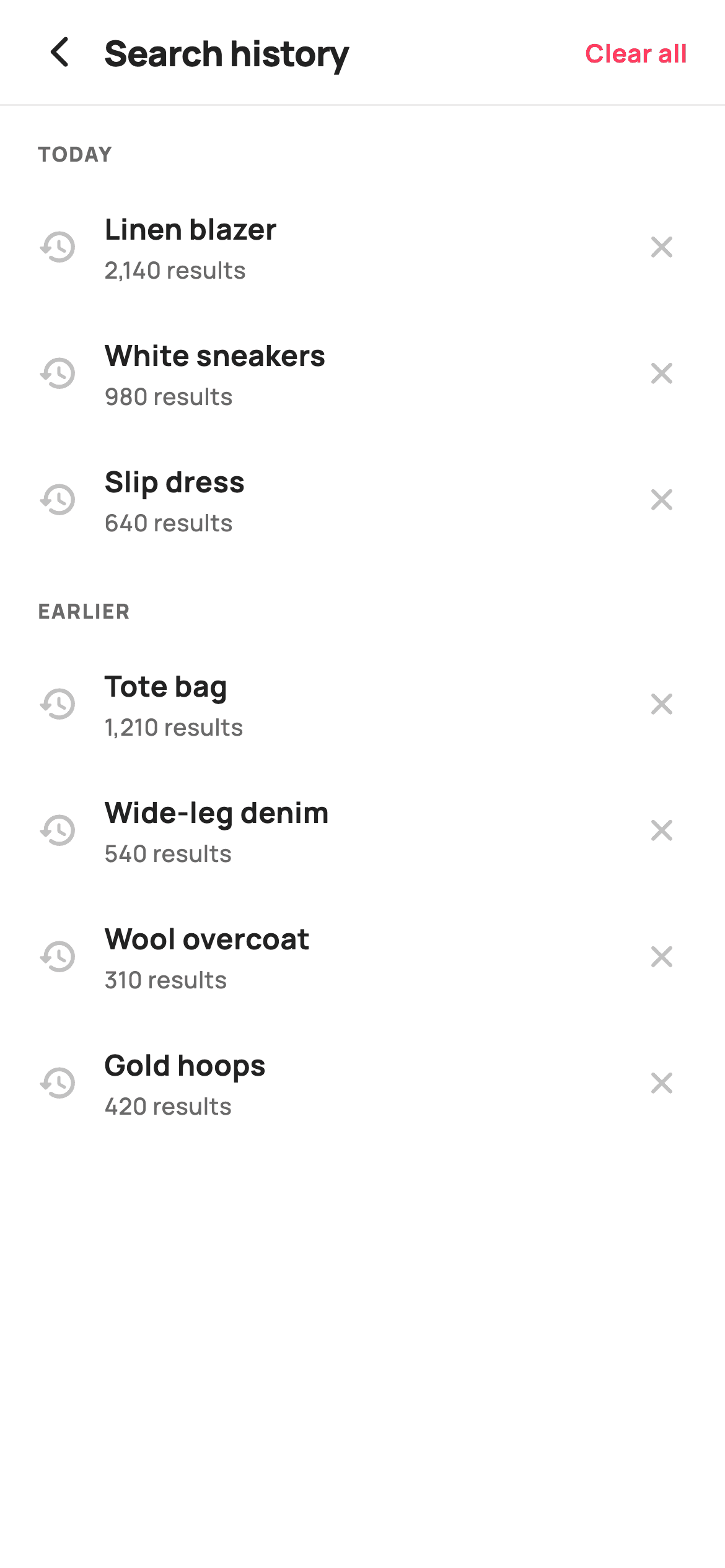
Most shopping apps throw away what you typed the moment you leave search, so the next visit starts from zero. This tutorial builds StyleCart's search-history screen in Flutter: two recency groups labelled Today and Earlier, rows that carry the term and its result count and re-run on tap, a close button that removes one entry from its own list, a brand Clear all action in the header, and a painted clock-and-magnifier empty state when the log runs dry.
Watch the Flutter UI walkthrough
A short screen recording of Search History running, if you'd rather see it before you read the code. The written tutorial below covers everything in it.
Can't see the video? Watch it on YouTube.
What you'll build
- ✓A recency-grouped log that emits TODAY and EARLIER labels only when that group still holds entries
- ✓History rows that re-run the term on tap and carry a result count as a second line
- ✓A per-row close button that removes one record from whichever list owns it
- ✓A Clear all header action that empties both lists and hides itself afterwards
- ✓A hand-painted clock-and-magnifier empty state with a Start browsing button
Step-by-step build
Create the file
Add a new file at lib/ecom_search_recent/ecom_search_recent_screen.dart in your Flutter project.
Register the bundled fonts
No external packages — this is pure Flutter. It does bundle its design font (Manrope), so drop the font file into fonts/ and declare it in pubspec.yaml:
flutter:
  fonts:
    - family: Manrope
      fonts:
- asset: fonts/Manrope-Regular.ttfBuild it, piece by piece
Here's how the screen goes together. Each block below is a real slice of the code with a plain-English explanation — paste them in order, or grab the whole file from the next section.
A stateful screen that owns its log
import 'package:flutter/material.dart';

/// StyleCart — Search History.
///
/// The full recent-search log grouped by recency, each row re-runnable or
/// removable, with a clear-all action that wipes to a painted empty state.
///
/// Self-contained per CONVENTIONS.md: pure Flutter, bundled Manrope, inline
/// Airbnb-style tokens, own light theme + SafeArea. The empty mark is a
/// CustomPainter (no emoji glyph). Exposes callbacks only; the log is internal.
class EcomSearchRecentScreen extends StatefulWidget {
  const EcomSearchRecentScreen({
    super.key,
    this.onBack,
    this.onTerm,
    this.onCleared,
    this.onBrowse,
  });

  final VoidCallback? onBack;
  final ValueChanged<String>? onTerm;
  final VoidCallback? onCleared;
  final VoidCallback? onBrowse;

  @override
  State<EcomSearchRecentScreen> createState() =>
      _EcomSearchRecentScreenState();
}

class _EcomSearchRecentScreenState extends State<EcomSearchRecentScreen> {
  static const String _font = 'Manrope';
  static const Color _canvas = Color(0xFFFFFFFF);
  static const Color _ink = Color(0xFF222222);
  static const Color _muted = Color(0xFF6A6A6A);
  static const Color _faint = Color(0xFFC1C1C1);
  static const Color _brand = Color(0xFFFF385C);
  static const Color _hairline = Color(0xFFEBEBEB);
`EcomSearchRecentScreen` is a `StatefulWidget` because the history is genuinely mutable — rows disappear as you dismiss them and the whole log can be wiped. Four nullable callbacks keep the widget host-agnostic: `onBack`, `onTerm` (a `ValueChanged<String>` so the parent receives the actual query to re-run), `onCleared`, and `onBrowse`. The palette is declared as `static const` fields on the state class, which is where the tone gets set: `_ink` #222222 for terms, `_muted` #6A6A6A for counts and section labels, `_faint` #C1C1C1 for both icons, and `_brand` coral #FF385C reserved for the two destructive-or-primary moments only.
Two lists, an emptiness getter, and clear-all
  final List<_H> _today = <_H>[
    const _H('Linen blazer', '2,140 results'),
    const _H('White sneakers', '980 results'),
    const _H('Slip dress', '640 results'),
  ];
  final List<_H> _earlier = <_H>[
    const _H('Tote bag', '1,210 results'),
    const _H('Wide-leg denim', '540 results'),
    const _H('Wool overcoat', '310 results'),
    const _H('Gold hoops', '420 results'),
  ];

  bool get _empty => _today.isEmpty && _earlier.isEmpty;

  void _clearAll() {
    setState(() {
      _today.clear();
      _earlier.clear();
    });
    widget.onCleared?.call();
  }
Recency grouping is modelled as two plain `List<_H>` fields, `_today` and `_earlier`, rather than one list with a timestamp that has to be bucketed at render time. That keeps grouping a data concern, and it is why removal later can be a one-liner. `bool get _empty => _today.isEmpty && _earlier.isEmpty` is a derived getter, so nothing has to be kept in sync — the header action, the body switch and the empty state all read the same expression. `_clearAll` empties both lists inside a single `setState` and then fires `widget.onCleared?.call()` after the rebuild, so the UI is already truthful by the time your backend hears about it.
The build: theme, safe area, and a two-way body
  @override
  Widget build(BuildContext context) {
    return Theme(
      data: ThemeData.light(useMaterial3: true),
      child: Scaffold(
        backgroundColor: _canvas,
        body: SafeArea(
          child: Column(
            children: <Widget>[
              _header(),
              const Divider(height: 1, color: _hairline),
              Expanded(child: _empty ? _emptyState() : _list()),
            ],
          ),
        ),
      ),
    );
  }
The screen wraps itself in `Theme(data: ThemeData.light(useMaterial3: true))` so it renders identically whether or not the surrounding app is Material 3 or dark — a drop-in requirement rather than a style choice. Inside, a `Scaffold` on `_canvas` white holds a `SafeArea` `Column` of exactly three things: the header, a one-pixel `Divider(height: 1, color: _hairline)` that pins the title to the top and lets the list scroll under it, and `Expanded(child: _empty ? _emptyState() : _list())`. Putting the ternary there means both states inherit the same header and hairline, so clearing the log never causes the top of the screen to jump.
A header whose action disappears with the data
  Widget _header() {
    return Padding(
      padding: const EdgeInsets.fromLTRB(8, 4, 20, 4),
      child: Row(
        children: <Widget>[
          IconButton(
            onPressed: widget.onBack,
            icon: const Icon(Icons.arrow_back_ios_new_rounded,
                size: 20, color: _ink),
          ),
          const Expanded(
            child: Text(
              'Search history',
              style: TextStyle(
                fontFamily: _font,
                fontSize: 19,
                fontWeight: FontWeight.w800,
                letterSpacing: -0.3,
                color: _ink,
              ),
            ),
          ),
          if (!_empty)
            GestureDetector(
              onTap: _clearAll,
              child: const Text(
                'Clear all',
                style: TextStyle(
                  fontFamily: _font,
                  fontSize: 13.5,
                  fontWeight: FontWeight.w700,
                  color: _brand,
                ),
              ),
            ),
        ],
      ),
    );
  }
The header is a `Row` inside asymmetric padding — `fromLTRB(8, 4, 20, 4)` — because the leading `IconButton` brings its own 48px touch target and padding, while the trailing text needs a real 20px margin from the edge. The title sits in `Expanded` at 19px `w800` with `letterSpacing: -0.3`, so it absorbs all leftover width and pushes the action right without a `Spacer`. The key line is `if (!_empty)`: Clear all is only built while there is something to clear, so the coral never sits there as a dead control after the log is emptied. It is a `GestureDetector` on bare text rather than a `TextButton`, keeping the action visually light despite being destructive.
Grouping with spread operators
  Widget _list() {
    return ListView(
      padding: const EdgeInsets.only(bottom: 24),
      children: <Widget>[
        if (_today.isNotEmpty) ...<Widget>[
          _label('Today'),
          ..._today.map((_H h) => _row(h, _today)),
        ],
        if (_earlier.isNotEmpty) ...<Widget>[
          _label('Earlier'),
          ..._earlier.map((_H h) => _row(h, _earlier)),
        ],
      ],
    );
  }

  Widget _label(String t) {
    return Padding(
      padding: const EdgeInsets.fromLTRB(20, 18, 20, 8),
      child: Text(
        t.toUpperCase(),
        style: const TextStyle(
          fontFamily: _font,
          fontSize: 11,
          fontWeight: FontWeight.w800,
          letterSpacing: 0.8,
          color: _muted,
        ),
      ),
    );
  }
`_list` is a plain `ListView` with `padding: EdgeInsets.only(bottom: 24)` so the last row clears the home indicator. Each group is a collection-if guarding a spread — `if (_today.isNotEmpty) ...<Widget>[_label('Today'), ..._today.map(...)]` — which is what makes the section headers self-managing: dismiss the final row in Today and the TODAY label vanishes with it, no separate bookkeeping. `_row(h, _today)` passes the owning list along with the record, and that argument is what lets a row delete itself later. `_label` uppercases in Dart with `t.toUpperCase()` at 11px `w800` with `letterSpacing: 0.8`, positive tracking being the fix that stops small all-caps text from looking cramped.
A row that re-runs on tap and deletes on the close icon
  Widget _row(_H h, List<_H> group) {
    return InkWell(
      onTap: () => widget.onTerm?.call(h.term),
      child: Padding(
        padding: const EdgeInsets.symmetric(horizontal: 20, vertical: 13),
        child: Row(
          children: <Widget>[
            const Icon(Icons.history_rounded, size: 22, color: _faint),
            const SizedBox(width: 14),
            Expanded(
              child: Column(
                crossAxisAlignment: CrossAxisAlignment.start,
                children: <Widget>[
                  Text(
                    h.term,
                    style: const TextStyle(
                      fontFamily: _font,
                      fontSize: 15.5,
                      fontWeight: FontWeight.w700,
                      color: _ink,
                    ),
                  ),
                  const SizedBox(height: 2),
                  Text(
                    h.count,
                    style: const TextStyle(
                      fontFamily: _font,
                      fontSize: 12.5,
                      fontWeight: FontWeight.w500,
                      color: _muted,
                    ),
                  ),
                ],
              ),
            ),
            GestureDetector(
              onTap: () => setState(() => group.remove(h)),
              child: const Padding(
                padding: EdgeInsets.all(4),
                child: Icon(Icons.close_rounded, size: 20, color: _faint),
              ),
            ),
          ],
        ),
      ),
    );
  }
Each row carries two independent gestures. The outer `InkWell` calls `widget.onTerm?.call(h.term)` — the primary action, since re-running a past search is why history exists — and gives the whole 20/13 padded strip a ripple. Nested inside is a `GestureDetector` whose `onTap` is `setState(() => group.remove(h))`; because the row was handed its owning list, removal needs no index, no id and no search. That inner `Padding(EdgeInsets.all(4))` around a 20px close icon exists purely to enlarge its hit area so the delete tap does not bleed into the re-run tap. The term at 15.5px `w700` sits above the count at 12.5px `_muted` in an `Expanded` Column, so a long query truncates instead of shoving the close button off-screen.
The empty state and the record type
  Widget _emptyState() {
    return Center(
      child: Padding(
        padding: const EdgeInsets.all(40),
        child: Column(
          mainAxisSize: MainAxisSize.min,
          children: <Widget>[
            SizedBox(
              width: 96,
              height: 96,
              child: CustomPaint(painter: _HistoryEmptyPainter()),
            ),
            const SizedBox(height: 22),
            const Text(
              'No search history',
              style: TextStyle(
                fontFamily: _font,
                fontSize: 19,
                fontWeight: FontWeight.w800,
                color: _ink,
              ),
            ),
            const SizedBox(height: 8),
            const Text(
              'Searches you make will show up here so you can\nre-run them in a tap.',
              textAlign: TextAlign.center,
              style: TextStyle(
                fontFamily: _font,
                fontSize: 14,
                fontWeight: FontWeight.w500,
                height: 1.4,
                color: _muted,
              ),
            ),
            const SizedBox(height: 26),
            SizedBox(
              height: 52,
              child: FilledButton(
                onPressed: widget.onBrowse,
                style: FilledButton.styleFrom(
                  backgroundColor: _brand,
                  foregroundColor: _canvas,
                  shape: const StadiumBorder(),
                  padding: const EdgeInsets.symmetric(horizontal: 32),
                  textStyle: const TextStyle(
                    fontFamily: _font,
                    fontSize: 15,
                    fontWeight: FontWeight.w800,
                  ),
                ),
                child: const Text('Start browsing'),
              ),
            ),
          ],
        ),
      ),
    );
  }
}

class _H {
  const _H(this.term, this.count);
  final String term;
  final String count;
}
`_emptyState` centres a `Column` with `mainAxisSize: MainAxisSize.min` inside 40px padding, so the block stays optically centred rather than stretching. The 96x96 `CustomPaint` leads, then 'No search history' at 19px `w800`, then a subtitle with a hard `\n` before 're-run them in a tap' — a manual break chosen over natural wrapping to guarantee two balanced lines. The copy explains the mechanic instead of apologising, and the coral `FilledButton` with a `StadiumBorder` sends the reader to `onBrowse`, because with no history there is nothing to search from here. `_H` at the bottom is a two-field immutable record holding `term` and `count` — small enough that a full model class would be overhead.
Painting the clock-and-magnifier mark
/// Paints a clock with a magnifier — the empty-history mark.
class _HistoryEmptyPainter extends CustomPainter {
  @override
  void paint(Canvas canvas, Size size) {
    const Color brand = Color(0xFFFF385C);
    final Offset c = Offset(size.width * 0.44, size.height * 0.44);
    final double r = size.width * 0.34;

    canvas.drawCircle(Offset(size.width / 2, size.height / 2),
        size.width / 2, Paint()..color = brand.withValues(alpha: 0.08));

    final Paint stroke = Paint()
      ..style = PaintingStyle.stroke
      ..strokeWidth = 3
      ..strokeCap = StrokeCap.round
      ..color = brand;
    canvas.drawCircle(c, r, stroke);
    // Clock hands.
    canvas.drawLine(c, c + Offset(0, -r * 0.55), stroke);
    canvas.drawLine(c, c + Offset(r * 0.42, r * 0.1), stroke);

    // Small magnifier lower-right.
    final Offset m = Offset(size.width * 0.74, size.height * 0.74);
    final double mr = size.width * 0.12;
    final Paint thin = Paint()
      ..style = PaintingStyle.stroke
      ..strokeWidth = 2.6
      ..strokeCap = StrokeCap.round
      ..color = brand.withValues(alpha: 0.6);
    canvas.drawCircle(m, mr, thin);
    canvas.drawLine(
      m + Offset(mr * 0.7, mr * 0.7),
      m + Offset(mr * 1.5, mr * 1.5),
      thin,
    );
  }

  @override
  bool shouldRepaint(_HistoryEmptyPainter oldDelegate) => false;
}
`_HistoryEmptyPainter` draws the mark from primitives, so there is no asset and no `flutter_svg` dependency. A full-bleed disc at `brand.withValues(alpha: 0.08)` gives the soft coral ground; on top, a stroked clock centred slightly up-left at `(0.44, 0.44)` with radius `0.34 * width`, its hands drawn as two `drawLine` calls offset from the same centre — one straight up at `-r * 0.55`, one to the lower right — reading as a time near two o'clock. The magnifier at `(0.74, 0.74)` uses a thinner 2.6px stroke at 60% alpha so it recedes behind the clock rather than competing with it. Every coordinate is a fraction of `size`, so the badge is resolution-independent, and `shouldRepaint` returns `false` because nothing here depends on state.
Full code
The complete, ready-to-paste source. Free to use in your projects — one click copies it all.
import 'package:flutter/material.dart';

/// StyleCart — Search History.
///
/// The full recent-search log grouped by recency, each row re-runnable or
/// removable, with a clear-all action that wipes to a painted empty state.
///
/// Self-contained per CONVENTIONS.md: pure Flutter, bundled Manrope, inline
/// Airbnb-style tokens, own light theme + SafeArea. The empty mark is a
/// CustomPainter (no emoji glyph). Exposes callbacks only; the log is internal.
class EcomSearchRecentScreen extends StatefulWidget {
  const EcomSearchRecentScreen({
    super.key,
    this.onBack,
    this.onTerm,
    this.onCleared,
    this.onBrowse,
  });

  final VoidCallback? onBack;
  final ValueChanged<String>? onTerm;
  final VoidCallback? onCleared;
  final VoidCallback? onBrowse;

  @override
  State<EcomSearchRecentScreen> createState() =>
      _EcomSearchRecentScreenState();
}

class _EcomSearchRecentScreenState extends State<EcomSearchRecentScreen> {
  static const String _font = 'Manrope';
  static const Color _canvas = Color(0xFFFFFFFF);
  static const Color _ink = Color(0xFF222222);
  static const Color _muted = Color(0xFF6A6A6A);
  static const Color _faint = Color(0xFFC1C1C1);
  static const Color _brand = Color(0xFFFF385C);
  static const Color _hairline = Color(0xFFEBEBEB);

  final List<_H> _today = <_H>[
    const _H('Linen blazer', '2,140 results'),
    const _H('White sneakers', '980 results'),
    const _H('Slip dress', '640 results'),
  ];
  final List<_H> _earlier = <_H>[
    const _H('Tote bag', '1,210 results'),
    const _H('Wide-leg denim', '540 results'),
    const _H('Wool overcoat', '310 results'),
    const _H('Gold hoops', '420 results'),
  ];

  bool get _empty => _today.isEmpty && _earlier.isEmpty;

  void _clearAll() {
    setState(() {
      _today.clear();
      _earlier.clear();
    });
    widget.onCleared?.call();
  }

  @override
  Widget build(BuildContext context) {
    return Theme(
      data: ThemeData.light(useMaterial3: true),
      child: Scaffold(
        backgroundColor: _canvas,
        body: SafeArea(
          child: Column(
            children: <Widget>[
              _header(),
              const Divider(height: 1, color: _hairline),
              Expanded(child: _empty ? _emptyState() : _list()),
            ],
          ),
        ),
      ),
    );
  }

  Widget _header() {
    return Padding(
      padding: const EdgeInsets.fromLTRB(8, 4, 20, 4),
      child: Row(
        children: <Widget>[
          IconButton(
            onPressed: widget.onBack,
            icon: const Icon(Icons.arrow_back_ios_new_rounded,
                size: 20, color: _ink),
          ),
          const Expanded(
            child: Text(
              'Search history',
              style: TextStyle(
                fontFamily: _font,
                fontSize: 19,
                fontWeight: FontWeight.w800,
                letterSpacing: -0.3,
                color: _ink,
              ),
            ),
          ),
          if (!_empty)
            GestureDetector(
              onTap: _clearAll,
              child: const Text(
                'Clear all',
                style: TextStyle(
                  fontFamily: _font,
                  fontSize: 13.5,
                  fontWeight: FontWeight.w700,
                  color: _brand,
                ),
              ),
            ),
        ],
      ),
    );
  }

  Widget _list() {
    return ListView(
      padding: const EdgeInsets.only(bottom: 24),
      children: <Widget>[
        if (_today.isNotEmpty) ...<Widget>[
          _label('Today'),
          ..._today.map((_H h) => _row(h, _today)),
        ],
        if (_earlier.isNotEmpty) ...<Widget>[
          _label('Earlier'),
          ..._earlier.map((_H h) => _row(h, _earlier)),
        ],
      ],
    );
  }

  Widget _label(String t) {
    return Padding(
      padding: const EdgeInsets.fromLTRB(20, 18, 20, 8),
      child: Text(
        t.toUpperCase(),
        style: const TextStyle(
          fontFamily: _font,
          fontSize: 11,
          fontWeight: FontWeight.w800,
          letterSpacing: 0.8,
          color: _muted,
        ),
      ),
    );
  }

  Widget _row(_H h, List<_H> group) {
    return InkWell(
      onTap: () => widget.onTerm?.call(h.term),
      child: Padding(
        padding: const EdgeInsets.symmetric(horizontal: 20, vertical: 13),
        child: Row(
          children: <Widget>[
            const Icon(Icons.history_rounded, size: 22, color: _faint),
            const SizedBox(width: 14),
            Expanded(
              child: Column(
                crossAxisAlignment: CrossAxisAlignment.start,
                children: <Widget>[
                  Text(
                    h.term,
                    style: const TextStyle(
                      fontFamily: _font,
                      fontSize: 15.5,
                      fontWeight: FontWeight.w700,
                      color: _ink,
                    ),
                  ),
                  const SizedBox(height: 2),
                  Text(
                    h.count,
                    style: const TextStyle(
                      fontFamily: _font,
                      fontSize: 12.5,
                      fontWeight: FontWeight.w500,
                      color: _muted,
                    ),
                  ),
                ],
              ),
            ),
            GestureDetector(
              onTap: () => setState(() => group.remove(h)),
              child: const Padding(
                padding: EdgeInsets.all(4),
                child: Icon(Icons.close_rounded, size: 20, color: _faint),
              ),
            ),
          ],
        ),
      ),
    );
  }

  Widget _emptyState() {
    return Center(
      child: Padding(
        padding: const EdgeInsets.all(40),
        child: Column(
          mainAxisSize: MainAxisSize.min,
          children: <Widget>[
            SizedBox(
              width: 96,
              height: 96,
              child: CustomPaint(painter: _HistoryEmptyPainter()),
            ),
            const SizedBox(height: 22),
            const Text(
              'No search history',
              style: TextStyle(
                fontFamily: _font,
                fontSize: 19,
                fontWeight: FontWeight.w800,
                color: _ink,
              ),
            ),
            const SizedBox(height: 8),
            const Text(
              'Searches you make will show up here so you can\nre-run them in a tap.',
              textAlign: TextAlign.center,
              style: TextStyle(
                fontFamily: _font,
                fontSize: 14,
                fontWeight: FontWeight.w500,
                height: 1.4,
                color: _muted,
              ),
            ),
            const SizedBox(height: 26),
            SizedBox(
              height: 52,
              child: FilledButton(
                onPressed: widget.onBrowse,
                style: FilledButton.styleFrom(
                  backgroundColor: _brand,
                  foregroundColor: _canvas,
                  shape: const StadiumBorder(),
                  padding: const EdgeInsets.symmetric(horizontal: 32),
                  textStyle: const TextStyle(
                    fontFamily: _font,
                    fontSize: 15,
                    fontWeight: FontWeight.w800,
                  ),
                ),
                child: const Text('Start browsing'),
              ),
            ),
          ],
        ),
      ),
    );
  }
}

class _H {
  const _H(this.term, this.count);
  final String term;
  final String count;
}

/// Paints a clock with a magnifier — the empty-history mark.
class _HistoryEmptyPainter extends CustomPainter {
  @override
  void paint(Canvas canvas, Size size) {
    const Color brand = Color(0xFFFF385C);
    final Offset c = Offset(size.width * 0.44, size.height * 0.44);
    final double r = size.width * 0.34;

    canvas.drawCircle(Offset(size.width / 2, size.height / 2),
        size.width / 2, Paint()..color = brand.withValues(alpha: 0.08));

    final Paint stroke = Paint()
      ..style = PaintingStyle.stroke
      ..strokeWidth = 3
      ..strokeCap = StrokeCap.round
      ..color = brand;
    canvas.drawCircle(c, r, stroke);
    // Clock hands.
    canvas.drawLine(c, c + Offset(0, -r * 0.55), stroke);
    canvas.drawLine(c, c + Offset(r * 0.42, r * 0.1), stroke);

    // Small magnifier lower-right.
    final Offset m = Offset(size.width * 0.74, size.height * 0.74);
    final double mr = size.width * 0.12;
    final Paint thin = Paint()
      ..style = PaintingStyle.stroke
      ..strokeWidth = 2.6
      ..strokeCap = StrokeCap.round
      ..color = brand.withValues(alpha: 0.6);
    canvas.drawCircle(m, mr, thin);
    canvas.drawLine(
      m + Offset(mr * 0.7, mr * 0.7),
      m + Offset(mr * 1.5, mr * 1.5),
      thin,
    );
  }

  @override
  bool shouldRepaint(_HistoryEmptyPainter oldDelegate) => false;
}
Plus bundled 5 binary assets (fonts/images). The CLI and MCP install those for you automatically.
Two faster ways to add it
Copy-paste works, but you can skip it entirely.
1. FlutterKit CLI
One command drops this screen — and its fonts — straight into your project.
$ flutterkit add ecom-search-recent2. AI agent (MCP)
Connect FlutterKit's MCP server in Claude or Cursor and just ask your agent to install ecom-search-recent — it fetches and writes the files for you.
FAQ
Is this search history screen free to use in a commercial app?
Yes. FlutterKit is free with no paid tier, no licence key and no sign-up. Copy the Dart from this page, install it with the CLI, or pull it through MCP, and ship it in a store app. Attribution is not required.
How do I make the history survive an app restart?
Add `shared_preferences`, encode the two lists as JSON in `_clearAll` and in the row's remove handler, and load them in `initState` before the first build. Because `_today` and `_earlier` are ordinary lists on the state class, persistence is a read at startup and a write after each mutation — no change to any widget.
Do I need extra packages or a font file?
No packages — it is `package:flutter/material.dart` only, and the empty mark is a `CustomPainter` rather than an image. It does reference `fontFamily: 'Manrope'`, so bundle Manrope in `pubspec.yaml` or delete the `_font` constant to fall back to your app's default typeface.
How do I bucket real timestamps into Today and Earlier?
Keep one list of records with a `DateTime`, then compute the two groups in `build` by comparing each date against today's midnight. The rest of the screen is unchanged — `_row` only needs the term, the count and whichever list it should remove itself from, so the same spread-and-collection-if pattern still hides an empty section.
Which Flutter version does this need?
Flutter 3.22 or newer, because the painter calls `Color.withValues(alpha: 0.08)` and the constructor uses the `super.key` parameter. On an older SDK swap those for `withOpacity(0.08)` and the `{Key? key, ...}) : super(key: key)` form; nothing else in the file is version-sensitive.


