How to Build a Search Home Screen in Flutter (Full Code + Preview)
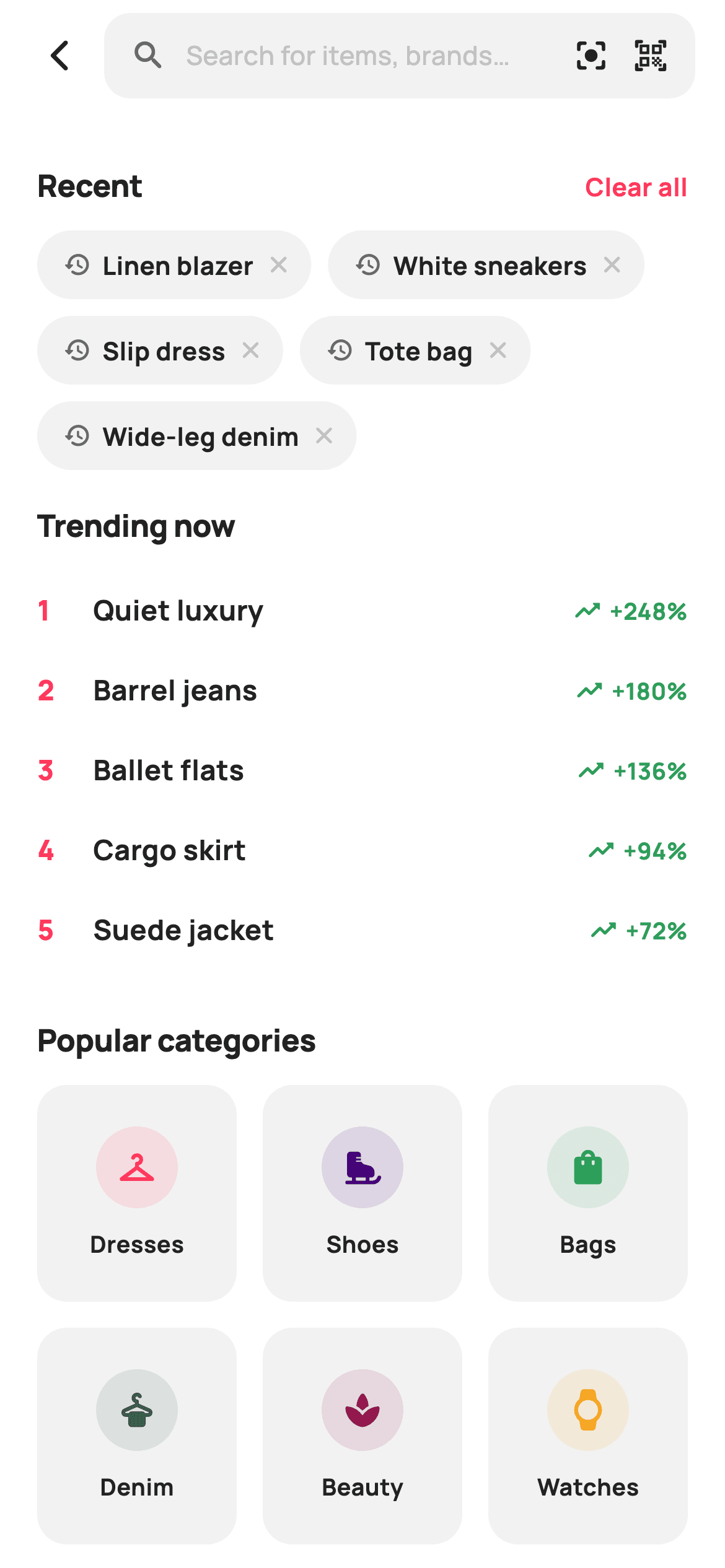
This is the screen a shopping app shows the moment you tap the search bar and before you've typed anything: individually removable recent-search chips, a ranked trending list with growth percentages, and a colour-coded category grid. Two details are worth the read — nesting a `GridView` inside a `ListView` without a crash, and putting a delete button inside a chip that's itself a tap target, so the two gestures don't fight each other.
Watch the Flutter UI walkthrough
A short screen recording of Search running, if you'd rather see it before you read the code. The written tutorial below covers everything in it.
Can't see the video? Watch it on YouTube.
What you'll build
- ✓A search bar with inline visual-search and barcode-scanner shortcuts, each its own tap target
- ✓Recent-search chips with a per-chip × and a 'Clear all' link, backed by a mutable list
- ✓A ranked trending list with brand-red positions and green growth deltas
- ✓A category grid nested inside a scrolling list via `shrinkWrap` + `NeverScrollableScrollPhysics`
- ✓Category tiles that tint their own icon circle from one colour per category
Step-by-step build
Create the file
Add a new file at lib/ecom_search_main/ecom_search_main_screen.dart in your Flutter project.
Register the bundled fonts
No external packages — this is pure Flutter. It does bundle its design font (Manrope), so drop the font file into fonts/ and declare it in pubspec.yaml:
flutter:
  fonts:
    - family: Manrope
      fonts:
- asset: fonts/Manrope-Regular.ttfBuild it, piece by piece
Here's how the screen goes together. Each block below is a real slice of the code with a plain-English explanation — paste them in order, or grab the whole file from the next section.
Eight callbacks and three data sets
class EcomSearchMainScreen extends StatefulWidget {
  const EcomSearchMainScreen({
    super.key,
    this.onBack,
    this.onFocusField,
    this.onSubmit,
    this.onVisualSearch,
    this.onBarcode,
    this.onTerm,
    this.onCategory,
    this.onClearRecents,
  });

  final VoidCallback? onBack;

  /// The field was tapped — open live suggestions.
  final VoidCallback? onFocusField;

  /// A query was submitted (passes the term).
  final ValueChanged<String>? onSubmit;
  final VoidCallback? onVisualSearch;
  final VoidCallback? onBarcode;

  /// A recent or trending term was tapped (passes the term).
  final ValueChanged<String>? onTerm;
  final ValueChanged<String>? onCategory;
  final VoidCallback? onClearRecents;

  @override
  State<EcomSearchMainScreen> createState() => _EcomSearchMainScreenState();
}

class _EcomSearchMainScreenState extends State<EcomSearchMainScreen> {
  static const String _font = 'Manrope';
  static const Color _canvas = Color(0xFFFFFFFF);
  static const Color _ink = Color(0xFF222222);
  static const Color _muted = Color(0xFF6A6A6A);
  static const Color _faint = Color(0xFFC1C1C1);
  static const Color _brand = Color(0xFFFF385C);
  static const Color _surface = Color(0xFFF2F2F2);

  final List<String> _recent = <String>[
    'Linen blazer',
    'White sneakers',
    'Slip dress',
    'Tote bag',
    'Wide-leg denim',
  ];

  static const List<_Trend> _trending = <_Trend>[
    _Trend('Quiet luxury', '+248%'),
    _Trend('Barrel jeans', '+180%'),
    _Trend('Ballet flats', '+136%'),
    _Trend('Cargo skirt', '+94%'),
    _Trend('Suede jacket', '+72%'),
  ];

  static const List<_Cat> _cats = <_Cat>[
    _Cat('Dresses', Icons.checkroom_rounded, Color(0xFFFF385C)),
    _Cat('Shoes', Icons.ice_skating_rounded, Color(0xFF460479)),
    _Cat('Bags', Icons.shopping_bag_rounded, Color(0xFF2E9E5B)),
    _Cat('Denim', Icons.dry_cleaning_rounded, Color(0xFF345E54)),
    _Cat('Beauty', Icons.spa_rounded, Color(0xFF92174D)),
    _Cat('Watches', Icons.watch_rounded, Color(0xFFF5A623)),
  ];
The callback list maps the screen's exits precisely: `onFocusField` for tapping into live suggestions, `onSubmit` for a query, `onVisualSearch` and `onBarcode` for the two shortcuts, and a shared `ValueChanged<String> onTerm` used by both recent chips and trending rows since both mean 'search for this'. Note that `_recent` is a plain `final List` while `_trending` and `_cats` are `static const` — only recents are mutable, because only they can be removed. Each `_Cat` carries its own tint colour, which the grid later uses for both the icon and its background at reduced alpha.
The search row and its nested tap targets
  Widget _searchRow() {
    return Padding(
      padding: const EdgeInsets.fromLTRB(8, 6, 16, 8),
      child: Row(
        children: <Widget>[
          IconButton(
            onPressed: widget.onBack,
            icon: const Icon(Icons.arrow_back_ios_new_rounded,
                size: 20, color: _ink),
          ),
          Expanded(
            child: GestureDetector(
              onTap: widget.onFocusField,
              child: Container(
                height: 46,
                padding: const EdgeInsets.symmetric(horizontal: 14),
                decoration: BoxDecoration(
                  color: _surface,
                  borderRadius: BorderRadius.circular(14),
                ),
                child: Row(
                  children: <Widget>[
                    const Icon(Icons.search_rounded, size: 20, color: _muted),
                    const SizedBox(width: 10),
                    const Expanded(
                      child: Text(
                        'Search for items, brands…',
                        style: TextStyle(
                          fontFamily: _font,
                          fontSize: 14,
                          fontWeight: FontWeight.w500,
                          color: _faint,
                        ),
                      ),
                    ),
                    GestureDetector(
                      onTap: widget.onVisualSearch,
                      child: const Icon(Icons.center_focus_strong_rounded,
                          size: 20, color: _ink),
                    ),
                    const SizedBox(width: 12),
                    GestureDetector(
                      onTap: widget.onBarcode,
                      child: const Icon(Icons.qr_code_scanner_rounded,
                          size: 20, color: _ink),
                    ),
                  ],
                ),
              ),
            ),
          ),
        ],
      ),
    );
  }
The field is not a `TextField` — it's a `GestureDetector` around a styled `Container` with placeholder text, which is the right call when tapping should hand off to a dedicated suggestions screen. Inside it sit two more `GestureDetector`s for the visual-search and barcode icons. That nesting works because Flutter's hit test walks inner-to-outer: a tap on the barcode icon is claimed by the innermost detector and never reaches the field's, so the two actions can't both fire. The `Expanded` around the placeholder pushes both icons to the trailing edge regardless of the hint's length.
A section header with an optional trailing widget
  Widget _section(String title, Widget? trailing) {
    return Padding(
      padding: const EdgeInsets.only(top: 18, bottom: 12),
      child: Row(
        children: <Widget>[
          Expanded(
            child: Text(
              title,
              style: const TextStyle(
                fontFamily: _font,
                fontSize: 16.5,
                fontWeight: FontWeight.w800,
                letterSpacing: -0.2,
                color: _ink,
              ),
            ),
          ),
          ?trailing,
        ],
      ),
    );
  }
`_section` takes a title plus a nullable `trailing` widget and places it after an `Expanded` title. The `?trailing` on line 183 is Dart's null-aware element — a newer language feature that includes the element only when it's non-null, replacing the older `if (trailing != null) trailing` form. That's why 'Recent' can carry a 'Clear all' link while 'Trending now' and 'Popular categories' pass `null` and render as plain headings, all through one helper.
Removable recent-search chips
  Widget _recentSection() {
    return Column(
      crossAxisAlignment: CrossAxisAlignment.start,
      children: <Widget>[
        _section(
          'Recent',
          GestureDetector(
            onTap: () {
              setState(_recent.clear);
              widget.onClearRecents?.call();
            },
            child: const Text(
              'Clear all',
              style: TextStyle(
                fontFamily: _font,
                fontSize: 13.5,
                fontWeight: FontWeight.w700,
                color: _brand,
              ),
            ),
          ),
        ),
        Wrap(
          spacing: 9,
          runSpacing: 9,
          children: _recent.map((String t) {
            return GestureDetector(
              onTap: () => widget.onTerm?.call(t),
              child: Container(
                padding: const EdgeInsets.fromLTRB(14, 9, 10, 9),
                decoration: BoxDecoration(
                  color: _surface,
                  borderRadius: BorderRadius.circular(99),
                ),
                child: Row(
                  mainAxisSize: MainAxisSize.min,
                  children: <Widget>[
                    const Icon(Icons.history_rounded,
                        size: 15, color: _muted),
                    const SizedBox(width: 6),
                    Text(
                      t,
                      style: const TextStyle(
                        fontFamily: _font,
                        fontSize: 13.5,
                        fontWeight: FontWeight.w700,
                        color: _ink,
                      ),
                    ),
                    const SizedBox(width: 6),
                    GestureDetector(
                      onTap: () => setState(() => _recent.remove(t)),
                      child: const Icon(Icons.close_rounded,
                          size: 15, color: _faint),
                    ),
                  ],
                ),
              ),
            );
          }).toList(),
        ),
      ],
    );
  }
'Clear all' calls `setState(_recent.clear)` — passing the method as a tear-off rather than wrapping it in a closure — and then reports upward so the parent can clear persisted history too. Each chip is a `Wrap` child with asymmetric padding, `EdgeInsets.fromLTRB(14, 9, 10, 9)`, tighter on the right because the × sits there and needs less breathing room than text would. The chip's outer `GestureDetector` fires `onTerm`, and a second inner one wraps only the × icon to call `setState(() => _recent.remove(t))`. Inner-first hit testing means tapping the × removes the chip without also triggering a search. Because the section is guarded by `if (_recent.isNotEmpty)` in the build method, clearing the list removes the heading too.
The ranked trending rows
  Widget _trendRow(int i) {
    final _Trend t = _trending[i];
    return InkWell(
      onTap: () => widget.onTerm?.call(t.term),
      child: Padding(
        padding: const EdgeInsets.symmetric(vertical: 11),
        child: Row(
          children: <Widget>[
            SizedBox(
              width: 22,
              child: Text(
                '${i + 1}',
                style: const TextStyle(
                  fontFamily: _font,
                  fontSize: 15,
                  fontWeight: FontWeight.w800,
                  color: _brand,
                ),
              ),
            ),
            const SizedBox(width: 8),
            Expanded(
              child: Text(
                t.term,
                style: const TextStyle(
                  fontFamily: _font,
                  fontSize: 15,
                  fontWeight: FontWeight.w700,
                  color: _ink,
                ),
              ),
            ),
            Row(
              children: <Widget>[
                const Icon(Icons.trending_up_rounded,
                    size: 16, color: Color(0xFF2E9E5B)),
                const SizedBox(width: 4),
                Text(
                  t.delta,
                  style: const TextStyle(
                    fontFamily: _font,
                    fontSize: 12.5,
                    fontWeight: FontWeight.w700,
                    color: Color(0xFF2E9E5B),
                  ),
                ),
              ],
            ),
          ],
        ),
      ),
    );
  }
Rank comes from list position — `'${i + 1}'` — inside a fixed `SizedBox(width: 22)` so single and double digits both leave the terms aligned. The rank is brand-red and the growth delta green with a `trending_up_rounded` icon, so the row carries two distinct colour signals without any decoration. `InkWell` rather than `GestureDetector` is used here deliberately: these are list rows, and the Material ripple is the expected feedback for a full-width row tap. The 11px symmetric vertical padding sets the row rhythm without needing dividers.
Nesting a grid inside a list
  Widget _catGrid() {
    return GridView.builder(
      shrinkWrap: true,
      physics: const NeverScrollableScrollPhysics(),
      gridDelegate: const SliverGridDelegateWithFixedCrossAxisCount(
        crossAxisCount: 3,
        mainAxisSpacing: 14,
        crossAxisSpacing: 14,
        childAspectRatio: 0.92,
      ),
      itemCount: _cats.length,
      itemBuilder: (BuildContext context, int i) {
        final _Cat c = _cats[i];
        return GestureDetector(
          onTap: () => widget.onCategory?.call(c.label),
          child: Container(
            decoration: BoxDecoration(
              color: _surface,
              borderRadius: BorderRadius.circular(16),
            ),
            child: Column(
              mainAxisAlignment: MainAxisAlignment.center,
              children: <Widget>[
                Container(
                  width: 44,
                  height: 44,
                  decoration: BoxDecoration(
                    color: c.tint.withValues(alpha: 0.12),
                    shape: BoxShape.circle,
                  ),
                  child: Icon(c.icon, size: 22, color: c.tint),
                ),
                const SizedBox(height: 10),
                Text(
                  c.label,
                  style: const TextStyle(
                    fontFamily: _font,
                    fontSize: 12.5,
                    fontWeight: FontWeight.w700,
                    color: _ink,
                  ),
                ),
              ],
            ),
          ),
        );
      },
    );
  }
A `GridView` inside a `ListView` normally throws an unbounded-height error, and the two properties on lines 310–311 are the fix: `shrinkWrap: true` makes the grid size itself to its content instead of demanding infinite height, and `NeverScrollableScrollPhysics` stops it from competing with the parent for scroll gestures, so the whole page scrolls as one. Three columns at `childAspectRatio: 0.92` gives tiles slightly taller than wide, enough for a 44px icon circle plus a label. Each tile derives its own colours from `c.tint`: the icon at full strength over a circle of the same colour at 12% alpha — one value producing a matched pair, which is why six differently-coloured tiles still look like one set.
Full code
The complete, ready-to-paste source. Free to use in your projects — one click copies it all.
import 'package:flutter/material.dart';

/// StyleCart — Search (entry).
///
/// The focused search home: an active search field with camera + barcode
/// shortcuts, removable recent-search chips, a ranked "Trending now" list and a
/// popular-categories grid.
///
/// Self-contained per CONVENTIONS.md: pure Flutter, bundled Manrope, inline
/// Airbnb-style tokens, own light theme + SafeArea. Category badges are Material
/// glyphs (render in goldens); no emoji. Exposes callbacks only — recent-chip
/// state is internal.
class EcomSearchMainScreen extends StatefulWidget {
  const EcomSearchMainScreen({
    super.key,
    this.onBack,
    this.onFocusField,
    this.onSubmit,
    this.onVisualSearch,
    this.onBarcode,
    this.onTerm,
    this.onCategory,
    this.onClearRecents,
  });

  final VoidCallback? onBack;

  /// The field was tapped — open live suggestions.
  final VoidCallback? onFocusField;

  /// A query was submitted (passes the term).
  final ValueChanged<String>? onSubmit;
  final VoidCallback? onVisualSearch;
  final VoidCallback? onBarcode;

  /// A recent or trending term was tapped (passes the term).
  final ValueChanged<String>? onTerm;
  final ValueChanged<String>? onCategory;
  final VoidCallback? onClearRecents;

  @override
  State<EcomSearchMainScreen> createState() => _EcomSearchMainScreenState();
}

class _EcomSearchMainScreenState extends State<EcomSearchMainScreen> {
  static const String _font = 'Manrope';
  static const Color _canvas = Color(0xFFFFFFFF);
  static const Color _ink = Color(0xFF222222);
  static const Color _muted = Color(0xFF6A6A6A);
  static const Color _faint = Color(0xFFC1C1C1);
  static const Color _brand = Color(0xFFFF385C);
  static const Color _surface = Color(0xFFF2F2F2);

  final List<String> _recent = <String>[
    'Linen blazer',
    'White sneakers',
    'Slip dress',
    'Tote bag',
    'Wide-leg denim',
  ];

  static const List<_Trend> _trending = <_Trend>[
    _Trend('Quiet luxury', '+248%'),
    _Trend('Barrel jeans', '+180%'),
    _Trend('Ballet flats', '+136%'),
    _Trend('Cargo skirt', '+94%'),
    _Trend('Suede jacket', '+72%'),
  ];

  static const List<_Cat> _cats = <_Cat>[
    _Cat('Dresses', Icons.checkroom_rounded, Color(0xFFFF385C)),
    _Cat('Shoes', Icons.ice_skating_rounded, Color(0xFF460479)),
    _Cat('Bags', Icons.shopping_bag_rounded, Color(0xFF2E9E5B)),
    _Cat('Denim', Icons.dry_cleaning_rounded, Color(0xFF345E54)),
    _Cat('Beauty', Icons.spa_rounded, Color(0xFF92174D)),
    _Cat('Watches', Icons.watch_rounded, Color(0xFFF5A623)),
  ];

  @override
  Widget build(BuildContext context) {
    return Theme(
      data: ThemeData.light(useMaterial3: true),
      child: Scaffold(
        backgroundColor: _canvas,
        body: SafeArea(
          child: Column(
            children: <Widget>[
              _searchRow(),
              Expanded(
                child: ListView(
                  padding: const EdgeInsets.fromLTRB(20, 8, 20, 24),
                  children: <Widget>[
                    if (_recent.isNotEmpty) _recentSection(),
                    _section('Trending now', null),
                    ...List<Widget>.generate(
                        _trending.length, (int i) => _trendRow(i)),
                    const SizedBox(height: 8),
                    _section('Popular categories', null),
                    _catGrid(),
                  ],
                ),
              ),
            ],
          ),
        ),
      ),
    );
  }

  Widget _searchRow() {
    return Padding(
      padding: const EdgeInsets.fromLTRB(8, 6, 16, 8),
      child: Row(
        children: <Widget>[
          IconButton(
            onPressed: widget.onBack,
            icon: const Icon(Icons.arrow_back_ios_new_rounded,
                size: 20, color: _ink),
          ),
          Expanded(
            child: GestureDetector(
              onTap: widget.onFocusField,
              child: Container(
                height: 46,
                padding: const EdgeInsets.symmetric(horizontal: 14),
                decoration: BoxDecoration(
                  color: _surface,
                  borderRadius: BorderRadius.circular(14),
                ),
                child: Row(
                  children: <Widget>[
                    const Icon(Icons.search_rounded, size: 20, color: _muted),
                    const SizedBox(width: 10),
                    const Expanded(
                      child: Text(
                        'Search for items, brands…',
                        style: TextStyle(
                          fontFamily: _font,
                          fontSize: 14,
                          fontWeight: FontWeight.w500,
                          color: _faint,
                        ),
                      ),
                    ),
                    GestureDetector(
                      onTap: widget.onVisualSearch,
                      child: const Icon(Icons.center_focus_strong_rounded,
                          size: 20, color: _ink),
                    ),
                    const SizedBox(width: 12),
                    GestureDetector(
                      onTap: widget.onBarcode,
                      child: const Icon(Icons.qr_code_scanner_rounded,
                          size: 20, color: _ink),
                    ),
                  ],
                ),
              ),
            ),
          ),
        ],
      ),
    );
  }

  Widget _section(String title, Widget? trailing) {
    return Padding(
      padding: const EdgeInsets.only(top: 18, bottom: 12),
      child: Row(
        children: <Widget>[
          Expanded(
            child: Text(
              title,
              style: const TextStyle(
                fontFamily: _font,
                fontSize: 16.5,
                fontWeight: FontWeight.w800,
                letterSpacing: -0.2,
                color: _ink,
              ),
            ),
          ),
          ?trailing,
        ],
      ),
    );
  }

  Widget _recentSection() {
    return Column(
      crossAxisAlignment: CrossAxisAlignment.start,
      children: <Widget>[
        _section(
          'Recent',
          GestureDetector(
            onTap: () {
              setState(_recent.clear);
              widget.onClearRecents?.call();
            },
            child: const Text(
              'Clear all',
              style: TextStyle(
                fontFamily: _font,
                fontSize: 13.5,
                fontWeight: FontWeight.w700,
                color: _brand,
              ),
            ),
          ),
        ),
        Wrap(
          spacing: 9,
          runSpacing: 9,
          children: _recent.map((String t) {
            return GestureDetector(
              onTap: () => widget.onTerm?.call(t),
              child: Container(
                padding: const EdgeInsets.fromLTRB(14, 9, 10, 9),
                decoration: BoxDecoration(
                  color: _surface,
                  borderRadius: BorderRadius.circular(99),
                ),
                child: Row(
                  mainAxisSize: MainAxisSize.min,
                  children: <Widget>[
                    const Icon(Icons.history_rounded,
                        size: 15, color: _muted),
                    const SizedBox(width: 6),
                    Text(
                      t,
                      style: const TextStyle(
                        fontFamily: _font,
                        fontSize: 13.5,
                        fontWeight: FontWeight.w700,
                        color: _ink,
                      ),
                    ),
                    const SizedBox(width: 6),
                    GestureDetector(
                      onTap: () => setState(() => _recent.remove(t)),
                      child: const Icon(Icons.close_rounded,
                          size: 15, color: _faint),
                    ),
                  ],
                ),
              ),
            );
          }).toList(),
        ),
      ],
    );
  }

  Widget _trendRow(int i) {
    final _Trend t = _trending[i];
    return InkWell(
      onTap: () => widget.onTerm?.call(t.term),
      child: Padding(
        padding: const EdgeInsets.symmetric(vertical: 11),
        child: Row(
          children: <Widget>[
            SizedBox(
              width: 22,
              child: Text(
                '${i + 1}',
                style: const TextStyle(
                  fontFamily: _font,
                  fontSize: 15,
                  fontWeight: FontWeight.w800,
                  color: _brand,
                ),
              ),
            ),
            const SizedBox(width: 8),
            Expanded(
              child: Text(
                t.term,
                style: const TextStyle(
                  fontFamily: _font,
                  fontSize: 15,
                  fontWeight: FontWeight.w700,
                  color: _ink,
                ),
              ),
            ),
            Row(
              children: <Widget>[
                const Icon(Icons.trending_up_rounded,
                    size: 16, color: Color(0xFF2E9E5B)),
                const SizedBox(width: 4),
                Text(
                  t.delta,
                  style: const TextStyle(
                    fontFamily: _font,
                    fontSize: 12.5,
                    fontWeight: FontWeight.w700,
                    color: Color(0xFF2E9E5B),
                  ),
                ),
              ],
            ),
          ],
        ),
      ),
    );
  }

  Widget _catGrid() {
    return GridView.builder(
      shrinkWrap: true,
      physics: const NeverScrollableScrollPhysics(),
      gridDelegate: const SliverGridDelegateWithFixedCrossAxisCount(
        crossAxisCount: 3,
        mainAxisSpacing: 14,
        crossAxisSpacing: 14,
        childAspectRatio: 0.92,
      ),
      itemCount: _cats.length,
      itemBuilder: (BuildContext context, int i) {
        final _Cat c = _cats[i];
        return GestureDetector(
          onTap: () => widget.onCategory?.call(c.label),
          child: Container(
            decoration: BoxDecoration(
              color: _surface,
              borderRadius: BorderRadius.circular(16),
            ),
            child: Column(
              mainAxisAlignment: MainAxisAlignment.center,
              children: <Widget>[
                Container(
                  width: 44,
                  height: 44,
                  decoration: BoxDecoration(
                    color: c.tint.withValues(alpha: 0.12),
                    shape: BoxShape.circle,
                  ),
                  child: Icon(c.icon, size: 22, color: c.tint),
                ),
                const SizedBox(height: 10),
                Text(
                  c.label,
                  style: const TextStyle(
                    fontFamily: _font,
                    fontSize: 12.5,
                    fontWeight: FontWeight.w700,
                    color: _ink,
                  ),
                ),
              ],
            ),
          ),
        );
      },
    );
  }
}

class _Trend {
  const _Trend(this.term, this.delta);
  final String term;
  final String delta;
}

class _Cat {
  const _Cat(this.label, this.icon, this.tint);
  final String label;
  final IconData icon;
  final Color tint;
}
Plus bundled 5 binary assets (fonts/images). The CLI and MCP install those for you automatically.
Two faster ways to add it
Copy-paste works, but you can skip it entirely.
1. FlutterKit CLI
One command drops this screen — and its fonts — straight into your project.
$ flutterkit add ecom-search-main2. AI agent (MCP)
Connect FlutterKit's MCP server in Claude or Cursor and just ask your agent to install ecom-search-main — it fetches and writes the files for you.
FAQ
Is this Flutter search screen free to use?
Yes. The full Dart source on this page is free for personal and commercial apps. Copy it from the code block, install it with the FlutterKit CLI (flutterkit add ecom-search-main), or add it via an AI agent over MCP.
Does it need any packages?
No — it's pure Flutter on material.dart, with no search or chip package. The only asset to register in pubspec.yaml is the bundled Manrope font family, which the CLI and MCP install for you.
How do I persist recent searches between sessions?
The _recent list is ordinary in-memory state. Load it from shared_preferences (or your own store) in initState, and write it back in the same places the screen already mutates it — the per-chip remove and the Clear all handler, which already calls onClearRecents so the parent can do exactly that.
Why is the search bar not a real TextField?
Because this screen is the pre-typing state: tapping the field fires onFocusField so you can push a dedicated suggestions screen with its own focused TextField. If you'd rather type in place, swap the placeholder Text for a TextField with border: InputBorder.none and wire onSubmitted to onSubmit.
Which Flutter version does it target?
It uses Color.withValues(alpha:) and the null-aware element syntax (?trailing), which needs Dart 3.10 / Flutter 3.38+. On an older SDK, replace ?trailing with if (trailing != null) trailing and each withValues(alpha: x) with withOpacity(x).


