How to Build a Search No Results Screen in Flutter (Full Code + Preview)
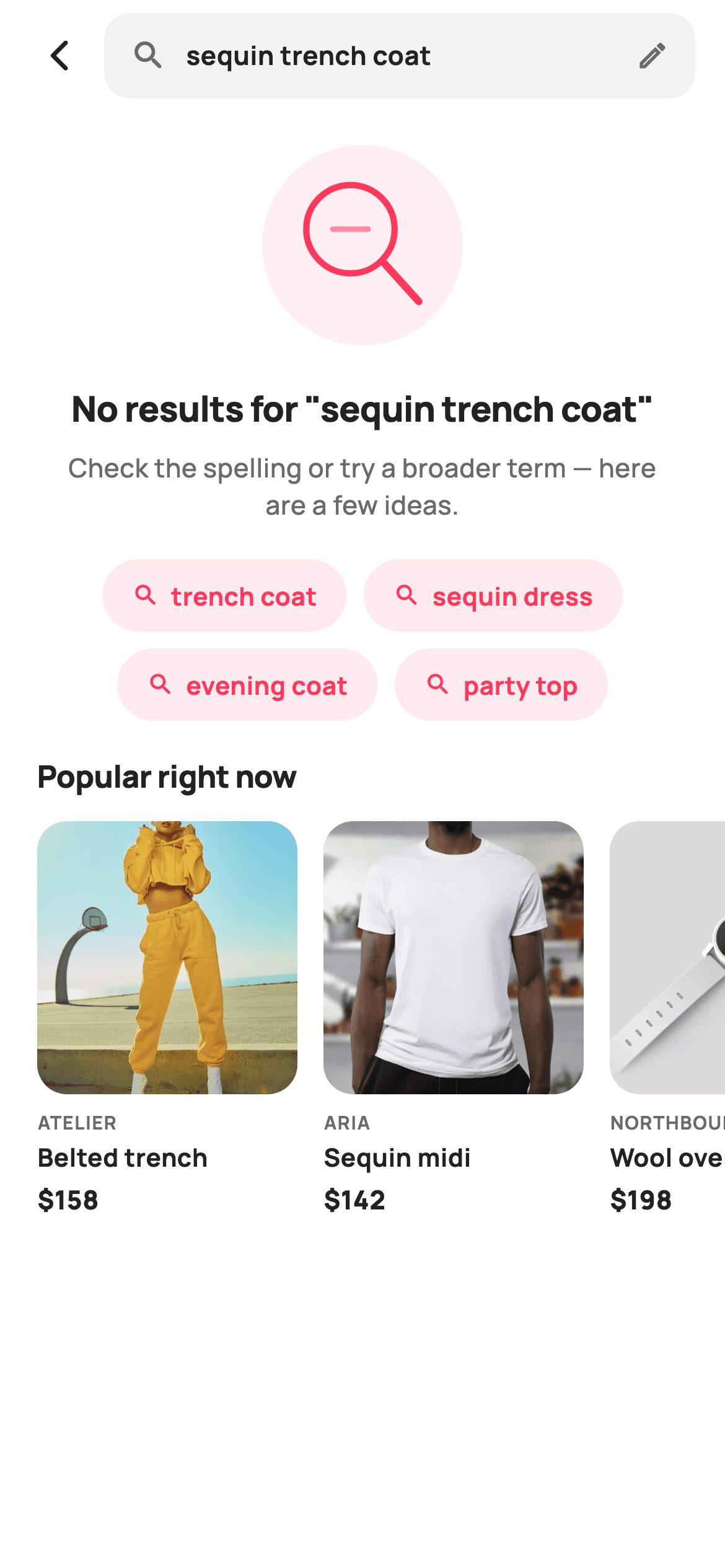
A search that returns nothing is a dead end the shopper did not ask for — they typed something real, and the catalogue simply has no match for it. This tutorial builds StyleCart's no-results screen in Flutter: a search bar that keeps the failed query visible and editable, a painted magnifier with an empty dash where a match should be, the query echoed back in the headline, four tappable alternative searches that broaden the term, and a horizontal 'Popular right now' rail so the trip is never wasted.
Watch the Flutter UI walkthrough
A short screen recording of No results running, if you'd rather see it before you read the code. The written tutorial below covers everything in it.
Can't see the video? Watch it on YouTube.
What you'll build
- ✓A search bar that keeps the failed query on screen behind an edit pencil, so retyping starts from the original words
- ✓A CustomPainter no-match mark: a coral magnifier whose lens holds a faded dash instead of a result
- ✓A headline that quotes the query back verbatim plus a spelling-or-broaden hint
- ✓A centred Wrap of four alternative-search chips that each step one level wider than the failed term
- ✓A horizontal 'Popular right now' rail of six products with brand, title and price
Step-by-step build
Create the file
Add a new file at lib/ecom_search_empty/ecom_search_empty_screen.dart in your Flutter project.
Register the bundled fonts
No external packages — this is pure Flutter. It does bundle its design font (Manrope), so drop the font file into fonts/ and declare it in pubspec.yaml:
flutter:
  fonts:
    - family: Manrope
      fonts:
- asset: fonts/Manrope-Regular.ttfBuild it, piece by piece
Here's how the screen goes together. Each block below is a real slice of the code with a plain-English explanation — paste them in order, or grab the whole file from the next section.
The query, the callbacks and the two data lists
class EcomSearchEmptyScreen extends StatelessWidget {
  const EcomSearchEmptyScreen({
    super.key,
    this.query = 'sequin trench coat',
    this.onBack,
    this.onEditQuery,
    this.onAlternative,
    this.onProduct,
  });

  final String query;
  final VoidCallback? onBack;
  final VoidCallback? onEditQuery;
  final ValueChanged<String>? onAlternative;
  final ValueChanged<String>? onProduct;

  static const String _font = 'Manrope';
  static const Color _canvas = Color(0xFFFFFFFF);
  static const Color _ink = Color(0xFF222222);
  static const Color _muted = Color(0xFF6A6A6A);
  static const Color _brand = Color(0xFFFF385C);
  static const Color _surface = Color(0xFFF2F2F2);
  static const Color _imageBg = Color(0xFFF5F5F5);

  static const String _dir =
      'lib/screens/ecommerce/ecom_search_empty/images';

  static const List<String> _alternatives = <String>[
    'trench coat',
    'sequin dress',
    'evening coat',
    'party top',
  ];

  static const List<_Prod> _popular = <_Prod>[
    _Prod('Belted trench', 'Atelier', 158, 'p15.webp'),
    _Prod('Sequin midi', 'Aria', 142, 'p16.webp'),
    _Prod('Wool overcoat', 'Northbound', 198, 'p17.webp'),
    _Prod('Satin slip', 'Aria', 96, 'p18.webp'),
    _Prod('Cropped blazer', 'Maison', 128, 'p19.webp'),
    _Prod('Leather tote', 'Maison', 165, 'p20.webp'),
  ];
`EcomSearchEmptyScreen` is a `StatelessWidget` whose only input is `final String query`, defaulting to `'sequin trench coat'` — the screen never searches, it reports on a search that already happened. Four callbacks split the exits: `onBack`, `onEditQuery` for retyping, `ValueChanged<String> onAlternative` and `onProduct`, both passing the tapped string up so the host knows which recovery route was chosen. `_alternatives` holds four broader terms and `_popular` six `_Prod` records, kept as `static const` lists so the merchandising copy is editable in one place rather than buried in widget trees. `_brand` is the `#FF385C` coral used only on tappable things.
Fixed search bar over a scrolling body
  @override
  Widget build(BuildContext context) {
    return Theme(
      data: ThemeData.light(useMaterial3: true),
      child: Scaffold(
        backgroundColor: _canvas,
        body: SafeArea(
          child: Column(
            children: <Widget>[
              _searchRow(),
              Expanded(
                child: ListView(
                  padding: const EdgeInsets.only(bottom: 24),
                  children: <Widget>[
                    const SizedBox(height: 18),
                    Center(
                      child: SizedBox(
                        width: 108,
                        height: 108,
                        child: CustomPaint(painter: _NoMatchPainter()),
                      ),
                    ),
The `Scaffold` body is a `Column` with `_searchRow()` pinned at the top and everything else inside an `Expanded` `ListView`. That split matters here: the bar carrying the failed query must stay reachable while the shopper scrolls down through suggestions and the popular rail, because correcting the search is the primary fix and it should never scroll off. The `ListView` takes `padding: EdgeInsets.only(bottom: 24)` so the rail clears the home indicator. The no-match mark is a `SizedBox(width: 108, height: 108)` wrapping `CustomPaint(painter: _NoMatchPainter())` — a fixed square box, since the painter works in fractions of whatever size it is given.
Echoing the query and telling the shopper what to change
                    const SizedBox(height: 20),
                    Padding(
                      padding: const EdgeInsets.symmetric(horizontal: 32),
                      child: Column(
                        children: <Widget>[
                          Text(
                            'No results for "$query"',
                            textAlign: TextAlign.center,
                            style: const TextStyle(
                              fontFamily: _font,
                              fontSize: 19,
                              fontWeight: FontWeight.w800,
                              letterSpacing: -0.3,
                              color: _ink,
                            ),
                          ),
                          const SizedBox(height: 8),
                          const Text(
                            'Check the spelling or try a broader term — '
                            'here are a few ideas.',
                            textAlign: TextAlign.center,
                            style: TextStyle(
                              fontFamily: _font,
                              fontSize: 14,
                              fontWeight: FontWeight.w500,
                              height: 1.45,
                              color: _muted,
                            ),
                          ),
                        ],
                      ),
                    ),
                    const SizedBox(height: 20),
                    _altChips(),
The headline is `'No results for "$query"'` — interpolating the string straight into quotes. Quoting it back does two jobs: it proves the app searched what was typed, and it exposes a typo the moment the shopper reads it, which is the single most common cause of a zero-result search. It sits at 19px `w800` with `letterSpacing: -0.3` and `TextAlign.center` inside 32px horizontal padding so a long query wraps to a tidy block. Under it, 14px muted copy says to check the spelling or try a broader term — naming both failure modes before the chips below act them out.
Handing the shopper somewhere else to go
                    const SizedBox(height: 18),
                    Padding(
                      padding: const EdgeInsets.symmetric(horizontal: 20),
                      child: Text(
                        'Popular right now',
                        style: const TextStyle(
                          fontFamily: _font,
                          fontSize: 16.5,
                          fontWeight: FontWeight.w800,
                          letterSpacing: -0.2,
                          color: _ink,
                        ),
                      ),
                    ),
                    const SizedBox(height: 12),
                    _popularRail(),
                  ],
                ),
              ),
            ],
          ),
        ),
      ),
    );
  }
After the chips, a 'Popular right now' heading at 16.5px `w800` introduces the rail. This section is the fallback for the case the suggestions do not cover: the shopper's term may simply not exist in the catalogue, and offering stock that does sell keeps the session alive rather than ending it at an apology. Ordering is deliberate — correction first (the bar), reformulation second (the chips), then browsing. The `SizedBox` heights between blocks step 18 / 20 / 20 / 18 / 12, tightening as the content moves from the message down into merchandising.
The search bar that keeps the failed words
  Widget _searchRow() {
    return Padding(
      padding: const EdgeInsets.fromLTRB(8, 6, 16, 6),
      child: Row(
        children: <Widget>[
          IconButton(
            onPressed: onBack,
            icon: const Icon(Icons.arrow_back_ios_new_rounded,
                size: 20, color: _ink),
          ),
          Expanded(
            child: GestureDetector(
              onTap: onEditQuery,
              child: Container(
                height: 46,
                padding: const EdgeInsets.symmetric(horizontal: 14),
                decoration: BoxDecoration(
                  color: _surface,
                  borderRadius: BorderRadius.circular(14),
                ),
                child: Row(
                  children: <Widget>[
                    const Icon(Icons.search_rounded, size: 20, color: _muted),
                    const SizedBox(width: 10),
                    Expanded(
                      child: Text(
                        query,
                        maxLines: 1,
                        overflow: TextOverflow.ellipsis,
                        style: const TextStyle(
                          fontFamily: _font,
                          fontSize: 14,
                          fontWeight: FontWeight.w700,
                          color: _ink,
                        ),
                      ),
                    ),
                    const Icon(Icons.edit_outlined, size: 18, color: _muted),
                  ],
                ),
              ),
            ),
          ),
        ],
      ),
    );
  }
This is a fake field, not a `TextField`: a 46px `Container` in `_surface` grey with a 14px radius, wrapped in a `GestureDetector` calling `onEditQuery`. Tapping it should hand off to the live search screen with the text preselected. Inside, a leading `Icons.search_rounded`, the query in `Expanded` with `maxLines: 1` and `TextOverflow.ellipsis`, and a trailing `Icons.edit_outlined` at 18px. The pencil is the important detail — it signals the query is editable rather than a static label, so the shopper knows a wrong term can be fixed in place instead of being retyped from scratch.
Alternative-search chips
  Widget _altChips() {
    return Padding(
      padding: const EdgeInsets.symmetric(horizontal: 20),
      child: Wrap(
        alignment: WrapAlignment.center,
        spacing: 9,
        runSpacing: 9,
        children: _alternatives.map((String a) {
          return GestureDetector(
            onTap: () => onAlternative?.call(a),
            child: Container(
              padding:
                  const EdgeInsets.symmetric(horizontal: 16, vertical: 10),
              decoration: BoxDecoration(
                color: _brand.withValues(alpha: 0.10),
                borderRadius: BorderRadius.circular(99),
              ),
              child: Row(
                mainAxisSize: MainAxisSize.min,
                children: <Widget>[
                  const Icon(Icons.search_rounded, size: 15, color: _brand),
                  const SizedBox(width: 6),
                  Text(
                    a,
                    style: const TextStyle(
                      fontFamily: _font,
                      fontSize: 13.5,
                      fontWeight: FontWeight.w700,
                      color: _brand,
                    ),
                  ),
                ],
              ),
            ),
          );
        }).toList(),
      ),
    );
  }
The four suggestions render through a `Wrap` with `WrapAlignment.center` and 9px `spacing`/`runSpacing`, so they centre under the centred headline and reflow to a second line on a narrow phone without any width maths. Each chip is a fully-rounded `Container` (`BorderRadius.circular(99)`) at `_brand.withValues(alpha: 0.10)` with the coral text and a 15px search glyph — the magnifier repeated at chip scale is what says 'tap to run this search' rather than 'filter'. `mainAxisSize: MainAxisSize.min` makes each pill hug its own term. Tapping calls `onAlternative?.call(a)` with the term itself, so the host just reruns the search.
The popular-products rail
  Widget _popularRail() {
    return SizedBox(
      height: 214,
      child: ListView.separated(
        scrollDirection: Axis.horizontal,
        padding: const EdgeInsets.symmetric(horizontal: 20),
        itemCount: _popular.length,
        separatorBuilder: (_, _) => const SizedBox(width: 14),
        itemBuilder: (BuildContext context, int i) {
          final _Prod p = _popular[i];
          return GestureDetector(
            onTap: () => onProduct?.call(p.title),
            child: SizedBox(
              width: 140,
              child: Column(
                crossAxisAlignment: CrossAxisAlignment.start,
                children: <Widget>[
                  Expanded(
                    child: ClipRRect(
                      borderRadius: BorderRadius.circular(16),
                      child: Stack(
                        fit: StackFit.expand,
                        children: <Widget>[
                          Container(color: _imageBg),
                          Image.asset('$_dir/${p.asset}', fit: BoxFit.cover),
                        ],
                      ),
                    ),
                  ),
                  const SizedBox(height: 8),
                  Text(
                    p.brand.toUpperCase(),
                    style: const TextStyle(
                      fontFamily: _font,
                      fontSize: 10,
                      fontWeight: FontWeight.w700,
                      letterSpacing: 0.6,
                      color: _muted,
                    ),
                  ),
                  const SizedBox(height: 2),
                  Text(
                    p.title,
                    maxLines: 1,
                    overflow: TextOverflow.ellipsis,
                    style: const TextStyle(
                      fontFamily: _font,
                      fontSize: 13.5,
                      fontWeight: FontWeight.w700,
                      color: _ink,
                    ),
                  ),
                  const SizedBox(height: 4),
                  Text(
                    '\$${p.price}',
                    style: const TextStyle(
                      fontFamily: _font,
                      fontSize: 14,
                      fontWeight: FontWeight.w800,
                      color: _ink,
                    ),
                  ),
                ],
              ),
            ),
          );
        },
      ),
    );
  }
A 214px-tall `SizedBox` holds a horizontal `ListView.separated` with 14px gaps and 20px end padding, so the first card lines up with the section heading and the last one still hints at more beyond the edge. Each card is 140px wide; the image sits in an `Expanded` `ClipRRect` at radius 16 over a `Stack` whose bottom layer is a plain `_imageBg` grey `Container` — that grey shows while the webp decodes, so the rail never flashes white. Below it, the brand goes through `toUpperCase()` at 10px with `letterSpacing: 0.6`, the title ellipsises at one line, and the price is 14px `w800`.
Painting the no-match magnifier
/// Paints a magnifier over an empty dashed field — the "nothing found" mark.
class _NoMatchPainter extends CustomPainter {
  @override
  void paint(Canvas canvas, Size size) {
    const Color brand = Color(0xFFFF385C);
    final double w = size.width;
    final double h = size.height;

    canvas.drawCircle(
      Offset(w / 2, h / 2),
      w / 2,
      Paint()..color = brand.withValues(alpha: 0.08),
    );

    // Magnifier ring + handle.
    final Offset lens = Offset(w * 0.44, h * 0.42);
    final double lr = w * 0.22;
    final Paint stroke = Paint()
      ..style = PaintingStyle.stroke
      ..strokeWidth = 3.4
      ..strokeCap = StrokeCap.round
      ..color = brand;
    canvas.drawCircle(lens, lr, stroke);
    canvas.drawLine(
      Offset(lens.dx + lr * 0.72, lens.dy + lr * 0.72),
      Offset(w * 0.78, h * 0.78),
      stroke..strokeWidth = 4,
    );

    // Empty "no match" dash inside the lens.
    canvas.drawLine(
      Offset(lens.dx - lr * 0.4, lens.dy),
      Offset(lens.dx + lr * 0.4, lens.dy),
      Paint()
        ..strokeWidth = 3
        ..strokeCap = StrokeCap.round
        ..color = brand.withValues(alpha: 0.55),
    );
  }

  @override
  bool shouldRepaint(_NoMatchPainter oldDelegate) => false;
}
`_NoMatchPainter` draws three things on fractions of `size`, so it scales to any box. First a full-width disc at `brand.withValues(alpha: 0.08)` as a soft coral ground. Then the magnifier: a lens centred at `(w * 0.44, h * 0.42)` with radius `w * 0.22`, stroked at 3.4px with `StrokeCap.round`, and a handle running from the lens edge at `lr * 0.72` out to `(w * 0.78, h * 0.78)` — the same `stroke` Paint reused with `strokeWidth` bumped to 4 so the handle reads slightly heavier than the ring. The idea lives in the last stroke: a 3px horizontal dash across the lens at 55% alpha, the flat line of a zero-result readout where a product should have been.
Full code
The complete, ready-to-paste source. Free to use in your projects — one click copies it all.
import 'package:flutter/material.dart';

/// StyleCart — No Results (search).
///
/// The empty search state: a painted no-match mark, the echoed query, a row of
/// suggested alternative searches, and a "Popular right now" product rail so the
/// shopper always has somewhere to go.
///
/// Self-contained per CONVENTIONS.md: pure Flutter, bundled Manrope, inline
/// Airbnb-style tokens, own light theme + SafeArea, bundled webp photos. The
/// empty mark is a CustomPainter (no emoji glyph). Exposes callbacks only.
class EcomSearchEmptyScreen extends StatelessWidget {
  const EcomSearchEmptyScreen({
    super.key,
    this.query = 'sequin trench coat',
    this.onBack,
    this.onEditQuery,
    this.onAlternative,
    this.onProduct,
  });

  final String query;
  final VoidCallback? onBack;
  final VoidCallback? onEditQuery;
  final ValueChanged<String>? onAlternative;
  final ValueChanged<String>? onProduct;

  static const String _font = 'Manrope';
  static const Color _canvas = Color(0xFFFFFFFF);
  static const Color _ink = Color(0xFF222222);
  static const Color _muted = Color(0xFF6A6A6A);
  static const Color _brand = Color(0xFFFF385C);
  static const Color _surface = Color(0xFFF2F2F2);
  static const Color _imageBg = Color(0xFFF5F5F5);

  static const String _dir =
      'lib/screens/ecommerce/ecom_search_empty/images';

  static const List<String> _alternatives = <String>[
    'trench coat',
    'sequin dress',
    'evening coat',
    'party top',
  ];

  static const List<_Prod> _popular = <_Prod>[
    _Prod('Belted trench', 'Atelier', 158, 'p15.webp'),
    _Prod('Sequin midi', 'Aria', 142, 'p16.webp'),
    _Prod('Wool overcoat', 'Northbound', 198, 'p17.webp'),
    _Prod('Satin slip', 'Aria', 96, 'p18.webp'),
    _Prod('Cropped blazer', 'Maison', 128, 'p19.webp'),
    _Prod('Leather tote', 'Maison', 165, 'p20.webp'),
  ];

  @override
  Widget build(BuildContext context) {
    return Theme(
      data: ThemeData.light(useMaterial3: true),
      child: Scaffold(
        backgroundColor: _canvas,
        body: SafeArea(
          child: Column(
            children: <Widget>[
              _searchRow(),
              Expanded(
                child: ListView(
                  padding: const EdgeInsets.only(bottom: 24),
                  children: <Widget>[
                    const SizedBox(height: 18),
                    Center(
                      child: SizedBox(
                        width: 108,
                        height: 108,
                        child: CustomPaint(painter: _NoMatchPainter()),
                      ),
                    ),
                    const SizedBox(height: 20),
                    Padding(
                      padding: const EdgeInsets.symmetric(horizontal: 32),
                      child: Column(
                        children: <Widget>[
                          Text(
                            'No results for "$query"',
                            textAlign: TextAlign.center,
                            style: const TextStyle(
                              fontFamily: _font,
                              fontSize: 19,
                              fontWeight: FontWeight.w800,
                              letterSpacing: -0.3,
                              color: _ink,
                            ),
                          ),
                          const SizedBox(height: 8),
                          const Text(
                            'Check the spelling or try a broader term — '
                            'here are a few ideas.',
                            textAlign: TextAlign.center,
                            style: TextStyle(
                              fontFamily: _font,
                              fontSize: 14,
                              fontWeight: FontWeight.w500,
                              height: 1.45,
                              color: _muted,
                            ),
                          ),
                        ],
                      ),
                    ),
                    const SizedBox(height: 20),
                    _altChips(),
                    const SizedBox(height: 18),
                    Padding(
                      padding: const EdgeInsets.symmetric(horizontal: 20),
                      child: Text(
                        'Popular right now',
                        style: const TextStyle(
                          fontFamily: _font,
                          fontSize: 16.5,
                          fontWeight: FontWeight.w800,
                          letterSpacing: -0.2,
                          color: _ink,
                        ),
                      ),
                    ),
                    const SizedBox(height: 12),
                    _popularRail(),
                  ],
                ),
              ),
            ],
          ),
        ),
      ),
    );
  }

  Widget _searchRow() {
    return Padding(
      padding: const EdgeInsets.fromLTRB(8, 6, 16, 6),
      child: Row(
        children: <Widget>[
          IconButton(
            onPressed: onBack,
            icon: const Icon(Icons.arrow_back_ios_new_rounded,
                size: 20, color: _ink),
          ),
          Expanded(
            child: GestureDetector(
              onTap: onEditQuery,
              child: Container(
                height: 46,
                padding: const EdgeInsets.symmetric(horizontal: 14),
                decoration: BoxDecoration(
                  color: _surface,
                  borderRadius: BorderRadius.circular(14),
                ),
                child: Row(
                  children: <Widget>[
                    const Icon(Icons.search_rounded, size: 20, color: _muted),
                    const SizedBox(width: 10),
                    Expanded(
                      child: Text(
                        query,
                        maxLines: 1,
                        overflow: TextOverflow.ellipsis,
                        style: const TextStyle(
                          fontFamily: _font,
                          fontSize: 14,
                          fontWeight: FontWeight.w700,
                          color: _ink,
                        ),
                      ),
                    ),
                    const Icon(Icons.edit_outlined, size: 18, color: _muted),
                  ],
                ),
              ),
            ),
          ),
        ],
      ),
    );
  }

  Widget _altChips() {
    return Padding(
      padding: const EdgeInsets.symmetric(horizontal: 20),
      child: Wrap(
        alignment: WrapAlignment.center,
        spacing: 9,
        runSpacing: 9,
        children: _alternatives.map((String a) {
          return GestureDetector(
            onTap: () => onAlternative?.call(a),
            child: Container(
              padding:
                  const EdgeInsets.symmetric(horizontal: 16, vertical: 10),
              decoration: BoxDecoration(
                color: _brand.withValues(alpha: 0.10),
                borderRadius: BorderRadius.circular(99),
              ),
              child: Row(
                mainAxisSize: MainAxisSize.min,
                children: <Widget>[
                  const Icon(Icons.search_rounded, size: 15, color: _brand),
                  const SizedBox(width: 6),
                  Text(
                    a,
                    style: const TextStyle(
                      fontFamily: _font,
                      fontSize: 13.5,
                      fontWeight: FontWeight.w700,
                      color: _brand,
                    ),
                  ),
                ],
              ),
            ),
          );
        }).toList(),
      ),
    );
  }

  Widget _popularRail() {
    return SizedBox(
      height: 214,
      child: ListView.separated(
        scrollDirection: Axis.horizontal,
        padding: const EdgeInsets.symmetric(horizontal: 20),
        itemCount: _popular.length,
        separatorBuilder: (_, _) => const SizedBox(width: 14),
        itemBuilder: (BuildContext context, int i) {
          final _Prod p = _popular[i];
          return GestureDetector(
            onTap: () => onProduct?.call(p.title),
            child: SizedBox(
              width: 140,
              child: Column(
                crossAxisAlignment: CrossAxisAlignment.start,
                children: <Widget>[
                  Expanded(
                    child: ClipRRect(
                      borderRadius: BorderRadius.circular(16),
                      child: Stack(
                        fit: StackFit.expand,
                        children: <Widget>[
                          Container(color: _imageBg),
                          Image.asset('$_dir/${p.asset}', fit: BoxFit.cover),
                        ],
                      ),
                    ),
                  ),
                  const SizedBox(height: 8),
                  Text(
                    p.brand.toUpperCase(),
                    style: const TextStyle(
                      fontFamily: _font,
                      fontSize: 10,
                      fontWeight: FontWeight.w700,
                      letterSpacing: 0.6,
                      color: _muted,
                    ),
                  ),
                  const SizedBox(height: 2),
                  Text(
                    p.title,
                    maxLines: 1,
                    overflow: TextOverflow.ellipsis,
                    style: const TextStyle(
                      fontFamily: _font,
                      fontSize: 13.5,
                      fontWeight: FontWeight.w700,
                      color: _ink,
                    ),
                  ),
                  const SizedBox(height: 4),
                  Text(
                    '\$${p.price}',
                    style: const TextStyle(
                      fontFamily: _font,
                      fontSize: 14,
                      fontWeight: FontWeight.w800,
                      color: _ink,
                    ),
                  ),
                ],
              ),
            ),
          );
        },
      ),
    );
  }
}

class _Prod {
  const _Prod(this.title, this.brand, this.price, this.asset);
  final String title;
  final String brand;
  final int price;
  final String asset;
}

/// Paints a magnifier over an empty dashed field — the "nothing found" mark.
class _NoMatchPainter extends CustomPainter {
  @override
  void paint(Canvas canvas, Size size) {
    const Color brand = Color(0xFFFF385C);
    final double w = size.width;
    final double h = size.height;

    canvas.drawCircle(
      Offset(w / 2, h / 2),
      w / 2,
      Paint()..color = brand.withValues(alpha: 0.08),
    );

    // Magnifier ring + handle.
    final Offset lens = Offset(w * 0.44, h * 0.42);
    final double lr = w * 0.22;
    final Paint stroke = Paint()
      ..style = PaintingStyle.stroke
      ..strokeWidth = 3.4
      ..strokeCap = StrokeCap.round
      ..color = brand;
    canvas.drawCircle(lens, lr, stroke);
    canvas.drawLine(
      Offset(lens.dx + lr * 0.72, lens.dy + lr * 0.72),
      Offset(w * 0.78, h * 0.78),
      stroke..strokeWidth = 4,
    );

    // Empty "no match" dash inside the lens.
    canvas.drawLine(
      Offset(lens.dx - lr * 0.4, lens.dy),
      Offset(lens.dx + lr * 0.4, lens.dy),
      Paint()
        ..strokeWidth = 3
        ..strokeCap = StrokeCap.round
        ..color = brand.withValues(alpha: 0.55),
    );
  }

  @override
  bool shouldRepaint(_NoMatchPainter oldDelegate) => false;
}
Plus bundled 11 binary assets (fonts/images). The CLI and MCP install those for you automatically.
Two faster ways to add it
Copy-paste works, but you can skip it entirely.
1. FlutterKit CLI
One command drops this screen — and its fonts — straight into your project.
$ flutterkit add ecom-search-empty2. AI agent (MCP)
Connect FlutterKit's MCP server in Claude or Cursor and just ask your agent to install ecom-search-empty — it fetches and writes the files for you.
FAQ
Can I use this no-results screen in a commercial app?
Yes. FlutterKit is free — there is nothing to buy and no locked version of this screen. Copy the Dart from this page, install it with the CLI, or pull it through MCP, and ship it in a paid shopping app. No sign-up, no licence key, no attribution line required.
How do I generate real alternative searches instead of the hardcoded four?
Replace the `static const _alternatives` list with a `List<String>` constructor parameter and feed it from your search backend. Most engines already return the pieces you need: a spelling correction ("did you mean"), a stemmed or broader query, and top sibling categories. The chip widget does not care where the strings come from — `onAlternative` just hands the tapped term back to you to rerun.
What packages and fonts does it need?
No packages at all — pure Flutter `material.dart`, with `Icons.search_rounded`, `Icons.edit_outlined` and a `CustomPainter` doing the illustration, so there is no `flutter_svg` or icon pack. Manrope is bundled as the `_font` family; declare it in `pubspec.yaml` or delete the `fontFamily` lines to fall back to the platform default.
The rail images are missing — where do they come from?
`_dir` points at `lib/screens/ecommerce/ecom_search_empty/images` and each `_Prod` names a webp such as `p15.webp`, loaded with `Image.asset`. Drop your own six files there and register the folder under `assets:` in `pubspec.yaml`, or swap `Image.asset` for `Image.network` with your CDN URLs. The grey `_imageBg` layer underneath keeps the card looking intentional while an image loads.
Which Flutter version does this need?
Flutter 3.29 or newer. The chips and the painter use `Color.withValues(alpha: …)`, which needs 3.22+, and `separatorBuilder: (_, _) =>` uses Dart 3.7 wildcard parameters. On an older SDK, rename the second one to `(_, __)`, swap `withValues(alpha: 0.10)` for `withOpacity(0.10)`, and expand `super.key` to the `{Key? key}) : super(key: key)` form.


