How to Build an E-commerce Search Results Grid in Flutter (Full Code + Preview)
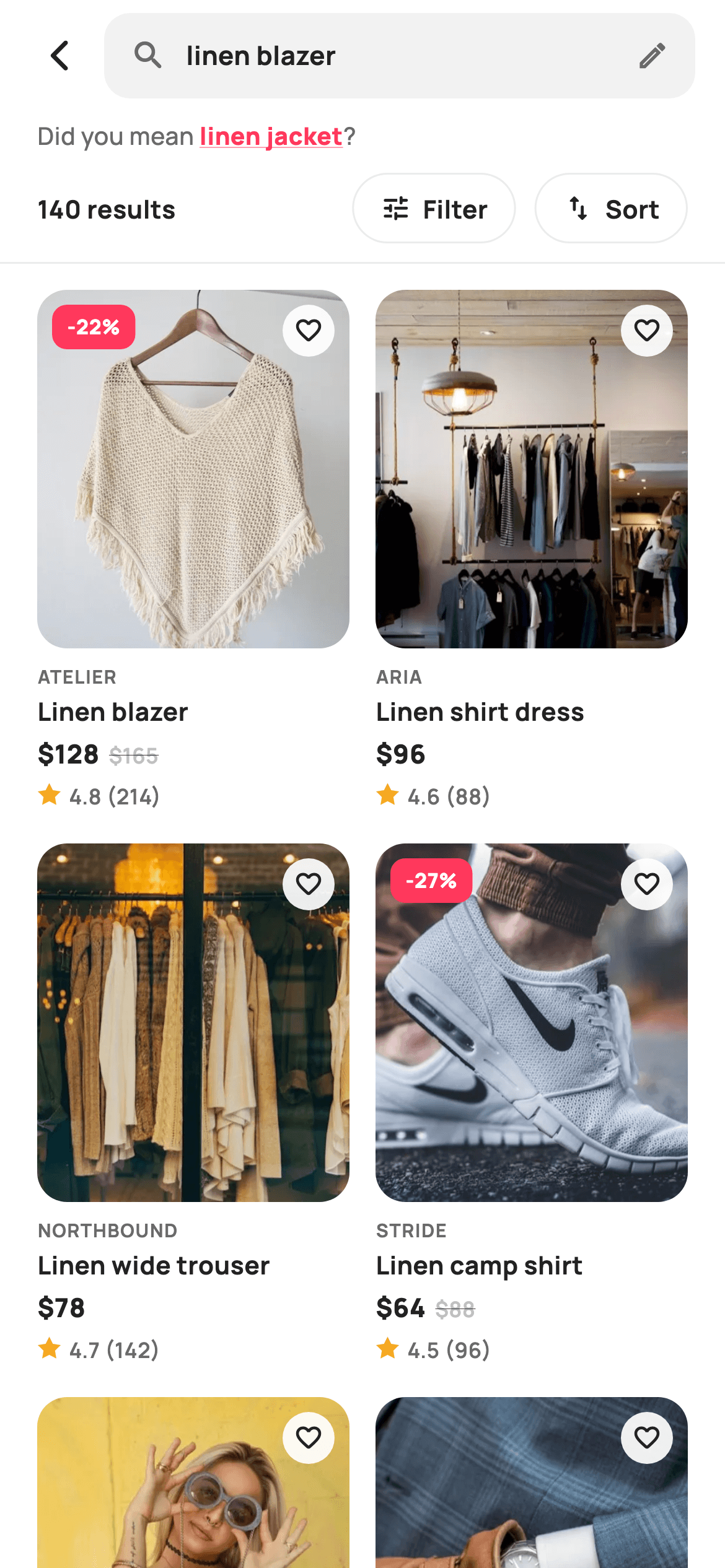
A search results page has one job: prove the shop understood the query and get the shopper into a product within two taps. This tutorial builds StyleCart's results screen in Flutter as a single `StatelessWidget`: a tappable search bar that echoes the query, an underlined 'did you mean' correction, a result count beside pill Filter and Sort buttons, and a two-column `GridView.builder` of photo cards. Each card computes its own percentage-off badge from `price` and `was`, strikes through the old price, and draws its rating star with a `CustomPainter` instead of an emoji.
Watch the Flutter UI walkthrough
A short screen recording of Search Results running, if you'd rather see it before you read the code. The written tutorial below covers everything in it.
Can't see the video? Watch it on YouTube.
What you'll build
- ✓A stateless `EcomSearchResultsScreen` that exposes seven callbacks (`onBack`, `onEditQuery`, `onDidYouMean`, `onFilter`, `onSort`, `onProduct`) and no internal state
- ✓A read-only search bar built from a `GestureDetector` around a `Container`, with an edit icon signalling that tapping returns to live suggestions
- ✓A two-column `SliverGridDelegateWithFixedCrossAxisCount` grid with `childAspectRatio: 0.60` so each card fits photo, brand, title, price row and rating
- ✓A sale badge whose `-$off%` label is computed per card from `p.price` and `p.was`, plus a struck-through 'was' price that only renders when the sale flag is true
- ✓A `_StarPainter` that walks ten alternating outer/inner radii with `math.cos`/`math.sin` to draw a filled five-point star in 13 logical pixels
Step-by-step build
Create the file
Add a new file at lib/ecom_search_results/ecom_search_results_screen.dart in your Flutter project.
Register the bundled fonts
No external packages — this is pure Flutter. It does bundle its design font (Manrope), so drop the font file into fonts/ and declare it in pubspec.yaml:
flutter:
  fonts:
    - family: Manrope
      fonts:
- asset: fonts/Manrope-Regular.ttfBuild it, piece by piece
Here's how the screen goes together. Each block below is a real slice of the code with a plain-English explanation — paste them in order, or grab the whole file from the next section.
Callbacks, tokens and the product data table
import 'dart:math' as math;

import 'package:flutter/material.dart';

/// StyleCart — Search Results.
///
/// The product grid for a submitted query: a search bar echoing the term, a
/// "did you mean" correction row, a result count + Filter / Sort bar, and a
/// two-column grid of photo cards with painted rating and sale badges.
///
/// Self-contained per CONVENTIONS.md: pure Flutter, bundled Manrope, inline
/// Airbnb-style tokens, own light theme + SafeArea, bundled webp photos. Star
/// rating is a CustomPainter (no emoji glyph). Exposes callbacks only.
class EcomSearchResultsScreen extends StatelessWidget {
  const EcomSearchResultsScreen({
    super.key,
    this.query = 'linen blazer',
    this.didYouMean = 'linen jacket',
    this.onBack,
    this.onEditQuery,
    this.onDidYouMean,
    this.onFilter,
    this.onSort,
    this.onProduct,
  });

  final String query;
  final String didYouMean;
  final VoidCallback? onBack;

  /// Tapping the search bar returns to live suggestions.
  final VoidCallback? onEditQuery;
  final ValueChanged<String>? onDidYouMean;
  final VoidCallback? onFilter;
  final VoidCallback? onSort;
  final ValueChanged<String>? onProduct;

  static const String _font = 'Manrope';
  static const Color _canvas = Color(0xFFFFFFFF);
  static const Color _ink = Color(0xFF222222);
  static const Color _muted = Color(0xFF6A6A6A);
  static const Color _faint = Color(0xFFC1C1C1);
  static const Color _brand = Color(0xFFFF385C);
  static const Color _surface = Color(0xFFF2F2F2);
  static const Color _imageBg = Color(0xFFF5F5F5);
  static const Color _hairline = Color(0xFFEBEBEB);

  static const String _dir =
      'lib/screens/ecommerce/ecom_search_results/images';

  static const List<_P> _items = <_P>[
    _P('Linen blazer', 'Atelier', 128, 165, 4.8, 214, 'p01.webp'),
    _P('Linen shirt dress', 'Aria', 96, 0, 4.6, 88, 'p02.webp'),
    _P('Linen wide trouser', 'Northbound', 78, 0, 4.7, 142, 'p03.webp'),
    _P('Linen camp shirt', 'Stride', 64, 88, 4.5, 96, 'p04.webp'),
    _P('Linen tote', 'Maison', 112, 0, 4.9, 204, 'p05.webp'),
    _P('Linen cardigan', 'Maison', 84, 0, 4.4, 74, 'p06.webp'),
    _P('Linen midi skirt', 'Aria', 72, 95, 4.6, 120, 'p07.webp'),
    _P('Linen overshirt', 'Northbound', 98, 0, 4.7, 158, 'p08.webp'),
    _P('Linen shorts', 'Stride', 52, 0, 4.3, 68, 'p09.webp'),
    _P('Linen slip dress', 'Aria', 118, 145, 4.8, 176, 'p10.webp'),
  ];
The screen is a `StatelessWidget` because a results page has nothing to mutate on its own: every interaction is handed outward. `onEditQuery` is a `VoidCallback` rather than a text handler because tapping the bar is meant to pop back to the live-suggestions screen, not edit inline. `onDidYouMean` and `onProduct` are `ValueChanged<String>` so the parent receives the corrected term or the product title without the screen knowing about routing. The Airbnb-style palette is inline: `_brand` `0xFFFF385C` coral is reserved for the correction link and sale badge, `_surface` `0xFFF2F2F2` fills the search bar, and `_faint` `0xFFC1C1C1` is used only for the struck-through price so it recedes. The ten products live in a `static const List<_P>`, where `was` is `0` for full-price items; that zero is what later drives the sale logic, so no separate boolean is stored.
Forced light theme and the column-over-grid skeleton
  @override
  Widget build(BuildContext context) {
    return Theme(
      data: ThemeData.light(useMaterial3: true),
      child: Scaffold(
        backgroundColor: _canvas,
        body: SafeArea(
          child: Column(
            children: <Widget>[
              _searchRow(),
              _didYouMeanRow(),
              _toolbar(),
              const Divider(height: 1, color: _hairline),
              Expanded(
                child: GridView.builder(
                  padding: const EdgeInsets.fromLTRB(20, 14, 20, 24),
                  gridDelegate:
                      const SliverGridDelegateWithFixedCrossAxisCount(
                    crossAxisCount: 2,
                    mainAxisSpacing: 18,
                    crossAxisSpacing: 14,
                    childAspectRatio: 0.60,
                  ),
                  itemCount: _items.length,
                  itemBuilder: (BuildContext context, int i) =>
                      _card(_items[i]),
                ),
              ),
            ],
          ),
        ),
      ),
    );
  }
`build` wraps everything in `Theme(data: ThemeData.light(useMaterial3: true))` so the screen renders identically inside a dark host app, and the `Scaffold` background is pinned to `_canvas` white rather than inherited. Inside `SafeArea`, a `Column` stacks three fixed-height rows, a one-pixel `Divider` in `_hairline` `0xFFEBEBEB`, then an `Expanded` `GridView.builder`. The grid delegate is `SliverGridDelegateWithFixedCrossAxisCount` with `crossAxisCount: 2`, `mainAxisSpacing: 18` and `crossAxisSpacing: 14`; the vertical gap is deliberately larger than the horizontal one so rows read as rows. `childAspectRatio: 0.60` makes each cell 1.67 times taller than it is wide, which is the room needed for the photo plus four text lines below it. Padding is `fromLTRB(20, 14, 20, 24)` so the last row clears the home indicator.
The echoing search bar with an edit affordance
  Widget _searchRow() {
    return Padding(
      padding: const EdgeInsets.fromLTRB(8, 6, 16, 6),
      child: Row(
        children: <Widget>[
          IconButton(
            onPressed: onBack,
            icon: const Icon(Icons.arrow_back_ios_new_rounded,
                size: 20, color: _ink),
          ),
          Expanded(
            child: GestureDetector(
              onTap: onEditQuery,
              child: Container(
                height: 46,
                padding: const EdgeInsets.symmetric(horizontal: 14),
                decoration: BoxDecoration(
                  color: _surface,
                  borderRadius: BorderRadius.circular(14),
                ),
                child: Row(
                  children: <Widget>[
                    const Icon(Icons.search_rounded, size: 20, color: _muted),
                    const SizedBox(width: 10),
                    Expanded(
                      child: Text(
                        query,
                        maxLines: 1,
                        overflow: TextOverflow.ellipsis,
                        style: const TextStyle(
                          fontFamily: _font,
                          fontSize: 14,
                          fontWeight: FontWeight.w700,
                          color: _ink,
                        ),
                      ),
                    ),
                    const Icon(Icons.edit_outlined, size: 18, color: _muted),
                  ],
                ),
              ),
            ),
          ),
        ],
      ),
    );
  }
`_searchRow` is not a `TextField`. It is a 46-pixel `Container` in `_surface` grey with a 14-radius corner, wrapped in a `GestureDetector` whose `onTap` fires `onEditQuery`. The query is shown as bold 14-point Manrope `Text` with `maxLines: 1` and `TextOverflow.ellipsis`, flanked by a `search_rounded` icon on the left and `edit_outlined` on the right. The trailing pencil is the affordance: it tells the shopper the bar is tappable even though no cursor is blinking. The row padding is `fromLTRB(8, 6, 16, 6)`, tighter on the left because the `IconButton` for `onBack` already carries its own 48-pixel hit area, so a full 16 would push the chevron visibly inward compared with the content below.
The 'did you mean' correction row
  Widget _didYouMeanRow() {
    return Padding(
      padding: const EdgeInsets.fromLTRB(20, 4, 20, 6),
      child: Row(
        children: <Widget>[
          const Text(
            'Did you mean ',
            style: TextStyle(
              fontFamily: _font,
              fontSize: 13,
              fontWeight: FontWeight.w500,
              color: _muted,
            ),
          ),
          GestureDetector(
            onTap: () => onDidYouMean?.call(didYouMean),
            child: Text(
              didYouMean,
              style: const TextStyle(
                fontFamily: _font,
                fontSize: 13,
                fontWeight: FontWeight.w800,
                color: _brand,
                decoration: TextDecoration.underline,
                decorationColor: _brand,
              ),
            ),
          ),
          const Text(
            '?',
            style: TextStyle(
              fontFamily: _font,
              fontSize: 13,
              fontWeight: FontWeight.w500,
              color: _muted,
            ),
          ),
        ],
      ),
    );
  }
The correction is three `Text` widgets in a `Row`, not one rich string. 'Did you mean ' and the closing '?' are 13-point `w500` in `_muted` `0xFF6A6A6A`, while the suggested term sits between them as `w800` in `_brand` coral with `TextDecoration.underline` and a matching `decorationColor`. Splitting it this way means only the middle `Text` is wrapped in a `GestureDetector`, so the tap target is exactly the word and nothing else. `onTap` calls `onDidYouMean?.call(didYouMean)`, passing the suggestion back so the parent can re-run the search with it. Note the `?.call` form: if the parent supplies no handler, tapping simply does nothing rather than throwing on a null callback.
Result count and outlined Filter / Sort pills
  Widget _toolbar() {
    return Padding(
      padding: const EdgeInsets.fromLTRB(20, 4, 20, 10),
      child: Row(
        children: <Widget>[
          Expanded(
            child: Text(
              '${_items.length * 14} results',
              style: const TextStyle(
                fontFamily: _font,
                fontSize: 13.5,
                fontWeight: FontWeight.w700,
                color: _ink,
              ),
            ),
          ),
          _toolBtn(Icons.tune_rounded, 'Filter', onFilter),
          const SizedBox(width: 10),
          _toolBtn(Icons.swap_vert_rounded, 'Sort', onSort),
        ],
      ),
    );
  }

  Widget _toolBtn(IconData icon, String label, VoidCallback? onTap) {
    return GestureDetector(
      onTap: onTap,
      child: Container(
        height: 38,
        padding: const EdgeInsets.symmetric(horizontal: 14),
        alignment: Alignment.center,
        decoration: BoxDecoration(
          borderRadius: BorderRadius.circular(99),
          border: Border.all(color: _hairline),
        ),
        child: Row(
          children: <Widget>[
            Icon(icon, size: 17, color: _ink),
            const SizedBox(width: 6),
            Text(
              label,
              style: const TextStyle(
                fontFamily: _font,
                fontSize: 13.5,
                fontWeight: FontWeight.w700,
                color: _ink,
              ),
            ),
          ],
        ),
      ),
    );
  }
`_toolbar` puts the count text in an `Expanded` so it takes whatever width the two buttons leave. The count is `'${_items.length * 14} results'`, a demo multiplier that reads as 140 results while the grid shows the first ten; replace it with the real total from your API. `_toolBtn` is a small factory taking an `IconData`, a label and a nullable `VoidCallback`, returning a 38-pixel `Container` with `BorderRadius.circular(99)` for a true pill and `Border.all(color: _hairline)` rather than a fill. Outlined pills keep the toolbar quiet so the coral sale badges below remain the only saturated colour. `tune_rounded` and `swap_vert_rounded` are the icons; both are 17 pixels in `_ink` with a 6-pixel gap before the 13.5-point `w700` label.
The product card: sale maths, badge and wishlist heart
  Widget _card(_P p) {
    final bool sale = p.was > p.price && p.was > 0;
    final int off = sale ? (100 - (p.price * 100 / p.was)).round() : 0;
    return GestureDetector(
      onTap: () => onProduct?.call(p.title),
      child: Column(
        crossAxisAlignment: CrossAxisAlignment.start,
        children: <Widget>[
          Expanded(
            child: ClipRRect(
              borderRadius: BorderRadius.circular(16),
              child: Stack(
                fit: StackFit.expand,
                children: <Widget>[
                  Container(color: _imageBg),
                  Image.asset('$_dir/${p.asset}', fit: BoxFit.cover),
                  if (sale)
                    Positioned(
                      left: 8,
                      top: 8,
                      child: Container(
                        padding: const EdgeInsets.symmetric(
                            horizontal: 8, vertical: 4),
                        decoration: BoxDecoration(
                          color: _brand,
                          borderRadius: BorderRadius.circular(8),
                        ),
                        child: Text(
                          '-$off%',
                          style: const TextStyle(
                            fontFamily: _font,
                            fontSize: 11,
                            fontWeight: FontWeight.w800,
                            color: _canvas,
                          ),
                        ),
                      ),
                    ),
                  Positioned(
                    right: 8,
                    top: 8,
                    child: Container(
                      width: 28,
                      height: 28,
                      decoration: BoxDecoration(
                        color: _canvas.withValues(alpha: 0.92),
                        shape: BoxShape.circle,
                      ),
                      child: const Icon(Icons.favorite_border_rounded,
                          size: 16, color: _ink),
                    ),
                  ),
                ],
              ),
            ),
          ),
`_card` derives two locals before building anything: `sale` is `p.was > p.price && p.was > 0`, and `off` is `(100 - (p.price * 100 / p.was)).round()`, so 128 against 165 becomes `-22%` with no stored discount field. The image area is an `Expanded` `ClipRRect` with a 16-radius corner around a `Stack` with `StackFit.expand`. Its first layer is a plain `Container(color: _imageBg)` in `0xFFF5F5F5`, which shows while the webp decodes so the card never flashes white. `Image.asset` uses `BoxFit.cover` on top. The badge is `Positioned(left: 8, top: 8)` under an `if (sale)` guard, a coral rounded rectangle with 11-point `w800` white text. The heart on the right is a 28-pixel circle in `_canvas.withValues(alpha: 0.92)` so it stays legible over dark photos; it is decorative here, with no callback wired.
Brand, title, price pair and painted rating
          const SizedBox(height: 8),
          Text(
            p.brand.toUpperCase(),
            style: const TextStyle(
              fontFamily: _font,
              fontSize: 10,
              fontWeight: FontWeight.w700,
              letterSpacing: 0.6,
              color: _muted,
            ),
          ),
          const SizedBox(height: 2),
          Text(
            p.title,
            maxLines: 1,
            overflow: TextOverflow.ellipsis,
            style: const TextStyle(
              fontFamily: _font,
              fontSize: 13.5,
              fontWeight: FontWeight.w700,
              color: _ink,
            ),
          ),
          const SizedBox(height: 4),
          Row(
            children: <Widget>[
              Text(
                '\$${p.price}',
                style: const TextStyle(
                  fontFamily: _font,
                  fontSize: 14,
                  fontWeight: FontWeight.w800,
                  color: _ink,
                ),
              ),
              if (sale) ...<Widget>[
                const SizedBox(width: 5),
                Text(
                  '\$${p.was}',
                  style: const TextStyle(
                    fontFamily: _font,
                    fontSize: 11.5,
                    fontWeight: FontWeight.w600,
                    color: _faint,
                    decoration: TextDecoration.lineThrough,
                  ),
                ),
              ],
            ],
          ),
          const SizedBox(height: 4),
          Row(
            children: <Widget>[
              SizedBox(
                width: 13,
                height: 13,
                child: CustomPaint(painter: _StarPainter()),
              ),
              const SizedBox(width: 4),
              Text(
                '${p.rating} (${p.reviews})',
                style: const TextStyle(
                  fontFamily: _font,
                  fontSize: 11.5,
                  fontWeight: FontWeight.w600,
                  color: _muted,
                ),
              ),
            ],
          ),
        ],
      ),
    );
  }
}
Below the photo, four lines are spaced by 8, 2, 4 and 4 pixels. The brand is uppercased in code with `p.brand.toUpperCase()` at 10 points with `letterSpacing: 0.6`, which is what makes a small caps label readable in `_muted`. The title is 13.5-point `w700` with a single-line ellipsis so long names never push the price row out of the fixed cell. The price `Row` uses a collapse-if spread: `if (sale) ...<Widget>[ SizedBox(width: 5), Text(was) ]` adds the struck-through original only on sale items, in `_faint` at 11.5 points with `TextDecoration.lineThrough`. The rating line is a 13-by-13 `SizedBox` holding `CustomPaint(painter: _StarPainter())`, followed by `'${p.rating} (${p.reviews})'`. Using a painted star instead of a star emoji keeps the glyph identical across iOS and Android fonts.
The `_P` model and the ten-vertex star painter
class _P {
  const _P(this.title, this.brand, this.price, this.was, this.rating,
      this.reviews, this.asset);
  final String title;
  final String brand;
  final int price;
  final int was;
  final double rating;
  final int reviews;
  final String asset;
}

/// A single filled five-point star (rating mark).
class _StarPainter extends CustomPainter {
  @override
  void paint(Canvas canvas, Size size) {
    const Color amber = Color(0xFFF5A623);
    final Path star = _starPath(
        size.width / 2, size.height / 2, size.width / 2, size.width / 4);
    canvas.drawPath(star, Paint()..color = amber);
  }

  Path _starPath(double cx, double cy, double outer, double inner) {
    final Path p = Path();
    const double step = math.pi / 5;
    double a = -math.pi / 2;
    for (int i = 0; i < 10; i++) {
      final double r = i.isEven ? outer : inner;
      final double x = cx + r * math.cos(a);
      final double y = cy + r * math.sin(a);
      if (i == 0) {
        p.moveTo(x, y);
      } else {
        p.lineTo(x, y);
      }
      a += step;
    }
    p.close();
    return p;
  }

  @override
  bool shouldRepaint(_StarPainter oldDelegate) => false;
}
`_P` is a `const`-constructible value class with seven positional fields; keeping it positional makes the data table above readable as rows. `_StarPainter.paint` builds a path via `_starPath(cx, cy, outer, inner)` where the outer radius is half the width and the inner radius is a quarter, a 2:1 ratio that gives the classic sharp five-point silhouette. The loop runs ten iterations with `step = math.pi / 5` (36 degrees), starting at `-math.pi / 2` so the first vertex points straight up. Even indices use `outer` and odd indices `inner`, so the path alternates tip, valley, tip, valley around the circle; `moveTo` on the first point, `lineTo` for the rest, then `close()`. The fill is amber `0xFFF5A623`. `shouldRepaint` returns `false` because the star has no inputs, so Flutter caches the raster and never repaints it during scrolling.
Full code
The complete, ready-to-paste source. Free to use in your projects — one click copies it all.
import 'dart:math' as math;

import 'package:flutter/material.dart';

/// StyleCart — Search Results.
///
/// The product grid for a submitted query: a search bar echoing the term, a
/// "did you mean" correction row, a result count + Filter / Sort bar, and a
/// two-column grid of photo cards with painted rating and sale badges.
///
/// Self-contained per CONVENTIONS.md: pure Flutter, bundled Manrope, inline
/// Airbnb-style tokens, own light theme + SafeArea, bundled webp photos. Star
/// rating is a CustomPainter (no emoji glyph). Exposes callbacks only.
class EcomSearchResultsScreen extends StatelessWidget {
  const EcomSearchResultsScreen({
    super.key,
    this.query = 'linen blazer',
    this.didYouMean = 'linen jacket',
    this.onBack,
    this.onEditQuery,
    this.onDidYouMean,
    this.onFilter,
    this.onSort,
    this.onProduct,
  });

  final String query;
  final String didYouMean;
  final VoidCallback? onBack;

  /// Tapping the search bar returns to live suggestions.
  final VoidCallback? onEditQuery;
  final ValueChanged<String>? onDidYouMean;
  final VoidCallback? onFilter;
  final VoidCallback? onSort;
  final ValueChanged<String>? onProduct;

  static const String _font = 'Manrope';
  static const Color _canvas = Color(0xFFFFFFFF);
  static const Color _ink = Color(0xFF222222);
  static const Color _muted = Color(0xFF6A6A6A);
  static const Color _faint = Color(0xFFC1C1C1);
  static const Color _brand = Color(0xFFFF385C);
  static const Color _surface = Color(0xFFF2F2F2);
  static const Color _imageBg = Color(0xFFF5F5F5);
  static const Color _hairline = Color(0xFFEBEBEB);

  static const String _dir =
      'lib/screens/ecommerce/ecom_search_results/images';

  static const List<_P> _items = <_P>[
    _P('Linen blazer', 'Atelier', 128, 165, 4.8, 214, 'p01.webp'),
    _P('Linen shirt dress', 'Aria', 96, 0, 4.6, 88, 'p02.webp'),
    _P('Linen wide trouser', 'Northbound', 78, 0, 4.7, 142, 'p03.webp'),
    _P('Linen camp shirt', 'Stride', 64, 88, 4.5, 96, 'p04.webp'),
    _P('Linen tote', 'Maison', 112, 0, 4.9, 204, 'p05.webp'),
    _P('Linen cardigan', 'Maison', 84, 0, 4.4, 74, 'p06.webp'),
    _P('Linen midi skirt', 'Aria', 72, 95, 4.6, 120, 'p07.webp'),
    _P('Linen overshirt', 'Northbound', 98, 0, 4.7, 158, 'p08.webp'),
    _P('Linen shorts', 'Stride', 52, 0, 4.3, 68, 'p09.webp'),
    _P('Linen slip dress', 'Aria', 118, 145, 4.8, 176, 'p10.webp'),
  ];

  @override
  Widget build(BuildContext context) {
    return Theme(
      data: ThemeData.light(useMaterial3: true),
      child: Scaffold(
        backgroundColor: _canvas,
        body: SafeArea(
          child: Column(
            children: <Widget>[
              _searchRow(),
              _didYouMeanRow(),
              _toolbar(),
              const Divider(height: 1, color: _hairline),
              Expanded(
                child: GridView.builder(
                  padding: const EdgeInsets.fromLTRB(20, 14, 20, 24),
                  gridDelegate:
                      const SliverGridDelegateWithFixedCrossAxisCount(
                    crossAxisCount: 2,
                    mainAxisSpacing: 18,
                    crossAxisSpacing: 14,
                    childAspectRatio: 0.60,
                  ),
                  itemCount: _items.length,
                  itemBuilder: (BuildContext context, int i) =>
                      _card(_items[i]),
                ),
              ),
            ],
          ),
        ),
      ),
    );
  }

  Widget _searchRow() {
    return Padding(
      padding: const EdgeInsets.fromLTRB(8, 6, 16, 6),
      child: Row(
        children: <Widget>[
          IconButton(
            onPressed: onBack,
            icon: const Icon(Icons.arrow_back_ios_new_rounded,
                size: 20, color: _ink),
          ),
          Expanded(
            child: GestureDetector(
              onTap: onEditQuery,
              child: Container(
                height: 46,
                padding: const EdgeInsets.symmetric(horizontal: 14),
                decoration: BoxDecoration(
                  color: _surface,
                  borderRadius: BorderRadius.circular(14),
                ),
                child: Row(
                  children: <Widget>[
                    const Icon(Icons.search_rounded, size: 20, color: _muted),
                    const SizedBox(width: 10),
                    Expanded(
                      child: Text(
                        query,
                        maxLines: 1,
                        overflow: TextOverflow.ellipsis,
                        style: const TextStyle(
                          fontFamily: _font,
                          fontSize: 14,
                          fontWeight: FontWeight.w700,
                          color: _ink,
                        ),
                      ),
                    ),
                    const Icon(Icons.edit_outlined, size: 18, color: _muted),
                  ],
                ),
              ),
            ),
          ),
        ],
      ),
    );
  }

  Widget _didYouMeanRow() {
    return Padding(
      padding: const EdgeInsets.fromLTRB(20, 4, 20, 6),
      child: Row(
        children: <Widget>[
          const Text(
            'Did you mean ',
            style: TextStyle(
              fontFamily: _font,
              fontSize: 13,
              fontWeight: FontWeight.w500,
              color: _muted,
            ),
          ),
          GestureDetector(
            onTap: () => onDidYouMean?.call(didYouMean),
            child: Text(
              didYouMean,
              style: const TextStyle(
                fontFamily: _font,
                fontSize: 13,
                fontWeight: FontWeight.w800,
                color: _brand,
                decoration: TextDecoration.underline,
                decorationColor: _brand,
              ),
            ),
          ),
          const Text(
            '?',
            style: TextStyle(
              fontFamily: _font,
              fontSize: 13,
              fontWeight: FontWeight.w500,
              color: _muted,
            ),
          ),
        ],
      ),
    );
  }

  Widget _toolbar() {
    return Padding(
      padding: const EdgeInsets.fromLTRB(20, 4, 20, 10),
      child: Row(
        children: <Widget>[
          Expanded(
            child: Text(
              '${_items.length * 14} results',
              style: const TextStyle(
                fontFamily: _font,
                fontSize: 13.5,
                fontWeight: FontWeight.w700,
                color: _ink,
              ),
            ),
          ),
          _toolBtn(Icons.tune_rounded, 'Filter', onFilter),
          const SizedBox(width: 10),
          _toolBtn(Icons.swap_vert_rounded, 'Sort', onSort),
        ],
      ),
    );
  }

  Widget _toolBtn(IconData icon, String label, VoidCallback? onTap) {
    return GestureDetector(
      onTap: onTap,
      child: Container(
        height: 38,
        padding: const EdgeInsets.symmetric(horizontal: 14),
        alignment: Alignment.center,
        decoration: BoxDecoration(
          borderRadius: BorderRadius.circular(99),
          border: Border.all(color: _hairline),
        ),
        child: Row(
          children: <Widget>[
            Icon(icon, size: 17, color: _ink),
            const SizedBox(width: 6),
            Text(
              label,
              style: const TextStyle(
                fontFamily: _font,
                fontSize: 13.5,
                fontWeight: FontWeight.w700,
                color: _ink,
              ),
            ),
          ],
        ),
      ),
    );
  }

  Widget _card(_P p) {
    final bool sale = p.was > p.price && p.was > 0;
    final int off = sale ? (100 - (p.price * 100 / p.was)).round() : 0;
    return GestureDetector(
      onTap: () => onProduct?.call(p.title),
      child: Column(
        crossAxisAlignment: CrossAxisAlignment.start,
        children: <Widget>[
          Expanded(
            child: ClipRRect(
              borderRadius: BorderRadius.circular(16),
              child: Stack(
                fit: StackFit.expand,
                children: <Widget>[
                  Container(color: _imageBg),
                  Image.asset('$_dir/${p.asset}', fit: BoxFit.cover),
                  if (sale)
                    Positioned(
                      left: 8,
                      top: 8,
                      child: Container(
                        padding: const EdgeInsets.symmetric(
                            horizontal: 8, vertical: 4),
                        decoration: BoxDecoration(
                          color: _brand,
                          borderRadius: BorderRadius.circular(8),
                        ),
                        child: Text(
                          '-$off%',
                          style: const TextStyle(
                            fontFamily: _font,
                            fontSize: 11,
                            fontWeight: FontWeight.w800,
                            color: _canvas,
                          ),
                        ),
                      ),
                    ),
                  Positioned(
                    right: 8,
                    top: 8,
                    child: Container(
                      width: 28,
                      height: 28,
                      decoration: BoxDecoration(
                        color: _canvas.withValues(alpha: 0.92),
                        shape: BoxShape.circle,
                      ),
                      child: const Icon(Icons.favorite_border_rounded,
                          size: 16, color: _ink),
                    ),
                  ),
                ],
              ),
            ),
          ),
          const SizedBox(height: 8),
          Text(
            p.brand.toUpperCase(),
            style: const TextStyle(
              fontFamily: _font,
              fontSize: 10,
              fontWeight: FontWeight.w700,
              letterSpacing: 0.6,
              color: _muted,
            ),
          ),
          const SizedBox(height: 2),
          Text(
            p.title,
            maxLines: 1,
            overflow: TextOverflow.ellipsis,
            style: const TextStyle(
              fontFamily: _font,
              fontSize: 13.5,
              fontWeight: FontWeight.w700,
              color: _ink,
            ),
          ),
          const SizedBox(height: 4),
          Row(
            children: <Widget>[
              Text(
                '\$${p.price}',
                style: const TextStyle(
                  fontFamily: _font,
                  fontSize: 14,
                  fontWeight: FontWeight.w800,
                  color: _ink,
                ),
              ),
              if (sale) ...<Widget>[
                const SizedBox(width: 5),
                Text(
                  '\$${p.was}',
                  style: const TextStyle(
                    fontFamily: _font,
                    fontSize: 11.5,
                    fontWeight: FontWeight.w600,
                    color: _faint,
                    decoration: TextDecoration.lineThrough,
                  ),
                ),
              ],
            ],
          ),
          const SizedBox(height: 4),
          Row(
            children: <Widget>[
              SizedBox(
                width: 13,
                height: 13,
                child: CustomPaint(painter: _StarPainter()),
              ),
              const SizedBox(width: 4),
              Text(
                '${p.rating} (${p.reviews})',
                style: const TextStyle(
                  fontFamily: _font,
                  fontSize: 11.5,
                  fontWeight: FontWeight.w600,
                  color: _muted,
                ),
              ),
            ],
          ),
        ],
      ),
    );
  }
}

class _P {
  const _P(this.title, this.brand, this.price, this.was, this.rating,
      this.reviews, this.asset);
  final String title;
  final String brand;
  final int price;
  final int was;
  final double rating;
  final int reviews;
  final String asset;
}

/// A single filled five-point star (rating mark).
class _StarPainter extends CustomPainter {
  @override
  void paint(Canvas canvas, Size size) {
    const Color amber = Color(0xFFF5A623);
    final Path star = _starPath(
        size.width / 2, size.height / 2, size.width / 2, size.width / 4);
    canvas.drawPath(star, Paint()..color = amber);
  }

  Path _starPath(double cx, double cy, double outer, double inner) {
    final Path p = Path();
    const double step = math.pi / 5;
    double a = -math.pi / 2;
    for (int i = 0; i < 10; i++) {
      final double r = i.isEven ? outer : inner;
      final double x = cx + r * math.cos(a);
      final double y = cy + r * math.sin(a);
      if (i == 0) {
        p.moveTo(x, y);
      } else {
        p.lineTo(x, y);
      }
      a += step;
    }
    p.close();
    return p;
  }

  @override
  bool shouldRepaint(_StarPainter oldDelegate) => false;
}
Plus bundled 15 binary assets (fonts/images). The CLI and MCP install those for you automatically.
Two faster ways to add it
Copy-paste works, but you can skip it entirely.
1. FlutterKit CLI
One command drops this screen — and its fonts — straight into your project.
$ flutterkit add ecom-search-results2. AI agent (MCP)
Connect FlutterKit's MCP server in Claude or Cursor and just ask your agent to install ecom-search-results — it fetches and writes the files for you.
FAQ
Can I use this search results screen in a commercial shopping app?
Yes. FlutterKit screens are free for personal and commercial projects under an MIT-style licence, with no key to enter and no attribution required. Copy the code from this page, run `flutterkit add ecom-search-results`, or pull it through MCP, then swap the product table for your own catalogue.
Which packages and fonts does it depend on?
No pub packages at all; it is pure Flutter using `dart:math` for the star geometry and `Image.asset` for the ten bundled webp photos. The only asset dependency is the Manrope font, which `flutterkit add ecom-search-results` copies into your project and registers in `pubspec.yaml` along with the images.
Which Flutter version do I need?
Flutter 3.22 or newer, because the wishlist heart uses `_canvas.withValues(alpha: 0.92)` and the constructor uses `super.key`. On an older 3.x SDK, change that call to `withOpacity(0.92)` and expand the constructor to `{Key? key, ...} : super(key: key)`.
How do I feed real search results instead of the hard-coded `_items` list?
Add a `List<_P> items` parameter (or make `_P` public) and pass it from your search provider, then replace `_items` in `itemCount`, `itemBuilder` and the count string. Because the sale badge and struck-through price are computed in `_card` from `price` and `was`, you only need to map your API's current and original prices; pass `0` for `was` when an item is not discounted and the badge disappears automatically.
Why is the search bar a `Container` and not a `TextField`?
Because on a results page the query is already submitted. Tapping the bar calls `onEditQuery`, which is meant to navigate back to the suggestions screen where the real `TextField` and autocomplete live. Rendering it as a static bar avoids a keyboard popping over the grid, and the trailing `edit_outlined` icon still tells the shopper it is tappable.


