How to Build an Empty Orders Screen in Flutter (Full Code + Preview)
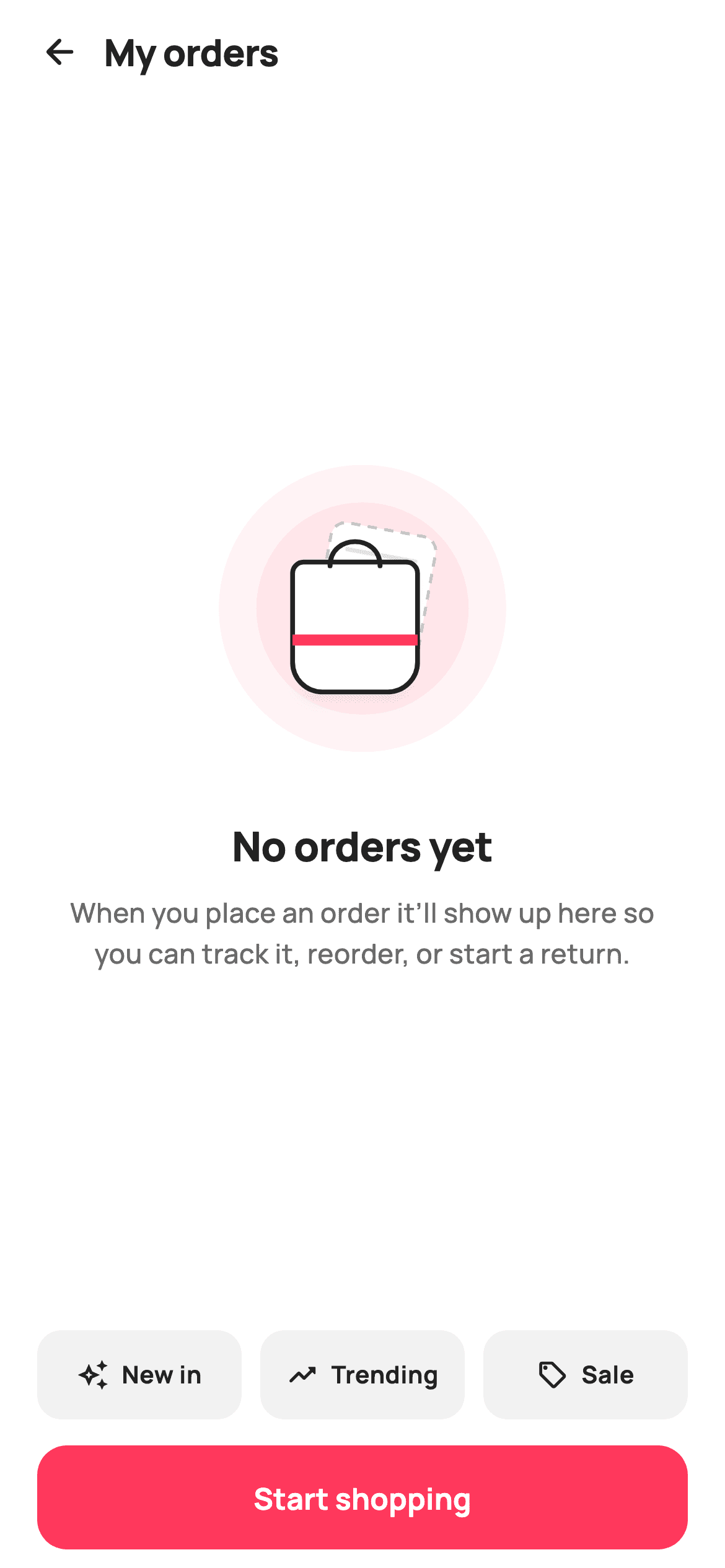
The orders tab is the one screen a brand-new shopper reaches before they have ever bought anything, and a bare list with nothing in it reads like a bug. This tutorial builds StyleCart's no-orders state in Flutter: a 168px CustomPaint illustration of a shopping bag with a dashed receipt tucked behind it, a headline and body line that explain what order history will do once it has something in it, three tappable category chips, and a full-width Start shopping button.
Watch the Flutter UI walkthrough
A short screen recording of No orders running, if you'd rather see it before you read the code. The written tutorial below covers everything in it.
Can't see the video? Watch it on YouTube.
What you'll build
- ✓A 168x168 painted shopping bag with a rotated dashed receipt behind it, drawn with no image assets
- ✓Body copy that names the three things order history is for — tracking, reordering and returns
- ✓Three Expanded category chips (New in, Trending, Sale) that report their own label through onCategory
- ✓A 56px coral Start shopping button pinned below the centred block inside its own bottom SafeArea
Step-by-step build
Create the file
Add a new file at lib/ecom_orders_empty/ecom_orders_empty_screen.dart in your Flutter project.
Register the bundled fonts
No external packages — this is pure Flutter. It does bundle its design font (Manrope), so drop the font file into fonts/ and declare it in pubspec.yaml:
flutter:
  fonts:
    - family: Manrope
      fonts:
- asset: fonts/Manrope-Regular.ttfBuild it, piece by piece
Here's how the screen goes together. Each block below is a real slice of the code with a plain-English explanation — paste them in order, or grab the whole file from the next section.
Callbacks, tokens and the three shortcut categories
import 'package:flutter/material.dart';

/// StyleCart — No Orders.
///
/// The empty state for the orders tab: a painted illustration (a shopping bag
/// with a dashed "nothing yet" receipt — no emoji glyph, no asset), a friendly
/// headline + body, a primary "Start shopping" CTA, and a couple of quick
/// category shortcuts.
///
/// Self-contained per CONVENTIONS.md: pure Flutter, bundled Manrope, inline
/// Airbnb-style tokens, own light theme + SafeArea. Painter-only graphics.
/// Exposes callbacks only.
class EcomOrdersEmptyScreen extends StatelessWidget {
  const EcomOrdersEmptyScreen({
    super.key,
    this.onBack,
    this.onStartShopping,
    this.onCategory,
  });

  final VoidCallback? onBack;
  final VoidCallback? onStartShopping;
  final ValueChanged<String>? onCategory;

  static const String _font = 'Manrope';
  static const Color _canvas = Color(0xFFFFFFFF);
  static const Color _ink = Color(0xFF222222);
  static const Color _muted = Color(0xFF6A6A6A);
  static const Color _brand = Color(0xFFFF385C);
  static const Color _surface = Color(0xFFF2F2F2);

  static const List<_Cat> _cats = <_Cat>[
    _Cat('New in', Icons.auto_awesome_outlined),
    _Cat('Trending', Icons.trending_up_rounded),
    _Cat('Sale', Icons.sell_outlined),
  ];
`EcomOrdersEmptyScreen` is a `StatelessWidget` because an order history with nothing in it has no state to hold — the emptiness is decided by whoever built the tab, and this widget only reports taps back out through `onBack`, `onStartShopping` and `onCategory`. Note `onCategory` is a `ValueChanged<String>`, not a bare `VoidCallback`: one handler receives whichever shortcut was pressed. The palette keeps `_brand` coral `0xFFFF385C` for the one action worth taking and `_surface` grey `0xFFF2F2F2` for the chips. The three `_Cat` records sit in a `static const` list so adding a fourth entry point is one line, not a new widget.
A title row instead of an AppBar
  @override
  Widget build(BuildContext context) {
    return Theme(
      data: ThemeData.light(useMaterial3: true),
      child: Scaffold(
        backgroundColor: _canvas,
        body: SafeArea(
          child: Column(
            children: <Widget>[
              Padding(
                padding: const EdgeInsets.fromLTRB(8, 4, 20, 0),
                child: Row(
                  children: <Widget>[
                    IconButton(
                      onPressed: onBack,
                      icon: const Icon(Icons.arrow_back_rounded,
                          size: 22, color: _ink),
                    ),
                    const Text(
                      'My orders',
                      style: TextStyle(
                        fontFamily: _font,
                        fontSize: 20,
                        fontWeight: FontWeight.w800,
                        letterSpacing: -0.3,
                        color: _ink,
                      ),
                    ),
                  ],
                ),
              ),
`Theme(data: ThemeData.light(useMaterial3: true))` wraps the `Scaffold` so the screen keeps its light look after being dropped into an app running a dark theme — worth doing when the illustration below assumes a white bag on a white canvas. The header is a plain `Row` inside `EdgeInsets.fromLTRB(8, 4, 20, 0)`, not an `AppBar`: an `IconButton` plus a 20px `w800` 'My orders' title. The asymmetric left padding of 8 compensates for the IconButton's own 48px touch target, pulling the arrow to the visual edge while the title still lands on a normal margin.
The centred illustration and the copy that earns its place
              Expanded(
                child: Padding(
                  padding: const EdgeInsets.symmetric(horizontal: 32),
                  child: Column(
                    mainAxisAlignment: MainAxisAlignment.center,
                    children: <Widget>[
                      SizedBox(
                        width: 168,
                        height: 168,
                        child: CustomPaint(painter: _EmptyArtPainter()),
                      ),
                      const SizedBox(height: 28),
                      const Text(
                        'No orders yet',
                        style: TextStyle(
                          fontFamily: _font,
                          fontSize: 22,
                          fontWeight: FontWeight.w800,
                          letterSpacing: -0.3,
                          color: _ink,
                        ),
                      ),
                      const SizedBox(height: 10),
                      const Text(
                        'When you place an order it’ll show up here so you can '
                        'track it, reorder, or start a return.',
                        textAlign: TextAlign.center,
                        style: TextStyle(
                          fontFamily: _font,
                          fontSize: 14.5,
                          fontWeight: FontWeight.w500,
                          height: 1.5,
                          color: _muted,
                        ),
                      ),
                    ],
                  ),
                ),
              ),
              _shortcuts(),
              _cta(),
            ],
          ),
        ),
      ),
    );
  }
The middle sits in an `Expanded` with `MainAxisAlignment.center`, so the illustration and copy float in whatever vertical room is left after the header, chips and button take theirs — no hard-coded top offsets to break on a small phone. The painter gets a fixed 168x168 `SizedBox`, then 28px of air, then the 22px `w800` 'No orders yet'. The body line is the part doing real work: it names track, reorder and return, telling a first-time shopper what this tab is actually for rather than restating that it is blank. It runs at 14.5px with `height: 1.5` and `TextAlign.center` inside 32px horizontal padding.
Category shortcuts that split the row evenly
  Widget _shortcuts() {
    return Padding(
      padding: const EdgeInsets.symmetric(horizontal: 20),
      child: Row(
        children: <Widget>[
          for (int i = 0; i < _cats.length; i++) ...<Widget>[
            if (i > 0) const SizedBox(width: 10),
            Expanded(child: _catChip(_cats[i])),
          ],
        ],
      ),
    );
  }

  Widget _catChip(_Cat c) {
    return GestureDetector(
      onTap: () => onCategory?.call(c.label),
      child: Container(
        height: 48,
        decoration: BoxDecoration(
          color: _surface,
          borderRadius: BorderRadius.circular(13),
        ),
        child: Row(
          mainAxisAlignment: MainAxisAlignment.center,
          children: <Widget>[
            Icon(c.icon, size: 17, color: _ink),
            const SizedBox(width: 7),
            Text(
              c.label,
              style: const TextStyle(
                fontFamily: _font,
                fontSize: 13,
                fontWeight: FontWeight.w700,
                color: _ink,
              ),
            ),
          ],
        ),
      ),
    );
  }
`_shortcuts` builds its Row with a collection-for that spreads two widgets per pass — `if (i > 0) const SizedBox(width: 10)` then `Expanded(child: _catChip(...))` — so the 10px gaps fall only between chips and never leave a trailing gap against the 20px padding. Wrapping each chip in `Expanded` gives all three equal thirds regardless of label length, so 'New in' and 'Trending' still line up. Each chip is a 48px `Container` at radius 13 in `_surface`, and `onTap: () => onCategory?.call(c.label)` passes its own label up, which is why the parent needs only one handler for all three.
The Start shopping button
  Widget _cta() {
    return SafeArea(
      top: false,
      child: Padding(
        padding: const EdgeInsets.fromLTRB(20, 14, 20, 10),
        child: SizedBox(
          height: 56,
          child: FilledButton(
            onPressed: onStartShopping,
            style: FilledButton.styleFrom(
              backgroundColor: _brand,
              foregroundColor: _canvas,
              minimumSize: const Size.fromHeight(56),
              shape: RoundedRectangleBorder(
                borderRadius: BorderRadius.circular(16),
              ),
            ),
            child: const Text(
              'Start shopping',
              style: TextStyle(
                fontFamily: _font,
                fontSize: 16,
                fontWeight: FontWeight.w700,
              ),
            ),
          ),
        ),
      ),
    );
  }
}
`_cta` opens with `SafeArea(top: false)` — the header already claimed the top inset, so re-applying it here would double the gap; this call only lifts the button above the home indicator. Inside, a 56px `FilledButton` in `_brand` coral with radius 16 carries a single unambiguous label. Both the `SizedBox(height: 56)` and `minimumSize: const Size.fromHeight(56)` are set: the outer box fixes the height, the `Size.fromHeight` forces full width without a `double.infinity` wrapper. One filled button and no secondary action is deliberate — a shopper with no order history has exactly one useful next step.
Painting the halo and the dashed receipt
/// Paints the empty-orders illustration: a soft halo, a shopping bag, and a
/// dashed "no receipts" sheet tucked behind it — entirely vector, no glyphs.
class _EmptyArtPainter extends CustomPainter {
  const _EmptyArtPainter();

  static const Color _ink = Color(0xFF222222);
  static const Color _brand = Color(0xFFFF385C);

  @override
  void paint(Canvas canvas, Size size) {
    final Offset c = Offset(size.width / 2, size.height / 2);

    // Halo.
    canvas.drawCircle(
      c,
      size.width * 0.46,
      Paint()..color = _brand.withValues(alpha: 0.06),
    );
    canvas.drawCircle(
      c,
      size.width * 0.34,
      Paint()..color = _brand.withValues(alpha: 0.07),
    );

    // Dashed receipt sheet behind, slightly rotated.
    canvas.save();
    canvas.translate(c.dx + 6, c.dy - 6);
    canvas.rotate(0.18);
    final Rect sheet = Rect.fromCenter(
        center: Offset.zero, width: size.width * 0.34, height: size.width * 0.44);
    final RRect sheetR =
        RRect.fromRectAndRadius(sheet, const Radius.circular(8));
    canvas.drawRRect(sheetR, Paint()..color = const Color(0xFFFFFFFF));
    _dashedRRect(canvas, sheetR,
        Paint()
          ..style = PaintingStyle.stroke
          ..strokeWidth = 1.6
          ..color = const Color(0xFFC1C1C1));
    final Paint line = Paint()
      ..color = const Color(0xFFE3E3E3)
      ..strokeWidth = 2.4
      ..strokeCap = StrokeCap.round;
    for (int i = 0; i < 3; i++) {
      final double y = sheet.top + 14 + i * 11;
      canvas.drawLine(
          Offset(sheet.left + 10, y), Offset(sheet.right - 10, y), line);
    }
    canvas.restore();
`_EmptyArtPainter` starts with two coral circles at `size.width * 0.46` and `0.34`, tinted `withValues(alpha: 0.06)` and `0.07`. Stacking two near-identical alphas is what produces a halo that fades outward without a gradient shader. The receipt is drawn inside `canvas.save()` / `restore()` after `translate(c.dx + 6, c.dy - 6)` and `rotate(0.18)` — about ten degrees of tilt that reads as a slip of paper tucked behind the bag. Its `Rect.fromCenter` is 0.34 wide by 0.44 of the width tall, filled white, dash-stroked in `#C1C1C1`, and given three grey text lines at `sheet.top + 14 + i * 11` to suggest a receipt with nothing printed on it.
The shopping bag in front
    // Shopping bag in front.
    final double bw = size.width * 0.40;
    final double bh = bw * 1.04;
    final Rect bagRect = Rect.fromCenter(
        center: Offset(c.dx - 4, c.dy + 10), width: bw, height: bh);
    final RRect bag = RRect.fromRectAndCorners(
      bagRect,
      topLeft: const Radius.circular(6),
      topRight: const Radius.circular(6),
      bottomLeft: const Radius.circular(16),
      bottomRight: const Radius.circular(16),
    );
    canvas.drawShadow(
        Path()..addRRect(bag), const Color(0x33000000), 6, true);
    canvas.drawRRect(bag, Paint()..color = const Color(0xFFFFFFFF));
    canvas.drawRRect(
      bag,
      Paint()
        ..style = PaintingStyle.stroke
        ..strokeWidth = 2.6
        ..color = _ink,
    );

    // Bag handle.
    final Path handle = Path()
      ..moveTo(bagRect.center.dx - bw * 0.20, bagRect.top + 2)
      ..cubicTo(
        bagRect.center.dx - bw * 0.20,
        bagRect.top - bh * 0.22,
        bagRect.center.dx + bw * 0.20,
        bagRect.top - bh * 0.22,
        bagRect.center.dx + bw * 0.20,
        bagRect.top + 2,
      );
    canvas.drawPath(
      handle,
      Paint()
        ..style = PaintingStyle.stroke
        ..strokeWidth = 2.6
        ..strokeCap = StrokeCap.round
        ..color = _ink,
    );

    // Brand band across the bag.
    canvas.drawRect(
      Rect.fromLTWH(bagRect.left, bagRect.center.dy + 4, bagRect.width, 6),
      Paint()..color = _brand,
    );
  }
The bag is `size.width * 0.40` wide by `bw * 1.04` tall, centred 4px left and 10px below the canvas centre so it overlaps the tilted receipt instead of sitting on top of it. `RRect.fromRectAndCorners` gives 6px top corners and 16px bottom corners — the flare that makes a rectangle read as a paper bag rather than a box. `canvas.drawShadow` with `0x33000000` at 6px elevation lifts it off the halo before the white fill and the 2.6px `_ink` outline land. The handle is a single `cubicTo` whose control points rise `bh * 0.22` above the bag top, and a 6px coral `drawRect` just under centre acts as the brand band.
Manual dashes and why nothing repaints
  void _dashedRRect(Canvas canvas, RRect r, Paint paint) {
    final Path src = Path()..addRRect(r);
    const double dash = 5;
    const double gap = 4;
    for (final m in src.computeMetrics()) {
      double d = 0;
      while (d < m.length) {
        final double end = (d + dash).clamp(0, m.length).toDouble();
        canvas.drawPath(m.extractPath(d, end), paint);
        d += dash + gap;
      }
    }
  }

  @override
  bool shouldRepaint(_EmptyArtPainter old) => false;
}
Flutter's Canvas has no dashed-stroke option, so `_dashedRRect` walks the outline itself: `Path()..addRRect(r)` then `computeMetrics()`, and for each metric a while loop extracts 5px of path, skips 4px, and advances by `dash + gap`. The `.clamp(0, m.length)` on the segment end is what stops the final dash overrunning the corner and doubling back over the start. Because the metric follows the rounded rect, dashes bend correctly around each 8px corner. `shouldRepaint` returns `false` — the illustration has no inputs at all, so Flutter can skip it on every rebuild of the surrounding column.
Full code
The complete, ready-to-paste source. Free to use in your projects — one click copies it all.
import 'package:flutter/material.dart';

/// StyleCart — No Orders.
///
/// The empty state for the orders tab: a painted illustration (a shopping bag
/// with a dashed "nothing yet" receipt — no emoji glyph, no asset), a friendly
/// headline + body, a primary "Start shopping" CTA, and a couple of quick
/// category shortcuts.
///
/// Self-contained per CONVENTIONS.md: pure Flutter, bundled Manrope, inline
/// Airbnb-style tokens, own light theme + SafeArea. Painter-only graphics.
/// Exposes callbacks only.
class EcomOrdersEmptyScreen extends StatelessWidget {
  const EcomOrdersEmptyScreen({
    super.key,
    this.onBack,
    this.onStartShopping,
    this.onCategory,
  });

  final VoidCallback? onBack;
  final VoidCallback? onStartShopping;
  final ValueChanged<String>? onCategory;

  static const String _font = 'Manrope';
  static const Color _canvas = Color(0xFFFFFFFF);
  static const Color _ink = Color(0xFF222222);
  static const Color _muted = Color(0xFF6A6A6A);
  static const Color _brand = Color(0xFFFF385C);
  static const Color _surface = Color(0xFFF2F2F2);

  static const List<_Cat> _cats = <_Cat>[
    _Cat('New in', Icons.auto_awesome_outlined),
    _Cat('Trending', Icons.trending_up_rounded),
    _Cat('Sale', Icons.sell_outlined),
  ];

  @override
  Widget build(BuildContext context) {
    return Theme(
      data: ThemeData.light(useMaterial3: true),
      child: Scaffold(
        backgroundColor: _canvas,
        body: SafeArea(
          child: Column(
            children: <Widget>[
              Padding(
                padding: const EdgeInsets.fromLTRB(8, 4, 20, 0),
                child: Row(
                  children: <Widget>[
                    IconButton(
                      onPressed: onBack,
                      icon: const Icon(Icons.arrow_back_rounded,
                          size: 22, color: _ink),
                    ),
                    const Text(
                      'My orders',
                      style: TextStyle(
                        fontFamily: _font,
                        fontSize: 20,
                        fontWeight: FontWeight.w800,
                        letterSpacing: -0.3,
                        color: _ink,
                      ),
                    ),
                  ],
                ),
              ),
              Expanded(
                child: Padding(
                  padding: const EdgeInsets.symmetric(horizontal: 32),
                  child: Column(
                    mainAxisAlignment: MainAxisAlignment.center,
                    children: <Widget>[
                      SizedBox(
                        width: 168,
                        height: 168,
                        child: CustomPaint(painter: _EmptyArtPainter()),
                      ),
                      const SizedBox(height: 28),
                      const Text(
                        'No orders yet',
                        style: TextStyle(
                          fontFamily: _font,
                          fontSize: 22,
                          fontWeight: FontWeight.w800,
                          letterSpacing: -0.3,
                          color: _ink,
                        ),
                      ),
                      const SizedBox(height: 10),
                      const Text(
                        'When you place an order it’ll show up here so you can '
                        'track it, reorder, or start a return.',
                        textAlign: TextAlign.center,
                        style: TextStyle(
                          fontFamily: _font,
                          fontSize: 14.5,
                          fontWeight: FontWeight.w500,
                          height: 1.5,
                          color: _muted,
                        ),
                      ),
                    ],
                  ),
                ),
              ),
              _shortcuts(),
              _cta(),
            ],
          ),
        ),
      ),
    );
  }

  Widget _shortcuts() {
    return Padding(
      padding: const EdgeInsets.symmetric(horizontal: 20),
      child: Row(
        children: <Widget>[
          for (int i = 0; i < _cats.length; i++) ...<Widget>[
            if (i > 0) const SizedBox(width: 10),
            Expanded(child: _catChip(_cats[i])),
          ],
        ],
      ),
    );
  }

  Widget _catChip(_Cat c) {
    return GestureDetector(
      onTap: () => onCategory?.call(c.label),
      child: Container(
        height: 48,
        decoration: BoxDecoration(
          color: _surface,
          borderRadius: BorderRadius.circular(13),
        ),
        child: Row(
          mainAxisAlignment: MainAxisAlignment.center,
          children: <Widget>[
            Icon(c.icon, size: 17, color: _ink),
            const SizedBox(width: 7),
            Text(
              c.label,
              style: const TextStyle(
                fontFamily: _font,
                fontSize: 13,
                fontWeight: FontWeight.w700,
                color: _ink,
              ),
            ),
          ],
        ),
      ),
    );
  }

  Widget _cta() {
    return SafeArea(
      top: false,
      child: Padding(
        padding: const EdgeInsets.fromLTRB(20, 14, 20, 10),
        child: SizedBox(
          height: 56,
          child: FilledButton(
            onPressed: onStartShopping,
            style: FilledButton.styleFrom(
              backgroundColor: _brand,
              foregroundColor: _canvas,
              minimumSize: const Size.fromHeight(56),
              shape: RoundedRectangleBorder(
                borderRadius: BorderRadius.circular(16),
              ),
            ),
            child: const Text(
              'Start shopping',
              style: TextStyle(
                fontFamily: _font,
                fontSize: 16,
                fontWeight: FontWeight.w700,
              ),
            ),
          ),
        ),
      ),
    );
  }
}

class _Cat {
  const _Cat(this.label, this.icon);
  final String label;
  final IconData icon;
}

/// Paints the empty-orders illustration: a soft halo, a shopping bag, and a
/// dashed "no receipts" sheet tucked behind it — entirely vector, no glyphs.
class _EmptyArtPainter extends CustomPainter {
  const _EmptyArtPainter();

  static const Color _ink = Color(0xFF222222);
  static const Color _brand = Color(0xFFFF385C);

  @override
  void paint(Canvas canvas, Size size) {
    final Offset c = Offset(size.width / 2, size.height / 2);

    // Halo.
    canvas.drawCircle(
      c,
      size.width * 0.46,
      Paint()..color = _brand.withValues(alpha: 0.06),
    );
    canvas.drawCircle(
      c,
      size.width * 0.34,
      Paint()..color = _brand.withValues(alpha: 0.07),
    );

    // Dashed receipt sheet behind, slightly rotated.
    canvas.save();
    canvas.translate(c.dx + 6, c.dy - 6);
    canvas.rotate(0.18);
    final Rect sheet = Rect.fromCenter(
        center: Offset.zero, width: size.width * 0.34, height: size.width * 0.44);
    final RRect sheetR =
        RRect.fromRectAndRadius(sheet, const Radius.circular(8));
    canvas.drawRRect(sheetR, Paint()..color = const Color(0xFFFFFFFF));
    _dashedRRect(canvas, sheetR,
        Paint()
          ..style = PaintingStyle.stroke
          ..strokeWidth = 1.6
          ..color = const Color(0xFFC1C1C1));
    final Paint line = Paint()
      ..color = const Color(0xFFE3E3E3)
      ..strokeWidth = 2.4
      ..strokeCap = StrokeCap.round;
    for (int i = 0; i < 3; i++) {
      final double y = sheet.top + 14 + i * 11;
      canvas.drawLine(
          Offset(sheet.left + 10, y), Offset(sheet.right - 10, y), line);
    }
    canvas.restore();

    // Shopping bag in front.
    final double bw = size.width * 0.40;
    final double bh = bw * 1.04;
    final Rect bagRect = Rect.fromCenter(
        center: Offset(c.dx - 4, c.dy + 10), width: bw, height: bh);
    final RRect bag = RRect.fromRectAndCorners(
      bagRect,
      topLeft: const Radius.circular(6),
      topRight: const Radius.circular(6),
      bottomLeft: const Radius.circular(16),
      bottomRight: const Radius.circular(16),
    );
    canvas.drawShadow(
        Path()..addRRect(bag), const Color(0x33000000), 6, true);
    canvas.drawRRect(bag, Paint()..color = const Color(0xFFFFFFFF));
    canvas.drawRRect(
      bag,
      Paint()
        ..style = PaintingStyle.stroke
        ..strokeWidth = 2.6
        ..color = _ink,
    );

    // Bag handle.
    final Path handle = Path()
      ..moveTo(bagRect.center.dx - bw * 0.20, bagRect.top + 2)
      ..cubicTo(
        bagRect.center.dx - bw * 0.20,
        bagRect.top - bh * 0.22,
        bagRect.center.dx + bw * 0.20,
        bagRect.top - bh * 0.22,
        bagRect.center.dx + bw * 0.20,
        bagRect.top + 2,
      );
    canvas.drawPath(
      handle,
      Paint()
        ..style = PaintingStyle.stroke
        ..strokeWidth = 2.6
        ..strokeCap = StrokeCap.round
        ..color = _ink,
    );

    // Brand band across the bag.
    canvas.drawRect(
      Rect.fromLTWH(bagRect.left, bagRect.center.dy + 4, bagRect.width, 6),
      Paint()..color = _brand,
    );
  }

  void _dashedRRect(Canvas canvas, RRect r, Paint paint) {
    final Path src = Path()..addRRect(r);
    const double dash = 5;
    const double gap = 4;
    for (final m in src.computeMetrics()) {
      double d = 0;
      while (d < m.length) {
        final double end = (d + dash).clamp(0, m.length).toDouble();
        canvas.drawPath(m.extractPath(d, end), paint);
        d += dash + gap;
      }
    }
  }

  @override
  bool shouldRepaint(_EmptyArtPainter old) => false;
}
Plus bundled 5 binary assets (fonts/images). The CLI and MCP install those for you automatically.
Two faster ways to add it
Copy-paste works, but you can skip it entirely.
1. FlutterKit CLI
One command drops this screen — and its fonts — straight into your project.
$ flutterkit add ecom-orders-empty2. AI agent (MCP)
Connect FlutterKit's MCP server in Claude or Cursor and just ask your agent to install ecom-orders-empty — it fetches and writes the files for you.
FAQ
Is this empty orders screen free to use in a commercial app?
Yes. FlutterKit is free — there is no paid tier, no licence key and no sign-up. Copy the Dart from this page or install it with the CLI, drop it into your orders tab, and ship it in a paid app. No attribution required.
Does it need any packages, assets or an icon pack?
No packages at all — the pubspec dependency list is empty. The shopping bag and receipt are drawn by a `CustomPainter`, and the chip glyphs are stock Material icons (`auto_awesome_outlined`, `trending_up_rounded`, `sell_outlined`). The only asset is the bundled Manrope family referenced through the `_font` constant; point that at your own family and the screen adopts it.
How do I swap in my own store categories?
Edit the `static const List<_Cat> _cats` — each entry is a label and an `IconData`. Because `_shortcuts` builds the Row with a loop over that list and wraps every chip in `Expanded`, adding or removing an entry re-splits the row automatically. Beyond four the labels start to crowd at 13px, so switch the Row to a horizontally scrolling `ListView` if you need more.
How do I show this only when the order list is genuinely empty?
Keep the decision in the parent. Branch on your orders future or stream — show a loading state while it resolves, this screen when the resulting list is empty, and your real list otherwise. The widget itself is stateless and knows nothing about orders, which is exactly why it can also serve a filtered view that returned no results.
Which Flutter version does this need?
Flutter 3.22 or newer. The halo uses `Color.withValues(alpha: 0.06)` and the constructor uses `super.key`. On an older SDK, replace those calls with `withOpacity(0.06)` and `withOpacity(0.07)`, and expand the constructor to the `{Key? key, ...}) : super(key: key)` form.


