How to Build a Store Pickup Screen in Flutter (Full Code + Preview)
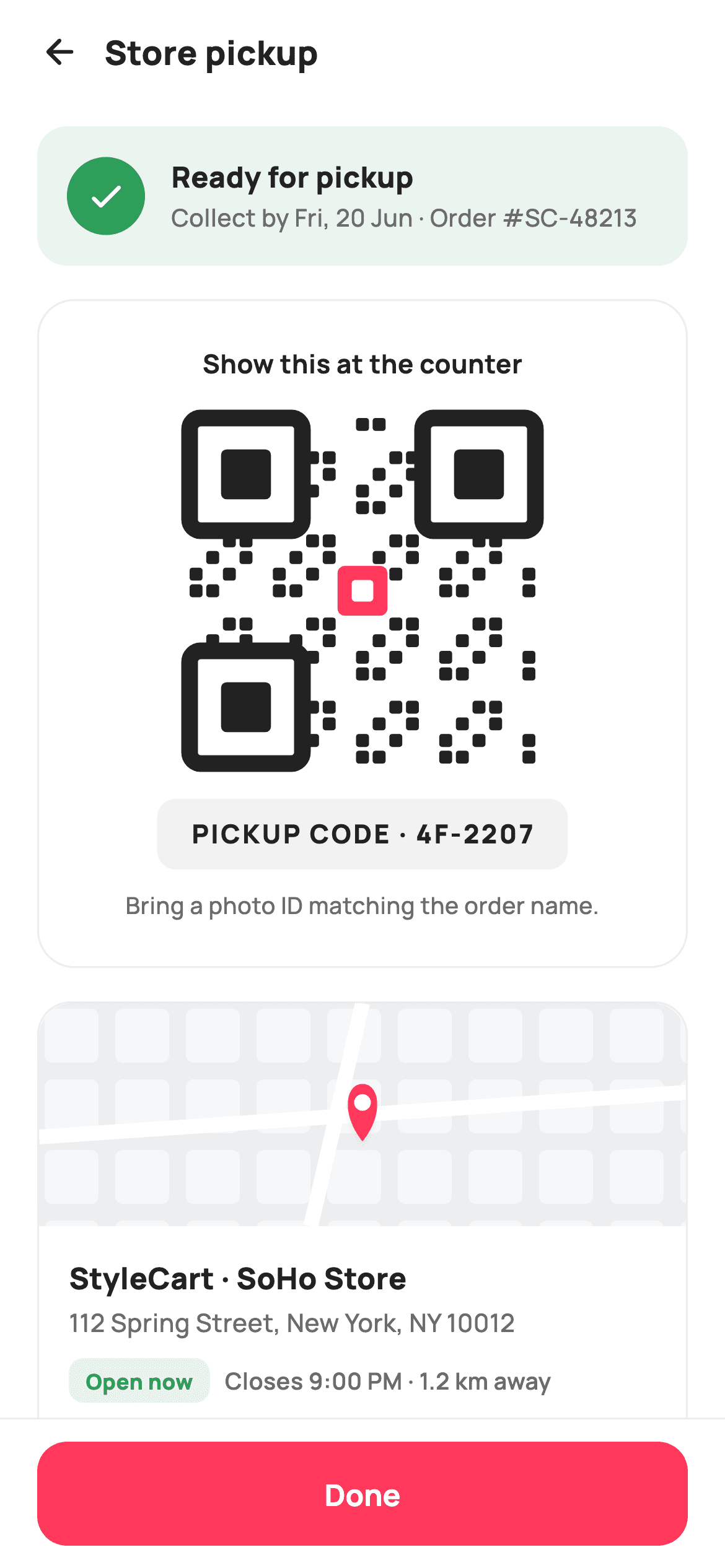
Click-and-collect only works if the shopper can walk to a counter and be identified in seconds. This tutorial builds StyleCart's store-pickup screen in Flutter: a green ready-for-pickup banner carrying the collect-by date and order number, a card holding a hand-painted 21x21 QR grid with a spelled-out PICKUP CODE chip beneath it as a fallback, and a store panel that pairs a painted map preview with the address, an Open now badge, closing time, distance, and Directions ranked above Call store.
Watch the Flutter UI walkthrough
A short screen recording of Store Pickup running, if you'd rather see it before you read the code. The written tutorial below covers everything in it.
Can't see the video? Watch it on YouTube.
What you'll build
- ✓A ready-for-pickup banner that states the collect-by deadline and order number together
- ✓A 21x21 QR grid drawn entirely by a CustomPainter — three finder patterns, a deterministic module hash and a brand centre module
- ✓A letter-spaced PICKUP CODE chip plus a photo-ID line, so collection still works when a scanner fails
- ✓A store card whose map preview is painted — tinted ground, block grid, two roads and a shadowed pin
- ✓Directions and Call store as unequal siblings: one ink-filled, one hairline-outlined
Step-by-step build
Create the file
Add a new file at lib/ecom_order_pickup/ecom_order_pickup_screen.dart in your Flutter project.
Register the bundled fonts
No external packages — this is pure Flutter. It does bundle its design font (Manrope), so drop the font file into fonts/ and declare it in pubspec.yaml:
flutter:
  fonts:
    - family: Manrope
      fonts:
- asset: fonts/Manrope-Regular.ttfBuild it, piece by piece
Here's how the screen goes together. Each block below is a real slice of the code with a plain-English explanation — paste them in order, or grab the whole file from the next section.
Callbacks only, and a palette with two greens' worth of jobs
import 'package:flutter/material.dart';

/// StyleCart — Store Pickup.
///
/// The collect-in-store view: a "ready for pickup" banner, a painted QR pickup
/// code with the order’s short code, the store address with opening hours and a
/// painted map preview, plus get-directions / call actions.
///
/// Self-contained per CONVENTIONS.md: pure Flutter, bundled Manrope, inline
/// Airbnb-style tokens, own light theme + SafeArea. The QR and map are
/// CustomPainters (no emoji glyph, no network). Exposes callbacks only.
class EcomOrderPickupScreen extends StatelessWidget {
  const EcomOrderPickupScreen({
    super.key,
    this.onBack,
    this.onDirections,
    this.onCall,
    this.onDone,
  });

  final VoidCallback? onBack;
  final VoidCallback? onDirections;
  final VoidCallback? onCall;
  final VoidCallback? onDone;

  static const String _font = 'Manrope';
  static const Color _canvas = Color(0xFFFFFFFF);
  static const Color _ink = Color(0xFF222222);
  static const Color _muted = Color(0xFF6A6A6A);
  static const Color _brand = Color(0xFFFF385C);
  static const Color _surface = Color(0xFFF2F2F2);
  static const Color _success = Color(0xFF2E9E5B);
  static const Color _hairline = Color(0xFFEBEBEB);
The screen is a `StatelessWidget` exposing four nullable callbacks — `onBack`, `onDirections`, `onCall`, `onDone`. Nothing here mutates: a pickup code does not change while you look at it, and directions and phone calls both leave the app, so state would have nothing to hold. The palette splits work between `_brand` `#FF385C` and `_success` `#2E9E5B`. Green owns the status language — the banner and the Open now badge — while coral is kept for the single Done button and the QR's centre module. Mixing them would make readiness look like a call to action. `_hairline` `#EBEBEB` gives every card its border instead of a shadow.
Three stacked cards over a pinned Done bar
  @override
  Widget build(BuildContext context) {
    return Theme(
      data: ThemeData.light(useMaterial3: true),
      child: Scaffold(
        backgroundColor: _canvas,
        body: SafeArea(
          child: Column(
            children: <Widget>[
              _header(),
              Expanded(
                child: ListView(
                  padding: const EdgeInsets.fromLTRB(20, 8, 20, 24),
                  children: <Widget>[
                    _readyBanner(),
                    const SizedBox(height: 18),
                    _qrCard(),
                    const SizedBox(height: 18),
                    _storeCard(),
                  ],
                ),
              ),
              _doneBar(),
            ],
          ),
        ),
      ),
    );
  }

  Widget _header() {
    return Padding(
      padding: const EdgeInsets.fromLTRB(8, 4, 20, 8),
      child: Row(
        children: <Widget>[
          IconButton(
            onPressed: onBack,
            icon: const Icon(Icons.arrow_back_rounded, size: 22, color: _ink),
          ),
          const Text(
            'Store pickup',
            style: TextStyle(
              fontFamily: _font,
              fontSize: 18,
              fontWeight: FontWeight.w800,
              color: _ink,
            ),
          ),
        ],
      ),
    );
  }
`Theme(data: ThemeData.light(useMaterial3: true))` wraps the `Scaffold` so the screen renders identically whatever theme the host app runs. The body is a `Column` of header, `Expanded(ListView)` and `_doneBar()` — the list scrolls between two fixed edges, which matters because the QR card alone is 188px tall plus padding and will push the store card off a small phone. The list's `EdgeInsets.fromLTRB(20, 8, 20, 24)` gives the last card breathing room above the bar. The header pairs a back arrow with a plain 18px `w800` 'Store pickup' title, left-aligned right next to the icon rather than centred.
The ready banner: deadline and order number in one line
  Widget _readyBanner() {
    return Container(
      padding: const EdgeInsets.all(16),
      decoration: BoxDecoration(
        color: _success.withValues(alpha: 0.1),
        borderRadius: BorderRadius.circular(16),
      ),
      child: Row(
        children: <Widget>[
          Container(
            width: 42,
            height: 42,
            decoration: const BoxDecoration(
              color: _success,
              shape: BoxShape.circle,
            ),
            child: const Icon(Icons.check_rounded, size: 22, color: _canvas),
          ),
          const SizedBox(width: 14),
          const Expanded(
            child: Column(
              crossAxisAlignment: CrossAxisAlignment.start,
              children: <Widget>[
                Text(
                  'Ready for pickup',
                  style: TextStyle(
                    fontFamily: _font,
                    fontSize: 15.5,
                    fontWeight: FontWeight.w800,
                    color: _ink,
                  ),
                ),
                SizedBox(height: 2),
                Text(
                  'Collect by Fri, 20 Jun · Order #SC-48213',
                  style: TextStyle(
                    fontFamily: _font,
                    fontSize: 13,
                    fontWeight: FontWeight.w500,
                    color: _muted,
                  ),
                ),
              ],
            ),
          ),
        ],
      ),
    );
  }
The banner is a 16-radius container tinted `_success.withValues(alpha: 0.1)` — a wash, not a solid green block, so it reads as a status rather than an alert. Inside, a 42px solid-green circle carries a white `Icons.check_rounded`, and the text column sits in an `Expanded` so it wraps instead of overflowing. The subtitle is the useful part: 'Collect by Fri, 20 Jun · Order #SC-48213' fuses the two facts a shopper needs — the deadline before the order is returned to stock, and the reference a staff member will ask for. Splitting them across two rows would double the banner's height for no gain.
The QR card, with a typed code as its fallback
  Widget _qrCard() {
    return Container(
      padding: const EdgeInsets.symmetric(vertical: 24, horizontal: 20),
      decoration: BoxDecoration(
        color: _canvas,
        borderRadius: BorderRadius.circular(20),
        border: Border.all(color: _hairline),
      ),
      child: Column(
        children: <Widget>[
          const Text(
            'Show this at the counter',
            style: TextStyle(
              fontFamily: _font,
              fontSize: 14,
              fontWeight: FontWeight.w700,
              color: _ink,
            ),
          ),
          const SizedBox(height: 18),
          SizedBox(
            width: 188,
            height: 188,
            child: CustomPaint(painter: _QrPainter()),
          ),
          const SizedBox(height: 18),
          Container(
            padding: const EdgeInsets.symmetric(horizontal: 18, vertical: 9),
            decoration: BoxDecoration(
              color: _surface,
              borderRadius: BorderRadius.circular(10),
            ),
            child: const Text(
              'PICKUP CODE · 4F-2207',
              style: TextStyle(
                fontFamily: _font,
                fontSize: 14,
                fontWeight: FontWeight.w800,
                letterSpacing: 1.2,
                color: _ink,
              ),
            ),
          ),
          const SizedBox(height: 10),
          const Text(
            'Bring a photo ID matching the order name.',
            textAlign: TextAlign.center,
            style: TextStyle(
              fontFamily: _font,
              fontSize: 12.5,
              fontWeight: FontWeight.w500,
              color: _muted,
            ),
          ),
        ],
      ),
    );
  }
A white card with a `_hairline` border holds four things in order: the instruction 'Show this at the counter', a fixed `SizedBox(width: 188, height: 188)` wrapping `CustomPaint(painter: _QrPainter())`, the code chip, and a photo-ID line. The QR gets a hard square size rather than an aspect ratio because a painter given a non-square box would stretch its modules. The chip below is the insurance policy: 'PICKUP CODE · 4F-2207' at 14px `w800` with `letterSpacing: 1.2` on `_surface` grey, so a staff member can type the code when a scanner or a cracked screen defeats the QR. The ID note at 12.5px muted sets the expectation before the shopper is standing at the counter.
The store card: map, address, hours, actions
  Widget _storeCard() {
    return Container(
      decoration: BoxDecoration(
        color: _canvas,
        borderRadius: BorderRadius.circular(18),
        border: Border.all(color: _hairline),
      ),
      child: Column(
        children: <Widget>[
          ClipRRect(
            borderRadius:
                const BorderRadius.vertical(top: Radius.circular(18)),
            child: SizedBox(
              height: 120,
              child: CustomPaint(
                  painter: _MiniMapPainter(), size: Size.infinite),
            ),
          ),
          Padding(
            padding: const EdgeInsets.all(16),
            child: Column(
              crossAxisAlignment: CrossAxisAlignment.start,
              children: <Widget>[
                const Text(
                  'StyleCart · SoHo Store',
                  style: TextStyle(
                    fontFamily: _font,
                    fontSize: 16,
                    fontWeight: FontWeight.w800,
                    color: _ink,
                  ),
                ),
                const SizedBox(height: 4),
                const Text(
                  '112 Spring Street, New York, NY 10012',
                  style: TextStyle(
                    fontFamily: _font,
                    fontSize: 13.5,
                    fontWeight: FontWeight.w500,
                    height: 1.35,
                    color: _muted,
                  ),
                ),
                const SizedBox(height: 10),
                Row(
                  children: <Widget>[
                    Container(
                      padding: const EdgeInsets.symmetric(
                          horizontal: 9, vertical: 4),
                      decoration: BoxDecoration(
                        color: _success.withValues(alpha: 0.12),
                        borderRadius: BorderRadius.circular(8),
                      ),
                      child: const Text(
                        'Open now',
                        style: TextStyle(
                          fontFamily: _font,
                          fontSize: 11.5,
                          fontWeight: FontWeight.w800,
                          color: _success,
                        ),
                      ),
                    ),
                    const SizedBox(width: 8),
                    const Text(
                      'Closes 9:00 PM · 1.2 km away',
                      style: TextStyle(
                        fontFamily: _font,
                        fontSize: 12.5,
                        fontWeight: FontWeight.w600,
                        color: _muted,
                      ),
                    ),
                  ],
                ),
                const SizedBox(height: 14),
                Row(
                  children: <Widget>[
                    Expanded(
                      child: _miniBtn(
                          Icons.directions_outlined, 'Directions', onDirections,
                          filled: true),
                    ),
                    const SizedBox(width: 10),
                    Expanded(
                      child: _miniBtn(Icons.call_rounded, 'Call store', onCall,
                          filled: false),
                    ),
                  ],
                ),
              ],
            ),
          ),
        ],
      ),
    );
  }
The card leads with a 120px `CustomPaint(painter: _MiniMapPainter(), size: Size.infinite)` clipped by `BorderRadius.vertical(top: Radius.circular(18))` — `Size.infinite` is what lets the painter fill the card's width, and the vertical-only clip keeps the map flush to the card's top corners while its bottom edge stays square against the text. Below it, the store name, the full street address at `height: 1.35` for a clean two-line wrap, then a status row: an 'Open now' pill tinted `_success.withValues(alpha: 0.12)` beside 'Closes 9:00 PM · 1.2 km away'. Answering open-now, closing-time and distance in one row is what tells someone whether to leave right away.
Two actions, deliberately unequal, and the Done bar
  Widget _miniBtn(IconData icon, String label, VoidCallback? onTap,
      {required bool filled}) {
    return GestureDetector(
      onTap: onTap,
      child: Container(
        height: 46,
        decoration: BoxDecoration(
          color: filled ? _ink : _canvas,
          borderRadius: BorderRadius.circular(12),
          border: filled ? null : Border.all(color: _hairline),
        ),
        child: Row(
          mainAxisAlignment: MainAxisAlignment.center,
          children: <Widget>[
            Icon(icon, size: 17, color: filled ? _canvas : _ink),
            const SizedBox(width: 7),
            Text(
              label,
              style: TextStyle(
                fontFamily: _font,
                fontSize: 13.5,
                fontWeight: FontWeight.w700,
                color: filled ? _canvas : _ink,
              ),
            ),
          ],
        ),
      ),
    );
  }

  Widget _doneBar() {
    return Container(
      decoration: const BoxDecoration(
        color: _canvas,
        border: Border(top: BorderSide(color: _hairline)),
      ),
      child: SafeArea(
        top: false,
        child: Padding(
          padding: const EdgeInsets.fromLTRB(20, 12, 20, 12),
          child: SizedBox(
            height: 56,
            child: FilledButton(
              onPressed: onDone,
              style: FilledButton.styleFrom(
                backgroundColor: _brand,
                foregroundColor: _canvas,
                minimumSize: const Size.fromHeight(56),
                shape: RoundedRectangleBorder(
                  borderRadius: BorderRadius.circular(16),
                ),
              ),
              child: const Text(
                'Done',
                style: TextStyle(
                  fontFamily: _font,
                  fontSize: 16,
                  fontWeight: FontWeight.w700,
                ),
              ),
            ),
          ),
        ),
      ),
    );
  }
`_miniBtn` takes a `required bool filled` and switches three properties at once — background `_ink` or `_canvas`, border null or `_hairline`, and content colour inverted to match — so one 46px-tall builder produces both ranks. Directions is filled and Call store is outlined because navigating is what most people do next; calling is the exception path for stock questions. Both sit in `Expanded` siblings with a 10px gap, so they share the width evenly despite the difference in emphasis. The `_doneBar` is a container with a top hairline wrapping `SafeArea(top: false)`, so white extends under the home indicator while the 56px coral `FilledButton` stays above it.
Painting the QR: finders, a module hash, a brand centre
/// Paints a deterministic QR-style code: a 21×21 module grid with three finder
/// patterns and a brand centre dot. No randomness, so it’s golden-stable.
class _QrPainter extends CustomPainter {
  static const Color _ink = Color(0xFF222222);
  static const Color _brand = Color(0xFFFF385C);

  bool _inFinder(int x, int y) {
    return _finder(x, y, 0, 0) || _finder(x, y, 14, 0) || _finder(x, y, 0, 14);
  }

  bool _finder(int x, int y, int ox, int oy) {
    return x >= ox && x < ox + 7 && y >= oy && y < oy + 7;
  }

  @override
  void paint(Canvas canvas, Size size) {
    const int n = 21;
    final double cell = size.width / n;
    final Paint p = Paint()..color = _ink;

    for (int y = 0; y < n; y++) {
      for (int x = 0; x < n; x++) {
        if (_inFinder(x, y)) continue;
        final int hash = (x * 7 + y * 13 + x * y * 3) % 5;
        if (hash == 0 || hash == 2) {
          canvas.drawRRect(
            RRect.fromRectAndRadius(
              Rect.fromLTWH(x * cell + 1, y * cell + 1, cell - 2, cell - 2),
              const Radius.circular(1.5),
            ),
            p,
          );
        }
      }
    }

    // Finder patterns.
    _drawFinder(canvas, cell, 0, 0);
    _drawFinder(canvas, cell, 14, 0);
    _drawFinder(canvas, cell, 0, 14);

    // Brand centre module.
    final Offset c = Offset(size.width / 2, size.height / 2);
    canvas.drawRRect(
      RRect.fromRectAndRadius(
        Rect.fromCenter(center: c, width: cell * 3, height: cell * 3),
        const Radius.circular(4),
      ),
      Paint()..color = _brand,
    );
    canvas.drawRRect(
      RRect.fromRectAndRadius(
        Rect.fromCenter(center: c, width: cell * 1.3, height: cell * 1.3),
        const Radius.circular(2),
      ),
      Paint()..color = const Color(0xFFFFFFFF),
    );
  }

  void _drawFinder(Canvas canvas, double cell, int ox, int oy) {
    final Rect outer =
        Rect.fromLTWH(ox * cell, oy * cell, cell * 7, cell * 7);
    canvas.drawRRect(
      RRect.fromRectAndRadius(outer.deflate(1), const Radius.circular(6)),
      Paint()
        ..style = PaintingStyle.stroke
        ..strokeWidth = cell
        ..color = _ink,
    );
    canvas.drawRRect(
      RRect.fromRectAndRadius(
        Rect.fromLTWH(
            (ox + 2) * cell, (oy + 2) * cell, cell * 3, cell * 3),
        const Radius.circular(3),
      ),
      Paint()..color = _ink,
    );
  }

  @override
  bool shouldRepaint(_QrPainter oldDelegate) => false;
}
`_QrPainter` draws a 21x21 grid where `cell = size.width / 21`. It skips any coordinate inside the three 7x7 finder zones via `_inFinder`, then decides every remaining module with `(x * 7 + y * 13 + x * y * 3) % 5`, filling on 0 or 2. That arithmetic is the whole trick: no `Random`, so the pattern is identical on every rebuild and golden tests stay stable. Modules are `RRect`s inset 1px with a 1.5 radius. `_drawFinder` builds each eye from a stroked rounded rect at `strokeWidth = cell` plus a solid 3x3 core, while the centre gets a `cell * 3` brand square with a white `cell * 1.3` hole punched over it.
Painting the map preview
/// Paints a small map preview: tinted ground, a soft block grid, two roads and
/// a brand store pin.
class _MiniMapPainter extends CustomPainter {
  static const Color _brand = Color(0xFFFF385C);

  @override
  void paint(Canvas canvas, Size size) {
    canvas.drawRect(
        Offset.zero & size, Paint()..color = const Color(0xFFEDEEF0));

    final Paint block = Paint()..color = const Color(0xFFF6F7F8);
    const double g = 38;
    for (double y = 0; y < size.height; y += g) {
      for (double x = 0; x < size.width; x += g) {
        canvas.drawRRect(
          RRect.fromRectAndRadius(
            Rect.fromLTWH(x + 3, y + 3, g - 9, g - 9),
            const Radius.circular(4),
          ),
          block,
        );
      }
    }

    final Paint road = Paint()
      ..color = const Color(0xFFFFFFFF)
      ..strokeWidth = 8;
    canvas.drawLine(
        Offset(0, size.height * 0.6), Offset(size.width, size.height * 0.4),
        road);
    canvas.drawLine(
        Offset(size.width * 0.5, 0), Offset(size.width * 0.42, size.height),
        road);

    // Store pin.
    final Offset tip = Offset(size.width * 0.5, size.height * 0.62);
    final Path pin = Path()
      ..moveTo(tip.dx, tip.dy)
      ..cubicTo(tip.dx - 12, tip.dy - 15, tip.dx - 9, tip.dy - 31, tip.dx,
          tip.dy - 31)
      ..cubicTo(tip.dx + 9, tip.dy - 31, tip.dx + 12, tip.dy - 15, tip.dx,
          tip.dy);
    canvas.drawShadow(pin, const Color(0x33000000), 3, false);
    canvas.drawPath(pin, Paint()..color = _brand);
    canvas.drawCircle(Offset(tip.dx, tip.dy - 21), 4.5,
        Paint()..color = const Color(0xFFFFFFFF));
  }

  @override
  bool shouldRepaint(_MiniMapPainter oldDelegate) => false;
}
`_MiniMapPainter` builds a city from four layers and no tiles. A `#EDEEF0` ground fills `Offset.zero & size`, then a double loop steps 38px in both axes drawing `#F6F7F8` blocks inset 3px and shrunk by 9, which leaves a consistent street gap between them. Two 8px white lines cross the frame at deliberately off-parallel angles — 0.6 to 0.4 height horizontally, 0.5 to 0.42 width vertically — because perfectly straight roads read as a grid graphic rather than a map. The pin is a `Path` of two mirrored `cubicTo` curves from a tip at 50% / 62%, given depth by `canvas.drawShadow(pin, Color(0x33000000), 3, false)` before it is filled brand coral, with a 4.5px white circle for its hole.
Full code
The complete, ready-to-paste source. Free to use in your projects — one click copies it all.
import 'package:flutter/material.dart';

/// StyleCart — Store Pickup.
///
/// The collect-in-store view: a "ready for pickup" banner, a painted QR pickup
/// code with the order’s short code, the store address with opening hours and a
/// painted map preview, plus get-directions / call actions.
///
/// Self-contained per CONVENTIONS.md: pure Flutter, bundled Manrope, inline
/// Airbnb-style tokens, own light theme + SafeArea. The QR and map are
/// CustomPainters (no emoji glyph, no network). Exposes callbacks only.
class EcomOrderPickupScreen extends StatelessWidget {
  const EcomOrderPickupScreen({
    super.key,
    this.onBack,
    this.onDirections,
    this.onCall,
    this.onDone,
  });

  final VoidCallback? onBack;
  final VoidCallback? onDirections;
  final VoidCallback? onCall;
  final VoidCallback? onDone;

  static const String _font = 'Manrope';
  static const Color _canvas = Color(0xFFFFFFFF);
  static const Color _ink = Color(0xFF222222);
  static const Color _muted = Color(0xFF6A6A6A);
  static const Color _brand = Color(0xFFFF385C);
  static const Color _surface = Color(0xFFF2F2F2);
  static const Color _success = Color(0xFF2E9E5B);
  static const Color _hairline = Color(0xFFEBEBEB);

  @override
  Widget build(BuildContext context) {
    return Theme(
      data: ThemeData.light(useMaterial3: true),
      child: Scaffold(
        backgroundColor: _canvas,
        body: SafeArea(
          child: Column(
            children: <Widget>[
              _header(),
              Expanded(
                child: ListView(
                  padding: const EdgeInsets.fromLTRB(20, 8, 20, 24),
                  children: <Widget>[
                    _readyBanner(),
                    const SizedBox(height: 18),
                    _qrCard(),
                    const SizedBox(height: 18),
                    _storeCard(),
                  ],
                ),
              ),
              _doneBar(),
            ],
          ),
        ),
      ),
    );
  }

  Widget _header() {
    return Padding(
      padding: const EdgeInsets.fromLTRB(8, 4, 20, 8),
      child: Row(
        children: <Widget>[
          IconButton(
            onPressed: onBack,
            icon: const Icon(Icons.arrow_back_rounded, size: 22, color: _ink),
          ),
          const Text(
            'Store pickup',
            style: TextStyle(
              fontFamily: _font,
              fontSize: 18,
              fontWeight: FontWeight.w800,
              color: _ink,
            ),
          ),
        ],
      ),
    );
  }

  Widget _readyBanner() {
    return Container(
      padding: const EdgeInsets.all(16),
      decoration: BoxDecoration(
        color: _success.withValues(alpha: 0.1),
        borderRadius: BorderRadius.circular(16),
      ),
      child: Row(
        children: <Widget>[
          Container(
            width: 42,
            height: 42,
            decoration: const BoxDecoration(
              color: _success,
              shape: BoxShape.circle,
            ),
            child: const Icon(Icons.check_rounded, size: 22, color: _canvas),
          ),
          const SizedBox(width: 14),
          const Expanded(
            child: Column(
              crossAxisAlignment: CrossAxisAlignment.start,
              children: <Widget>[
                Text(
                  'Ready for pickup',
                  style: TextStyle(
                    fontFamily: _font,
                    fontSize: 15.5,
                    fontWeight: FontWeight.w800,
                    color: _ink,
                  ),
                ),
                SizedBox(height: 2),
                Text(
                  'Collect by Fri, 20 Jun · Order #SC-48213',
                  style: TextStyle(
                    fontFamily: _font,
                    fontSize: 13,
                    fontWeight: FontWeight.w500,
                    color: _muted,
                  ),
                ),
              ],
            ),
          ),
        ],
      ),
    );
  }

  Widget _qrCard() {
    return Container(
      padding: const EdgeInsets.symmetric(vertical: 24, horizontal: 20),
      decoration: BoxDecoration(
        color: _canvas,
        borderRadius: BorderRadius.circular(20),
        border: Border.all(color: _hairline),
      ),
      child: Column(
        children: <Widget>[
          const Text(
            'Show this at the counter',
            style: TextStyle(
              fontFamily: _font,
              fontSize: 14,
              fontWeight: FontWeight.w700,
              color: _ink,
            ),
          ),
          const SizedBox(height: 18),
          SizedBox(
            width: 188,
            height: 188,
            child: CustomPaint(painter: _QrPainter()),
          ),
          const SizedBox(height: 18),
          Container(
            padding: const EdgeInsets.symmetric(horizontal: 18, vertical: 9),
            decoration: BoxDecoration(
              color: _surface,
              borderRadius: BorderRadius.circular(10),
            ),
            child: const Text(
              'PICKUP CODE · 4F-2207',
              style: TextStyle(
                fontFamily: _font,
                fontSize: 14,
                fontWeight: FontWeight.w800,
                letterSpacing: 1.2,
                color: _ink,
              ),
            ),
          ),
          const SizedBox(height: 10),
          const Text(
            'Bring a photo ID matching the order name.',
            textAlign: TextAlign.center,
            style: TextStyle(
              fontFamily: _font,
              fontSize: 12.5,
              fontWeight: FontWeight.w500,
              color: _muted,
            ),
          ),
        ],
      ),
    );
  }

  Widget _storeCard() {
    return Container(
      decoration: BoxDecoration(
        color: _canvas,
        borderRadius: BorderRadius.circular(18),
        border: Border.all(color: _hairline),
      ),
      child: Column(
        children: <Widget>[
          ClipRRect(
            borderRadius:
                const BorderRadius.vertical(top: Radius.circular(18)),
            child: SizedBox(
              height: 120,
              child: CustomPaint(
                  painter: _MiniMapPainter(), size: Size.infinite),
            ),
          ),
          Padding(
            padding: const EdgeInsets.all(16),
            child: Column(
              crossAxisAlignment: CrossAxisAlignment.start,
              children: <Widget>[
                const Text(
                  'StyleCart · SoHo Store',
                  style: TextStyle(
                    fontFamily: _font,
                    fontSize: 16,
                    fontWeight: FontWeight.w800,
                    color: _ink,
                  ),
                ),
                const SizedBox(height: 4),
                const Text(
                  '112 Spring Street, New York, NY 10012',
                  style: TextStyle(
                    fontFamily: _font,
                    fontSize: 13.5,
                    fontWeight: FontWeight.w500,
                    height: 1.35,
                    color: _muted,
                  ),
                ),
                const SizedBox(height: 10),
                Row(
                  children: <Widget>[
                    Container(
                      padding: const EdgeInsets.symmetric(
                          horizontal: 9, vertical: 4),
                      decoration: BoxDecoration(
                        color: _success.withValues(alpha: 0.12),
                        borderRadius: BorderRadius.circular(8),
                      ),
                      child: const Text(
                        'Open now',
                        style: TextStyle(
                          fontFamily: _font,
                          fontSize: 11.5,
                          fontWeight: FontWeight.w800,
                          color: _success,
                        ),
                      ),
                    ),
                    const SizedBox(width: 8),
                    const Text(
                      'Closes 9:00 PM · 1.2 km away',
                      style: TextStyle(
                        fontFamily: _font,
                        fontSize: 12.5,
                        fontWeight: FontWeight.w600,
                        color: _muted,
                      ),
                    ),
                  ],
                ),
                const SizedBox(height: 14),
                Row(
                  children: <Widget>[
                    Expanded(
                      child: _miniBtn(
                          Icons.directions_outlined, 'Directions', onDirections,
                          filled: true),
                    ),
                    const SizedBox(width: 10),
                    Expanded(
                      child: _miniBtn(Icons.call_rounded, 'Call store', onCall,
                          filled: false),
                    ),
                  ],
                ),
              ],
            ),
          ),
        ],
      ),
    );
  }

  Widget _miniBtn(IconData icon, String label, VoidCallback? onTap,
      {required bool filled}) {
    return GestureDetector(
      onTap: onTap,
      child: Container(
        height: 46,
        decoration: BoxDecoration(
          color: filled ? _ink : _canvas,
          borderRadius: BorderRadius.circular(12),
          border: filled ? null : Border.all(color: _hairline),
        ),
        child: Row(
          mainAxisAlignment: MainAxisAlignment.center,
          children: <Widget>[
            Icon(icon, size: 17, color: filled ? _canvas : _ink),
            const SizedBox(width: 7),
            Text(
              label,
              style: TextStyle(
                fontFamily: _font,
                fontSize: 13.5,
                fontWeight: FontWeight.w700,
                color: filled ? _canvas : _ink,
              ),
            ),
          ],
        ),
      ),
    );
  }

  Widget _doneBar() {
    return Container(
      decoration: const BoxDecoration(
        color: _canvas,
        border: Border(top: BorderSide(color: _hairline)),
      ),
      child: SafeArea(
        top: false,
        child: Padding(
          padding: const EdgeInsets.fromLTRB(20, 12, 20, 12),
          child: SizedBox(
            height: 56,
            child: FilledButton(
              onPressed: onDone,
              style: FilledButton.styleFrom(
                backgroundColor: _brand,
                foregroundColor: _canvas,
                minimumSize: const Size.fromHeight(56),
                shape: RoundedRectangleBorder(
                  borderRadius: BorderRadius.circular(16),
                ),
              ),
              child: const Text(
                'Done',
                style: TextStyle(
                  fontFamily: _font,
                  fontSize: 16,
                  fontWeight: FontWeight.w700,
                ),
              ),
            ),
          ),
        ),
      ),
    );
  }
}

/// Paints a deterministic QR-style code: a 21×21 module grid with three finder
/// patterns and a brand centre dot. No randomness, so it’s golden-stable.
class _QrPainter extends CustomPainter {
  static const Color _ink = Color(0xFF222222);
  static const Color _brand = Color(0xFFFF385C);

  bool _inFinder(int x, int y) {
    return _finder(x, y, 0, 0) || _finder(x, y, 14, 0) || _finder(x, y, 0, 14);
  }

  bool _finder(int x, int y, int ox, int oy) {
    return x >= ox && x < ox + 7 && y >= oy && y < oy + 7;
  }

  @override
  void paint(Canvas canvas, Size size) {
    const int n = 21;
    final double cell = size.width / n;
    final Paint p = Paint()..color = _ink;

    for (int y = 0; y < n; y++) {
      for (int x = 0; x < n; x++) {
        if (_inFinder(x, y)) continue;
        final int hash = (x * 7 + y * 13 + x * y * 3) % 5;
        if (hash == 0 || hash == 2) {
          canvas.drawRRect(
            RRect.fromRectAndRadius(
              Rect.fromLTWH(x * cell + 1, y * cell + 1, cell - 2, cell - 2),
              const Radius.circular(1.5),
            ),
            p,
          );
        }
      }
    }

    // Finder patterns.
    _drawFinder(canvas, cell, 0, 0);
    _drawFinder(canvas, cell, 14, 0);
    _drawFinder(canvas, cell, 0, 14);

    // Brand centre module.
    final Offset c = Offset(size.width / 2, size.height / 2);
    canvas.drawRRect(
      RRect.fromRectAndRadius(
        Rect.fromCenter(center: c, width: cell * 3, height: cell * 3),
        const Radius.circular(4),
      ),
      Paint()..color = _brand,
    );
    canvas.drawRRect(
      RRect.fromRectAndRadius(
        Rect.fromCenter(center: c, width: cell * 1.3, height: cell * 1.3),
        const Radius.circular(2),
      ),
      Paint()..color = const Color(0xFFFFFFFF),
    );
  }

  void _drawFinder(Canvas canvas, double cell, int ox, int oy) {
    final Rect outer =
        Rect.fromLTWH(ox * cell, oy * cell, cell * 7, cell * 7);
    canvas.drawRRect(
      RRect.fromRectAndRadius(outer.deflate(1), const Radius.circular(6)),
      Paint()
        ..style = PaintingStyle.stroke
        ..strokeWidth = cell
        ..color = _ink,
    );
    canvas.drawRRect(
      RRect.fromRectAndRadius(
        Rect.fromLTWH(
            (ox + 2) * cell, (oy + 2) * cell, cell * 3, cell * 3),
        const Radius.circular(3),
      ),
      Paint()..color = _ink,
    );
  }

  @override
  bool shouldRepaint(_QrPainter oldDelegate) => false;
}

/// Paints a small map preview: tinted ground, a soft block grid, two roads and
/// a brand store pin.
class _MiniMapPainter extends CustomPainter {
  static const Color _brand = Color(0xFFFF385C);

  @override
  void paint(Canvas canvas, Size size) {
    canvas.drawRect(
        Offset.zero & size, Paint()..color = const Color(0xFFEDEEF0));

    final Paint block = Paint()..color = const Color(0xFFF6F7F8);
    const double g = 38;
    for (double y = 0; y < size.height; y += g) {
      for (double x = 0; x < size.width; x += g) {
        canvas.drawRRect(
          RRect.fromRectAndRadius(
            Rect.fromLTWH(x + 3, y + 3, g - 9, g - 9),
            const Radius.circular(4),
          ),
          block,
        );
      }
    }

    final Paint road = Paint()
      ..color = const Color(0xFFFFFFFF)
      ..strokeWidth = 8;
    canvas.drawLine(
        Offset(0, size.height * 0.6), Offset(size.width, size.height * 0.4),
        road);
    canvas.drawLine(
        Offset(size.width * 0.5, 0), Offset(size.width * 0.42, size.height),
        road);

    // Store pin.
    final Offset tip = Offset(size.width * 0.5, size.height * 0.62);
    final Path pin = Path()
      ..moveTo(tip.dx, tip.dy)
      ..cubicTo(tip.dx - 12, tip.dy - 15, tip.dx - 9, tip.dy - 31, tip.dx,
          tip.dy - 31)
      ..cubicTo(tip.dx + 9, tip.dy - 31, tip.dx + 12, tip.dy - 15, tip.dx,
          tip.dy);
    canvas.drawShadow(pin, const Color(0x33000000), 3, false);
    canvas.drawPath(pin, Paint()..color = _brand);
    canvas.drawCircle(Offset(tip.dx, tip.dy - 21), 4.5,
        Paint()..color = const Color(0xFFFFFFFF));
  }

  @override
  bool shouldRepaint(_MiniMapPainter oldDelegate) => false;
}
Plus bundled 5 binary assets (fonts/images). The CLI and MCP install those for you automatically.
Two faster ways to add it
Copy-paste works, but you can skip it entirely.
1. FlutterKit CLI
One command drops this screen — and its fonts — straight into your project.
$ flutterkit add ecom-order-pickup2. AI agent (MCP)
Connect FlutterKit's MCP server in Claude or Cursor and just ask your agent to install ecom-order-pickup — it fetches and writes the files for you.
FAQ
Can I use this store pickup screen in a commercial app?
Yes. FlutterKit is free — there is no paid tier behind this page, no licence key and no sign-up. Copy the Dart from this page, install it with the CLI, or pull it through MCP, and ship it in a paid retail app. Attribution is not required.
Does the QR code actually scan?
No — `_QrPainter` draws a QR-shaped graphic, not an encoded payload. Its modules come from `(x * 7 + y * 13 + x * y * 3) % 5`, which is a deterministic pattern rather than error-corrected data. For a real scannable code, keep this layout and swap the `CustomPaint` for a generator package fed with your order id; the 188px box and the surrounding card need no changes.
What packages and fonts does it need?
No packages at all — the QR and the map preview are `CustomPainter`s, so there is no QR library, no maps SDK and no network call. The only dependency is the Manrope font family, referenced as `_font` on every `TextStyle`. Add it to `pubspec.yaml` or change that one constant to your own family.
How do I wire up Directions and Call store?
Both are plain `VoidCallback?`s on the constructor, so the screen stays backend-agnostic. Pass handlers that launch a maps URL with the store's coordinates and a `tel:` URL with its number — typically through `url_launcher`. Leaving either null makes the `GestureDetector` inert rather than crashing, which is convenient while previewing.
Which Flutter version does this need?
Flutter 3.22 or newer, because the banner and the Open now badge use `Color.withValues(alpha: ...)` and the constructor uses the `super.key` super-parameter form. On an older SDK swap those calls for `withOpacity(0.1)` and `withOpacity(0.12)`, and expand the constructor to `{Key? key, ...}) : super(key: key)`.


