How to Build an Order Detail Screen in Flutter (Full Code + Preview)
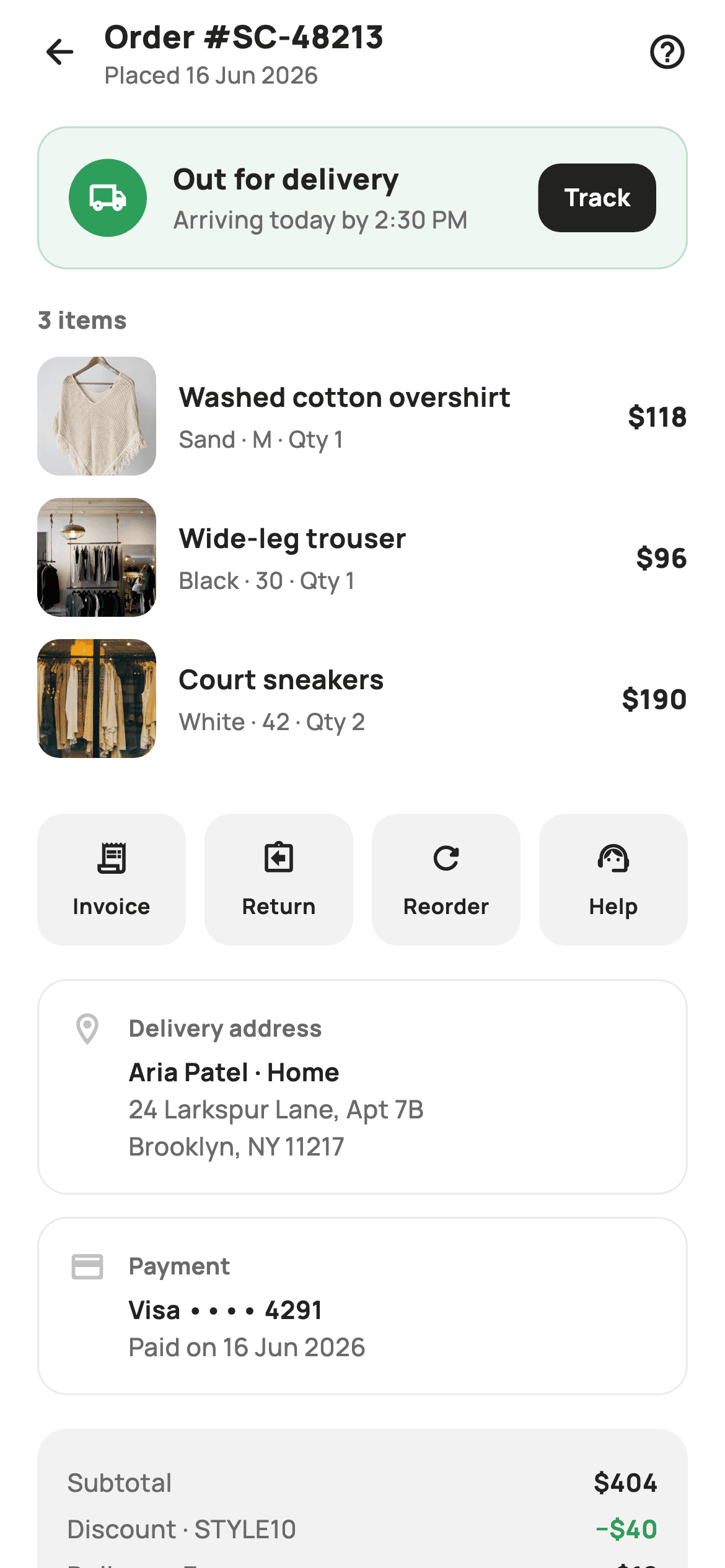
An order detail screen is the page a shopper opens wanting one of three answers: where is it, what did I buy, and what was I charged. This tutorial builds StyleCart's version in Flutter — a green delivery banner with an inline Track button, tappable item rows showing variant, quantity and line total, a four-up row for Invoice, Return, Reorder and Help, hairline address and payment cards, and a price card that computes tax and total from the item list rather than hard-coding them.
Watch the Flutter UI walkthrough
A short screen recording of Order Detail running, if you'd rather see it before you read the code. The written tutorial below covers everything in it.
Can't see the video? Watch it on YouTube.
What you'll build
- ✓A tinted delivery banner whose Track button stays ink-black so it does not dissolve into the green
- ✓Item rows that print the line total (price × qty), not the unit price, so the arithmetic matches the receipt
- ✓A four-up Invoice / Return / Reorder / Help row built from a list with 10px gaps injected between tiles only
- ✓A price card that derives subtotal with `fold`, then discount, delivery, 8% tax and total paid
- ✓Address and payment summary cards where the first line is bold ink and the rest fall back to muted grey
Step-by-step build
Create the file
Add a new file at lib/ecom_order_detail/ecom_order_detail_screen.dart in your Flutter project.
Register the bundled fonts
No external packages — this is pure Flutter. It does bundle its design font (Manrope), so drop the font file into fonts/ and declare it in pubspec.yaml:
flutter:
  fonts:
    - family: Manrope
      fonts:
- asset: fonts/Manrope-Regular.ttfBuild it, piece by piece
Here's how the screen goes together. Each block below is a real slice of the code with a plain-English explanation — paste them in order, or grab the whole file from the next section.
Callbacks, tokens and the order as data
import 'package:flutter/material.dart';

/// StyleCart — Order Detail.
///
/// The full record for one order: a status banner with the order ID and ETA,
/// the item list with thumbnails, delivery-address and payment summaries, an
/// itemised price breakdown, and a row of actions (track, invoice, return,
/// reorder, help).
///
/// Self-contained per CONVENTIONS.md: pure Flutter, bundled Manrope, inline
/// Airbnb-style tokens, own light theme + SafeArea, bundled webp. Exposes
/// callbacks only.
class EcomOrderDetailScreen extends StatelessWidget {
  const EcomOrderDetailScreen({
    super.key,
    this.onBack,
    this.onTrack,
    this.onInvoice,
    this.onReturn,
    this.onReorder,
    this.onHelp,
    this.onProduct,
  });

  final VoidCallback? onBack;
  final VoidCallback? onTrack;
  final VoidCallback? onInvoice;
  final VoidCallback? onReturn;
  final VoidCallback? onReorder;
  final VoidCallback? onHelp;
  final ValueChanged<String>? onProduct;

  static const String _font = 'Manrope';
  static const Color _canvas = Color(0xFFFFFFFF);
  static const Color _ink = Color(0xFF222222);
  static const Color _muted = Color(0xFF6A6A6A);
  static const Color _faint = Color(0xFFC1C1C1);
  static const Color _surface = Color(0xFFF2F2F2);
  static const Color _imageBg = Color(0xFFF5F5F5);
  static const Color _success = Color(0xFF2E9E5B);
  static const Color _hairline = Color(0xFFEBEBEB);

  static const String _dir = 'lib/screens/ecommerce/ecom_order_detail/images';

  static const List<_Item> _items = <_Item>[
    _Item('p01', 'Washed cotton overshirt', 'Sand · M', 118, 1),
    _Item('p02', 'Wide-leg trouser', 'Black · 30', 96, 1),
    _Item('p03', 'Court sneakers', 'White · 42', 95, 2),
  ];
`EcomOrderDetailScreen` is a `StatelessWidget` exposing seven optional callbacks — `onBack`, `onTrack`, `onInvoice`, `onReturn`, `onReorder`, `onHelp`, and `onProduct` which is a `ValueChanged<String>` carrying the tapped product id. Everything else is fixed data, so nothing here needs `setState`. The palette splits grey into three deliberate jobs: `_muted` #6A6A6A for secondary text, `_faint` #C1C1C1 for the summary-card icons that should recede, and `_hairline` #EBEBEB for 1px borders. `_success` #2E9E5B is reused for both the delivery banner and the discount figure. The three `_Item` records store price and qty separately rather than a pre-multiplied total, which is what lets the subtotal be computed instead of typed.
Deriving the money, then a header over a ListView
  @override
  Widget build(BuildContext context) {
    final int subtotal = _items.fold(0, (int s, _Item i) => s + i.price * i.qty);
    const double discount = 40;
    const double shipping = 12;
    final double tax = (subtotal - discount) * 0.08;
    final double total = subtotal - discount + shipping + tax;

    return Theme(
      data: ThemeData.light(useMaterial3: true),
      child: Scaffold(
        backgroundColor: _canvas,
        body: SafeArea(
          child: Column(
            children: <Widget>[
              _header(),
              Expanded(
                child: ListView(
                  padding: const EdgeInsets.fromLTRB(20, 8, 20, 24),
                  children: <Widget>[
                    _statusBanner(),
                    const SizedBox(height: 18),
                    _sectionTitle('${_items.length} items'),
                    const SizedBox(height: 10),
                    for (final _Item it in _items) _itemRow(it),
                    const SizedBox(height: 18),
                    _actionsGrid(),
                    const SizedBox(height: 18),
                    _summaryCard('Delivery address', Icons.location_on_outlined,
                        <String>[
                      'Aria Patel · Home',
                      '24 Larkspur Lane, Apt 7B',
                      'Brooklyn, NY 11217',
                    ]),
                    const SizedBox(height: 12),
                    _summaryCard('Payment', Icons.credit_card_rounded,
                        <String>[
                      'Visa •••• 4291',
                      'Paid on 16 Jun 2026',
                    ]),
                    const SizedBox(height: 18),
                    _priceCard(subtotal, discount, shipping, tax, total),
                  ],
                ),
              ),
            ],
          ),
        ),
      ),
    );
  }
`build` opens by folding the item list into `subtotal` (404 from 118 + 96 + 95×2), then applies a flat 40 discount, 12 delivery, and `tax = (subtotal - discount) * 0.08` — tax is charged on the discounted amount, which is the behaviour most jurisdictions actually expect, and `total` sums all four. Computing these means editing `_items` keeps the receipt honest instead of leaving stale literals at the bottom of the screen. The layout is a `Column` with `_header()` pinned outside an `Expanded` `ListView`, so the order number stays visible while the items and price card scroll. `SafeArea` sits inside the `Scaffold`, and `Theme(data: ThemeData.light(...))` forces the light look regardless of the host app's theme.
An order number that doubles as the title
  Widget _header() {
    return Padding(
      padding: const EdgeInsets.fromLTRB(8, 4, 20, 8),
      child: Row(
        children: <Widget>[
          IconButton(
            onPressed: onBack,
            icon: const Icon(Icons.arrow_back_rounded, size: 22, color: _ink),
          ),
          const Expanded(
            child: Column(
              crossAxisAlignment: CrossAxisAlignment.start,
              children: <Widget>[
                Text(
                  'Order #SC-48213',
                  style: TextStyle(
                    fontFamily: _font,
                    fontSize: 17,
                    fontWeight: FontWeight.w800,
                    color: _ink,
                  ),
                ),
                Text(
                  'Placed 16 Jun 2026',
                  style: TextStyle(
                    fontFamily: _font,
                    fontSize: 12.5,
                    fontWeight: FontWeight.w500,
                    color: _muted,
                  ),
                ),
              ],
            ),
          ),
          GestureDetector(
            onTap: onHelp,
            child: const Icon(Icons.help_outline_rounded, size: 22, color: _ink),
          ),
        ],
      ),
    );
  }
The header stacks 'Order #SC-48213' at 17px `w800` above 'Placed 16 Jun 2026' at 12.5px `w500` inside an `Expanded` `Column`, rather than using an `AppBar` title. Two lines of identity beat one: the ID is what a shopper quotes to support, the date is what tells them whether this is the order they meant to open. Left padding is only 8 because `IconButton` carries its own 48px touch target and a full 20 would push the arrow visibly inward compared to the 20px body padding. The trailing help glyph is a bare `GestureDetector` around an `Icon` — no ripple, no extra 48px box crowding the right edge — and it fires the same `onHelp` as the Help tile further down.
The delivery status banner
  Widget _statusBanner() {
    return Container(
      padding: const EdgeInsets.all(16),
      decoration: BoxDecoration(
        color: _success.withValues(alpha: 0.08),
        borderRadius: BorderRadius.circular(16),
        border: Border.all(color: _success.withValues(alpha: 0.25)),
      ),
      child: Row(
        children: <Widget>[
          Container(
            width: 42,
            height: 42,
            decoration: const BoxDecoration(
              color: _success,
              shape: BoxShape.circle,
            ),
            child: const Icon(Icons.local_shipping_outlined,
                size: 21, color: _canvas),
          ),
          const SizedBox(width: 14),
          const Expanded(
            child: Column(
              crossAxisAlignment: CrossAxisAlignment.start,
              children: <Widget>[
                Text(
                  'Out for delivery',
                  style: TextStyle(
                    fontFamily: _font,
                    fontSize: 15.5,
                    fontWeight: FontWeight.w800,
                    color: _ink,
                  ),
                ),
                SizedBox(height: 2),
                Text(
                  'Arriving today by 2:30 PM',
                  style: TextStyle(
                    fontFamily: _font,
                    fontSize: 13,
                    fontWeight: FontWeight.w500,
                    color: _muted,
                  ),
                ),
              ],
            ),
          ),
          GestureDetector(
            onTap: onTrack,
            child: Container(
              padding:
                  const EdgeInsets.symmetric(horizontal: 14, vertical: 9),
              decoration: BoxDecoration(
                color: _ink,
                borderRadius: BorderRadius.circular(12),
              ),
              child: const Text(
                'Track',
                style: TextStyle(
                  fontFamily: _font,
                  fontSize: 13,
                  fontWeight: FontWeight.w700,
                  color: _canvas,
                ),
              ),
            ),
          ),
        ],
      ),
    );
  }
The banner tints `_success` at `alpha: 0.08` for its fill and `0.25` for its border, so the state reads as green without shouting. Inside sits a solid 42px `_success` circle holding a white `local_shipping_outlined`, then an `Expanded` column with 'Out for delivery' at 15.5px `w800` over the ETA 'Arriving today by 2:30 PM' — the status names the phase, the second line answers the actual question. The Track button is the notable choice: it is filled `_ink`, not green. A green button on a green wash would lose its edge, so the one interactive element in the banner is the only dark thing in it. Radius is 16 on the banner and 12 on the button, keeping the nested corner tighter than its parent.
Section label and the tappable item row
  Widget _sectionTitle(String text) {
    return Text(
      text,
      style: const TextStyle(
        fontFamily: _font,
        fontSize: 13,
        fontWeight: FontWeight.w800,
        letterSpacing: 0.3,
        color: _muted,
      ),
    );
  }

  Widget _itemRow(_Item it) {
    return GestureDetector(
      onTap: onProduct == null ? null : () => onProduct!(it.id),
      child: Padding(
        padding: const EdgeInsets.only(bottom: 12),
        child: Row(
          children: <Widget>[
            Container(
              width: 64,
              height: 64,
              decoration: BoxDecoration(
                color: _imageBg,
                borderRadius: BorderRadius.circular(12),
              ),
              child: ClipRRect(
                borderRadius: BorderRadius.circular(12),
                child: Image.asset('$_dir/${it.id}.webp', fit: BoxFit.cover),
              ),
            ),
            const SizedBox(width: 12),
            Expanded(
              child: Column(
                crossAxisAlignment: CrossAxisAlignment.start,
                children: <Widget>[
                  Text(
                    it.name,
                    maxLines: 1,
                    overflow: TextOverflow.ellipsis,
                    style: const TextStyle(
                      fontFamily: _font,
                      fontSize: 14.5,
                      fontWeight: FontWeight.w700,
                      color: _ink,
                    ),
                  ),
                  const SizedBox(height: 3),
                  Text(
                    '${it.variant} · Qty ${it.qty}',
                    style: const TextStyle(
                      fontFamily: _font,
                      fontSize: 12.5,
                      fontWeight: FontWeight.w500,
                      color: _muted,
                    ),
                  ),
                ],
              ),
            ),
            const SizedBox(width: 10),
            Text(
              '\$${it.price * it.qty}',
              style: const TextStyle(
                fontFamily: _font,
                fontSize: 14.5,
                fontWeight: FontWeight.w800,
                color: _ink,
              ),
            ),
          ],
        ),
      ),
    );
  }
`_sectionTitle` renders '3 items' — interpolated from `_items.length`, so it can never disagree with the list — at 13px `w800` in `_muted` with `letterSpacing: 0.3`, a small-caps-adjacent label rather than a heading. Each `_itemRow` wraps in a `GestureDetector` whose `onTap` is `null` when `onProduct` is null, which keeps the row inert instead of swallowing taps when no handler is wired. The 64px thumbnail sets `_imageBg` on the `Container` *and* clips the `Image.asset` to the same 12px radius, so a slow-loading or transparent webp still shows a rounded grey tile. The trailing price prints `it.price * it.qty` — the line total — so the sneakers row reads $190, not $95, and the column visibly adds up to the subtotal.
The four-up action row
  Widget _actionsGrid() {
    final List<List<dynamic>> actions = <List<dynamic>>[
      <dynamic>[Icons.receipt_long_outlined, 'Invoice', onInvoice],
      <dynamic>[Icons.assignment_return_outlined, 'Return', onReturn],
      <dynamic>[Icons.refresh_rounded, 'Reorder', onReorder],
      <dynamic>[Icons.support_agent_rounded, 'Help', onHelp],
    ];
    return Row(
      children: <Widget>[
        for (int i = 0; i < actions.length; i++) ...<Widget>[
          if (i > 0) const SizedBox(width: 10),
          Expanded(
            child: GestureDetector(
              onTap: actions[i][2] as VoidCallback?,
              child: Container(
                padding: const EdgeInsets.symmetric(vertical: 14),
                decoration: BoxDecoration(
                  color: _surface,
                  borderRadius: BorderRadius.circular(14),
                ),
                child: Column(
                  children: <Widget>[
                    Icon(actions[i][0] as IconData, size: 20, color: _ink),
                    const SizedBox(height: 7),
                    Text(
                      actions[i][1] as String,
                      style: const TextStyle(
                        fontFamily: _font,
                        fontSize: 11.5,
                        fontWeight: FontWeight.w700,
                        color: _ink,
                      ),
                    ),
                  ],
                ),
              ),
            ),
          ),
        ],
      ],
    );
  }
The four actions are declared as a `List<List<dynamic>>` of icon, label and callback, then rendered by an indexed collection-for that spreads `if (i > 0) const SizedBox(width: 10)` before each `Expanded` tile — the gaps land only between tiles, so the row still spans exactly the 20px body padding with no trailing space to absorb. Each tile is an equal-flex `_surface` block at 14px vertical padding with a 20px icon over an 11.5px `w700` label, giving four identical targets no matter the label lengths. The `dynamic` list needs casts at use (`actions[i][0] as IconData`); it is compact for a demo, though a small typed record or class would catch a reordering mistake at compile time.
Address and payment summary cards
  Widget _summaryCard(String title, IconData icon, List<String> lines) {
    return Container(
      padding: const EdgeInsets.all(16),
      decoration: BoxDecoration(
        color: _canvas,
        borderRadius: BorderRadius.circular(16),
        border: Border.all(color: _hairline),
      ),
      child: Row(
        crossAxisAlignment: CrossAxisAlignment.start,
        children: <Widget>[
          Icon(icon, size: 20, color: _faint),
          const SizedBox(width: 12),
          Expanded(
            child: Column(
              crossAxisAlignment: CrossAxisAlignment.start,
              children: <Widget>[
                Text(
                  title,
                  style: const TextStyle(
                    fontFamily: _font,
                    fontSize: 12.5,
                    fontWeight: FontWeight.w700,
                    color: _muted,
                  ),
                ),
                const SizedBox(height: 6),
                for (int i = 0; i < lines.length; i++) ...<Widget>[
                  if (i > 0) const SizedBox(height: 2),
                  Text(
                    lines[i],
                    style: TextStyle(
                      fontFamily: _font,
                      fontSize: 13.5,
                      fontWeight: i == 0 ? FontWeight.w700 : FontWeight.w500,
                      height: 1.35,
                      color: i == 0 ? _ink : _muted,
                    ),
                  ),
                ],
              ],
            ),
          ),
        ],
      ),
    );
  }
`_summaryCard` is one function serving both the delivery address and the payment block: a white card with a `_hairline` border — not a fill — so it separates from the canvas without competing with the tinted banner above it. The leading icon is `_faint` #C1C1C1, intentionally the lightest ink on screen because it labels a section nobody needs to read twice. The body loops the lines with an index and styles by position: `i == 0` gets `w700` in `_ink`, everything after gets `w500` in `_muted`, with 2px between lines and `height: 1.35`. That single ternary is why 'Aria Patel · Home' and 'Visa •••• 4291' both stand out as the identifying line without either call site passing style flags.
The price breakdown and the item record
  Widget _priceCard(int subtotal, double discount, double shipping, double tax,
      double total) {
    return Container(
      padding: const EdgeInsets.all(16),
      decoration: BoxDecoration(
        color: _surface,
        borderRadius: BorderRadius.circular(16),
      ),
      child: Column(
        children: <Widget>[
          _priceRow('Subtotal', '\$$subtotal'),
          _priceRow('Discount · STYLE10', '−\$${discount.toStringAsFixed(0)}',
              valueColor: _success),
          _priceRow('Delivery · Express', '\$${shipping.toStringAsFixed(0)}'),
          _priceRow('Tax (8%)', '\$${tax.toStringAsFixed(2)}'),
          Padding(
            padding: const EdgeInsets.symmetric(vertical: 10),
            child: Container(height: 1, color: _hairline),
          ),
          _priceRow('Total paid', '\$${total.toStringAsFixed(2)}',
              bold: true),
        ],
      ),
    );
  }

  Widget _priceRow(String label, String value,
      {bool bold = false, Color? valueColor}) {
    return Padding(
      padding: const EdgeInsets.symmetric(vertical: 3),
      child: Row(
        children: <Widget>[
          Expanded(
            child: Text(
              label,
              style: TextStyle(
                fontFamily: _font,
                fontSize: bold ? 15 : 13.5,
                fontWeight: bold ? FontWeight.w800 : FontWeight.w500,
                color: bold ? _ink : _muted,
              ),
            ),
          ),
          Text(
            value,
            style: TextStyle(
              fontFamily: _font,
              fontSize: bold ? 16 : 13.5,
              fontWeight: bold ? FontWeight.w800 : FontWeight.w700,
              color: valueColor ?? _ink,
            ),
          ),
        ],
      ),
    );
  }
}

class _Item {
  const _Item(this.id, this.name, this.variant, this.price, this.qty);
  final String id;
  final String name;
  final String variant;
  final int price;
  final int qty;
}
`_priceCard` fills `_surface` grey instead of using a border, marking it as a summary block rather than another content card. It labels the charges with their reasons — 'Discount · STYLE10', 'Delivery · Express', 'Tax (8%)' — so the shopper can see which promo applied and which shipping tier they picked. The discount is printed with a true minus sign (−) and coloured `_success`, the only green outside the banner, because money coming off is the one number a reader hopes to find. `_priceRow`'s `bold` flag drives four things at once: 15px/16px sizes, `w800`, and `_ink` instead of `_muted`, so the 'Total paid' line steps up without a second widget. A 1px `_hairline` divider with 10px of vertical padding fences it off from the four charges above.
Full code
The complete, ready-to-paste source. Free to use in your projects — one click copies it all.
import 'package:flutter/material.dart';
/// StyleCart — Order Detail.
///
/// The full record for one order: a status banner with the order ID and ETA,
/// the item list with thumbnails, delivery-address and payment summaries, an
/// itemised price breakdown, and a row of actions (track, invoice, return,
/// reorder, help).
///
/// Self-contained per CONVENTIONS.md: pure Flutter, bundled Manrope, inline
/// Airbnb-style tokens, own light theme + SafeArea, bundled webp. Exposes
/// callbacks only.
class EcomOrderDetailScreen extends StatelessWidget {
const EcomOrderDetailScreen({
super.key,
this.onBack,
this.onTrack,
this.onInvoice,
this.onReturn,
this.onReorder,
this.onHelp,
this.onProduct,
});
final VoidCallback? onBack;
final VoidCallback? onTrack;
final VoidCallback? onInvoice;
final VoidCallback? onReturn;
final VoidCallback? onReorder;
final VoidCallback? onHelp;
final ValueChanged<String>? onProduct;
static const String _font = 'Manrope';
static const Color _canvas = Color(0xFFFFFFFF);
static const Color _ink = Color(0xFF222222);
static const Color _muted = Color(0xFF6A6A6A);
static const Color _faint = Color(0xFFC1C1C1);
static const Color _surface = Color(0xFFF2F2F2);
static const Color _imageBg = Color(0xFFF5F5F5);
static const Color _success = Color(0xFF2E9E5B);
static const Color _hairline = Color(0xFFEBEBEB);
static const String _dir = 'lib/screens/ecommerce/ecom_order_detail/images';
static const List<_Item> _items = <_Item>[
_Item('p01', 'Washed cotton overshirt', 'Sand · M', 118, 1),
_Item('p02', 'Wide-leg trouser', 'Black · 30', 96, 1),
_Item('p03', 'Court sneakers', 'White · 42', 95, 2),
];
@override
Widget build(BuildContext context) {
final int subtotal = _items.fold(0, (int s, _Item i) => s + i.price * i.qty);
const double discount = 40;
const double shipping = 12;
final double tax = (subtotal - discount) * 0.08;
final double total = subtotal - discount + shipping + tax;
return Theme(
data: ThemeData.light(useMaterial3: true),
child: Scaffold(
backgroundColor: _canvas,
body: SafeArea(
child: Column(
children: <Widget>[
_header(),
Expanded(
child: ListView(
padding: const EdgeInsets.fromLTRB(20, 8, 20, 24),
children: <Widget>[
_statusBanner(),
const SizedBox(height: 18),
_sectionTitle('${_items.length} items'),
const SizedBox(height: 10),
for (final _Item it in _items) _itemRow(it),
const SizedBox(height: 18),
_actionsGrid(),
const SizedBox(height: 18),
_summaryCard('Delivery address', Icons.location_on_outlined,
<String>[
'Aria Patel · Home',
'24 Larkspur Lane, Apt 7B',
'Brooklyn, NY 11217',
]),
const SizedBox(height: 12),
_summaryCard('Payment', Icons.credit_card_rounded,
<String>[
'Visa •••• 4291',
'Paid on 16 Jun 2026',
]),
const SizedBox(height: 18),
_priceCard(subtotal, discount, shipping, tax, total),
],
),
),
],
),
),
),
);
}
Widget _header() {
return Padding(
padding: const EdgeInsets.fromLTRB(8, 4, 20, 8),
child: Row(
children: <Widget>[
IconButton(
onPressed: onBack,
icon: const Icon(Icons.arrow_back_rounded, size: 22, color: _ink),
),
const Expanded(
child: Column(
crossAxisAlignment: CrossAxisAlignment.start,
children: <Widget>[
Text(
'Order #SC-48213',
style: TextStyle(
fontFamily: _font,
fontSize: 17,
fontWeight: FontWeight.w800,
color: _ink,
),
),
Text(
'Placed 16 Jun 2026',
style: TextStyle(
fontFamily: _font,
fontSize: 12.5,
fontWeight: FontWeight.w500,
color: _muted,
),
),
],
),
),
GestureDetector(
onTap: onHelp,
child: const Icon(Icons.help_outline_rounded, size: 22, color: _ink),
),
],
),
);
}
Widget _statusBanner() {
return Container(
padding: const EdgeInsets.all(16),
decoration: BoxDecoration(
color: _success.withValues(alpha: 0.08),
borderRadius: BorderRadius.circular(16),
border: Border.all(color: _success.withValues(alpha: 0.25)),
),
child: Row(
children: <Widget>[
Container(
width: 42,
height: 42,
decoration: const BoxDecoration(
color: _success,
shape: BoxShape.circle,
),
child: const Icon(Icons.local_shipping_outlined,
size: 21, color: _canvas),
),
const SizedBox(width: 14),
const Expanded(
child: Column(
crossAxisAlignment: CrossAxisAlignment.start,
children: <Widget>[
Text(
'Out for delivery',
style: TextStyle(
fontFamily: _font,
fontSize: 15.5,
fontWeight: FontWeight.w800,
color: _ink,
),
),
SizedBox(height: 2),
Text(
'Arriving today by 2:30 PM',
style: TextStyle(
fontFamily: _font,
fontSize: 13,
fontWeight: FontWeight.w500,
color: _muted,
),
),
],
),
),
GestureDetector(
onTap: onTrack,
child: Container(
padding:
const EdgeInsets.symmetric(horizontal: 14, vertical: 9),
decoration: BoxDecoration(
color: _ink,
borderRadius: BorderRadius.circular(12),
),
child: const Text(
'Track',
style: TextStyle(
fontFamily: _font,
fontSize: 13,
fontWeight: FontWeight.w700,
color: _canvas,
),
),
),
),
],
),
);
}
Widget _sectionTitle(String text) {
return Text(
text,
style: const TextStyle(
fontFamily: _font,
fontSize: 13,
fontWeight: FontWeight.w800,
letterSpacing: 0.3,
color: _muted,
),
);
}
Widget _itemRow(_Item it) {
return GestureDetector(
onTap: onProduct == null ? null : () => onProduct!(it.id),
child: Padding(
padding: const EdgeInsets.only(bottom: 12),
child: Row(
children: <Widget>[
Container(
width: 64,
height: 64,
decoration: BoxDecoration(
color: _imageBg,
borderRadius: BorderRadius.circular(12),
),
child: ClipRRect(
borderRadius: BorderRadius.circular(12),
child: Image.asset('$_dir/${it.id}.webp', fit: BoxFit.cover),
),
),
const SizedBox(width: 12),
Expanded(
child: Column(
crossAxisAlignment: CrossAxisAlignment.start,
children: <Widget>[
Text(
it.name,
maxLines: 1,
overflow: TextOverflow.ellipsis,
style: const TextStyle(
fontFamily: _font,
fontSize: 14.5,
fontWeight: FontWeight.w700,
color: _ink,
),
),
const SizedBox(height: 3),
Text(
'${it.variant} · Qty ${it.qty}',
style: const TextStyle(
fontFamily: _font,
fontSize: 12.5,
fontWeight: FontWeight.w500,
color: _muted,
),
),
],
),
),
const SizedBox(width: 10),
Text(
'\$${it.price * it.qty}',
style: const TextStyle(
fontFamily: _font,
fontSize: 14.5,
fontWeight: FontWeight.w800,
color: _ink,
),
),
],
),
),
);
}
Widget _actionsGrid() {
final List<List<dynamic>> actions = <List<dynamic>>[
<dynamic>[Icons.receipt_long_outlined, 'Invoice', onInvoice],
<dynamic>[Icons.assignment_return_outlined, 'Return', onReturn],
<dynamic>[Icons.refresh_rounded, 'Reorder', onReorder],
<dynamic>[Icons.support_agent_rounded, 'Help', onHelp],
];
return Row(
children: <Widget>[
for (int i = 0; i < actions.length; i++) ...<Widget>[
if (i > 0) const SizedBox(width: 10),
Expanded(
child: GestureDetector(
onTap: actions[i][2] as VoidCallback?,
child: Container(
padding: const EdgeInsets.symmetric(vertical: 14),
decoration: BoxDecoration(
color: _surface,
borderRadius: BorderRadius.circular(14),
),
child: Column(
children: <Widget>[
Icon(actions[i][0] as IconData, size: 20, color: _ink),
const SizedBox(height: 7),
Text(
actions[i][1] as String,
style: const TextStyle(
fontFamily: _font,
fontSize: 11.5,
fontWeight: FontWeight.w700,
color: _ink,
),
),
],
),
),
),
),
],
],
);
}
Widget _summaryCard(String title, IconData icon, List<String> lines) {
return Container(
padding: const EdgeInsets.all(16),
decoration: BoxDecoration(
color: _canvas,
borderRadius: BorderRadius.circular(16),
border: Border.all(color: _hairline),
),
child: Row(
crossAxisAlignment: CrossAxisAlignment.start,
children: <Widget>[
Icon(icon, size: 20, color: _faint),
const SizedBox(width: 12),
Expanded(
child: Column(
crossAxisAlignment: CrossAxisAlignment.start,
children: <Widget>[
Text(
title,
style: const TextStyle(
fontFamily: _font,
fontSize: 12.5,
fontWeight: FontWeight.w700,
color: _muted,
),
),
const SizedBox(height: 6),
for (int i = 0; i < lines.length; i++) ...<Widget>[
if (i > 0) const SizedBox(height: 2),
Text(
lines[i],
style: TextStyle(
fontFamily: _font,
fontSize: 13.5,
fontWeight: i == 0 ? FontWeight.w700 : FontWeight.w500,
height: 1.35,
color: i == 0 ? _ink : _muted,
),
),
],
],
),
),
],
),
);
}
Widget _priceCard(int subtotal, double discount, double shipping, double tax,
double total) {
return Container(
padding: const EdgeInsets.all(16),
decoration: BoxDecoration(
color: _surface,
borderRadius: BorderRadius.circular(16),
),
child: Column(
children: <Widget>[
_priceRow('Subtotal', '\$$subtotal'),
_priceRow('Discount · STYLE10', '−\$${discount.toStringAsFixed(0)}',
valueColor: _success),
_priceRow('Delivery · Express', '\$${shipping.toStringAsFixed(0)}'),
_priceRow('Tax (8%)', '\$${tax.toStringAsFixed(2)}'),
Padding(
padding: const EdgeInsets.symmetric(vertical: 10),
child: Container(height: 1, color: _hairline),
),
_priceRow('Total paid', '\$${total.toStringAsFixed(2)}',
bold: true),
],
),
);
}
Widget _priceRow(String label, String value,
{bool bold = false, Color? valueColor}) {
return Padding(
padding: const EdgeInsets.symmetric(vertical: 3),
child: Row(
children: <Widget>[
Expanded(
child: Text(
label,
style: TextStyle(
fontFamily: _font,
fontSize: bold ? 15 : 13.5,
fontWeight: bold ? FontWeight.w800 : FontWeight.w500,
color: bold ? _ink : _muted,
),
),
),
Text(
value,
style: TextStyle(
fontFamily: _font,
fontSize: bold ? 16 : 13.5,
fontWeight: bold ? FontWeight.w800 : FontWeight.w700,
color: valueColor ?? _ink,
),
),
],
),
);
}
}
class _Item {
const _Item(this.id, this.name, this.variant, this.price, this.qty);
final String id;
final String name;
final String variant;
final int price;
final int qty;
}
Plus bundled 8 binary assets (fonts/images). The CLI and MCP install those for you automatically.
Two faster ways to add it
Copy-paste works, but you can skip it entirely.
1. FlutterKit CLI
One command drops this screen — and its fonts — straight into your project.
$ flutterkit add ecom-order-detail2. AI agent (MCP)
Connect FlutterKit's MCP server in Claude or Cursor and just ask your agent to install ecom-order-detail — it fetches and writes the files for you.
FAQ
Is this order detail screen free to use in a commercial app?
Yes — completely free, with nothing to unlock. Copy the Dart from this page, install it with the CLI, or pull it through MCP, and ship it in a store app. No sign-up, no attribution, no paid tier waiting behind it.
How do I wire this to a real order from my backend?
Replace the `static const List<_Item> _items` with a constructor parameter and give `_Item` fields for whatever your API returns, then pass the order number, placed date, status text and ETA in the same way. Keep the `fold` and the tax formula in `build` only if your backend does not already send totals — if it does, take the server's numbers so the app can never disagree with the invoice.
Does it need any packages or fonts?
No packages — it is pure `flutter/material`, and every icon is a built-in Material icon. The one asset dependency is Manrope, declared in `pubspec.yaml` and referenced through the `_font` constant, plus three product webps loaded from the `_dir` path. Swap in your own font name and image URLs and nothing else changes.
The item images are `Image.asset` — how do I load them from a network?
Change the `Image.asset('$_dir/${it.id}.webp', fit: BoxFit.cover)` inside the thumbnail to `Image.network(it.imageUrl, fit: BoxFit.cover)` and add that field to `_Item`. The surrounding `Container` already paints `_imageBg` behind the clip, so the tile keeps its rounded grey shape while the image is still downloading — add an `errorBuilder` returning `SizedBox.shrink()` and a broken URL degrades to that same placeholder.
Which Flutter version does this need?
Flutter 3.22 or newer, because the status banner uses `Color.withValues(alpha: 0.08)` and the constructor uses `super.key`. On an older SDK swap those calls for `withOpacity(0.08)` and `withOpacity(0.25)`, and rewrite the constructor in the `{Key? key, ...}) : super(key: key)` form.


