How to Build a Live Order Tracking Screen in Flutter (Full Code + Preview)
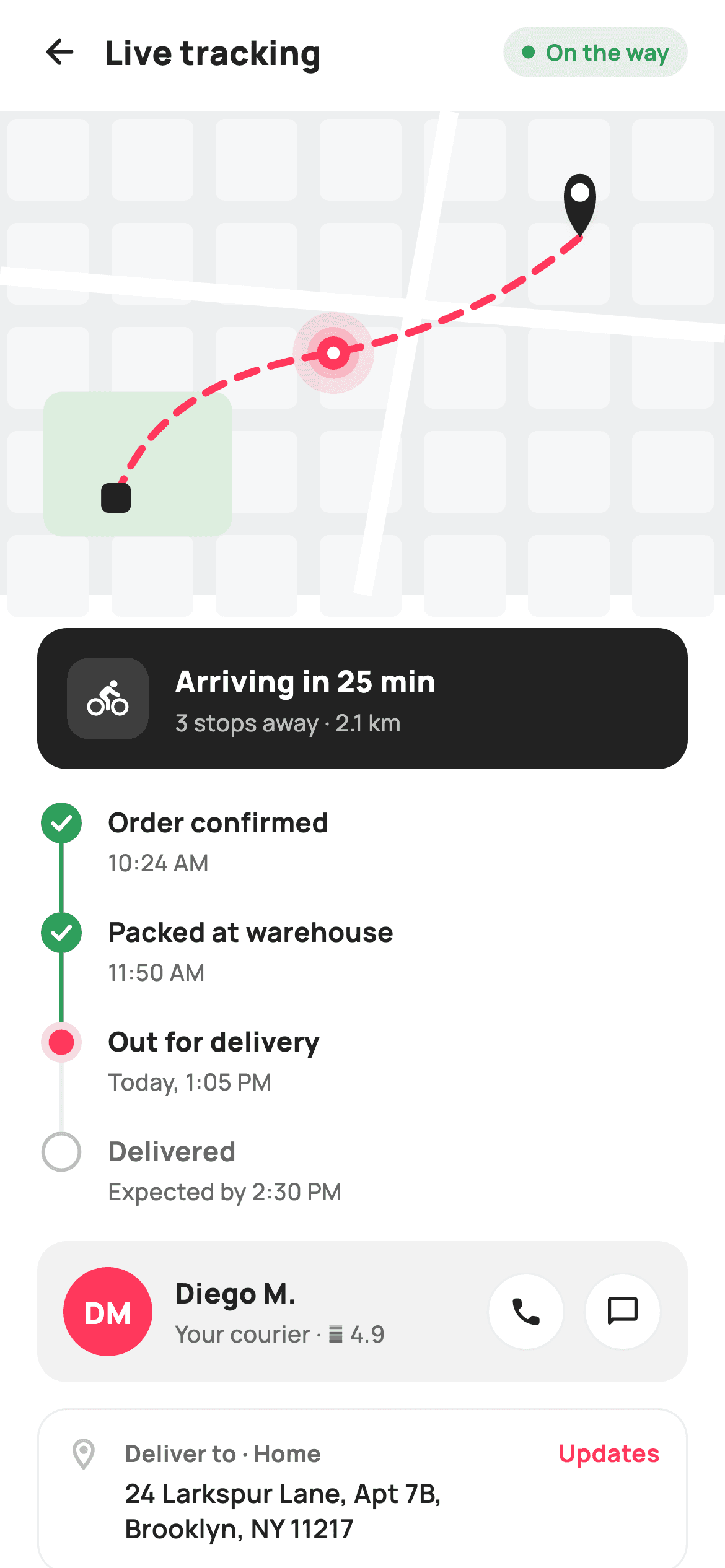
Delivery tracking usually means a Google Maps SDK, an API key, and a billing account. This screen paints the map instead — a tinted ground, a rounded block grid, two white roads, a dashed brand-red route, a pulsing courier marker and a teardrop destination pin — all on `Canvas`, with no key, no network, and no per-load cost. Below it sits a proper vertical stepper whose connector lines are painted to span each row exactly, plus an ETA banner, a courier card, and the delivery address.
Watch the Flutter UI walkthrough
A short screen recording of Live order tracking running, if you'd rather see it before you read the code. The written tutorial below covers everything in it.
Can't see the video? Watch it on YouTube.
What you'll build
- ✓A stylised city map drawn entirely with `CustomPainter` — no maps SDK, API key, or network call
- ✓A dashed route line built with `Path.computeMetrics()` and `extractPath`, the standard way to dash any path in Flutter
- ✓A three-state vertical stepper (done / active / todo) whose connectors stretch with the text via `IntrinsicHeight`
- ✓A concentric-circle pulse marker for the courier and a shadowed teardrop pin for the destination
- ✓An inverted dark ETA banner, a monogram-avatar courier card with call/chat buttons, and a live status chip
Step-by-step build
Create the file
Add a new file at lib/ecom_order_tracking/ecom_order_tracking_screen.dart in your Flutter project.
Register the bundled fonts
No external packages — this is pure Flutter. It does bundle its design font (Manrope), so drop the font file into fonts/ and declare it in pubspec.yaml:
flutter:
  fonts:
    - family: Manrope
      fonts:
- asset: fonts/Manrope-Regular.ttfBuild it, piece by piece
Here's how the screen goes together. Each block below is a real slice of the code with a plain-English explanation — paste them in order, or grab the whole file from the next section.
Stages as data, and a live status chip
class EcomOrderTrackingScreen extends StatelessWidget {
  const EcomOrderTrackingScreen({
    super.key,
    this.onBack,
    this.onUpdates,
    this.onCall,
    this.onChat,
  });

  final VoidCallback? onBack;
  final VoidCallback? onUpdates;
  final VoidCallback? onCall;
  final VoidCallback? onChat;

  static const String _font = 'Manrope';
  static const Color _canvas = Color(0xFFFFFFFF);
  static const Color _ink = Color(0xFF222222);
  static const Color _muted = Color(0xFF6A6A6A);
  static const Color _faint = Color(0xFFC1C1C1);
  static const Color _brand = Color(0xFFFF385C);
  static const Color _surface = Color(0xFFF2F2F2);
  static const Color _success = Color(0xFF2E9E5B);
  static const Color _hairline = Color(0xFFEBEBEB);

  static const List<_Stage> _stages = <_Stage>[
    _Stage('Order confirmed', '10:24 AM', _StageState.done),
    _Stage('Packed at warehouse', '11:50 AM', _StageState.done),
    _Stage('Out for delivery', 'Today, 1:05 PM', _StageState.active),
    _Stage('Delivered', 'Expected by 2:30 PM', _StageState.todo),
  ];

  @override
  Widget build(BuildContext context) {
    return Theme(
      data: ThemeData.light(useMaterial3: true),
      child: Scaffold(
        backgroundColor: _canvas,
        body: SafeArea(
          child: Column(
            children: <Widget>[
              _header(),
              Expanded(
                child: ListView(
                  padding: EdgeInsets.zero,
                  children: <Widget>[
                    _map(),
                    Padding(
                      padding: const EdgeInsets.fromLTRB(20, 18, 20, 20),
                      child: Column(
                        crossAxisAlignment: CrossAxisAlignment.start,
                        children: <Widget>[
                          _etaBanner(),
                          const SizedBox(height: 18),
                          _stepper(),
                          const SizedBox(height: 18),
                          _courierCard(),
                          const SizedBox(height: 14),
                          _addressCard(),
                        ],
                      ),
                    ),
                  ],
                ),
              ),
            ],
          ),
        ),
      ),
    );
  }

  Widget _header() {
    return Padding(
      padding: const EdgeInsets.fromLTRB(8, 4, 20, 8),
      child: Row(
        children: <Widget>[
          IconButton(
            onPressed: onBack,
            icon: const Icon(Icons.arrow_back_rounded, size: 22, color: _ink),
          ),
          const Text(
            'Live tracking',
            style: TextStyle(
              fontFamily: _font,
              fontSize: 18,
              fontWeight: FontWeight.w800,
              color: _ink,
            ),
          ),
          const Spacer(),
          Container(
            padding: const EdgeInsets.symmetric(horizontal: 10, vertical: 5),
            decoration: BoxDecoration(
              color: _success.withValues(alpha: 0.12),
              borderRadius: BorderRadius.circular(20),
            ),
            child: Row(
              mainAxisSize: MainAxisSize.min,
              children: <Widget>[
                Container(
                  width: 7,
                  height: 7,
                  decoration: const BoxDecoration(
                    color: _success,
                    shape: BoxShape.circle,
                  ),
                ),
                const SizedBox(width: 6),
                const Text(
                  'On the way',
                  style: TextStyle(
                    fontFamily: _font,
                    fontSize: 12,
                    fontWeight: FontWeight.w700,
                    color: _success,
                  ),
                ),
              ],
            ),
          ),
        ],
      ),
    );
  }
The whole screen is a `StatelessWidget` — tracking state comes from the server, so there's nothing local to mutate. The `_stages` list is the delivery timeline expressed as data: four `_Stage` records each carrying a label, a timestamp, and a `_StageState` of `done`, `active`, or `todo`. Everything the stepper draws is derived from that enum. The header's 'On the way' chip follows the tint recipe used across these screens — `_success.withValues(alpha: 0.12)` behind full-strength green — with a 7px circular dot standing in for a live indicator. `MainAxisSize.min` on its inner `Row` is what lets the chip hug its text instead of stretching.
The ETA banner and courier card
  Widget _map() {
    return SizedBox(
      height: 260,
      child: CustomPaint(painter: _DeliveryMapPainter(), size: Size.infinite),
    );
  }

  Widget _etaBanner() {
    return Container(
      padding: const EdgeInsets.all(16),
      decoration: BoxDecoration(
        color: _ink,
        borderRadius: BorderRadius.circular(16),
      ),
      child: Row(
        children: <Widget>[
          Container(
            width: 44,
            height: 44,
            decoration: BoxDecoration(
              color: _canvas.withValues(alpha: 0.12),
              borderRadius: BorderRadius.circular(12),
            ),
            child: const Icon(Icons.directions_bike_rounded,
                size: 22, color: _canvas),
          ),
          const SizedBox(width: 14),
          const Expanded(
            child: Column(
              crossAxisAlignment: CrossAxisAlignment.start,
              children: <Widget>[
                Text(
                  'Arriving in 25 min',
                  style: TextStyle(
                    fontFamily: _font,
                    fontSize: 16,
                    fontWeight: FontWeight.w800,
                    color: _canvas,
                  ),
                ),
                SizedBox(height: 2),
                Text(
                  '3 stops away · 2.1 km',
                  style: TextStyle(
                    fontFamily: _font,
                    fontSize: 12.5,
                    fontWeight: FontWeight.w500,
                    color: Color(0xFFBFBFBF),
                  ),
                ),
              ],
            ),
          ),
        ],
      ),
    );
  }

  Widget _stepper() {
    return Column(
      children: <Widget>[
        for (int i = 0; i < _stages.length; i++)
          _StageTile(stage: _stages[i], isLast: i == _stages.length - 1),
      ],
    );
  }

  Widget _courierCard() {
    return Container(
      padding: const EdgeInsets.all(14),
      decoration: BoxDecoration(
        color: _surface,
        borderRadius: BorderRadius.circular(16),
      ),
      child: Row(
        children: <Widget>[
          Container(
            width: 48,
            height: 48,
            decoration: const BoxDecoration(
              color: _brand,
              shape: BoxShape.circle,
            ),
            child: const Center(
              child: Text(
                'DM',
                style: TextStyle(
                  fontFamily: _font,
                  fontSize: 16,
                  fontWeight: FontWeight.w800,
                  color: _canvas,
                ),
              ),
            ),
          ),
          const SizedBox(width: 12),
          const Expanded(
            child: Column(
              crossAxisAlignment: CrossAxisAlignment.start,
              children: <Widget>[
                Text(
                  'Diego M.',
                  style: TextStyle(
                    fontFamily: _font,
                    fontSize: 15,
                    fontWeight: FontWeight.w800,
                    color: _ink,
                  ),
                ),
                SizedBox(height: 2),
                Text(
                  'Your courier · ★ 4.9',
                  style: TextStyle(
                    fontFamily: _font,
                    fontSize: 12.5,
                    fontWeight: FontWeight.w500,
                    color: _muted,
                  ),
                ),
              ],
            ),
          ),
          _roundBtn(Icons.call_rounded, onCall),
          const SizedBox(width: 10),
          _roundBtn(Icons.chat_bubble_outline_rounded, onChat),
        ],
      ),
    );
  }

  Widget _roundBtn(IconData icon, VoidCallback? onTap) {
    return GestureDetector(
      onTap: onTap,
      child: Container(
        width: 42,
        height: 42,
        decoration: BoxDecoration(
          color: _canvas,
          shape: BoxShape.circle,
          border: Border.all(color: _hairline),
        ),
        child: Icon(icon, size: 19, color: _ink),
      ),
    );
  }
The map is just a 260px `SizedBox` around a `CustomPaint` with `size: Size.infinite`, telling the painter to fill whatever box it's given. The ETA banner inverts the palette — a solid `_ink` card with white text — so the single most important fact on the screen ('Arriving in 25 min') is the highest-contrast element. Its icon tile uses `_canvas.withValues(alpha: 0.12)`, a translucent white that picks up the dark background rather than a hard-coded grey. The courier avatar is a monogram: 'DM' centred in a brand-red circle, which is how you show a person with no photo to load. Two `_roundBtn` circles handle call and chat, and because the text column is `Expanded`, they stay pinned to the trailing edge whatever the name's length.
A stepper row that can't misalign
class _StageTile extends StatelessWidget {
  const _StageTile({required this.stage, required this.isLast});

  final _Stage stage;
  final bool isLast;

  static const String _font = 'Manrope';
  static const Color _ink = Color(0xFF222222);
  static const Color _muted = Color(0xFF6A6A6A);

  @override
  Widget build(BuildContext context) {
    final bool done = stage.state == _StageState.done;
    final bool active = stage.state == _StageState.active;
    return IntrinsicHeight(
      child: Row(
        crossAxisAlignment: CrossAxisAlignment.stretch,
        children: <Widget>[
          SizedBox(
            width: 26,
            child: CustomPaint(
              painter: _NodePainter(
                state: stage.state,
                isLast: isLast,
              ),
            ),
          ),
          const SizedBox(width: 12),
          Padding(
            padding: EdgeInsets.only(bottom: isLast ? 0 : 18),
            child: Column(
              crossAxisAlignment: CrossAxisAlignment.start,
              children: <Widget>[
                Text(
                  stage.label,
                  style: TextStyle(
                    fontFamily: _font,
                    fontSize: 14.5,
                    fontWeight: active ? FontWeight.w800 : FontWeight.w700,
                    color: (done || active) ? _ink : _muted,
                  ),
                ),
                const SizedBox(height: 2),
                Text(
                  stage.sub,
                  style: const TextStyle(
                    fontFamily: _font,
                    fontSize: 12.5,
                    fontWeight: FontWeight.w500,
                    color: _muted,
                  ),
                ),
              ],
            ),
          ),
        ],
      ),
    );
  }
}
`_StageTile` solves the classic stepper problem — the connector line has to reach from this node down to the next one, but the row's height depends on its text. `IntrinsicHeight` with `crossAxisAlignment: CrossAxisAlignment.stretch` forces the 26px-wide painter column to match the text column's height exactly, so the painter can simply draw down to `size.height` and always land right. The label's styling is derived from the state too: `w800` when active versus `w700` otherwise, and `_ink` for done or active but `_muted` for upcoming — so a glance down the column tells you where the parcel is. The trailing padding of 18px is skipped on the last row, which is what closes the timeline cleanly.
Three node styles from one enum
class _NodePainter extends CustomPainter {
  const _NodePainter({required this.state, required this.isLast});

  final _StageState state;
  final bool isLast;

  static const Color _brand = Color(0xFFFF385C);
  static const Color _success = Color(0xFF2E9E5B);
  static const Color _faint = Color(0xFFC1C1C1);
  static const Color _hairline = Color(0xFFEBEBEB);
  static const Color _canvas = Color(0xFFFFFFFF);

  @override
  void paint(Canvas canvas, Size size) {
    final double cx = size.width / 2;
    const double cy = 11;
    const double r = 11;

    // Connector below the node.
    if (!isLast) {
      canvas.drawLine(
        Offset(cx, cy + r),
        Offset(cx, size.height),
        Paint()
          ..color = state == _StageState.done ? _success : _hairline
          ..strokeWidth = 2.4,
      );
    }

    final Offset c = Offset(cx, cy);
    switch (state) {
      case _StageState.done:
        canvas.drawCircle(c, r, Paint()..color = _success);
        final Path check = Path()
          ..moveTo(cx - 4.5, cy + 0.2)
          ..lineTo(cx - 1.2, cy + 3.4)
          ..lineTo(cx + 4.6, cy - 3.2);
        canvas.drawPath(
          check,
          Paint()
            ..style = PaintingStyle.stroke
            ..strokeWidth = 2.2
            ..strokeCap = StrokeCap.round
            ..strokeJoin = StrokeJoin.round
            ..color = _canvas,
        );
        break;
      case _StageState.active:
        canvas.drawCircle(c, r, Paint()..color = _brand.withValues(alpha: 0.18));
        canvas.drawCircle(c, r * 0.62, Paint()..color = _brand);
        break;
      case _StageState.todo:
        canvas.drawCircle(c, r, Paint()..color = _canvas);
        canvas.drawCircle(
          c,
          r - 1.2,
          Paint()
            ..style = PaintingStyle.stroke
            ..strokeWidth = 2
            ..color = _faint,
        );
        break;
    }
  }

  @override
  bool shouldRepaint(_NodePainter old) =>
      old.state != state || old.isLast != isLast;
}
`_NodePainter` draws the connector first so the node circle paints over its top edge. The connector colour is itself a signal — green for a completed leg, `_hairline` grey for anything after — and it's skipped entirely when `isLast`. Then a `switch` on the state draws one of three marks: `done` is a filled green circle with a three-point white check stroked at 2.2px with rounded caps; `active` is two concentric brand-red circles, an 18%-alpha halo at radius 11 and a solid core at `r * 0.62`, giving a target-like emphasis; `todo` is a white disc with a 2px `_faint` ring, so upcoming steps read as hollow. Note `cy` and `r` are both fixed at 11, which is what keeps every node vertically aligned no matter how tall its row grows.
Painting a city map
class _DeliveryMapPainter extends CustomPainter {
  const _DeliveryMapPainter();

  static const Color _brand = Color(0xFFFF385C);

  @override
  void paint(Canvas canvas, Size size) {
    final double w = size.width;
    final double h = size.height;

    canvas.drawRect(
        Offset.zero & size, Paint()..color = const Color(0xFFEDEEF0));

    // Block grid.
    final Paint block = Paint()..color = const Color(0xFFF6F7F8);
    const double g = 56;
    for (double y = 0; y < h; y += g) {
      for (double x = 0; x < w; x += g) {
        canvas.drawRRect(
          RRect.fromRectAndRadius(
            Rect.fromLTWH(x + 4, y + 4, g - 12, g - 12),
            const Radius.circular(5),
          ),
          block,
        );
      }
    }

    // A faint park patch.
    canvas.drawRRect(
      RRect.fromRectAndRadius(
        Rect.fromLTWH(w * 0.06, h * 0.58, w * 0.26, h * 0.3),
        const Radius.circular(10),
      ),
      Paint()..color = const Color(0xFFDDEEDF),
    );

    // Roads.
    final Paint road = Paint()
      ..color = const Color(0xFFFFFFFF)
      ..strokeWidth = 10;
    canvas.drawLine(Offset(0, h * 0.34), Offset(w, h * 0.46), road);
    canvas.drawLine(Offset(w * 0.62, 0), Offset(w * 0.5, h), road);

    // Route: store -> courier -> destination.
    final Offset store = Offset(w * 0.16, h * 0.8);
    final Offset courier = Offset(w * 0.46, h * 0.5);
    final Offset dest = Offset(w * 0.8, h * 0.26);
    final Path route = Path()
      ..moveTo(store.dx, store.dy)
      ..quadraticBezierTo(w * 0.22, h * 0.55, courier.dx, courier.dy)
      ..quadraticBezierTo(w * 0.66, h * 0.44, dest.dx, dest.dy);

    // Dashed route line.
    final Paint routePaint = Paint()
      ..style = PaintingStyle.stroke
      ..strokeWidth = 4
      ..strokeCap = StrokeCap.round
      ..color = _brand;
    _drawDashed(canvas, route, routePaint, 11, 8);

    // Store marker (small square).
    canvas.drawRRect(
      RRect.fromRectAndRadius(
        Rect.fromCenter(center: store, width: 16, height: 16),
        const Radius.circular(4),
      ),
      Paint()..color = const Color(0xFF222222),
    );

    // Courier pulse + marker.
    canvas.drawCircle(courier, 22, Paint()..color = _brand.withValues(alpha: 0.12));
    canvas.drawCircle(courier, 14, Paint()..color = _brand.withValues(alpha: 0.22));
    canvas.drawCircle(courier, 9, Paint()..color = _brand);
    canvas.drawCircle(courier, 3.4, Paint()..color = const Color(0xFFFFFFFF));

    // Destination pin (teardrop).
    _drawPin(canvas, dest);
  }
The map builds up in layers. A flat #EDEEF0 rect is the ground, then a nested loop steps `g = 56` pixels in both directions drawing rounded rects inset by 4px and shrunk by 12 — the gaps between them become the streets, which is why the grid reads as city blocks without drawing a single street. A green `RRect` adds a park. Two thick white `drawLine` calls are the main roads, drawn at slight angles so the map doesn't look like graph paper. The route is a `Path` of two `quadraticBezierTo` segments from store to courier to destination — quadratic curves need just one control point each, which is enough for a road-like bend. The courier marker is four concentric circles at 12%, 22%, full brand, then a white centre dot: a static rendering of a pulse, which stays deterministic for screenshot tests.
The dashed-line helper and the map pin
  void _drawPin(Canvas canvas, Offset tip) {
    final Path pin = Path()
      ..moveTo(tip.dx, tip.dy)
      ..cubicTo(tip.dx - 13, tip.dy - 16, tip.dx - 10, tip.dy - 34,
          tip.dx, tip.dy - 34)
      ..cubicTo(tip.dx + 10, tip.dy - 34, tip.dx + 13, tip.dy - 16, tip.dx,
          tip.dy);
    canvas.drawShadow(pin, const Color(0x33000000), 3, false);
    canvas.drawPath(pin, Paint()..color = const Color(0xFF222222));
    canvas.drawCircle(
        Offset(tip.dx, tip.dy - 24), 5, Paint()..color = const Color(0xFFFFFFFF));
  }

  void _drawDashed(
      Canvas canvas, Path path, Paint paint, double dash, double gap) {
    for (final m in path.computeMetrics()) {
      double d = 0;
      while (d < m.length) {
        final double next = d + dash;
        canvas.drawPath(
          m.extractPath(d, next.clamp(0, m.length)),
          paint,
        );
        d = next + gap;
      }
    }
  }

  @override
  bool shouldRepaint(_DeliveryMapPainter oldDelegate) => false;
`_drawDashed` is the reusable piece here, because Flutter's `Paint` has no dash property. It walks the path's `computeMetrics()` — each metric knowing its own `length` — and repeatedly calls `m.extractPath(d, next)` to cut out a `dash`-long segment, then skips forward by `gap`. Clamping `next` to `m.length` prevents an over-run on the final dash. Drop this method into any project and you can dash any path at all, curves included. `_drawPin` builds a teardrop from two mirrored `cubicTo` curves that start and end at the tip, and calls `canvas.drawShadow` before filling — that's Flutter's built-in path shadow, which lifts the pin off the map far more convincingly than a second offset copy of the shape.
Full code
The complete, ready-to-paste source. Free to use in your projects — one click copies it all.
import 'package:flutter/material.dart';
/// StyleCart — Live Tracking.
///
/// The real-time delivery view: a painted city map with the courier’s route, a
/// pulsing courier marker and the destination pin; an ETA banner; a compact
/// vertical status stepper; a courier card (monogram avatar, call / chat); and
/// the delivery address.
///
/// Self-contained per CONVENTIONS.md: pure Flutter, bundled Manrope, inline
/// Airbnb-style tokens, own light theme + SafeArea. The map and stepper nodes
/// are CustomPainters (no emoji glyph, no network). Exposes callbacks only.
class EcomOrderTrackingScreen extends StatelessWidget {
const EcomOrderTrackingScreen({
super.key,
this.onBack,
this.onUpdates,
this.onCall,
this.onChat,
});
final VoidCallback? onBack;
final VoidCallback? onUpdates;
final VoidCallback? onCall;
final VoidCallback? onChat;
static const String _font = 'Manrope';
static const Color _canvas = Color(0xFFFFFFFF);
static const Color _ink = Color(0xFF222222);
static const Color _muted = Color(0xFF6A6A6A);
static const Color _faint = Color(0xFFC1C1C1);
static const Color _brand = Color(0xFFFF385C);
static const Color _surface = Color(0xFFF2F2F2);
static const Color _success = Color(0xFF2E9E5B);
static const Color _hairline = Color(0xFFEBEBEB);
static const List<_Stage> _stages = <_Stage>[
_Stage('Order confirmed', '10:24 AM', _StageState.done),
_Stage('Packed at warehouse', '11:50 AM', _StageState.done),
_Stage('Out for delivery', 'Today, 1:05 PM', _StageState.active),
_Stage('Delivered', 'Expected by 2:30 PM', _StageState.todo),
];
@override
Widget build(BuildContext context) {
return Theme(
data: ThemeData.light(useMaterial3: true),
child: Scaffold(
backgroundColor: _canvas,
body: SafeArea(
child: Column(
children: <Widget>[
_header(),
Expanded(
child: ListView(
padding: EdgeInsets.zero,
children: <Widget>[
_map(),
Padding(
padding: const EdgeInsets.fromLTRB(20, 18, 20, 20),
child: Column(
crossAxisAlignment: CrossAxisAlignment.start,
children: <Widget>[
_etaBanner(),
const SizedBox(height: 18),
_stepper(),
const SizedBox(height: 18),
_courierCard(),
const SizedBox(height: 14),
_addressCard(),
],
),
),
],
),
),
],
),
),
),
);
}
Widget _header() {
return Padding(
padding: const EdgeInsets.fromLTRB(8, 4, 20, 8),
child: Row(
children: <Widget>[
IconButton(
onPressed: onBack,
icon: const Icon(Icons.arrow_back_rounded, size: 22, color: _ink),
),
const Text(
'Live tracking',
style: TextStyle(
fontFamily: _font,
fontSize: 18,
fontWeight: FontWeight.w800,
color: _ink,
),
),
const Spacer(),
Container(
padding: const EdgeInsets.symmetric(horizontal: 10, vertical: 5),
decoration: BoxDecoration(
color: _success.withValues(alpha: 0.12),
borderRadius: BorderRadius.circular(20),
),
child: Row(
mainAxisSize: MainAxisSize.min,
children: <Widget>[
Container(
width: 7,
height: 7,
decoration: const BoxDecoration(
color: _success,
shape: BoxShape.circle,
),
),
const SizedBox(width: 6),
const Text(
'On the way',
style: TextStyle(
fontFamily: _font,
fontSize: 12,
fontWeight: FontWeight.w700,
color: _success,
),
),
],
),
),
],
),
);
}
Widget _map() {
return SizedBox(
height: 260,
child: CustomPaint(painter: _DeliveryMapPainter(), size: Size.infinite),
);
}
Widget _etaBanner() {
return Container(
padding: const EdgeInsets.all(16),
decoration: BoxDecoration(
color: _ink,
borderRadius: BorderRadius.circular(16),
),
child: Row(
children: <Widget>[
Container(
width: 44,
height: 44,
decoration: BoxDecoration(
color: _canvas.withValues(alpha: 0.12),
borderRadius: BorderRadius.circular(12),
),
child: const Icon(Icons.directions_bike_rounded,
size: 22, color: _canvas),
),
const SizedBox(width: 14),
const Expanded(
child: Column(
crossAxisAlignment: CrossAxisAlignment.start,
children: <Widget>[
Text(
'Arriving in 25 min',
style: TextStyle(
fontFamily: _font,
fontSize: 16,
fontWeight: FontWeight.w800,
color: _canvas,
),
),
SizedBox(height: 2),
Text(
'3 stops away · 2.1 km',
style: TextStyle(
fontFamily: _font,
fontSize: 12.5,
fontWeight: FontWeight.w500,
color: Color(0xFFBFBFBF),
),
),
],
),
),
],
),
);
}
Widget _stepper() {
return Column(
children: <Widget>[
for (int i = 0; i < _stages.length; i++)
_StageTile(stage: _stages[i], isLast: i == _stages.length - 1),
],
);
}
Widget _courierCard() {
return Container(
padding: const EdgeInsets.all(14),
decoration: BoxDecoration(
color: _surface,
borderRadius: BorderRadius.circular(16),
),
child: Row(
children: <Widget>[
Container(
width: 48,
height: 48,
decoration: const BoxDecoration(
color: _brand,
shape: BoxShape.circle,
),
child: const Center(
child: Text(
'DM',
style: TextStyle(
fontFamily: _font,
fontSize: 16,
fontWeight: FontWeight.w800,
color: _canvas,
),
),
),
),
const SizedBox(width: 12),
const Expanded(
child: Column(
crossAxisAlignment: CrossAxisAlignment.start,
children: <Widget>[
Text(
'Diego M.',
style: TextStyle(
fontFamily: _font,
fontSize: 15,
fontWeight: FontWeight.w800,
color: _ink,
),
),
SizedBox(height: 2),
Text(
'Your courier · ★ 4.9',
style: TextStyle(
fontFamily: _font,
fontSize: 12.5,
fontWeight: FontWeight.w500,
color: _muted,
),
),
],
),
),
_roundBtn(Icons.call_rounded, onCall),
const SizedBox(width: 10),
_roundBtn(Icons.chat_bubble_outline_rounded, onChat),
],
),
);
}
Widget _roundBtn(IconData icon, VoidCallback? onTap) {
return GestureDetector(
onTap: onTap,
child: Container(
width: 42,
height: 42,
decoration: BoxDecoration(
color: _canvas,
shape: BoxShape.circle,
border: Border.all(color: _hairline),
),
child: Icon(icon, size: 19, color: _ink),
),
);
}
Widget _addressCard() {
return Container(
padding: const EdgeInsets.all(14),
decoration: BoxDecoration(
color: _canvas,
borderRadius: BorderRadius.circular(16),
border: Border.all(color: _hairline),
),
child: Row(
crossAxisAlignment: CrossAxisAlignment.start,
children: <Widget>[
const Icon(Icons.location_on_outlined, size: 20, color: _faint),
const SizedBox(width: 12),
const Expanded(
child: Column(
crossAxisAlignment: CrossAxisAlignment.start,
children: <Widget>[
Text(
'Deliver to · Home',
style: TextStyle(
fontFamily: _font,
fontSize: 12.5,
fontWeight: FontWeight.w700,
color: _muted,
),
),
SizedBox(height: 3),
Text(
'24 Larkspur Lane, Apt 7B, Brooklyn, NY 11217',
style: TextStyle(
fontFamily: _font,
fontSize: 14,
fontWeight: FontWeight.w600,
height: 1.35,
color: _ink,
),
),
],
),
),
GestureDetector(
onTap: onUpdates,
child: const Text(
'Updates',
style: TextStyle(
fontFamily: _font,
fontSize: 13,
fontWeight: FontWeight.w700,
color: _brand,
),
),
),
],
),
);
}
}
enum _StageState { done, active, todo }
class _Stage {
const _Stage(this.label, this.sub, this.state);
final String label;
final String sub;
final _StageState state;
}
/// One row of the vertical stepper: a painted node + connector on the left and
/// the label/time on the right. Uses IntrinsicHeight so the connector spans the
/// row regardless of text height (overflow-proof).
class _StageTile extends StatelessWidget {
const _StageTile({required this.stage, required this.isLast});
final _Stage stage;
final bool isLast;
static const String _font = 'Manrope';
static const Color _ink = Color(0xFF222222);
static const Color _muted = Color(0xFF6A6A6A);
@override
Widget build(BuildContext context) {
final bool done = stage.state == _StageState.done;
final bool active = stage.state == _StageState.active;
return IntrinsicHeight(
child: Row(
crossAxisAlignment: CrossAxisAlignment.stretch,
children: <Widget>[
SizedBox(
width: 26,
child: CustomPaint(
painter: _NodePainter(
state: stage.state,
isLast: isLast,
),
),
),
const SizedBox(width: 12),
Padding(
padding: EdgeInsets.only(bottom: isLast ? 0 : 18),
child: Column(
crossAxisAlignment: CrossAxisAlignment.start,
children: <Widget>[
Text(
stage.label,
style: TextStyle(
fontFamily: _font,
fontSize: 14.5,
fontWeight: active ? FontWeight.w800 : FontWeight.w700,
color: (done || active) ? _ink : _muted,
),
),
const SizedBox(height: 2),
Text(
stage.sub,
style: const TextStyle(
fontFamily: _font,
fontSize: 12.5,
fontWeight: FontWeight.w500,
color: _muted,
),
),
],
),
),
],
),
);
}
}
/// Paints a stepper node (filled check when done, ringed brand dot when active,
/// hollow faint dot when upcoming) plus the connector line below it.
class _NodePainter extends CustomPainter {
const _NodePainter({required this.state, required this.isLast});
final _StageState state;
final bool isLast;
static const Color _brand = Color(0xFFFF385C);
static const Color _success = Color(0xFF2E9E5B);
static const Color _faint = Color(0xFFC1C1C1);
static const Color _hairline = Color(0xFFEBEBEB);
static const Color _canvas = Color(0xFFFFFFFF);
@override
void paint(Canvas canvas, Size size) {
final double cx = size.width / 2;
const double cy = 11;
const double r = 11;
// Connector below the node.
if (!isLast) {
canvas.drawLine(
Offset(cx, cy + r),
Offset(cx, size.height),
Paint()
..color = state == _StageState.done ? _success : _hairline
..strokeWidth = 2.4,
);
}
final Offset c = Offset(cx, cy);
switch (state) {
case _StageState.done:
canvas.drawCircle(c, r, Paint()..color = _success);
final Path check = Path()
..moveTo(cx - 4.5, cy + 0.2)
..lineTo(cx - 1.2, cy + 3.4)
..lineTo(cx + 4.6, cy - 3.2);
canvas.drawPath(
check,
Paint()
..style = PaintingStyle.stroke
..strokeWidth = 2.2
..strokeCap = StrokeCap.round
..strokeJoin = StrokeJoin.round
..color = _canvas,
);
break;
case _StageState.active:
canvas.drawCircle(c, r, Paint()..color = _brand.withValues(alpha: 0.18));
canvas.drawCircle(c, r * 0.62, Paint()..color = _brand);
break;
case _StageState.todo:
canvas.drawCircle(c, r, Paint()..color = _canvas);
canvas.drawCircle(
c,
r - 1.2,
Paint()
..style = PaintingStyle.stroke
..strokeWidth = 2
..color = _faint,
);
break;
}
}
@override
bool shouldRepaint(_NodePainter old) =>
old.state != state || old.isLast != isLast;
}
/// Paints a stylised city map: a tinted ground, a soft block grid, two main
/// roads, a dashed delivery route from the store to the destination, a pulsing
/// courier marker mid-route and a destination pin.
class _DeliveryMapPainter extends CustomPainter {
const _DeliveryMapPainter();
static const Color _brand = Color(0xFFFF385C);
@override
void paint(Canvas canvas, Size size) {
final double w = size.width;
final double h = size.height;
canvas.drawRect(
Offset.zero & size, Paint()..color = const Color(0xFFEDEEF0));
// Block grid.
final Paint block = Paint()..color = const Color(0xFFF6F7F8);
const double g = 56;
for (double y = 0; y < h; y += g) {
for (double x = 0; x < w; x += g) {
canvas.drawRRect(
RRect.fromRectAndRadius(
Rect.fromLTWH(x + 4, y + 4, g - 12, g - 12),
const Radius.circular(5),
),
block,
);
}
}
// A faint park patch.
canvas.drawRRect(
RRect.fromRectAndRadius(
Rect.fromLTWH(w * 0.06, h * 0.58, w * 0.26, h * 0.3),
const Radius.circular(10),
),
Paint()..color = const Color(0xFFDDEEDF),
);
// Roads.
final Paint road = Paint()
..color = const Color(0xFFFFFFFF)
..strokeWidth = 10;
canvas.drawLine(Offset(0, h * 0.34), Offset(w, h * 0.46), road);
canvas.drawLine(Offset(w * 0.62, 0), Offset(w * 0.5, h), road);
// Route: store -> courier -> destination.
final Offset store = Offset(w * 0.16, h * 0.8);
final Offset courier = Offset(w * 0.46, h * 0.5);
final Offset dest = Offset(w * 0.8, h * 0.26);
final Path route = Path()
..moveTo(store.dx, store.dy)
..quadraticBezierTo(w * 0.22, h * 0.55, courier.dx, courier.dy)
..quadraticBezierTo(w * 0.66, h * 0.44, dest.dx, dest.dy);
// Dashed route line.
final Paint routePaint = Paint()
..style = PaintingStyle.stroke
..strokeWidth = 4
..strokeCap = StrokeCap.round
..color = _brand;
_drawDashed(canvas, route, routePaint, 11, 8);
// Store marker (small square).
canvas.drawRRect(
RRect.fromRectAndRadius(
Rect.fromCenter(center: store, width: 16, height: 16),
const Radius.circular(4),
),
Paint()..color = const Color(0xFF222222),
);
// Courier pulse + marker.
canvas.drawCircle(courier, 22, Paint()..color = _brand.withValues(alpha: 0.12));
canvas.drawCircle(courier, 14, Paint()..color = _brand.withValues(alpha: 0.22));
canvas.drawCircle(courier, 9, Paint()..color = _brand);
canvas.drawCircle(courier, 3.4, Paint()..color = const Color(0xFFFFFFFF));
// Destination pin (teardrop).
_drawPin(canvas, dest);
}
void _drawPin(Canvas canvas, Offset tip) {
final Path pin = Path()
..moveTo(tip.dx, tip.dy)
..cubicTo(tip.dx - 13, tip.dy - 16, tip.dx - 10, tip.dy - 34,
tip.dx, tip.dy - 34)
..cubicTo(tip.dx + 10, tip.dy - 34, tip.dx + 13, tip.dy - 16, tip.dx,
tip.dy);
canvas.drawShadow(pin, const Color(0x33000000), 3, false);
canvas.drawPath(pin, Paint()..color = const Color(0xFF222222));
canvas.drawCircle(
Offset(tip.dx, tip.dy - 24), 5, Paint()..color = const Color(0xFFFFFFFF));
}
void _drawDashed(
Canvas canvas, Path path, Paint paint, double dash, double gap) {
for (final m in path.computeMetrics()) {
double d = 0;
while (d < m.length) {
final double next = d + dash;
canvas.drawPath(
m.extractPath(d, next.clamp(0, m.length)),
paint,
);
d = next + gap;
}
}
}
@override
bool shouldRepaint(_DeliveryMapPainter oldDelegate) => false;
}
Plus bundled 5 binary assets (fonts/images). The CLI and MCP install those for you automatically.
Two faster ways to add it
Copy-paste works, but you can skip it entirely.
1. FlutterKit CLI
One command drops this screen — and its fonts — straight into your project.
$ flutterkit add ecom-order-tracking2. AI agent (MCP)
Connect FlutterKit's MCP server in Claude or Cursor and just ask your agent to install ecom-order-tracking — it fetches and writes the files for you.
FAQ
Is this order tracking screen free to use?
Yes. The complete Dart source on this page is free for personal and commercial apps. Copy it from the code block, install it with the FlutterKit CLI (flutterkit add ecom-order-tracking), or add it via an AI agent over MCP.
Does it use Google Maps or need an API key?
No. The map is a CustomPainter drawing a stylised city — ground, blocks, roads, route, and markers — so there's no google_maps_flutter dependency, no API key, no billing, and no network request. The only asset to register is the bundled Manrope font family.
Can I swap in a real map later?
Yes, and the seam is clean: _map() is a single 260px SizedBox. Replace its CustomPaint with a GoogleMap or flutter_map widget and everything below — the ETA banner, stepper, courier card, and address — keeps working untouched.
How do I drive the stepper from a real order status?
Build the _stages list from your API response, marking completed legs done, the current one active, and the rest todo. The node art, the connector colours, and the label weights are all derived from that enum, so nothing else needs changing.
Which Flutter version does it target?
It uses Color.withValues(alpha:) and Material 3, so it targets Flutter 3.27+. On an older SDK, replace each withValues(alpha: x) call with withOpacity(x) and it compiles back to Flutter 3.10.


