How to Build a Modify Order Screen in Flutter (Full Code + Preview)
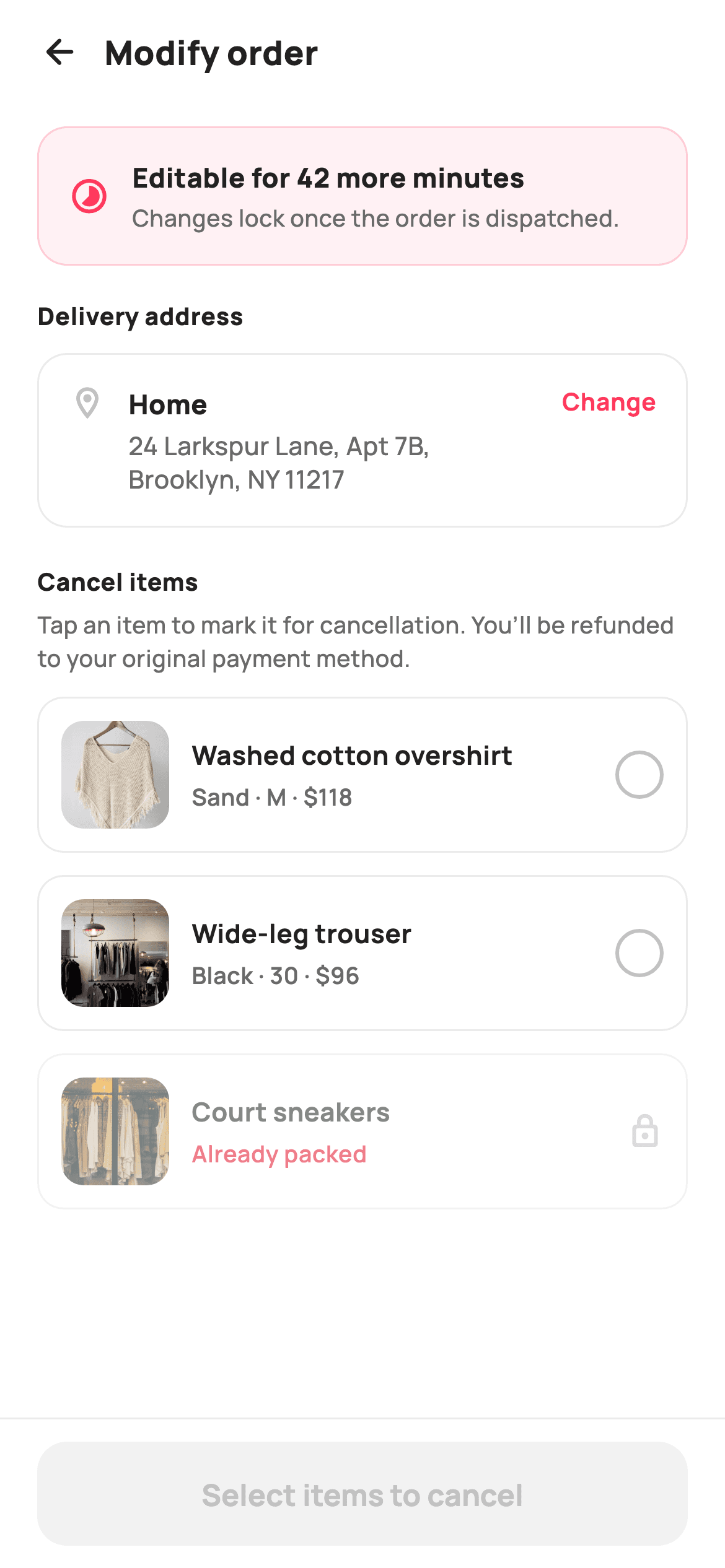
Between payment and dispatch there is a short window where a shopper can still fix an order — a wrong address, one item they no longer want — and an app that closes that window sends them to support instead. This tutorial builds StyleCart's modify-order screen in Flutter: a tinted banner stating how long edits stay open, a tappable delivery-address card, an item list where a tap marks a product for cancellation while an already-packed one stays locked, and a pinned bar that tallies the refund live.
Watch the Flutter UI walkthrough
A short screen recording of Modify Order running, if you'd rather see it before you read the code. The written tutorial below covers everything in it.
Can't see the video? Watch it on YouTube.
What you'll build
- ✓An eligibility banner in brand-tinted coral that states how long the placed order stays editable
- ✓A tap-to-toggle cancel list where marked rows strike through, turn red and swap their ring for a filled cross
- ✓An ineligible already-packed item dimmed to 55% opacity, tap-disabled and marked with a lock
- ✓A refund total recomputed from a Set of selected indices and named against the card that paid
- ✓A pinned confirm bar that pluralises its own label and stays disabled until something actually changes
Step-by-step build
Create the file
Add a new file at lib/ecom_order_modify/ecom_order_modify_screen.dart in your Flutter project.
Register the bundled fonts
No external packages — this is pure Flutter. It does bundle its design font (Manrope), so drop the font file into fonts/ and declare it in pubspec.yaml:
flutter:
  fonts:
    - family: Manrope
      fonts:
- asset: fonts/Manrope-Regular.ttfBuild it, piece by piece
Here's how the screen goes together. Each block below is a real slice of the code with a plain-English explanation — paste them in order, or grab the whole file from the next section.
Callbacks, tokens and the order as data
import 'package:flutter/material.dart';

/// StyleCart — Modify Order.
///
/// The pre-dispatch edit window: an eligibility banner with a countdown, a
/// change-delivery-address card, and a cancellable item list (tap to mark items
/// for cancellation, with an ineligible item shown locked). A pinned bar
/// confirms the changes and reflects the refund where items are removed.
///
/// Self-contained per CONVENTIONS.md: pure Flutter, bundled Manrope, inline
/// Airbnb-style tokens, own light theme + SafeArea, bundled webp. Exposes
/// callbacks only.
class EcomOrderModifyScreen extends StatefulWidget {
  const EcomOrderModifyScreen({
    super.key,
    this.onBack,
    this.onChangeAddress,
    this.onConfirm,
  });

  final VoidCallback? onBack;
  final VoidCallback? onChangeAddress;
  final ValueChanged<int>? onConfirm;

  @override
  State<EcomOrderModifyScreen> createState() => _EcomOrderModifyScreenState();
}

class _EcomOrderModifyScreenState extends State<EcomOrderModifyScreen> {
  static const String _font = 'Manrope';
  static const Color _canvas = Color(0xFFFFFFFF);
  static const Color _ink = Color(0xFF222222);
  static const Color _muted = Color(0xFF6A6A6A);
  static const Color _faint = Color(0xFFC1C1C1);
  static const Color _brand = Color(0xFFFF385C);
  static const Color _surface = Color(0xFFF2F2F2);
  static const Color _imageBg = Color(0xFFF5F5F5);
  static const Color _success = Color(0xFF2E9E5B);
  static const Color _danger = Color(0xFFE0162B);
  static const Color _hairline = Color(0xFFEBEBEB);

  static const String _dir = 'lib/screens/ecommerce/ecom_order_modify/images';

  static const List<_Item> _items = <_Item>[
    _Item('p01', 'Washed cotton overshirt', 'Sand · M', 118, true),
    _Item('p02', 'Wide-leg trouser', 'Black · 30', 96, true),
    _Item('p03', 'Court sneakers', 'White · 42', 95, false), // already packed
  ];
`EcomOrderModifyScreen` exposes only `onBack`, `onChangeAddress` and `onConfirm` — and `onConfirm` is a `ValueChanged<int>`, not a bare `VoidCallback`, so the screen hands the refund amount back to whatever placed the order rather than expecting the caller to recompute it. The palette keeps `_brand` coral for the still-open edit window and reserves `_danger` red strictly for removal and `_success` green for money coming back, so a shopper never has to read a label to know which way a change points. The three `_Item` records are `static const`, and the third carries `eligible: false` with an `// already packed` comment — the locked row is baked into the sample data, not a flag toggled at runtime.
Selection state and the refund getter
  final Set<int> _toCancel = <int>{};

  int get _refund {
    int r = 0;
    for (final int i in _toCancel) {
      r += _items[i].price;
    }
    return r;
  }
All mutable state is one line: `final Set<int> _toCancel = <int>{}` holding the list indices marked for removal. A Set rather than a List makes toggling idempotent — adding the same index twice cannot produce a double refund — and `contains` is what each row reads back to decide how it draws. `_refund` is a getter that loops the selected indices and sums `_items[i].price`, so the total is derived on every build instead of being incremented and decremented alongside the taps. That is the difference between a number that can drift out of sync with the checkmarks and one that cannot: unselect a row and the refund is simply recalculated from what is left.
The page skeleton and its running order
  @override
  Widget build(BuildContext context) {
    return Theme(
      data: ThemeData.light(useMaterial3: true),
      child: Scaffold(
        backgroundColor: _canvas,
        body: SafeArea(
          child: Column(
            children: <Widget>[
              _header(),
              Expanded(
                child: ListView(
                  padding: const EdgeInsets.fromLTRB(20, 8, 20, 24),
                  children: <Widget>[
                    _eligibility(),
                    const SizedBox(height: 18),
                    _sectionTitle('Delivery address'),
                    const SizedBox(height: 10),
                    _addressCard(),
                    const SizedBox(height: 20),
                    _sectionTitle('Cancel items'),
                    const SizedBox(height: 4),
                    const Text(
                      'Tap an item to mark it for cancellation. You’ll be '
                      'refunded to your original payment method.',
                      style: TextStyle(
                        fontFamily: _font,
                        fontSize: 12.5,
                        fontWeight: FontWeight.w500,
                        height: 1.4,
                        color: _muted,
                      ),
                    ),
                    const SizedBox(height: 12),
                    for (int i = 0; i < _items.length; i++) _itemRow(i),
                  ],
                ),
              ),
              _confirmBar(),
            ],
          ),
        ),
      ),
    );
  }
A local `Theme` wrapping `ThemeData.light(useMaterial3: true)` isolates the screen from the host app, so the coral and greys survive being dropped into a dark app. The body is a `Column` of three parts: `_header()`, an `Expanded` `ListView` and `_confirmBar()` — the bar sits outside the scroll view, so the refund and the confirm action stay visible while the shopper works down the item list. The ListView orders the edits by cost of getting them wrong: eligibility first, address second, cancellations last. The helper text under `Cancel items` spells out the interaction, because a row that is also a checkbox is not self-evident, and the rows are emitted by a plain `for` loop over `_items.length` so each one knows its index.
Header and the countdown eligibility banner
  Widget _header() {
    return Padding(
      padding: const EdgeInsets.fromLTRB(8, 4, 20, 8),
      child: Row(
        children: <Widget>[
          IconButton(
            onPressed: widget.onBack,
            icon: const Icon(Icons.arrow_back_rounded, size: 22, color: _ink),
          ),
          const Text(
            'Modify order',
            style: TextStyle(
              fontFamily: _font,
              fontSize: 18,
              fontWeight: FontWeight.w800,
              color: _ink,
            ),
          ),
        ],
      ),
    );
  }

  Widget _eligibility() {
    return Container(
      padding: const EdgeInsets.all(16),
      decoration: BoxDecoration(
        color: _brand.withValues(alpha: 0.07),
        borderRadius: BorderRadius.circular(16),
        border: Border.all(color: _brand.withValues(alpha: 0.2)),
      ),
      child: Row(
        children: <Widget>[
          const Icon(Icons.timelapse_rounded, size: 22, color: _brand),
          const SizedBox(width: 12),
          const Expanded(
            child: Column(
              crossAxisAlignment: CrossAxisAlignment.start,
              children: <Widget>[
                Text(
                  'Editable for 42 more minutes',
                  style: TextStyle(
                    fontFamily: _font,
                    fontSize: 14.5,
                    fontWeight: FontWeight.w800,
                    color: _ink,
                  ),
                ),
                SizedBox(height: 2),
                Text(
                  'Changes lock once the order is dispatched.',
                  style: TextStyle(
                    fontFamily: _font,
                    fontSize: 12.5,
                    fontWeight: FontWeight.w500,
                    color: _muted,
                  ),
                ),
              ],
            ),
          ),
        ],
      ),
    );
  }
The header is just a back `IconButton` and an 18px `w800` title in a Row — no actions, because every action on this screen belongs to the content. `_eligibility` is the banner that licenses the whole page: a `timelapse_rounded` icon over `_brand.withValues(alpha: 0.07)` fill with a `0.2` alpha border of the same colour, tinted rather than solid so it informs without shouting. Its headline reads 'Editable for 42 more minutes' as a literal string — there is no `Timer` here, so wiring a real countdown means passing the remaining minutes in and rebuilding. The 12.5px subline, 'Changes lock once the order is dispatched', explains why the deadline exists, which is what stops a shopper treating it as an arbitrary limit.
Section titles and the change-address card
  Widget _sectionTitle(String text) {
    return Text(
      text,
      style: const TextStyle(
        fontFamily: _font,
        fontSize: 13,
        fontWeight: FontWeight.w800,
        letterSpacing: 0.3,
        color: _ink,
      ),
    );
  }

  Widget _addressCard() {
    return GestureDetector(
      onTap: widget.onChangeAddress,
      child: Container(
        padding: const EdgeInsets.all(16),
        decoration: BoxDecoration(
          color: _canvas,
          borderRadius: BorderRadius.circular(16),
          border: Border.all(color: _hairline),
        ),
        child: Row(
          crossAxisAlignment: CrossAxisAlignment.start,
          children: <Widget>[
            const Icon(Icons.location_on_outlined, size: 20, color: _faint),
            const SizedBox(width: 12),
            const Expanded(
              child: Column(
                crossAxisAlignment: CrossAxisAlignment.start,
                children: <Widget>[
                  Text(
                    'Home',
                    style: TextStyle(
                      fontFamily: _font,
                      fontSize: 14.5,
                      fontWeight: FontWeight.w800,
                      color: _ink,
                    ),
                  ),
                  SizedBox(height: 3),
                  Text(
                    '24 Larkspur Lane, Apt 7B, Brooklyn, NY 11217',
                    style: TextStyle(
                      fontFamily: _font,
                      fontSize: 13.5,
                      fontWeight: FontWeight.w500,
                      height: 1.35,
                      color: _muted,
                    ),
                  ),
                ],
              ),
            ),
            const SizedBox(width: 8),
            const Text(
              'Change',
              style: TextStyle(
                fontFamily: _font,
                fontSize: 13,
                fontWeight: FontWeight.w700,
                color: _brand,
              ),
            ),
          ],
        ),
      ),
    );
  }
`_sectionTitle` is a one-widget helper at 13px `w800` with `letterSpacing: 0.3` — small and tracked out so it reads as a label rather than competing with the 14.5px card headings below it. `_addressCard` wraps the whole panel in a `GestureDetector` calling `onChangeAddress`, so the target is the entire 16px-padded container, not just the coral 'Change' text; that word is styling, and the tap area is the card. Inside, the Row uses `crossAxisAlignment: CrossAxisAlignment.start` so the pin icon and the 'Change' affordance stay level with 'Home' when the street address wraps to a second line at `height: 1.35`. The card keeps a white `_canvas` fill with only a `_hairline` border, leaving the tint budget for the banner above.
The tap-to-cancel item row
  Widget _itemRow(int i) {
    final _Item it = _items[i];
    final bool marked = _toCancel.contains(i);
    final bool eligible = it.eligible;

    return Opacity(
      opacity: eligible ? 1 : 0.55,
      child: GestureDetector(
        onTap: !eligible
            ? null
            : () => setState(() {
                  if (marked) {
                    _toCancel.remove(i);
                  } else {
                    _toCancel.add(i);
                  }
                }),
        child: Container(
          margin: const EdgeInsets.only(bottom: 12),
          padding: const EdgeInsets.all(12),
          decoration: BoxDecoration(
            color: marked ? _danger.withValues(alpha: 0.05) : _canvas,
            borderRadius: BorderRadius.circular(14),
            border: Border.all(
              color: marked ? _danger.withValues(alpha: 0.4) : _hairline,
              width: marked ? 1.4 : 1,
            ),
          ),
          child: Row(
            children: <Widget>[
              Container(
                width: 58,
                height: 58,
                decoration: BoxDecoration(
                  color: _imageBg,
                  borderRadius: BorderRadius.circular(12),
                ),
                child: ClipRRect(
                  borderRadius: BorderRadius.circular(12),
                  child: Image.asset('$_dir/${it.id}.webp', fit: BoxFit.cover),
                ),
              ),
              const SizedBox(width: 12),
              Expanded(
                child: Column(
                  crossAxisAlignment: CrossAxisAlignment.start,
                  children: <Widget>[
                    Text(
                      it.name,
                      maxLines: 1,
                      overflow: TextOverflow.ellipsis,
                      style: TextStyle(
                        fontFamily: _font,
                        fontSize: 14,
                        fontWeight: FontWeight.w700,
                        decoration: marked ? TextDecoration.lineThrough : null,
                        color: _ink,
                      ),
                    ),
                    const SizedBox(height: 3),
                    Text(
                      eligible ? '${it.variant} · \$${it.price}' : 'Already packed',
                      style: TextStyle(
                        fontFamily: _font,
                        fontSize: 12.5,
                        fontWeight: FontWeight.w600,
                        color: eligible ? _muted : _danger,
                      ),
                    ),
                  ],
                ),
              ),
              const SizedBox(width: 10),
              _marker(marked, eligible),
            ],
          ),
        ),
      ),
    );
  }
Each row resolves `marked` from `_toCancel.contains(i)` and `eligible` from the item itself, then lets those two booleans drive five things at once. `Opacity(opacity: eligible ? 1 : 0.55)` dims the packed item; its `onTap` is set to `null` rather than a callback that quietly does nothing, so the gesture is genuinely dead. A marked row swaps its fill to `_danger.withValues(alpha: 0.05)`, its border to `_danger` at `0.4` alpha, and thickens that border from 1 to 1.4px so selection survives on a low-contrast screen. The title picks up `TextDecoration.lineThrough`, and the subtitle switches from '`variant` · $`price`' in `_muted` to the red words 'Already packed' — the ineligible row explains itself where the price would be, instead of needing a tooltip.
One marker widget, three states
  Widget _marker(bool marked, bool eligible) {
    if (!eligible) {
      return const Icon(Icons.lock_outline_rounded, size: 20, color: _faint);
    }
    return Container(
      width: 26,
      height: 26,
      decoration: BoxDecoration(
        color: marked ? _danger : _canvas,
        shape: BoxShape.circle,
        border: marked ? null : Border.all(color: _faint, width: 2),
      ),
      child: marked
          ? const Icon(Icons.close_rounded, size: 16, color: _canvas)
          : null,
    );
  }
`_marker` returns early with a `lock_outline_rounded` icon in `_faint` when the item is not eligible, so a locked row shows a lock and never an empty circle a shopper would keep tapping. Otherwise it draws a 26×26 circle that is either an unselected outline — `_canvas` fill with a 2px `_faint` border — or, when marked, solid `_danger` with a white `close_rounded` at 16px and no border at all. Dropping the border on the filled state is what keeps both variants the same visual weight, and the cross is deliberately not a checkmark: a tick reads as approval, while this control is agreeing to remove something from the order.
The pinned bar, live refund and disabled state
  Widget _confirmBar() {
    final bool hasChanges = _toCancel.isNotEmpty;
    return Container(
      decoration: const BoxDecoration(
        color: _canvas,
        border: Border(top: BorderSide(color: _hairline)),
      ),
      child: SafeArea(
        top: false,
        child: Padding(
          padding: const EdgeInsets.fromLTRB(20, 12, 20, 12),
          child: Column(
            mainAxisSize: MainAxisSize.min,
            children: <Widget>[
              if (hasChanges)
                Padding(
                  padding: const EdgeInsets.only(bottom: 10),
                  child: Row(
                    children: <Widget>[
                      const Icon(Icons.savings_outlined,
                          size: 16, color: _success),
                      const SizedBox(width: 8),
                      Text(
                        'Refund of \$$_refund to Visa •••• 4291',
                        style: const TextStyle(
                          fontFamily: _font,
                          fontSize: 13,
                          fontWeight: FontWeight.w700,
                          color: _success,
                        ),
                      ),
                    ],
                  ),
                ),
              SizedBox(
                height: 56,
                child: FilledButton(
                  onPressed: hasChanges
                      ? () => widget.onConfirm?.call(_refund)
                      : null,
                  style: FilledButton.styleFrom(
                    backgroundColor: _brand,
                    foregroundColor: _canvas,
                    disabledBackgroundColor: _surface,
                    disabledForegroundColor: _faint,
                    minimumSize: const Size.fromHeight(56),
                    shape: RoundedRectangleBorder(
                      borderRadius: BorderRadius.circular(16),
                    ),
                  ),
                  child: Text(
                    hasChanges
                        ? 'Confirm changes · cancel ${_toCancel.length} item'
                            '${_toCancel.length == 1 ? '' : 's'}'
                        : 'Select items to cancel',
                    style: const TextStyle(
                      fontFamily: _font,
                      fontSize: 16,
                      fontWeight: FontWeight.w700,
                    ),
                  ),
                ),
              ),
            ],
          ),
        ),
      ),
    );
  }
`hasChanges` is computed once from `_toCancel.isNotEmpty` and drives the entire bar. The refund line only renders behind `if (hasChanges)`, so nothing about money appears until something is actually being removed — then it reads 'Refund of $`_refund` to Visa •••• 4291' in `_success` green beside a `savings_outlined` icon, naming the destination so the shopper does not have to wonder where it lands. The `FilledButton` passes `onPressed: null` with nothing selected, which lets Flutter apply `disabledBackgroundColor: _surface` automatically, and its label switches from 'Select items to cancel' to a count that pluralises inline via `${_toCancel.length == 1 ? '' : 's'}`. Confirming calls `widget.onConfirm?.call(_refund)`, sending the amount out with the intent.
Full code
The complete, ready-to-paste source. Free to use in your projects — one click copies it all.
import 'package:flutter/material.dart';

/// StyleCart — Modify Order.
///
/// The pre-dispatch edit window: an eligibility banner with a countdown, a
/// change-delivery-address card, and a cancellable item list (tap to mark items
/// for cancellation, with an ineligible item shown locked). A pinned bar
/// confirms the changes and reflects the refund where items are removed.
///
/// Self-contained per CONVENTIONS.md: pure Flutter, bundled Manrope, inline
/// Airbnb-style tokens, own light theme + SafeArea, bundled webp. Exposes
/// callbacks only.
class EcomOrderModifyScreen extends StatefulWidget {
  const EcomOrderModifyScreen({
    super.key,
    this.onBack,
    this.onChangeAddress,
    this.onConfirm,
  });

  final VoidCallback? onBack;
  final VoidCallback? onChangeAddress;
  final ValueChanged<int>? onConfirm;

  @override
  State<EcomOrderModifyScreen> createState() => _EcomOrderModifyScreenState();
}

class _EcomOrderModifyScreenState extends State<EcomOrderModifyScreen> {
  static const String _font = 'Manrope';
  static const Color _canvas = Color(0xFFFFFFFF);
  static const Color _ink = Color(0xFF222222);
  static const Color _muted = Color(0xFF6A6A6A);
  static const Color _faint = Color(0xFFC1C1C1);
  static const Color _brand = Color(0xFFFF385C);
  static const Color _surface = Color(0xFFF2F2F2);
  static const Color _imageBg = Color(0xFFF5F5F5);
  static const Color _success = Color(0xFF2E9E5B);
  static const Color _danger = Color(0xFFE0162B);
  static const Color _hairline = Color(0xFFEBEBEB);

  static const String _dir = 'lib/screens/ecommerce/ecom_order_modify/images';

  static const List<_Item> _items = <_Item>[
    _Item('p01', 'Washed cotton overshirt', 'Sand · M', 118, true),
    _Item('p02', 'Wide-leg trouser', 'Black · 30', 96, true),
    _Item('p03', 'Court sneakers', 'White · 42', 95, false), // already packed
  ];

  final Set<int> _toCancel = <int>{};

  int get _refund {
    int r = 0;
    for (final int i in _toCancel) {
      r += _items[i].price;
    }
    return r;
  }

  @override
  Widget build(BuildContext context) {
    return Theme(
      data: ThemeData.light(useMaterial3: true),
      child: Scaffold(
        backgroundColor: _canvas,
        body: SafeArea(
          child: Column(
            children: <Widget>[
              _header(),
              Expanded(
                child: ListView(
                  padding: const EdgeInsets.fromLTRB(20, 8, 20, 24),
                  children: <Widget>[
                    _eligibility(),
                    const SizedBox(height: 18),
                    _sectionTitle('Delivery address'),
                    const SizedBox(height: 10),
                    _addressCard(),
                    const SizedBox(height: 20),
                    _sectionTitle('Cancel items'),
                    const SizedBox(height: 4),
                    const Text(
                      'Tap an item to mark it for cancellation. You’ll be '
                      'refunded to your original payment method.',
                      style: TextStyle(
                        fontFamily: _font,
                        fontSize: 12.5,
                        fontWeight: FontWeight.w500,
                        height: 1.4,
                        color: _muted,
                      ),
                    ),
                    const SizedBox(height: 12),
                    for (int i = 0; i < _items.length; i++) _itemRow(i),
                  ],
                ),
              ),
              _confirmBar(),
            ],
          ),
        ),
      ),
    );
  }

  Widget _header() {
    return Padding(
      padding: const EdgeInsets.fromLTRB(8, 4, 20, 8),
      child: Row(
        children: <Widget>[
          IconButton(
            onPressed: widget.onBack,
            icon: const Icon(Icons.arrow_back_rounded, size: 22, color: _ink),
          ),
          const Text(
            'Modify order',
            style: TextStyle(
              fontFamily: _font,
              fontSize: 18,
              fontWeight: FontWeight.w800,
              color: _ink,
            ),
          ),
        ],
      ),
    );
  }

  Widget _eligibility() {
    return Container(
      padding: const EdgeInsets.all(16),
      decoration: BoxDecoration(
        color: _brand.withValues(alpha: 0.07),
        borderRadius: BorderRadius.circular(16),
        border: Border.all(color: _brand.withValues(alpha: 0.2)),
      ),
      child: Row(
        children: <Widget>[
          const Icon(Icons.timelapse_rounded, size: 22, color: _brand),
          const SizedBox(width: 12),
          const Expanded(
            child: Column(
              crossAxisAlignment: CrossAxisAlignment.start,
              children: <Widget>[
                Text(
                  'Editable for 42 more minutes',
                  style: TextStyle(
                    fontFamily: _font,
                    fontSize: 14.5,
                    fontWeight: FontWeight.w800,
                    color: _ink,
                  ),
                ),
                SizedBox(height: 2),
                Text(
                  'Changes lock once the order is dispatched.',
                  style: TextStyle(
                    fontFamily: _font,
                    fontSize: 12.5,
                    fontWeight: FontWeight.w500,
                    color: _muted,
                  ),
                ),
              ],
            ),
          ),
        ],
      ),
    );
  }

  Widget _sectionTitle(String text) {
    return Text(
      text,
      style: const TextStyle(
        fontFamily: _font,
        fontSize: 13,
        fontWeight: FontWeight.w800,
        letterSpacing: 0.3,
        color: _ink,
      ),
    );
  }

  Widget _addressCard() {
    return GestureDetector(
      onTap: widget.onChangeAddress,
      child: Container(
        padding: const EdgeInsets.all(16),
        decoration: BoxDecoration(
          color: _canvas,
          borderRadius: BorderRadius.circular(16),
          border: Border.all(color: _hairline),
        ),
        child: Row(
          crossAxisAlignment: CrossAxisAlignment.start,
          children: <Widget>[
            const Icon(Icons.location_on_outlined, size: 20, color: _faint),
            const SizedBox(width: 12),
            const Expanded(
              child: Column(
                crossAxisAlignment: CrossAxisAlignment.start,
                children: <Widget>[
                  Text(
                    'Home',
                    style: TextStyle(
                      fontFamily: _font,
                      fontSize: 14.5,
                      fontWeight: FontWeight.w800,
                      color: _ink,
                    ),
                  ),
                  SizedBox(height: 3),
                  Text(
                    '24 Larkspur Lane, Apt 7B, Brooklyn, NY 11217',
                    style: TextStyle(
                      fontFamily: _font,
                      fontSize: 13.5,
                      fontWeight: FontWeight.w500,
                      height: 1.35,
                      color: _muted,
                    ),
                  ),
                ],
              ),
            ),
            const SizedBox(width: 8),
            const Text(
              'Change',
              style: TextStyle(
                fontFamily: _font,
                fontSize: 13,
                fontWeight: FontWeight.w700,
                color: _brand,
              ),
            ),
          ],
        ),
      ),
    );
  }

  Widget _itemRow(int i) {
    final _Item it = _items[i];
    final bool marked = _toCancel.contains(i);
    final bool eligible = it.eligible;

    return Opacity(
      opacity: eligible ? 1 : 0.55,
      child: GestureDetector(
        onTap: !eligible
            ? null
            : () => setState(() {
                  if (marked) {
                    _toCancel.remove(i);
                  } else {
                    _toCancel.add(i);
                  }
                }),
        child: Container(
          margin: const EdgeInsets.only(bottom: 12),
          padding: const EdgeInsets.all(12),
          decoration: BoxDecoration(
            color: marked ? _danger.withValues(alpha: 0.05) : _canvas,
            borderRadius: BorderRadius.circular(14),
            border: Border.all(
              color: marked ? _danger.withValues(alpha: 0.4) : _hairline,
              width: marked ? 1.4 : 1,
            ),
          ),
          child: Row(
            children: <Widget>[
              Container(
                width: 58,
                height: 58,
                decoration: BoxDecoration(
                  color: _imageBg,
                  borderRadius: BorderRadius.circular(12),
                ),
                child: ClipRRect(
                  borderRadius: BorderRadius.circular(12),
                  child: Image.asset('$_dir/${it.id}.webp', fit: BoxFit.cover),
                ),
              ),
              const SizedBox(width: 12),
              Expanded(
                child: Column(
                  crossAxisAlignment: CrossAxisAlignment.start,
                  children: <Widget>[
                    Text(
                      it.name,
                      maxLines: 1,
                      overflow: TextOverflow.ellipsis,
                      style: TextStyle(
                        fontFamily: _font,
                        fontSize: 14,
                        fontWeight: FontWeight.w700,
                        decoration: marked ? TextDecoration.lineThrough : null,
                        color: _ink,
                      ),
                    ),
                    const SizedBox(height: 3),
                    Text(
                      eligible ? '${it.variant} · \$${it.price}' : 'Already packed',
                      style: TextStyle(
                        fontFamily: _font,
                        fontSize: 12.5,
                        fontWeight: FontWeight.w600,
                        color: eligible ? _muted : _danger,
                      ),
                    ),
                  ],
                ),
              ),
              const SizedBox(width: 10),
              _marker(marked, eligible),
            ],
          ),
        ),
      ),
    );
  }

  Widget _marker(bool marked, bool eligible) {
    if (!eligible) {
      return const Icon(Icons.lock_outline_rounded, size: 20, color: _faint);
    }
    return Container(
      width: 26,
      height: 26,
      decoration: BoxDecoration(
        color: marked ? _danger : _canvas,
        shape: BoxShape.circle,
        border: marked ? null : Border.all(color: _faint, width: 2),
      ),
      child: marked
          ? const Icon(Icons.close_rounded, size: 16, color: _canvas)
          : null,
    );
  }

  Widget _confirmBar() {
    final bool hasChanges = _toCancel.isNotEmpty;
    return Container(
      decoration: const BoxDecoration(
        color: _canvas,
        border: Border(top: BorderSide(color: _hairline)),
      ),
      child: SafeArea(
        top: false,
        child: Padding(
          padding: const EdgeInsets.fromLTRB(20, 12, 20, 12),
          child: Column(
            mainAxisSize: MainAxisSize.min,
            children: <Widget>[
              if (hasChanges)
                Padding(
                  padding: const EdgeInsets.only(bottom: 10),
                  child: Row(
                    children: <Widget>[
                      const Icon(Icons.savings_outlined,
                          size: 16, color: _success),
                      const SizedBox(width: 8),
                      Text(
                        'Refund of \$$_refund to Visa •••• 4291',
                        style: const TextStyle(
                          fontFamily: _font,
                          fontSize: 13,
                          fontWeight: FontWeight.w700,
                          color: _success,
                        ),
                      ),
                    ],
                  ),
                ),
              SizedBox(
                height: 56,
                child: FilledButton(
                  onPressed: hasChanges
                      ? () => widget.onConfirm?.call(_refund)
                      : null,
                  style: FilledButton.styleFrom(
                    backgroundColor: _brand,
                    foregroundColor: _canvas,
                    disabledBackgroundColor: _surface,
                    disabledForegroundColor: _faint,
                    minimumSize: const Size.fromHeight(56),
                    shape: RoundedRectangleBorder(
                      borderRadius: BorderRadius.circular(16),
                    ),
                  ),
                  child: Text(
                    hasChanges
                        ? 'Confirm changes · cancel ${_toCancel.length} item'
                            '${_toCancel.length == 1 ? '' : 's'}'
                        : 'Select items to cancel',
                    style: const TextStyle(
                      fontFamily: _font,
                      fontSize: 16,
                      fontWeight: FontWeight.w700,
                    ),
                  ),
                ),
              ),
            ],
          ),
        ),
      ),
    );
  }
}

class _Item {
  const _Item(this.id, this.name, this.variant, this.price, this.eligible);
  final String id;
  final String name;
  final String variant;
  final int price;
  final bool eligible;
}
Plus bundled 8 binary assets (fonts/images). The CLI and MCP install those for you automatically.
Two faster ways to add it
Copy-paste works, but you can skip it entirely.
1. FlutterKit CLI
One command drops this screen — and its fonts — straight into your project.
$ flutterkit add ecom-order-modify2. AI agent (MCP)
Connect FlutterKit's MCP server in Claude or Cursor and just ask your agent to install ecom-order-modify — it fetches and writes the files for you.
FAQ
Is this modify-order screen free to use in a commercial app?
Yes. FlutterKit is free — there is no paid tier, no licence key and no sign-up. Copy the Dart from this page, install it with the CLI, or pull it through MCP, and ship it in a real shopping app. Attribution is not required.
Does it need any packages, and where do the product thumbnails come from?
No packages at all — everything is `package:flutter/material.dart`. Manrope is a bundled font, so declare it in `pubspec.yaml` or replace `_font` with your own family. The three thumbnails are local webp assets loaded as `Image.asset('$_dir/${it.id}.webp')`, keyed by product id; point `_dir` at your own folder or swap in `Image.network` for a live catalogue.
How do I make the 42-minute edit window real instead of static text?
The banner headline is a literal string, so add a dispatch timestamp parameter and a `Timer.periodic` in `initState` that calls `setState` each minute, formatting the remaining time into that Text. Once it hits zero, the honest move is to stop rendering the cancel list and confirm bar entirely rather than letting a tap fail server-side — the same eligibility check must also run on your backend, since a client countdown is a courtesy, not enforcement.
Why cancel whole items instead of editing quantities with a stepper?
Because the order is already paid for. A stepper implies a recalculation that can go either way, and increasing quantity after payment is a new charge, not an edit — so the screen offers only the direction that resolves to a refund. Each `_Item` carries a single `price` and one `eligible` flag, and the selection is a `Set<int>`, which keeps the refund arithmetic to a sum with no partial-quantity edge cases.
Which Flutter version does this screen need?
Flutter 3.22 or newer, because the banner and marked rows use `Color.withValues(alpha: ...)` and the constructor uses the `super.key` parameter. On an older SDK swap each call for `withOpacity(...)` and expand the constructor to the `{Key? key, ...}) : super(key: key)` form; nothing else in the file is version-sensitive.


