How to Build a Cancel Order Screen in Flutter (Full Code + Preview)
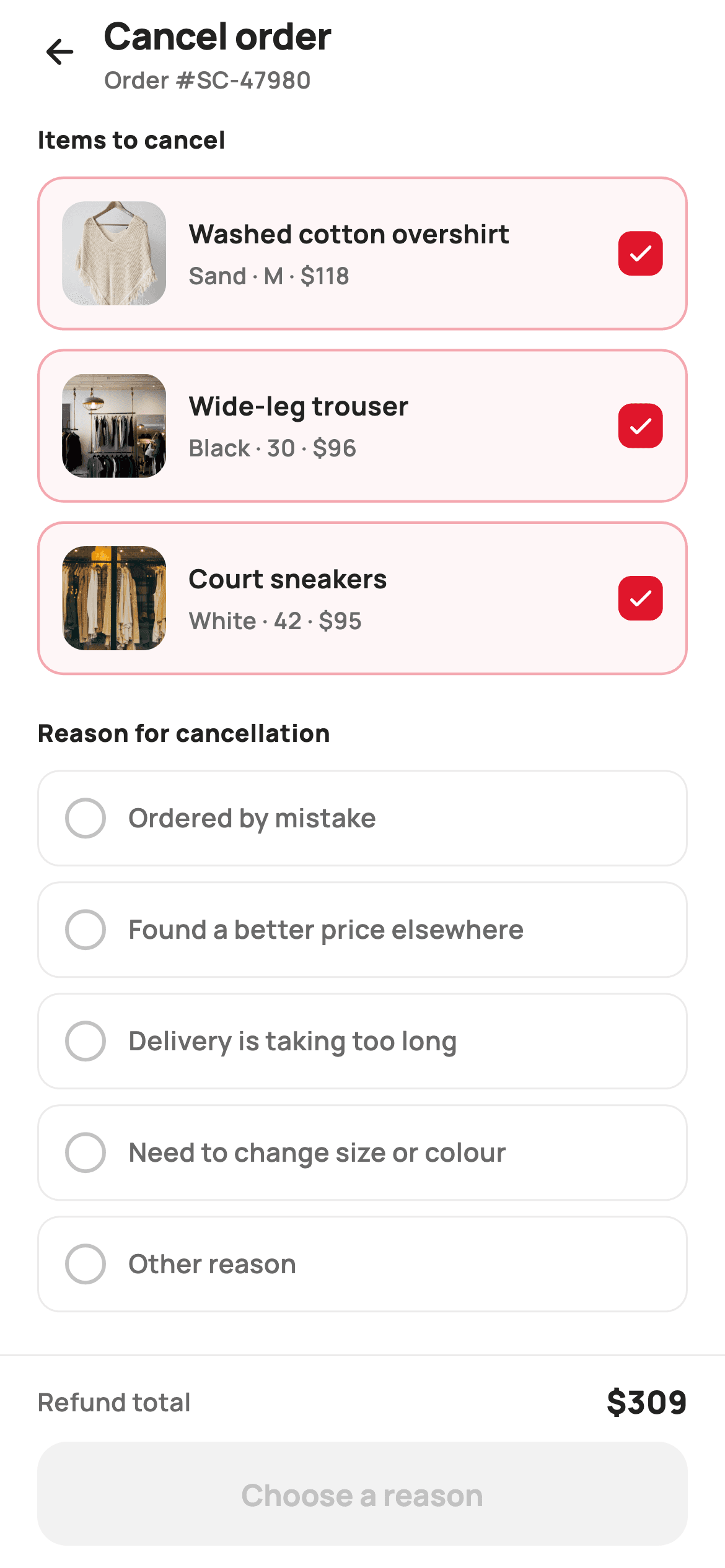
Cancelling an order is a request, not a single tap. A shopper usually wants two of three items gone, and the merchant needs a reason attached to the request. This tutorial builds StyleCart's cancel-order screen in Flutter: tick-to-cancel item rows that tint red as they are picked, a five-option reason radio list, a refund note naming the card and the settlement window, and a pinned bar whose refund total sums only the ticked items behind a danger button that relabels itself until both choices are made.
Watch the Flutter UI walkthrough
A short screen recording of Cancel Order running, if you'd rather see it before you read the code. The written tutorial below covers everything in it.
Can't see the video? Watch it on YouTube.
What you'll build
- ✓Item rows backed by a `Set<int>` so a shopper can cancel part of an order instead of all of it
- ✓A single-choice reason list whose radio dot is drawn as a 6.5px border rather than a Radio widget
- ✓A refund total getter that re-sums the ticked items on every setState
- ✓A danger-red confirm button that stays disabled and renames itself to name the missing step
Step-by-step build
Create the file
Add a new file at lib/ecom_orders_cancel/ecom_orders_cancel_screen.dart in your Flutter project.
Register the bundled fonts
No external packages — this is pure Flutter. It does bundle its design font (Manrope), so drop the font file into fonts/ and declare it in pubspec.yaml:
flutter:
  fonts:
    - family: Manrope
      fonts:
- asset: fonts/Manrope-Regular.ttfBuild it, piece by piece
Here's how the screen goes together. Each block below is a real slice of the code with a plain-English explanation — paste them in order, or grab the whole file from the next section.
Tokens, the item list and the five reasons
import 'package:flutter/material.dart';

/// StyleCart — Cancel Order.
///
/// Select which items to cancel, pick a reason from a radio list, read the
/// refund-method note, and confirm with a danger-styled pinned bar. The refund
/// figure tracks the selected items, and confirm is disabled until both items
/// and a reason are chosen.
///
/// Self-contained per CONVENTIONS.md: pure Flutter, bundled Manrope, inline
/// Airbnb-style tokens, own light theme + SafeArea, bundled webp. Exposes
/// callbacks only.
class EcomOrdersCancelScreen extends StatefulWidget {
  const EcomOrdersCancelScreen({
    super.key,
    this.onBack,
    this.onConfirm,
  });

  final VoidCallback? onBack;

  /// Fires with the refund amount once the cancellation is confirmed.
  final ValueChanged<int>? onConfirm;

  @override
  State<EcomOrdersCancelScreen> createState() => _EcomOrdersCancelScreenState();
}

class _EcomOrdersCancelScreenState extends State<EcomOrdersCancelScreen> {
  static const String _font = 'Manrope';
  static const Color _canvas = Color(0xFFFFFFFF);
  static const Color _ink = Color(0xFF222222);
  static const Color _muted = Color(0xFF6A6A6A);
  static const Color _faint = Color(0xFFC1C1C1);
  static const Color _brand = Color(0xFFFF385C);
  static const Color _surface = Color(0xFFF2F2F2);
  static const Color _imageBg = Color(0xFFF5F5F5);
  static const Color _danger = Color(0xFFE0162B);
  static const Color _hairline = Color(0xFFEBEBEB);

  static const String _dir = 'lib/screens/ecommerce/ecom_orders_cancel/images';

  static const List<_Item> _items = <_Item>[
    _Item('p01', 'Washed cotton overshirt', 'Sand · M', 118),
    _Item('p02', 'Wide-leg trouser', 'Black · 30', 96),
    _Item('p03', 'Court sneakers', 'White · 42', 95),
  ];

  static const List<String> _reasons = <String>[
    'Ordered by mistake',
    'Found a better price elsewhere',
    'Delivery is taking too long',
    'Need to change size or colour',
    'Other reason',
  ];

  final Set<int> _picked = <int>{0, 1, 2};
  int _reason = -1;
The screen is a `StatefulWidget` because cancellation is a form: two independent choices have to be held before anything can be sent. `onConfirm` is a `ValueChanged<int>` rather than a `VoidCallback`, so the parent receives the refund amount the shopper just agreed to and never has to recompute it. Note that two accent colours coexist: `_brand` `#FF385C` marks the reason radio, while `_danger` `#E0162B` is reserved for anything destructive — the item checks, the tinted card and the confirm button. The three `_Item` records and the five `_reasons` strings are `static const`, so editing the copy never touches widget code.
Selection state and the derived refund
  int get _refund {
    int r = 0;
    for (final int i in _picked) {
      r += _items[i].price;
    }
    return r;
  }

  bool get _canConfirm => _picked.isNotEmpty && _reason >= 0;

  @override
  Widget build(BuildContext context) {
    return Theme(
      data: ThemeData.light(useMaterial3: true),
      child: Scaffold(
        backgroundColor: _canvas,
        body: SafeArea(
          child: Column(
            children: <Widget>[
              _header(),
              Expanded(
                child: ListView(
                  padding: const EdgeInsets.fromLTRB(20, 8, 20, 24),
                  children: <Widget>[
                    _sectionTitle('Items to cancel'),
                    const SizedBox(height: 10),
                    for (int i = 0; i < _items.length; i++) _itemRow(i),
                    const SizedBox(height: 12),
                    _sectionTitle('Reason for cancellation'),
                    const SizedBox(height: 10),
                    for (int i = 0; i < _reasons.length; i++) _reasonRow(i),
                    const SizedBox(height: 16),
                    _refundNote(),
                  ],
                ),
              ),
              _confirmBar(),
            ],
          ),
        ),
      ),
    );
  }
`_picked` is a `Set<int>` seeded with `{0, 1, 2}` — every item pre-ticked, because a shopper who opened this screen most likely wants the whole order gone and un-ticking is the rarer edit. `_reason` starts at `-1` as an explicit 'nothing chosen' sentinel, which is why it is an int rather than a nullable index. `_refund` is a getter that walks `_picked` and sums prices on each rebuild instead of being cached in a field, so it can never fall out of sync with the checkboxes. `_canConfirm` reads as the rule it enforces: items picked *and* a reason chosen. The `Column` puts the header and `_confirmBar()` outside the `Expanded` ListView, pinning both.
A header that carries the order number
  Widget _header() {
    return Padding(
      padding: const EdgeInsets.fromLTRB(8, 4, 20, 6),
      child: Row(
        children: <Widget>[
          IconButton(
            onPressed: widget.onBack,
            icon: const Icon(Icons.arrow_back_rounded, size: 22, color: _ink),
          ),
          const Expanded(
            child: Column(
              crossAxisAlignment: CrossAxisAlignment.start,
              children: <Widget>[
                Text(
                  'Cancel order',
                  style: TextStyle(
                    fontFamily: _font,
                    fontSize: 20,
                    fontWeight: FontWeight.w800,
                    letterSpacing: -0.3,
                    color: _ink,
                  ),
                ),
                Text(
                  'Order #SC-47980',
                  style: TextStyle(
                    fontFamily: _font,
                    fontSize: 12.5,
                    fontWeight: FontWeight.w600,
                    color: _muted,
                  ),
                ),
              ],
            ),
          ),
        ],
      ),
    );
  }

  Widget _sectionTitle(String text) {
    return Text(
      text,
      style: const TextStyle(
        fontFamily: _font,
        fontSize: 13,
        fontWeight: FontWeight.w800,
        letterSpacing: 0.3,
        color: _ink,
      ),
    );
  }
The back arrow and title share one Row, with the title stack inside `Expanded` so it takes the remaining width. The second line, `Order #SC-47980` at 12.5px `_muted`, is doing real work — a shopper with several open orders needs to confirm they are cancelling the right one before ticking anything, and a bare 'Cancel order' title would not tell them. Left padding is only 8px because `IconButton` brings its own 48px touch target and its internal padding already supplies the optical inset. `_sectionTitle` is a separate helper at 13px `w800` with positive `letterSpacing: 0.3` — the widened tracking is what makes a small bold label read as a section marker rather than body text.
Item rows: partial cancellation via a tinted card
  Widget _itemRow(int i) {
    final _Item it = _items[i];
    final bool on = _picked.contains(i);
    return GestureDetector(
      onTap: () => setState(() {
        if (on) {
          _picked.remove(i);
        } else {
          _picked.add(i);
        }
      }),
      child: Container(
        margin: const EdgeInsets.only(bottom: 10),
        padding: const EdgeInsets.all(12),
        decoration: BoxDecoration(
          color: on ? _danger.withValues(alpha: 0.04) : _canvas,
          borderRadius: BorderRadius.circular(14),
          border: Border.all(
            color: on ? _danger.withValues(alpha: 0.35) : _hairline,
            width: on ? 1.4 : 1,
          ),
        ),
        child: Row(
          children: <Widget>[
            Container(
              width: 56,
              height: 56,
              decoration: BoxDecoration(
                color: _imageBg,
                borderRadius: BorderRadius.circular(12),
              ),
              child: ClipRRect(
                borderRadius: BorderRadius.circular(12),
                child: Image.asset('$_dir/${it.id}.webp', fit: BoxFit.cover),
              ),
            ),
            const SizedBox(width: 12),
            Expanded(
              child: Column(
                crossAxisAlignment: CrossAxisAlignment.start,
                children: <Widget>[
                  Text(
                    it.name,
                    maxLines: 1,
                    overflow: TextOverflow.ellipsis,
                    style: const TextStyle(
                      fontFamily: _font,
                      fontSize: 14,
                      fontWeight: FontWeight.w700,
                      color: _ink,
                    ),
                  ),
                  const SizedBox(height: 3),
                  Text(
                    '${it.variant} · \$${it.price}',
                    style: const TextStyle(
                      fontFamily: _font,
                      fontSize: 12.5,
                      fontWeight: FontWeight.w600,
                      color: _muted,
                    ),
                  ),
                ],
              ),
            ),
            const SizedBox(width: 10),
            Container(
              width: 24,
              height: 24,
              decoration: BoxDecoration(
                color: on ? _danger : _canvas,
                borderRadius: BorderRadius.circular(7),
                border: on ? null : Border.all(color: _faint, width: 2),
              ),
              child: on
                  ? const Icon(Icons.check_rounded, size: 16, color: _canvas)
                  : null,
            ),
          ],
        ),
      ),
    );
  }
The whole card is a `GestureDetector`, so the tap target is the row rather than the 24px box — toggling `_picked` by add/remove on the set inside `setState`. Selection is signalled three ways at once: a 4% `_danger` wash on the background, the border swapping from `_hairline` to `_danger` at 35% alpha, and its width thickening from 1 to 1.4. That last detail matters — colour alone would vanish for a red-blind shopper, and the extra 0.4px keeps the state legible. The check box itself is a 24px `Container` with `borderRadius: 12`, filled solid `_danger` with a white `check_rounded` when on, and reduced to a 2px `_faint` outline with a null child when off. The thumbnail is a `ClipRRect` over an `Image.asset` on an `_imageBg` plate so a transparent webp never shows the tint through it.
The reason list, with a hand-drawn radio
  Widget _reasonRow(int i) {
    final bool on = _reason == i;
    return GestureDetector(
      onTap: () => setState(() => _reason = i),
      child: Container(
        margin: const EdgeInsets.only(bottom: 8),
        padding: const EdgeInsets.symmetric(horizontal: 14, vertical: 14),
        decoration: BoxDecoration(
          color: _canvas,
          borderRadius: BorderRadius.circular(12),
          border: Border.all(
            color: on ? _brand : _hairline,
            width: on ? 1.4 : 1,
          ),
        ),
        child: Row(
          children: <Widget>[
            Container(
              width: 22,
              height: 22,
              decoration: BoxDecoration(
                shape: BoxShape.circle,
                border: Border.all(
                  color: on ? _brand : _faint,
                  width: on ? 6.5 : 2,
                ),
              ),
            ),
            const SizedBox(width: 12),
            Expanded(
              child: Text(
                _reasons[i],
                style: TextStyle(
                  fontFamily: _font,
                  fontSize: 14,
                  fontWeight: on ? FontWeight.w700 : FontWeight.w600,
                  color: on ? _ink : _muted,
                ),
              ),
            ),
          ],
        ),
      ),
    );
  }
Where items add and remove, `_reasonRow` assigns — `setState(() => _reason = i)` — which is the whole difference between the two lists and why one is a `Set` and the other an `int`. There is no `Radio` widget here: the dot is a 22px circle whose *border* is animated in intent, `width: on ? 6.5 : 2`. A 6.5px border on a 22px circle closes in on the centre and reads as a filled dot with a ring, so one Container renders both states without a nested child. Selected rows switch to the `_brand` coral outline rather than `_danger` red, because choosing a reason is not itself the destructive act. The label also steps from `w600` `_muted` to `w700` `_ink`, so the choice survives a glance without relying on the dot.
Setting expectations about the money
  Widget _refundNote() {
    return Container(
      padding: const EdgeInsets.all(14),
      decoration: BoxDecoration(
        color: _surface,
        borderRadius: BorderRadius.circular(14),
      ),
      child: Row(
        crossAxisAlignment: CrossAxisAlignment.start,
        children: <Widget>[
          const Icon(Icons.account_balance_wallet_outlined,
              size: 20, color: _muted),
          const SizedBox(width: 12),
          Expanded(
            child: Column(
              crossAxisAlignment: CrossAxisAlignment.start,
              children: const <Widget>[
                Text(
                  'Refund to original payment',
                  style: TextStyle(
                    fontFamily: _font,
                    fontSize: 13.5,
                    fontWeight: FontWeight.w700,
                    color: _ink,
                  ),
                ),
                SizedBox(height: 3),
                Text(
                  'Goes back to Visa •••• 4291 within 3–5 business days '
                  'after the cancellation is processed.',
                  style: TextStyle(
                    fontFamily: _font,
                    fontSize: 12.5,
                    fontWeight: FontWeight.w500,
                    height: 1.4,
                    color: _muted,
                  ),
                ),
              ],
            ),
          ),
        ],
      ),
    );
  }
The refund note is a plain `_surface` panel with a wallet outline icon and two stacked lines, and it exists to pre-empt the support ticket that follows every cancellation: where did my money go, and when. It names both the destination — `Visa •••• 4291` — and the window, '3–5 business days after the cancellation is processed'. `crossAxisAlignment: CrossAxisAlignment.start` on the Row keeps the icon beside the first line when the body wraps, and the text sits in `Expanded` so it wraps rather than overflowing. The body runs at 12.5px `w500` with `height: 1.4`, deliberately lighter than the 13.5px `w700` heading above it so the panel reads as a note, not a second section.
The pinned bar and a button that names what is missing
  Widget _confirmBar() {
    return Container(
      decoration: const BoxDecoration(
        color: _canvas,
        border: Border(top: BorderSide(color: _hairline)),
      ),
      child: SafeArea(
        top: false,
        child: Padding(
          padding: const EdgeInsets.fromLTRB(20, 12, 20, 12),
          child: Column(
            mainAxisSize: MainAxisSize.min,
            children: <Widget>[
              Row(
                children: <Widget>[
                  const Text(
                    'Refund total',
                    style: TextStyle(
                      fontFamily: _font,
                      fontSize: 13.5,
                      fontWeight: FontWeight.w600,
                      color: _muted,
                    ),
                  ),
                  const Spacer(),
                  Text(
                    '\$$_refund',
                    style: const TextStyle(
                      fontFamily: _font,
                      fontSize: 17,
                      fontWeight: FontWeight.w800,
                      color: _ink,
                    ),
                  ),
                ],
              ),
              const SizedBox(height: 10),
              SizedBox(
                height: 56,
                child: FilledButton(
                  onPressed:
                      _canConfirm ? () => widget.onConfirm?.call(_refund) : null,
                  style: FilledButton.styleFrom(
                    backgroundColor: _danger,
                    foregroundColor: _canvas,
                    disabledBackgroundColor: _surface,
                    disabledForegroundColor: _faint,
                    minimumSize: const Size.fromHeight(56),
                    shape: RoundedRectangleBorder(
                      borderRadius: BorderRadius.circular(16),
                    ),
                  ),
                  child: Text(
                    _picked.isEmpty
                        ? 'Select items to cancel'
                        : _reason < 0
                            ? 'Choose a reason'
                            : 'Confirm cancellation',
                    style: const TextStyle(
                      fontFamily: _font,
                      fontSize: 16,
                      fontWeight: FontWeight.w700,
                    ),
                  ),
                ),
              ),
            ],
          ),
        ),
      ),
    );
  }
The bar is a Container with a `_hairline` top border wrapping `SafeArea(top: false)` — inside the Container, so the white extends under the home indicator while the content stays above it. A `Spacer()` pushes `\$$_refund` to the right of the 'Refund total' label, and because `_refund` is a getter the figure updates the instant a row is un-ticked. The best detail is the button's label: it is a nested conditional reading 'Select items to cancel', then 'Choose a reason', then 'Confirm cancellation'. A disabled button that only greys out leaves the shopper hunting for the blocker; this one names it. `disabledBackgroundColor: _surface` with `disabledForegroundColor: _faint` keeps the dead state visibly inert instead of a dimmed red.
The item record
class _Item {
  const _Item(this.id, this.name, this.variant, this.price);
  final String id;
  final String name;
  final String variant;
  final int price;
}
`_Item` is a private four-field class with a const positional constructor — `id`, `name`, `variant`, `price`. Positional arguments are the right call here because the list is declared once, immediately below the class, where the column order is self-evident; named arguments would triple the line count for no gain. `price` is an `int` of whole dollars rather than a double, which is why `_refund` can sum with `+=` and interpolate directly with no rounding step. `id` is not decoration either: it resolves the thumbnail path as `'$_dir/${it.id}.webp'`, so adding a product means adding one record and one image file.
Full code
The complete, ready-to-paste source. Free to use in your projects — one click copies it all.
import 'package:flutter/material.dart';

/// StyleCart — Cancel Order.
///
/// Select which items to cancel, pick a reason from a radio list, read the
/// refund-method note, and confirm with a danger-styled pinned bar. The refund
/// figure tracks the selected items, and confirm is disabled until both items
/// and a reason are chosen.
///
/// Self-contained per CONVENTIONS.md: pure Flutter, bundled Manrope, inline
/// Airbnb-style tokens, own light theme + SafeArea, bundled webp. Exposes
/// callbacks only.
class EcomOrdersCancelScreen extends StatefulWidget {
  const EcomOrdersCancelScreen({
    super.key,
    this.onBack,
    this.onConfirm,
  });

  final VoidCallback? onBack;

  /// Fires with the refund amount once the cancellation is confirmed.
  final ValueChanged<int>? onConfirm;

  @override
  State<EcomOrdersCancelScreen> createState() => _EcomOrdersCancelScreenState();
}

class _EcomOrdersCancelScreenState extends State<EcomOrdersCancelScreen> {
  static const String _font = 'Manrope';
  static const Color _canvas = Color(0xFFFFFFFF);
  static const Color _ink = Color(0xFF222222);
  static const Color _muted = Color(0xFF6A6A6A);
  static const Color _faint = Color(0xFFC1C1C1);
  static const Color _brand = Color(0xFFFF385C);
  static const Color _surface = Color(0xFFF2F2F2);
  static const Color _imageBg = Color(0xFFF5F5F5);
  static const Color _danger = Color(0xFFE0162B);
  static const Color _hairline = Color(0xFFEBEBEB);

  static const String _dir = 'lib/screens/ecommerce/ecom_orders_cancel/images';

  static const List<_Item> _items = <_Item>[
    _Item('p01', 'Washed cotton overshirt', 'Sand · M', 118),
    _Item('p02', 'Wide-leg trouser', 'Black · 30', 96),
    _Item('p03', 'Court sneakers', 'White · 42', 95),
  ];

  static const List<String> _reasons = <String>[
    'Ordered by mistake',
    'Found a better price elsewhere',
    'Delivery is taking too long',
    'Need to change size or colour',
    'Other reason',
  ];

  final Set<int> _picked = <int>{0, 1, 2};
  int _reason = -1;

  int get _refund {
    int r = 0;
    for (final int i in _picked) {
      r += _items[i].price;
    }
    return r;
  }

  bool get _canConfirm => _picked.isNotEmpty && _reason >= 0;

  @override
  Widget build(BuildContext context) {
    return Theme(
      data: ThemeData.light(useMaterial3: true),
      child: Scaffold(
        backgroundColor: _canvas,
        body: SafeArea(
          child: Column(
            children: <Widget>[
              _header(),
              Expanded(
                child: ListView(
                  padding: const EdgeInsets.fromLTRB(20, 8, 20, 24),
                  children: <Widget>[
                    _sectionTitle('Items to cancel'),
                    const SizedBox(height: 10),
                    for (int i = 0; i < _items.length; i++) _itemRow(i),
                    const SizedBox(height: 12),
                    _sectionTitle('Reason for cancellation'),
                    const SizedBox(height: 10),
                    for (int i = 0; i < _reasons.length; i++) _reasonRow(i),
                    const SizedBox(height: 16),
                    _refundNote(),
                  ],
                ),
              ),
              _confirmBar(),
            ],
          ),
        ),
      ),
    );
  }

  Widget _header() {
    return Padding(
      padding: const EdgeInsets.fromLTRB(8, 4, 20, 6),
      child: Row(
        children: <Widget>[
          IconButton(
            onPressed: widget.onBack,
            icon: const Icon(Icons.arrow_back_rounded, size: 22, color: _ink),
          ),
          const Expanded(
            child: Column(
              crossAxisAlignment: CrossAxisAlignment.start,
              children: <Widget>[
                Text(
                  'Cancel order',
                  style: TextStyle(
                    fontFamily: _font,
                    fontSize: 20,
                    fontWeight: FontWeight.w800,
                    letterSpacing: -0.3,
                    color: _ink,
                  ),
                ),
                Text(
                  'Order #SC-47980',
                  style: TextStyle(
                    fontFamily: _font,
                    fontSize: 12.5,
                    fontWeight: FontWeight.w600,
                    color: _muted,
                  ),
                ),
              ],
            ),
          ),
        ],
      ),
    );
  }

  Widget _sectionTitle(String text) {
    return Text(
      text,
      style: const TextStyle(
        fontFamily: _font,
        fontSize: 13,
        fontWeight: FontWeight.w800,
        letterSpacing: 0.3,
        color: _ink,
      ),
    );
  }

  Widget _itemRow(int i) {
    final _Item it = _items[i];
    final bool on = _picked.contains(i);
    return GestureDetector(
      onTap: () => setState(() {
        if (on) {
          _picked.remove(i);
        } else {
          _picked.add(i);
        }
      }),
      child: Container(
        margin: const EdgeInsets.only(bottom: 10),
        padding: const EdgeInsets.all(12),
        decoration: BoxDecoration(
          color: on ? _danger.withValues(alpha: 0.04) : _canvas,
          borderRadius: BorderRadius.circular(14),
          border: Border.all(
            color: on ? _danger.withValues(alpha: 0.35) : _hairline,
            width: on ? 1.4 : 1,
          ),
        ),
        child: Row(
          children: <Widget>[
            Container(
              width: 56,
              height: 56,
              decoration: BoxDecoration(
                color: _imageBg,
                borderRadius: BorderRadius.circular(12),
              ),
              child: ClipRRect(
                borderRadius: BorderRadius.circular(12),
                child: Image.asset('$_dir/${it.id}.webp', fit: BoxFit.cover),
              ),
            ),
            const SizedBox(width: 12),
            Expanded(
              child: Column(
                crossAxisAlignment: CrossAxisAlignment.start,
                children: <Widget>[
                  Text(
                    it.name,
                    maxLines: 1,
                    overflow: TextOverflow.ellipsis,
                    style: const TextStyle(
                      fontFamily: _font,
                      fontSize: 14,
                      fontWeight: FontWeight.w700,
                      color: _ink,
                    ),
                  ),
                  const SizedBox(height: 3),
                  Text(
                    '${it.variant} · \$${it.price}',
                    style: const TextStyle(
                      fontFamily: _font,
                      fontSize: 12.5,
                      fontWeight: FontWeight.w600,
                      color: _muted,
                    ),
                  ),
                ],
              ),
            ),
            const SizedBox(width: 10),
            Container(
              width: 24,
              height: 24,
              decoration: BoxDecoration(
                color: on ? _danger : _canvas,
                borderRadius: BorderRadius.circular(7),
                border: on ? null : Border.all(color: _faint, width: 2),
              ),
              child: on
                  ? const Icon(Icons.check_rounded, size: 16, color: _canvas)
                  : null,
            ),
          ],
        ),
      ),
    );
  }

  Widget _reasonRow(int i) {
    final bool on = _reason == i;
    return GestureDetector(
      onTap: () => setState(() => _reason = i),
      child: Container(
        margin: const EdgeInsets.only(bottom: 8),
        padding: const EdgeInsets.symmetric(horizontal: 14, vertical: 14),
        decoration: BoxDecoration(
          color: _canvas,
          borderRadius: BorderRadius.circular(12),
          border: Border.all(
            color: on ? _brand : _hairline,
            width: on ? 1.4 : 1,
          ),
        ),
        child: Row(
          children: <Widget>[
            Container(
              width: 22,
              height: 22,
              decoration: BoxDecoration(
                shape: BoxShape.circle,
                border: Border.all(
                  color: on ? _brand : _faint,
                  width: on ? 6.5 : 2,
                ),
              ),
            ),
            const SizedBox(width: 12),
            Expanded(
              child: Text(
                _reasons[i],
                style: TextStyle(
                  fontFamily: _font,
                  fontSize: 14,
                  fontWeight: on ? FontWeight.w700 : FontWeight.w600,
                  color: on ? _ink : _muted,
                ),
              ),
            ),
          ],
        ),
      ),
    );
  }

  Widget _refundNote() {
    return Container(
      padding: const EdgeInsets.all(14),
      decoration: BoxDecoration(
        color: _surface,
        borderRadius: BorderRadius.circular(14),
      ),
      child: Row(
        crossAxisAlignment: CrossAxisAlignment.start,
        children: <Widget>[
          const Icon(Icons.account_balance_wallet_outlined,
              size: 20, color: _muted),
          const SizedBox(width: 12),
          Expanded(
            child: Column(
              crossAxisAlignment: CrossAxisAlignment.start,
              children: const <Widget>[
                Text(
                  'Refund to original payment',
                  style: TextStyle(
                    fontFamily: _font,
                    fontSize: 13.5,
                    fontWeight: FontWeight.w700,
                    color: _ink,
                  ),
                ),
                SizedBox(height: 3),
                Text(
                  'Goes back to Visa •••• 4291 within 3–5 business days '
                  'after the cancellation is processed.',
                  style: TextStyle(
                    fontFamily: _font,
                    fontSize: 12.5,
                    fontWeight: FontWeight.w500,
                    height: 1.4,
                    color: _muted,
                  ),
                ),
              ],
            ),
          ),
        ],
      ),
    );
  }

  Widget _confirmBar() {
    return Container(
      decoration: const BoxDecoration(
        color: _canvas,
        border: Border(top: BorderSide(color: _hairline)),
      ),
      child: SafeArea(
        top: false,
        child: Padding(
          padding: const EdgeInsets.fromLTRB(20, 12, 20, 12),
          child: Column(
            mainAxisSize: MainAxisSize.min,
            children: <Widget>[
              Row(
                children: <Widget>[
                  const Text(
                    'Refund total',
                    style: TextStyle(
                      fontFamily: _font,
                      fontSize: 13.5,
                      fontWeight: FontWeight.w600,
                      color: _muted,
                    ),
                  ),
                  const Spacer(),
                  Text(
                    '\$$_refund',
                    style: const TextStyle(
                      fontFamily: _font,
                      fontSize: 17,
                      fontWeight: FontWeight.w800,
                      color: _ink,
                    ),
                  ),
                ],
              ),
              const SizedBox(height: 10),
              SizedBox(
                height: 56,
                child: FilledButton(
                  onPressed:
                      _canConfirm ? () => widget.onConfirm?.call(_refund) : null,
                  style: FilledButton.styleFrom(
                    backgroundColor: _danger,
                    foregroundColor: _canvas,
                    disabledBackgroundColor: _surface,
                    disabledForegroundColor: _faint,
                    minimumSize: const Size.fromHeight(56),
                    shape: RoundedRectangleBorder(
                      borderRadius: BorderRadius.circular(16),
                    ),
                  ),
                  child: Text(
                    _picked.isEmpty
                        ? 'Select items to cancel'
                        : _reason < 0
                            ? 'Choose a reason'
                            : 'Confirm cancellation',
                    style: const TextStyle(
                      fontFamily: _font,
                      fontSize: 16,
                      fontWeight: FontWeight.w700,
                    ),
                  ),
                ),
              ),
            ],
          ),
        ),
      ),
    );
  }
}

class _Item {
  const _Item(this.id, this.name, this.variant, this.price);
  final String id;
  final String name;
  final String variant;
  final int price;
}
Plus bundled 8 binary assets (fonts/images). The CLI and MCP install those for you automatically.
Two faster ways to add it
Copy-paste works, but you can skip it entirely.
1. FlutterKit CLI
One command drops this screen — and its fonts — straight into your project.
$ flutterkit add ecom-orders-cancel2. AI agent (MCP)
Connect FlutterKit's MCP server in Claude or Cursor and just ask your agent to install ecom-orders-cancel — it fetches and writes the files for you.
FAQ
Is this cancel order screen free to use in a commercial app?
Yes. Every FlutterKit screen is free — no paid tier, no licence key, no sign-up and no attribution line. Copy the Dart from this page, add it with the CLI, or pull it through MCP, and ship it inside a real store app.
How do I send the cancellation to my backend?
The screen is deliberately backend-agnostic: `onConfirm` fires with the refund amount only. Widen it to carry the selection by mapping `_picked` to ids — `_picked.map((i) => _items[i].id).toList()` — and pass `_reasons[_reason]` alongside it. Feed `_items` in as a constructor parameter instead of a `static const` so the screen renders whichever order the caller opened.
Why is every item ticked when the screen opens?
Because `_picked` is initialised as `<int>{0, 1, 2}`. Most people who tap 'cancel order' mean the entire order, so the default matches the common case and partial cancellation is the edit. If your data says otherwise, start it as an empty set — the button already handles that state by reading 'Select items to cancel'.
Do I need any packages or fonts?
No packages at all — it is pure `material.dart` with `Icons.check_rounded`, `Icons.arrow_back_rounded` and `Icons.account_balance_wallet_outlined`. The type is Manrope, declared through `fontFamily: _font`; bundle it in `pubspec.yaml` or delete the line to fall back to the platform font. The three product thumbnails are bundled webp assets under the `_dir` path.
Which Flutter version does this need?
Flutter 3.22 or newer, because the item rows use `Color.withValues(alpha: 0.04)` and the constructor uses `super.key`. On an older SDK swap those for `withOpacity(0.04)` and the `{Key? key, ...}) : super(key: key)` form.


