How to Build a Seed Phrase Import Screen in Flutter (Full Code + Preview)
Restoring a wallet means typing twelve or twenty-four words in exact order, on a phone keyboard that wants to autocorrect every one of them. This tutorial builds Aurum's recovery-phrase entry step in Flutter: a 12/24 segmented toggle, a two-column grid of numbered word fields with suggestions switched off, a header action that swaps between Paste and Clear, and a live 'X of N words' counter above an Import wallet bar that only lights up once every visible field holds a word.
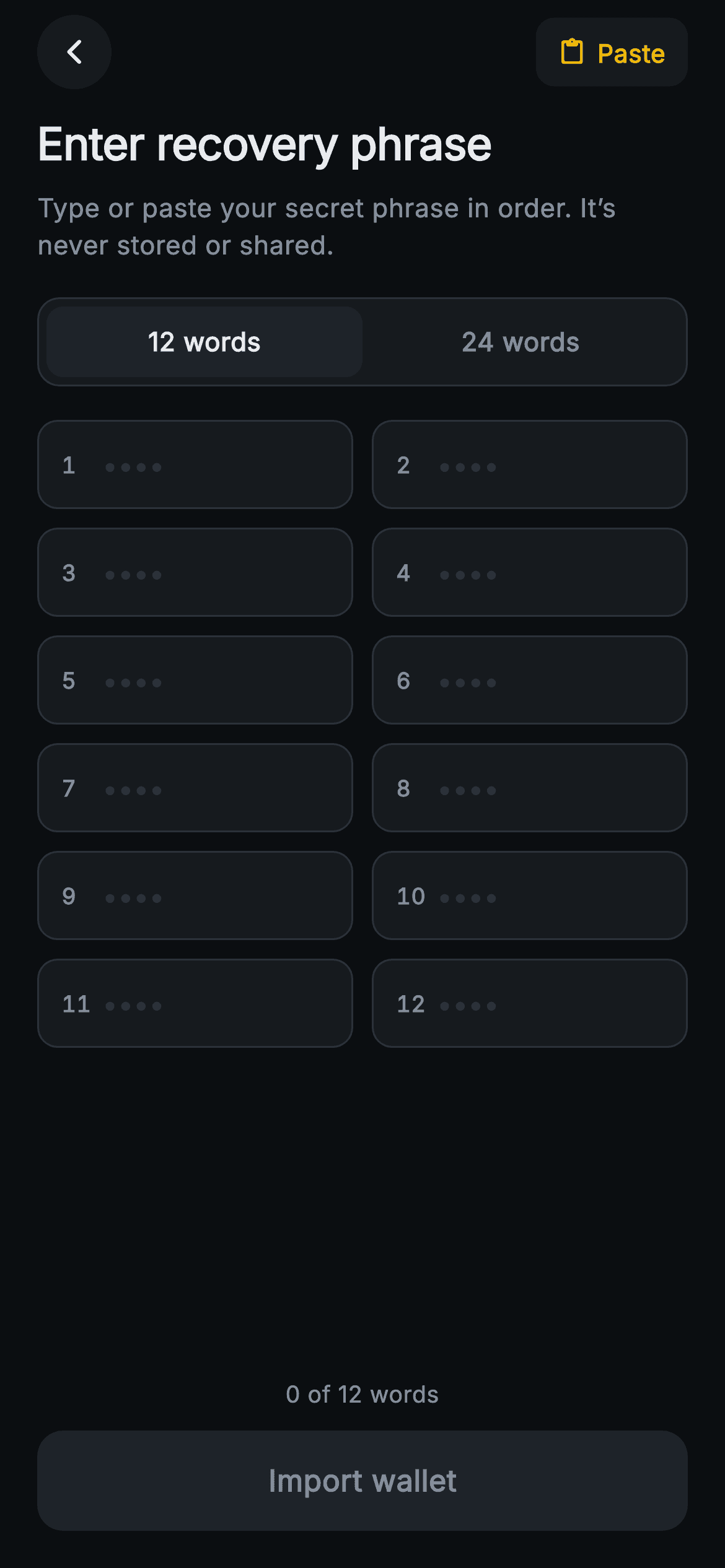
What you'll build
- ✓A 12 words / 24 words segmented toggle that resizes the grid without throwing away anything already typed
- ✓A two-column GridView of numbered word tiles with tabular-figure indexes and autocorrect and keyboard suggestions disabled
- ✓One header action that reads Paste on an empty grid and Clear as soon as any word is present
- ✓A pinned footer with a live '$_filled of $_count words' counter and an Import wallet bar gated on the `_complete` getter
- ✓Twenty-four TextEditingControllers allocated once in initState and disposed together
Step-by-step build
Create the file
Add a new file at lib/web3_import_seed/web3_import_seed_screen.dart in your Flutter project.
Register the bundled fonts
No external packages — this is pure Flutter. It does bundle its design font (Inter), so drop the font file into fonts/ and declare it in pubspec.yaml:
flutter:
  fonts:
    - family: Inter
      fonts:
- asset: fonts/Inter-Regular.ttfBuild it, piece by piece
Here's how the screen goes together. Each block below is a real slice of the code with a plain-English explanation — paste them in order, or grab the whole file from the next section.
Two callbacks and a demo phrase
import 'package:flutter/material.dart';

/// Web3 import — Enter Recovery Phrase. A 12/24-word numbered input grid with a
/// word-count toggle, a paste-all action and a validate bar that enables once
/// every word is filled. Self-contained per CONVENTIONS.md: pure Flutter,
/// bundled Inter font, painted/icon graphics, forced dark theme so it renders
/// standalone as a route.
class Web3ImportSeedScreen extends StatefulWidget {
  const Web3ImportSeedScreen({super.key, this.onImport, this.onBack});

  final VoidCallback? onImport;
  final VoidCallback? onBack;

  @override
  State<Web3ImportSeedScreen> createState() => _Web3ImportSeedScreenState();
}

class _Web3ImportSeedScreenState extends State<Web3ImportSeedScreen> {
  static const String _font = 'Inter';
  static const Color _bg = Color(0xFF0B0E11);
  static const Color _surface = Color(0xFF161A1E);
  static const Color _surfaceAlt = Color(0xFF1E2329);
  static const Color _brand = Color(0xFFF0B90B);
  static const Color _text = Color(0xFFEAECEF);
  static const Color _muted = Color(0xFF848E9C);
  static const Color _hairline = Color(0xFF2B3139);

  // A valid sample phrase used by the "Paste" action (demo content).
  static const List<String> _sample = <String>[
    'harbor', 'velvet', 'orbit', 'pledge', 'cactus', 'nimble',
    'salmon', 'tunnel', 'gravity', 'wisdom', 'enroll', 'fabric',
    'meadow', 'quartz', 'ignite', 'bishop', 'tundra', 'oxygen',
    'rookie', 'plasma', 'cobalt', 'jungle', 'frozen', 'sunset',
  ];
`Web3ImportSeedScreen` is a `StatefulWidget` that exposes only `onImport` and `onBack`, both plain nullable `VoidCallback`s. The palette constants are the same Aurum dark set as the rest of the import flow, so the part that matters here is `_sample`: a const list of exactly 24 real-looking words ('harbor', 'velvet', 'orbit' and so on). The comment calls it what it is, demo content for the Paste action. Because it holds 24 entries, the same list can fill either phrase length. Keep that in mind for later: nothing on this screen ever reads the system clipboard.
24 controllers, a count, and two derived getters
  int _count = 12;
  late List<TextEditingController> _controllers;

  @override
  void initState() {
    super.initState();
    _controllers =
        List<TextEditingController>.generate(24, (_) => TextEditingController());
  }

  @override
  void dispose() {
    for (final TextEditingController c in _controllers) {
      c.dispose();
    }
    super.dispose();
  }

  int get _filled => _controllers
      .take(_count)
      .where((TextEditingController c) => c.text.trim().isNotEmpty)
      .length;

  bool get _complete => _filled == _count;

  void _paste() {
    setState(() {
      for (int i = 0; i < _count; i++) {
        _controllers[i].text = _sample[i];
      }
    });
  }

  void _clear() {
    setState(() {
      for (final TextEditingController c in _controllers) {
        c.clear();
      }
    });
  }
The state is just `int _count = 12` plus a `late List<TextEditingController>`. `initState` generates all 24 controllers no matter which length is selected, and that is the design decision behind the toggle: dropping from 24 to 12 only hides fields 13–24 without destroying them, so switching back brings the words back. `dispose` loops over every controller. `_filled` uses `take(_count)` so hidden fields never count toward progress, and `trim().isNotEmpty` stops a field holding only a space from counting as a word. `_complete` is `_filled == _count`, and the whole of the validation lives in that one line. `_paste` writes `_sample[i]` into only the visible fields, while `_clear` wipes all 24, so a half-typed hidden phrase can't stay in memory after the user clears.
A header action that changes role
  @override
  Widget build(BuildContext context) {
    return Theme(
      data: ThemeData.dark(useMaterial3: true),
      child: Scaffold(
        backgroundColor: _bg,
        body: SafeArea(
          child: Column(
            crossAxisAlignment: CrossAxisAlignment.stretch,
            children: <Widget>[
              Padding(
                padding: const EdgeInsets.fromLTRB(20, 8, 20, 0),
                child: Row(
                  children: <Widget>[
                    _CircleButton(
                        icon: Icons.arrow_back_ios_new_rounded,
                        onTap: widget.onBack),
                    const Spacer(),
                    _TextAction(
                      label: _filled > 0 ? 'Clear' : 'Paste',
                      icon: _filled > 0
                          ? Icons.close_rounded
                          : Icons.content_paste_rounded,
                      onTap: _filled > 0 ? _clear : _paste,
                    ),
                  ],
                ),
              ),
The forced `ThemeData.dark` wrapper and `SafeArea` frame a `Column` with `CrossAxisAlignment.stretch`. The header row puts `_CircleButton` on the left and `_TextAction` on the right, separated by a `Spacer`. All three of that action's inputs (label, icon and `onTap`) depend on the same `_filled > 0` test. An empty grid offers 'Paste' with `Icons.content_paste_rounded` and calls `_paste`. As soon as any visible field holds text, the same button becomes 'Clear' with `Icons.close_rounded` and calls `_clear`. Swapping one slot keeps the header uncluttered, and it means paste can never merge into a partly typed phrase: the user has to clear first, so a pasted phrase never gets mixed up with words they typed themselves.
Heading, toggle and the word grid
              Expanded(
                child: ListView(
                  padding: const EdgeInsets.fromLTRB(20, 12, 20, 16),
                  children: <Widget>[
                    const Text(
                      'Enter recovery phrase',
                      style: TextStyle(
                        fontFamily: _font,
                        fontSize: 24,
                        fontWeight: FontWeight.w700,
                        letterSpacing: -0.3,
                        color: _text,
                      ),
                    ),
                    const SizedBox(height: 8),
                    const Text(
                      'Type or paste your secret phrase in order. It’s never '
                      'stored or shared.',
                      style: TextStyle(
                        fontFamily: _font,
                        fontSize: 14,
                        height: 1.4,
                        color: _muted,
                      ),
                    ),
                    const SizedBox(height: 18),
                    _CountToggle(
                      count: _count,
                      onChanged: (int c) => setState(() => _count = c),
                    ),
                    const SizedBox(height: 18),
                    GridView.builder(
                      shrinkWrap: true,
                      physics: const NeverScrollableScrollPhysics(),
                      itemCount: _count,
                      gridDelegate:
                          const SliverGridDelegateWithFixedCrossAxisCount(
                        crossAxisCount: 2,
                        mainAxisSpacing: 10,
                        crossAxisSpacing: 10,
                        mainAxisExtent: 48,
                      ),
                      itemBuilder: (BuildContext context, int i) {
                        return _WordField(
                          index: i,
                          controller: _controllers[i],
                          onChanged: () => setState(() {}),
                        );
                      },
                    ),
                  ],
                ),
              ),
The scrollable middle is an `Expanded` `ListView`, so it scrolls under the open keyboard while the footer stays put. The 24px `w700` heading sits above a muted subtitle promising the phrase is 'never stored or shared'. `_CountToggle` receives `_count` and an `onChanged` that just calls `setState(() => _count = c)`, because the getters do the rest. The grid is a `GridView.builder` with `shrinkWrap: true` and `NeverScrollableScrollPhysics` so the outer ListView owns scrolling. `itemCount: _count` is what makes the toggle resize it. `mainAxisExtent: 48` fixes every tile's height instead of using `childAspectRatio`, so the tiles don't grow taller on wide screens. Each `_WordField` gets `onChanged: () => setState(() {})`, an empty rebuild that refreshes the counter and button on every keystroke. Order runs row-major: 1 and 2 on the first row, then 3 and 4.
Counter and gated Import bar
              Padding(
                padding: const EdgeInsets.fromLTRB(20, 8, 20, 20),
                child: Column(
                  crossAxisAlignment: CrossAxisAlignment.stretch,
                  children: <Widget>[
                    Text(
                      '$_filled of $_count words',
                      textAlign: TextAlign.center,
                      style: const TextStyle(
                        fontFamily: _font,
                        fontSize: 12.5,
                        fontWeight: FontWeight.w500,
                        color: _muted,
                      ),
                    ),
                    const SizedBox(height: 10),
                    SizedBox(
                      height: 54,
                      child: Material(
                        color: _complete ? _brand : _surfaceAlt,
                        borderRadius: BorderRadius.circular(14),
                        child: InkWell(
                          borderRadius: BorderRadius.circular(14),
                          onTap: _complete ? widget.onImport : null,
                          child: Center(
                            child: Text(
                              'Import wallet',
                              style: TextStyle(
                                fontFamily: _font,
                                fontSize: 16,
                                fontWeight: FontWeight.w600,
                                color: _complete ? _bg : _muted,
                              ),
                            ),
                          ),
                        ),
                      ),
                    ),
                  ],
                ),
              ),
            ],
          ),
        ),
      ),
    );
  }
}
The footer sits outside the ListView, so the progress line and button stay pinned to the bottom. The default `resizeToAvoidBottomInset` on `Scaffold` lifts them above the keyboard. The 12.5px `_muted` counter interpolates `'$_filled of $_count words'`, which tells someone halfway through a 24-word phrase exactly where they are. The button is a 54px `Material` and `InkWell` pair rather than a `FilledButton`. Its fill switches between `_surfaceAlt` and `_brand` gold based on `_complete`, and its label switches from `_muted` to `_bg`, giving near-black text on gold for contrast. `onTap: _complete ? widget.onImport : null` is the real gate. A null `onTap` disables the InkWell completely, so the grey bar shows no ripple, and the user doesn't get a tap response from a button that does nothing.
The 12 / 24 segmented toggle
class _CountToggle extends StatelessWidget {
  const _CountToggle({required this.count, required this.onChanged});

  final int count;
  final ValueChanged<int> onChanged;

  @override
  Widget build(BuildContext context) {
    return Container(
      padding: const EdgeInsets.all(4),
      decoration: BoxDecoration(
        color: _Web3ImportSeedScreenState._surface,
        borderRadius: BorderRadius.circular(12),
        border: Border.all(color: _Web3ImportSeedScreenState._hairline),
      ),
      child: Row(
        children: <Widget>[
          for (final int c in const <int>[12, 24])
            Expanded(
              child: GestureDetector(
                onTap: () => onChanged(c),
                behavior: HitTestBehavior.opaque,
                child: Container(
                  height: 38,
                  alignment: Alignment.center,
                  decoration: BoxDecoration(
                    color: count == c
                        ? _Web3ImportSeedScreenState._surfaceAlt
                        : Colors.transparent,
                    borderRadius: BorderRadius.circular(9),
                  ),
                  child: Text(
                    '$c words',
                    style: TextStyle(
                      fontFamily: _Web3ImportSeedScreenState._font,
                      fontSize: 14,
                      fontWeight: FontWeight.w600,
                      color: count == c
                          ? _Web3ImportSeedScreenState._text
                          : _Web3ImportSeedScreenState._muted,
                    ),
                  ),
                ),
              ),
            ),
        ],
      ),
    );
  }
}
`_CountToggle` is a stateless segmented control. The selection lives in the parent and arrives as `count`, and changes go back up through `ValueChanged<int>`. A `_surface` track with a `_hairline` border and 4px padding holds a collection-for over `const <int>[12, 24]`. Each segment is `Expanded`, so the two halves always split evenly. The selected segment fills with `_surfaceAlt` at a 9px radius, which sits correctly inside the track's 12px radius minus its padding, and its label goes from `_muted` to `_text`. `HitTestBehavior.opaque` on the `GestureDetector` matters: without it, taps on the transparent unselected half would only register on the text glyphs. Private widgets reach the palette as `_Web3ImportSeedScreenState._surface`, which works because they share one library.
A word tile built for secrets
class _WordField extends StatelessWidget {
  const _WordField({
    required this.index,
    required this.controller,
    required this.onChanged,
  });

  final int index;
  final TextEditingController controller;
  final VoidCallback onChanged;

  @override
  Widget build(BuildContext context) {
    return Container(
      padding: const EdgeInsets.symmetric(horizontal: 12),
      decoration: BoxDecoration(
        color: _Web3ImportSeedScreenState._surface,
        borderRadius: BorderRadius.circular(11),
        border: Border.all(color: _Web3ImportSeedScreenState._hairline),
      ),
      child: Row(
        children: <Widget>[
          SizedBox(
            width: 22,
            child: Text(
              '${index + 1}',
              style: const TextStyle(
                fontFamily: _Web3ImportSeedScreenState._font,
                fontSize: 12,
                fontWeight: FontWeight.w600,
                fontFeatures: <FontFeature>[FontFeature.tabularFigures()],
                color: _Web3ImportSeedScreenState._muted,
              ),
            ),
          ),
          Expanded(
            child: TextField(
              controller: controller,
              onChanged: (_) => onChanged(),
              cursorColor: _Web3ImportSeedScreenState._brand,
              autocorrect: false,
              enableSuggestions: false,
              style: const TextStyle(
                fontFamily: _Web3ImportSeedScreenState._font,
                fontSize: 14,
                fontWeight: FontWeight.w600,
                color: _Web3ImportSeedScreenState._text,
              ),
              decoration: const InputDecoration(
                isDense: true,
                contentPadding: EdgeInsets.symmetric(vertical: 12),
                border: InputBorder.none,
                hintText: '••••',
                hintStyle: TextStyle(
                  fontFamily: _Web3ImportSeedScreenState._font,
                  fontSize: 14,
                  color: _Web3ImportSeedScreenState._hairline,
                ),
              ),
            ),
          ),
        ],
      ),
    );
  }
}
Each `_WordField` is a `_surface` tile with an 11px radius and hairline border. The index sits in a fixed 22px `SizedBox` and uses `FontFeature.tabularFigures()`, so single digits and '24' take the same width and every word starts at the same x position down the column. The `TextField` drops its own chrome (`InputBorder.none`, `isDense`, 12px vertical padding) and lets the container draw the box. The two flags that matter most are `autocorrect: false` and `enableSuggestions: false`. Seed words are ordinary English, so a keyboard would happily 'fix' them, and its suggestion strip can learn them as well. The hint is '••••' painted in `_hairline`, so empty slots read as placeholders rather than instructions, and the cursor uses brand gold. The fields don't obscure their text, there's no `textInputAction` to jump to the next word, and nothing lowercases input.
Shared header buttons
class _TextAction extends StatelessWidget {
  const _TextAction({
    required this.label,
    required this.icon,
    required this.onTap,
  });

  final String label;
  final IconData icon;
  final VoidCallback onTap;

  @override
  Widget build(BuildContext context) {
    return Material(
      color: _Web3ImportSeedScreenState._surface,
      borderRadius: BorderRadius.circular(10),
      child: InkWell(
        borderRadius: BorderRadius.circular(10),
        onTap: onTap,
        child: Padding(
          padding: const EdgeInsets.symmetric(horizontal: 12, vertical: 9),
          child: Row(
            mainAxisSize: MainAxisSize.min,
            children: <Widget>[
              Icon(icon, size: 15, color: _Web3ImportSeedScreenState._brand),
              const SizedBox(width: 6),
              Text(
                label,
                style: const TextStyle(
                  fontFamily: _Web3ImportSeedScreenState._font,
                  fontSize: 13.5,
                  fontWeight: FontWeight.w600,
                  color: _Web3ImportSeedScreenState._brand,
                ),
              ),
            ],
          ),
        ),
      ),
    );
  }
}

class _CircleButton extends StatelessWidget {
  const _CircleButton({required this.icon, required this.onTap});

  final IconData icon;
  final VoidCallback? onTap;

  @override
  Widget build(BuildContext context) {
    return Material(
      color: _Web3ImportSeedScreenState._surface,
      shape: const CircleBorder(),
      child: InkWell(
        customBorder: const CircleBorder(),
        onTap: onTap,
        child: SizedBox(
          width: 40,
          height: 40,
          child: Icon(icon,
              size: 16, color: _Web3ImportSeedScreenState._text),
        ),
      ),
    );
  }
}
`_TextAction` is a `_surface` `Material` with a 10px radius around an `InkWell`, and both get the same radius so the ripple stays inside the rounded corners. Inside is a `MainAxisSize.min` row with a 15px icon and a 13.5px `w600` label, both in brand gold, so it hugs its content instead of stretching across the header. Its `onTap` is non-nullable because the screen always passes either `_paste` or `_clear`. `_CircleButton` uses `CircleBorder` on the `Material` and the same shape as `customBorder` on the `InkWell`, which is how you get a round splash rather than a square one, around a 16px back chevron on a 40x40 target. Its `onTap` stays nullable, so the button simply goes inert when no `onBack` is supplied.
Full code
The complete, ready-to-paste source. Free to use in your projects — one click copies it all.
import 'package:flutter/material.dart';

/// Web3 import — Enter Recovery Phrase. A 12/24-word numbered input grid with a
/// word-count toggle, a paste-all action and a validate bar that enables once
/// every word is filled. Self-contained per CONVENTIONS.md: pure Flutter,
/// bundled Inter font, painted/icon graphics, forced dark theme so it renders
/// standalone as a route.
class Web3ImportSeedScreen extends StatefulWidget {
  const Web3ImportSeedScreen({super.key, this.onImport, this.onBack});

  final VoidCallback? onImport;
  final VoidCallback? onBack;

  @override
  State<Web3ImportSeedScreen> createState() => _Web3ImportSeedScreenState();
}

class _Web3ImportSeedScreenState extends State<Web3ImportSeedScreen> {
  static const String _font = 'Inter';
  static const Color _bg = Color(0xFF0B0E11);
  static const Color _surface = Color(0xFF161A1E);
  static const Color _surfaceAlt = Color(0xFF1E2329);
  static const Color _brand = Color(0xFFF0B90B);
  static const Color _text = Color(0xFFEAECEF);
  static const Color _muted = Color(0xFF848E9C);
  static const Color _hairline = Color(0xFF2B3139);

  // A valid sample phrase used by the "Paste" action (demo content).
  static const List<String> _sample = <String>[
    'harbor', 'velvet', 'orbit', 'pledge', 'cactus', 'nimble',
    'salmon', 'tunnel', 'gravity', 'wisdom', 'enroll', 'fabric',
    'meadow', 'quartz', 'ignite', 'bishop', 'tundra', 'oxygen',
    'rookie', 'plasma', 'cobalt', 'jungle', 'frozen', 'sunset',
  ];

  int _count = 12;
  late List<TextEditingController> _controllers;

  @override
  void initState() {
    super.initState();
    _controllers =
        List<TextEditingController>.generate(24, (_) => TextEditingController());
  }

  @override
  void dispose() {
    for (final TextEditingController c in _controllers) {
      c.dispose();
    }
    super.dispose();
  }

  int get _filled => _controllers
      .take(_count)
      .where((TextEditingController c) => c.text.trim().isNotEmpty)
      .length;

  bool get _complete => _filled == _count;

  void _paste() {
    setState(() {
      for (int i = 0; i < _count; i++) {
        _controllers[i].text = _sample[i];
      }
    });
  }

  void _clear() {
    setState(() {
      for (final TextEditingController c in _controllers) {
        c.clear();
      }
    });
  }

  @override
  Widget build(BuildContext context) {
    return Theme(
      data: ThemeData.dark(useMaterial3: true),
      child: Scaffold(
        backgroundColor: _bg,
        body: SafeArea(
          child: Column(
            crossAxisAlignment: CrossAxisAlignment.stretch,
            children: <Widget>[
              Padding(
                padding: const EdgeInsets.fromLTRB(20, 8, 20, 0),
                child: Row(
                  children: <Widget>[
                    _CircleButton(
                        icon: Icons.arrow_back_ios_new_rounded,
                        onTap: widget.onBack),
                    const Spacer(),
                    _TextAction(
                      label: _filled > 0 ? 'Clear' : 'Paste',
                      icon: _filled > 0
                          ? Icons.close_rounded
                          : Icons.content_paste_rounded,
                      onTap: _filled > 0 ? _clear : _paste,
                    ),
                  ],
                ),
              ),
              Expanded(
                child: ListView(
                  padding: const EdgeInsets.fromLTRB(20, 12, 20, 16),
                  children: <Widget>[
                    const Text(
                      'Enter recovery phrase',
                      style: TextStyle(
                        fontFamily: _font,
                        fontSize: 24,
                        fontWeight: FontWeight.w700,
                        letterSpacing: -0.3,
                        color: _text,
                      ),
                    ),
                    const SizedBox(height: 8),
                    const Text(
                      'Type or paste your secret phrase in order. It’s never '
                      'stored or shared.',
                      style: TextStyle(
                        fontFamily: _font,
                        fontSize: 14,
                        height: 1.4,
                        color: _muted,
                      ),
                    ),
                    const SizedBox(height: 18),
                    _CountToggle(
                      count: _count,
                      onChanged: (int c) => setState(() => _count = c),
                    ),
                    const SizedBox(height: 18),
                    GridView.builder(
                      shrinkWrap: true,
                      physics: const NeverScrollableScrollPhysics(),
                      itemCount: _count,
                      gridDelegate:
                          const SliverGridDelegateWithFixedCrossAxisCount(
                        crossAxisCount: 2,
                        mainAxisSpacing: 10,
                        crossAxisSpacing: 10,
                        mainAxisExtent: 48,
                      ),
                      itemBuilder: (BuildContext context, int i) {
                        return _WordField(
                          index: i,
                          controller: _controllers[i],
                          onChanged: () => setState(() {}),
                        );
                      },
                    ),
                  ],
                ),
              ),
              Padding(
                padding: const EdgeInsets.fromLTRB(20, 8, 20, 20),
                child: Column(
                  crossAxisAlignment: CrossAxisAlignment.stretch,
                  children: <Widget>[
                    Text(
                      '$_filled of $_count words',
                      textAlign: TextAlign.center,
                      style: const TextStyle(
                        fontFamily: _font,
                        fontSize: 12.5,
                        fontWeight: FontWeight.w500,
                        color: _muted,
                      ),
                    ),
                    const SizedBox(height: 10),
                    SizedBox(
                      height: 54,
                      child: Material(
                        color: _complete ? _brand : _surfaceAlt,
                        borderRadius: BorderRadius.circular(14),
                        child: InkWell(
                          borderRadius: BorderRadius.circular(14),
                          onTap: _complete ? widget.onImport : null,
                          child: Center(
                            child: Text(
                              'Import wallet',
                              style: TextStyle(
                                fontFamily: _font,
                                fontSize: 16,
                                fontWeight: FontWeight.w600,
                                color: _complete ? _bg : _muted,
                              ),
                            ),
                          ),
                        ),
                      ),
                    ),
                  ],
                ),
              ),
            ],
          ),
        ),
      ),
    );
  }
}

class _CountToggle extends StatelessWidget {
  const _CountToggle({required this.count, required this.onChanged});

  final int count;
  final ValueChanged<int> onChanged;

  @override
  Widget build(BuildContext context) {
    return Container(
      padding: const EdgeInsets.all(4),
      decoration: BoxDecoration(
        color: _Web3ImportSeedScreenState._surface,
        borderRadius: BorderRadius.circular(12),
        border: Border.all(color: _Web3ImportSeedScreenState._hairline),
      ),
      child: Row(
        children: <Widget>[
          for (final int c in const <int>[12, 24])
            Expanded(
              child: GestureDetector(
                onTap: () => onChanged(c),
                behavior: HitTestBehavior.opaque,
                child: Container(
                  height: 38,
                  alignment: Alignment.center,
                  decoration: BoxDecoration(
                    color: count == c
                        ? _Web3ImportSeedScreenState._surfaceAlt
                        : Colors.transparent,
                    borderRadius: BorderRadius.circular(9),
                  ),
                  child: Text(
                    '$c words',
                    style: TextStyle(
                      fontFamily: _Web3ImportSeedScreenState._font,
                      fontSize: 14,
                      fontWeight: FontWeight.w600,
                      color: count == c
                          ? _Web3ImportSeedScreenState._text
                          : _Web3ImportSeedScreenState._muted,
                    ),
                  ),
                ),
              ),
            ),
        ],
      ),
    );
  }
}

class _WordField extends StatelessWidget {
  const _WordField({
    required this.index,
    required this.controller,
    required this.onChanged,
  });

  final int index;
  final TextEditingController controller;
  final VoidCallback onChanged;

  @override
  Widget build(BuildContext context) {
    return Container(
      padding: const EdgeInsets.symmetric(horizontal: 12),
      decoration: BoxDecoration(
        color: _Web3ImportSeedScreenState._surface,
        borderRadius: BorderRadius.circular(11),
        border: Border.all(color: _Web3ImportSeedScreenState._hairline),
      ),
      child: Row(
        children: <Widget>[
          SizedBox(
            width: 22,
            child: Text(
              '${index + 1}',
              style: const TextStyle(
                fontFamily: _Web3ImportSeedScreenState._font,
                fontSize: 12,
                fontWeight: FontWeight.w600,
                fontFeatures: <FontFeature>[FontFeature.tabularFigures()],
                color: _Web3ImportSeedScreenState._muted,
              ),
            ),
          ),
          Expanded(
            child: TextField(
              controller: controller,
              onChanged: (_) => onChanged(),
              cursorColor: _Web3ImportSeedScreenState._brand,
              autocorrect: false,
              enableSuggestions: false,
              style: const TextStyle(
                fontFamily: _Web3ImportSeedScreenState._font,
                fontSize: 14,
                fontWeight: FontWeight.w600,
                color: _Web3ImportSeedScreenState._text,
              ),
              decoration: const InputDecoration(
                isDense: true,
                contentPadding: EdgeInsets.symmetric(vertical: 12),
                border: InputBorder.none,
                hintText: '••••',
                hintStyle: TextStyle(
                  fontFamily: _Web3ImportSeedScreenState._font,
                  fontSize: 14,
                  color: _Web3ImportSeedScreenState._hairline,
                ),
              ),
            ),
          ),
        ],
      ),
    );
  }
}

class _TextAction extends StatelessWidget {
  const _TextAction({
    required this.label,
    required this.icon,
    required this.onTap,
  });

  final String label;
  final IconData icon;
  final VoidCallback onTap;

  @override
  Widget build(BuildContext context) {
    return Material(
      color: _Web3ImportSeedScreenState._surface,
      borderRadius: BorderRadius.circular(10),
      child: InkWell(
        borderRadius: BorderRadius.circular(10),
        onTap: onTap,
        child: Padding(
          padding: const EdgeInsets.symmetric(horizontal: 12, vertical: 9),
          child: Row(
            mainAxisSize: MainAxisSize.min,
            children: <Widget>[
              Icon(icon, size: 15, color: _Web3ImportSeedScreenState._brand),
              const SizedBox(width: 6),
              Text(
                label,
                style: const TextStyle(
                  fontFamily: _Web3ImportSeedScreenState._font,
                  fontSize: 13.5,
                  fontWeight: FontWeight.w600,
                  color: _Web3ImportSeedScreenState._brand,
                ),
              ),
            ],
          ),
        ),
      ),
    );
  }
}

class _CircleButton extends StatelessWidget {
  const _CircleButton({required this.icon, required this.onTap});

  final IconData icon;
  final VoidCallback? onTap;

  @override
  Widget build(BuildContext context) {
    return Material(
      color: _Web3ImportSeedScreenState._surface,
      shape: const CircleBorder(),
      child: InkWell(
        customBorder: const CircleBorder(),
        onTap: onTap,
        child: SizedBox(
          width: 40,
          height: 40,
          child: Icon(icon,
              size: 16, color: _Web3ImportSeedScreenState._text),
        ),
      ),
    );
  }
}
Plus bundled 1 binary asset (fonts/images). The CLI and MCP install those for you automatically.
Two faster ways to add it
Copy-paste works, but you can skip it entirely.
1. FlutterKit CLI
One command drops this screen — and its fonts — straight into your project.
$ flutterkit add web3-import-seed2. AI agent (MCP)
Connect FlutterKit's MCP server in Claude or Cursor and just ask your agent to install web3-import-seed — it fetches and writes the files for you.
FAQ
Can I use this recovery phrase screen in a commercial wallet app?
Yes. It's free for personal and commercial projects, including client work and paid apps. You don't need a licence key or an account, and you don't have to credit anyone.
What dependencies does it need?
None beyond Flutter itself: the only import is `package:flutter/material.dart`, and every icon comes from the built-in Material set. The one asset is the Inter font, referenced as `fontFamily: 'Inter'` and bundled with the screen, so declare it in your pubspec's fonts section.
Which Flutter version is required?
There's no `Color.withValues` here, so there's no Flutter 3.22 minimum. The constructors use `super.key` and super parameters, which need Dart 2.17 (Flutter 3.0) or newer. On an older SDK, rewrite them as `{Key? key, ...} : super(key: key)`. If your SDK's `ThemeData.dark()` doesn't accept `useMaterial3`, remove that argument.
Does the Paste button actually read the clipboard?
No. `_paste` copies the hard-coded `_sample` words into the visible fields. For a real paste, make `_paste` async, call `Clipboard.getData(Clipboard.kTextPlain)` from `package:flutter/services.dart`, split the text on whitespace, set `_count` to 24 when you get 24 words, then assign each word to its controller. Without that, a user who pastes a whole phrase into field 1 puts every word in one box, and that box counts as only one word.
Does Import wallet check that the phrase is valid, and how do I get the words out?
It only checks that every visible field holds a non-blank word. It doesn't check the BIP-39 wordlist or the checksum. `onImport` is a bare `VoidCallback`, so no words reach the caller either. Change it to `ValueChanged<List<String>>` and pass `_controllers.take(_count).map((c) => c.text.trim().toLowerCase()).toList()`. Then validate those words against the wordlist and checksum before you derive any keys.


