Aurum · Set Passcode
Aurum · Set Passcode is a production-ready Web3 Flutter screen from FlutterKit — free, with full source code.
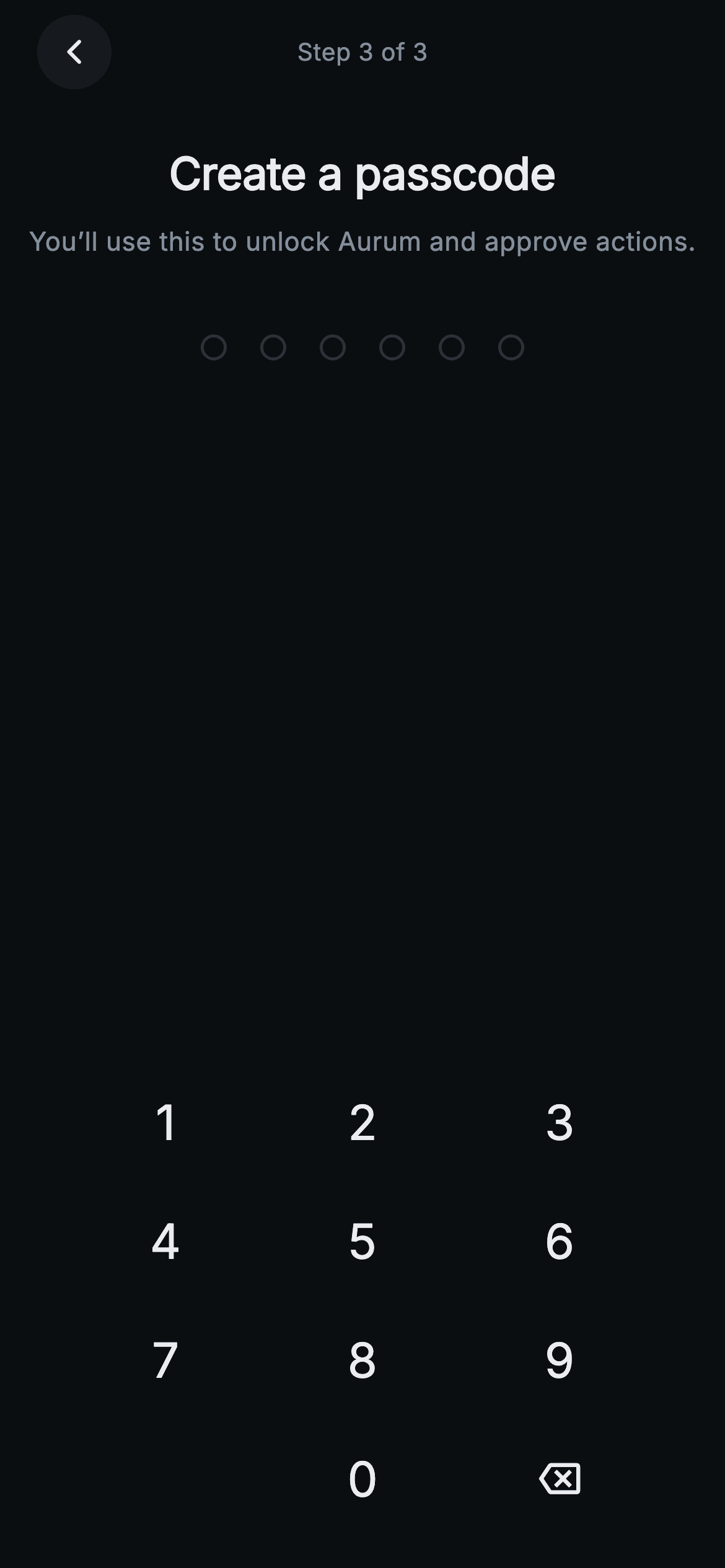
The final step of Aurum's wallet-creation flow (a "Step 3 of 3" pill sits between a circular back chevron in the header). On a near-black 0xFF0B0E11 canvas, a bold 24px "Create a passcode" title and the muted subline "You'll use this to unlock Aurum and approve actions" frame the task. Below sits a centered row of six circular dot indicators that read as hollow hairline rings (0xFF2B3139 border) until a digit lands, then fill solid with Aurum's gold 0xFFF0B90B. A custom numeric keypad anchors the bottom: rows 1-2-3, 4-5-6, 7-8-9, and a final row with an empty cell, 0, and a backspace icon — each key an InkWell with a CircleBorder ripple, no painted button chrome. Built in pure Flutter: a StatefulWidget tracks the entered string, fills dots as digits arrive, ignores input past six, and fires onComplete(code) via a post-frame callback once six digits are in; onBack drives the chevron. It bundles the Inter font, forces ThemeData.dark so it renders standalone, and stays backend-agnostic through ValueChanged/VoidCallback hooks rather than any storage or crypto SDK.
Full tutorial coming soon.
The step-by-step walkthrough and complete Dart source for this screen haven't been published yet. They'll be free when they are — no sign-up, no payment. In the meantime, browse the screens that already have their tutorial.
What's included
- ✓web3_create_set_passcode_screen.dart — a single self-contained StatefulWidget with onComplete(String) and onBack callbacks
- ✓_PasscodeDots widget rendering six rings that fill solid gold (0xFFF0B90B) as digits land, hairline 0xFF2B3139 when empty
- ✓_Numpad with a 1-9 / empty-0-backspace grid of InkWell CircleBorder keys and a backspace_outlined icon
- ✓Digit-entry logic that caps input at six and auto-advances via addPostFrameCallback once the code is complete
- ✓Bundled Inter font, forced ThemeData.dark, and the Binance-style 0xFF0B0E11 / gold palette so it drops in standalone
- ✓Header with a circular back button and a 'Step 3 of 3' progress label, no AppBar dependency
Use cases
- ✓Crypto wallet onboarding where a user sets an app-unlock passcode after generating a seed phrase
- ✓Securing a self-custody DeFi or NFT app with a local 6-digit PIN gate before approving transactions
- ✓Web3 exchange or staking apps needing a dark-themed passcode-creation step in account setup
- ✓Any fintech or trading app reusing a painted numeric keypad and dot indicator for PIN entry


