How to Build a Seed Phrase Verification Quiz Screen in Flutter (Full Code + Preview)
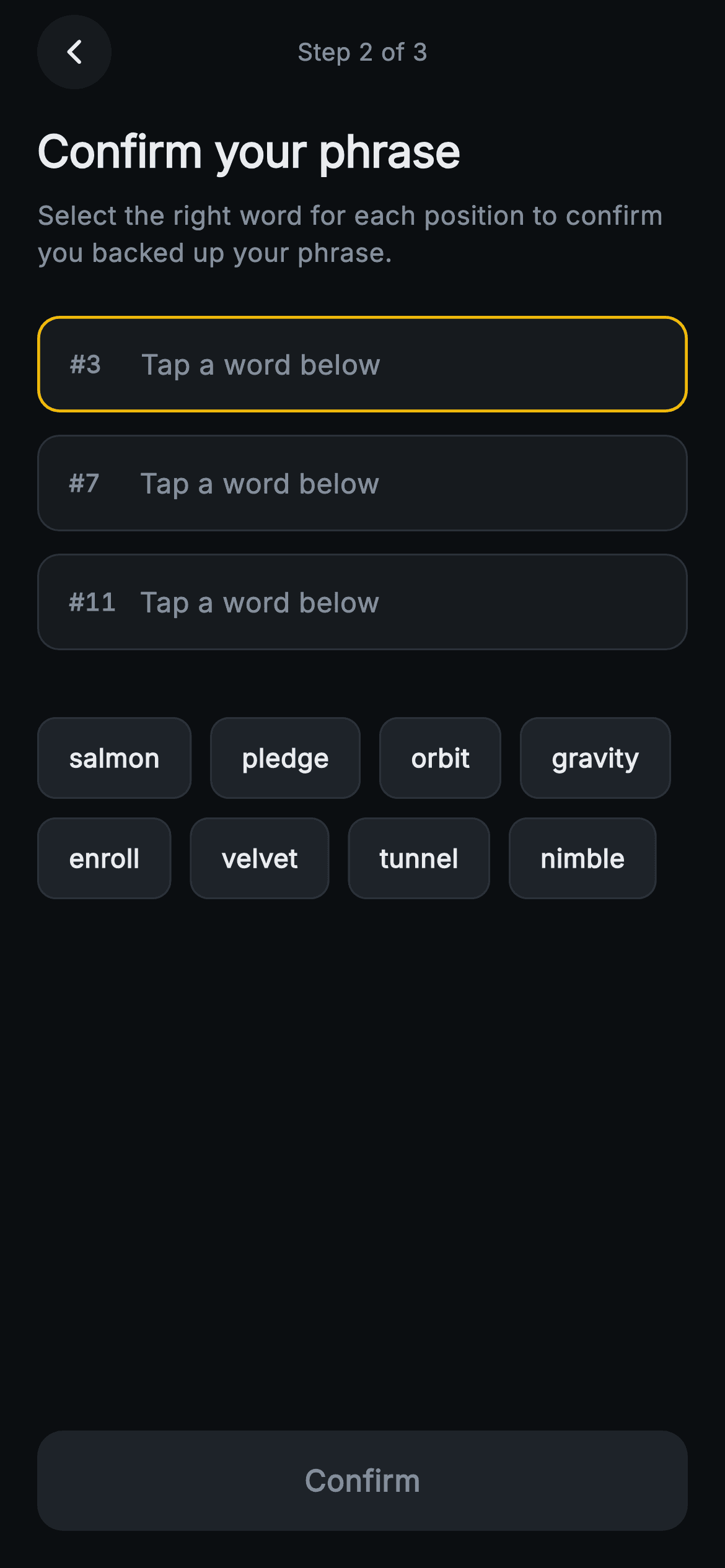
Plenty of people tap straight past a recovery phrase without writing it down, so wallets follow it with a short quiz that proves the backup exists. This tutorial builds Aurum's confirm step in Flutter: three numbered slots for words #3, #7 and #11, an eight-word pool that drops each tap into the next empty slot, per-slot green and red borders, an inline mismatch line, and a Confirm button that stays inert until every pick is right. All of it runs on one nullable list and three derived getters.
What you'll build
- ✓Three numbered answer slots (#3, #7, #11) that fill strictly in order through a derived `_nextSlot` getter, with tap-to-clear on any filled slot
- ✓An eight-chip `Wrap` pool whose distractors come from the same phrase, with used chips dimmed and disabled in place rather than removed
- ✓Slot borders that resolve to amber for the active slot, green for a correct word and red for a wrong one
- ✓An inline mismatch message that waits until all three slots are filled before it appears
- ✓A pinned Confirm button whose `InkWell` has a null `onTap`, so it does nothing at all until every pick matches
Step-by-step build
Create the file
Add a new file at lib/web3_create_seed_confirm/web3_create_seed_confirm_screen.dart in your Flutter project.
Register the bundled fonts
No external packages — this is pure Flutter. It does bundle its design font (Inter), so drop the font file into fonts/ and declare it in pubspec.yaml:
flutter:
  fonts:
    - family: Inter
      fonts:
- asset: fonts/Inter-Regular.ttfBuild it, piece by piece
Here's how the screen goes together. Each block below is a real slice of the code with a plain-English explanation — paste them in order, or grab the whole file from the next section.
The doc comment is the spec, and there are only two exits
import 'package:flutter/material.dart';

/// Web3 create — Confirm Phrase. Verifies the user saved their recovery phrase
/// by asking them to tap the correct word for three numbered slots, in order,
/// from a shuffled chip pool. Shows live validation. Self-contained per
/// CONVENTIONS.md: pure Flutter, bundled Inter font, painted/icon graphics,
/// forced dark theme so it renders standalone as a route.
class Web3CreateSeedConfirmScreen extends StatefulWidget {
  const Web3CreateSeedConfirmScreen({super.key, this.onConfirmed, this.onBack});

  final VoidCallback? onConfirmed;
  final VoidCallback? onBack;

  @override
  State<Web3CreateSeedConfirmScreen> createState() =>
      _Web3CreateSeedConfirmScreenState();
}
The doc comment states the whole rule set in two lines: tap the correct word for three numbered slots, in order, from a shuffled pool, with live validation. The constructor takes `super.key` plus just `onConfirmed` and `onBack`. Compare that with the previous step's `onCopy` and `onContinue`: this screen has a single outcome, verified or not, so there is nothing else for the host to handle. Because `onConfirmed` can only fire once the quiz is passed (see the button chunk), the caller gets that callback only when the check has passed and does not need to validate again. It is a `StatefulWidget` because the three picks change with every tap.
Parallel challenge lists and a pool built from the phrase itself
class _Web3CreateSeedConfirmScreenState
    extends State<Web3CreateSeedConfirmScreen> {
  static const String _font = 'Inter';
  static const Color _bg = Color(0xFF0B0E11);
  static const Color _surface = Color(0xFF161A1E);
  static const Color _surfaceAlt = Color(0xFF1E2329);
  static const Color _brand = Color(0xFFF0B90B);
  static const Color _up = Color(0xFF2EBD85);
  static const Color _down = Color(0xFFF6465D);
  static const Color _text = Color(0xFFEAECEF);
  static const Color _muted = Color(0xFF848E9C);
  static const Color _hairline = Color(0xFF2B3139);

  // The three challenge positions (1-based) and their correct words.
  static const List<int> _positions = <int>[3, 7, 11];
  static const List<String> _answers = <String>['orbit', 'salmon', 'enroll'];

  // Shuffled pool (correct words + distractors) — fixed order for determinism.
  static const List<String> _pool = <String>[
    'salmon', 'pledge', 'orbit', 'gravity',
    'enroll', 'velvet', 'tunnel', 'nimble',
  ];
The colours are the familiar Aurum constants, but two of them do new work here: `_up` `#2EBD85` and `_down` `#F6465D`, normally price-up and price-down colours, become right and wrong. The quiz itself is two parallel `static const` lists: `_positions` `[3, 7, 11]` and `_answers` `['orbit', 'salmon', 'enroll']`, where index `i` of one pairs with index `i` of the other. These answers really are words 3, 7 and 11 of the previous screen's demo phrase, and the challenge picks one word from each third of it. The detail that matters most is `_pool`: the five distractors, pledge, gravity, velvet, tunnel and nimble, also come from that same phrase. Recognising a word is not enough, so the user has to know which position it held. The comment explains the fixed order as 'for determinism', so previews and screenshots never change.
One nullable list, three getters, two guarded mutations
  final List<String?> _picks = <String?>[null, null, null];

  int get _nextSlot => _picks.indexWhere((String? w) => w == null);
  bool get _full => _nextSlot == -1;
  bool get _correct {
    for (int i = 0; i < _answers.length; i++) {
      if (_picks[i] != _answers[i]) return false;
    }
    return true;
  }

  void _pick(String word) {
    if (_pool.where((String w) => w == word).isEmpty) return;
    final int slot = _nextSlot;
    if (slot == -1) return;
    setState(() => _picks[slot] = word);
  }

  void _clearSlot(int i) {
    setState(() => _picks[i] = null);
  }
All of the quiz's state is `final List<String?> _picks = [null, null, null]`. The reference is final, but its contents change inside `setState`. Everything else is derived from it. `_nextSlot` is `indexWhere((w) => w == null)`, so it always returns the earliest empty slot, or -1 when none is left. Because it searches from the start every time, clearing slot 0 after filling all three makes slot 0 the target again, and the 'in order' rule needs no extra bookkeeping. `_full` is just `_nextSlot == -1`. `_correct` compares `_picks[i]` with `_answers[i]` and returns false on the first mismatch. A null never equals a string, so it stays false until every slot is filled and needs no separate full check. `_pick` has two guards. One rejects words that are not in `_pool`, which is purely defensive because chips only pass pool words. The other returns when `slot == -1`, so tapping a chip while every slot is full does nothing instead of overwriting the last answer.
Deriving the error flag once, then rendering the slots
  @override
  Widget build(BuildContext context) {
    final bool showError = _full && !_correct;
    return Theme(
      data: ThemeData.dark(useMaterial3: true),
      child: Scaffold(
        backgroundColor: _bg,
        body: SafeArea(
          child: Column(
            crossAxisAlignment: CrossAxisAlignment.stretch,
            children: <Widget>[
              Padding(
                padding: const EdgeInsets.fromLTRB(20, 8, 20, 0),
                child: Row(
                  children: <Widget>[
                    _CircleButton(
                        icon: Icons.arrow_back_ios_new_rounded,
                        onTap: widget.onBack),
                    const Spacer(),
                    const Text(
                      'Step 2 of 3',
                      style: TextStyle(
                        fontFamily: _font,
                        fontSize: 13,
                        fontWeight: FontWeight.w500,
                        color: _muted,
                      ),
                    ),
                    const Spacer(),
                    const SizedBox(width: 40),
                  ],
                ),
              ),
              Expanded(
                child: ListView(
                  padding: const EdgeInsets.fromLTRB(20, 16, 20, 16),
                  children: <Widget>[
                    const Text(
                      'Confirm your phrase',
                      style: TextStyle(
                        fontFamily: _font,
                        fontSize: 24,
                        fontWeight: FontWeight.w700,
                        letterSpacing: -0.3,
                        color: _text,
                      ),
                    ),
                    const SizedBox(height: 8),
                    const Text(
                      'Select the right word for each position to confirm you '
                      'backed up your phrase.',
                      style: TextStyle(
                        fontFamily: _font,
                        fontSize: 14,
                        height: 1.45,
                        color: _muted,
                      ),
                    ),
                    const SizedBox(height: 24),
                    for (int i = 0; i < _positions.length; i++)
                      Padding(
                        padding: const EdgeInsets.only(bottom: 12),
                        child: _Slot(
                          position: _positions[i],
                          word: _picks[i],
                          active: _nextSlot == i,
                          correct: _picks[i] != null
                              ? _picks[i] == _answers[i]
                              : null,
                          onClear: () => _clearSlot(i),
                        ),
                      ),
`build` begins with `final bool showError = _full && !_correct;`. The aggregate error stays hidden until all three slots are filled, because the slot borders already flag individual mistakes and an early banner would be noise. The theme wrapper and the balanced header are the same as in step 1, but the label now reads 'Step 2 of 3'. Under the 24px 'Confirm your phrase' headline and its 14px muted instruction, a collection-for builds one `_Slot` per position. Each slot receives `active: _nextSlot == i`, so only one slot is ever highlighted. It also receives a three-state `correct` that is `null` while the slot is empty and otherwise `_picks[i] == _answers[i]`. `onClear: () => _clearSlot(i)` is safe inside the loop because Dart gives each iteration of a `for` its own `i`, so each closure clears its own slot.
A mismatch line that tells the user how to fix it, and the word pool
                    const SizedBox(height: 8),
                    if (showError)
                      Row(
                        children: <Widget>[
                          const Icon(Icons.error_outline_rounded,
                              size: 16, color: _down),
                          const SizedBox(width: 6),
                          const Text(
                            'That doesn’t match. Tap a slot to redo it.',
                            style: TextStyle(
                              fontFamily: _font,
                              fontSize: 13,
                              fontWeight: FontWeight.w500,
                              color: _down,
                            ),
                          ),
                        ],
                      ),
                    const SizedBox(height: 16),
                    Wrap(
                      spacing: 10,
                      runSpacing: 10,
                      children: <Widget>[
                        for (final String w in _pool)
                          _PoolChip(
                            word: w,
                            used: _picks.contains(w),
                            onTap: () => _pick(w),
                          ),
                      ],
                    ),
                  ],
                ),
              ),
When `showError` is true, a row with a 16px `error_outline_rounded` icon and 13px `w500` text, both in `_down`, reads 'That doesn’t match. Tap a slot to redo it.' The second sentence matters more than the first, because it names the fix instead of just reporting the failure. One gotcha: the `Text` is not wrapped in `Flexible`, so a large accessibility text scale on a narrow phone could overflow the row. Wrap it if you support big font sizes. The fixed `SizedBox` gaps around the row also mean the pool shifts down when the error appears. Below that, a `Wrap` with 10px `spacing` and `runSpacing` lays out the eight `_PoolChip`s. Each chip is as wide as its word, so they reflow onto as many rows as the width needs. `used: _picks.contains(w)` is what dims a chip once it has been placed.
A Confirm button with one job and a truly disabled state
              Padding(
                padding: const EdgeInsets.fromLTRB(20, 8, 20, 20),
                child: SizedBox(
                  height: 54,
                  child: Material(
                    color: _correct ? _brand : _surfaceAlt,
                    borderRadius: BorderRadius.circular(14),
                    child: InkWell(
                      borderRadius: BorderRadius.circular(14),
                      onTap: _correct ? widget.onConfirmed : null,
                      child: Center(
                        child: Text(
                          'Confirm',
                          style: TextStyle(
                            fontFamily: _font,
                            fontSize: 16,
                            fontWeight: FontWeight.w600,
                            color: _correct ? _bg : _muted,
                          ),
                        ),
                      ),
                    ),
                  ),
                ),
              ),
            ],
          ),
        ),
      ),
    );
  }
}
The step 1 screen used one bar that switched from reveal to continue. Here the button only ever confirms, and it unlocks on `_correct`, not `_full`, so three filled but wrong slots keep it grey. The `Material` colour switches between `_brand` gold and `_surfaceAlt`, and the label between `_bg` near-black (for contrast on gold) and `_muted`. The key line is `onTap: _correct ? widget.onConfirmed : null`. An `InkWell` with a null `onTap` draws no ripple and ignores taps, so the grey state does nothing when pressed and does not just look disabled. The 54px button sits outside the `ListView` in the outer `Column`, so it stays pinned while the slots and pool scroll. `Material` and `InkWell` share `BorderRadius.circular(14)` so the ripple clips to the rounded corners.
The slot: border precedence, a full-width hit area, and an X that means clear
class _Slot extends StatelessWidget {
  const _Slot({
    required this.position,
    required this.word,
    required this.active,
    required this.correct,
    required this.onClear,
  });

  final int position;
  final String? word;
  final bool active;
  final bool? correct;
  final VoidCallback onClear;

  @override
  Widget build(BuildContext context) {
    Color border = _Web3CreateSeedConfirmScreenState._hairline;
    if (active) border = _Web3CreateSeedConfirmScreenState._brand;
    if (correct == true) border = _Web3CreateSeedConfirmScreenState._up;
    if (correct == false) border = _Web3CreateSeedConfirmScreenState._down;

    return GestureDetector(
      onTap: word != null ? onClear : null,
      behavior: HitTestBehavior.opaque,
      child: Container(
        height: 52,
        padding: const EdgeInsets.symmetric(horizontal: 16),
        decoration: BoxDecoration(
          color: _Web3CreateSeedConfirmScreenState._surface,
          borderRadius: BorderRadius.circular(12),
          border: Border.all(color: border, width: active ? 1.6 : 1),
        ),
        child: Row(
          children: <Widget>[
            SizedBox(
              width: 30,
              child: Text(
                '#$position',
                style: const TextStyle(
                  fontFamily: _Web3CreateSeedConfirmScreenState._font,
                  fontSize: 13,
                  fontWeight: FontWeight.w600,
                  fontFeatures: <FontFeature>[FontFeature.tabularFigures()],
                  color: _Web3CreateSeedConfirmScreenState._muted,
                ),
              ),
            ),
            const SizedBox(width: 8),
            Expanded(
              child: Text(
                word ?? 'Tap a word below',
                style: TextStyle(
                  fontFamily: _Web3CreateSeedConfirmScreenState._font,
                  fontSize: 15,
                  fontWeight: word != null ? FontWeight.w600 : FontWeight.w400,
                  color: word != null
                      ? _Web3CreateSeedConfirmScreenState._text
                      : _Web3CreateSeedConfirmScreenState._muted,
                ),
              ),
            ),
            if (correct == true)
              const Icon(Icons.check_circle_rounded,
                  size: 18, color: _Web3CreateSeedConfirmScreenState._up)
            else if (word != null)
              const Icon(Icons.close_rounded,
                  size: 18, color: _Web3CreateSeedConfirmScreenState._muted),
          ],
        ),
      ),
    );
  }
}
`_Slot` resolves its border colour with a chain of `if` statements where the last match wins: `_hairline` by default, `_brand` when active, `_up` when correct and `_down` when wrong. Active and correct never overlap in practice, because the active slot is always empty. The active border is also thicker, `width: active ? 1.6 : 1`, so it reads as a cursor. The `GestureDetector` only gets an `onTap` when `word != null`. `HitTestBehavior.opaque` makes the whole 52px row tappable, including the blank padding, which the default behaviour would miss. Correct slots can still be cleared too. The `'#$position'` label sits in a 30px box with `FontFeature.tabularFigures()`, so '#3' and '#11' keep the words aligned. Empty slots show 'Tap a word below' at `w400` muted, and filled slots show the word at `w600`. The trailing icon is a green `check_circle_rounded` for a correct word. A wrong word gets a muted `close_rounded` rather than a second red signal, because the border already says wrong and the X hints that tapping clears the slot. The colours come from `_Web3CreateSeedConfirmScreenState._hairline` and the other private statics, which every class in the file can read.
Pool chips that stay in place, and the circular back button
class _PoolChip extends StatelessWidget {
  const _PoolChip({required this.word, required this.used, required this.onTap});

  final String word;
  final bool used;
  final VoidCallback onTap;

  @override
  Widget build(BuildContext context) {
    return Material(
      color: used
          ? _Web3CreateSeedConfirmScreenState._surface
          : _Web3CreateSeedConfirmScreenState._surfaceAlt,
      borderRadius: BorderRadius.circular(10),
      child: InkWell(
        borderRadius: BorderRadius.circular(10),
        onTap: used ? null : onTap,
        child: Container(
          padding: const EdgeInsets.symmetric(horizontal: 16, vertical: 11),
          decoration: BoxDecoration(
            borderRadius: BorderRadius.circular(10),
            border: Border.all(color: _Web3CreateSeedConfirmScreenState._hairline),
          ),
          child: Text(
            word,
            style: TextStyle(
              fontFamily: _Web3CreateSeedConfirmScreenState._font,
              fontSize: 14,
              fontWeight: FontWeight.w600,
              color: used
                  ? _Web3CreateSeedConfirmScreenState._muted
                  : _Web3CreateSeedConfirmScreenState._text,
            ),
          ),
        ),
      ),
    );
  }
}

class _CircleButton extends StatelessWidget {
  const _CircleButton({required this.icon, required this.onTap});

  final IconData icon;
  final VoidCallback? onTap;

  @override
  Widget build(BuildContext context) {
    return Material(
      color: _Web3CreateSeedConfirmScreenState._surface,
      shape: const CircleBorder(),
      child: InkWell(
        customBorder: const CircleBorder(),
        onTap: onTap,
        child: SizedBox(
          width: 40,
          height: 40,
          child: Icon(icon,
              size: 16, color: _Web3CreateSeedConfirmScreenState._text),
        ),
      ),
    );
  }
}
When `_PoolChip` is used, it changes three things. Its fill drops from `_surfaceAlt` to the darker `_surface`, its text goes from `_text` to `_muted`, and `onTap: used ? null : onTap` disables the `InkWell`. What it does not do is disappear. Because a used chip keeps its slot in the `Wrap`, nothing reflows, so the next word the user is about to tap never moves under their finger. Clearing a slot brings the chip back in the same spot. The hairline border is drawn on an inner `Container` with the same 10px radius as the `Material`, and the padding is 16×11 around 14px `w600` text. `_CircleButton` is the usual 40×40 control: `Material(shape: CircleBorder())` paired with `InkWell(customBorder: CircleBorder())` so the ripple stays circular, with a 16px back glyph in `_text`.
Full code
The complete, ready-to-paste source. Free to use in your projects — one click copies it all.
import 'package:flutter/material.dart';

/// Web3 create — Confirm Phrase. Verifies the user saved their recovery phrase
/// by asking them to tap the correct word for three numbered slots, in order,
/// from a shuffled chip pool. Shows live validation. Self-contained per
/// CONVENTIONS.md: pure Flutter, bundled Inter font, painted/icon graphics,
/// forced dark theme so it renders standalone as a route.
class Web3CreateSeedConfirmScreen extends StatefulWidget {
  const Web3CreateSeedConfirmScreen({super.key, this.onConfirmed, this.onBack});

  final VoidCallback? onConfirmed;
  final VoidCallback? onBack;

  @override
  State<Web3CreateSeedConfirmScreen> createState() =>
      _Web3CreateSeedConfirmScreenState();
}

class _Web3CreateSeedConfirmScreenState
    extends State<Web3CreateSeedConfirmScreen> {
  static const String _font = 'Inter';
  static const Color _bg = Color(0xFF0B0E11);
  static const Color _surface = Color(0xFF161A1E);
  static const Color _surfaceAlt = Color(0xFF1E2329);
  static const Color _brand = Color(0xFFF0B90B);
  static const Color _up = Color(0xFF2EBD85);
  static const Color _down = Color(0xFFF6465D);
  static const Color _text = Color(0xFFEAECEF);
  static const Color _muted = Color(0xFF848E9C);
  static const Color _hairline = Color(0xFF2B3139);

  // The three challenge positions (1-based) and their correct words.
  static const List<int> _positions = <int>[3, 7, 11];
  static const List<String> _answers = <String>['orbit', 'salmon', 'enroll'];

  // Shuffled pool (correct words + distractors) — fixed order for determinism.
  static const List<String> _pool = <String>[
    'salmon', 'pledge', 'orbit', 'gravity',
    'enroll', 'velvet', 'tunnel', 'nimble',
  ];

  final List<String?> _picks = <String?>[null, null, null];

  int get _nextSlot => _picks.indexWhere((String? w) => w == null);
  bool get _full => _nextSlot == -1;
  bool get _correct {
    for (int i = 0; i < _answers.length; i++) {
      if (_picks[i] != _answers[i]) return false;
    }
    return true;
  }

  void _pick(String word) {
    if (_pool.where((String w) => w == word).isEmpty) return;
    final int slot = _nextSlot;
    if (slot == -1) return;
    setState(() => _picks[slot] = word);
  }

  void _clearSlot(int i) {
    setState(() => _picks[i] = null);
  }

  @override
  Widget build(BuildContext context) {
    final bool showError = _full && !_correct;
    return Theme(
      data: ThemeData.dark(useMaterial3: true),
      child: Scaffold(
        backgroundColor: _bg,
        body: SafeArea(
          child: Column(
            crossAxisAlignment: CrossAxisAlignment.stretch,
            children: <Widget>[
              Padding(
                padding: const EdgeInsets.fromLTRB(20, 8, 20, 0),
                child: Row(
                  children: <Widget>[
                    _CircleButton(
                        icon: Icons.arrow_back_ios_new_rounded,
                        onTap: widget.onBack),
                    const Spacer(),
                    const Text(
                      'Step 2 of 3',
                      style: TextStyle(
                        fontFamily: _font,
                        fontSize: 13,
                        fontWeight: FontWeight.w500,
                        color: _muted,
                      ),
                    ),
                    const Spacer(),
                    const SizedBox(width: 40),
                  ],
                ),
              ),
              Expanded(
                child: ListView(
                  padding: const EdgeInsets.fromLTRB(20, 16, 20, 16),
                  children: <Widget>[
                    const Text(
                      'Confirm your phrase',
                      style: TextStyle(
                        fontFamily: _font,
                        fontSize: 24,
                        fontWeight: FontWeight.w700,
                        letterSpacing: -0.3,
                        color: _text,
                      ),
                    ),
                    const SizedBox(height: 8),
                    const Text(
                      'Select the right word for each position to confirm you '
                      'backed up your phrase.',
                      style: TextStyle(
                        fontFamily: _font,
                        fontSize: 14,
                        height: 1.45,
                        color: _muted,
                      ),
                    ),
                    const SizedBox(height: 24),
                    for (int i = 0; i < _positions.length; i++)
                      Padding(
                        padding: const EdgeInsets.only(bottom: 12),
                        child: _Slot(
                          position: _positions[i],
                          word: _picks[i],
                          active: _nextSlot == i,
                          correct: _picks[i] != null
                              ? _picks[i] == _answers[i]
                              : null,
                          onClear: () => _clearSlot(i),
                        ),
                      ),
                    const SizedBox(height: 8),
                    if (showError)
                      Row(
                        children: <Widget>[
                          const Icon(Icons.error_outline_rounded,
                              size: 16, color: _down),
                          const SizedBox(width: 6),
                          const Text(
                            'That doesn’t match. Tap a slot to redo it.',
                            style: TextStyle(
                              fontFamily: _font,
                              fontSize: 13,
                              fontWeight: FontWeight.w500,
                              color: _down,
                            ),
                          ),
                        ],
                      ),
                    const SizedBox(height: 16),
                    Wrap(
                      spacing: 10,
                      runSpacing: 10,
                      children: <Widget>[
                        for (final String w in _pool)
                          _PoolChip(
                            word: w,
                            used: _picks.contains(w),
                            onTap: () => _pick(w),
                          ),
                      ],
                    ),
                  ],
                ),
              ),
              Padding(
                padding: const EdgeInsets.fromLTRB(20, 8, 20, 20),
                child: SizedBox(
                  height: 54,
                  child: Material(
                    color: _correct ? _brand : _surfaceAlt,
                    borderRadius: BorderRadius.circular(14),
                    child: InkWell(
                      borderRadius: BorderRadius.circular(14),
                      onTap: _correct ? widget.onConfirmed : null,
                      child: Center(
                        child: Text(
                          'Confirm',
                          style: TextStyle(
                            fontFamily: _font,
                            fontSize: 16,
                            fontWeight: FontWeight.w600,
                            color: _correct ? _bg : _muted,
                          ),
                        ),
                      ),
                    ),
                  ),
                ),
              ),
            ],
          ),
        ),
      ),
    );
  }
}

class _Slot extends StatelessWidget {
  const _Slot({
    required this.position,
    required this.word,
    required this.active,
    required this.correct,
    required this.onClear,
  });

  final int position;
  final String? word;
  final bool active;
  final bool? correct;
  final VoidCallback onClear;

  @override
  Widget build(BuildContext context) {
    Color border = _Web3CreateSeedConfirmScreenState._hairline;
    if (active) border = _Web3CreateSeedConfirmScreenState._brand;
    if (correct == true) border = _Web3CreateSeedConfirmScreenState._up;
    if (correct == false) border = _Web3CreateSeedConfirmScreenState._down;

    return GestureDetector(
      onTap: word != null ? onClear : null,
      behavior: HitTestBehavior.opaque,
      child: Container(
        height: 52,
        padding: const EdgeInsets.symmetric(horizontal: 16),
        decoration: BoxDecoration(
          color: _Web3CreateSeedConfirmScreenState._surface,
          borderRadius: BorderRadius.circular(12),
          border: Border.all(color: border, width: active ? 1.6 : 1),
        ),
        child: Row(
          children: <Widget>[
            SizedBox(
              width: 30,
              child: Text(
                '#$position',
                style: const TextStyle(
                  fontFamily: _Web3CreateSeedConfirmScreenState._font,
                  fontSize: 13,
                  fontWeight: FontWeight.w600,
                  fontFeatures: <FontFeature>[FontFeature.tabularFigures()],
                  color: _Web3CreateSeedConfirmScreenState._muted,
                ),
              ),
            ),
            const SizedBox(width: 8),
            Expanded(
              child: Text(
                word ?? 'Tap a word below',
                style: TextStyle(
                  fontFamily: _Web3CreateSeedConfirmScreenState._font,
                  fontSize: 15,
                  fontWeight: word != null ? FontWeight.w600 : FontWeight.w400,
                  color: word != null
                      ? _Web3CreateSeedConfirmScreenState._text
                      : _Web3CreateSeedConfirmScreenState._muted,
                ),
              ),
            ),
            if (correct == true)
              const Icon(Icons.check_circle_rounded,
                  size: 18, color: _Web3CreateSeedConfirmScreenState._up)
            else if (word != null)
              const Icon(Icons.close_rounded,
                  size: 18, color: _Web3CreateSeedConfirmScreenState._muted),
          ],
        ),
      ),
    );
  }
}

class _PoolChip extends StatelessWidget {
  const _PoolChip({required this.word, required this.used, required this.onTap});

  final String word;
  final bool used;
  final VoidCallback onTap;

  @override
  Widget build(BuildContext context) {
    return Material(
      color: used
          ? _Web3CreateSeedConfirmScreenState._surface
          : _Web3CreateSeedConfirmScreenState._surfaceAlt,
      borderRadius: BorderRadius.circular(10),
      child: InkWell(
        borderRadius: BorderRadius.circular(10),
        onTap: used ? null : onTap,
        child: Container(
          padding: const EdgeInsets.symmetric(horizontal: 16, vertical: 11),
          decoration: BoxDecoration(
            borderRadius: BorderRadius.circular(10),
            border: Border.all(color: _Web3CreateSeedConfirmScreenState._hairline),
          ),
          child: Text(
            word,
            style: TextStyle(
              fontFamily: _Web3CreateSeedConfirmScreenState._font,
              fontSize: 14,
              fontWeight: FontWeight.w600,
              color: used
                  ? _Web3CreateSeedConfirmScreenState._muted
                  : _Web3CreateSeedConfirmScreenState._text,
            ),
          ),
        ),
      ),
    );
  }
}

class _CircleButton extends StatelessWidget {
  const _CircleButton({required this.icon, required this.onTap});

  final IconData icon;
  final VoidCallback? onTap;

  @override
  Widget build(BuildContext context) {
    return Material(
      color: _Web3CreateSeedConfirmScreenState._surface,
      shape: const CircleBorder(),
      child: InkWell(
        customBorder: const CircleBorder(),
        onTap: onTap,
        child: SizedBox(
          width: 40,
          height: 40,
          child: Icon(icon,
              size: 16, color: _Web3CreateSeedConfirmScreenState._text),
        ),
      ),
    );
  }
}
Plus bundled 1 binary asset (fonts/images). The CLI and MCP install those for you automatically.
Two faster ways to add it
Copy-paste works, but you can skip it entirely.
1. FlutterKit CLI
One command drops this screen — and its fonts — straight into your project.
$ flutterkit add web3-create-seed-confirm2. AI agent (MCP)
Connect FlutterKit's MCP server in Claude or Cursor and just ask your agent to install web3-create-seed-confirm — it fetches and writes the files for you.
FAQ
Can I use this confirm-phrase screen in a commercial wallet app?
Yes. It is free for personal and commercial projects. Copy the code from this page, add it with the CLI or fetch it over MCP, and ship it. No licence key, account or attribution is needed.
How do I make the quiz use the user's real phrase instead of the hard-coded words?
Pass the mnemonic into the widget and turn `_positions`, `_answers` and `_pool` from `static const` into state fields set in `initState`. Pick three indices with `Random.secure()` and sort them so the slots read in order. Set the answers to `words[index - 1]`, then build the pool from those answers plus five other words from the same phrase and shuffle it once. Do the shuffle in `initState`, not `build`, or the chips will jump on every tap. BIP-39 phrases can repeat a word, and `_picks.contains(w)` would then disable both copies, so in that case track used chips by pool index instead.
Doesn't the instant green/red feedback let someone guess the answers?
Yes. Because each slot shows `correct` as soon as it is filled, someone who never wrote the phrase down can clear and retry until every slot turns green. That is forgiving, but it is not strict. For a real check, pass `correct: null` to every slot until `_full` is true and rely on the aggregate `showError` line. You could also limit retries and send the user back to step 1 after too many misses.
Does it need any packages or a font setup?
No packages. The only import is `package:flutter/material.dart`, and unlike the reveal step there is no `dart:ui` blur. The font is Inter, bundled at `lib/web3_create_seed_confirm/fonts/Inter.ttf` and referenced through `fontFamily: 'Inter'`, so there is no Google Fonts dependency.
What Flutter version does it require?
Any reasonably current Flutter 3 release. There is no `Color.withValues` in this file, so the 3.22 minimum that applies to many sibling screens does not apply here. The constructor uses `super.key`, which needs Dart 2.17 (Flutter 3.0). On older code, expand it to `{Key? key, ...} : super(key: key)`. If your SDK rejects `ThemeData.dark(useMaterial3: true)`, use `ThemeData(brightness: Brightness.dark, useMaterial3: true)` instead.


