How to Build a Crypto Wallet Recovery Phrase Screen in Flutter (Full Code + Preview)
A seed phrase is the one screen in a crypto wallet where a design mistake costs users real money. This tutorial builds Aurum's recovery-phrase screen in Flutter: twelve numbered word chips in a six-row grid, hidden behind a live BackdropFilter blur until the user deliberately taps reveal, an amber banner warning that support will never ask for the phrase, a copy control that stays disabled while the words are hidden, and a pinned bar that converts from the reveal trigger into a gold 'I've saved it' continue gate.
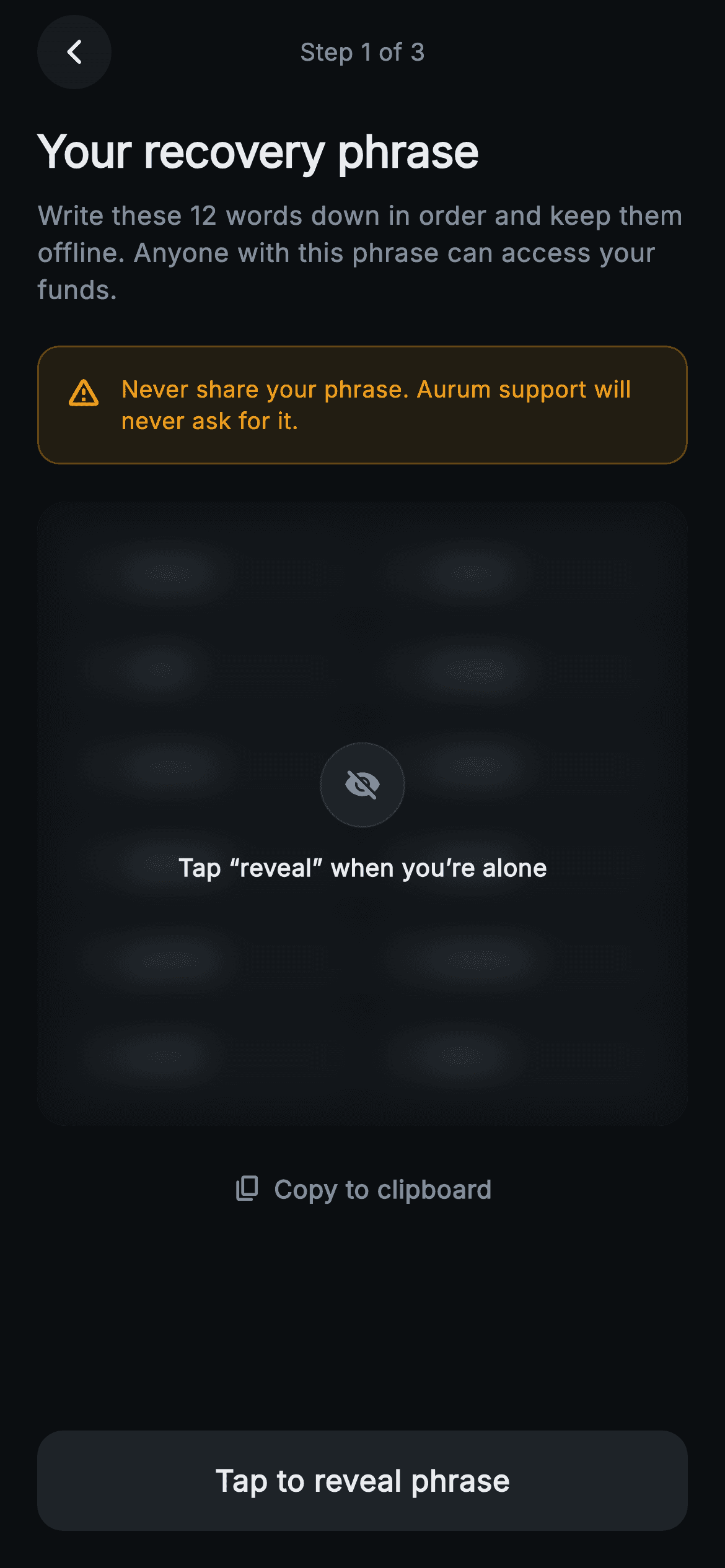
What you'll build
- ✓A blur-until-reveal overlay that blurs the real word chips with ImageFilter.blur(sigma 9) instead of showing a fake placeholder
- ✓A six-row grid of twelve numbered word pills with tabular-figure indices so every word aligns
- ✓A copy-to-clipboard control that is colour-disabled and tap-guarded until the phrase is revealed
- ✓One pinned action bar that starts as 'Tap to reveal phrase' and becomes the gold 'I've saved it' continue gate
- ✓An amber warning banner reminding users that support never asks for the phrase
Step-by-step build
Create the file
Add a new file at lib/web3_create_seed_phrase/web3_create_seed_phrase_screen.dart in your Flutter project.
Register the bundled fonts
No external packages — this is pure Flutter. It does bundle its design font (Inter), so drop the font file into fonts/ and declare it in pubspec.yaml:
flutter:
  fonts:
    - family: Inter
      fonts:
- asset: fonts/Inter-Regular.ttfBuild it, piece by piece
Here's how the screen goes together. Each block below is a real slice of the code with a plain-English explanation — paste them in order, or grab the whole file from the next section.
One extra import, and a screen with two states
import 'dart:ui' as ui;

import 'package:flutter/material.dart';

/// Web3 create — Your Recovery Phrase. A 12-word numbered grid in surface chips
/// hidden behind a blur-until-reveal overlay, with copy and an "I’ve saved it"
/// pinned bar (disabled until revealed). Self-contained per CONVENTIONS.md:
/// pure Flutter, bundled Inter font, painted graphics only, forced dark theme
/// so it renders standalone as a route.
class Web3CreateSeedPhraseScreen extends StatefulWidget {
  const Web3CreateSeedPhraseScreen({
    super.key,
    this.onContinue,
    this.onCopy,
    this.onBack,
  });

  final VoidCallback? onContinue;
  final VoidCallback? onCopy;
  final VoidCallback? onBack;

  @override
  State<Web3CreateSeedPhraseScreen> createState() =>
      _Web3CreateSeedPhraseScreenState();
}
The only import beyond `material.dart` is `dart:ui as ui`, and it is there for exactly one call — `ui.ImageFilter.blur` in the reveal overlay. Unlike a static confirmation page this is a `StatefulWidget`, because two things genuinely change on-device: whether the phrase is revealed and whether it has been copied. The three optional callbacks — `onContinue`, `onCopy`, `onBack` — draw the line of responsibility: the screen owns its reveal choreography, while navigation and the actual clipboard write belong to the caller. That is what lets the same file drop into any wallet backend unchanged.
A gold-on-near-black palette, twelve words, two booleans
class _Web3CreateSeedPhraseScreenState
    extends State<Web3CreateSeedPhraseScreen> {
  static const String _font = 'Inter';
  static const Color _bg = Color(0xFF0B0E11);
  static const Color _surface = Color(0xFF161A1E);
  static const Color _surfaceAlt = Color(0xFF1E2329);
  static const Color _brand = Color(0xFFF0B90B);
  static const Color _warn = Color(0xFFF0A020);
  static const Color _text = Color(0xFFEAECEF);
  static const Color _muted = Color(0xFF848E9C);
  static const Color _hairline = Color(0xFF2B3139);

  static const List<String> _words = <String>[
    'harbor', 'velvet', 'orbit', 'pledge',
    'cactus', 'nimble', 'salmon', 'tunnel',
    'gravity', 'wisdom', 'enroll', 'fabric',
  ];

  bool _revealed = false;
  bool _copied = false;
The palette is exchange-app dark: `#0B0E11` background, `#161A1E` surface, `#1E2329` for the chips one step lighter, `#EAECEF` text, `#848E9C` muted, `#2B3139` hairlines. Two yellows are deliberately kept apart — `_brand` gold `#F0B90B` is reserved for actions (the continue bar, the enabled copy tint), while `_warn` amber `#F0A020` is reserved for danger (the banner). If the warning wore the brand colour, the scariest element on screen would look tappable. The twelve words live in a `static const List<String>`, written four per line so the 6×2 grid is visible in the source, and the entire interactive surface hangs off just `_revealed` and `_copied`.
Forced dark theme and a phantom-balanced header
  @override
  Widget build(BuildContext context) {
    return Theme(
      data: ThemeData.dark(useMaterial3: true),
      child: Scaffold(
        backgroundColor: _bg,
        body: SafeArea(
          child: Column(
            crossAxisAlignment: CrossAxisAlignment.stretch,
            children: <Widget>[
              Padding(
                padding: const EdgeInsets.fromLTRB(20, 8, 20, 0),
                child: Row(
                  children: <Widget>[
                    _CircleButton(
                      icon: Icons.arrow_back_ios_new_rounded,
                      onTap: widget.onBack,
                    ),
                    const Spacer(),
                    const Text(
                      'Step 1 of 3',
                      style: TextStyle(
                        fontFamily: _font,
                        fontSize: 13,
                        fontWeight: FontWeight.w500,
                        color: _muted,
                      ),
                    ),
                    const Spacer(),
                    const SizedBox(width: 40),
                  ],
                ),
              ),
The tree is wrapped in `Theme(data: ThemeData.dark(useMaterial3: true))`, so the screen renders correctly as a standalone route even inside a light-themed host app — ripples, icons and defaults all inherit dark. The header row is a `_CircleButton` back control, a `Spacer`, the 'Step 1 of 3' label at 13px muted, another `Spacer`, then `const SizedBox(width: 40)`. That trailing box is a phantom twin of the 40px back button: without it the two Spacers would centre the label between the button's right edge and the screen edge, nudging it off the true centreline. Framing the phrase as step 1 of 3 also promises a confirm step, which lowers the temptation to skim this one.
Body copy that states the stakes, and a guarded copy tap
              Expanded(
                child: ListView(
                  padding: const EdgeInsets.fromLTRB(20, 16, 20, 16),
                  children: <Widget>[
                    const Text(
                      'Your recovery phrase',
                      style: TextStyle(
                        fontFamily: _font,
                        fontSize: 24,
                        fontWeight: FontWeight.w700,
                        letterSpacing: -0.3,
                        color: _text,
                      ),
                    ),
                    const SizedBox(height: 8),
                    const Text(
                      'Write these 12 words down in order and keep them '
                      'offline. Anyone with this phrase can access your funds.',
                      style: TextStyle(
                        fontFamily: _font,
                        fontSize: 14,
                        height: 1.45,
                        color: _muted,
                      ),
                    ),
                    const SizedBox(height: 20),
                    _WarningBanner(),
                    const SizedBox(height: 20),
                    _PhraseGrid(words: _words, revealed: _revealed),
                    const SizedBox(height: 16),
                    Center(
                      child: _CopyButton(
                        copied: _copied,
                        enabled: _revealed,
                        onTap: () {
                          if (!_revealed) return;
                          setState(() => _copied = true);
                          widget.onCopy?.call();
                        },
                      ),
                    ),
                  ],
                ),
The body is a `ListView` so short phones scroll instead of overflowing. The 24px `w700` headline with `letterSpacing: -0.3` sits over guidance that ends on the sentence that matters: 'Anyone with this phrase can access your funds.' Order is intentional — `_WarningBanner()` renders before `_PhraseGrid`, so the reader passes the caution before reaching the secret. The grid receives both `_words` and `_revealed`, letting it manage its own overlay. The copy control is double-locked: it gets `enabled: _revealed` for its visual state, and its `onTap` opens with `if (!_revealed) return;` — so even a registered tap on the blurred state does nothing. Only after that guard does `setState` flip `_copied` and forward to `widget.onCopy?.call()`.
One pinned bar, two jobs
              Padding(
                padding: const EdgeInsets.fromLTRB(20, 8, 20, 20),
                child: SizedBox(
                  height: 54,
                  child: Material(
                    color: _revealed ? _brand : _surfaceAlt,
                    borderRadius: BorderRadius.circular(14),
                    child: InkWell(
                      borderRadius: BorderRadius.circular(14),
                      onTap: _revealed
                          ? widget.onContinue
                          : () => setState(() => _revealed = true),
                      child: Center(
                        child: Text(
                          _revealed ? 'I’ve saved it' : 'Tap to reveal phrase',
                          style: TextStyle(
                            fontFamily: _font,
                            fontSize: 16,
                            fontWeight: FontWeight.w600,
                            color: _revealed ? _bg : _text,
                          ),
                        ),
                      ),
                    ),
                  ),
                ),
              ),
            ],
          ),
        ),
      ),
    );
  }
}
The bottom bar is a single 54px `Material` + `InkWell`, and every property forks on `_revealed`. Hidden: `_surfaceAlt` fill, `_text` label, 'Tap to reveal phrase', and a tap that just runs `setState(() => _revealed = true)`. Revealed: gold `_brand` fill, near-black `_bg` label for contrast on gold, 'I've saved it', wired to `widget.onContinue`. Making reveal and continue the same physical control is the gate — there is no path to the continue action that does not pass through revealing the words first, enforced by the widget tree rather than by validation logic. Both `Material` and `InkWell` carry the same `BorderRadius.circular(14)` so the ripple clips to the rounded shape.
The word grid and the blur that hides real content
class _PhraseGrid extends StatelessWidget {
  const _PhraseGrid({required this.words, required this.revealed});

  final List<String> words;
  final bool revealed;

  @override
  Widget build(BuildContext context) {
    final Widget grid = Container(
      padding: const EdgeInsets.all(16),
      decoration: BoxDecoration(
        color: _Web3CreateSeedPhraseScreenState._surface,
        borderRadius: BorderRadius.circular(16),
        border: Border.all(color: _Web3CreateSeedPhraseScreenState._hairline),
      ),
      child: Column(
        children: <Widget>[
          for (int row = 0; row < 6; row++)
            Padding(
              padding: EdgeInsets.only(bottom: row == 5 ? 0 : 10),
              child: Row(
                children: <Widget>[
                  Expanded(child: _WordChip(index: row * 2, word: words[row * 2])),
                  const SizedBox(width: 10),
                  Expanded(
                      child: _WordChip(
                          index: row * 2 + 1, word: words[row * 2 + 1])),
                ],
              ),
            ),
        ],
      ),
    );

    return Stack(
      children: <Widget>[
        grid,
        if (!revealed)
          Positioned.fill(
            child: ClipRRect(
              borderRadius: BorderRadius.circular(16),
              child: BackdropFilter(
                filter: ui.ImageFilter.blur(sigmaX: 9, sigmaY: 9),
                child: Container(
                  decoration: BoxDecoration(
                    color: _Web3CreateSeedPhraseScreenState._bg
                        .withValues(alpha: 0.55),
                    borderRadius: BorderRadius.circular(16),
                  ),
                  alignment: Alignment.center,
                  child: Column(
                    mainAxisSize: MainAxisSize.min,
                    children: <Widget>[
                      Container(
                        width: 46,
                        height: 46,
                        decoration: BoxDecoration(
                          color: _Web3CreateSeedPhraseScreenState._surfaceAlt,
                          shape: BoxShape.circle,
                          border: Border.all(
                              color: _Web3CreateSeedPhraseScreenState._hairline),
                        ),
                        child: const Icon(Icons.visibility_off_rounded,
                            size: 20,
                            color: _Web3CreateSeedPhraseScreenState._muted),
                      ),
                      const SizedBox(height: 12),
                      const Text(
                        'Tap “reveal” when you’re alone',
                        style: TextStyle(
                          fontFamily: _Web3CreateSeedPhraseScreenState._font,
                          fontSize: 13,
                          fontWeight: FontWeight.w600,
                          color: _Web3CreateSeedPhraseScreenState._text,
                        ),
                      ),
                    ],
                  ),
                ),
              ),
            ),
          ),
      ],
    );
  }
}
`_PhraseGrid` first builds the grid into a local `grid` variable: a `_surface` card with a `_hairline` border and 16px radius, emitting six rows via a collection-for where `EdgeInsets.only(bottom: row == 5 ? 0 : 10)` puts 10px between rows and none after the last, and the chip indices come from `row * 2` and `row * 2 + 1`. Then a `Stack` layers the mask over it — but only `if (!revealed)`, so once revealed the overlay leaves the tree entirely. The mask is `Positioned.fill` → `ClipRRect` at the same 16px radius (so the blur cannot bleed past the card's corners) → `BackdropFilter` with `ui.ImageFilter.blur(sigmaX: 9, sigmaY: 9)` → a scrim of `_bg.withValues(alpha: 0.55)`. Because it is a backdrop blur, the real chips are genuinely rendered underneath and smeared live — the hidden state is honest, not a screenshot or placeholder. Centred on the scrim: a 46px `_surfaceAlt` circle holding a `visibility_off_rounded` icon, and the line 'Tap "reveal" when you're alone', which turns the mask itself into a shoulder-surfing prompt.
Word chips with tabular figures
class _WordChip extends StatelessWidget {
  const _WordChip({required this.index, required this.word});

  final int index;
  final String word;

  @override
  Widget build(BuildContext context) {
    return Container(
      padding: const EdgeInsets.symmetric(horizontal: 12, vertical: 11),
      decoration: BoxDecoration(
        color: _Web3CreateSeedPhraseScreenState._surfaceAlt,
        borderRadius: BorderRadius.circular(10),
      ),
      child: Row(
        children: <Widget>[
          SizedBox(
            width: 20,
            child: Text(
              '${index + 1}',
              style: const TextStyle(
                fontFamily: _Web3CreateSeedPhraseScreenState._font,
                fontSize: 12,
                fontWeight: FontWeight.w600,
                fontFeatures: <FontFeature>[FontFeature.tabularFigures()],
                color: _Web3CreateSeedPhraseScreenState._muted,
              ),
            ),
          ),
          Expanded(
            child: Text(
              word,
              style: const TextStyle(
                fontFamily: _Web3CreateSeedPhraseScreenState._font,
                fontSize: 14,
                fontWeight: FontWeight.w600,
                color: _Web3CreateSeedPhraseScreenState._text,
              ),
            ),
          ),
        ],
      ),
    );
  }
}
`_WordChip` is a `_surfaceAlt` pill with a 10px radius and 12×11 padding. Its index sits in a fixed `SizedBox(width: 20)` styled with `FontFeature.tabularFigures()` — every digit takes the same advance width, so '1' and '12' occupy identical space and all twelve words start on the same vertical line without any per-row measuring. The index is deliberately quieter than the word (12px `_muted` versus 14px `_text`, both `w600`), because during a written backup the number is a checkpoint but the word is the payload. The word sits in an `Expanded`, so an unusually long word truncates inside its own chip instead of shoving its row wider than the others.
The warning banner, copy button and circle button
class _WarningBanner extends StatelessWidget {
  @override
  Widget build(BuildContext context) {
    return Container(
      padding: const EdgeInsets.all(14),
      decoration: BoxDecoration(
        color: _Web3CreateSeedPhraseScreenState._warn.withValues(alpha: 0.10),
        borderRadius: BorderRadius.circular(12),
        border: Border.all(
            color: _Web3CreateSeedPhraseScreenState._warn.withValues(alpha: 0.3)),
      ),
      child: Row(
        crossAxisAlignment: CrossAxisAlignment.start,
        children: <Widget>[
          const Icon(Icons.warning_amber_rounded,
              size: 20, color: _Web3CreateSeedPhraseScreenState._warn),
          const SizedBox(width: 10),
          const Expanded(
            child: Text(
              'Never share your phrase. Aurum support will never ask for it.',
              style: TextStyle(
                fontFamily: _Web3CreateSeedPhraseScreenState._font,
                fontSize: 12.5,
                height: 1.35,
                fontWeight: FontWeight.w500,
                color: _Web3CreateSeedPhraseScreenState._warn,
              ),
            ),
          ),
        ],
      ),
    );
  }
}

class _CopyButton extends StatelessWidget {
  const _CopyButton({
    required this.copied,
    required this.enabled,
    required this.onTap,
  });

  final bool copied;
  final bool enabled;
  final VoidCallback onTap;

  @override
  Widget build(BuildContext context) {
    final Color tint = enabled
        ? _Web3CreateSeedPhraseScreenState._brand
        : _Web3CreateSeedPhraseScreenState._muted;
    return Material(
      color: Colors.transparent,
      borderRadius: BorderRadius.circular(10),
      child: InkWell(
        borderRadius: BorderRadius.circular(10),
        onTap: onTap,
        child: Padding(
          padding: const EdgeInsets.symmetric(horizontal: 12, vertical: 8),
          child: Row(
            mainAxisSize: MainAxisSize.min,
            children: <Widget>[
              Icon(copied ? Icons.check_rounded : Icons.copy_rounded,
                  size: 16, color: tint),
              const SizedBox(width: 6),
              Text(
                copied ? 'Copied' : 'Copy to clipboard',
                style: TextStyle(
                  fontFamily: _Web3CreateSeedPhraseScreenState._font,
                  fontSize: 13.5,
                  fontWeight: FontWeight.w600,
                  color: tint,
                ),
              ),
            ],
          ),
        ),
      ),
    );
  }
}

class _CircleButton extends StatelessWidget {
  const _CircleButton({required this.icon, required this.onTap});

  final IconData icon;
  final VoidCallback? onTap;

  @override
  Widget build(BuildContext context) {
    return Material(
      color: _Web3CreateSeedPhraseScreenState._surface,
      shape: const CircleBorder(),
      child: InkWell(
        customBorder: const CircleBorder(),
        onTap: onTap,
        child: SizedBox(
          width: 40,
          height: 40,
          child: Icon(icon,
              size: 16, color: _Web3CreateSeedPhraseScreenState._text),
        ),
      ),
    );
  }
}
Three small widgets finish the screen. `_WarningBanner` uses one amber at two strengths — `_warn.withValues(alpha: 0.10)` fill and `alpha: 0.3` border — with the icon and text in full `_warn`, so the whole banner reads as a single temperature; `CrossAxisAlignment.start` plus an `Expanded` keeps the 20px `warning_amber_rounded` icon pinned to the first line if the copy wraps. `_CopyButton` computes one `tint` — `_brand` when enabled, `_muted` when not — and applies it to both icon and label, so the disabled state is pure colour with no extra widgets, and the copied state swaps `copy_rounded` for `check_rounded` and 'Copy to clipboard' for 'Copied'. `_CircleButton` pairs `Material(shape: CircleBorder())` with `InkWell(customBorder: CircleBorder())`, which is the standard trick for a ripple that clips to a circle, sized 40×40 with a small 16px glyph.
Full code
The complete, ready-to-paste source. Free to use in your projects — one click copies it all.
import 'dart:ui' as ui;

import 'package:flutter/material.dart';

/// Web3 create — Your Recovery Phrase. A 12-word numbered grid in surface chips
/// hidden behind a blur-until-reveal overlay, with copy and an "I’ve saved it"
/// pinned bar (disabled until revealed). Self-contained per CONVENTIONS.md:
/// pure Flutter, bundled Inter font, painted graphics only, forced dark theme
/// so it renders standalone as a route.
class Web3CreateSeedPhraseScreen extends StatefulWidget {
  const Web3CreateSeedPhraseScreen({
    super.key,
    this.onContinue,
    this.onCopy,
    this.onBack,
  });

  final VoidCallback? onContinue;
  final VoidCallback? onCopy;
  final VoidCallback? onBack;

  @override
  State<Web3CreateSeedPhraseScreen> createState() =>
      _Web3CreateSeedPhraseScreenState();
}

class _Web3CreateSeedPhraseScreenState
    extends State<Web3CreateSeedPhraseScreen> {
  static const String _font = 'Inter';
  static const Color _bg = Color(0xFF0B0E11);
  static const Color _surface = Color(0xFF161A1E);
  static const Color _surfaceAlt = Color(0xFF1E2329);
  static const Color _brand = Color(0xFFF0B90B);
  static const Color _warn = Color(0xFFF0A020);
  static const Color _text = Color(0xFFEAECEF);
  static const Color _muted = Color(0xFF848E9C);
  static const Color _hairline = Color(0xFF2B3139);

  static const List<String> _words = <String>[
    'harbor', 'velvet', 'orbit', 'pledge',
    'cactus', 'nimble', 'salmon', 'tunnel',
    'gravity', 'wisdom', 'enroll', 'fabric',
  ];

  bool _revealed = false;
  bool _copied = false;

  @override
  Widget build(BuildContext context) {
    return Theme(
      data: ThemeData.dark(useMaterial3: true),
      child: Scaffold(
        backgroundColor: _bg,
        body: SafeArea(
          child: Column(
            crossAxisAlignment: CrossAxisAlignment.stretch,
            children: <Widget>[
              Padding(
                padding: const EdgeInsets.fromLTRB(20, 8, 20, 0),
                child: Row(
                  children: <Widget>[
                    _CircleButton(
                      icon: Icons.arrow_back_ios_new_rounded,
                      onTap: widget.onBack,
                    ),
                    const Spacer(),
                    const Text(
                      'Step 1 of 3',
                      style: TextStyle(
                        fontFamily: _font,
                        fontSize: 13,
                        fontWeight: FontWeight.w500,
                        color: _muted,
                      ),
                    ),
                    const Spacer(),
                    const SizedBox(width: 40),
                  ],
                ),
              ),
              Expanded(
                child: ListView(
                  padding: const EdgeInsets.fromLTRB(20, 16, 20, 16),
                  children: <Widget>[
                    const Text(
                      'Your recovery phrase',
                      style: TextStyle(
                        fontFamily: _font,
                        fontSize: 24,
                        fontWeight: FontWeight.w700,
                        letterSpacing: -0.3,
                        color: _text,
                      ),
                    ),
                    const SizedBox(height: 8),
                    const Text(
                      'Write these 12 words down in order and keep them '
                      'offline. Anyone with this phrase can access your funds.',
                      style: TextStyle(
                        fontFamily: _font,
                        fontSize: 14,
                        height: 1.45,
                        color: _muted,
                      ),
                    ),
                    const SizedBox(height: 20),
                    _WarningBanner(),
                    const SizedBox(height: 20),
                    _PhraseGrid(words: _words, revealed: _revealed),
                    const SizedBox(height: 16),
                    Center(
                      child: _CopyButton(
                        copied: _copied,
                        enabled: _revealed,
                        onTap: () {
                          if (!_revealed) return;
                          setState(() => _copied = true);
                          widget.onCopy?.call();
                        },
                      ),
                    ),
                  ],
                ),
              ),
              Padding(
                padding: const EdgeInsets.fromLTRB(20, 8, 20, 20),
                child: SizedBox(
                  height: 54,
                  child: Material(
                    color: _revealed ? _brand : _surfaceAlt,
                    borderRadius: BorderRadius.circular(14),
                    child: InkWell(
                      borderRadius: BorderRadius.circular(14),
                      onTap: _revealed
                          ? widget.onContinue
                          : () => setState(() => _revealed = true),
                      child: Center(
                        child: Text(
                          _revealed ? 'I’ve saved it' : 'Tap to reveal phrase',
                          style: TextStyle(
                            fontFamily: _font,
                            fontSize: 16,
                            fontWeight: FontWeight.w600,
                            color: _revealed ? _bg : _text,
                          ),
                        ),
                      ),
                    ),
                  ),
                ),
              ),
            ],
          ),
        ),
      ),
    );
  }
}

class _PhraseGrid extends StatelessWidget {
  const _PhraseGrid({required this.words, required this.revealed});

  final List<String> words;
  final bool revealed;

  @override
  Widget build(BuildContext context) {
    final Widget grid = Container(
      padding: const EdgeInsets.all(16),
      decoration: BoxDecoration(
        color: _Web3CreateSeedPhraseScreenState._surface,
        borderRadius: BorderRadius.circular(16),
        border: Border.all(color: _Web3CreateSeedPhraseScreenState._hairline),
      ),
      child: Column(
        children: <Widget>[
          for (int row = 0; row < 6; row++)
            Padding(
              padding: EdgeInsets.only(bottom: row == 5 ? 0 : 10),
              child: Row(
                children: <Widget>[
                  Expanded(child: _WordChip(index: row * 2, word: words[row * 2])),
                  const SizedBox(width: 10),
                  Expanded(
                      child: _WordChip(
                          index: row * 2 + 1, word: words[row * 2 + 1])),
                ],
              ),
            ),
        ],
      ),
    );

    return Stack(
      children: <Widget>[
        grid,
        if (!revealed)
          Positioned.fill(
            child: ClipRRect(
              borderRadius: BorderRadius.circular(16),
              child: BackdropFilter(
                filter: ui.ImageFilter.blur(sigmaX: 9, sigmaY: 9),
                child: Container(
                  decoration: BoxDecoration(
                    color: _Web3CreateSeedPhraseScreenState._bg
                        .withValues(alpha: 0.55),
                    borderRadius: BorderRadius.circular(16),
                  ),
                  alignment: Alignment.center,
                  child: Column(
                    mainAxisSize: MainAxisSize.min,
                    children: <Widget>[
                      Container(
                        width: 46,
                        height: 46,
                        decoration: BoxDecoration(
                          color: _Web3CreateSeedPhraseScreenState._surfaceAlt,
                          shape: BoxShape.circle,
                          border: Border.all(
                              color: _Web3CreateSeedPhraseScreenState._hairline),
                        ),
                        child: const Icon(Icons.visibility_off_rounded,
                            size: 20,
                            color: _Web3CreateSeedPhraseScreenState._muted),
                      ),
                      const SizedBox(height: 12),
                      const Text(
                        'Tap “reveal” when you’re alone',
                        style: TextStyle(
                          fontFamily: _Web3CreateSeedPhraseScreenState._font,
                          fontSize: 13,
                          fontWeight: FontWeight.w600,
                          color: _Web3CreateSeedPhraseScreenState._text,
                        ),
                      ),
                    ],
                  ),
                ),
              ),
            ),
          ),
      ],
    );
  }
}

class _WordChip extends StatelessWidget {
  const _WordChip({required this.index, required this.word});

  final int index;
  final String word;

  @override
  Widget build(BuildContext context) {
    return Container(
      padding: const EdgeInsets.symmetric(horizontal: 12, vertical: 11),
      decoration: BoxDecoration(
        color: _Web3CreateSeedPhraseScreenState._surfaceAlt,
        borderRadius: BorderRadius.circular(10),
      ),
      child: Row(
        children: <Widget>[
          SizedBox(
            width: 20,
            child: Text(
              '${index + 1}',
              style: const TextStyle(
                fontFamily: _Web3CreateSeedPhraseScreenState._font,
                fontSize: 12,
                fontWeight: FontWeight.w600,
                fontFeatures: <FontFeature>[FontFeature.tabularFigures()],
                color: _Web3CreateSeedPhraseScreenState._muted,
              ),
            ),
          ),
          Expanded(
            child: Text(
              word,
              style: const TextStyle(
                fontFamily: _Web3CreateSeedPhraseScreenState._font,
                fontSize: 14,
                fontWeight: FontWeight.w600,
                color: _Web3CreateSeedPhraseScreenState._text,
              ),
            ),
          ),
        ],
      ),
    );
  }
}

class _WarningBanner extends StatelessWidget {
  @override
  Widget build(BuildContext context) {
    return Container(
      padding: const EdgeInsets.all(14),
      decoration: BoxDecoration(
        color: _Web3CreateSeedPhraseScreenState._warn.withValues(alpha: 0.10),
        borderRadius: BorderRadius.circular(12),
        border: Border.all(
            color: _Web3CreateSeedPhraseScreenState._warn.withValues(alpha: 0.3)),
      ),
      child: Row(
        crossAxisAlignment: CrossAxisAlignment.start,
        children: <Widget>[
          const Icon(Icons.warning_amber_rounded,
              size: 20, color: _Web3CreateSeedPhraseScreenState._warn),
          const SizedBox(width: 10),
          const Expanded(
            child: Text(
              'Never share your phrase. Aurum support will never ask for it.',
              style: TextStyle(
                fontFamily: _Web3CreateSeedPhraseScreenState._font,
                fontSize: 12.5,
                height: 1.35,
                fontWeight: FontWeight.w500,
                color: _Web3CreateSeedPhraseScreenState._warn,
              ),
            ),
          ),
        ],
      ),
    );
  }
}

class _CopyButton extends StatelessWidget {
  const _CopyButton({
    required this.copied,
    required this.enabled,
    required this.onTap,
  });

  final bool copied;
  final bool enabled;
  final VoidCallback onTap;

  @override
  Widget build(BuildContext context) {
    final Color tint = enabled
        ? _Web3CreateSeedPhraseScreenState._brand
        : _Web3CreateSeedPhraseScreenState._muted;
    return Material(
      color: Colors.transparent,
      borderRadius: BorderRadius.circular(10),
      child: InkWell(
        borderRadius: BorderRadius.circular(10),
        onTap: onTap,
        child: Padding(
          padding: const EdgeInsets.symmetric(horizontal: 12, vertical: 8),
          child: Row(
            mainAxisSize: MainAxisSize.min,
            children: <Widget>[
              Icon(copied ? Icons.check_rounded : Icons.copy_rounded,
                  size: 16, color: tint),
              const SizedBox(width: 6),
              Text(
                copied ? 'Copied' : 'Copy to clipboard',
                style: TextStyle(
                  fontFamily: _Web3CreateSeedPhraseScreenState._font,
                  fontSize: 13.5,
                  fontWeight: FontWeight.w600,
                  color: tint,
                ),
              ),
            ],
          ),
        ),
      ),
    );
  }
}

class _CircleButton extends StatelessWidget {
  const _CircleButton({required this.icon, required this.onTap});

  final IconData icon;
  final VoidCallback? onTap;

  @override
  Widget build(BuildContext context) {
    return Material(
      color: _Web3CreateSeedPhraseScreenState._surface,
      shape: const CircleBorder(),
      child: InkWell(
        customBorder: const CircleBorder(),
        onTap: onTap,
        child: SizedBox(
          width: 40,
          height: 40,
          child: Icon(icon,
              size: 16, color: _Web3CreateSeedPhraseScreenState._text),
        ),
      ),
    );
  }
}
Plus bundled 1 binary asset (fonts/images). The CLI and MCP install those for you automatically.
Two faster ways to add it
Copy-paste works, but you can skip it entirely.
1. FlutterKit CLI
One command drops this screen — and its fonts — straight into your project.
$ flutterkit add web3-create-seed-phrase2. AI agent (MCP)
Connect FlutterKit's MCP server in Claude or Cursor and just ask your agent to install web3-create-seed-phrase — it fetches and writes the files for you.
FAQ
Is this recovery phrase screen free to use, including commercially?
Yes. FlutterKit screens are free for personal and commercial projects alike — copy the code from this page, install it via the CLI, or pull it through MCP, and ship it in a production wallet. No licence key, no sign-up, no attribution required.
Are the twelve words a real BIP-39 mnemonic?
No — they are a hard-coded `static const` placeholder list ('harbor', 'velvet', 'orbit'…) chosen to look plausible in previews, and the screen performs no key derivation. In a real wallet, generate the mnemonic with a vetted BIP-39 implementation and pass those words into `_PhraseGrid` instead; the UI does not care where the list comes from.
Does the copy button actually write to the clipboard?
Not by itself. Tapping it flips the local `_copied` flag for the 'Copied' check state and invokes `onCopy` — the actual `Clipboard.setData` call is left to you deliberately, since many wallets restrict or discourage copying a seed phrase at all. If you do wire it up, join `_words` with spaces and consider clearing the clipboard after a timeout.
Does it need any packages or fonts?
No third-party packages — it is pure Flutter, and even the blur comes from the SDK's own `dart:ui` `ImageFilter`, not a plugin. The Inter font ships bundled with the screen at `lib/web3_create_seed_phrase/fonts/Inter.ttf`, so typography matches the preview with no Google Fonts dependency.
Which Flutter version does this require?
Flutter 3.22 or newer: the scrim and warning banner use `Color.withValues(alpha: …)`, and the constructor uses `super.key`. On an older SDK, replace each `withValues(alpha: x)` with `withOpacity(x)` and expand the constructor to the `{Key? key} : super(key: key)` form.


