How to Build a Streaming App Splash Screen in Flutter (Full Code + Preview)
A streaming app opens on a dark, cinematic splash while the catalog loads, and that first second sets the mood. In this tutorial you'll build the launch screen for 'Cineo', a Netflix-style movie service: a near-black canvas, a hand-painted play-button brandmark that glows red, a wide-tracked CINEO wordmark, a tagline, and an animated red shimmer bar that sweeps left to right while content loads. Every mark is drawn with CustomPainter, the whole screen forces its own dark theme, and it's pure Flutter with one bundled font.
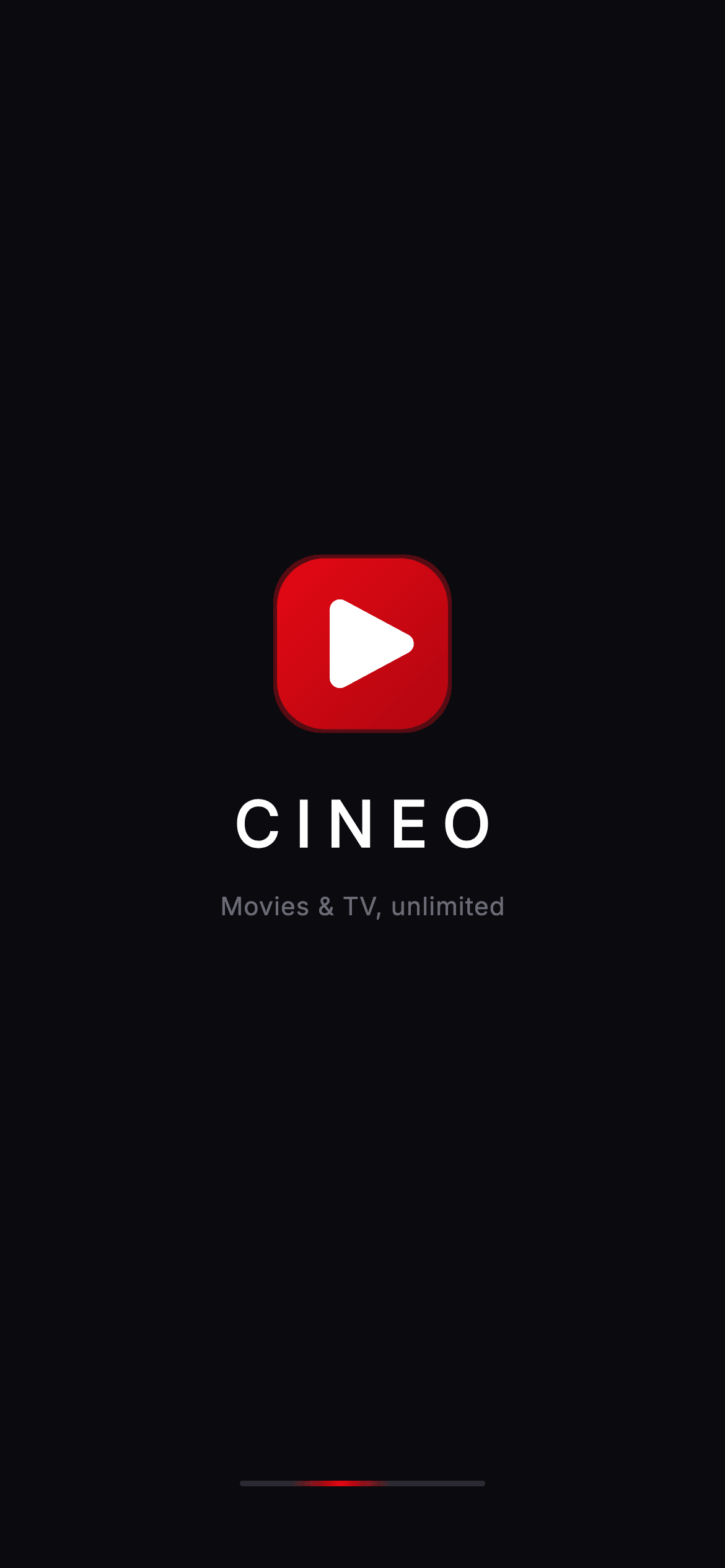
Watch the Flutter UI walkthrough
A short screen recording of Cineo · Splash running, if you'd rather see it before you read the code. The written tutorial below covers everything in it.
Can't see the video? Watch it on YouTube.
What you'll build
- ✓A self-contained dark splash that forces ThemeData.dark so it looks right pushed as any route
- ✓A custom-painted brandmark: a red gradient tile with a soft glow and a play triangle drawn by hand (no image asset)
- ✓A CINEO wordmark with heavy weight and 8px letter-spacing, plus a muted tagline
- ✓An infinitely looping red shimmer loading bar built from an AnimationController and a CustomPainter
- ✓Correct animation lifecycle — a ticker mixin, a repeating controller, and disposal on teardown
Step-by-step build
Create the file
Add a new file at lib/stream_onboarding_splash/stream_onboarding_splash_screen.dart in your Flutter project.
Register the bundled fonts
No external packages — this is pure Flutter. It does bundle its design font (Inter), so drop the font file into fonts/ and declare it in pubspec.yaml:
flutter:
  fonts:
    - family: Inter
      fonts:
- asset: fonts/Inter-Regular.ttfBuild it, piece by piece
Here's how the screen goes together. Each block below is a real slice of the code with a plain-English explanation — paste them in order, or grab the whole file from the next section.
Imports, the stateful widget, and the Cineo color tokens
import 'package:flutter/material.dart';

/// Splash — branded launch screen for **Cineo**, a premium cinematic streaming
/// app (Netflix / Disney+ / HBO Max mold). Self-contained per CONVENTIONS.md:
/// pure Flutter, the exact design font (Inter) is bundled under `fonts/`, and
/// the screen forces its own dark theme so it renders standalone when pushed as
/// a route. The wordmark and play mark are fully painted (no raster logo).
class StreamOnboardingSplashScreen extends StatefulWidget {
  const StreamOnboardingSplashScreen({super.key, this.onContinue});

  /// Optional tap / auto-advance callback used by the gallery to chain the flow.
  final VoidCallback? onContinue;

  static const String _font = 'Inter';

  // ── Cineo cinematic token palette (inline, shared across streaming screens) ──
  static const Color _bg = Color(0xFF0B0B0F);
  static const Color _brand = Color(0xFFE50914);
  static const Color _brandDark = Color(0xFFB00610);
  static const Color _text = Color(0xFFFFFFFF);
  static const Color _muted = Color(0xFF6B6B76);

  @override
  State<StreamOnboardingSplashScreen> createState() =>
      _StreamOnboardingSplashScreenState();
}
The file imports only Flutter's material library, then declares StreamOnboardingSplashScreen as a StatefulWidget because it will drive a looping animation. It exposes one optional callback, onContinue, that the gallery uses to advance the flow when the screen is tapped. Five private const Colors act as design tokens: _bg (#0B0B0F) is the near-black canvas, _brand (#E50914) is the signature streaming red, _brandDark (#B00610) is its deeper shade for the gradient, _text is white for the wordmark, and _muted (#6B6B76) is the grey for the tagline. _font pins everything to the bundled Inter typeface.
The looping animation controller and its lifecycle
class _StreamOnboardingSplashScreenState
    extends State<StreamOnboardingSplashScreen>
    with SingleTickerProviderStateMixin {
  late final AnimationController _controller;

  @override
  void initState() {
    super.initState();
    _controller = AnimationController(
      vsync: this,
      duration: const Duration(milliseconds: 1600),
    )..repeat();
  }

  @override
  void dispose() {
    _controller.dispose();
    super.dispose();
  }
The State class mixes in SingleTickerProviderStateMixin, which supplies the single 'vsync' ticker an AnimationController needs to sync with the screen's refresh rate. In initState the controller is created with a 1600ms duration and immediately '..repeat()', so its value cycles from 0 to 1 forever — that endless cycle is what powers the shimmer later. The matching dispose() calls _controller.dispose() before super.dispose(), releasing the ticker so the animation doesn't leak or keep running after the screen is gone.
Forcing dark mode, a tap-through scaffold, and the centered brand column
  @override
  Widget build(BuildContext context) {
    return Theme(
      data: ThemeData.dark(useMaterial3: true),
      child: Scaffold(
        backgroundColor: StreamOnboardingSplashScreen._bg,
        body: GestureDetector(
          onTap: widget.onContinue,
          behavior: HitTestBehavior.opaque,
          child: SafeArea(
            child: SizedBox.expand(
              child: Column(
                crossAxisAlignment: CrossAxisAlignment.center,
                children: <Widget>[
                  const Spacer(),
                  const _CineoMark(size: 92),
                  const SizedBox(height: 26),
                  const Text(
                    'CINEO',
                    style: TextStyle(
                      fontFamily: StreamOnboardingSplashScreen._font,
                      fontSize: 34,
                      fontWeight: FontWeight.w800,
                      letterSpacing: 8,
                      color: StreamOnboardingSplashScreen._text,
                    ),
                  ),
                  const SizedBox(height: 10),
                  const Text(
                    'Movies & TV, unlimited',
                    style: TextStyle(
                      fontFamily: StreamOnboardingSplashScreen._font,
                      fontSize: 13.5,
                      fontWeight: FontWeight.w500,
                      letterSpacing: 0.4,
                      color: StreamOnboardingSplashScreen._muted,
                    ),
                  ),
                  const Spacer(),
build() wraps everything in a Theme with ThemeData.dark(useMaterial3: true) so the splash renders correctly even when pushed onto a light app. The Scaffold is painted with _bg, and a GestureDetector with behavior HitTestBehavior.opaque makes the whole surface tappable — firing onContinue anywhere, not just on the logo. Inside SafeArea, a SizedBox.expand forces a full-screen Column. A Spacer at the top and one after balance the group vertically: the 92px _CineoMark, then the 'CINEO' wordmark at 34px, weight w800, with a bold 8px letterSpacing, then the 13.5px muted 'Movies & TV, unlimited' tagline.
The animated red shimmer loading bar
                  const Spacer(),
                  // Brand-red shimmer loading bar.
                  SizedBox(
                    width: 132,
                    height: 3,
                    child: AnimatedBuilder(
                      animation: _controller,
                      builder: (BuildContext context, Widget? child) {
                        return CustomPaint(
                          painter: _ShimmerBarPainter(progress: _controller.value),
                        );
                      },
                    ),
                  ),
                  const SizedBox(height: 44),
                ],
              ),
            ),
          ),
        ),
      ),
    );
  }
}
Below the second Spacer sits the loading indicator: a 132×3 SizedBox holding an AnimatedBuilder wired to _controller. AnimatedBuilder rebuilds only its child on every frame the controller ticks, so it hands the current _controller.value (0 to 1) into a CustomPaint using _ShimmerBarPainter. That's the efficient way to repaint a thin bar 60 times a second without rebuilding the whole tree. A final SizedBox(height: 44) lifts the bar off the very bottom edge.
Painting the brandmark — a gradient tile with a play triangle
/// The Cineo brandmark — a brand-gradient rounded square with a painted play
/// triangle punched out of a soft cinematic glow.
class _CineoMark extends StatelessWidget {
  const _CineoMark({required this.size});

  final double size;

  @override
  Widget build(BuildContext context) {
    return Container(
      width: size,
      height: size,
      decoration: BoxDecoration(
        borderRadius: BorderRadius.circular(size * 0.28),
        gradient: const LinearGradient(
          begin: Alignment.topLeft,
          end: Alignment.bottomRight,
          colors: <Color>[
            StreamOnboardingSplashScreen._brand,
            StreamOnboardingSplashScreen._brandDark,
          ],
        ),
        boxShadow: <BoxShadow>[
          BoxShadow(
            color: StreamOnboardingSplashScreen._brand.withValues(alpha: 0.35),
            blurRadius: 32,
            spreadRadius: 2,
          ),
        ],
      ),
      child: CustomPaint(painter: _PlayMarkPainter()),
    );
  }
}

/// Paints a rounded white play triangle centered in the brandmark.
class _PlayMarkPainter extends CustomPainter {
  @override
  void paint(Canvas canvas, Size size) {
    final double w = size.width;
    final double h = size.height;
    final Paint paint = Paint()
      ..color = Colors.white
      ..style = PaintingStyle.fill
      ..strokeJoin = StrokeJoin.round
      ..strokeCap = StrokeCap.round
      ..strokeWidth = w * 0.12;
    final double cx = w * 0.54;
    final double cy = h * 0.5;
    final double r = w * 0.2;
    final Path tri = Path()
      ..moveTo(cx - r * 0.86, cy - r)
      ..lineTo(cx + r, cy)
      ..lineTo(cx - r * 0.86, cy + r)
      ..close();
    canvas.drawPath(
      tri,
      paint
        ..style = PaintingStyle.stroke,
    );
    canvas.drawPath(tri, paint..style = PaintingStyle.fill);
  }

  @override
  bool shouldRepaint(covariant _PlayMarkPainter oldDelegate) => false;
}
_CineoMark is a Container whose BoxDecoration rounds its corners to size * 0.28 and fills it with a topLeft-to-bottomRight LinearGradient from _brand to _brandDark. A BoxShadow using _brand.withValues(alpha: 0.35) with a 32px blur creates the soft red cinematic glow around the tile. Its child is a CustomPaint running _PlayMarkPainter, which builds a three-point Path — a triangle offset to cx = 54% width so it looks optically centered — and draws it twice, once stroked with rounded joins and once filled white, giving the play icon slightly softened corners.
The shimmer painter — a gradient window sweeping a dim track
/// A brand-red gradient sweep that travels along a dim track — the splash
/// loading shimmer.
class _ShimmerBarPainter extends CustomPainter {
  const _ShimmerBarPainter({required this.progress});

  final double progress;

  @override
  void paint(Canvas canvas, Size size) {
    final RRect track = RRect.fromRectAndRadius(
      Offset.zero & size,
      Radius.circular(size.height / 2),
    );
    canvas.drawRRect(
      track,
      Paint()..color = const Color(0xFF2A2A33),
    );
    // Moving highlight window.
    final double windowW = size.width * 0.42;
    final double travel = (size.width + windowW) * progress - windowW;
    final Rect glow = Rect.fromLTWH(travel, 0, windowW, size.height);
    canvas.save();
    canvas.clipRRect(track);
    canvas.drawRect(
      glow,
      Paint()
        ..shader = const LinearGradient(
          colors: <Color>[
            Color(0x00E50914),
            StreamOnboardingSplashScreen._brand,
            Color(0x00E50914),
          ],
        ).createShader(glow),
    );
    canvas.restore();
  }

  @override
  bool shouldRepaint(covariant _ShimmerBarPainter oldDelegate) =>
      oldDelegate.progress != progress;
}
_ShimmerBarPainter takes the animation's progress value and draws two layers. First a fully-rounded RRect track in dark grey (#2A2A33) as the resting bar. Then a moving highlight: windowW is 42% of the width, and 'travel' maps progress so the window slides from just off the left edge to off the right. After clipRRect keeps the glow inside the pill, it fills that window with a horizontal LinearGradient that fades transparent → _brand → transparent, so a soft red streak appears to travel across. shouldRepaint returns true only when progress changes, avoiding wasted repaints.
Full code
The complete, ready-to-paste source. Free to use in your projects — one click copies it all.
import 'package:flutter/material.dart';

/// Splash — branded launch screen for **Cineo**, a premium cinematic streaming
/// app (Netflix / Disney+ / HBO Max mold). Self-contained per CONVENTIONS.md:
/// pure Flutter, the exact design font (Inter) is bundled under `fonts/`, and
/// the screen forces its own dark theme so it renders standalone when pushed as
/// a route. The wordmark and play mark are fully painted (no raster logo).
class StreamOnboardingSplashScreen extends StatefulWidget {
  const StreamOnboardingSplashScreen({super.key, this.onContinue});

  /// Optional tap / auto-advance callback used by the gallery to chain the flow.
  final VoidCallback? onContinue;

  static const String _font = 'Inter';

  // ── Cineo cinematic token palette (inline, shared across streaming screens) ──
  static const Color _bg = Color(0xFF0B0B0F);
  static const Color _brand = Color(0xFFE50914);
  static const Color _brandDark = Color(0xFFB00610);
  static const Color _text = Color(0xFFFFFFFF);
  static const Color _muted = Color(0xFF6B6B76);

  @override
  State<StreamOnboardingSplashScreen> createState() =>
      _StreamOnboardingSplashScreenState();
}

class _StreamOnboardingSplashScreenState
    extends State<StreamOnboardingSplashScreen>
    with SingleTickerProviderStateMixin {
  late final AnimationController _controller;

  @override
  void initState() {
    super.initState();
    _controller = AnimationController(
      vsync: this,
      duration: const Duration(milliseconds: 1600),
    )..repeat();
  }

  @override
  void dispose() {
    _controller.dispose();
    super.dispose();
  }

  @override
  Widget build(BuildContext context) {
    return Theme(
      data: ThemeData.dark(useMaterial3: true),
      child: Scaffold(
        backgroundColor: StreamOnboardingSplashScreen._bg,
        body: GestureDetector(
          onTap: widget.onContinue,
          behavior: HitTestBehavior.opaque,
          child: SafeArea(
            child: SizedBox.expand(
              child: Column(
                crossAxisAlignment: CrossAxisAlignment.center,
                children: <Widget>[
                  const Spacer(),
                  const _CineoMark(size: 92),
                  const SizedBox(height: 26),
                  const Text(
                    'CINEO',
                    style: TextStyle(
                      fontFamily: StreamOnboardingSplashScreen._font,
                      fontSize: 34,
                      fontWeight: FontWeight.w800,
                      letterSpacing: 8,
                      color: StreamOnboardingSplashScreen._text,
                    ),
                  ),
                  const SizedBox(height: 10),
                  const Text(
                    'Movies & TV, unlimited',
                    style: TextStyle(
                      fontFamily: StreamOnboardingSplashScreen._font,
                      fontSize: 13.5,
                      fontWeight: FontWeight.w500,
                      letterSpacing: 0.4,
                      color: StreamOnboardingSplashScreen._muted,
                    ),
                  ),
                  const Spacer(),
                  // Brand-red shimmer loading bar.
                  SizedBox(
                    width: 132,
                    height: 3,
                    child: AnimatedBuilder(
                      animation: _controller,
                      builder: (BuildContext context, Widget? child) {
                        return CustomPaint(
                          painter: _ShimmerBarPainter(progress: _controller.value),
                        );
                      },
                    ),
                  ),
                  const SizedBox(height: 44),
                ],
              ),
            ),
          ),
        ),
      ),
    );
  }
}

/// The Cineo brandmark — a brand-gradient rounded square with a painted play
/// triangle punched out of a soft cinematic glow.
class _CineoMark extends StatelessWidget {
  const _CineoMark({required this.size});

  final double size;

  @override
  Widget build(BuildContext context) {
    return Container(
      width: size,
      height: size,
      decoration: BoxDecoration(
        borderRadius: BorderRadius.circular(size * 0.28),
        gradient: const LinearGradient(
          begin: Alignment.topLeft,
          end: Alignment.bottomRight,
          colors: <Color>[
            StreamOnboardingSplashScreen._brand,
            StreamOnboardingSplashScreen._brandDark,
          ],
        ),
        boxShadow: <BoxShadow>[
          BoxShadow(
            color: StreamOnboardingSplashScreen._brand.withValues(alpha: 0.35),
            blurRadius: 32,
            spreadRadius: 2,
          ),
        ],
      ),
      child: CustomPaint(painter: _PlayMarkPainter()),
    );
  }
}

/// Paints a rounded white play triangle centered in the brandmark.
class _PlayMarkPainter extends CustomPainter {
  @override
  void paint(Canvas canvas, Size size) {
    final double w = size.width;
    final double h = size.height;
    final Paint paint = Paint()
      ..color = Colors.white
      ..style = PaintingStyle.fill
      ..strokeJoin = StrokeJoin.round
      ..strokeCap = StrokeCap.round
      ..strokeWidth = w * 0.12;
    final double cx = w * 0.54;
    final double cy = h * 0.5;
    final double r = w * 0.2;
    final Path tri = Path()
      ..moveTo(cx - r * 0.86, cy - r)
      ..lineTo(cx + r, cy)
      ..lineTo(cx - r * 0.86, cy + r)
      ..close();
    canvas.drawPath(
      tri,
      paint
        ..style = PaintingStyle.stroke,
    );
    canvas.drawPath(tri, paint..style = PaintingStyle.fill);
  }

  @override
  bool shouldRepaint(covariant _PlayMarkPainter oldDelegate) => false;
}

/// A brand-red gradient sweep that travels along a dim track — the splash
/// loading shimmer.
class _ShimmerBarPainter extends CustomPainter {
  const _ShimmerBarPainter({required this.progress});

  final double progress;

  @override
  void paint(Canvas canvas, Size size) {
    final RRect track = RRect.fromRectAndRadius(
      Offset.zero & size,
      Radius.circular(size.height / 2),
    );
    canvas.drawRRect(
      track,
      Paint()..color = const Color(0xFF2A2A33),
    );
    // Moving highlight window.
    final double windowW = size.width * 0.42;
    final double travel = (size.width + windowW) * progress - windowW;
    final Rect glow = Rect.fromLTWH(travel, 0, windowW, size.height);
    canvas.save();
    canvas.clipRRect(track);
    canvas.drawRect(
      glow,
      Paint()
        ..shader = const LinearGradient(
          colors: <Color>[
            Color(0x00E50914),
            StreamOnboardingSplashScreen._brand,
            Color(0x00E50914),
          ],
        ).createShader(glow),
    );
    canvas.restore();
  }

  @override
  bool shouldRepaint(covariant _ShimmerBarPainter oldDelegate) =>
      oldDelegate.progress != progress;
}
Plus bundled 1 binary asset (fonts/images). The CLI and MCP install those for you automatically.
Two faster ways to add it
Copy-paste works, but you can skip it entirely.
1. FlutterKit CLI
One command drops this screen — and its fonts — straight into your project.
$ flutterkit add stream-onboarding-splash2. AI agent (MCP)
Connect FlutterKit's MCP server in Claude or Cursor and just ask your agent to install stream-onboarding-splash — it fetches and writes the files for you.
FAQ
Is this streaming splash screen free to use?
Yes. The full Dart source on this page is free to copy into your own projects, personal or commercial. Paste it directly, install it with the FlutterKit CLI (flutterkit add stream-onboarding-splash), or have an AI agent add it for you via MCP.
Does it need any external packages?
No — it's pure Flutter, built entirely on the material library with CustomPainter for the logo and shimmer. The only asset is the bundled Inter font, which you register in pubspec.yaml as shown in step 2. The CLI and MCP install that font file for you automatically.
Which Flutter version does it target?
It uses modern APIs like Color.withValues() and super parameters (super.key), so it targets Flutter 3.22+ (Dart 3). On an older SDK, swap _brand.withValues(alpha: 0.35) for _brand.withOpacity(0.35) and it will compile.


