How to Build a Profile Bio Setup Screen in Flutter (Full Code + Preview)
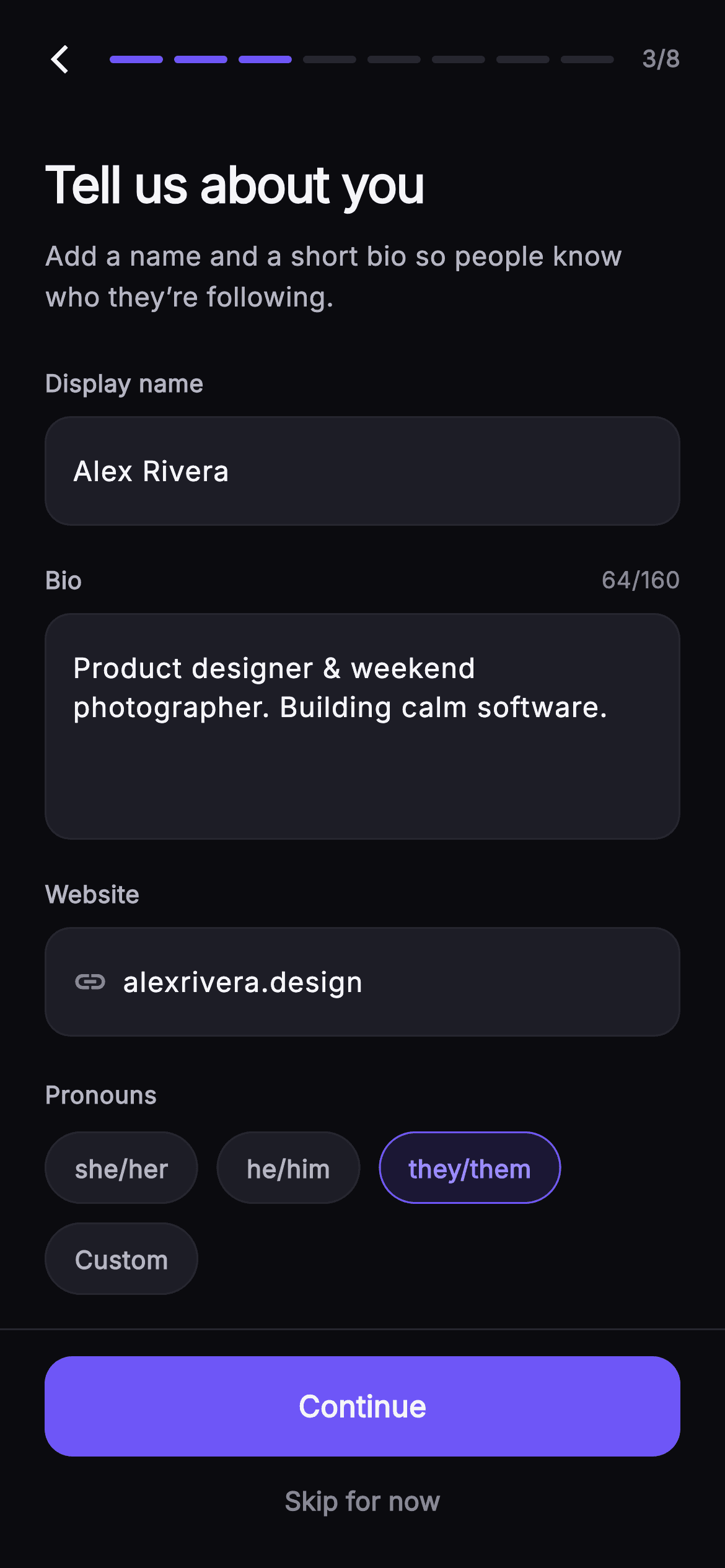
A bio field is the one place in onboarding where people stall: they have 160 characters, no idea how many they have used, and a Continue button waiting. This tutorial builds Pulse's About You step in Flutter — a four-line bio TextField whose stock counter is suppressed and replaced by a header-row counter that recolours, a seeded display name and website field sharing one _FieldShell, a pronouns chip row, and an eight-segment progress bar over a Continue-plus-Skip footer.
Watch the Flutter UI walkthrough
A short screen recording of Pulse · About You running, if you'd rather see it before you read the code. The written tutorial below covers everything in it.
Can't see the video? Watch it on YouTube.
What you'll build
- ✓A 4-line bio TextField capped at 160 characters with Flutter's built-in counter suppressed
- ✓A live `64/160` readout in the label row that turns #F4476B once the text passes the cap
- ✓One `_FieldShell` container reused by the name, bio and website inputs so all three share a border radius
- ✓A `_PronounChip` Wrap where the selected chip gets a tinted fill, a brand border and accent text at once
- ✓An eight-segment progress header reading `3/8` and a footer that ranks Continue above Skip for now
Step-by-step build
Create the file
Add a new file at lib/social_setup_bio/social_setup_bio_screen.dart in your Flutter project.
Register the bundled fonts
No external packages — this is pure Flutter. It does bundle its design font (Inter), so drop the font file into fonts/ and declare it in pubspec.yaml:
flutter:
  fonts:
    - family: Inter
      fonts:
- asset: fonts/Inter-Regular.ttfBuild it, piece by piece
Here's how the screen goes together. Each block below is a real slice of the code with a plain-English explanation — paste them in order, or grab the whole file from the next section.
Callbacks in, palette as constants
import 'package:flutter/material.dart';

/// About You — third step of Pulse profile setup. Collects a display name, a bio
/// textarea with a live character counter, a website/link field, and a pronouns
/// chip row (she/her, he/him, they/them, custom). Step progress tops the screen;
/// Continue is pinned at fixed height with a Skip link. Self-contained per
/// CONVENTIONS.md: pure Flutter, bundled Inter font, own dark theme, SafeArea.
class SocialSetupBioScreen extends StatefulWidget {
  const SocialSetupBioScreen({
    super.key,
    this.onBack,
    this.onContinue,
    this.onSkip,
  });

  final VoidCallback? onBack;
  final VoidCallback? onContinue;
  final VoidCallback? onSkip;

  static const String _font = 'Inter';
  static const Color _bg = Color(0xFF0B0B0F);
  static const Color _surfaceAlt = Color(0xFF1D1D26);
  static const Color _brand = Color(0xFF6E56F7);
  static const Color _accent = Color(0xFF9B8CFF);
  static const Color _hairline = Color(0xFF26262F);
  static const Color _textHi = Color(0xFFF4F4F7);
  static const Color _textLo = Color(0xFFB5B5C2);
  static const Color _muted = Color(0xFF8A8A99);

  @override
  State<SocialSetupBioScreen> createState() => _SocialSetupBioScreenState();
}
`SocialSetupBioScreen` takes three nullable `VoidCallback`s — `onBack`, `onContinue`, `onSkip` — and no data. The screen owns its draft text locally and hands the exits to the wizard above it, which is why it can be dropped into any signup flow without knowing what step follows. Nine `static const Color` fields sit on the widget class rather than in a theme file: `_bg` #0B0B0F for the canvas, `_surfaceAlt` #1D1D26 for input shells, `_brand` #6E56F7 for filled chrome and `_accent` #9B8CFF for text on tinted surfaces. Splitting brand from accent matters here — the indigo brand is too dark to read against its own 16% tint, so the lighter accent carries the selected chip's label.
Three controllers and the listener that drives the counter
class _SocialSetupBioScreenState extends State<SocialSetupBioScreen> {
  static const int _bioMax = 160;
  final TextEditingController _name =
      TextEditingController(text: 'Alex Rivera');
  final TextEditingController _bio = TextEditingController(
      text: 'Product designer & weekend photographer. Building calm software.');
  final TextEditingController _link =
      TextEditingController(text: 'alexrivera.design');

  static const List<String> _pronouns = <String>[
    'she/her',
    'he/him',
    'they/them',
    'Custom',
  ];
  String _selectedPronoun = 'they/them';

  @override
  void initState() {
    super.initState();
    _bio.addListener(() => setState(() {}));
  }

  @override
  void dispose() {
    _name.dispose();
    _bio.dispose();
    _link.dispose();
    super.dispose();
  }
`_bioMax = 160` is declared once and used for both the cap and the readout, so the two can never disagree. All three `TextEditingController`s are seeded with realistic copy — 'Alex Rivera', a two-sentence bio, 'alexrivera.design' — so the screen previews as a filled form instead of empty boxes. The important line is `_bio.addListener(() => setState(() {}))` in `initState`: a `TextField` repaints itself as you type, but the counter lives in a separate `Row` above it, so without that listener the number would freeze. Only `_bio` gets a listener; rebuilding on every keystroke in the name and link fields would be wasted work. `dispose` releases all three controllers before `super.dispose()`.
Header, scrolling body and the display-name field
  @override
  Widget build(BuildContext context) {
    return Theme(
      data: ThemeData.dark(useMaterial3: true),
      child: Scaffold(
        backgroundColor: SocialSetupBioScreen._bg,
        body: SafeArea(
          child: Column(
            children: <Widget>[
              _SetupHeader(step: 3, total: 8, onBack: widget.onBack),
              Expanded(
                child: ListView(
                  padding: const EdgeInsets.fromLTRB(24, 20, 24, 24),
                  children: <Widget>[
                    const Text(
                      'Tell us about you',
                      style: TextStyle(
                        fontFamily: SocialSetupBioScreen._font,
                        fontSize: 27,
                        fontWeight: FontWeight.w700,
                        letterSpacing: -0.7,
                        color: SocialSetupBioScreen._textHi,
                      ),
                    ),
                    const SizedBox(height: 8),
                    const Text(
                      'Add a name and a short bio so people know who they’re following.',
                      style: TextStyle(
                        fontFamily: SocialSetupBioScreen._font,
                        fontSize: 14.5,
                        height: 1.5,
                        color: SocialSetupBioScreen._textLo,
                      ),
                    ),
                    const SizedBox(height: 26),
                    const _Label('Display name'),
                    const SizedBox(height: 8),
                    _FieldShell(
                      child: TextField(
                        controller: _name,
                        cursorColor: SocialSetupBioScreen._accent,
                        style: _inputStyle,
                        decoration: _inputDecoration('Your name'),
                      ),
                    ),
                    const SizedBox(height: 20),
A local `Theme(data: ThemeData.dark(useMaterial3: true))` wraps the `Scaffold` so the screen keeps its dark cursor and selection handles even inside a light host app. The `SafeArea` holds a `Column` of three parts: `_SetupHeader(step: 3, total: 8)`, an `Expanded` `ListView`, and the footer. Making only the middle scrollable is what pins the progress bar and the Continue button while a raised keyboard squeezes the fields. The title runs at 27px `w700` with `letterSpacing: -0.7` to tighten a large display size, the subtitle at 14.5px with `height: 1.5`. The name input is a bare `TextField` inside `_FieldShell` with `cursorColor: _accent`.
The bio field and its hand-built counter
                    Row(
                      mainAxisAlignment: MainAxisAlignment.spaceBetween,
                      children: <Widget>[
                        const _Label('Bio'),
                        Text(
                          '${_bio.text.length}/$_bioMax',
                          style: TextStyle(
                            fontFamily: SocialSetupBioScreen._font,
                            fontSize: 12.5,
                            fontWeight: FontWeight.w500,
                            color: _bio.text.length > _bioMax
                                ? const Color(0xFFF4476B)
                                : SocialSetupBioScreen._muted,
                          ),
                        ),
                      ],
                    ),
                    const SizedBox(height: 8),
                    _FieldShell(
                      child: TextField(
                        controller: _bio,
                        maxLines: 4,
                        maxLength: _bioMax,
                        cursorColor: SocialSetupBioScreen._accent,
                        style: _inputStyle,
                        decoration: _inputDecoration(
                          'A sentence or two about you',
                        ).copyWith(counterText: ''),
                      ),
                    ),
The label row uses `MainAxisAlignment.spaceBetween` to push `_Label('Bio')` left and `'${_bio.text.length}/$_bioMax'` right, so the count sits where the eye already is rather than under the box. Its colour is a ternary: `#F4476B` when the length exceeds `_bioMax`, otherwise `_muted` grey. Note that `maxLength: _bioMax` on the `TextField` already stops typing at 160, so the red branch only fires on text seeded or pasted in programmatically — it is a safety net, not the normal path. `maxLines: 4` gives the field a fixed four-line box that never grows, and `.copyWith(counterText: '')` blanks Material's own bottom-right counter so the custom one is not duplicated.
Website field, pronoun chips and the footer
                    const SizedBox(height: 20),
                    const _Label('Website'),
                    const SizedBox(height: 8),
                    _FieldShell(
                      child: Row(
                        children: <Widget>[
                          const Icon(Icons.link,
                              size: 19, color: SocialSetupBioScreen._muted),
                          const SizedBox(width: 8),
                          Expanded(
                            child: TextField(
                              controller: _link,
                              keyboardType: TextInputType.url,
                              cursorColor: SocialSetupBioScreen._accent,
                              style: _inputStyle,
                              decoration: _inputDecoration('yoursite.com'),
                            ),
                          ),
                        ],
                      ),
                    ),
                    const SizedBox(height: 22),
                    const _Label('Pronouns'),
                    const SizedBox(height: 10),
                    Wrap(
                      spacing: 10,
                      runSpacing: 10,
                      children: _pronouns.map((String p) {
                        final bool sel = p == _selectedPronoun;
                        return _PronounChip(
                          label: p,
                          selected: sel,
                          onTap: () => setState(() => _selectedPronoun = p),
                        );
                      }).toList(),
                    ),
                  ],
                ),
              ),
              _SetupFooter(
                onContinue: widget.onContinue,
                onSkip: widget.onSkip,
              ),
            ],
          ),
        ),
      ),
    );
  }
The website row puts a 19px `Icons.link` before an `Expanded` `TextField` inside the same `_FieldShell`, which is cheaper than a `prefixIcon` and keeps the icon vertically centred against a single-line input. `keyboardType: TextInputType.url` brings up a keyboard with a dot and slash. The pronouns use a `Wrap` with `spacing: 10, runSpacing: 10` rather than a `Row`, so 'they/them' and 'Custom' reflow onto a second line on a narrow phone instead of overflowing. Each entry maps to a `_PronounChip` with `sel` computed against `_selectedPronoun`, and the tap sets that single `String` — a plain radio behaviour, not a multi-select.
Shared input styling and the field shell
  static const TextStyle _inputStyle = TextStyle(
    fontFamily: SocialSetupBioScreen._font,
    fontSize: 15,
    fontWeight: FontWeight.w500,
    height: 1.4,
    color: SocialSetupBioScreen._textHi,
  );

  InputDecoration _inputDecoration(String hint) => InputDecoration(
        isCollapsed: true,
        contentPadding: const EdgeInsets.symmetric(vertical: 4),
        border: InputBorder.none,
        hintText: hint,
        hintStyle: const TextStyle(
          fontFamily: SocialSetupBioScreen._font,
          fontSize: 15,
          color: SocialSetupBioScreen._muted,
        ),
      );
}

class _Label extends StatelessWidget {
  const _Label(this.text);
  final String text;

  @override
  Widget build(BuildContext context) {
    return Text(
      text,
      style: const TextStyle(
        fontFamily: SocialSetupBioScreen._font,
        fontSize: 13,
        fontWeight: FontWeight.w600,
        color: SocialSetupBioScreen._textLo,
      ),
    );
  }
}

class _FieldShell extends StatelessWidget {
  const _FieldShell({required this.child});
  final Widget child;

  @override
  Widget build(BuildContext context) {
    return Container(
      decoration: BoxDecoration(
        color: SocialSetupBioScreen._surfaceAlt,
        borderRadius: BorderRadius.circular(14),
        border: Border.all(color: SocialSetupBioScreen._hairline),
      ),
      padding: const EdgeInsets.symmetric(horizontal: 14, vertical: 14),
      child: child,
    );
  }
}
`_inputStyle` and `_inputDecoration` are defined once on the state class so all three fields share 15px `w500` Inter and the same `_muted` hint. The decoration is deliberately stripped: `isCollapsed: true`, `border: InputBorder.none` and a 4px vertical `contentPadding`. That is what lets `_FieldShell` own the visual box instead of fighting Material's underline — a `Container` at `_surfaceAlt` with a 14px radius, a `_hairline` #26262F border and 14px padding on both axes. Because the shell is a separate widget rather than a copied `BoxDecoration`, changing the radius or border once restyles the name, bio and website inputs together. `_Label` is a 13px `w600` text in `_textLo`.
A chip that signals selection three ways
class _PronounChip extends StatelessWidget {
  const _PronounChip({
    required this.label,
    required this.selected,
    this.onTap,
  });
  final String label;
  final bool selected;
  final VoidCallback? onTap;

  @override
  Widget build(BuildContext context) {
    return Material(
      color: selected
          ? SocialSetupBioScreen._brand.withValues(alpha: 0.16)
          : SocialSetupBioScreen._surfaceAlt,
      borderRadius: BorderRadius.circular(20),
      child: InkWell(
        onTap: onTap,
        borderRadius: BorderRadius.circular(20),
        child: Container(
          padding: const EdgeInsets.symmetric(horizontal: 15, vertical: 9),
          decoration: BoxDecoration(
            borderRadius: BorderRadius.circular(20),
            border: Border.all(
              color: selected
                  ? SocialSetupBioScreen._brand
                  : SocialSetupBioScreen._hairline,
            ),
          ),
          child: Text(
            label,
            style: TextStyle(
              fontFamily: SocialSetupBioScreen._font,
              fontSize: 13.5,
              fontWeight: FontWeight.w600,
              color: selected
                  ? SocialSetupBioScreen._accent
                  : SocialSetupBioScreen._textLo,
            ),
          ),
        ),
      ),
    );
  }
}
`_PronounChip` layers a `Material` for the fill, an `InkWell` for the ripple and a `Container` for the border, all with `BorderRadius.circular(20)` repeated on each — the ripple would otherwise splash into square corners. Selection changes three properties at once: fill from `_surfaceAlt` to `_brand.withValues(alpha: 0.16)`, border from `_hairline` to full `_brand`, and label from `_textLo` to `_accent`. Colour alone would be a weak signal at 13.5px, and pronouns are exactly the kind of choice a user re-checks before continuing. Padding of 15 by 9 keeps the pill compact enough that four fit in two rows.
The step header and the ranked footer
class _SetupHeader extends StatelessWidget {
  const _SetupHeader({required this.step, required this.total, this.onBack});
  final int step;
  final int total;
  final VoidCallback? onBack;

  @override
  Widget build(BuildContext context) {
    return Padding(
      padding: const EdgeInsets.fromLTRB(8, 8, 24, 4),
      child: Row(
        children: <Widget>[
          IconButton(
            onPressed: onBack,
            icon: const Icon(Icons.arrow_back_ios_new,
                size: 18, color: SocialSetupBioScreen._textHi),
          ),
          Expanded(
            child: Row(
              children: List<Widget>.generate(total, (int i) {
                return Expanded(
                  child: Container(
                    height: 4,
                    margin: const EdgeInsets.symmetric(horizontal: 3),
                    decoration: BoxDecoration(
                      borderRadius: BorderRadius.circular(2),
                      color: i < step
                          ? SocialSetupBioScreen._brand
                          : SocialSetupBioScreen._hairline,
                    ),
                  ),
                );
              }),
            ),
          ),
          const SizedBox(width: 12),
          Text(
            '$step/$total',
            style: const TextStyle(
              fontFamily: SocialSetupBioScreen._font,
              fontSize: 12.5,
              fontWeight: FontWeight.w600,
              color: SocialSetupBioScreen._muted,
            ),
          ),
        ],
      ),
    );
  }
}

class _SetupFooter extends StatelessWidget {
  const _SetupFooter({this.onContinue, this.onSkip});
  final VoidCallback? onContinue;
  final VoidCallback? onSkip;

  @override
  Widget build(BuildContext context) {
    return Container(
      decoration: const BoxDecoration(
        color: SocialSetupBioScreen._bg,
        border: Border(top: BorderSide(color: SocialSetupBioScreen._hairline)),
      ),
      padding: const EdgeInsets.fromLTRB(24, 14, 24, 12),
      child: Column(
        mainAxisSize: MainAxisSize.min,
        children: <Widget>[
          SizedBox(
            width: double.infinity,
            height: 54,
            child: FilledButton(
              onPressed: onContinue,
              style: FilledButton.styleFrom(
                backgroundColor: SocialSetupBioScreen._brand,
                foregroundColor: Colors.white,
                shape: RoundedRectangleBorder(
                  borderRadius: BorderRadius.circular(15),
                ),
              ),
              child: const Text(
                'Continue',
                style: TextStyle(
                  fontFamily: SocialSetupBioScreen._font,
                  fontSize: 16,
                  fontWeight: FontWeight.w600,
                ),
              ),
            ),
          ),
          TextButton(
            onPressed: onSkip,
            style: TextButton.styleFrom(
              foregroundColor: SocialSetupBioScreen._muted,
            ),
            child: const Text(
              'Skip for now',
              style: TextStyle(
                fontFamily: SocialSetupBioScreen._font,
                fontSize: 14,
                fontWeight: FontWeight.w600,
              ),
            ),
          ),
        ],
      ),
    );
  }
}
`_SetupHeader` builds its progress bar with `List<Widget>.generate(total, ...)`, each segment an `Expanded` 4px `Container` filled `_brand` when `i < step` and `_hairline` otherwise — so passing `step: 3, total: 8` fills three of eight with no hardcoded widths, and the same widget serves every step of the wizard. The `3/8` text repeats it numerically for anyone who cannot judge eight small bars. `_SetupFooter` sits in a `Container` with a top `BorderSide` hairline that separates it from the scrolling list, and ranks its actions: a full-width 54px indigo `FilledButton` for Continue over a `TextButton` in `_muted` reading 'Skip for now'. Bio and pronouns are genuinely optional, so Skip must exist — but muted and secondary, never a second filled button.
Full code
The complete, ready-to-paste source. Free to use in your projects — one click copies it all.
import 'package:flutter/material.dart';

/// About You — third step of Pulse profile setup. Collects a display name, a bio
/// textarea with a live character counter, a website/link field, and a pronouns
/// chip row (she/her, he/him, they/them, custom). Step progress tops the screen;
/// Continue is pinned at fixed height with a Skip link. Self-contained per
/// CONVENTIONS.md: pure Flutter, bundled Inter font, own dark theme, SafeArea.
class SocialSetupBioScreen extends StatefulWidget {
  const SocialSetupBioScreen({
    super.key,
    this.onBack,
    this.onContinue,
    this.onSkip,
  });

  final VoidCallback? onBack;
  final VoidCallback? onContinue;
  final VoidCallback? onSkip;

  static const String _font = 'Inter';
  static const Color _bg = Color(0xFF0B0B0F);
  static const Color _surfaceAlt = Color(0xFF1D1D26);
  static const Color _brand = Color(0xFF6E56F7);
  static const Color _accent = Color(0xFF9B8CFF);
  static const Color _hairline = Color(0xFF26262F);
  static const Color _textHi = Color(0xFFF4F4F7);
  static const Color _textLo = Color(0xFFB5B5C2);
  static const Color _muted = Color(0xFF8A8A99);

  @override
  State<SocialSetupBioScreen> createState() => _SocialSetupBioScreenState();
}

class _SocialSetupBioScreenState extends State<SocialSetupBioScreen> {
  static const int _bioMax = 160;
  final TextEditingController _name =
      TextEditingController(text: 'Alex Rivera');
  final TextEditingController _bio = TextEditingController(
      text: 'Product designer & weekend photographer. Building calm software.');
  final TextEditingController _link =
      TextEditingController(text: 'alexrivera.design');

  static const List<String> _pronouns = <String>[
    'she/her',
    'he/him',
    'they/them',
    'Custom',
  ];
  String _selectedPronoun = 'they/them';

  @override
  void initState() {
    super.initState();
    _bio.addListener(() => setState(() {}));
  }

  @override
  void dispose() {
    _name.dispose();
    _bio.dispose();
    _link.dispose();
    super.dispose();
  }

  @override
  Widget build(BuildContext context) {
    return Theme(
      data: ThemeData.dark(useMaterial3: true),
      child: Scaffold(
        backgroundColor: SocialSetupBioScreen._bg,
        body: SafeArea(
          child: Column(
            children: <Widget>[
              _SetupHeader(step: 3, total: 8, onBack: widget.onBack),
              Expanded(
                child: ListView(
                  padding: const EdgeInsets.fromLTRB(24, 20, 24, 24),
                  children: <Widget>[
                    const Text(
                      'Tell us about you',
                      style: TextStyle(
                        fontFamily: SocialSetupBioScreen._font,
                        fontSize: 27,
                        fontWeight: FontWeight.w700,
                        letterSpacing: -0.7,
                        color: SocialSetupBioScreen._textHi,
                      ),
                    ),
                    const SizedBox(height: 8),
                    const Text(
                      'Add a name and a short bio so people know who they’re following.',
                      style: TextStyle(
                        fontFamily: SocialSetupBioScreen._font,
                        fontSize: 14.5,
                        height: 1.5,
                        color: SocialSetupBioScreen._textLo,
                      ),
                    ),
                    const SizedBox(height: 26),
                    const _Label('Display name'),
                    const SizedBox(height: 8),
                    _FieldShell(
                      child: TextField(
                        controller: _name,
                        cursorColor: SocialSetupBioScreen._accent,
                        style: _inputStyle,
                        decoration: _inputDecoration('Your name'),
                      ),
                    ),
                    const SizedBox(height: 20),
                    Row(
                      mainAxisAlignment: MainAxisAlignment.spaceBetween,
                      children: <Widget>[
                        const _Label('Bio'),
                        Text(
                          '${_bio.text.length}/$_bioMax',
                          style: TextStyle(
                            fontFamily: SocialSetupBioScreen._font,
                            fontSize: 12.5,
                            fontWeight: FontWeight.w500,
                            color: _bio.text.length > _bioMax
                                ? const Color(0xFFF4476B)
                                : SocialSetupBioScreen._muted,
                          ),
                        ),
                      ],
                    ),
                    const SizedBox(height: 8),
                    _FieldShell(
                      child: TextField(
                        controller: _bio,
                        maxLines: 4,
                        maxLength: _bioMax,
                        cursorColor: SocialSetupBioScreen._accent,
                        style: _inputStyle,
                        decoration: _inputDecoration(
                          'A sentence or two about you',
                        ).copyWith(counterText: ''),
                      ),
                    ),
                    const SizedBox(height: 20),
                    const _Label('Website'),
                    const SizedBox(height: 8),
                    _FieldShell(
                      child: Row(
                        children: <Widget>[
                          const Icon(Icons.link,
                              size: 19, color: SocialSetupBioScreen._muted),
                          const SizedBox(width: 8),
                          Expanded(
                            child: TextField(
                              controller: _link,
                              keyboardType: TextInputType.url,
                              cursorColor: SocialSetupBioScreen._accent,
                              style: _inputStyle,
                              decoration: _inputDecoration('yoursite.com'),
                            ),
                          ),
                        ],
                      ),
                    ),
                    const SizedBox(height: 22),
                    const _Label('Pronouns'),
                    const SizedBox(height: 10),
                    Wrap(
                      spacing: 10,
                      runSpacing: 10,
                      children: _pronouns.map((String p) {
                        final bool sel = p == _selectedPronoun;
                        return _PronounChip(
                          label: p,
                          selected: sel,
                          onTap: () => setState(() => _selectedPronoun = p),
                        );
                      }).toList(),
                    ),
                  ],
                ),
              ),
              _SetupFooter(
                onContinue: widget.onContinue,
                onSkip: widget.onSkip,
              ),
            ],
          ),
        ),
      ),
    );
  }

  static const TextStyle _inputStyle = TextStyle(
    fontFamily: SocialSetupBioScreen._font,
    fontSize: 15,
    fontWeight: FontWeight.w500,
    height: 1.4,
    color: SocialSetupBioScreen._textHi,
  );

  InputDecoration _inputDecoration(String hint) => InputDecoration(
        isCollapsed: true,
        contentPadding: const EdgeInsets.symmetric(vertical: 4),
        border: InputBorder.none,
        hintText: hint,
        hintStyle: const TextStyle(
          fontFamily: SocialSetupBioScreen._font,
          fontSize: 15,
          color: SocialSetupBioScreen._muted,
        ),
      );
}

class _Label extends StatelessWidget {
  const _Label(this.text);
  final String text;

  @override
  Widget build(BuildContext context) {
    return Text(
      text,
      style: const TextStyle(
        fontFamily: SocialSetupBioScreen._font,
        fontSize: 13,
        fontWeight: FontWeight.w600,
        color: SocialSetupBioScreen._textLo,
      ),
    );
  }
}

class _FieldShell extends StatelessWidget {
  const _FieldShell({required this.child});
  final Widget child;

  @override
  Widget build(BuildContext context) {
    return Container(
      decoration: BoxDecoration(
        color: SocialSetupBioScreen._surfaceAlt,
        borderRadius: BorderRadius.circular(14),
        border: Border.all(color: SocialSetupBioScreen._hairline),
      ),
      padding: const EdgeInsets.symmetric(horizontal: 14, vertical: 14),
      child: child,
    );
  }
}

class _PronounChip extends StatelessWidget {
  const _PronounChip({
    required this.label,
    required this.selected,
    this.onTap,
  });
  final String label;
  final bool selected;
  final VoidCallback? onTap;

  @override
  Widget build(BuildContext context) {
    return Material(
      color: selected
          ? SocialSetupBioScreen._brand.withValues(alpha: 0.16)
          : SocialSetupBioScreen._surfaceAlt,
      borderRadius: BorderRadius.circular(20),
      child: InkWell(
        onTap: onTap,
        borderRadius: BorderRadius.circular(20),
        child: Container(
          padding: const EdgeInsets.symmetric(horizontal: 15, vertical: 9),
          decoration: BoxDecoration(
            borderRadius: BorderRadius.circular(20),
            border: Border.all(
              color: selected
                  ? SocialSetupBioScreen._brand
                  : SocialSetupBioScreen._hairline,
            ),
          ),
          child: Text(
            label,
            style: TextStyle(
              fontFamily: SocialSetupBioScreen._font,
              fontSize: 13.5,
              fontWeight: FontWeight.w600,
              color: selected
                  ? SocialSetupBioScreen._accent
                  : SocialSetupBioScreen._textLo,
            ),
          ),
        ),
      ),
    );
  }
}

class _SetupHeader extends StatelessWidget {
  const _SetupHeader({required this.step, required this.total, this.onBack});
  final int step;
  final int total;
  final VoidCallback? onBack;

  @override
  Widget build(BuildContext context) {
    return Padding(
      padding: const EdgeInsets.fromLTRB(8, 8, 24, 4),
      child: Row(
        children: <Widget>[
          IconButton(
            onPressed: onBack,
            icon: const Icon(Icons.arrow_back_ios_new,
                size: 18, color: SocialSetupBioScreen._textHi),
          ),
          Expanded(
            child: Row(
              children: List<Widget>.generate(total, (int i) {
                return Expanded(
                  child: Container(
                    height: 4,
                    margin: const EdgeInsets.symmetric(horizontal: 3),
                    decoration: BoxDecoration(
                      borderRadius: BorderRadius.circular(2),
                      color: i < step
                          ? SocialSetupBioScreen._brand
                          : SocialSetupBioScreen._hairline,
                    ),
                  ),
                );
              }),
            ),
          ),
          const SizedBox(width: 12),
          Text(
            '$step/$total',
            style: const TextStyle(
              fontFamily: SocialSetupBioScreen._font,
              fontSize: 12.5,
              fontWeight: FontWeight.w600,
              color: SocialSetupBioScreen._muted,
            ),
          ),
        ],
      ),
    );
  }
}

class _SetupFooter extends StatelessWidget {
  const _SetupFooter({this.onContinue, this.onSkip});
  final VoidCallback? onContinue;
  final VoidCallback? onSkip;

  @override
  Widget build(BuildContext context) {
    return Container(
      decoration: const BoxDecoration(
        color: SocialSetupBioScreen._bg,
        border: Border(top: BorderSide(color: SocialSetupBioScreen._hairline)),
      ),
      padding: const EdgeInsets.fromLTRB(24, 14, 24, 12),
      child: Column(
        mainAxisSize: MainAxisSize.min,
        children: <Widget>[
          SizedBox(
            width: double.infinity,
            height: 54,
            child: FilledButton(
              onPressed: onContinue,
              style: FilledButton.styleFrom(
                backgroundColor: SocialSetupBioScreen._brand,
                foregroundColor: Colors.white,
                shape: RoundedRectangleBorder(
                  borderRadius: BorderRadius.circular(15),
                ),
              ),
              child: const Text(
                'Continue',
                style: TextStyle(
                  fontFamily: SocialSetupBioScreen._font,
                  fontSize: 16,
                  fontWeight: FontWeight.w600,
                ),
              ),
            ),
          ),
          TextButton(
            onPressed: onSkip,
            style: TextButton.styleFrom(
              foregroundColor: SocialSetupBioScreen._muted,
            ),
            child: const Text(
              'Skip for now',
              style: TextStyle(
                fontFamily: SocialSetupBioScreen._font,
                fontSize: 14,
                fontWeight: FontWeight.w600,
              ),
            ),
          ),
        ],
      ),
    );
  }
}
Plus bundled 1 binary asset (fonts/images). The CLI and MCP install those for you automatically.
Two faster ways to add it
Copy-paste works, but you can skip it entirely.
1. FlutterKit CLI
One command drops this screen — and its fonts — straight into your project.
$ flutterkit add social-setup-bio2. AI agent (MCP)
Connect FlutterKit's MCP server in Claude or Cursor and just ask your agent to install social-setup-bio — it fetches and writes the files for you.
FAQ
Is this profile bio setup screen free to use commercially?
Yes. FlutterKit is free — there is no paid tier, no licence key and no paywall on this page. Copy the Dart, install it with the CLI, or pull it through MCP and ship it in a commercial app. No sign-up and no attribution required.
Why is there a custom counter when TextField already has one?
Material's built-in counter renders small and grey under the bottom-right corner of the box, which readers miss while typing into a four-line field. The code blanks it with `.copyWith(counterText: '')` and draws its own `64/160` in the label row instead, level with the word 'Bio', where it is visible before the first keystroke.
Can the counter actually turn red?
Only if the controller is given text longer than 160 characters — a seeded draft or a programmatic paste. `maxLength: _bioMax` blocks typing past the cap, so during normal use the count stops at `160/160` in grey. Drop `maxLength` if you would rather let people overflow and see the warning colour, then block Continue on it.
Do I need any packages or a font file?
No packages — the screen is pure `flutter/material` with no `google_fonts`, no icon pack and no network images. It asks for `fontFamily: 'Inter'`, so bundle Inter in `pubspec.yaml` under `fonts:` or delete the `_font` constant to fall back to the platform default.
Which Flutter version does this need?
Flutter 3.22 or newer, because the selected chip uses `Color.withValues(alpha: 0.16)` and the constructor uses `super.key`. On an older SDK swap that for `withOpacity(0.16)` and expand the constructor to the `{Key? key, ...}) : super(key: key)` form.


