How to Build a Savings Goal Setup Screen in Flutter (Full Code + Preview)
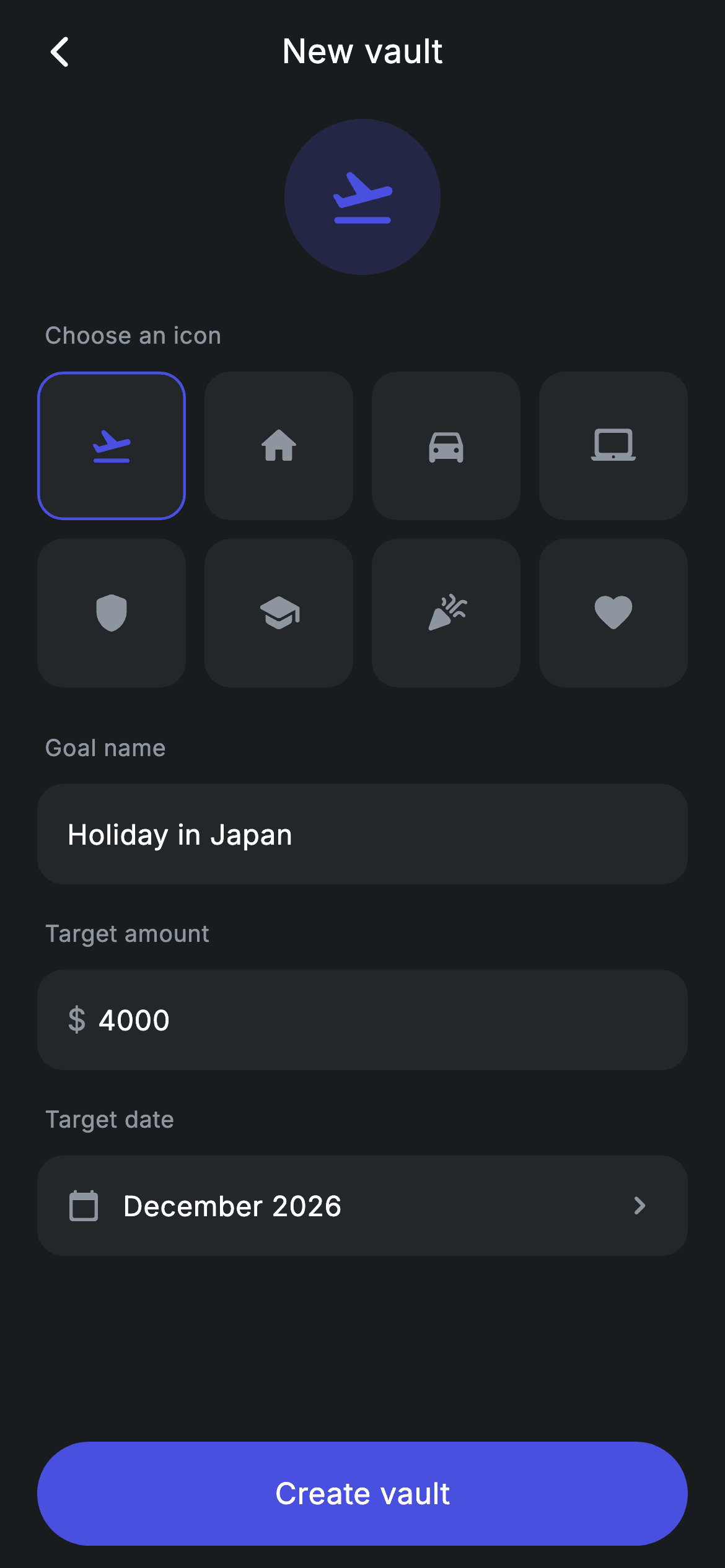
A create-goal form with one detail most Flutter forms get wrong: the Create button greys out until both the name and the amount are valid, and it re-evaluates *as you type*. That takes three lines in `initState` — attaching listeners to the `TextEditingController`s — because a `TextField` alone never rebuilds its parent. Around that sit an 8-icon picker whose selection previews in an 84px circle above the form, a reusable field with an optional `$` prefix, and a date row.
Watch the Flutter UI walkthrough
A short screen recording of Vault Create running, if you'd rather see it before you read the code. The written tutorial below covers everything in it.
Can't see the video? Watch it on YouTube.
What you'll build
- ✓Live form validation that re-runs on every keystroke via `TextEditingController` listeners
- ✓A 4×2 icon picker built with `GridView.count` nested inside a scrolling `ListView`
- ✓An 84px preview circle that reflects the chosen icon instantly
- ✓A reusable field widget with an optional currency prefix and a numeric keyboard flag
- ✓A Create button whose colour, label tint, and tappability all derive from one `_valid` getter
Step-by-step build
Create the file
Add a new file at lib/fintech_vault_create/fintech_vault_create_screen.dart in your Flutter project.
Register the bundled fonts
No external packages — this is pure Flutter. It does bundle its design font (Inter), so drop the font file into fonts/ and declare it in pubspec.yaml:
flutter:
  fonts:
    - family: Inter
      fonts:
- asset: fonts/Inter-Regular.ttfBuild it, piece by piece
Here's how the screen goes together. Each block below is a real slice of the code with a plain-English explanation — paste them in order, or grab the whole file from the next section.
Icons, controllers, and the validity getter
class FintechVaultCreateScreen extends StatefulWidget {
  const FintechVaultCreateScreen({super.key, this.onBack, this.onCreate});

  final VoidCallback? onBack;
  final VoidCallback? onCreate;

  @override
  State<FintechVaultCreateScreen> createState() =>
      _FintechVaultCreateScreenState();
}

class _FintechVaultCreateScreenState extends State<FintechVaultCreateScreen> {
  static const String _font = 'Inter';
  static const Color _bg = Color(0xFF191C1F);
  static const Color _surface = Color(0xFF242729);
  static const Color _brand = Color(0xFF494FDF);
  static const Color _muted = Color(0xFF8D969E);

  static const List<IconData> _icons = <IconData>[
    Icons.flight_takeoff_rounded,
    Icons.home_rounded,
    Icons.directions_car_rounded,
    Icons.laptop_mac_rounded,
    Icons.shield_rounded,
    Icons.school_rounded,
    Icons.celebration_rounded,
    Icons.favorite_rounded,
  ];

  int _icon = 0;
  final TextEditingController _name = TextEditingController(text: 'Holiday in Japan');
  final TextEditingController _goal = TextEditingController(text: '4000');

  @override
  void initState() {
    super.initState();
    _name.addListener(() => setState(() {}));
    _goal.addListener(() => setState(() {}));
  }

  @override
  void dispose() {
    _name.dispose();
    _goal.dispose();
    super.dispose();
  }

  bool get _valid =>
      _name.text.trim().isNotEmpty && (double.tryParse(_goal.text) ?? 0) > 0;
The eight `IconData` values live in a `static const` list, and `_icon` holds the selected index — storing an index rather than the icon itself is what makes the preview, the grid highlight, and any future persistence all read from one number. Both fields start pre-filled so the screen previews meaningfully. The important lines are 45–46: `_name.addListener(() => setState(() {}))` on each controller. Without them, typing changes the field's text but never triggers a rebuild, so `_valid` would only be re-evaluated when something *else* happened to rebuild the screen — the classic reason a 'live' validated button appears frozen. `_valid` itself trims the name and parses the goal with `double.tryParse(...) ?? 0`, so whitespace-only names and unparseable amounts both fail cleanly. Both controllers are released in `dispose()`.
Form layout above a pinned CTA
  @override
  Widget build(BuildContext context) {
    return Theme(
      data: ThemeData.dark(useMaterial3: true),
      child: Scaffold(
        backgroundColor: _bg,
        body: SafeArea(
          child: Column(
            children: <Widget>[
              _buildAppBar(),
              Expanded(
                child: ListView(
                  physics: const BouncingScrollPhysics(),
                  padding: const EdgeInsets.fromLTRB(20, 8, 20, 24),
                  children: <Widget>[
                    Center(child: _buildPreview()),
                    const SizedBox(height: 24),
                    _label('Choose an icon'),
                    _buildIconGrid(),
                    const SizedBox(height: 24),
                    _label('Goal name'),
                    _Field(controller: _name, hint: 'e.g. Holiday in Japan'),
                    const SizedBox(height: 18),
                    _label('Target amount'),
                    _Field(
                      controller: _goal,
                      hint: '4000',
                      prefix: r'$',
                      number: true,
                    ),
                    const SizedBox(height: 18),
                    _label('Target date'),
                    _buildDateRow(),
                  ],
                ),
              ),
              _buildCreate(),
            ],
          ),
        ),
      ),
    );
  }

  Widget _buildAppBar() {
    return Padding(
      padding: const EdgeInsets.fromLTRB(8, 4, 8, 4),
      child: Row(
        children: <Widget>[
          IconButton(
            onPressed: widget.onBack,
            icon: const Icon(Icons.arrow_back_ios_new_rounded,
                size: 20, color: Colors.white),
          ),
          const Expanded(
            child: Text(
              'New vault',
              textAlign: TextAlign.center,
              style: TextStyle(
                fontFamily: _font,
                fontSize: 18,
                fontWeight: FontWeight.w500,
                letterSpacing: 0.24,
                color: Colors.white,
              ),
            ),
          ),
          const SizedBox(width: 48),
        ],
      ),
    );
  }
`Expanded(child: ListView(...))` above `_buildCreate()` is the right shape for a form: the fields scroll and the button stays reachable when the keyboard opens. Reading the children top to bottom gives you the whole form — preview, icon grid, name, amount, date — with `_label` supplying a consistent muted caption above each control. The app bar centres its title using `const SizedBox(width: 48)` on the trailing side to counterweight the leading `IconButton`, the standard trick when only one side carries an action.
Preview circle and icon grid
  Widget _buildPreview() {
    return Container(
      width: 84,
      height: 84,
      decoration: BoxDecoration(
        color: _brand.withValues(alpha: 0.2),
        shape: BoxShape.circle,
      ),
      child: Icon(_icons[_icon], size: 38, color: _brand),
    );
  }

  Widget _buildIconGrid() {
    return GridView.count(
      crossAxisCount: 4,
      shrinkWrap: true,
      physics: const NeverScrollableScrollPhysics(),
      mainAxisSpacing: 10,
      crossAxisSpacing: 10,
      children: <Widget>[
        for (int i = 0; i < _icons.length; i++)
          GestureDetector(
            onTap: () => setState(() => _icon = i),
            child: Container(
              decoration: BoxDecoration(
                color: _surface,
                borderRadius: BorderRadius.circular(14),
                border: Border.all(
                  color: _icon == i ? _brand : Colors.transparent,
                  width: 1.5,
                ),
              ),
              child: Icon(
                _icons[i],
                size: 24,
                color: _icon == i ? _brand : _muted,
              ),
            ),
          ),
      ],
    );
  }
The preview is an 84px circle filled `_brand.withValues(alpha: 0.2)` with the selected icon at 38px in full-strength brand — the same tint pairing used for badges elsewhere in this design system, scaled up to hero size. The grid uses `GridView.count` with `shrinkWrap: true` and `NeverScrollableScrollPhysics`, the two properties required to nest a grid inside a `ListView`: `shrinkWrap` makes it size to its content instead of demanding infinite height, and the physics stop it competing with the parent for scroll gestures. Each cell expresses selection twice — a 1.5px brand border (transparent when unselected, so the tile never changes size) and the icon shifting from `_muted` to `_brand`.
The date row and section labels
  Widget _buildDateRow() {
    return Container(
      height: 54,
      padding: const EdgeInsets.symmetric(horizontal: 16),
      decoration: BoxDecoration(
        color: _surface,
        borderRadius: BorderRadius.circular(14),
      ),
      child: Row(
        children: const <Widget>[
          Icon(Icons.calendar_today_rounded, size: 18, color: _muted),
          SizedBox(width: 12),
          Text(
            'December 2026',
            style: TextStyle(
              fontFamily: _font,
              fontSize: 15,
              fontWeight: FontWeight.w500,
              letterSpacing: 0.24,
              color: Colors.white,
            ),
          ),
          Spacer(),
          Icon(Icons.chevron_right_rounded, size: 20, color: _muted),
        ],
      ),
    );
  }

  Widget _label(String text) {
    return Padding(
      padding: const EdgeInsets.only(left: 4, bottom: 10),
      child: Text(
        text,
        style: const TextStyle(
          fontFamily: _font,
          fontSize: 12.5,
          fontWeight: FontWeight.w500,
          letterSpacing: 0.24,
          color: _muted,
        ),
      ),
    );
  }
The date row is presentational: a 54px `_surface` container matching the fields' height and radius exactly, so the calendar row reads as part of the same form even though it opens a picker rather than accepting typed input. A leading calendar icon, the value in white, a `Spacer()`, and a trailing chevron is the standard 'tap to choose' row shape. `_label` adds `left: 4` padding so captions align optically with the 16px-inset field text rather than sitting flush against the container edge.
The validity-driven CTA
  Widget _buildCreate() {
    return Padding(
      padding: const EdgeInsets.fromLTRB(20, 0, 20, 12),
      child: SizedBox(
        width: double.infinity,
        height: 56,
        child: Material(
          color: _valid ? _brand : _surface,
          borderRadius: BorderRadius.circular(9999),
          child: InkWell(
            borderRadius: BorderRadius.circular(9999),
            onTap: _valid ? widget.onCreate : null,
            child: Center(
              child: Text(
                'Create vault',
                style: TextStyle(
                  fontFamily: _font,
                  fontSize: 16,
                  fontWeight: FontWeight.w500,
                  letterSpacing: 0.24,
                  color: _valid ? Colors.white : _muted,
                ),
              ),
            ),
          ),
        ),
      ),
    );
  }
`_valid` is read three times here, and that's the point: it sets the `Material` colour (brand indigo versus inert `_surface`), the `InkWell`'s `onTap` (the callback or `null`), and the label's colour (white versus `_muted`). Passing `null` to `onTap` also disables the ripple, so a disabled button gives no touch feedback whatsoever — the correct behaviour, and something you'd have to opt into manually with a `GestureDetector`. Because the getter is recomputed on each build and the controller listeners force a build on each keystroke, the button flips the instant the form becomes valid.
The reusable field
class _Field extends StatelessWidget {
  const _Field({
    required this.controller,
    required this.hint,
    this.prefix,
    this.number = false,
  });

  final TextEditingController controller;
  final String hint;
  final String? prefix;
  final bool number;

  @override
  Widget build(BuildContext context) {
    return Container(
      height: 54,
      padding: const EdgeInsets.symmetric(horizontal: 16),
      decoration: BoxDecoration(
        color: _FintechVaultCreateScreenState._surface,
        borderRadius: BorderRadius.circular(14),
      ),
      child: Row(
        children: <Widget>[
          if (prefix != null) ...<Widget>[
            Text(
              prefix!,
              style: const TextStyle(
                fontFamily: _FintechVaultCreateScreenState._font,
                fontSize: 16,
                fontWeight: FontWeight.w500,
                color: _FintechVaultCreateScreenState._muted,
              ),
            ),
            const SizedBox(width: 6),
          ],
          Expanded(
            child: TextField(
              controller: controller,
              keyboardType: number ? TextInputType.number : TextInputType.text,
              cursorColor: _FintechVaultCreateScreenState._brand,
              style: const TextStyle(
                fontFamily: _FintechVaultCreateScreenState._font,
                fontSize: 15,
                letterSpacing: 0.24,
                color: Colors.white,
              ),
              decoration: InputDecoration(
                isDense: true,
                border: InputBorder.none,
                hintText: hint,
                hintStyle: const TextStyle(
                  fontFamily: _FintechVaultCreateScreenState._font,
                  fontSize: 15,
                  letterSpacing: 0.24,
                  color: _FintechVaultCreateScreenState._muted,
                ),
              ),
            ),
          ),
        ],
      ),
    );
  }
}
`_Field` puts all the visual chrome on a 54px `Container` — `_surface` fill, 14px radius — and strips the `TextField` bare with `border: InputBorder.none` and `isDense: true`, which removes Material's underline and its built-in vertical padding so the text sits centred in a box you control. The optional `prefix` is spread in with collection-if, so a field without one has no leftover gap; that's how the amount field gets its `$` without a second widget class. The `number` flag maps to `TextInputType.number` for the numeric keypad, and `cursorColor: _brand` is the one place the accent appears while typing.
Full code
The complete, ready-to-paste source. Free to use in your projects — one click copies it all.
import 'package:flutter/material.dart';

/// Vault create — set up a savings goal (Revolut-inspired design system).
///
/// Self-contained per CONVENTIONS.md: pure Flutter only, the exact design font
/// (Inter) is bundled under `fonts/`, no network/emoji images, and the screen
/// forces its own dark theme. An icon picker, name + goal fields and a target
/// date drive live state; the chosen icon previews at the top.
class FintechVaultCreateScreen extends StatefulWidget {
  const FintechVaultCreateScreen({super.key, this.onBack, this.onCreate});

  final VoidCallback? onBack;
  final VoidCallback? onCreate;

  @override
  State<FintechVaultCreateScreen> createState() =>
      _FintechVaultCreateScreenState();
}

class _FintechVaultCreateScreenState extends State<FintechVaultCreateScreen> {
  static const String _font = 'Inter';
  static const Color _bg = Color(0xFF191C1F);
  static const Color _surface = Color(0xFF242729);
  static const Color _brand = Color(0xFF494FDF);
  static const Color _muted = Color(0xFF8D969E);

  static const List<IconData> _icons = <IconData>[
    Icons.flight_takeoff_rounded,
    Icons.home_rounded,
    Icons.directions_car_rounded,
    Icons.laptop_mac_rounded,
    Icons.shield_rounded,
    Icons.school_rounded,
    Icons.celebration_rounded,
    Icons.favorite_rounded,
  ];

  int _icon = 0;
  final TextEditingController _name = TextEditingController(text: 'Holiday in Japan');
  final TextEditingController _goal = TextEditingController(text: '4000');

  @override
  void initState() {
    super.initState();
    _name.addListener(() => setState(() {}));
    _goal.addListener(() => setState(() {}));
  }

  @override
  void dispose() {
    _name.dispose();
    _goal.dispose();
    super.dispose();
  }

  bool get _valid =>
      _name.text.trim().isNotEmpty && (double.tryParse(_goal.text) ?? 0) > 0;

  @override
  Widget build(BuildContext context) {
    return Theme(
      data: ThemeData.dark(useMaterial3: true),
      child: Scaffold(
        backgroundColor: _bg,
        body: SafeArea(
          child: Column(
            children: <Widget>[
              _buildAppBar(),
              Expanded(
                child: ListView(
                  physics: const BouncingScrollPhysics(),
                  padding: const EdgeInsets.fromLTRB(20, 8, 20, 24),
                  children: <Widget>[
                    Center(child: _buildPreview()),
                    const SizedBox(height: 24),
                    _label('Choose an icon'),
                    _buildIconGrid(),
                    const SizedBox(height: 24),
                    _label('Goal name'),
                    _Field(controller: _name, hint: 'e.g. Holiday in Japan'),
                    const SizedBox(height: 18),
                    _label('Target amount'),
                    _Field(
                      controller: _goal,
                      hint: '4000',
                      prefix: r'$',
                      number: true,
                    ),
                    const SizedBox(height: 18),
                    _label('Target date'),
                    _buildDateRow(),
                  ],
                ),
              ),
              _buildCreate(),
            ],
          ),
        ),
      ),
    );
  }

  Widget _buildAppBar() {
    return Padding(
      padding: const EdgeInsets.fromLTRB(8, 4, 8, 4),
      child: Row(
        children: <Widget>[
          IconButton(
            onPressed: widget.onBack,
            icon: const Icon(Icons.arrow_back_ios_new_rounded,
                size: 20, color: Colors.white),
          ),
          const Expanded(
            child: Text(
              'New vault',
              textAlign: TextAlign.center,
              style: TextStyle(
                fontFamily: _font,
                fontSize: 18,
                fontWeight: FontWeight.w500,
                letterSpacing: 0.24,
                color: Colors.white,
              ),
            ),
          ),
          const SizedBox(width: 48),
        ],
      ),
    );
  }

  Widget _buildPreview() {
    return Container(
      width: 84,
      height: 84,
      decoration: BoxDecoration(
        color: _brand.withValues(alpha: 0.2),
        shape: BoxShape.circle,
      ),
      child: Icon(_icons[_icon], size: 38, color: _brand),
    );
  }

  Widget _buildIconGrid() {
    return GridView.count(
      crossAxisCount: 4,
      shrinkWrap: true,
      physics: const NeverScrollableScrollPhysics(),
      mainAxisSpacing: 10,
      crossAxisSpacing: 10,
      children: <Widget>[
        for (int i = 0; i < _icons.length; i++)
          GestureDetector(
            onTap: () => setState(() => _icon = i),
            child: Container(
              decoration: BoxDecoration(
                color: _surface,
                borderRadius: BorderRadius.circular(14),
                border: Border.all(
                  color: _icon == i ? _brand : Colors.transparent,
                  width: 1.5,
                ),
              ),
              child: Icon(
                _icons[i],
                size: 24,
                color: _icon == i ? _brand : _muted,
              ),
            ),
          ),
      ],
    );
  }

  Widget _buildDateRow() {
    return Container(
      height: 54,
      padding: const EdgeInsets.symmetric(horizontal: 16),
      decoration: BoxDecoration(
        color: _surface,
        borderRadius: BorderRadius.circular(14),
      ),
      child: Row(
        children: const <Widget>[
          Icon(Icons.calendar_today_rounded, size: 18, color: _muted),
          SizedBox(width: 12),
          Text(
            'December 2026',
            style: TextStyle(
              fontFamily: _font,
              fontSize: 15,
              fontWeight: FontWeight.w500,
              letterSpacing: 0.24,
              color: Colors.white,
            ),
          ),
          Spacer(),
          Icon(Icons.chevron_right_rounded, size: 20, color: _muted),
        ],
      ),
    );
  }

  Widget _label(String text) {
    return Padding(
      padding: const EdgeInsets.only(left: 4, bottom: 10),
      child: Text(
        text,
        style: const TextStyle(
          fontFamily: _font,
          fontSize: 12.5,
          fontWeight: FontWeight.w500,
          letterSpacing: 0.24,
          color: _muted,
        ),
      ),
    );
  }

  Widget _buildCreate() {
    return Padding(
      padding: const EdgeInsets.fromLTRB(20, 0, 20, 12),
      child: SizedBox(
        width: double.infinity,
        height: 56,
        child: Material(
          color: _valid ? _brand : _surface,
          borderRadius: BorderRadius.circular(9999),
          child: InkWell(
            borderRadius: BorderRadius.circular(9999),
            onTap: _valid ? widget.onCreate : null,
            child: Center(
              child: Text(
                'Create vault',
                style: TextStyle(
                  fontFamily: _font,
                  fontSize: 16,
                  fontWeight: FontWeight.w500,
                  letterSpacing: 0.24,
                  color: _valid ? Colors.white : _muted,
                ),
              ),
            ),
          ),
        ),
      ),
    );
  }
}

class _Field extends StatelessWidget {
  const _Field({
    required this.controller,
    required this.hint,
    this.prefix,
    this.number = false,
  });

  final TextEditingController controller;
  final String hint;
  final String? prefix;
  final bool number;

  @override
  Widget build(BuildContext context) {
    return Container(
      height: 54,
      padding: const EdgeInsets.symmetric(horizontal: 16),
      decoration: BoxDecoration(
        color: _FintechVaultCreateScreenState._surface,
        borderRadius: BorderRadius.circular(14),
      ),
      child: Row(
        children: <Widget>[
          if (prefix != null) ...<Widget>[
            Text(
              prefix!,
              style: const TextStyle(
                fontFamily: _FintechVaultCreateScreenState._font,
                fontSize: 16,
                fontWeight: FontWeight.w500,
                color: _FintechVaultCreateScreenState._muted,
              ),
            ),
            const SizedBox(width: 6),
          ],
          Expanded(
            child: TextField(
              controller: controller,
              keyboardType: number ? TextInputType.number : TextInputType.text,
              cursorColor: _FintechVaultCreateScreenState._brand,
              style: const TextStyle(
                fontFamily: _FintechVaultCreateScreenState._font,
                fontSize: 15,
                letterSpacing: 0.24,
                color: Colors.white,
              ),
              decoration: InputDecoration(
                isDense: true,
                border: InputBorder.none,
                hintText: hint,
                hintStyle: const TextStyle(
                  fontFamily: _FintechVaultCreateScreenState._font,
                  fontSize: 15,
                  letterSpacing: 0.24,
                  color: _FintechVaultCreateScreenState._muted,
                ),
              ),
            ),
          ),
        ],
      ),
    );
  }
}
Plus bundled 1 binary asset (fonts/images). The CLI and MCP install those for you automatically.
Two faster ways to add it
Copy-paste works, but you can skip it entirely.
1. FlutterKit CLI
One command drops this screen — and its fonts — straight into your project.
$ flutterkit add fintech-vault-create2. AI agent (MCP)
Connect FlutterKit's MCP server in Claude or Cursor and just ask your agent to install fintech-vault-create — it fetches and writes the files for you.
FAQ
Is this savings goal screen free to use?
Yes. The full Dart source on this page is free for personal and commercial apps. Copy it from the code block, install it with the FlutterKit CLI (flutterkit add fintech-vault-create), or add it via an AI agent over MCP.
Does it need any packages?
No — it's pure Flutter on material.dart, with no form or validation package. The only asset to register in pubspec.yaml is the bundled Inter font family, which the CLI and MCP install for you.
Why does the button need controller listeners instead of a Form?
A TextField's controller changing does not rebuild the widget that owns it, so a getter like _valid would go stale. The two addListener calls in initState force a rebuild on each keystroke. The alternative is wrapping the fields in a Form with TextFormFields and calling _formKey.currentState!.validate(), but that validates on submit or on interaction rather than continuously — which is why the listener approach is used here.
How do I wire up a real date picker?
Wrap _buildDateRow's Container in a GestureDetector and call showDatePicker (or showDateRangePicker) in its onTap, storing the result in state and formatting it in place of the hard-coded 'December 2026'. The row's height and radius already match the fields, so nothing else needs to change.
Which Flutter version does it target?
It uses Color.withValues(alpha:) and Material 3, so it targets Flutter 3.27+. On an older SDK, replace _brand.withValues(alpha: 0.2) with withOpacity(0.2) and it compiles back to Flutter 3.10.


