How to Build a Transactions Screen in Flutter (Full Code + Preview)
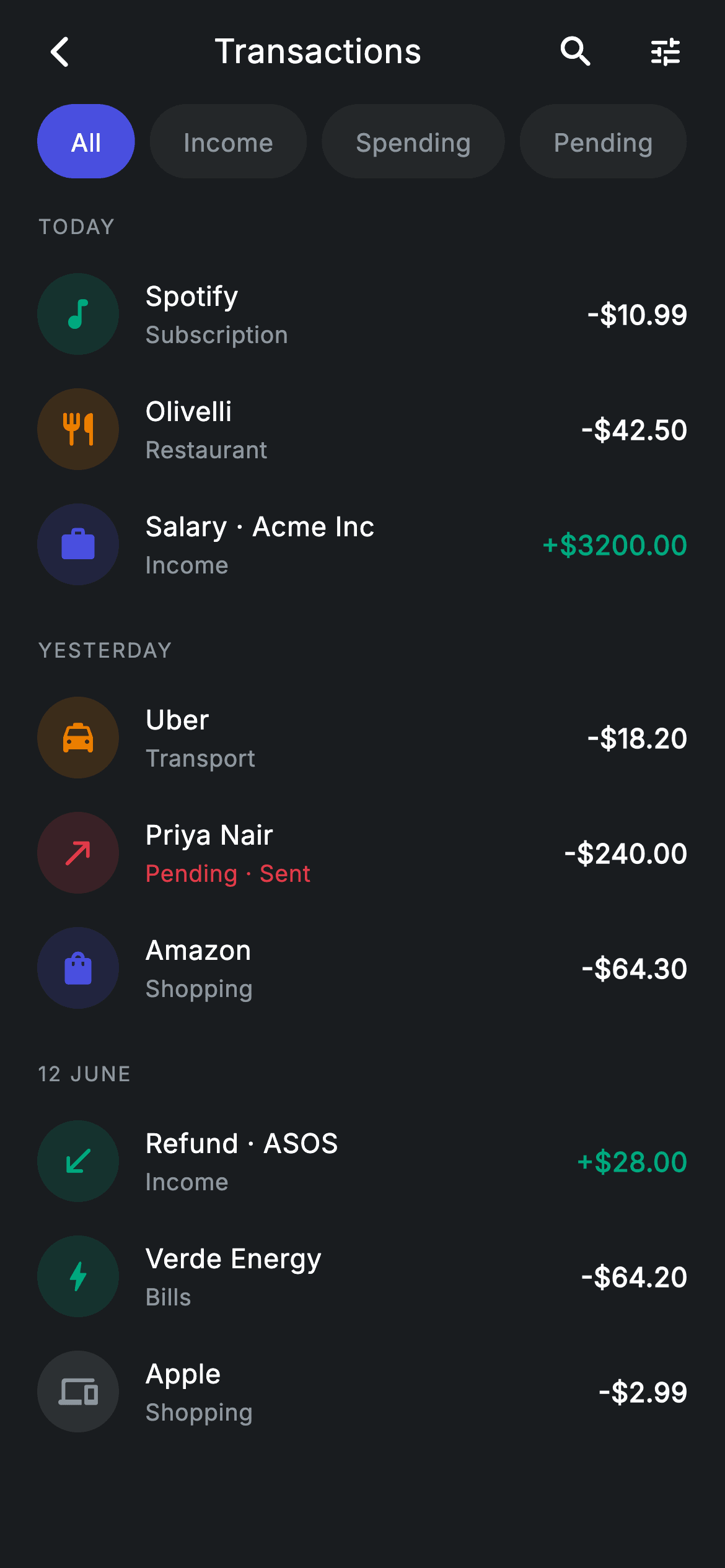
This is a full transaction history built out of one integer of state. A row of pills — All, Income, Spending, Pending — filters nine hard-coded transactions live, and whatever survives the filter is regrouped under uppercase day headers like TODAY and YESTERDAY. By the end you'll have tinted circular category icons, signed dollar amounts that flip to teal for income, a red 'Pending · Sent' subtitle, and a 'Nothing here yet' fallback for when a filter empties every group. Pure Flutter, no packages, no list plugin.
Watch the Flutter UI walkthrough
A short screen recording of Transactions running, if you'd rather see it before you read the code. The written tutorial below covers everything in it.
Can't see the video? Watch it on YouTube.
What you'll build
- ✓A horizontally scrolling pill filter bar where tapping a pill re-filters the whole list through a single `_tab` index
- ✓Day-grouped rows built imperatively, with group headers that disappear when a filter leaves that day empty
- ✓Transaction rows with a 44px circular icon tinted from the transaction's own accent colour at 16% alpha
- ✓Signed amount formatting (`+$3200.00` / `-$10.99`) that colours income teal and everything else white
- ✓A centred empty state that only appears when the active filter matches nothing at all
Step-by-step build
Create the file
Add a new file at lib/fintech_transactions/fintech_transactions_screen.dart in your Flutter project.
Register the bundled fonts
No external packages — this is pure Flutter. It does bundle its design font (Inter), so drop the font file into fonts/ and declare it in pubspec.yaml:
flutter:
  fonts:
    - family: Inter
      fonts:
- asset: fonts/Inter-Regular.ttfBuild it, piece by piece
Here's how the screen goes together. Each block below is a real slice of the code with a plain-English explanation — paste them in order, or grab the whole file from the next section.
The widget shell, callbacks, and colour tokens
import 'package:flutter/material.dart';

/// Transactions — full history with filter tabs (Revolut-inspired design).
///
/// Self-contained per CONVENTIONS.md: pure Flutter only, the exact design font
/// (Inter) is bundled under `fonts/`, merchant marks are painted monograms (no
/// network images), and the screen forces its own dark theme. Tabs filter the
/// list live and items are grouped by day with a running total header.
class FintechTransactionsScreen extends StatefulWidget {
  const FintechTransactionsScreen({
    super.key,
    this.onBack,
    this.onTxnTap,
    this.onFilter,
    this.onSearch,
  });

  final VoidCallback? onBack;
  final VoidCallback? onTxnTap;
  final VoidCallback? onFilter;
  final VoidCallback? onSearch;

  @override
  State<FintechTransactionsScreen> createState() =>
      _FintechTransactionsScreenState();
}

class _FintechTransactionsScreenState extends State<FintechTransactionsScreen> {
  static const String _font = 'Inter';
  static const Color _bg = Color(0xFF191C1F);
  static const Color _surface = Color(0xFF242729);
  static const Color _brand = Color(0xFF494FDF);
  static const Color _teal = Color(0xFF00A87E);
  static const Color _amber = Color(0xFFEC7E00);
  static const Color _red = Color(0xFFE23B4A);
  static const Color _muted = Color(0xFF8D969E);

  static const List<String> _tabs = <String>['All', 'Income', 'Spending', 'Pending'];
  int _tab = 0;
`FintechTransactionsScreen` is a `StatefulWidget` that takes four optional `VoidCallback`s — `onBack`, `onTxnTap`, `onFilter`, `onSearch` — so the screen never navigates or fetches anything itself; the parent decides what a tap means. The state class opens with the design tokens: `_font = 'Inter'`, `_bg` (#191C1F) for the near-black canvas, `_surface` (#242729) for inactive pills, `_brand` (#494FDF) indigo for the selected pill, `_teal` (#00A87E) for income, `_amber` (#EC7E00) and `_red` (#E23B4A) for category tints and pending status, and `_muted` (#8D969E) for secondary text. The filter labels live in a `const List<String> _tabs`, and the entire filter state is one `int _tab = 0`.
Mock data and the one-line filter predicate
  static const List<_Group> _groups = <_Group>[
    _Group('Today', <_Txn>[
      _Txn('Spotify', 'Subscription', -10.99, Icons.music_note_rounded, _teal,
          _Kind.spend),
      _Txn('Olivelli', 'Restaurant', -42.50, Icons.restaurant_rounded, _amber,
          _Kind.spend),
      _Txn('Salary · Acme Inc', 'Income', 3200.00, Icons.work_rounded, _brand,
          _Kind.income),
    ]),
    _Group('Yesterday', <_Txn>[
      _Txn('Uber', 'Transport', -18.20, Icons.local_taxi_rounded, _amber,
          _Kind.spend),
      _Txn('Priya Nair', 'Pending · Sent', -240.00, Icons.north_east_rounded,
          _red, _Kind.pending),
      _Txn('Amazon', 'Shopping', -64.30, Icons.shopping_bag_rounded, _brand,
          _Kind.spend),
    ]),
    _Group('12 June', <_Txn>[
      _Txn('Refund · ASOS', 'Income', 28.00, Icons.south_west_rounded, _teal,
          _Kind.income),
      _Txn('Verde Energy', 'Bills', -64.20, Icons.bolt_rounded, _teal,
          _Kind.spend),
      _Txn('Apple', 'Shopping', -2.99, Icons.devices_rounded, _muted,
          _Kind.spend),
    ]),
  ];

  bool _matches(_Txn t) {
    switch (_tab) {
      case 1:
        return t.kind == _Kind.income;
      case 2:
        return t.kind == _Kind.spend;
      case 3:
        return t.kind == _Kind.pending;
      default:
        return true;
    }
  }
`_groups` is a `static const` list of three `_Group`s — 'Today', 'Yesterday' and '12 June' — each holding three `_Txn` records. Every `_Txn` carries its name, category string, a signed `double` amount, a Material icon, a tint colour, and a `_Kind` (income, spend or pending). Notice how the data does the design work: Spotify gets `Icons.music_note_rounded` in teal, Uber gets `Icons.local_taxi_rounded` in amber, and the pending 'Priya Nair' send gets `Icons.north_east_rounded` in red. Because it is `const`, the whole dataset is built at compile time. `_matches` is the entire filter: a `switch` on `_tab` returning `t.kind == _Kind.income` for tab 1, `_Kind.spend` for 2, `_Kind.pending` for 3, and `true` by default for 'All'.
Forcing a dark theme and building the app bar
  @override
  Widget build(BuildContext context) {
    return Theme(
      data: ThemeData.dark(useMaterial3: true),
      child: Scaffold(
        backgroundColor: _bg,
        body: SafeArea(
          child: Column(
            children: <Widget>[
              _buildAppBar(),
              _buildTabs(),
              Expanded(child: _buildList()),
            ],
          ),
        ),
      ),
    );
  }

  Widget _buildAppBar() {
    return Padding(
      padding: const EdgeInsets.fromLTRB(8, 4, 8, 4),
      child: Row(
        children: <Widget>[
          IconButton(
            onPressed: widget.onBack,
            icon: const Icon(Icons.arrow_back_ios_new_rounded,
                size: 20, color: Colors.white),
          ),
          const Expanded(
            child: Text(
              'Transactions',
              textAlign: TextAlign.center,
              style: TextStyle(
                fontFamily: _font,
                fontSize: 18,
                fontWeight: FontWeight.w500,
                letterSpacing: 0.24,
                color: Colors.white,
              ),
            ),
          ),
          IconButton(
            onPressed: widget.onSearch,
            icon: const Icon(Icons.search_rounded, size: 22, color: Colors.white),
          ),
          IconButton(
            onPressed: widget.onFilter,
            icon: const Icon(Icons.tune_rounded, size: 20, color: Colors.white),
          ),
        ],
      ),
    );
  }
`build` wraps everything in `Theme(data: ThemeData.dark(useMaterial3: true))` so the screen stays dark even if the host app is running a light theme — a useful trick for a drop-in screen. Inside, a `Scaffold` painted `_bg` holds a `SafeArea` and a three-part `Column`: the app bar, the tab strip, and `Expanded(child: _buildList())` so the list takes all remaining height. `_buildAppBar` is a plain `Row`, not an `AppBar`: a back `IconButton` with `Icons.arrow_back_ios_new_rounded` at size 20, an `Expanded` centred 'Transactions' title in 18px Inter with `letterSpacing: 0.24`, then search (`Icons.search_rounded`, 22) and filter (`Icons.tune_rounded`, 20) buttons wired to `widget.onSearch` and `widget.onFilter`. Wrapping the title in `Expanded` is what keeps it optically centred while the two trailing icons sit to its right.
The horizontal pill filter bar
  Widget _buildTabs() {
    return SizedBox(
      height: 40,
      child: ListView.separated(
        scrollDirection: Axis.horizontal,
        padding: const EdgeInsets.symmetric(horizontal: 20),
        physics: const BouncingScrollPhysics(),
        itemCount: _tabs.length,
        separatorBuilder: (BuildContext context, int i) =>
            const SizedBox(width: 8),
        itemBuilder: (BuildContext context, int i) {
          final bool active = _tab == i;
          return GestureDetector(
            onTap: () => setState(() => _tab = i),
            child: Container(
              alignment: Alignment.center,
              padding: const EdgeInsets.symmetric(horizontal: 18),
              decoration: BoxDecoration(
                color: active ? _brand : _surface,
                borderRadius: BorderRadius.circular(9999),
              ),
              child: Text(
                _tabs[i],
                style: TextStyle(
                  fontFamily: _font,
                  fontSize: 13.5,
                  fontWeight: FontWeight.w500,
                  letterSpacing: 0.24,
                  color: active ? Colors.white : _muted,
                ),
              ),
            ),
          );
        },
      ),
    );
  }
The tab strip is a fixed 40px-tall `SizedBox` containing a horizontal `ListView.separated`, so the pills scroll sideways if you ever add more filters than fit. `separatorBuilder` inserts a plain `SizedBox(width: 8)` between them and `BouncingScrollPhysics` gives the iOS-style rubber-band. Each item computes `final bool active = _tab == i` and swaps two things off it: the `Container` colour (`_brand` indigo when active, `_surface` grey when not) and the label colour (white vs `_muted`). `borderRadius: BorderRadius.circular(9999)` is the usual way to force a fully rounded pill regardless of height. The `GestureDetector`'s `onTap` does the only mutation in the file — `setState(() => _tab = i)` — which rebuilds the list below with a new filter.
Grouping, headers, and the empty state
  Widget _buildList() {
    final List<Widget> children = <Widget>[];
    for (final _Group g in _groups) {
      final List<_Txn> items = g.items.where(_matches).toList();
      if (items.isEmpty) {
        continue;
      }
      children.add(Padding(
        padding: const EdgeInsets.fromLTRB(20, 18, 20, 8),
        child: Text(
          g.label.toUpperCase(),
          style: const TextStyle(
            fontFamily: _font,
            fontSize: 11,
            fontWeight: FontWeight.w500,
            letterSpacing: 1.0,
            color: _muted,
          ),
        ),
      ));
      for (final _Txn t in items) {
        children.add(_TxnRow(txn: t, onTap: widget.onTxnTap));
      }
    }
    if (children.isEmpty) {
      return const Center(
        child: Text(
          'Nothing here yet',
          style: TextStyle(
            fontFamily: _font,
            fontSize: 14,
            letterSpacing: 0.24,
            color: _muted,
          ),
        ),
      );
    }
    return ListView(
      physics: const BouncingScrollPhysics(),
      padding: const EdgeInsets.only(bottom: 24),
      children: children,
    );
  }
}
`_buildList` builds a flat `List<Widget>` by hand rather than using `ListView.builder`, because the number of children depends on the filter. It loops the `_groups`, applies `g.items.where(_matches).toList()`, and `continue`s past any group whose items all got filtered out — that is why the 'YESTERDAY' header vanishes when you select Income. For a surviving group it appends the header, `g.label.toUpperCase()` in 11px `_muted` Inter with `letterSpacing: 1.0`, then one `_TxnRow` per transaction with `widget.onTxnTap` passed down. If `children` is still empty after all three groups, it returns a centred 'Nothing here yet' `Text` instead of a list; otherwise a `ListView` with 24px of bottom padding so the last row clears the home indicator.
The data models and the transaction row
enum _Kind { income, spend, pending }

class _Group {
  const _Group(this.label, this.items);
  final String label;
  final List<_Txn> items;
}

class _Txn {
  const _Txn(this.name, this.category, this.amount, this.icon, this.tint, this.kind);
  final String name;
  final String category;
  final double amount;
  final IconData icon;
  final Color tint;
  final _Kind kind;
}

class _TxnRow extends StatelessWidget {
  const _TxnRow({required this.txn, this.onTap});

  final _Txn txn;
  final VoidCallback? onTap;

  @override
  Widget build(BuildContext context) {
    final bool income = txn.kind == _Kind.income;
    final bool pending = txn.kind == _Kind.pending;
    return InkWell(
      onTap: onTap,
      child: Padding(
        padding: const EdgeInsets.symmetric(horizontal: 20, vertical: 9),
        child: Row(
          children: <Widget>[
            Container(
              width: 44,
              height: 44,
              decoration: BoxDecoration(
                color: txn.tint.withValues(alpha: 0.16),
                shape: BoxShape.circle,
              ),
              child: Icon(txn.icon, size: 21, color: txn.tint),
            ),
            const SizedBox(width: 14),
            Expanded(
              child: Column(
                crossAxisAlignment: CrossAxisAlignment.start,
                children: <Widget>[
                  Text(
                    txn.name,
                    maxLines: 1,
                    overflow: TextOverflow.ellipsis,
                    style: const TextStyle(
                      fontFamily: _FintechTransactionsScreenState._font,
                      fontSize: 14.5,
                      fontWeight: FontWeight.w500,
                      letterSpacing: 0.24,
                      color: Colors.white,
                    ),
                  ),
                  const SizedBox(height: 2),
                  Text(
                    txn.category,
                    maxLines: 1,
                    overflow: TextOverflow.ellipsis,
                    style: TextStyle(
                      fontFamily: _FintechTransactionsScreenState._font,
                      fontSize: 12.5,
                      letterSpacing: 0.24,
                      color: pending
                          ? _FintechTransactionsScreenState._red
                          : _FintechTransactionsScreenState._muted,
                    ),
                  ),
                ],
              ),
            ),
            Text(
              '${income ? '+' : '-'}\$${txn.amount.abs().toStringAsFixed(2)}',
              style: TextStyle(
                fontFamily: _FintechTransactionsScreenState._font,
                fontSize: 14.5,
                fontWeight: FontWeight.w600,
                letterSpacing: 0.24,
                color: income
                    ? _FintechTransactionsScreenState._teal
                    : Colors.white,
              ),
            ),
          ],
        ),
      ),
    );
  }
}
`_Kind`, `_Group` and `_Txn` are small private types kept in the same file so the screen stays self-contained. `_TxnRow` is a `StatelessWidget` wrapped in an `InkWell`, giving each row a Material ripple for free. It derives two booleans up front — `income` and `pending` — and lets them drive every visual difference. The leading avatar is a 44×44 `Container` with `shape: BoxShape.circle` filled with `txn.tint.withValues(alpha: 0.16)` and a 21px icon in the full-strength tint, so each category gets a matching halo from a single colour value. The middle `Expanded` `Column` shows the name at 14.5px w500 and the category at 12.5px, coloured `_red` when `pending` so 'Pending · Sent' reads as a status rather than a category. The trailing amount is built with string interpolation — `'${income ? '+' : '-'}\$${txn.amount.abs().toStringAsFixed(2)}'` — taking `abs()` so the stored minus sign never double-prints, and it renders teal for income, white otherwise. Both text widgets use `maxLines: 1` with `TextOverflow.ellipsis` so long merchant names can't break the row.
Full code
The complete, ready-to-paste source. Free to use in your projects — one click copies it all.
import 'package:flutter/material.dart';

/// Transactions — full history with filter tabs (Revolut-inspired design).
///
/// Self-contained per CONVENTIONS.md: pure Flutter only, the exact design font
/// (Inter) is bundled under `fonts/`, merchant marks are painted monograms (no
/// network images), and the screen forces its own dark theme. Tabs filter the
/// list live and items are grouped by day with a running total header.
class FintechTransactionsScreen extends StatefulWidget {
  const FintechTransactionsScreen({
    super.key,
    this.onBack,
    this.onTxnTap,
    this.onFilter,
    this.onSearch,
  });

  final VoidCallback? onBack;
  final VoidCallback? onTxnTap;
  final VoidCallback? onFilter;
  final VoidCallback? onSearch;

  @override
  State<FintechTransactionsScreen> createState() =>
      _FintechTransactionsScreenState();
}

class _FintechTransactionsScreenState extends State<FintechTransactionsScreen> {
  static const String _font = 'Inter';
  static const Color _bg = Color(0xFF191C1F);
  static const Color _surface = Color(0xFF242729);
  static const Color _brand = Color(0xFF494FDF);
  static const Color _teal = Color(0xFF00A87E);
  static const Color _amber = Color(0xFFEC7E00);
  static const Color _red = Color(0xFFE23B4A);
  static const Color _muted = Color(0xFF8D969E);

  static const List<String> _tabs = <String>['All', 'Income', 'Spending', 'Pending'];
  int _tab = 0;

  static const List<_Group> _groups = <_Group>[
    _Group('Today', <_Txn>[
      _Txn('Spotify', 'Subscription', -10.99, Icons.music_note_rounded, _teal,
          _Kind.spend),
      _Txn('Olivelli', 'Restaurant', -42.50, Icons.restaurant_rounded, _amber,
          _Kind.spend),
      _Txn('Salary · Acme Inc', 'Income', 3200.00, Icons.work_rounded, _brand,
          _Kind.income),
    ]),
    _Group('Yesterday', <_Txn>[
      _Txn('Uber', 'Transport', -18.20, Icons.local_taxi_rounded, _amber,
          _Kind.spend),
      _Txn('Priya Nair', 'Pending · Sent', -240.00, Icons.north_east_rounded,
          _red, _Kind.pending),
      _Txn('Amazon', 'Shopping', -64.30, Icons.shopping_bag_rounded, _brand,
          _Kind.spend),
    ]),
    _Group('12 June', <_Txn>[
      _Txn('Refund · ASOS', 'Income', 28.00, Icons.south_west_rounded, _teal,
          _Kind.income),
      _Txn('Verde Energy', 'Bills', -64.20, Icons.bolt_rounded, _teal,
          _Kind.spend),
      _Txn('Apple', 'Shopping', -2.99, Icons.devices_rounded, _muted,
          _Kind.spend),
    ]),
  ];

  bool _matches(_Txn t) {
    switch (_tab) {
      case 1:
        return t.kind == _Kind.income;
      case 2:
        return t.kind == _Kind.spend;
      case 3:
        return t.kind == _Kind.pending;
      default:
        return true;
    }
  }

  @override
  Widget build(BuildContext context) {
    return Theme(
      data: ThemeData.dark(useMaterial3: true),
      child: Scaffold(
        backgroundColor: _bg,
        body: SafeArea(
          child: Column(
            children: <Widget>[
              _buildAppBar(),
              _buildTabs(),
              Expanded(child: _buildList()),
            ],
          ),
        ),
      ),
    );
  }

  Widget _buildAppBar() {
    return Padding(
      padding: const EdgeInsets.fromLTRB(8, 4, 8, 4),
      child: Row(
        children: <Widget>[
          IconButton(
            onPressed: widget.onBack,
            icon: const Icon(Icons.arrow_back_ios_new_rounded,
                size: 20, color: Colors.white),
          ),
          const Expanded(
            child: Text(
              'Transactions',
              textAlign: TextAlign.center,
              style: TextStyle(
                fontFamily: _font,
                fontSize: 18,
                fontWeight: FontWeight.w500,
                letterSpacing: 0.24,
                color: Colors.white,
              ),
            ),
          ),
          IconButton(
            onPressed: widget.onSearch,
            icon: const Icon(Icons.search_rounded, size: 22, color: Colors.white),
          ),
          IconButton(
            onPressed: widget.onFilter,
            icon: const Icon(Icons.tune_rounded, size: 20, color: Colors.white),
          ),
        ],
      ),
    );
  }

  Widget _buildTabs() {
    return SizedBox(
      height: 40,
      child: ListView.separated(
        scrollDirection: Axis.horizontal,
        padding: const EdgeInsets.symmetric(horizontal: 20),
        physics: const BouncingScrollPhysics(),
        itemCount: _tabs.length,
        separatorBuilder: (BuildContext context, int i) =>
            const SizedBox(width: 8),
        itemBuilder: (BuildContext context, int i) {
          final bool active = _tab == i;
          return GestureDetector(
            onTap: () => setState(() => _tab = i),
            child: Container(
              alignment: Alignment.center,
              padding: const EdgeInsets.symmetric(horizontal: 18),
              decoration: BoxDecoration(
                color: active ? _brand : _surface,
                borderRadius: BorderRadius.circular(9999),
              ),
              child: Text(
                _tabs[i],
                style: TextStyle(
                  fontFamily: _font,
                  fontSize: 13.5,
                  fontWeight: FontWeight.w500,
                  letterSpacing: 0.24,
                  color: active ? Colors.white : _muted,
                ),
              ),
            ),
          );
        },
      ),
    );
  }

  Widget _buildList() {
    final List<Widget> children = <Widget>[];
    for (final _Group g in _groups) {
      final List<_Txn> items = g.items.where(_matches).toList();
      if (items.isEmpty) {
        continue;
      }
      children.add(Padding(
        padding: const EdgeInsets.fromLTRB(20, 18, 20, 8),
        child: Text(
          g.label.toUpperCase(),
          style: const TextStyle(
            fontFamily: _font,
            fontSize: 11,
            fontWeight: FontWeight.w500,
            letterSpacing: 1.0,
            color: _muted,
          ),
        ),
      ));
      for (final _Txn t in items) {
        children.add(_TxnRow(txn: t, onTap: widget.onTxnTap));
      }
    }
    if (children.isEmpty) {
      return const Center(
        child: Text(
          'Nothing here yet',
          style: TextStyle(
            fontFamily: _font,
            fontSize: 14,
            letterSpacing: 0.24,
            color: _muted,
          ),
        ),
      );
    }
    return ListView(
      physics: const BouncingScrollPhysics(),
      padding: const EdgeInsets.only(bottom: 24),
      children: children,
    );
  }
}

enum _Kind { income, spend, pending }

class _Group {
  const _Group(this.label, this.items);
  final String label;
  final List<_Txn> items;
}

class _Txn {
  const _Txn(this.name, this.category, this.amount, this.icon, this.tint, this.kind);
  final String name;
  final String category;
  final double amount;
  final IconData icon;
  final Color tint;
  final _Kind kind;
}

class _TxnRow extends StatelessWidget {
  const _TxnRow({required this.txn, this.onTap});

  final _Txn txn;
  final VoidCallback? onTap;

  @override
  Widget build(BuildContext context) {
    final bool income = txn.kind == _Kind.income;
    final bool pending = txn.kind == _Kind.pending;
    return InkWell(
      onTap: onTap,
      child: Padding(
        padding: const EdgeInsets.symmetric(horizontal: 20, vertical: 9),
        child: Row(
          children: <Widget>[
            Container(
              width: 44,
              height: 44,
              decoration: BoxDecoration(
                color: txn.tint.withValues(alpha: 0.16),
                shape: BoxShape.circle,
              ),
              child: Icon(txn.icon, size: 21, color: txn.tint),
            ),
            const SizedBox(width: 14),
            Expanded(
              child: Column(
                crossAxisAlignment: CrossAxisAlignment.start,
                children: <Widget>[
                  Text(
                    txn.name,
                    maxLines: 1,
                    overflow: TextOverflow.ellipsis,
                    style: const TextStyle(
                      fontFamily: _FintechTransactionsScreenState._font,
                      fontSize: 14.5,
                      fontWeight: FontWeight.w500,
                      letterSpacing: 0.24,
                      color: Colors.white,
                    ),
                  ),
                  const SizedBox(height: 2),
                  Text(
                    txn.category,
                    maxLines: 1,
                    overflow: TextOverflow.ellipsis,
                    style: TextStyle(
                      fontFamily: _FintechTransactionsScreenState._font,
                      fontSize: 12.5,
                      letterSpacing: 0.24,
                      color: pending
                          ? _FintechTransactionsScreenState._red
                          : _FintechTransactionsScreenState._muted,
                    ),
                  ),
                ],
              ),
            ),
            Text(
              '${income ? '+' : '-'}\$${txn.amount.abs().toStringAsFixed(2)}',
              style: TextStyle(
                fontFamily: _FintechTransactionsScreenState._font,
                fontSize: 14.5,
                fontWeight: FontWeight.w600,
                letterSpacing: 0.24,
                color: income
                    ? _FintechTransactionsScreenState._teal
                    : Colors.white,
              ),
            ),
          ],
        ),
      ),
    );
  }
}
Plus bundled 1 binary asset (fonts/images). The CLI and MCP install those for you automatically.
Two faster ways to add it
Copy-paste works, but you can skip it entirely.
1. FlutterKit CLI
One command drops this screen — and its fonts — straight into your project.
$ flutterkit add fintech-transactions2. AI agent (MCP)
Connect FlutterKit's MCP server in Claude or Cursor and just ask your agent to install fintech-transactions — it fetches and writes the files for you.
FAQ
Can I use this transactions list in a commercial app?
Yes. The full Dart for this screen is free to copy and ship in personal or client projects. Paste it from this page, run `flutterkit add fintech-transactions` in your project, or let an AI agent install it for you over MCP.
Do the merchant icons or the filter pills need a package?
No — this is pure Flutter with an empty dependency list. Every merchant mark is a built-in Material icon (`Icons.music_note_rounded`, `Icons.local_taxi_rounded`, `Icons.bolt_rounded` and friends) rather than a network logo, and the pills are just `Container`s inside a `ListView.separated`. The one asset is the bundled Inter font, registered in `pubspec.yaml` as shown in step 2; the CLI and MCP copy that file in for you.
What Flutter SDK does the transactions screen need?
Flutter 3.22+ (Dart 3). It uses `super.key` super parameters in the constructors and `txn.tint.withValues(alpha: 0.16)` for the tinted icon circles. On an older SDK, change that one call to `txn.tint.withOpacity(0.16)` — `ThemeData.dark(useMaterial3: true)` and everything else compiles as-is.


