How to Build a Transaction Search Screen in Flutter (Full Code + Preview)
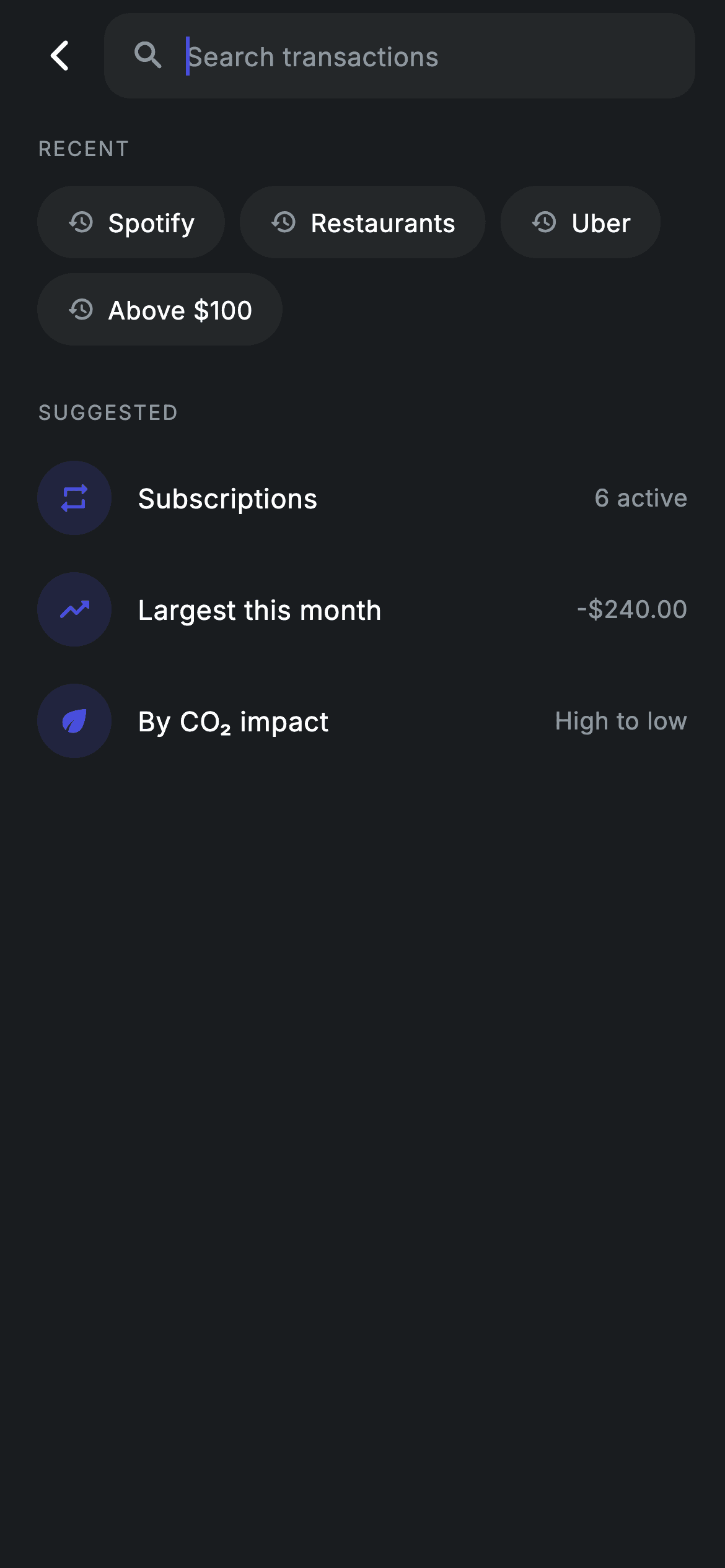
Typing into a search field is the easy half; deciding what to show while it is still empty is the hard half. This screen does both from one `_query` string. Blank, it offers recent-search chips and a SUGGESTED list; the instant a character lands, the same area becomes a list of transactions filtered on merchant name or category, with a search-off state when nothing matches. By the end you will have the whole dark, autofocusing screen — chips, tinted merchant rows, signed amounts — in pure Flutter with no packages.
Watch the Flutter UI walkthrough
A short screen recording of Transaction Search running, if you'd rather see it before you read the code. The written tutorial below covers everything in it.
Can't see the video? Watch it on YouTube.
What you'll build
- ✓A dark search screen whose entire body swaps between an idle view and a results view based on one String field
- ✓An autofocus search bar with a clear (x) icon that only appears once the query is non-empty
- ✓Tappable recent-search chips that write straight back into the query and re-run the filter
- ✓A case-insensitive filter that matches both the merchant name and its 'Today · Restaurant' subtitle
- ✓Transaction rows with tinted circular icons and amounts signed +/- and coloured by income vs spend
Step-by-step build
Create the file
Add a new file at lib/fintech_transaction_search/fintech_transaction_search_screen.dart in your Flutter project.
Register the bundled fonts
No external packages — this is pure Flutter. It does bundle its design font (Inter), so drop the font file into fonts/ and declare it in pubspec.yaml:
flutter:
  fonts:
    - family: Inter
      fonts:
- asset: fonts/Inter-Regular.ttfBuild it, piece by piece
Here's how the screen goes together. Each block below is a real slice of the code with a plain-English explanation — paste them in order, or grab the whole file from the next section.
The widget, its callbacks, and the palette
import 'package:flutter/material.dart';

/// Transaction search — search the history (Revolut-inspired design system).
///
/// Self-contained per CONVENTIONS.md: pure Flutter only, the exact design font
/// (Inter) is bundled under `fonts/`, merchant marks are painted (no network
/// images), and the screen forces its own dark theme. Typing filters a live
/// result list; an empty query shows recent searches + quick suggestions.
class FintechTransactionSearchScreen extends StatefulWidget {
  const FintechTransactionSearchScreen({
    super.key,
    this.onBack,
    this.onTxnTap,
  });

  final VoidCallback? onBack;
  final VoidCallback? onTxnTap;

  @override
  State<FintechTransactionSearchScreen> createState() =>
      _FintechTransactionSearchScreenState();
}

class _FintechTransactionSearchScreenState
    extends State<FintechTransactionSearchScreen> {
  static const String _font = 'Inter';
  static const Color _bg = Color(0xFF191C1F);
  static const Color _surface = Color(0xFF242729);
  static const Color _brand = Color(0xFF494FDF);
  static const Color _teal = Color(0xFF00A87E);
  static const Color _amber = Color(0xFFEC7E00);
  static const Color _muted = Color(0xFF8D969E);

  static const List<String> _recents = <String>[
    'Spotify',
    'Restaurants',
    'Uber',
    'Above \$100',
  ];
`FintechTransactionSearchScreen` is a `StatefulWidget` with two optional callbacks — `onBack` for the arrow in the search bar and `onTxnTap` for a result row — so the screen never imports a router and drops into any app. The state class starts with design tokens: `_font = 'Inter'`, `_bg` (#191C1F) for the canvas, `_surface` (#242729) for the search field and chips, and three accent tints — `_brand` indigo (#494FDF), `_teal` (#00A87E) and `_amber` (#EC7E00) — plus `_muted` (#8D969E) for secondary text. `_recents` is a plain const list of four past queries, including the escaped 'Above \$100' — the backslash stops Dart treating `$1` as string interpolation.
Mock transactions and the filter getter
  static const List<_Result> _all = <_Result>[
    _Result('Spotify', 'Today · Subscription', -10.99,
        Icons.music_note_rounded, _teal),
    _Result('Olivelli', 'Today · Restaurant', -42.50,
        Icons.restaurant_rounded, _amber),
    _Result('Uber', 'Yesterday · Transport', -18.20,
        Icons.local_taxi_rounded, _amber),
    _Result('Amazon', 'Yesterday · Shopping', -64.30,
        Icons.shopping_bag_rounded, _brand),
    _Result('Salary · Acme Inc', 'Today · Income', 3200.00,
        Icons.work_rounded, _brand),
    _Result('Verde Energy', '12 Jun · Bills', -64.20, Icons.bolt_rounded, _teal),
  ];

  String _query = '';

  List<_Result> get _results {
    if (_query.isEmpty) {
      return const <_Result>[];
    }
    final String q = _query.toLowerCase();
    return _all
        .where((_Result r) =>
            r.name.toLowerCase().contains(q) ||
            r.sub.toLowerCase().contains(q))
        .toList();
  }
`_all` holds six hard-coded `_Result` records — Spotify, Olivelli, Uber, Amazon, a positive 3200.00 salary and Verde Energy — each carrying its own icon and tint colour so the list looks varied without any network call. The search itself is the `_results` getter, and it is deliberately tiny: if `_query` is empty it returns an empty const list (the results view is never even asked to build), otherwise it lowercases the query once into `q` and keeps every row where `r.name` OR `r.sub` contains it. Because `sub` is a string like 'Today · Restaurant', typing 'rest' or 'today' matches by category and date too, not just by merchant.
Forced dark theme and the autofocus search bar
  @override
  Widget build(BuildContext context) {
    return Theme(
      data: ThemeData.dark(useMaterial3: true),
      child: Scaffold(
        backgroundColor: _bg,
        body: SafeArea(
          child: Column(
            children: <Widget>[
              _buildSearchBar(),
              Expanded(
                child: _query.isEmpty ? _buildIdle() : _buildResults(),
              ),
            ],
          ),
        ),
      ),
    );
  }

  Widget _buildSearchBar() {
    return Padding(
      padding: const EdgeInsets.fromLTRB(8, 6, 16, 8),
      child: Row(
        children: <Widget>[
          IconButton(
            onPressed: widget.onBack,
            icon: const Icon(Icons.arrow_back_ios_new_rounded,
                size: 20, color: Colors.white),
          ),
          Expanded(
            child: Container(
              height: 46,
              padding: const EdgeInsets.symmetric(horizontal: 14),
              decoration: BoxDecoration(
                color: _surface,
                borderRadius: BorderRadius.circular(14),
              ),
              child: Row(
                children: <Widget>[
                  const Icon(Icons.search_rounded, size: 20, color: _muted),
                  const SizedBox(width: 10),
                  Expanded(
                    child: TextField(
                      autofocus: true,
                      onChanged: (String v) => setState(() => _query = v),
                      cursorColor: _brand,
                      style: const TextStyle(
                        fontFamily: _font,
                        fontSize: 14,
                        letterSpacing: 0.24,
                        color: Colors.white,
                      ),
                      decoration: const InputDecoration(
                        isDense: true,
                        border: InputBorder.none,
                        hintText: 'Search transactions',
                        hintStyle: TextStyle(
                          fontFamily: _font,
                          fontSize: 14,
                          letterSpacing: 0.24,
                          color: _muted,
                        ),
                      ),
                    ),
                  ),
                  if (_query.isNotEmpty)
                    GestureDetector(
                      onTap: () => setState(() => _query = ''),
                      child: const Icon(Icons.close_rounded,
                          size: 18, color: _muted),
                    ),
                ],
              ),
            ),
          ),
        ],
      ),
    );
  }
`build()` wraps the `Scaffold` in `Theme(data: ThemeData.dark(useMaterial3: true))` so the screen stays dark even inside a light app, then splits a `Column` into two parts: the fixed `_buildSearchBar()` and an `Expanded` that shows `_buildIdle()` or `_buildResults()` purely on `_query.isEmpty`. The bar is a back `IconButton` beside a 46px-tall `_surface` container with a 14px radius, holding a search glyph and a borderless `TextField`. `autofocus: true` raises the keyboard on entry, `onChanged` calls `setState(() => _query = v)` on every keystroke — that single line is what makes the filtering live — and `InputBorder.none` with `isDense: true` strips Material's underline and default padding so the field sits flush in the pill. The clear icon is behind `if (_query.isNotEmpty)`, so it only appears once there is something to clear, and its `GestureDetector` resets the query to '' which flips the body back to the idle view.
The idle state: recent chips and suggestions
  Widget _buildIdle() {
    return ListView(
      physics: const BouncingScrollPhysics(),
      padding: const EdgeInsets.fromLTRB(20, 10, 20, 24),
      children: <Widget>[
        const Text(
          'RECENT',
          style: TextStyle(
            fontFamily: _font,
            fontSize: 11,
            fontWeight: FontWeight.w500,
            letterSpacing: 1.0,
            color: _muted,
          ),
        ),
        const SizedBox(height: 12),
        Wrap(
          spacing: 8,
          runSpacing: 8,
          children: <Widget>[
            for (final String r in _recents)
              GestureDetector(
                onTap: () => setState(() => _query = r),
                child: Container(
                  padding:
                      const EdgeInsets.symmetric(horizontal: 16, vertical: 10),
                  decoration: BoxDecoration(
                    color: _surface,
                    borderRadius: BorderRadius.circular(9999),
                  ),
                  child: Row(
                    mainAxisSize: MainAxisSize.min,
                    children: <Widget>[
                      const Icon(Icons.history_rounded,
                          size: 15, color: _muted),
                      const SizedBox(width: 7),
                      Text(
                        r,
                        style: const TextStyle(
                          fontFamily: _font,
                          fontSize: 13.5,
                          fontWeight: FontWeight.w500,
                          letterSpacing: 0.24,
                          color: Colors.white,
                        ),
                      ),
                    ],
                  ),
                ),
              ),
          ],
        ),
        const SizedBox(height: 28),
        const Text(
          'SUGGESTED',
          style: TextStyle(
            fontFamily: _font,
            fontSize: 11,
            fontWeight: FontWeight.w500,
            letterSpacing: 1.0,
            color: _muted,
          ),
        ),
        const SizedBox(height: 8),
        _suggestRow(Icons.repeat_rounded, 'Subscriptions', '6 active'),
        _suggestRow(Icons.trending_up_rounded, 'Largest this month', r'-$240.00'),
        _suggestRow(Icons.eco_rounded, 'By CO₂ impact', 'High to low'),
      ],
    );
  }

  Widget _suggestRow(IconData icon, String title, String trailing) {
    return Padding(
      padding: const EdgeInsets.symmetric(vertical: 10),
      child: Row(
        children: <Widget>[
          Container(
            width: 40,
            height: 40,
            decoration: BoxDecoration(
              color: _brand.withValues(alpha: 0.16),
              shape: BoxShape.circle,
            ),
            child: Icon(icon, size: 19, color: _brand),
          ),
          const SizedBox(width: 14),
          Expanded(
            child: Text(
              title,
              style: const TextStyle(
                fontFamily: _font,
                fontSize: 14.5,
                fontWeight: FontWeight.w500,
                letterSpacing: 0.24,
                color: Colors.white,
              ),
            ),
          ),
          Text(
            trailing,
            style: const TextStyle(
              fontFamily: _font,
              fontSize: 13,
              letterSpacing: 0.24,
              color: _muted,
            ),
          ),
        ],
      ),
    );
  }
`_buildIdle()` is a `ListView` with `BouncingScrollPhysics`, opening on a 'RECENT' label styled as an 11px uppercase eyebrow with `letterSpacing: 1.0` in `_muted`. Below it a `Wrap` with 8px `spacing` and `runSpacing` builds one fully-rounded chip per entry in `_recents` (radius 9999 on the `_surface` fill) using a `for` loop directly inside the children list. Each chip's `onTap` does `setState(() => _query = r)` — it does not just prefill the box, it immediately swaps the body to the filtered results for that term. After a 28px gap comes 'SUGGESTED', rendered by three `_suggestRow` calls: Subscriptions, Largest this month and 'By CO₂ impact'. `_suggestRow` is a small helper returning a `Row` with a 40px circle tinted `_brand.withValues(alpha: 0.16)` behind a 19px indigo icon, an `Expanded` title, and muted trailing meta — note the 'Largest this month' value uses a raw string `r'-$240.00'` so the dollar sign is literal.
Results, empty state, and signed amounts
  Widget _buildResults() {
    final List<_Result> results = _results;
    if (results.isEmpty) {
      return Center(
        child: Column(
          mainAxisSize: MainAxisSize.min,
          children: <Widget>[
            Container(
              width: 64,
              height: 64,
              decoration: const BoxDecoration(
                shape: BoxShape.circle,
                color: _surface,
              ),
              child: const Icon(Icons.search_off_rounded,
                  size: 28, color: _muted),
            ),
            const SizedBox(height: 16),
            Text(
              'No results for "$_query"',
              style: const TextStyle(
                fontFamily: _font,
                fontSize: 14,
                letterSpacing: 0.24,
                color: _muted,
              ),
            ),
          ],
        ),
      );
    }
    return ListView.builder(
      physics: const BouncingScrollPhysics(),
      padding: const EdgeInsets.fromLTRB(0, 6, 0, 24),
      itemCount: results.length,
      itemBuilder: (BuildContext context, int i) {
        final _Result r = results[i];
        final bool income = r.amount > 0;
        return InkWell(
          onTap: widget.onTxnTap,
          child: Padding(
            padding: const EdgeInsets.symmetric(horizontal: 20, vertical: 9),
            child: Row(
              children: <Widget>[
                Container(
                  width: 44,
                  height: 44,
                  decoration: BoxDecoration(
                    color: r.tint.withValues(alpha: 0.16),
                    shape: BoxShape.circle,
                  ),
                  child: Icon(r.icon, size: 21, color: r.tint),
                ),
                const SizedBox(width: 14),
                Expanded(
                  child: Column(
                    crossAxisAlignment: CrossAxisAlignment.start,
                    children: <Widget>[
                      Text(
                        r.name,
                        maxLines: 1,
                        overflow: TextOverflow.ellipsis,
                        style: const TextStyle(
                          fontFamily: _font,
                          fontSize: 14.5,
                          fontWeight: FontWeight.w500,
                          letterSpacing: 0.24,
                          color: Colors.white,
                        ),
                      ),
                      const SizedBox(height: 2),
                      Text(
                        r.sub,
                        style: const TextStyle(
                          fontFamily: _font,
                          fontSize: 12.5,
                          letterSpacing: 0.24,
                          color: _muted,
                        ),
                      ),
                    ],
                  ),
                ),
                Text(
                  '${income ? '+' : '-'}\$${r.amount.abs().toStringAsFixed(2)}',
                  style: TextStyle(
                    fontFamily: _font,
                    fontSize: 14.5,
                    fontWeight: FontWeight.w600,
                    letterSpacing: 0.24,
                    color: income ? _teal : Colors.white,
                  ),
                ),
              ],
            ),
          ),
        );
      },
    );
  }
`_buildResults()` reads the getter once into a local `results`, and if the filter matched nothing it centres a 64px `_surface` circle holding `Icons.search_off_rounded` above the message `'No results for "$_query"'` — echoing what the user typed rather than a generic apology. Otherwise a `ListView.builder` renders each row inside an `InkWell` wired to `widget.onTxnTap`, which is why the ripple spans the full width while the 20px horizontal padding sits inside it. Each row pairs a 44px circle filled with the transaction's own `r.tint.withValues(alpha: 0.16)` behind that tint at full strength for the icon, an `Expanded` column with the merchant name (`maxLines: 1` plus `TextOverflow.ellipsis`) over its muted subtitle, and the amount on the right. The sign and colour both come from `final bool income = r.amount > 0`: income prints '+' in `_teal`, spending prints '-' in white, and `r.amount.abs().toStringAsFixed(2)` drops the stored minus sign so the prefix is never doubled.
The _Result model
class _Result {
  const _Result(this.name, this.sub, this.amount, this.icon, this.tint);
  final String name;
  final String sub;
  final double amount;
  final IconData icon;
  final Color tint;
}
`_Result` is a private, immutable five-field class — `name`, `sub`, `amount`, `icon` and `tint` — with a const positional constructor, which is what lets the whole `_all` list be declared `const` and built at compile time. Keeping the colour and `IconData` on the model instead of deriving them in the row builder means adding a merchant is a one-line change and the list builder stays free of switch statements. Swap this for your own model when you wire a real backend: only the `_all` source and the `_results` getter need to change, since nothing in the UI reaches past these five fields.
Full code
The complete, ready-to-paste source. Free to use in your projects — one click copies it all.
import 'package:flutter/material.dart';

/// Transaction search — search the history (Revolut-inspired design system).
///
/// Self-contained per CONVENTIONS.md: pure Flutter only, the exact design font
/// (Inter) is bundled under `fonts/`, merchant marks are painted (no network
/// images), and the screen forces its own dark theme. Typing filters a live
/// result list; an empty query shows recent searches + quick suggestions.
class FintechTransactionSearchScreen extends StatefulWidget {
  const FintechTransactionSearchScreen({
    super.key,
    this.onBack,
    this.onTxnTap,
  });

  final VoidCallback? onBack;
  final VoidCallback? onTxnTap;

  @override
  State<FintechTransactionSearchScreen> createState() =>
      _FintechTransactionSearchScreenState();
}

class _FintechTransactionSearchScreenState
    extends State<FintechTransactionSearchScreen> {
  static const String _font = 'Inter';
  static const Color _bg = Color(0xFF191C1F);
  static const Color _surface = Color(0xFF242729);
  static const Color _brand = Color(0xFF494FDF);
  static const Color _teal = Color(0xFF00A87E);
  static const Color _amber = Color(0xFFEC7E00);
  static const Color _muted = Color(0xFF8D969E);

  static const List<String> _recents = <String>[
    'Spotify',
    'Restaurants',
    'Uber',
    'Above \$100',
  ];

  static const List<_Result> _all = <_Result>[
    _Result('Spotify', 'Today · Subscription', -10.99,
        Icons.music_note_rounded, _teal),
    _Result('Olivelli', 'Today · Restaurant', -42.50,
        Icons.restaurant_rounded, _amber),
    _Result('Uber', 'Yesterday · Transport', -18.20,
        Icons.local_taxi_rounded, _amber),
    _Result('Amazon', 'Yesterday · Shopping', -64.30,
        Icons.shopping_bag_rounded, _brand),
    _Result('Salary · Acme Inc', 'Today · Income', 3200.00,
        Icons.work_rounded, _brand),
    _Result('Verde Energy', '12 Jun · Bills', -64.20, Icons.bolt_rounded, _teal),
  ];

  String _query = '';

  List<_Result> get _results {
    if (_query.isEmpty) {
      return const <_Result>[];
    }
    final String q = _query.toLowerCase();
    return _all
        .where((_Result r) =>
            r.name.toLowerCase().contains(q) ||
            r.sub.toLowerCase().contains(q))
        .toList();
  }

  @override
  Widget build(BuildContext context) {
    return Theme(
      data: ThemeData.dark(useMaterial3: true),
      child: Scaffold(
        backgroundColor: _bg,
        body: SafeArea(
          child: Column(
            children: <Widget>[
              _buildSearchBar(),
              Expanded(
                child: _query.isEmpty ? _buildIdle() : _buildResults(),
              ),
            ],
          ),
        ),
      ),
    );
  }

  Widget _buildSearchBar() {
    return Padding(
      padding: const EdgeInsets.fromLTRB(8, 6, 16, 8),
      child: Row(
        children: <Widget>[
          IconButton(
            onPressed: widget.onBack,
            icon: const Icon(Icons.arrow_back_ios_new_rounded,
                size: 20, color: Colors.white),
          ),
          Expanded(
            child: Container(
              height: 46,
              padding: const EdgeInsets.symmetric(horizontal: 14),
              decoration: BoxDecoration(
                color: _surface,
                borderRadius: BorderRadius.circular(14),
              ),
              child: Row(
                children: <Widget>[
                  const Icon(Icons.search_rounded, size: 20, color: _muted),
                  const SizedBox(width: 10),
                  Expanded(
                    child: TextField(
                      autofocus: true,
                      onChanged: (String v) => setState(() => _query = v),
                      cursorColor: _brand,
                      style: const TextStyle(
                        fontFamily: _font,
                        fontSize: 14,
                        letterSpacing: 0.24,
                        color: Colors.white,
                      ),
                      decoration: const InputDecoration(
                        isDense: true,
                        border: InputBorder.none,
                        hintText: 'Search transactions',
                        hintStyle: TextStyle(
                          fontFamily: _font,
                          fontSize: 14,
                          letterSpacing: 0.24,
                          color: _muted,
                        ),
                      ),
                    ),
                  ),
                  if (_query.isNotEmpty)
                    GestureDetector(
                      onTap: () => setState(() => _query = ''),
                      child: const Icon(Icons.close_rounded,
                          size: 18, color: _muted),
                    ),
                ],
              ),
            ),
          ),
        ],
      ),
    );
  }

  Widget _buildIdle() {
    return ListView(
      physics: const BouncingScrollPhysics(),
      padding: const EdgeInsets.fromLTRB(20, 10, 20, 24),
      children: <Widget>[
        const Text(
          'RECENT',
          style: TextStyle(
            fontFamily: _font,
            fontSize: 11,
            fontWeight: FontWeight.w500,
            letterSpacing: 1.0,
            color: _muted,
          ),
        ),
        const SizedBox(height: 12),
        Wrap(
          spacing: 8,
          runSpacing: 8,
          children: <Widget>[
            for (final String r in _recents)
              GestureDetector(
                onTap: () => setState(() => _query = r),
                child: Container(
                  padding:
                      const EdgeInsets.symmetric(horizontal: 16, vertical: 10),
                  decoration: BoxDecoration(
                    color: _surface,
                    borderRadius: BorderRadius.circular(9999),
                  ),
                  child: Row(
                    mainAxisSize: MainAxisSize.min,
                    children: <Widget>[
                      const Icon(Icons.history_rounded,
                          size: 15, color: _muted),
                      const SizedBox(width: 7),
                      Text(
                        r,
                        style: const TextStyle(
                          fontFamily: _font,
                          fontSize: 13.5,
                          fontWeight: FontWeight.w500,
                          letterSpacing: 0.24,
                          color: Colors.white,
                        ),
                      ),
                    ],
                  ),
                ),
              ),
          ],
        ),
        const SizedBox(height: 28),
        const Text(
          'SUGGESTED',
          style: TextStyle(
            fontFamily: _font,
            fontSize: 11,
            fontWeight: FontWeight.w500,
            letterSpacing: 1.0,
            color: _muted,
          ),
        ),
        const SizedBox(height: 8),
        _suggestRow(Icons.repeat_rounded, 'Subscriptions', '6 active'),
        _suggestRow(Icons.trending_up_rounded, 'Largest this month', r'-$240.00'),
        _suggestRow(Icons.eco_rounded, 'By CO₂ impact', 'High to low'),
      ],
    );
  }

  Widget _suggestRow(IconData icon, String title, String trailing) {
    return Padding(
      padding: const EdgeInsets.symmetric(vertical: 10),
      child: Row(
        children: <Widget>[
          Container(
            width: 40,
            height: 40,
            decoration: BoxDecoration(
              color: _brand.withValues(alpha: 0.16),
              shape: BoxShape.circle,
            ),
            child: Icon(icon, size: 19, color: _brand),
          ),
          const SizedBox(width: 14),
          Expanded(
            child: Text(
              title,
              style: const TextStyle(
                fontFamily: _font,
                fontSize: 14.5,
                fontWeight: FontWeight.w500,
                letterSpacing: 0.24,
                color: Colors.white,
              ),
            ),
          ),
          Text(
            trailing,
            style: const TextStyle(
              fontFamily: _font,
              fontSize: 13,
              letterSpacing: 0.24,
              color: _muted,
            ),
          ),
        ],
      ),
    );
  }

  Widget _buildResults() {
    final List<_Result> results = _results;
    if (results.isEmpty) {
      return Center(
        child: Column(
          mainAxisSize: MainAxisSize.min,
          children: <Widget>[
            Container(
              width: 64,
              height: 64,
              decoration: const BoxDecoration(
                shape: BoxShape.circle,
                color: _surface,
              ),
              child: const Icon(Icons.search_off_rounded,
                  size: 28, color: _muted),
            ),
            const SizedBox(height: 16),
            Text(
              'No results for "$_query"',
              style: const TextStyle(
                fontFamily: _font,
                fontSize: 14,
                letterSpacing: 0.24,
                color: _muted,
              ),
            ),
          ],
        ),
      );
    }
    return ListView.builder(
      physics: const BouncingScrollPhysics(),
      padding: const EdgeInsets.fromLTRB(0, 6, 0, 24),
      itemCount: results.length,
      itemBuilder: (BuildContext context, int i) {
        final _Result r = results[i];
        final bool income = r.amount > 0;
        return InkWell(
          onTap: widget.onTxnTap,
          child: Padding(
            padding: const EdgeInsets.symmetric(horizontal: 20, vertical: 9),
            child: Row(
              children: <Widget>[
                Container(
                  width: 44,
                  height: 44,
                  decoration: BoxDecoration(
                    color: r.tint.withValues(alpha: 0.16),
                    shape: BoxShape.circle,
                  ),
                  child: Icon(r.icon, size: 21, color: r.tint),
                ),
                const SizedBox(width: 14),
                Expanded(
                  child: Column(
                    crossAxisAlignment: CrossAxisAlignment.start,
                    children: <Widget>[
                      Text(
                        r.name,
                        maxLines: 1,
                        overflow: TextOverflow.ellipsis,
                        style: const TextStyle(
                          fontFamily: _font,
                          fontSize: 14.5,
                          fontWeight: FontWeight.w500,
                          letterSpacing: 0.24,
                          color: Colors.white,
                        ),
                      ),
                      const SizedBox(height: 2),
                      Text(
                        r.sub,
                        style: const TextStyle(
                          fontFamily: _font,
                          fontSize: 12.5,
                          letterSpacing: 0.24,
                          color: _muted,
                        ),
                      ),
                    ],
                  ),
                ),
                Text(
                  '${income ? '+' : '-'}\$${r.amount.abs().toStringAsFixed(2)}',
                  style: TextStyle(
                    fontFamily: _font,
                    fontSize: 14.5,
                    fontWeight: FontWeight.w600,
                    letterSpacing: 0.24,
                    color: income ? _teal : Colors.white,
                  ),
                ),
              ],
            ),
          ),
        );
      },
    );
  }
}

class _Result {
  const _Result(this.name, this.sub, this.amount, this.icon, this.tint);
  final String name;
  final String sub;
  final double amount;
  final IconData icon;
  final Color tint;
}
Plus bundled 1 binary asset (fonts/images). The CLI and MCP install those for you automatically.
Two faster ways to add it
Copy-paste works, but you can skip it entirely.
1. FlutterKit CLI
One command drops this screen — and its fonts — straight into your project.
$ flutterkit add fintech-transaction-search2. AI agent (MCP)
Connect FlutterKit's MCP server in Claude or Cursor and just ask your agent to install fintech-transaction-search — it fetches and writes the files for you.
FAQ
Can I use this transaction search screen in a commercial banking app?
Yes. The Dart on this page is free to copy into personal or commercial projects, including paid apps. Paste it, run flutterkit add fintech-transaction-search with the CLI, or let an AI agent install it for you over MCP.
Do the chips, filtering or icons need any pub.dev packages?
No — the only import is package:flutter/material.dart. The chips are plain Containers in a Wrap, the merchant marks are Material rounded icons rather than network logos, and the filtering is a Dart contains() call, so there is no search or state package to add. The one asset is the bundled Inter font, registered in pubspec.yaml as shown in step 2 and installed automatically by the CLI and MCP.
What Flutter SDK does this screen need?
Flutter 3.22 or newer (Dart 3). It uses super parameters in the constructor and Color.withValues() for the tinted circles behind the suggestion and result icons. On an older SDK, replace _brand.withValues(alpha: 0.16) and r.tint.withValues(alpha: 0.16) with withOpacity(0.16); everything else, including ThemeData.dark(useMaterial3: true), compiles unchanged.


