How to Build a Transaction Filter Sheet in Flutter (Full Code + Preview)
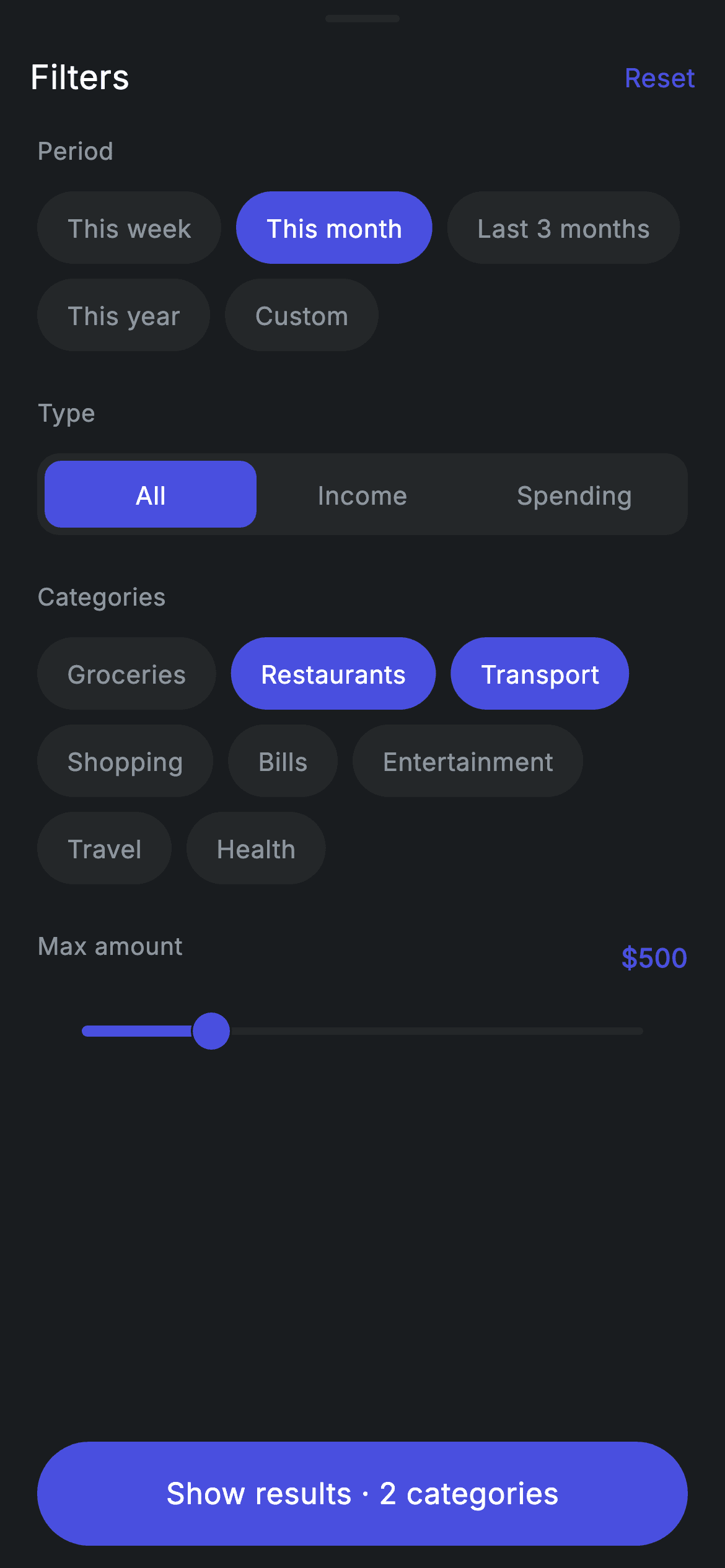
Filtering a transaction history means juggling four different input styles at once: a single-select period, a three-way income/spending toggle, a multi-select category set, and a numeric ceiling. This tutorial builds all four in one dark Revolut-style sheet, driven by exactly four state fields — an int, an int, a Set<String>, and a double. You'll see how one 30-line _Chip widget serves both the single-select and multi-select rows, how the segmented toggle is built from a plain Row, and how the footer button counts your selections live.
Watch the Flutter UI walkthrough
A short screen recording of Transaction Filter running, if you'd rather see it before you read the code. The written tutorial below covers everything in it.
Can't see the video? Watch it on YouTube.
What you'll build
- ✓A drag-handle sheet header with a 'Filters' title and a Reset action that clears all four filters in one setState
- ✓A wrapping period chip row where tapping a chip moves a single selected index, plus a category row where taps add and remove from a Set
- ✓A three-segment All / Income / Spending toggle built from a Row of Expanded GestureDetectors — no SegmentedButton needed
- ✓A themed Slider from $50 to $2000 with a live dollar readout in the brand indigo
- ✓A pinned 'Show results' pill whose label grows to 'Show results · N categories' as you select
Step-by-step build
Create the file
Add a new file at lib/fintech_transaction_filter/fintech_transaction_filter_screen.dart in your Flutter project.
Register the bundled fonts
No external packages — this is pure Flutter. It does bundle its design font (Inter), so drop the font file into fonts/ and declare it in pubspec.yaml:
flutter:
  fonts:
    - family: Inter
      fonts:
- asset: fonts/Inter-Regular.ttfBuild it, piece by piece
Here's how the screen goes together. Each block below is a real slice of the code with a plain-English explanation — paste them in order, or grab the whole file from the next section.
Tokens, filter options, and the four pieces of state
import 'package:flutter/material.dart';

/// Transaction filter — a filter sheet for the history (Revolut-inspired design).
///
/// Self-contained per CONVENTIONS.md: pure Flutter only, the exact design font
/// (Inter) is bundled under `fonts/`, no network images, and the screen forces
/// its own dark theme. Period chips, a type toggle, multi-select category chips
/// and an amount slider all drive live state; Reset clears everything.
class FintechTransactionFilterScreen extends StatefulWidget {
  const FintechTransactionFilterScreen({super.key, this.onClose, this.onApply});

  final VoidCallback? onClose;
  final VoidCallback? onApply;

  @override
  State<FintechTransactionFilterScreen> createState() =>
      _FintechTransactionFilterScreenState();
}

class _FintechTransactionFilterScreenState
    extends State<FintechTransactionFilterScreen> {
  static const String _font = 'Inter';
  static const Color _bg = Color(0xFF191C1F);
  static const Color _surface = Color(0xFF242729);
  static const Color _brand = Color(0xFF494FDF);
  static const Color _muted = Color(0xFF8D969E);

  static const List<String> _periods = <String>[
    'This week',
    'This month',
    'Last 3 months',
    'This year',
    'Custom',
  ];
  static const List<String> _types = <String>['All', 'Income', 'Spending'];
  static const List<String> _categories = <String>[
    'Groceries',
    'Restaurants',
    'Transport',
    'Shopping',
    'Bills',
    'Entertainment',
    'Travel',
    'Health',
  ];

  int _period = 1;
  int _type = 0;
  final Set<String> _selected = <String>{'Restaurants', 'Transport'};
  double _maxAmount = 500;
The screen is a StatefulWidget taking two optional callbacks, onClose and onApply, so the parent decides what dismissing or applying actually does — the sheet itself never navigates. Inside the state class, four const tokens define the palette: _bg (#191C1F) for the sheet, _surface (#242729) for unselected chips and the toggle track, _brand (#494FDF) for anything active, and _muted (#8D969E) for secondary text, all set in the 'Inter' font held in _font. Three const lists hold the option labels — five _periods from 'This week' to 'Custom', three _types, and eight _categories. Then the entire filter state is just four fields: _period = 1 (the index of 'This month'), _type = 0 ('All'), a Set<String> _selected seeded with 'Restaurants' and 'Transport', and _maxAmount = 500. Using a Set for categories is the key choice — membership tests and toggling are both one-liners.
Reset, and the sheet's Column skeleton
  void _reset() {
    setState(() {
      _period = 1;
      _type = 0;
      _selected.clear();
      _maxAmount = 500;
    });
  }

  @override
  Widget build(BuildContext context) {
    return Theme(
      data: ThemeData.dark(useMaterial3: true),
      child: Scaffold(
        backgroundColor: _bg,
        body: SafeArea(
          child: Column(
            children: <Widget>[
              _buildHandleBar(),
              Expanded(
                child: ListView(
                  physics: const BouncingScrollPhysics(),
                  padding: const EdgeInsets.fromLTRB(20, 8, 20, 24),
                  children: <Widget>[
                    _label('Period'),
                    Wrap(
                      spacing: 8,
                      runSpacing: 8,
                      children: <Widget>[
                        for (int i = 0; i < _periods.length; i++)
                          _Chip(
                            label: _periods[i],
                            active: _period == i,
                            onTap: () => setState(() => _period = i),
                          ),
                      ],
                    ),
                    const SizedBox(height: 24),
                    _label('Type'),
                    _buildTypeToggle(),
                    const SizedBox(height: 24),
                    _label('Categories'),
                    Wrap(
                      spacing: 8,
                      runSpacing: 8,
                      children: <Widget>[
                        for (final String c in _categories)
                          _Chip(
                            label: c,
                            active: _selected.contains(c),
                            onTap: () => setState(() {
                              if (_selected.contains(c)) {
                                _selected.remove(c);
                              } else {
                                _selected.add(c);
                              }
                            }),
                          ),
                      ],
                    ),
                    const SizedBox(height: 24),
_reset() is a single setState that writes all four fields back to their defaults — note it calls _selected.clear() rather than restoring the two seeded categories, so Reset always ends with zero categories chosen. build() wraps everything in Theme(data: ThemeData.dark(useMaterial3: true)) so the sheet looks the same whether the host app runs light or dark. The body is a Column of three parts: the handle bar, an Expanded ListView with BouncingScrollPhysics and 20px side padding, and a pinned button row that never scrolls away. Inside the list, the Period section is a Wrap with 8px spacing and runSpacing, filled by a `for (int i = 0; ...)` collection-for that builds one _Chip per period; each chip is active when _period == i and its onTap sets _period = i, which is what makes the row single-select. The Categories Wrap uses the same _Chip but different logic: active is _selected.contains(c), and the tap either removes or adds that string — multi-select from the same widget.
The max-amount row and its themed slider
                    Row(
                      mainAxisAlignment: MainAxisAlignment.spaceBetween,
                      children: <Widget>[
                        _label('Max amount'),
                        Text(
                          '\$${_maxAmount.round()}',
                          style: const TextStyle(
                            fontFamily: _font,
                            fontSize: 14,
                            fontWeight: FontWeight.w600,
                            letterSpacing: 0.24,
                            color: _brand,
                          ),
                        ),
                      ],
                    ),
                    SliderTheme(
                      data: SliderTheme.of(context).copyWith(
                        activeTrackColor: _brand,
                        inactiveTrackColor: _surface,
                        thumbColor: _brand,
                        overlayColor: _brand.withValues(alpha: 0.18),
                        trackHeight: 4,
                      ),
                      child: Slider(
                        value: _maxAmount,
                        min: 50,
                        max: 2000,
                        onChanged: (double v) => setState(() => _maxAmount = v),
                      ),
                    ),
                  ],
                ),
              ),
              _buildButtons(),
            ],
          ),
        ),
      ),
    );
  }
A Row with mainAxisAlignment.spaceBetween puts the 'Max amount' label on the left and the live value on the right, formatted as '\$${_maxAmount.round()}' in 14px semibold _brand — rounding at display time keeps the label clean while the underlying double stays continuous. The Slider itself is wrapped in SliderTheme with SliderTheme.of(context).copyWith(...), which is how you restyle a single slider without touching the app theme: activeTrackColor and thumbColor become _brand, inactiveTrackColor becomes _surface, the overlay is _brand at 18% alpha, and trackHeight drops to 4. The Slider runs min: 50 to max: 2000 with no `divisions`, so dragging is smooth rather than stepped, and onChanged just setStates _maxAmount.
The drag handle, title, and Reset action
  Widget _buildHandleBar() {
    return Padding(
      padding: const EdgeInsets.fromLTRB(8, 8, 8, 4),
      child: Column(
        children: <Widget>[
          Container(
            width: 40,
            height: 4,
            decoration: BoxDecoration(
              color: _surface,
              borderRadius: BorderRadius.circular(9999),
            ),
          ),
          const SizedBox(height: 12),
          Row(
            children: <Widget>[
              const SizedBox(width: 8),
              const Expanded(
                child: Text(
                  'Filters',
                  style: TextStyle(
                    fontFamily: _font,
                    fontSize: 18,
                    fontWeight: FontWeight.w500,
                    letterSpacing: 0.24,
                    color: Colors.white,
                  ),
                ),
              ),
              GestureDetector(
                onTap: _reset,
                child: const Padding(
                  padding: EdgeInsets.all(8),
                  child: Text(
                    'Reset',
                    style: TextStyle(
                      fontFamily: _font,
                      fontSize: 14,
                      fontWeight: FontWeight.w500,
                      letterSpacing: 0.24,
                      color: _brand,
                    ),
                  ),
                ),
              ),
            ],
          ),
        ],
      ),
    );
  }
_buildHandleBar() draws the affordance that tells users this is a sheet: a 40×4 Container filled with _surface and given borderRadius 9999 so it renders as a pill regardless of height. Below it a Row holds the 'Filters' title in 18px medium white inside an Expanded, which pushes the Reset text to the far right. Reset is a GestureDetector around a Text with EdgeInsets.all(8) padding — that padding is deliberate, since it widens the tap target well past the small 14px word. The label uses _brand, matching every other interactive accent in the sheet.
A segmented toggle built by hand, and the section label helper
  Widget _buildTypeToggle() {
    return Container(
      height: 44,
      padding: const EdgeInsets.all(4),
      decoration: BoxDecoration(
        color: _surface,
        borderRadius: BorderRadius.circular(12),
      ),
      child: Row(
        children: <Widget>[
          for (int i = 0; i < _types.length; i++)
            Expanded(
              child: GestureDetector(
                onTap: () => setState(() => _type = i),
                behavior: HitTestBehavior.opaque,
                child: Container(
                  alignment: Alignment.center,
                  decoration: BoxDecoration(
                    color: _type == i ? _brand : Colors.transparent,
                    borderRadius: BorderRadius.circular(9),
                  ),
                  child: Text(
                    _types[i],
                    style: TextStyle(
                      fontFamily: _font,
                      fontSize: 13.5,
                      fontWeight: FontWeight.w500,
                      letterSpacing: 0.24,
                      color: _type == i ? Colors.white : _muted,
                    ),
                  ),
                ),
              ),
            ),
        ],
      ),
    );
  }

  Widget _label(String text) {
    return Padding(
      padding: const EdgeInsets.only(bottom: 12),
      child: Text(
        text,
        style: const TextStyle(
          fontFamily: _font,
          fontSize: 13,
          fontWeight: FontWeight.w500,
          letterSpacing: 0.24,
          color: _muted,
        ),
      ),
    );
  }
_buildTypeToggle() is a 44px-tall Container filled with _surface, rounded to 12, with EdgeInsets.all(4) padding — that 4px inset is what makes the selected pill look nested inside a track. A Row holds one Expanded per type so the three segments always split the width evenly, and each wraps a GestureDetector with behavior: HitTestBehavior.opaque so taps register on the transparent gaps too, not just on the text glyphs. The selected segment's inner Container gets color _brand and borderRadius 9, one point tighter than the outer 12 so the corners nest visually; unselected segments are Colors.transparent with _muted text. _label() is the small helper for the 'Period' / 'Type' / 'Categories' headings — 13px medium _muted with 12px of bottom padding, so every section starts at the same rhythm.
The counting CTA and the shared chip widget
  Widget _buildButtons() {
    return Padding(
      padding: const EdgeInsets.fromLTRB(20, 0, 20, 12),
      child: SizedBox(
        width: double.infinity,
        height: 56,
        child: Material(
          color: _brand,
          borderRadius: BorderRadius.circular(9999),
          child: InkWell(
            borderRadius: BorderRadius.circular(9999),
            onTap: widget.onApply,
            child: Center(
              child: Text(
                _selected.isEmpty
                    ? 'Show results'
                    : 'Show results · ${_selected.length} categories',
                style: const TextStyle(
                  fontFamily: _font,
                  fontSize: 16,
                  fontWeight: FontWeight.w500,
                  letterSpacing: 0.24,
                  color: Colors.white,
                ),
              ),
            ),
          ),
        ),
      ),
    );
  }
}

class _Chip extends StatelessWidget {
  const _Chip({required this.label, required this.active, required this.onTap});

  final String label;
  final bool active;
  final VoidCallback onTap;

  @override
  Widget build(BuildContext context) {
    return GestureDetector(
      onTap: onTap,
      child: Container(
        padding: const EdgeInsets.symmetric(horizontal: 16, vertical: 10),
        decoration: BoxDecoration(
          color: active
              ? _FintechTransactionFilterScreenState._brand
              : _FintechTransactionFilterScreenState._surface,
          borderRadius: BorderRadius.circular(9999),
        ),
        child: Text(
          label,
          style: TextStyle(
            fontFamily: _FintechTransactionFilterScreenState._font,
            fontSize: 13.5,
            fontWeight: FontWeight.w500,
            letterSpacing: 0.24,
            color: active
                ? Colors.white
                : _FintechTransactionFilterScreenState._muted,
          ),
        ),
      ),
    );
  }
}
_buildButtons() renders a full-width 56px pill: a Material with color _brand and radius 9999, an InkWell on top with the same radius so the ripple is clipped to the pill instead of spilling into the corners, and onTap wired straight to widget.onApply. The label is the sheet's live feedback — when _selected is empty it reads 'Show results', otherwise it appends '· ${_selected.length} categories', so the count updates on every category tap without any extra state. Finally, _Chip is a small StatelessWidget taking label, active, and onTap. It has no colors of its own: it reaches into _FintechTransactionFilterScreenState._brand, ._surface, ._muted, and ._font, which is legal because the underscore makes those private to the file, not to the class. Its Container uses 16×10 padding and radius 9999 for a pill, swapping background and text color on `active` — one widget, used for both the single-select periods and the multi-select categories.
Full code
The complete, ready-to-paste source. Free to use in your projects — one click copies it all.
import 'package:flutter/material.dart';

/// Transaction filter — a filter sheet for the history (Revolut-inspired design).
///
/// Self-contained per CONVENTIONS.md: pure Flutter only, the exact design font
/// (Inter) is bundled under `fonts/`, no network images, and the screen forces
/// its own dark theme. Period chips, a type toggle, multi-select category chips
/// and an amount slider all drive live state; Reset clears everything.
class FintechTransactionFilterScreen extends StatefulWidget {
  const FintechTransactionFilterScreen({super.key, this.onClose, this.onApply});

  final VoidCallback? onClose;
  final VoidCallback? onApply;

  @override
  State<FintechTransactionFilterScreen> createState() =>
      _FintechTransactionFilterScreenState();
}

class _FintechTransactionFilterScreenState
    extends State<FintechTransactionFilterScreen> {
  static const String _font = 'Inter';
  static const Color _bg = Color(0xFF191C1F);
  static const Color _surface = Color(0xFF242729);
  static const Color _brand = Color(0xFF494FDF);
  static const Color _muted = Color(0xFF8D969E);

  static const List<String> _periods = <String>[
    'This week',
    'This month',
    'Last 3 months',
    'This year',
    'Custom',
  ];
  static const List<String> _types = <String>['All', 'Income', 'Spending'];
  static const List<String> _categories = <String>[
    'Groceries',
    'Restaurants',
    'Transport',
    'Shopping',
    'Bills',
    'Entertainment',
    'Travel',
    'Health',
  ];

  int _period = 1;
  int _type = 0;
  final Set<String> _selected = <String>{'Restaurants', 'Transport'};
  double _maxAmount = 500;

  void _reset() {
    setState(() {
      _period = 1;
      _type = 0;
      _selected.clear();
      _maxAmount = 500;
    });
  }

  @override
  Widget build(BuildContext context) {
    return Theme(
      data: ThemeData.dark(useMaterial3: true),
      child: Scaffold(
        backgroundColor: _bg,
        body: SafeArea(
          child: Column(
            children: <Widget>[
              _buildHandleBar(),
              Expanded(
                child: ListView(
                  physics: const BouncingScrollPhysics(),
                  padding: const EdgeInsets.fromLTRB(20, 8, 20, 24),
                  children: <Widget>[
                    _label('Period'),
                    Wrap(
                      spacing: 8,
                      runSpacing: 8,
                      children: <Widget>[
                        for (int i = 0; i < _periods.length; i++)
                          _Chip(
                            label: _periods[i],
                            active: _period == i,
                            onTap: () => setState(() => _period = i),
                          ),
                      ],
                    ),
                    const SizedBox(height: 24),
                    _label('Type'),
                    _buildTypeToggle(),
                    const SizedBox(height: 24),
                    _label('Categories'),
                    Wrap(
                      spacing: 8,
                      runSpacing: 8,
                      children: <Widget>[
                        for (final String c in _categories)
                          _Chip(
                            label: c,
                            active: _selected.contains(c),
                            onTap: () => setState(() {
                              if (_selected.contains(c)) {
                                _selected.remove(c);
                              } else {
                                _selected.add(c);
                              }
                            }),
                          ),
                      ],
                    ),
                    const SizedBox(height: 24),
                    Row(
                      mainAxisAlignment: MainAxisAlignment.spaceBetween,
                      children: <Widget>[
                        _label('Max amount'),
                        Text(
                          '\$${_maxAmount.round()}',
                          style: const TextStyle(
                            fontFamily: _font,
                            fontSize: 14,
                            fontWeight: FontWeight.w600,
                            letterSpacing: 0.24,
                            color: _brand,
                          ),
                        ),
                      ],
                    ),
                    SliderTheme(
                      data: SliderTheme.of(context).copyWith(
                        activeTrackColor: _brand,
                        inactiveTrackColor: _surface,
                        thumbColor: _brand,
                        overlayColor: _brand.withValues(alpha: 0.18),
                        trackHeight: 4,
                      ),
                      child: Slider(
                        value: _maxAmount,
                        min: 50,
                        max: 2000,
                        onChanged: (double v) => setState(() => _maxAmount = v),
                      ),
                    ),
                  ],
                ),
              ),
              _buildButtons(),
            ],
          ),
        ),
      ),
    );
  }

  Widget _buildHandleBar() {
    return Padding(
      padding: const EdgeInsets.fromLTRB(8, 8, 8, 4),
      child: Column(
        children: <Widget>[
          Container(
            width: 40,
            height: 4,
            decoration: BoxDecoration(
              color: _surface,
              borderRadius: BorderRadius.circular(9999),
            ),
          ),
          const SizedBox(height: 12),
          Row(
            children: <Widget>[
              const SizedBox(width: 8),
              const Expanded(
                child: Text(
                  'Filters',
                  style: TextStyle(
                    fontFamily: _font,
                    fontSize: 18,
                    fontWeight: FontWeight.w500,
                    letterSpacing: 0.24,
                    color: Colors.white,
                  ),
                ),
              ),
              GestureDetector(
                onTap: _reset,
                child: const Padding(
                  padding: EdgeInsets.all(8),
                  child: Text(
                    'Reset',
                    style: TextStyle(
                      fontFamily: _font,
                      fontSize: 14,
                      fontWeight: FontWeight.w500,
                      letterSpacing: 0.24,
                      color: _brand,
                    ),
                  ),
                ),
              ),
            ],
          ),
        ],
      ),
    );
  }

  Widget _buildTypeToggle() {
    return Container(
      height: 44,
      padding: const EdgeInsets.all(4),
      decoration: BoxDecoration(
        color: _surface,
        borderRadius: BorderRadius.circular(12),
      ),
      child: Row(
        children: <Widget>[
          for (int i = 0; i < _types.length; i++)
            Expanded(
              child: GestureDetector(
                onTap: () => setState(() => _type = i),
                behavior: HitTestBehavior.opaque,
                child: Container(
                  alignment: Alignment.center,
                  decoration: BoxDecoration(
                    color: _type == i ? _brand : Colors.transparent,
                    borderRadius: BorderRadius.circular(9),
                  ),
                  child: Text(
                    _types[i],
                    style: TextStyle(
                      fontFamily: _font,
                      fontSize: 13.5,
                      fontWeight: FontWeight.w500,
                      letterSpacing: 0.24,
                      color: _type == i ? Colors.white : _muted,
                    ),
                  ),
                ),
              ),
            ),
        ],
      ),
    );
  }

  Widget _label(String text) {
    return Padding(
      padding: const EdgeInsets.only(bottom: 12),
      child: Text(
        text,
        style: const TextStyle(
          fontFamily: _font,
          fontSize: 13,
          fontWeight: FontWeight.w500,
          letterSpacing: 0.24,
          color: _muted,
        ),
      ),
    );
  }

  Widget _buildButtons() {
    return Padding(
      padding: const EdgeInsets.fromLTRB(20, 0, 20, 12),
      child: SizedBox(
        width: double.infinity,
        height: 56,
        child: Material(
          color: _brand,
          borderRadius: BorderRadius.circular(9999),
          child: InkWell(
            borderRadius: BorderRadius.circular(9999),
            onTap: widget.onApply,
            child: Center(
              child: Text(
                _selected.isEmpty
                    ? 'Show results'
                    : 'Show results · ${_selected.length} categories',
                style: const TextStyle(
                  fontFamily: _font,
                  fontSize: 16,
                  fontWeight: FontWeight.w500,
                  letterSpacing: 0.24,
                  color: Colors.white,
                ),
              ),
            ),
          ),
        ),
      ),
    );
  }
}

class _Chip extends StatelessWidget {
  const _Chip({required this.label, required this.active, required this.onTap});

  final String label;
  final bool active;
  final VoidCallback onTap;

  @override
  Widget build(BuildContext context) {
    return GestureDetector(
      onTap: onTap,
      child: Container(
        padding: const EdgeInsets.symmetric(horizontal: 16, vertical: 10),
        decoration: BoxDecoration(
          color: active
              ? _FintechTransactionFilterScreenState._brand
              : _FintechTransactionFilterScreenState._surface,
          borderRadius: BorderRadius.circular(9999),
        ),
        child: Text(
          label,
          style: TextStyle(
            fontFamily: _FintechTransactionFilterScreenState._font,
            fontSize: 13.5,
            fontWeight: FontWeight.w500,
            letterSpacing: 0.24,
            color: active
                ? Colors.white
                : _FintechTransactionFilterScreenState._muted,
          ),
        ),
      ),
    );
  }
}
Plus bundled 1 binary asset (fonts/images). The CLI and MCP install those for you automatically.
Two faster ways to add it
Copy-paste works, but you can skip it entirely.
1. FlutterKit CLI
One command drops this screen — and its fonts — straight into your project.
$ flutterkit add fintech-transaction-filter2. AI agent (MCP)
Connect FlutterKit's MCP server in Claude or Cursor and just ask your agent to install fintech-transaction-filter — it fetches and writes the files for you.
FAQ
Can I use this filter sheet in a commercial banking app?
Yes. The complete Dart for the transaction filter is free to copy from this page and use in personal or commercial projects, with no attribution required. You can also drop it in with the FlutterKit CLI (flutterkit add fintech-transaction-filter) or let an AI agent install it through MCP.
Do the chips and slider rely on any pub.dev packages?
No — everything here is pure Flutter. The chips are GestureDetector + Container, the toggle is a Row of Expanded widgets, and the slider is the stock Material Slider restyled through SliderTheme. The only bundled asset is the Inter font family used by every TextStyle in the file, which you register in pubspec.yaml as shown in step 2; the CLI and MCP install those font files for you.
What Flutter SDK does the transaction filter need?
Flutter 3.22+ (Dart 3). It uses super parameters in the constructor ({super.key, this.onClose, this.onApply}), ThemeData.dark(useMaterial3: true), and Color.withValues for the slider overlay. On an older SDK, change _brand.withValues(alpha: 0.18) to _brand.withOpacity(0.18) and spell the key parameter out as Key? key : super(key: key), and the rest compiles unchanged.


