How to Build a Transaction Detail Screen in Flutter (Full Code + Preview)
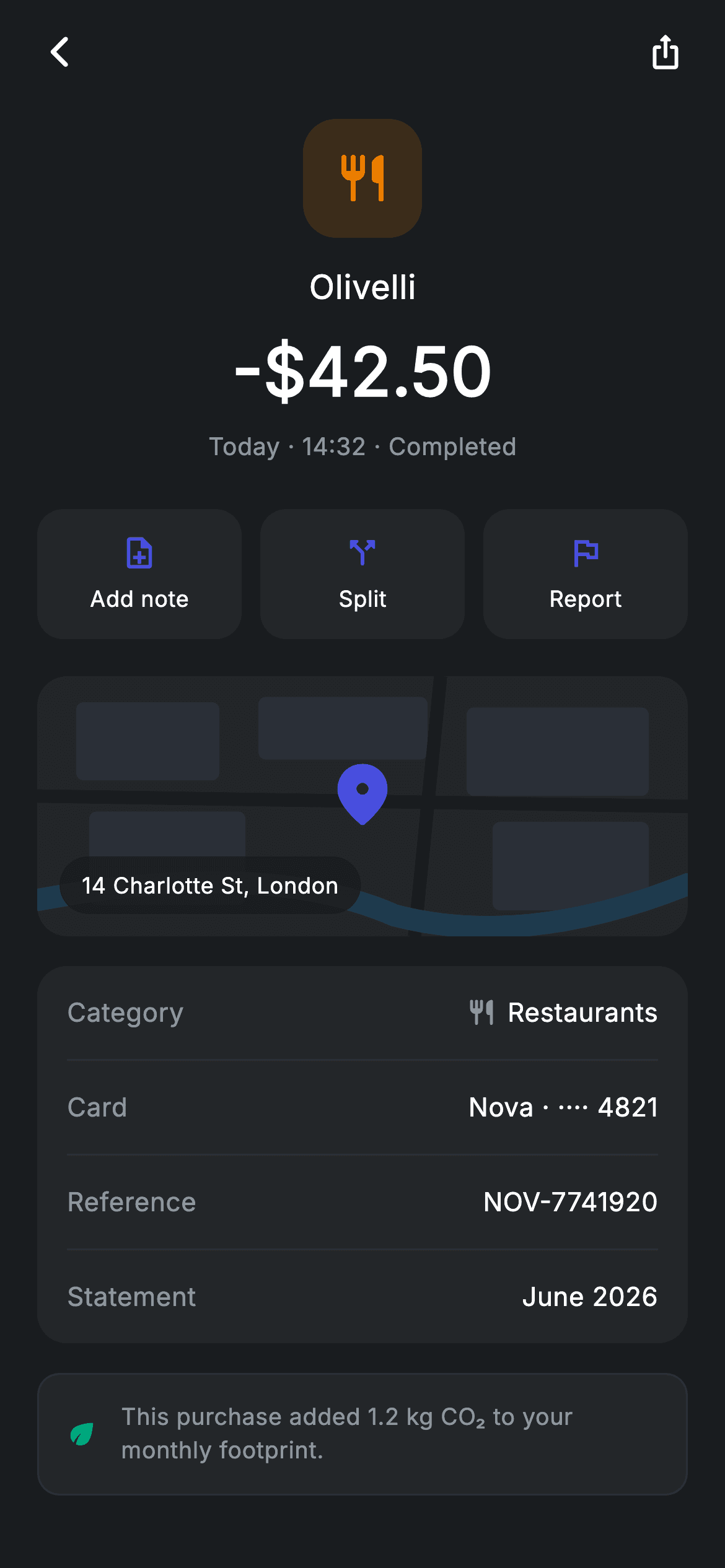
Tap any line in a banking app's spend history and you land here: one purchase, expanded. This tutorial builds that drill-down in Flutter — a restaurant tile above a large -$42.50 amount, Add note / Split / Report chips, a location map that is drawn with CustomPaint instead of loaded from a tile server, a four-row details card, and a carbon-footprint note. It is a StatelessWidget on hard-coded demo data, so you can wire it to your own transaction model in minutes. Pure Flutter, no map SDK, no packages.
Watch the Flutter UI walkthrough
A short screen recording of Transaction Detail running, if you'd rather see it before you read the code. The written tutorial below covers everything in it.
Can't see the video? Watch it on YouTube.
What you'll build
- ✓A dark transaction header: 64x64 amber icon tile, merchant name, a 36px signed amount and a 'Today · 14:32 · Completed' status line
- ✓A three-up action chip row (Add note, Split, Report) where each chip is an Expanded InkWell so they share the width evenly
- ✓A 140px location map painted entirely by a CustomPainter — blocks, roads and a river — with a centered pin and a translucent address pill
- ✓A rounded details card with Category / Card / Reference / Statement rows separated by 1px hairline dividers
- ✓A screen that forces its own ThemeData.dark(useMaterial3: true) so it renders identically inside a light-themed app
Step-by-step build
Create the file
Add a new file at lib/fintech_transaction_detail/fintech_transaction_detail_screen.dart in your Flutter project.
Register the bundled fonts
No external packages — this is pure Flutter. It does bundle its design font (Inter), so drop the font file into fonts/ and declare it in pubspec.yaml:
flutter:
  fonts:
    - family: Inter
      fonts:
- asset: fonts/Inter-Regular.ttfBuild it, piece by piece
Here's how the screen goes together. Each block below is a real slice of the code with a plain-English explanation — paste them in order, or grab the whole file from the next section.
The class, its two callbacks, and the colour tokens
import 'package:flutter/material.dart';

/// Transaction detail — merchant, map, category & receipt (Revolut-inspired).
///
/// Self-contained per CONVENTIONS.md: pure Flutter only, the exact design font
/// (Inter) is bundled under `fonts/`, the location map is fully custom-painted
/// (no tiles/network), and the screen forces its own dark theme. A clear amount
/// header, detail rows and action chips make it read like a real product.
class FintechTransactionDetailScreen extends StatelessWidget {
  const FintechTransactionDetailScreen({
    super.key,
    this.onBack,
    this.onAddNote,
  });

  final VoidCallback? onBack;
  final VoidCallback? onAddNote;

  static const String _font = 'Inter';
  static const Color _bg = Color(0xFF191C1F);
  static const Color _surface = Color(0xFF242729);
  static const Color _brand = Color(0xFF494FDF);
  static const Color _amber = Color(0xFFEC7E00);
  static const Color _muted = Color(0xFF8D969E);
  static const Color _hairline = Color(0xFF2E3235);
FintechTransactionDetailScreen is a StatelessWidget because nothing on the screen changes after it is drawn — every value shown is fixed demo data. It takes two optional callbacks, onBack and onAddNote, so the host app decides what tapping the back arrow or the 'Add note' chip actually does; leaving them null simply makes those targets inert. Below the constructor sit the design tokens: _font ('Inter', the bundled family), _bg (#191C1F) for the canvas, _surface (#242729) for every raised card and chip, _brand (#494FDF) indigo for icons and the map pin, _amber (#EC7E00) for the restaurant category, _muted (#8D969E) for secondary text, and _hairline (#2E3235) for dividers and borders. Because they are static const, the whole palette lives in seven lines you can retheme in one place.
Forcing a dark theme and stacking the page sections
  @override
  Widget build(BuildContext context) {
    return Theme(
      data: ThemeData.dark(useMaterial3: true),
      child: Scaffold(
        backgroundColor: _bg,
        body: SafeArea(
          child: Column(
            children: <Widget>[
              _buildAppBar(),
              Expanded(
                child: ListView(
                  physics: const BouncingScrollPhysics(),
                  padding: const EdgeInsets.fromLTRB(20, 8, 20, 24),
                  children: <Widget>[
                    _buildHeader(),
                    const SizedBox(height: 24),
                    _buildActions(),
                    const SizedBox(height: 20),
                    _buildMap(),
                    const SizedBox(height: 16),
                    _buildDetails(),
                    const SizedBox(height: 16),
                    _buildStatusNote(),
                  ],
                ),
              ),
            ],
          ),
        ),
      ),
    );
  }

  Widget _buildAppBar() {
    return Padding(
      padding: const EdgeInsets.fromLTRB(8, 4, 8, 4),
      child: Row(
        children: <Widget>[
          IconButton(
            onPressed: onBack,
            icon: const Icon(Icons.arrow_back_ios_new_rounded,
                size: 20, color: Colors.white),
          ),
          const Spacer(),
          IconButton(
            onPressed: () {},
            icon: const Icon(Icons.ios_share_rounded,
                size: 20, color: Colors.white),
          ),
        ],
      ),
    );
  }
build() wraps everything in a Theme with ThemeData.dark(useMaterial3: true). That matters: the screen is designed for a dark surface, and this override means it looks right even when it is pushed from a light-themed app. Inside, a Scaffold painted _bg and a SafeArea hold a Column whose first child is the fixed app bar and whose second is an Expanded ListView — so the header row stays pinned while the body scrolls. The ListView uses BouncingScrollPhysics for an iOS-style overscroll and EdgeInsets.fromLTRB(20, 8, 20, 24) to inset the content, then lays out the five sections in order — header, actions, map, details, status note — with explicit SizedBox gaps of 24, 20, 16 and 16 between them. _buildAppBar() is just a Row with two IconButtons pushed apart by a Spacer: arrow_back_ios_new_rounded calling onBack on the left, ios_share_rounded on the right, both 20px white.
The amount header and the action chip row
  Widget _buildHeader() {
    return Column(
      children: <Widget>[
        Container(
          width: 64,
          height: 64,
          alignment: Alignment.center,
          decoration: BoxDecoration(
            color: _amber.withValues(alpha: 0.16),
            borderRadius: BorderRadius.circular(18),
          ),
          child: const Icon(Icons.restaurant_rounded, size: 30, color: _amber),
        ),
        const SizedBox(height: 14),
        const Text(
          'Olivelli',
          style: TextStyle(
            fontFamily: _font,
            fontSize: 18,
            fontWeight: FontWeight.w500,
            letterSpacing: 0.24,
            color: Colors.white,
          ),
        ),
        const SizedBox(height: 6),
        const Text(
          r'-$42.50',
          style: TextStyle(
            fontFamily: _font,
            fontSize: 36,
            fontWeight: FontWeight.w600,
            letterSpacing: 0.24,
            color: Colors.white,
          ),
        ),
        const SizedBox(height: 6),
        const Text(
          'Today · 14:32 · Completed',
          style: TextStyle(
            fontFamily: _font,
            fontSize: 13,
            letterSpacing: 0.24,
            color: _muted,
          ),
        ),
      ],
    );
  }

  Widget _buildActions() {
    return Row(
      children: <Widget>[
        _chip(Icons.note_add_outlined, 'Add note', onAddNote),
        const SizedBox(width: 10),
        _chip(Icons.call_split_rounded, 'Split', null),
        const SizedBox(width: 10),
        _chip(Icons.flag_outlined, 'Report', null),
      ],
    );
  }
_buildHeader() is a centred Column that builds the visual hierarchy top to bottom. First a 64x64 Container with borderRadius 18 and a background of _amber.withValues(alpha: 0.16) — a 16% tint of the amber accent — holding a 30px restaurant_rounded icon in full-strength amber; that tinted-tile pattern is how you signal a spend category without needing a logo. Then the merchant 'Olivelli' at 18px w500, the amount r'-$42.50' at 36px w600 (the r prefix makes it a raw string so the $ is not read as Dart interpolation), and the status line 'Today · 14:32 · Completed' at 13px in _muted. The size jump from 18 to 36 is what makes the amount the thing your eye lands on. _buildActions() is a Row of three _chip() calls — Add note, Split and Report — separated by 10px SizedBoxes; only the first is given a callback (onAddNote), the other two pass null.
The chip builder and the custom-painted map
  Widget _chip(IconData icon, String label, VoidCallback? onTap) {
    return Expanded(
      child: InkWell(
        borderRadius: BorderRadius.circular(14),
        onTap: onTap,
        child: Container(
          height: 70,
          decoration: BoxDecoration(
            color: _surface,
            borderRadius: BorderRadius.circular(14),
          ),
          child: Column(
            mainAxisAlignment: MainAxisAlignment.center,
            children: <Widget>[
              Icon(icon, size: 20, color: _brand),
              const SizedBox(height: 6),
              Text(
                label,
                style: const TextStyle(
                  fontFamily: _font,
                  fontSize: 12,
                  fontWeight: FontWeight.w500,
                  letterSpacing: 0.24,
                  color: Colors.white,
                ),
              ),
            ],
          ),
        ),
      ),
    );
  }

  Widget _buildMap() {
    return ClipRRect(
      borderRadius: BorderRadius.circular(16),
      child: SizedBox(
        height: 140,
        width: double.infinity,
        child: Stack(
          fit: StackFit.expand,
          children: <Widget>[
            CustomPaint(painter: _MapPainter()),
            const Center(
              child: Padding(
                padding: EdgeInsets.only(bottom: 12),
                child: Icon(Icons.location_on_rounded,
                    size: 40, color: _brand),
              ),
            ),
            Positioned(
              left: 12,
              bottom: 12,
              child: Container(
                padding:
                    const EdgeInsets.symmetric(horizontal: 12, vertical: 7),
                decoration: BoxDecoration(
                  color: _bg.withValues(alpha: 0.82),
                  borderRadius: BorderRadius.circular(9999),
                ),
                child: const Text(
                  '14 Charlotte St, London',
                  style: TextStyle(
                    fontFamily: _font,
                    fontSize: 12,
                    fontWeight: FontWeight.w500,
                    letterSpacing: 0.24,
                    color: Colors.white,
                  ),
                ),
              ),
            ),
          ],
        ),
      ),
    );
  }
_chip() wraps each chip in Expanded, so the three chips divide the row width equally no matter how long the labels are. Each is an InkWell (with the same 14px borderRadius as the Container beneath it, so the ripple is clipped to the corners) over a 70px-tall _surface box holding a centred 20px icon in _brand above a 12px w500 white label. _buildMap() is the interesting part: a ClipRRect with radius 16 around a 140px-tall SizedBox containing a Stack with fit: StackFit.expand. Layer one is CustomPaint(painter: _MapPainter()) — the map itself, drawn in code. Layer two is a 40px location_on_rounded pin in _brand, centred with 12px of bottom padding so the point of the pin sits on the centre rather than the icon's middle. Layer three is a Positioned address pill 12px from the bottom-left: _bg at 82% alpha with a 9999 radius, reading '14 Charlotte St, London'.
The details card, the reusable row, and the eco note
  Widget _buildDetails() {
    return Container(
      padding: const EdgeInsets.symmetric(horizontal: 16),
      decoration: BoxDecoration(
        color: _surface,
        borderRadius: BorderRadius.circular(16),
      ),
      child: Column(
        children: <Widget>[
          _row('Category', 'Restaurants', trailingIcon: Icons.restaurant_rounded),
          const Divider(height: 1, color: _hairline),
          _row('Card', 'Nova · ···· 4821'),
          const Divider(height: 1, color: _hairline),
          _row('Reference', 'NOV-7741920'),
          const Divider(height: 1, color: _hairline),
          _row('Statement', 'June 2026'),
        ],
      ),
    );
  }

  Widget _row(String label, String value, {IconData? trailingIcon}) {
    return Padding(
      padding: const EdgeInsets.symmetric(vertical: 15),
      child: Row(
        children: <Widget>[
          Text(
            label,
            style: const TextStyle(
              fontFamily: _font,
              fontSize: 14,
              letterSpacing: 0.24,
              color: _muted,
            ),
          ),
          const Spacer(),
          if (trailingIcon != null) ...<Widget>[
            Icon(trailingIcon, size: 16, color: _muted),
            const SizedBox(width: 6),
          ],
          Text(
            value,
            style: const TextStyle(
              fontFamily: _font,
              fontSize: 14,
              fontWeight: FontWeight.w500,
              letterSpacing: 0.24,
              color: Colors.white,
            ),
          ),
        ],
      ),
    );
  }

  Widget _buildStatusNote() {
    return Container(
      padding: const EdgeInsets.all(14),
      decoration: BoxDecoration(
        color: _surface,
        borderRadius: BorderRadius.circular(12),
        border: Border.all(color: _hairline),
      ),
      child: Row(
        children: const <Widget>[
          Icon(Icons.eco_rounded, size: 18, color: Color(0xFF00A87E)),
          SizedBox(width: 12),
          Expanded(
            child: Text(
              'This purchase added 1.2 kg CO₂ to your monthly footprint.',
              style: TextStyle(
                fontFamily: _font,
                fontSize: 12.5,
                height: 1.4,
                letterSpacing: 0.24,
                color: _muted,
              ),
            ),
          ),
        ],
      ),
    );
  }
_buildDetails() is a single _surface Container with radius 16 and 16px of horizontal padding, containing four _row() calls — Category, Card, Reference, Statement — with Divider(height: 1, color: _hairline) between them. Putting the padding on the card and not the rows is what lets the dividers still look inset from the top and bottom rows' text. _row() takes a label, a value and an optional trailingIcon: the label is 14px _muted on the left, a Spacer pushes the value right, and the collection-if `if (trailingIcon != null) ...<Widget>[]` spreads a 16px muted icon plus a 6px gap into the row only for the Category line. Each row gets 15px of vertical padding, giving a comfortable ~44px tap-height rhythm. _buildStatusNote() closes the page with a bordered _surface card: a green (#00A87E) eco_rounded icon beside an Expanded Text at 12.5px with height: 1.4 line spacing — Expanded is what lets the CO₂ sentence wrap instead of overflowing.
Painting the map: blocks, roads and a river
/// Paints a stylised dark map: blocks, roads and a river. Decorative only —
/// no map tiles or network, so the screen stays self-contained.
class _MapPainter extends CustomPainter {
  @override
  void paint(Canvas canvas, Size size) {
    final Paint bg = Paint()..color = const Color(0xFF20242B);
    canvas.drawRect(Offset.zero & size, bg);

    final Paint block = Paint()..color = const Color(0xFF2A2F37);
    final double w = size.width;
    final double h = size.height;
    final List<Rect> blocks = <Rect>[
      Rect.fromLTWH(w * 0.06, h * 0.10, w * 0.22, h * 0.30),
      Rect.fromLTWH(w * 0.34, h * 0.08, w * 0.26, h * 0.24),
      Rect.fromLTWH(w * 0.66, h * 0.12, w * 0.28, h * 0.34),
      Rect.fromLTWH(w * 0.08, h * 0.52, w * 0.24, h * 0.36),
      Rect.fromLTWH(w * 0.70, h * 0.56, w * 0.24, h * 0.34),
    ];
    for (final Rect r in blocks) {
      canvas.drawRRect(
        RRect.fromRectAndRadius(r, const Radius.circular(4)),
        block,
      );
    }

    final Paint road = Paint()
      ..color = const Color(0xFF161A1F)
      ..strokeWidth = 7;
    canvas.drawLine(Offset(0, h * 0.46), Offset(w, h * 0.50), road);
    canvas.drawLine(Offset(w * 0.62, 0), Offset(w * 0.58, h), road);

    final Paint river = Paint()
      ..color = const Color(0xFF1E3A4D)
      ..strokeWidth = 12
      ..style = PaintingStyle.stroke
      ..strokeCap = StrokeCap.round;
    canvas.drawPath(
      Path()
        ..moveTo(0, h * 0.86)
        ..quadraticBezierTo(w * 0.35, h * 0.70, w * 0.55, h * 0.92)
        ..quadraticBezierTo(w * 0.75, h * 1.05, w, h * 0.80),
      river,
    );
  }

  @override
  bool shouldRepaint(covariant CustomPainter oldDelegate) => false;
}
_MapPainter is why this screen needs no map SDK, no API key and no network call. paint() first fills the whole canvas with #20242B, then draws five city blocks as RRects with a 4px radius in #2A2F37 — note every rectangle is expressed as a fraction of the incoming Size (w * 0.06, h * 0.10 and so on), so the map rescales cleanly at any width. Two roads are drawn as near-vertical and near-horizontal lines in a darker #161A1F with strokeWidth 7, deliberately offset a few percent at each end so they look hand-drawn rather than perfectly straight. The river is a stroked Path in muted blue #1E3A4D with strokeWidth 12 and StrokeCap.round, bent through two quadraticBezierTo control points — the second curve dips to h * 1.05, below the canvas, so the bend runs off the bottom edge instead of visibly ending. shouldRepaint returns false because the painting never depends on changing state.
Full code
The complete, ready-to-paste source. Free to use in your projects — one click copies it all.
import 'package:flutter/material.dart';

/// Transaction detail — merchant, map, category & receipt (Revolut-inspired).
///
/// Self-contained per CONVENTIONS.md: pure Flutter only, the exact design font
/// (Inter) is bundled under `fonts/`, the location map is fully custom-painted
/// (no tiles/network), and the screen forces its own dark theme. A clear amount
/// header, detail rows and action chips make it read like a real product.
class FintechTransactionDetailScreen extends StatelessWidget {
  const FintechTransactionDetailScreen({
    super.key,
    this.onBack,
    this.onAddNote,
  });

  final VoidCallback? onBack;
  final VoidCallback? onAddNote;

  static const String _font = 'Inter';
  static const Color _bg = Color(0xFF191C1F);
  static const Color _surface = Color(0xFF242729);
  static const Color _brand = Color(0xFF494FDF);
  static const Color _amber = Color(0xFFEC7E00);
  static const Color _muted = Color(0xFF8D969E);
  static const Color _hairline = Color(0xFF2E3235);

  @override
  Widget build(BuildContext context) {
    return Theme(
      data: ThemeData.dark(useMaterial3: true),
      child: Scaffold(
        backgroundColor: _bg,
        body: SafeArea(
          child: Column(
            children: <Widget>[
              _buildAppBar(),
              Expanded(
                child: ListView(
                  physics: const BouncingScrollPhysics(),
                  padding: const EdgeInsets.fromLTRB(20, 8, 20, 24),
                  children: <Widget>[
                    _buildHeader(),
                    const SizedBox(height: 24),
                    _buildActions(),
                    const SizedBox(height: 20),
                    _buildMap(),
                    const SizedBox(height: 16),
                    _buildDetails(),
                    const SizedBox(height: 16),
                    _buildStatusNote(),
                  ],
                ),
              ),
            ],
          ),
        ),
      ),
    );
  }

  Widget _buildAppBar() {
    return Padding(
      padding: const EdgeInsets.fromLTRB(8, 4, 8, 4),
      child: Row(
        children: <Widget>[
          IconButton(
            onPressed: onBack,
            icon: const Icon(Icons.arrow_back_ios_new_rounded,
                size: 20, color: Colors.white),
          ),
          const Spacer(),
          IconButton(
            onPressed: () {},
            icon: const Icon(Icons.ios_share_rounded,
                size: 20, color: Colors.white),
          ),
        ],
      ),
    );
  }

  Widget _buildHeader() {
    return Column(
      children: <Widget>[
        Container(
          width: 64,
          height: 64,
          alignment: Alignment.center,
          decoration: BoxDecoration(
            color: _amber.withValues(alpha: 0.16),
            borderRadius: BorderRadius.circular(18),
          ),
          child: const Icon(Icons.restaurant_rounded, size: 30, color: _amber),
        ),
        const SizedBox(height: 14),
        const Text(
          'Olivelli',
          style: TextStyle(
            fontFamily: _font,
            fontSize: 18,
            fontWeight: FontWeight.w500,
            letterSpacing: 0.24,
            color: Colors.white,
          ),
        ),
        const SizedBox(height: 6),
        const Text(
          r'-$42.50',
          style: TextStyle(
            fontFamily: _font,
            fontSize: 36,
            fontWeight: FontWeight.w600,
            letterSpacing: 0.24,
            color: Colors.white,
          ),
        ),
        const SizedBox(height: 6),
        const Text(
          'Today · 14:32 · Completed',
          style: TextStyle(
            fontFamily: _font,
            fontSize: 13,
            letterSpacing: 0.24,
            color: _muted,
          ),
        ),
      ],
    );
  }

  Widget _buildActions() {
    return Row(
      children: <Widget>[
        _chip(Icons.note_add_outlined, 'Add note', onAddNote),
        const SizedBox(width: 10),
        _chip(Icons.call_split_rounded, 'Split', null),
        const SizedBox(width: 10),
        _chip(Icons.flag_outlined, 'Report', null),
      ],
    );
  }

  Widget _chip(IconData icon, String label, VoidCallback? onTap) {
    return Expanded(
      child: InkWell(
        borderRadius: BorderRadius.circular(14),
        onTap: onTap,
        child: Container(
          height: 70,
          decoration: BoxDecoration(
            color: _surface,
            borderRadius: BorderRadius.circular(14),
          ),
          child: Column(
            mainAxisAlignment: MainAxisAlignment.center,
            children: <Widget>[
              Icon(icon, size: 20, color: _brand),
              const SizedBox(height: 6),
              Text(
                label,
                style: const TextStyle(
                  fontFamily: _font,
                  fontSize: 12,
                  fontWeight: FontWeight.w500,
                  letterSpacing: 0.24,
                  color: Colors.white,
                ),
              ),
            ],
          ),
        ),
      ),
    );
  }

  Widget _buildMap() {
    return ClipRRect(
      borderRadius: BorderRadius.circular(16),
      child: SizedBox(
        height: 140,
        width: double.infinity,
        child: Stack(
          fit: StackFit.expand,
          children: <Widget>[
            CustomPaint(painter: _MapPainter()),
            const Center(
              child: Padding(
                padding: EdgeInsets.only(bottom: 12),
                child: Icon(Icons.location_on_rounded,
                    size: 40, color: _brand),
              ),
            ),
            Positioned(
              left: 12,
              bottom: 12,
              child: Container(
                padding:
                    const EdgeInsets.symmetric(horizontal: 12, vertical: 7),
                decoration: BoxDecoration(
                  color: _bg.withValues(alpha: 0.82),
                  borderRadius: BorderRadius.circular(9999),
                ),
                child: const Text(
                  '14 Charlotte St, London',
                  style: TextStyle(
                    fontFamily: _font,
                    fontSize: 12,
                    fontWeight: FontWeight.w500,
                    letterSpacing: 0.24,
                    color: Colors.white,
                  ),
                ),
              ),
            ),
          ],
        ),
      ),
    );
  }

  Widget _buildDetails() {
    return Container(
      padding: const EdgeInsets.symmetric(horizontal: 16),
      decoration: BoxDecoration(
        color: _surface,
        borderRadius: BorderRadius.circular(16),
      ),
      child: Column(
        children: <Widget>[
          _row('Category', 'Restaurants', trailingIcon: Icons.restaurant_rounded),
          const Divider(height: 1, color: _hairline),
          _row('Card', 'Nova · ···· 4821'),
          const Divider(height: 1, color: _hairline),
          _row('Reference', 'NOV-7741920'),
          const Divider(height: 1, color: _hairline),
          _row('Statement', 'June 2026'),
        ],
      ),
    );
  }

  Widget _row(String label, String value, {IconData? trailingIcon}) {
    return Padding(
      padding: const EdgeInsets.symmetric(vertical: 15),
      child: Row(
        children: <Widget>[
          Text(
            label,
            style: const TextStyle(
              fontFamily: _font,
              fontSize: 14,
              letterSpacing: 0.24,
              color: _muted,
            ),
          ),
          const Spacer(),
          if (trailingIcon != null) ...<Widget>[
            Icon(trailingIcon, size: 16, color: _muted),
            const SizedBox(width: 6),
          ],
          Text(
            value,
            style: const TextStyle(
              fontFamily: _font,
              fontSize: 14,
              fontWeight: FontWeight.w500,
              letterSpacing: 0.24,
              color: Colors.white,
            ),
          ),
        ],
      ),
    );
  }

  Widget _buildStatusNote() {
    return Container(
      padding: const EdgeInsets.all(14),
      decoration: BoxDecoration(
        color: _surface,
        borderRadius: BorderRadius.circular(12),
        border: Border.all(color: _hairline),
      ),
      child: Row(
        children: const <Widget>[
          Icon(Icons.eco_rounded, size: 18, color: Color(0xFF00A87E)),
          SizedBox(width: 12),
          Expanded(
            child: Text(
              'This purchase added 1.2 kg CO₂ to your monthly footprint.',
              style: TextStyle(
                fontFamily: _font,
                fontSize: 12.5,
                height: 1.4,
                letterSpacing: 0.24,
                color: _muted,
              ),
            ),
          ),
        ],
      ),
    );
  }
}

/// Paints a stylised dark map: blocks, roads and a river. Decorative only —
/// no map tiles or network, so the screen stays self-contained.
class _MapPainter extends CustomPainter {
  @override
  void paint(Canvas canvas, Size size) {
    final Paint bg = Paint()..color = const Color(0xFF20242B);
    canvas.drawRect(Offset.zero & size, bg);

    final Paint block = Paint()..color = const Color(0xFF2A2F37);
    final double w = size.width;
    final double h = size.height;
    final List<Rect> blocks = <Rect>[
      Rect.fromLTWH(w * 0.06, h * 0.10, w * 0.22, h * 0.30),
      Rect.fromLTWH(w * 0.34, h * 0.08, w * 0.26, h * 0.24),
      Rect.fromLTWH(w * 0.66, h * 0.12, w * 0.28, h * 0.34),
      Rect.fromLTWH(w * 0.08, h * 0.52, w * 0.24, h * 0.36),
      Rect.fromLTWH(w * 0.70, h * 0.56, w * 0.24, h * 0.34),
    ];
    for (final Rect r in blocks) {
      canvas.drawRRect(
        RRect.fromRectAndRadius(r, const Radius.circular(4)),
        block,
      );
    }

    final Paint road = Paint()
      ..color = const Color(0xFF161A1F)
      ..strokeWidth = 7;
    canvas.drawLine(Offset(0, h * 0.46), Offset(w, h * 0.50), road);
    canvas.drawLine(Offset(w * 0.62, 0), Offset(w * 0.58, h), road);

    final Paint river = Paint()
      ..color = const Color(0xFF1E3A4D)
      ..strokeWidth = 12
      ..style = PaintingStyle.stroke
      ..strokeCap = StrokeCap.round;
    canvas.drawPath(
      Path()
        ..moveTo(0, h * 0.86)
        ..quadraticBezierTo(w * 0.35, h * 0.70, w * 0.55, h * 0.92)
        ..quadraticBezierTo(w * 0.75, h * 1.05, w, h * 0.80),
      river,
    );
  }

  @override
  bool shouldRepaint(covariant CustomPainter oldDelegate) => false;
}
Plus bundled 1 binary asset (fonts/images). The CLI and MCP install those for you automatically.
Two faster ways to add it
Copy-paste works, but you can skip it entirely.
1. FlutterKit CLI
One command drops this screen — and its fonts — straight into your project.
$ flutterkit add fintech-transaction-detail2. AI agent (MCP)
Connect FlutterKit's MCP server in Claude or Cursor and just ask your agent to install fintech-transaction-detail — it fetches and writes the files for you.
FAQ
Can I use this transaction detail screen in a commercial banking app?
Yes. The Dart on this page is free to copy into personal or commercial projects, including client work — swap 'Olivelli', the -$42.50 amount and the four detail rows for your own transaction model. You can also install it with the FlutterKit CLI (flutterkit add fintech-transaction-detail) or let an AI agent add it for you over MCP.
Do I need google_maps_flutter or any other dependency for the map?
No. The map is a plain CustomPaint driven by the _MapPainter class at the bottom of the file — rectangles, two lines and a bezier river — so there is no map SDK, no API key, no network request and no billing. The screen is pure Flutter on the material library; the only extra asset is the bundled Inter font, which you register in pubspec.yaml as shown in step 2 (the CLI and MCP copy the font file for you).
What Flutter SDK does this screen need?
Flutter 3.22+ / Dart 3. It uses super parameters in the constructor (super.key) and Color.withValues in two places — _amber.withValues(alpha: 0.16) on the header tile and _bg.withValues(alpha: 0.82) on the address pill. On an older SDK, change those to withOpacity(0.16) and withOpacity(0.82) and convert the constructor back to Key? key : super(key: key); everything else, including ThemeData.dark(useMaterial3: true) and the CustomPainter, compiles unchanged.


