How to Build a Stock Watchlist and Discover Screen in Flutter (Full Code + Preview)
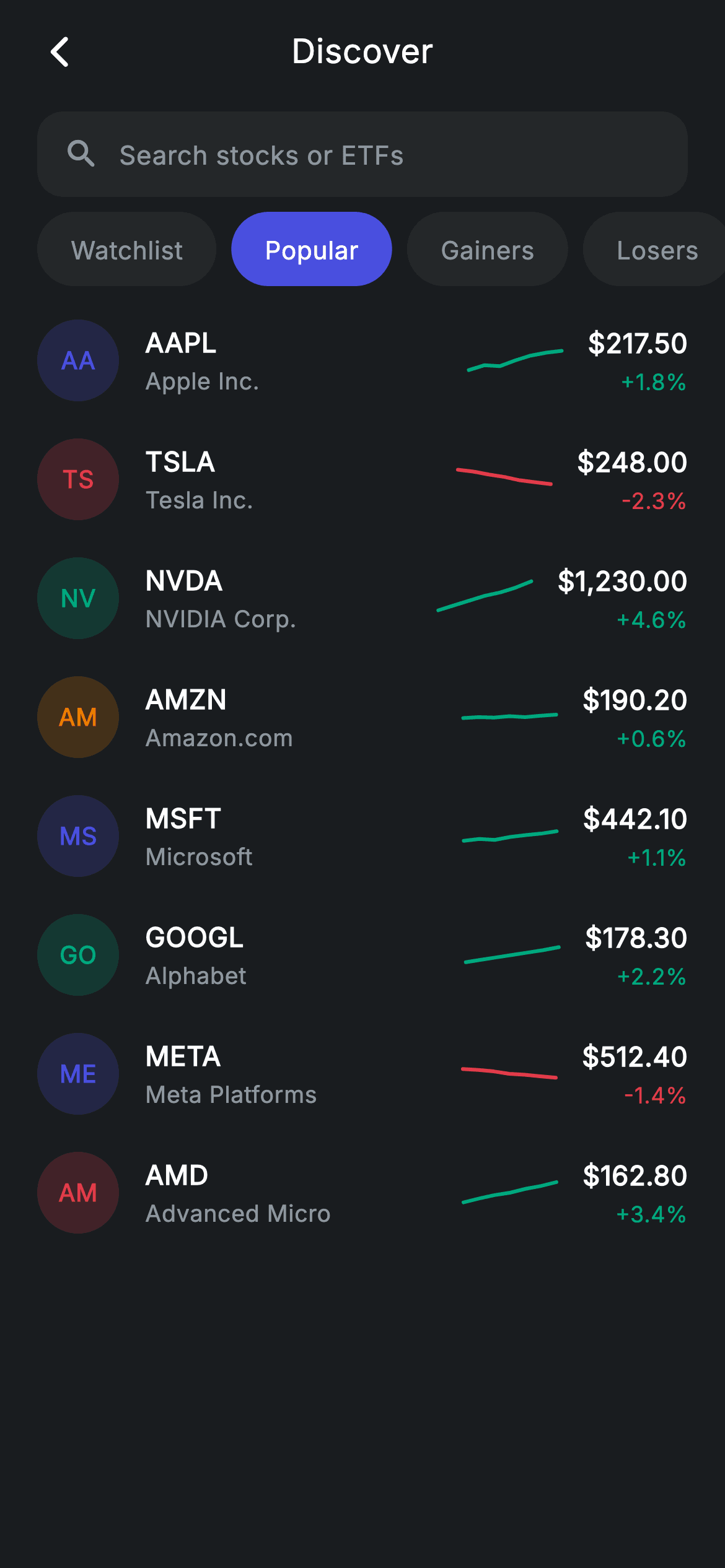
Trading apps open on a list of tickers, and every row has to carry four facts — symbol, company, price, direction — in about 60 pixels of height. This tutorial builds that row in Flutter, plus the search field and the four tabs above it (Watchlist, Popular, Gainers, Losers). Notably the screen opens on Popular rather than the first tab, and the Watchlist tab is a hard-coded ticker set rather than a computed one, which is exactly how you'd stub a per-user list before wiring persistence.
Watch the Flutter UI walkthrough
A short screen recording of Stocks Discover running, if you'd rather see it before you read the code. The written tutorial below covers everything in it.
Can't see the video? Watch it on YouTube.
What you'll build
- ✓A ticker row where the symbol leads and the company name plays the supporting role
- ✓Four filter tabs, including a stubbed Watchlist that filters by an explicit ticker set
- ✓A default tab that isn't index 0 — opening on 'Popular' rather than an empty watchlist
- ✓Live search across both symbol and company name
- ✓Two-letter ticker badges tinted per stock, with a painted 50×26 sparkline beside the price
- ✓A dependency-free `CustomPainter` sparkline shared by every row
Step-by-step build
Create the file
Add a new file at lib/fintech_stocks_discover/fintech_stocks_discover_screen.dart in your Flutter project.
Register the bundled fonts
No external packages — this is pure Flutter. It does bundle its design font (Inter), so drop the font file into fonts/ and declare it in pubspec.yaml:
flutter:
  fonts:
    - family: Inter
      fonts:
- asset: fonts/Inter-Regular.ttfBuild it, piece by piece
Here's how the screen goes together. Each block below is a real slice of the code with a plain-English explanation — paste them in order, or grab the whole file from the next section.
State, tabs, and eight stocks as const data
class _FintechStocksDiscoverScreenState
    extends State<FintechStocksDiscoverScreen> {
  static const String _font = 'Inter';
  static const Color _bg = Color(0xFF191C1F);
  static const Color _surface = Color(0xFF242729);
  static const Color _brand = Color(0xFF494FDF);
  static const Color _teal = Color(0xFF00A87E);
  static const Color _amber = Color(0xFFEC7E00);
  static const Color _red = Color(0xFFE23B4A);
  static const Color _muted = Color(0xFF8D969E);

  static const List<String> _tabs = <String>['Watchlist', 'Popular', 'Gainers', 'Losers'];
  int _tab = 1;
  String _query = '';

  static const List<_Stock> _all = <_Stock>[
    _Stock('AAPL', 'Apple Inc.', _brand, r'$217.50', 1.8,
        <double>[0.3, 0.4, 0.38, 0.5, 0.6, 0.66, 0.7]),
    _Stock('TSLA', 'Tesla Inc.', _red, r'$248.00', -2.3,
        <double>[0.7, 0.66, 0.6, 0.55, 0.48, 0.44, 0.4]),
    _Stock('NVDA', 'NVIDIA Corp.', _teal, r'$1,230.00', 4.6,
        <double>[0.25, 0.35, 0.45, 0.55, 0.62, 0.72, 0.85]),
    _Stock('AMZN', 'Amazon.com', _amber, r'$190.20', 0.6,
        <double>[0.48, 0.5, 0.49, 0.52, 0.5, 0.53, 0.55]),
    _Stock('MSFT', 'Microsoft', _brand, r'$442.10', 1.1,
        <double>[0.4, 0.44, 0.42, 0.48, 0.52, 0.55, 0.6]),
    _Stock('GOOGL', 'Alphabet', _teal, r'$178.30', 2.2,
        <double>[0.35, 0.4, 0.45, 0.5, 0.55, 0.6, 0.66]),
    _Stock('META', 'Meta Platforms', _brand, r'$512.40', -1.4,
        <double>[0.6, 0.58, 0.55, 0.5, 0.48, 0.45, 0.42]),
    _Stock('AMD', 'Advanced Micro', _red, r'$162.80', 3.4,
        <double>[0.3, 0.38, 0.45, 0.5, 0.58, 0.64, 0.72]),
  ];
Two fields hold everything mutable: `int _tab = 1` and `String _query = ''`. That `1` is a deliberate product decision — the tab order is Watchlist, Popular, Gainers, Losers, so the screen opens on *Popular* rather than dropping a new user into an empty watchlist. Below, `_all` is a `const List<_Stock>`; each entry carries a tint colour used for its badge and a seven-value `spark` list already normalised to 0–1, so the painter never needs to know real dollar ranges. Prices are raw strings (`r'$1,230.00'`) to keep `$` out of Dart's interpolation.
Watchlist as a hard-coded ticker set
  List<_Stock> get _visible {
    Iterable<_Stock> list = _all;
    if (_query.isNotEmpty) {
      final String q = _query.toLowerCase();
      list = list.where((_Stock s) =>
          s.name.toLowerCase().contains(q) ||
          s.ticker.toLowerCase().contains(q));
    }
    switch (_tab) {
      case 0:
        list = list.where((_Stock s) =>
            s.ticker == 'AAPL' || s.ticker == 'NVDA' || s.ticker == 'TSLA');
      case 2:
        list = list.where((_Stock s) => s.change > 0);
      case 3:
        list = list.where((_Stock s) => s.change < 0);
    }
    return list.toList();
  }
`_visible` applies search first, then narrows by tab. Cases 2 and 3 are computed from the data (`change > 0` and `change < 0`), but case 0 — Watchlist — is an explicit membership test: `s.ticker == 'AAPL' || s.ticker == 'NVDA' || s.ticker == 'TSLA'`. That's the honest shape of a stub: a watchlist is user data, not a property of the stock, so there is nothing on `_Stock` to derive it from. When you add persistence, this is the single line to replace with a `Set<String>` lookup. Case 1 (Popular) has no clause at all, so it falls through and shows everything.
Search field and the four tabs
  Widget _buildSearch() {
    return Padding(
      padding: const EdgeInsets.fromLTRB(20, 4, 20, 8),
      child: Container(
        height: 46,
        padding: const EdgeInsets.symmetric(horizontal: 14),
        decoration: BoxDecoration(
          color: _surface,
          borderRadius: BorderRadius.circular(14),
        ),
        child: Row(
          children: <Widget>[
            const Icon(Icons.search_rounded, size: 20, color: _muted),
            const SizedBox(width: 10),
            Expanded(
              child: TextField(
                onChanged: (String v) => setState(() => _query = v),
                cursorColor: _brand,
                style: const TextStyle(
                  fontFamily: _font,
                  fontSize: 14,
                  letterSpacing: 0.24,
                  color: Colors.white,
                ),
                decoration: const InputDecoration(
                  isDense: true,
                  border: InputBorder.none,
                  hintText: 'Search stocks or ETFs',
                  hintStyle: TextStyle(
                    fontFamily: _font,
                    fontSize: 14,
                    letterSpacing: 0.24,
                    color: _muted,
                  ),
                ),
              ),
            ),
          ],
        ),
      ),
    );
  }

  Widget _buildTabs() {
    return SizedBox(
      height: 40,
      child: ListView.separated(
        scrollDirection: Axis.horizontal,
        padding: const EdgeInsets.symmetric(horizontal: 20),
        physics: const BouncingScrollPhysics(),
        itemCount: _tabs.length,
        separatorBuilder: (BuildContext context, int i) =>
            const SizedBox(width: 8),
        itemBuilder: (BuildContext context, int i) {
          final bool active = _tab == i;
          return GestureDetector(
            onTap: () => setState(() => _tab = i),
            child: Container(
              alignment: Alignment.center,
              padding: const EdgeInsets.symmetric(horizontal: 18),
              decoration: BoxDecoration(
                color: active ? _brand : _surface,
                borderRadius: BorderRadius.circular(9999),
              ),
              child: Text(
                _tabs[i],
                style: TextStyle(
                  fontFamily: _font,
                  fontSize: 13.5,
                  fontWeight: FontWeight.w500,
                  letterSpacing: 0.24,
                  color: active ? Colors.white : _muted,
                ),
              ),
            ),
          );
        },
      ),
    );
  }
The search `Container` fakes a text field's chrome itself — a 46px rounded surface with a leading icon — while the real `TextField` inside runs with `border: InputBorder.none` and `isDense: true` so Material contributes no underline or extra padding of its own. `cursorColor: _brand` keeps the caret on-brand. The tabs are a horizontal `ListView.separated` inside a fixed 40px `SizedBox`, which a horizontal scroller needs because it has no natural height. Each chip is fully rounded and swaps both fill and text colour on `active`, and tapping calls `setState(() => _tab = i)` — the derived `_visible` does the rest.
The stock row: symbol first, company second
class _StockRow extends StatelessWidget {
  const _StockRow({required this.stock, this.onTap});

  final _Stock stock;
  final VoidCallback? onTap;

  @override
  Widget build(BuildContext context) {
    final bool up = stock.change >= 0;
    final Color trend = up
        ? _FintechStocksDiscoverScreenState._teal
        : _FintechStocksDiscoverScreenState._red;
    return InkWell(
      onTap: onTap,
      child: Padding(
        padding: const EdgeInsets.symmetric(vertical: 10),
        child: Row(
          children: <Widget>[
            Container(
              width: 44,
              height: 44,
              alignment: Alignment.center,
              decoration: BoxDecoration(
                color: stock.color.withValues(alpha: 0.2),
                shape: BoxShape.circle,
              ),
              child: Text(
                stock.ticker.substring(0, 2),
                style: TextStyle(
                  fontFamily: _FintechStocksDiscoverScreenState._font,
                  fontSize: 13,
                  fontWeight: FontWeight.w700,
                  letterSpacing: 0.24,
                  color: stock.color,
                ),
              ),
            ),
            const SizedBox(width: 14),
            Expanded(
              child: Column(
                crossAxisAlignment: CrossAxisAlignment.start,
                children: <Widget>[
                  Text(
                    stock.ticker,
                    style: const TextStyle(
                      fontFamily: _FintechStocksDiscoverScreenState._font,
                      fontSize: 14.5,
                      fontWeight: FontWeight.w600,
                      letterSpacing: 0.24,
                      color: Colors.white,
                    ),
                  ),
                  const SizedBox(height: 2),
                  Text(
                    stock.name,
                    style: const TextStyle(
                      fontFamily: _FintechStocksDiscoverScreenState._font,
                      fontSize: 12.5,
                      letterSpacing: 0.24,
                      color: _FintechStocksDiscoverScreenState._muted,
                    ),
                  ),
                ],
              ),
            ),
            SizedBox(
              width: 50,
              height: 26,
              child: CustomPaint(
                painter: _SparkPainter(points: stock.spark, color: trend),
              ),
            ),
            const SizedBox(width: 14),
            Column(
              crossAxisAlignment: CrossAxisAlignment.end,
              children: <Widget>[
                Text(
                  stock.price,
                  style: const TextStyle(
                    fontFamily: _FintechStocksDiscoverScreenState._font,
                    fontSize: 14.5,
                    fontWeight: FontWeight.w600,
                    letterSpacing: 0.24,
                    color: Colors.white,
                  ),
                ),
                const SizedBox(height: 2),
                Text(
                  '${up ? '+' : ''}${stock.change.toStringAsFixed(1)}%',
                  style: TextStyle(
                    fontFamily: _FintechStocksDiscoverScreenState._font,
                    fontSize: 12,
                    fontWeight: FontWeight.w500,
                    letterSpacing: 0.24,
                    color: trend,
                  ),
                ),
              ],
            ),
          ],
        ),
      ),
    );
  }
}
Note the hierarchy compared with a crypto list: here the *ticker* is the 14.5px semibold primary line and the company name sits beneath it in 12.5px muted grey, because traders scan by symbol. The 44px badge uses `stock.ticker.substring(0, 2)` — always exactly two letters, so 'GOOGL' shows 'GO' and every badge stays visually identical in width; be aware this assumes at least two characters, so guard it if you ever feed in a single-letter symbol. `up` is computed once from the sign of `change` and produces one `trend` colour that paints both the sparkline and the percentage. The `+` on positive numbers is added manually, since `toStringAsFixed` only ever emits a minus.
The shared sparkline painter
/// Paints a simple sparkline from normalised 0–1 points.
class _SparkPainter extends CustomPainter {
  _SparkPainter({required this.points, required this.color});

  final List<double> points;
  final Color color;

  @override
  void paint(Canvas canvas, Size size) {
    if (points.length < 2) return;
    final Paint line = Paint()
      ..color = color
      ..strokeWidth = 2
      ..style = PaintingStyle.stroke
      ..strokeCap = StrokeCap.round
      ..strokeJoin = StrokeJoin.round;
    final double dx = size.width / (points.length - 1);
    final Path path = Path();
    for (int i = 0; i < points.length; i++) {
      final double px = dx * i;
      final double py = size.height - points[i].clamp(0, 1) * size.height;
      i == 0 ? path.moveTo(px, py) : path.lineTo(px, py);
    }
    canvas.drawPath(path, line);
  }

  @override
  bool shouldRepaint(covariant _SparkPainter oldDelegate) =>
      oldDelegate.points != points || oldDelegate.color != color;
}
One painter serves all eight rows. `dx = size.width / (points.length - 1)` divides the 50px width into six equal steps for seven points, and `size.height - value * size.height` inverts each value because canvas Y increases downward. The early `if (points.length < 2) return` guards against a single-point list, which would otherwise divide by zero. The `Paint` is stroke-only at 2px with round caps and joins so the polyline stays smooth at this size, and `shouldRepaint` compares both `points` and `color`, so switching tabs repaints only rows whose trend colour actually changed.
Full code
The complete, ready-to-paste source. Free to use in your projects — one click copies it all.
import 'package:flutter/material.dart';

/// Stocks discover — explore, search & watchlist (Revolut-inspired design).
///
/// Self-contained per CONVENTIONS.md: pure Flutter only, the exact design font
/// (Inter) is bundled under `fonts/`, ticker badges + sparklines are custom-
/// painted (no charting package, no network/emoji), and the screen forces its
/// own dark theme. Search filters live; category chips switch the visible set.
class FintechStocksDiscoverScreen extends StatefulWidget {
  const FintechStocksDiscoverScreen({super.key, this.onBack, this.onStockTap});

  final VoidCallback? onBack;
  final VoidCallback? onStockTap;

  @override
  State<FintechStocksDiscoverScreen> createState() =>
      _FintechStocksDiscoverScreenState();
}

class _FintechStocksDiscoverScreenState
    extends State<FintechStocksDiscoverScreen> {
  static const String _font = 'Inter';
  static const Color _bg = Color(0xFF191C1F);
  static const Color _surface = Color(0xFF242729);
  static const Color _brand = Color(0xFF494FDF);
  static const Color _teal = Color(0xFF00A87E);
  static const Color _amber = Color(0xFFEC7E00);
  static const Color _red = Color(0xFFE23B4A);
  static const Color _muted = Color(0xFF8D969E);

  static const List<String> _tabs = <String>['Watchlist', 'Popular', 'Gainers', 'Losers'];
  int _tab = 1;
  String _query = '';

  static const List<_Stock> _all = <_Stock>[
    _Stock('AAPL', 'Apple Inc.', _brand, r'$217.50', 1.8,
        <double>[0.3, 0.4, 0.38, 0.5, 0.6, 0.66, 0.7]),
    _Stock('TSLA', 'Tesla Inc.', _red, r'$248.00', -2.3,
        <double>[0.7, 0.66, 0.6, 0.55, 0.48, 0.44, 0.4]),
    _Stock('NVDA', 'NVIDIA Corp.', _teal, r'$1,230.00', 4.6,
        <double>[0.25, 0.35, 0.45, 0.55, 0.62, 0.72, 0.85]),
    _Stock('AMZN', 'Amazon.com', _amber, r'$190.20', 0.6,
        <double>[0.48, 0.5, 0.49, 0.52, 0.5, 0.53, 0.55]),
    _Stock('MSFT', 'Microsoft', _brand, r'$442.10', 1.1,
        <double>[0.4, 0.44, 0.42, 0.48, 0.52, 0.55, 0.6]),
    _Stock('GOOGL', 'Alphabet', _teal, r'$178.30', 2.2,
        <double>[0.35, 0.4, 0.45, 0.5, 0.55, 0.6, 0.66]),
    _Stock('META', 'Meta Platforms', _brand, r'$512.40', -1.4,
        <double>[0.6, 0.58, 0.55, 0.5, 0.48, 0.45, 0.42]),
    _Stock('AMD', 'Advanced Micro', _red, r'$162.80', 3.4,
        <double>[0.3, 0.38, 0.45, 0.5, 0.58, 0.64, 0.72]),
  ];

  List<_Stock> get _visible {
    Iterable<_Stock> list = _all;
    if (_query.isNotEmpty) {
      final String q = _query.toLowerCase();
      list = list.where((_Stock s) =>
          s.name.toLowerCase().contains(q) ||
          s.ticker.toLowerCase().contains(q));
    }
    switch (_tab) {
      case 0:
        list = list.where((_Stock s) =>
            s.ticker == 'AAPL' || s.ticker == 'NVDA' || s.ticker == 'TSLA');
      case 2:
        list = list.where((_Stock s) => s.change > 0);
      case 3:
        list = list.where((_Stock s) => s.change < 0);
    }
    return list.toList();
  }

  @override
  Widget build(BuildContext context) {
    final List<_Stock> list = _visible;
    return Theme(
      data: ThemeData.dark(useMaterial3: true),
      child: Scaffold(
        backgroundColor: _bg,
        body: SafeArea(
          child: Column(
            children: <Widget>[
              _buildAppBar(),
              _buildSearch(),
              _buildTabs(),
              Expanded(
                child: list.isEmpty
                    ? _buildEmpty()
                    : ListView(
                        physics: const BouncingScrollPhysics(),
                        padding: const EdgeInsets.fromLTRB(20, 8, 20, 24),
                        children: <Widget>[
                          for (final _Stock s in list)
                            _StockRow(stock: s, onTap: widget.onStockTap),
                        ],
                      ),
              ),
            ],
          ),
        ),
      ),
    );
  }

  Widget _buildAppBar() {
    return Padding(
      padding: const EdgeInsets.fromLTRB(8, 4, 8, 4),
      child: Row(
        children: <Widget>[
          IconButton(
            onPressed: widget.onBack,
            icon: const Icon(Icons.arrow_back_ios_new_rounded,
                size: 20, color: Colors.white),
          ),
          const Expanded(
            child: Text(
              'Discover',
              textAlign: TextAlign.center,
              style: TextStyle(
                fontFamily: _font,
                fontSize: 18,
                fontWeight: FontWeight.w500,
                letterSpacing: 0.24,
                color: Colors.white,
              ),
            ),
          ),
          const SizedBox(width: 48),
        ],
      ),
    );
  }

  Widget _buildSearch() {
    return Padding(
      padding: const EdgeInsets.fromLTRB(20, 4, 20, 8),
      child: Container(
        height: 46,
        padding: const EdgeInsets.symmetric(horizontal: 14),
        decoration: BoxDecoration(
          color: _surface,
          borderRadius: BorderRadius.circular(14),
        ),
        child: Row(
          children: <Widget>[
            const Icon(Icons.search_rounded, size: 20, color: _muted),
            const SizedBox(width: 10),
            Expanded(
              child: TextField(
                onChanged: (String v) => setState(() => _query = v),
                cursorColor: _brand,
                style: const TextStyle(
                  fontFamily: _font,
                  fontSize: 14,
                  letterSpacing: 0.24,
                  color: Colors.white,
                ),
                decoration: const InputDecoration(
                  isDense: true,
                  border: InputBorder.none,
                  hintText: 'Search stocks or ETFs',
                  hintStyle: TextStyle(
                    fontFamily: _font,
                    fontSize: 14,
                    letterSpacing: 0.24,
                    color: _muted,
                  ),
                ),
              ),
            ),
          ],
        ),
      ),
    );
  }

  Widget _buildTabs() {
    return SizedBox(
      height: 40,
      child: ListView.separated(
        scrollDirection: Axis.horizontal,
        padding: const EdgeInsets.symmetric(horizontal: 20),
        physics: const BouncingScrollPhysics(),
        itemCount: _tabs.length,
        separatorBuilder: (BuildContext context, int i) =>
            const SizedBox(width: 8),
        itemBuilder: (BuildContext context, int i) {
          final bool active = _tab == i;
          return GestureDetector(
            onTap: () => setState(() => _tab = i),
            child: Container(
              alignment: Alignment.center,
              padding: const EdgeInsets.symmetric(horizontal: 18),
              decoration: BoxDecoration(
                color: active ? _brand : _surface,
                borderRadius: BorderRadius.circular(9999),
              ),
              child: Text(
                _tabs[i],
                style: TextStyle(
                  fontFamily: _font,
                  fontSize: 13.5,
                  fontWeight: FontWeight.w500,
                  letterSpacing: 0.24,
                  color: active ? Colors.white : _muted,
                ),
              ),
            ),
          );
        },
      ),
    );
  }

  Widget _buildEmpty() {
    return Center(
      child: Text(
        _query.isNotEmpty ? 'No stock matches "$_query"' : 'Nothing here',
        style: const TextStyle(
          fontFamily: _font,
          fontSize: 14,
          letterSpacing: 0.24,
          color: _muted,
        ),
      ),
    );
  }
}

class _Stock {
  const _Stock(this.ticker, this.name, this.color, this.price, this.change,
      this.spark);
  final String ticker;
  final String name;
  final Color color;
  final String price;
  final double change;
  final List<double> spark;
}

class _StockRow extends StatelessWidget {
  const _StockRow({required this.stock, this.onTap});

  final _Stock stock;
  final VoidCallback? onTap;

  @override
  Widget build(BuildContext context) {
    final bool up = stock.change >= 0;
    final Color trend = up
        ? _FintechStocksDiscoverScreenState._teal
        : _FintechStocksDiscoverScreenState._red;
    return InkWell(
      onTap: onTap,
      child: Padding(
        padding: const EdgeInsets.symmetric(vertical: 10),
        child: Row(
          children: <Widget>[
            Container(
              width: 44,
              height: 44,
              alignment: Alignment.center,
              decoration: BoxDecoration(
                color: stock.color.withValues(alpha: 0.2),
                shape: BoxShape.circle,
              ),
              child: Text(
                stock.ticker.substring(0, 2),
                style: TextStyle(
                  fontFamily: _FintechStocksDiscoverScreenState._font,
                  fontSize: 13,
                  fontWeight: FontWeight.w700,
                  letterSpacing: 0.24,
                  color: stock.color,
                ),
              ),
            ),
            const SizedBox(width: 14),
            Expanded(
              child: Column(
                crossAxisAlignment: CrossAxisAlignment.start,
                children: <Widget>[
                  Text(
                    stock.ticker,
                    style: const TextStyle(
                      fontFamily: _FintechStocksDiscoverScreenState._font,
                      fontSize: 14.5,
                      fontWeight: FontWeight.w600,
                      letterSpacing: 0.24,
                      color: Colors.white,
                    ),
                  ),
                  const SizedBox(height: 2),
                  Text(
                    stock.name,
                    style: const TextStyle(
                      fontFamily: _FintechStocksDiscoverScreenState._font,
                      fontSize: 12.5,
                      letterSpacing: 0.24,
                      color: _FintechStocksDiscoverScreenState._muted,
                    ),
                  ),
                ],
              ),
            ),
            SizedBox(
              width: 50,
              height: 26,
              child: CustomPaint(
                painter: _SparkPainter(points: stock.spark, color: trend),
              ),
            ),
            const SizedBox(width: 14),
            Column(
              crossAxisAlignment: CrossAxisAlignment.end,
              children: <Widget>[
                Text(
                  stock.price,
                  style: const TextStyle(
                    fontFamily: _FintechStocksDiscoverScreenState._font,
                    fontSize: 14.5,
                    fontWeight: FontWeight.w600,
                    letterSpacing: 0.24,
                    color: Colors.white,
                  ),
                ),
                const SizedBox(height: 2),
                Text(
                  '${up ? '+' : ''}${stock.change.toStringAsFixed(1)}%',
                  style: TextStyle(
                    fontFamily: _FintechStocksDiscoverScreenState._font,
                    fontSize: 12,
                    fontWeight: FontWeight.w500,
                    letterSpacing: 0.24,
                    color: trend,
                  ),
                ),
              ],
            ),
          ],
        ),
      ),
    );
  }
}

/// Paints a simple sparkline from normalised 0–1 points.
class _SparkPainter extends CustomPainter {
  _SparkPainter({required this.points, required this.color});

  final List<double> points;
  final Color color;

  @override
  void paint(Canvas canvas, Size size) {
    if (points.length < 2) return;
    final Paint line = Paint()
      ..color = color
      ..strokeWidth = 2
      ..style = PaintingStyle.stroke
      ..strokeCap = StrokeCap.round
      ..strokeJoin = StrokeJoin.round;
    final double dx = size.width / (points.length - 1);
    final Path path = Path();
    for (int i = 0; i < points.length; i++) {
      final double px = dx * i;
      final double py = size.height - points[i].clamp(0, 1) * size.height;
      i == 0 ? path.moveTo(px, py) : path.lineTo(px, py);
    }
    canvas.drawPath(path, line);
  }

  @override
  bool shouldRepaint(covariant _SparkPainter oldDelegate) =>
      oldDelegate.points != points || oldDelegate.color != color;
}
Plus bundled 1 binary asset (fonts/images). The CLI and MCP install those for you automatically.
Two faster ways to add it
Copy-paste works, but you can skip it entirely.
1. FlutterKit CLI
One command drops this screen — and its fonts — straight into your project.
$ flutterkit add fintech-stocks-discover2. AI agent (MCP)
Connect FlutterKit's MCP server in Claude or Cursor and just ask your agent to install fintech-stocks-discover — it fetches and writes the files for you.
FAQ
Is this stocks screen free to use?
Yes. The complete Dart source on this page is free for personal and commercial apps. Copy it from the block below, install it with the FlutterKit CLI (flutterkit add fintech-stocks-discover), or add it via an AI agent over MCP.
How do I make the Watchlist tab real?
Replace the ticker equality test in _visible with a lookup against a Set<String> of saved symbols — for example list.where((s) => _saved.contains(s.ticker)). Load that set from SharedPreferences or your backend in initState and call setState when it changes; nothing else in the screen needs to move.
Does the sparkline need a chart package?
No. _SparkPainter is about 30 lines of CustomPainter that strokes a single Path. There are no third-party dependencies anywhere in this screen — the only asset is the bundled Inter font.
Why does the screen open on the second tab?
_tab is initialised to 1 (Popular) on purpose. A brand-new user has an empty watchlist, so opening on tab 0 would show a blank list; starting on Popular guarantees content on first launch. Change the initial value if your app hydrates a watchlist before this screen appears.
Which Flutter version does it target?
It uses Color.withValues(alpha:), break-less switch cases and Material 3, so it targets Flutter 3.27+ with Dart 3. On an older SDK, add break to each switch case and swap withValues(alpha: x) for withOpacity(x).


