How to Build a Stock Detail Screen in Flutter (Full Code + Preview)
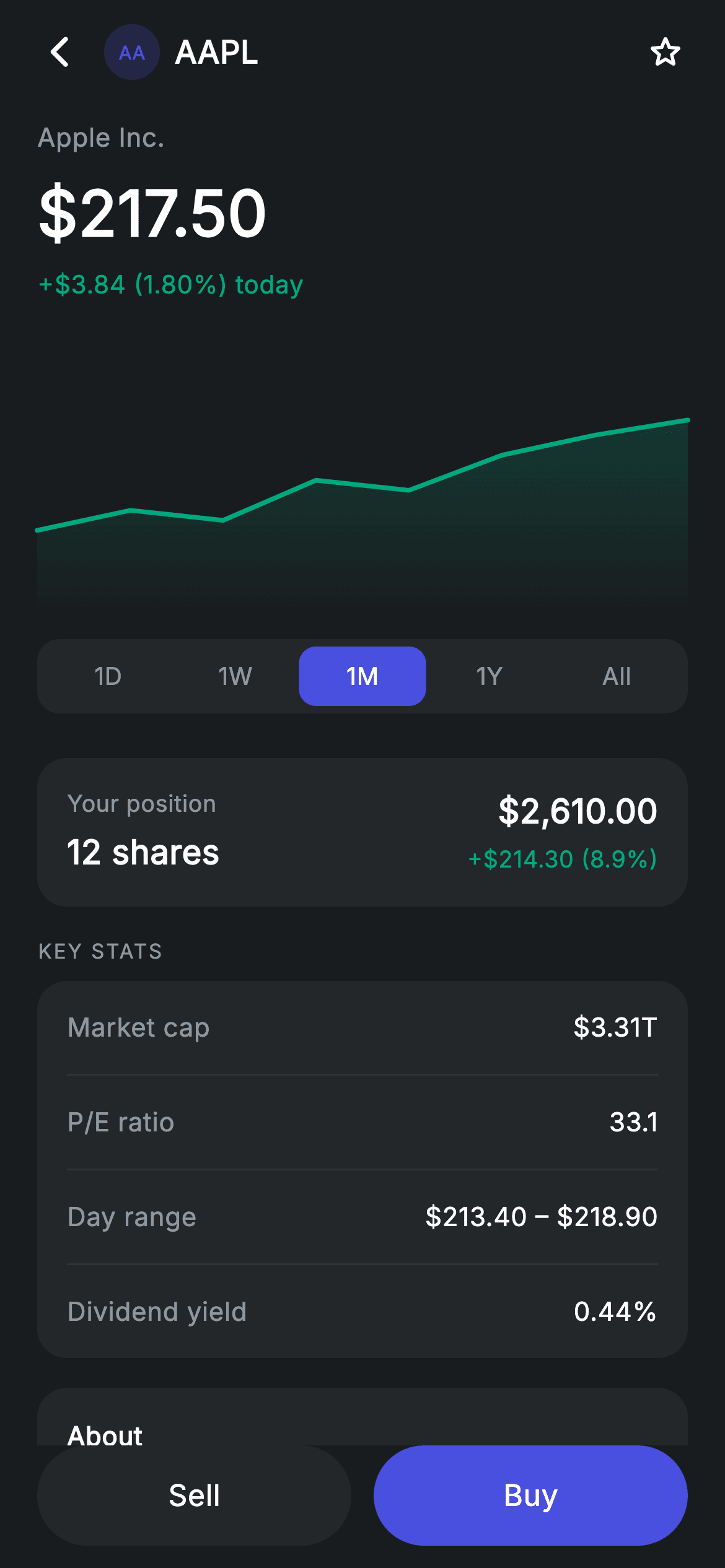
The screen behind every ticker tap: price, a 150px chart, and five timeframe tabs that swap the chart's data live. The interesting part is how little machinery that takes — a `Map<int, List<double>>` keyed by tab index, one `_frame` integer, and a painter that redraws whenever the list it's handed changes. Around that sit a position card, a divider-separated key-stats table, an about block, and a pinned Sell/Buy pair where only the background colour distinguishes the secondary action from the primary one.
Watch the Flutter UI walkthrough
A short screen recording of Stock Detail running, if you'd rather see it before you read the code. The written tutorial below covers everything in it.
Can't see the video? Watch it on YouTube.
What you'll build
- ✓Five timeframe tabs (1D/1W/1M/1Y/All) that swap the chart series through one index
- ✓A 150px gradient area chart redrawn from whichever series the active tab selects
- ✓A segmented tab track with an inset selected pill, built from `Expanded` children
- ✓A key-stats table where hairline `Divider`s inside a rounded card do all the separation
- ✓A pinned Sell/Buy row using the `Material` + `InkWell` pill pattern with matched radii
Step-by-step build
Create the file
Add a new file at lib/fintech_stock_detail/fintech_stock_detail_screen.dart in your Flutter project.
Register the bundled fonts
No external packages — this is pure Flutter. It does bundle its design font (Inter), so drop the font file into fonts/ and declare it in pubspec.yaml:
flutter:
  fonts:
    - family: Inter
      fonts:
- asset: fonts/Inter-Regular.ttfBuild it, piece by piece
Here's how the screen goes together. Each block below is a real slice of the code with a plain-English explanation — paste them in order, or grab the whole file from the next section.
Timeframes as a map of series
class FintechStockDetailScreen extends StatefulWidget {
  const FintechStockDetailScreen({
    super.key,
    this.onBack,
    this.onBuy,
    this.onSell,
  });

  final VoidCallback? onBack;
  final VoidCallback? onBuy;
  final VoidCallback? onSell;

  @override
  State<FintechStockDetailScreen> createState() =>
      _FintechStockDetailScreenState();
}

class _FintechStockDetailScreenState extends State<FintechStockDetailScreen> {
  static const String _font = 'Inter';
  static const Color _bg = Color(0xFF191C1F);
  static const Color _surface = Color(0xFF242729);
  static const Color _brand = Color(0xFF494FDF);
  static const Color _teal = Color(0xFF00A87E);
  static const Color _muted = Color(0xFF8D969E);
  static const Color _hairline = Color(0xFF2E3235);

  static const List<String> _frames = <String>['1D', '1W', '1M', '1Y', 'All'];
  int _frame = 2;

  static const Map<int, List<double>> _series = <int, List<double>>{
    0: <double>[0.5, 0.54, 0.5, 0.58, 0.55, 0.62, 0.6, 0.66],
    1: <double>[0.42, 0.48, 0.45, 0.55, 0.6, 0.56, 0.64, 0.7],
    2: <double>[0.3, 0.38, 0.34, 0.5, 0.46, 0.6, 0.68, 0.74],
    3: <double>[0.2, 0.32, 0.28, 0.45, 0.52, 0.5, 0.66, 0.85],
    4: <double>[0.1, 0.25, 0.22, 0.45, 0.4, 0.62, 0.78, 0.96],
  };
The whole timeframe feature is these two declarations. `_frames` holds the five labels, `_frame = 2` starts the screen on '1M', and `_series` is a `Map<int, List<double>>` whose keys line up with the tab indices — so selecting a tab is nothing more than `_frame = i`, and reading the chart data is `_series[_frame]!`. Each series is pre-normalised to 0–1, and they're shaped to tell a story: index 0 (1D) wobbles in a narrow band while index 4 (All) climbs from 0.1 to 0.96, which is what a longer window should look like. Storing them in a map rather than a list makes the index-to-data relationship explicit at the call site.
Page shell and the chart hookup
  @override
  Widget build(BuildContext context) {
    return Theme(
      data: ThemeData.dark(useMaterial3: true),
      child: Scaffold(
        backgroundColor: _bg,
        body: SafeArea(
          child: Column(
            children: <Widget>[
              _buildAppBar(),
              Expanded(
                child: ListView(
                  physics: const BouncingScrollPhysics(),
                  padding: const EdgeInsets.fromLTRB(20, 8, 20, 24),
                  children: <Widget>[
                    _buildHeader(),
                    const SizedBox(height: 20),
                    SizedBox(
                      height: 150,
                      child: CustomPaint(
                        size: Size.infinite,
                        painter: _AreaChartPainter(
                          points: _series[_frame]!,
                          color: _teal,
                        ),
                      ),
                    ),
                    const SizedBox(height: 12),
                    _buildFrameTabs(),
                    const SizedBox(height: 24),
                    _buildPositionCard(),
                    const SizedBox(height: 16),
                    _sectionLabel('Key stats'),
                    const SizedBox(height: 8),
                    _buildStats(),
                    const SizedBox(height: 16),
                    _buildAbout(),
                  ],
                ),
              ),
              _buildButtons(),
            ],
          ),
        ),
      ),
    );
  }
`Expanded(child: ListView(...))` above a fixed `_buildButtons()` keeps Sell/Buy pinned while everything else scrolls — the standard trade-screen layout, since those two actions must always be reachable. The chart is a 150px `SizedBox` wrapping a `CustomPaint` with `size: Size.infinite`, and it's fed `_series[_frame]!` directly. That's the entire wiring for live timeframe switching: `setState` changes `_frame`, `build` reads a different list, the painter's `shouldRepaint` sees new data and redraws. No animation controller, no chart state object.
App bar with an inline ticker badge
  Widget _buildAppBar() {
    return Padding(
      padding: const EdgeInsets.fromLTRB(8, 4, 8, 4),
      child: Row(
        children: <Widget>[
          IconButton(
            onPressed: widget.onBack,
            icon: const Icon(Icons.arrow_back_ios_new_rounded,
                size: 20, color: Colors.white),
          ),
          Row(
            children: <Widget>[
              Container(
                width: 30,
                height: 30,
                alignment: Alignment.center,
                decoration: BoxDecoration(
                  color: _brand.withValues(alpha: 0.2),
                  shape: BoxShape.circle,
                ),
                child: const Text('AA',
                    style: TextStyle(
                      fontFamily: _font,
                      fontSize: 10,
                      fontWeight: FontWeight.w700,
                      color: _brand,
                    )),
              ),
              const SizedBox(width: 8),
              const Text(
                'AAPL',
                style: TextStyle(
                  fontFamily: _font,
                  fontSize: 17,
                  fontWeight: FontWeight.w600,
                  letterSpacing: 0.24,
                  color: Colors.white,
                ),
              ),
            ],
          ),
          const Spacer(),
          IconButton(
            onPressed: () {},
            icon: const Icon(Icons.star_border_rounded,
                size: 22, color: Colors.white),
          ),
        ],
      ),
    );
  }

  Widget _buildHeader() {
    return Column(
      crossAxisAlignment: CrossAxisAlignment.start,
      children: const <Widget>[
        Text(
          'Apple Inc.',
          style: TextStyle(
            fontFamily: _font,
            fontSize: 14,
            letterSpacing: 0.24,
            color: _muted,
          ),
        ),
        SizedBox(height: 6),
        Text(
          r'$217.50',
          style: TextStyle(
            fontFamily: _font,
            fontSize: 34,
            fontWeight: FontWeight.w600,
            letterSpacing: 0.24,
            color: Colors.white,
          ),
        ),
        SizedBox(height: 4),
        Text(
          r'+$3.84 (1.80%) today',
          style: TextStyle(
            fontFamily: _font,
            fontSize: 13.5,
            fontWeight: FontWeight.w500,
            letterSpacing: 0.24,
            color: _teal,
          ),
        ),
      ],
    );
  }
Rather than a centred title, the app bar puts a 30px tinted badge and the symbol together at the leading edge, with a `Spacer()` pushing a watchlist star to the trailing side — the layout you want when identity matters more than symmetry. The badge follows the tint recipe: a circle at `_brand.withValues(alpha: 0.2)` with 'AA' in full-strength brand. The header below is left-aligned via `crossAxisAlignment: CrossAxisAlignment.start` and runs company name → price at 34px `w600` → day change in teal, so the eye lands on the number first and picks up context either side of it.
The timeframe tab track
  Widget _buildFrameTabs() {
    return Container(
      height: 40,
      padding: const EdgeInsets.all(4),
      decoration: BoxDecoration(
        color: _surface,
        borderRadius: BorderRadius.circular(12),
      ),
      child: Row(
        children: <Widget>[
          for (int i = 0; i < _frames.length; i++)
            Expanded(
              child: GestureDetector(
                onTap: () => setState(() => _frame = i),
                behavior: HitTestBehavior.opaque,
                child: Container(
                  alignment: Alignment.center,
                  decoration: BoxDecoration(
                    color: _frame == i ? _brand : Colors.transparent,
                    borderRadius: BorderRadius.circular(9),
                  ),
                  child: Text(
                    _frames[i],
                    style: TextStyle(
                      fontFamily: _font,
                      fontSize: 13,
                      fontWeight: FontWeight.w500,
                      letterSpacing: 0.24,
                      color: _frame == i ? Colors.white : _muted,
                    ),
                  ),
                ),
              ),
            ),
        ],
      ),
    );
  }
A 40px `Container` filled `_surface` with `padding: EdgeInsets.all(4)` forms the track — that 4px inset is what leaves room for the selected pill to sit *inside* it rather than covering it. Each tab is `Expanded`, so five labels divide the width evenly whatever their length. The selected one gets `color: _frame == i ? _brand : Colors.transparent` at a 9px radius, deliberately tighter than the track's 12px so the corners nest cleanly, and its label flips from `_muted` to white. `HitTestBehavior.opaque` makes the full tab cell tappable rather than just the two-character label.
Position card and the key-stats table
  Widget _buildPositionCard() {
    return Container(
      padding: const EdgeInsets.all(16),
      decoration: BoxDecoration(
        color: _surface,
        borderRadius: BorderRadius.circular(16),
      ),
      child: Row(
        children: const <Widget>[
          Expanded(
            child: Column(
              crossAxisAlignment: CrossAxisAlignment.start,
              children: <Widget>[
                Text(
                  'Your position',
                  style: TextStyle(
                    fontFamily: _font,
                    fontSize: 12.5,
                    letterSpacing: 0.24,
                    color: _muted,
                  ),
                ),
                SizedBox(height: 4),
                Text(
                  '12 shares',
                  style: TextStyle(
                    fontFamily: _font,
                    fontSize: 18,
                    fontWeight: FontWeight.w600,
                    letterSpacing: 0.24,
                    color: Colors.white,
                  ),
                ),
              ],
            ),
          ),
          Column(
            crossAxisAlignment: CrossAxisAlignment.end,
            children: <Widget>[
              Text(
                r'$2,610.00',
                style: TextStyle(
                  fontFamily: _font,
                  fontSize: 18,
                  fontWeight: FontWeight.w600,
                  letterSpacing: 0.24,
                  color: Colors.white,
                ),
              ),
              SizedBox(height: 4),
              Text(
                r'+$214.30 (8.9%)',
                style: TextStyle(
                  fontFamily: _font,
                  fontSize: 12.5,
                  letterSpacing: 0.24,
                  color: _teal,
                ),
              ),
            ],
          ),
        ],
      ),
    );
  }

  Widget _buildStats() {
    return Container(
      padding: const EdgeInsets.symmetric(horizontal: 16),
      decoration: BoxDecoration(
        color: _surface,
        borderRadius: BorderRadius.circular(16),
      ),
      child: Column(
        children: <Widget>[
          _statRow('Market cap', r'$3.31T'),
          const Divider(height: 1, color: _hairline),
          _statRow('P/E ratio', '33.1'),
          const Divider(height: 1, color: _hairline),
          _statRow('Day range', r'$213.40 – $218.90'),
          const Divider(height: 1, color: _hairline),
          _statRow('Dividend yield', '0.44%'),
        ],
      ),
    );
  }

  Widget _statRow(String label, String value) {
    return Padding(
      padding: const EdgeInsets.symmetric(vertical: 15),
      child: Row(
        mainAxisAlignment: MainAxisAlignment.spaceBetween,
        children: <Widget>[
          Text(
            label,
            style: const TextStyle(
              fontFamily: _font,
              fontSize: 14,
              letterSpacing: 0.24,
              color: _muted,
            ),
          ),
          Text(
            value,
            style: const TextStyle(
              fontFamily: _font,
              fontSize: 14,
              fontWeight: FontWeight.w500,
              letterSpacing: 0.24,
              color: Colors.white,
            ),
          ),
        ],
      ),
    );
  }
The position card is a two-column `Row`: an `Expanded` left column with the share count, and a right column using `crossAxisAlignment: CrossAxisAlignment.end` so the market value and the teal gain right-align cleanly against the card edge. The stats table is worth copying for its simplicity — a rounded `_surface` `Container` with only *horizontal* padding, then alternating `_statRow`s and `Divider(height: 1, color: _hairline)`. Because the rows carry their own 15px vertical padding and the container has none, each hairline runs the full inner width of the card rather than stopping short, which is exactly the look you want in a spec table.
The pinned Sell / Buy pair
  Widget _buildButtons() {
    return Padding(
      padding: const EdgeInsets.fromLTRB(20, 0, 20, 12),
      child: Row(
        children: <Widget>[
          Expanded(
            child: SizedBox(
              height: 54,
              child: Material(
                color: _surface,
                borderRadius: BorderRadius.circular(9999),
                child: InkWell(
                  borderRadius: BorderRadius.circular(9999),
                  onTap: widget.onSell,
                  child: const Center(
                    child: Text(
                      'Sell',
                      style: TextStyle(
                        fontFamily: _font,
                        fontSize: 16,
                        fontWeight: FontWeight.w500,
                        letterSpacing: 0.24,
                        color: Colors.white,
                      ),
                    ),
                  ),
                ),
              ),
            ),
          ),
          const SizedBox(width: 12),
          Expanded(
            child: SizedBox(
              height: 54,
              child: Material(
                color: _brand,
                borderRadius: BorderRadius.circular(9999),
                child: InkWell(
                  borderRadius: BorderRadius.circular(9999),
                  onTap: widget.onBuy,
                  child: const Center(
                    child: Text(
                      'Buy',
                      style: TextStyle(
                        fontFamily: _font,
                        fontSize: 16,
                        fontWeight: FontWeight.w500,
                        letterSpacing: 0.24,
                        color: Colors.white,
                      ),
                    ),
                  ),
                ),
              ),
            ),
          ),
        ],
      ),
    );
  }
Both buttons are identical apart from one property: Sell uses `color: _surface` and Buy uses `color: _brand`. That's the whole primary/secondary distinction — same 54px height, same 9999 radius, same white `w500` label — which keeps a destructive-adjacent action from being visually punished while still deferring to Buy. Each is a `Material` supplying the colour and radius with an `InkWell` inside carrying the *same* `borderRadius`; matching them is what clips the ripple to the pill instead of letting it splash into the corners. Both are wrapped in `Expanded` for an even split.
The area chart painter
class _AreaChartPainter extends CustomPainter {
  _AreaChartPainter({required this.points, required this.color});

  final List<double> points;
  final Color color;

  @override
  void paint(Canvas canvas, Size size) {
    if (points.length < 2) return;
    final double dx = size.width / (points.length - 1);
    double x(int i) => dx * i;
    double y(int i) => size.height - points[i].clamp(0, 1) * size.height * 0.9 - 6;

    final Path line = Path()..moveTo(x(0), y(0));
    for (int i = 1; i < points.length; i++) {
      line.lineTo(x(i), y(i));
    }
    final Path area = Path.from(line)
      ..lineTo(size.width, size.height)
      ..lineTo(0, size.height)
      ..close();
    canvas.drawPath(
      area,
      Paint()
        ..shader = LinearGradient(
          begin: Alignment.topCenter,
          end: Alignment.bottomCenter,
          colors: <Color>[color.withValues(alpha: 0.3), color.withValues(alpha: 0)],
        ).createShader(Offset.zero & size),
    );
    canvas.drawPath(
      line,
      Paint()
        ..color = color
        ..strokeWidth = 2.5
        ..style = PaintingStyle.stroke
        ..strokeCap = StrokeCap.round
        ..strokeJoin = StrokeJoin.round,
    );
  }

  @override
  bool shouldRepaint(covariant _AreaChartPainter oldDelegate) =>
      oldDelegate.points != points || oldDelegate.color != color;
}
Points arrive pre-normalised, so there's no min/max pass — the painter just spaces them with `dx = size.width / (points.length - 1)` and maps each to a Y. The `y(i)` expression inverts for canvas coordinates, compresses the plot to 90% of the height, and lifts it 6px, reserving headroom so a peak at 1.0 isn't clipped by the 2.5px stroke at the top edge. The fill is cloned from the stroke with `Path.from(line)` and closed down to the bottom corners, guaranteeing they trace the same curve. Painting it with a `shader` — a `LinearGradient` from 30% alpha to fully transparent, realised by `createShader(Offset.zero & size)` — is what produces the fade under the line. `shouldRepaint` compares `points`, which is exactly what makes tab switching redraw the chart.
Full code
The complete, ready-to-paste source. Free to use in your projects — one click copies it all.
import 'package:flutter/material.dart';
/// Stock detail — chart, stats & buy/sell (Revolut-inspired design system).
///
/// Self-contained per CONVENTIONS.md: pure Flutter only, the exact design font
/// (Inter) is bundled under `fonts/`, the price chart is custom-painted (no
/// charting package, no network), and the screen forces its own dark theme.
/// Timeframe tabs swap the chart data live; Buy/Sell are pinned at the bottom.
class FintechStockDetailScreen extends StatefulWidget {
const FintechStockDetailScreen({
super.key,
this.onBack,
this.onBuy,
this.onSell,
});
final VoidCallback? onBack;
final VoidCallback? onBuy;
final VoidCallback? onSell;
@override
State<FintechStockDetailScreen> createState() =>
_FintechStockDetailScreenState();
}
class _FintechStockDetailScreenState extends State<FintechStockDetailScreen> {
static const String _font = 'Inter';
static const Color _bg = Color(0xFF191C1F);
static const Color _surface = Color(0xFF242729);
static const Color _brand = Color(0xFF494FDF);
static const Color _teal = Color(0xFF00A87E);
static const Color _muted = Color(0xFF8D969E);
static const Color _hairline = Color(0xFF2E3235);
static const List<String> _frames = <String>['1D', '1W', '1M', '1Y', 'All'];
int _frame = 2;
static const Map<int, List<double>> _series = <int, List<double>>{
0: <double>[0.5, 0.54, 0.5, 0.58, 0.55, 0.62, 0.6, 0.66],
1: <double>[0.42, 0.48, 0.45, 0.55, 0.6, 0.56, 0.64, 0.7],
2: <double>[0.3, 0.38, 0.34, 0.5, 0.46, 0.6, 0.68, 0.74],
3: <double>[0.2, 0.32, 0.28, 0.45, 0.52, 0.5, 0.66, 0.85],
4: <double>[0.1, 0.25, 0.22, 0.45, 0.4, 0.62, 0.78, 0.96],
};
@override
Widget build(BuildContext context) {
return Theme(
data: ThemeData.dark(useMaterial3: true),
child: Scaffold(
backgroundColor: _bg,
body: SafeArea(
child: Column(
children: <Widget>[
_buildAppBar(),
Expanded(
child: ListView(
physics: const BouncingScrollPhysics(),
padding: const EdgeInsets.fromLTRB(20, 8, 20, 24),
children: <Widget>[
_buildHeader(),
const SizedBox(height: 20),
SizedBox(
height: 150,
child: CustomPaint(
size: Size.infinite,
painter: _AreaChartPainter(
points: _series[_frame]!,
color: _teal,
),
),
),
const SizedBox(height: 12),
_buildFrameTabs(),
const SizedBox(height: 24),
_buildPositionCard(),
const SizedBox(height: 16),
_sectionLabel('Key stats'),
const SizedBox(height: 8),
_buildStats(),
const SizedBox(height: 16),
_buildAbout(),
],
),
),
_buildButtons(),
],
),
),
),
);
}
Widget _buildAppBar() {
return Padding(
padding: const EdgeInsets.fromLTRB(8, 4, 8, 4),
child: Row(
children: <Widget>[
IconButton(
onPressed: widget.onBack,
icon: const Icon(Icons.arrow_back_ios_new_rounded,
size: 20, color: Colors.white),
),
Row(
children: <Widget>[
Container(
width: 30,
height: 30,
alignment: Alignment.center,
decoration: BoxDecoration(
color: _brand.withValues(alpha: 0.2),
shape: BoxShape.circle,
),
child: const Text('AA',
style: TextStyle(
fontFamily: _font,
fontSize: 10,
fontWeight: FontWeight.w700,
color: _brand,
)),
),
const SizedBox(width: 8),
const Text(
'AAPL',
style: TextStyle(
fontFamily: _font,
fontSize: 17,
fontWeight: FontWeight.w600,
letterSpacing: 0.24,
color: Colors.white,
),
),
],
),
const Spacer(),
IconButton(
onPressed: () {},
icon: const Icon(Icons.star_border_rounded,
size: 22, color: Colors.white),
),
],
),
);
}
Widget _buildHeader() {
return Column(
crossAxisAlignment: CrossAxisAlignment.start,
children: const <Widget>[
Text(
'Apple Inc.',
style: TextStyle(
fontFamily: _font,
fontSize: 14,
letterSpacing: 0.24,
color: _muted,
),
),
SizedBox(height: 6),
Text(
r'$217.50',
style: TextStyle(
fontFamily: _font,
fontSize: 34,
fontWeight: FontWeight.w600,
letterSpacing: 0.24,
color: Colors.white,
),
),
SizedBox(height: 4),
Text(
r'+$3.84 (1.80%) today',
style: TextStyle(
fontFamily: _font,
fontSize: 13.5,
fontWeight: FontWeight.w500,
letterSpacing: 0.24,
color: _teal,
),
),
],
);
}
Widget _buildFrameTabs() {
return Container(
height: 40,
padding: const EdgeInsets.all(4),
decoration: BoxDecoration(
color: _surface,
borderRadius: BorderRadius.circular(12),
),
child: Row(
children: <Widget>[
for (int i = 0; i < _frames.length; i++)
Expanded(
child: GestureDetector(
onTap: () => setState(() => _frame = i),
behavior: HitTestBehavior.opaque,
child: Container(
alignment: Alignment.center,
decoration: BoxDecoration(
color: _frame == i ? _brand : Colors.transparent,
borderRadius: BorderRadius.circular(9),
),
child: Text(
_frames[i],
style: TextStyle(
fontFamily: _font,
fontSize: 13,
fontWeight: FontWeight.w500,
letterSpacing: 0.24,
color: _frame == i ? Colors.white : _muted,
),
),
),
),
),
],
),
);
}
Widget _buildPositionCard() {
return Container(
padding: const EdgeInsets.all(16),
decoration: BoxDecoration(
color: _surface,
borderRadius: BorderRadius.circular(16),
),
child: Row(
children: const <Widget>[
Expanded(
child: Column(
crossAxisAlignment: CrossAxisAlignment.start,
children: <Widget>[
Text(
'Your position',
style: TextStyle(
fontFamily: _font,
fontSize: 12.5,
letterSpacing: 0.24,
color: _muted,
),
),
SizedBox(height: 4),
Text(
'12 shares',
style: TextStyle(
fontFamily: _font,
fontSize: 18,
fontWeight: FontWeight.w600,
letterSpacing: 0.24,
color: Colors.white,
),
),
],
),
),
Column(
crossAxisAlignment: CrossAxisAlignment.end,
children: <Widget>[
Text(
r'$2,610.00',
style: TextStyle(
fontFamily: _font,
fontSize: 18,
fontWeight: FontWeight.w600,
letterSpacing: 0.24,
color: Colors.white,
),
),
SizedBox(height: 4),
Text(
r'+$214.30 (8.9%)',
style: TextStyle(
fontFamily: _font,
fontSize: 12.5,
letterSpacing: 0.24,
color: _teal,
),
),
],
),
],
),
);
}
Widget _buildStats() {
return Container(
padding: const EdgeInsets.symmetric(horizontal: 16),
decoration: BoxDecoration(
color: _surface,
borderRadius: BorderRadius.circular(16),
),
child: Column(
children: <Widget>[
_statRow('Market cap', r'$3.31T'),
const Divider(height: 1, color: _hairline),
_statRow('P/E ratio', '33.1'),
const Divider(height: 1, color: _hairline),
_statRow('Day range', r'$213.40 – $218.90'),
const Divider(height: 1, color: _hairline),
_statRow('Dividend yield', '0.44%'),
],
),
);
}
Widget _statRow(String label, String value) {
return Padding(
padding: const EdgeInsets.symmetric(vertical: 15),
child: Row(
mainAxisAlignment: MainAxisAlignment.spaceBetween,
children: <Widget>[
Text(
label,
style: const TextStyle(
fontFamily: _font,
fontSize: 14,
letterSpacing: 0.24,
color: _muted,
),
),
Text(
value,
style: const TextStyle(
fontFamily: _font,
fontSize: 14,
fontWeight: FontWeight.w500,
letterSpacing: 0.24,
color: Colors.white,
),
),
],
),
);
}
Widget _buildAbout() {
return Container(
padding: const EdgeInsets.all(16),
decoration: BoxDecoration(
color: _surface,
borderRadius: BorderRadius.circular(16),
),
child: const Column(
crossAxisAlignment: CrossAxisAlignment.start,
children: <Widget>[
Text(
'About',
style: TextStyle(
fontFamily: _font,
fontSize: 14,
fontWeight: FontWeight.w600,
letterSpacing: 0.24,
color: Colors.white,
),
),
SizedBox(height: 8),
Text(
'Apple designs and sells consumer electronics, software and '
'services. Listed on NASDAQ under AAPL.',
style: TextStyle(
fontFamily: _font,
fontSize: 13,
height: 1.5,
letterSpacing: 0.24,
color: _muted,
),
),
],
),
);
}
Widget _sectionLabel(String text) {
return Text(
text.toUpperCase(),
style: const TextStyle(
fontFamily: _font,
fontSize: 11,
fontWeight: FontWeight.w500,
letterSpacing: 1.0,
color: _muted,
),
);
}
Widget _buildButtons() {
return Padding(
padding: const EdgeInsets.fromLTRB(20, 0, 20, 12),
child: Row(
children: <Widget>[
Expanded(
child: SizedBox(
height: 54,
child: Material(
color: _surface,
borderRadius: BorderRadius.circular(9999),
child: InkWell(
borderRadius: BorderRadius.circular(9999),
onTap: widget.onSell,
child: const Center(
child: Text(
'Sell',
style: TextStyle(
fontFamily: _font,
fontSize: 16,
fontWeight: FontWeight.w500,
letterSpacing: 0.24,
color: Colors.white,
),
),
),
),
),
),
),
const SizedBox(width: 12),
Expanded(
child: SizedBox(
height: 54,
child: Material(
color: _brand,
borderRadius: BorderRadius.circular(9999),
child: InkWell(
borderRadius: BorderRadius.circular(9999),
onTap: widget.onBuy,
child: const Center(
child: Text(
'Buy',
style: TextStyle(
fontFamily: _font,
fontSize: 16,
fontWeight: FontWeight.w500,
letterSpacing: 0.24,
color: Colors.white,
),
),
),
),
),
),
),
],
),
);
}
}
/// Paints a filled area chart from normalised 0–1 points.
class _AreaChartPainter extends CustomPainter {
_AreaChartPainter({required this.points, required this.color});
final List<double> points;
final Color color;
@override
void paint(Canvas canvas, Size size) {
if (points.length < 2) return;
final double dx = size.width / (points.length - 1);
double x(int i) => dx * i;
double y(int i) => size.height - points[i].clamp(0, 1) * size.height * 0.9 - 6;
final Path line = Path()..moveTo(x(0), y(0));
for (int i = 1; i < points.length; i++) {
line.lineTo(x(i), y(i));
}
final Path area = Path.from(line)
..lineTo(size.width, size.height)
..lineTo(0, size.height)
..close();
canvas.drawPath(
area,
Paint()
..shader = LinearGradient(
begin: Alignment.topCenter,
end: Alignment.bottomCenter,
colors: <Color>[color.withValues(alpha: 0.3), color.withValues(alpha: 0)],
).createShader(Offset.zero & size),
);
canvas.drawPath(
line,
Paint()
..color = color
..strokeWidth = 2.5
..style = PaintingStyle.stroke
..strokeCap = StrokeCap.round
..strokeJoin = StrokeJoin.round,
);
}
@override
bool shouldRepaint(covariant _AreaChartPainter oldDelegate) =>
oldDelegate.points != points || oldDelegate.color != color;
}
Plus bundled 1 binary asset (fonts/images). The CLI and MCP install those for you automatically.
Two faster ways to add it
Copy-paste works, but you can skip it entirely.
1. FlutterKit CLI
One command drops this screen — and its fonts — straight into your project.
$ flutterkit add fintech-stock-detail2. AI agent (MCP)
Connect FlutterKit's MCP server in Claude or Cursor and just ask your agent to install fintech-stock-detail — it fetches and writes the files for you.
FAQ
Is this stock detail screen free to use?
Yes. The full Dart source on this page is free for personal and commercial apps. Copy it from the code block, install it with the FlutterKit CLI (flutterkit add fintech-stock-detail), or add it via an AI agent over MCP.
Does the chart need a charting package?
No. It's a single CustomPainter at the bottom of the file using Canvas, Path, and Paint — no fl_chart or syncfusion, and no network. The only asset to register in pubspec.yaml is the bundled Inter font family.
How do I load real data for each timeframe?
Replace the const _series map with a Map<int, List<double>> you populate from your API, normalising each series to 0–1 with (p - min) / (max - min). If a timeframe loads asynchronously, hold a nullable list per index and render a placeholder while it's null — the painter already bails out on fewer than two points.
Can I animate the chart when the timeframe changes?
Yes — wrap the CustomPaint in a TweenAnimationBuilder or drive an AnimationController and lerp between the old and new point lists element by element, passing the interpolated list to the painter. The painter needs no changes because it redraws whenever its points argument differs.
Which Flutter version does it target?
It uses Color.withValues(alpha:) and Material 3, so it targets Flutter 3.27+. On an older SDK, replace each withValues(alpha: x) call — including the two in the gradient — with withOpacity(x), and it compiles back to Flutter 3.10.


