How to Build a Stock Buy Order Screen with a Custom Numpad in Flutter (Full Code + Preview)
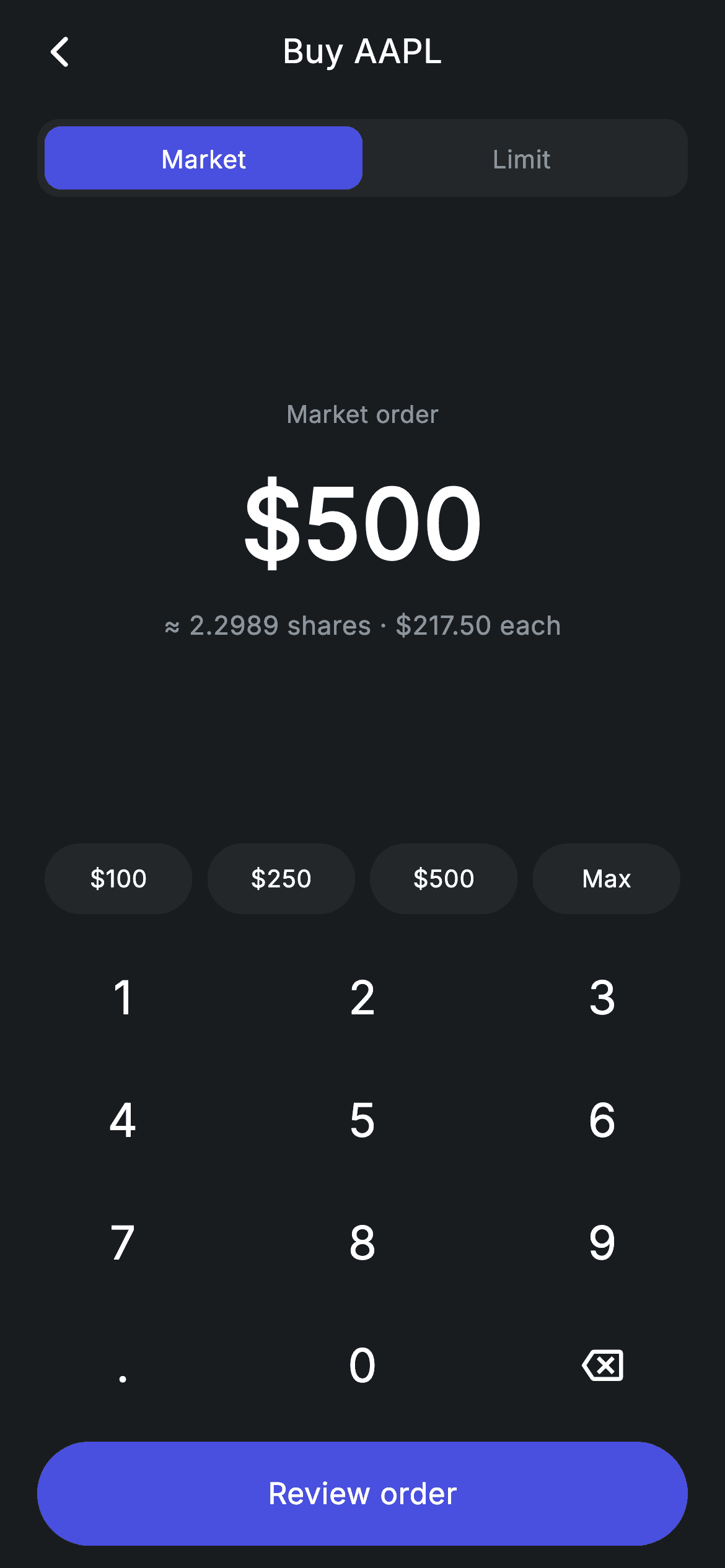
Fractional-share investing flips the usual order form around: you type dollars, not shares, and the app tells you how much of the stock that buys. This tutorial builds exactly that in Flutter — a Market/Limit segmented toggle, a huge live amount, an estimated share count recalculated on every keypress, four quick-amount chips, and a custom numpad. The numpad's `_onKey` handler is the piece worth studying: it enforces one decimal point, two decimal places, and a seven-character cap without a single `TextEditingController`.
Watch the Flutter UI walkthrough
A short screen recording of Stock Buy running, if you'd rather see it before you read the code. The written tutorial below covers everything in it.
Can't see the video? Watch it on YouTube.
What you'll build
- ✓A dollar-first order form that converts to fractional shares live (`≈ 2.2989 shares`)
- ✓A `_onKey` string reducer enforcing one dot, two decimals, and a 7-char maximum
- ✓A custom 3×4 numpad built from `GestureDetector`s — no keyboard, no controller
- ✓A Market / Limit segmented control made from two `Expanded` children in a padded track
- ✓Quick-amount chips including a 'Max' that jumps straight to the full balance
- ✓A CTA that disables itself — colour, text tint, and `onTap: null` — when the amount is zero
Step-by-step build
Create the file
Add a new file at lib/fintech_stock_buy/fintech_stock_buy_screen.dart in your Flutter project.
Register the bundled fonts
No external packages — this is pure Flutter. It does bundle its design font (Inter), so drop the font file into fonts/ and declare it in pubspec.yaml:
flutter:
  fonts:
    - family: Inter
      fonts:
- asset: fonts/Inter-Regular.ttfBuild it, piece by piece
Here's how the screen goes together. Each block below is a real slice of the code with a plain-English explanation — paste them in order, or grab the whole file from the next section.
State: one string, two derived numbers
class _FintechStockBuyScreenState extends State<FintechStockBuyScreen> {
  static const String _font = 'Inter';
  static const Color _bg = Color(0xFF191C1F);
  static const Color _surface = Color(0xFF242729);
  static const Color _brand = Color(0xFF494FDF);
  static const Color _muted = Color(0xFF8D969E);

  static const double _price = 217.50;
  int _orderType = 0; // 0 = Market, 1 = Limit
  String _amount = '500';

  double get _usd => double.tryParse(_amount) ?? 0;
  double get _shares => _usd / _price;
The amount is stored as a `String _amount = '500'`, not a `double`. That matters: only a string can represent the intermediate state '500.' that a user passes through while typing, which a numeric field would silently normalise away. The two getters do the maths — `_usd` parses defensively with `double.tryParse(_amount) ?? 0` so a lone '.' can never crash the build, and `_shares` divides by the `_price` constant of 217.50. Because they're getters rather than stored fields, they can never drift out of sync with `_amount`.
The numpad reducer that validates as you type
  void _onKey(String key) {
    setState(() {
      switch (key) {
        case '⌫':
          _amount = _amount.length <= 1 ? '0' : _amount.substring(0, _amount.length - 1);
        case '.':
          if (!_amount.contains('.')) _amount = '$_amount.';
        default:
          if (_amount == '0') {
            _amount = key;
          } else if (_amount.length < 7) {
            final int dot = _amount.indexOf('.');
            if (dot == -1 || _amount.length - dot <= 2) _amount = '$_amount$key';
          }
      }
    });
  }
`_onKey` is a switch over the pressed key inside a single `setState`. Backspace trims the last character but floors at `'0'` rather than an empty string, so the display never goes blank. The `'.'` case is a no-op when a dot already exists — that's the one-decimal-point rule. The default branch handles digits and layers three guards: a leading `'0'` is *replaced* rather than appended (so you get '5', not '05'), the total length is capped at 7, and `_amount.length - dot <= 2` refuses a third digit after the decimal point. All of this runs on a plain string, which is why no `TextEditingController` or input formatter is needed anywhere.
The Market / Limit segmented control
  Widget _buildOrderType() {
    return Padding(
      padding: const EdgeInsets.symmetric(horizontal: 20),
      child: Container(
        height: 42,
        padding: const EdgeInsets.all(4),
        decoration: BoxDecoration(
          color: _surface,
          borderRadius: BorderRadius.circular(12),
        ),
        child: Row(
          children: <Widget>[
            for (int i = 0; i < 2; i++)
              Expanded(
                child: GestureDetector(
                  onTap: () => setState(() => _orderType = i),
                  behavior: HitTestBehavior.opaque,
                  child: Container(
                    alignment: Alignment.center,
                    decoration: BoxDecoration(
                      color: _orderType == i ? _brand : Colors.transparent,
                      borderRadius: BorderRadius.circular(9),
                    ),
                    child: Text(
                      i == 0 ? 'Market' : 'Limit',
                      style: TextStyle(
                        fontFamily: _font,
                        fontSize: 13.5,
                        fontWeight: FontWeight.w500,
                        letterSpacing: 0.24,
                        color: _orderType == i ? Colors.white : _muted,
                      ),
                    ),
                  ),
                ),
              ),
          ],
        ),
      ),
    );
  }
The classic iOS-style segmented control is simpler than it looks: an outer 42px `Container` painted `_surface` with a 12px radius and `padding: EdgeInsets.all(4)`, holding a `Row` of two `Expanded` children. Each child's inner `Container` gets the brand fill when selected and `Colors.transparent` otherwise, with a 9px radius — 12 minus the 4px padding — so the selected pill's corners stay concentric with the track's. `behavior: HitTestBehavior.opaque` on the `GestureDetector` makes the whole half tappable, including the transparent area, not just the label glyphs.
The live amount and share estimate
  Widget _buildAmount() {
    return Center(
      child: Column(
        mainAxisAlignment: MainAxisAlignment.center,
        mainAxisSize: MainAxisSize.min,
        children: <Widget>[
          Text(
            _orderType == 0 ? 'Market order' : 'Limit at \$215.00',
            style: const TextStyle(
              fontFamily: _font,
              fontSize: 13,
              letterSpacing: 0.24,
              color: _muted,
            ),
          ),
          const SizedBox(height: 12),
          FittedBox(
            fit: BoxFit.scaleDown,
            child: Text(
              '\$$_amount',
              style: const TextStyle(
                fontFamily: _font,
                fontSize: 52,
                fontWeight: FontWeight.w600,
                letterSpacing: 0.24,
                color: Colors.white,
              ),
            ),
          ),
          const SizedBox(height: 8),
          Text(
            '≈ ${_shares.toStringAsFixed(4)} shares · \$217.50 each',
            style: const TextStyle(
              fontFamily: _font,
              fontSize: 14,
              letterSpacing: 0.24,
              color: _muted,
            ),
          ),
        ],
      ),
    );
  }
The amount sits in an `Expanded` region so it takes all the space the numpad and chips don't. `FittedBox(fit: BoxFit.scaleDown)` wraps the 52px figure — as the user types toward the 7-character cap, the text shrinks to fit rather than overflowing, which is why the numpad can allow long numbers at all. Under it, `_shares.toStringAsFixed(4)` renders four decimals because fractional investing routinely deals in hundredths of a share. The line above the amount is the only place `_orderType` shows up visually, switching between 'Market order' and 'Limit at $215.00'.
Quick chips and a self-disabling CTA
  Widget _buildQuick() {
    return Padding(
      padding: const EdgeInsets.symmetric(horizontal: 20),
      child: Row(
        children: <Widget>[
          for (final String v in <String>['100', '250', '500', 'Max'])
            Expanded(
              child: Padding(
                padding: const EdgeInsets.symmetric(horizontal: 4),
                child: GestureDetector(
                  onTap: () => setState(
                      () => _amount = v == 'Max' ? '12485' : v),
                  child: Container(
                    height: 38,
                    alignment: Alignment.center,
                    decoration: BoxDecoration(
                      color: _surface,
                      borderRadius: BorderRadius.circular(9999),
                    ),
                    child: Text(
                      v == 'Max' ? 'Max' : '\$$v',
                      style: const TextStyle(
                        fontFamily: _font,
                        fontSize: 13,
                        fontWeight: FontWeight.w500,
                        letterSpacing: 0.24,
                        color: Colors.white,
                      ),
                    ),
                  ),
                ),
              ),
            ),
        ],
      ),
    );
  }

  Widget _buildButton() {
    final bool valid = _usd > 0;
    return Padding(
      padding: const EdgeInsets.fromLTRB(20, 0, 20, 12),
      child: SizedBox(
        width: double.infinity,
        height: 56,
        child: Material(
          color: valid ? _brand : _surface,
          borderRadius: BorderRadius.circular(9999),
          child: InkWell(
            borderRadius: BorderRadius.circular(9999),
            onTap: valid ? widget.onReview : null,
            child: Center(
              child: Text(
                'Review order',
                style: TextStyle(
                  fontFamily: _font,
                  fontSize: 16,
                  fontWeight: FontWeight.w500,
                  letterSpacing: 0.24,
                  color: valid ? Colors.white : _muted,
                ),
              ),
            ),
          ),
        ),
      ),
    );
  }
The chips are built with a collection-for over `['100', '250', '500', 'Max']`, each `Expanded` with 4px of horizontal padding so the four share the width evenly. `Max` is special-cased in both places it appears — it sets `_amount` to '12485' (the stubbed balance) and renders without a `$` prefix. The CTA derives `final bool valid = _usd > 0` and uses it three ways at once: the `Material` colour drops from brand to `_surface`, the label colour from white to muted, and `onTap` becomes literally `null`. Passing `null` is what actually disables the `InkWell` — it stops the ripple too, so the button doesn't just look dead, it behaves dead.
The numpad widget
class _Numpad extends StatelessWidget {
  const _Numpad({required this.onKey});

  final ValueChanged<String> onKey;

  static const List<List<String>> _rows = <List<String>>[
    <String>['1', '2', '3'],
    <String>['4', '5', '6'],
    <String>['7', '8', '9'],
    <String>['.', '0', '⌫'],
  ];

  @override
  Widget build(BuildContext context) {
    return Padding(
      padding: const EdgeInsets.symmetric(horizontal: 32),
      child: Column(
        mainAxisSize: MainAxisSize.min,
        children: <Widget>[
          for (final List<String> row in _rows)
            Padding(
              padding: const EdgeInsets.symmetric(vertical: 5),
              child: Row(
                mainAxisAlignment: MainAxisAlignment.spaceBetween,
                children: <Widget>[
                  for (final String key in row)
                    GestureDetector(
                      onTap: () => onKey(key),
                      behavior: HitTestBehavior.opaque,
                      child: Container(
                        width: 68,
                        height: 56,
                        alignment: Alignment.center,
                        child: key == '⌫'
                            ? const Icon(Icons.backspace_outlined,
                                size: 22, color: Colors.white)
                            : Text(
                                key,
                                style: const TextStyle(
                                  fontFamily: _FintechStockBuyScreenState._font,
                                  fontSize: 25,
                                  fontWeight: FontWeight.w500,
                                  letterSpacing: 0.24,
                                  color: Colors.white,
                                ),
                              ),
                      ),
                    ),
                ],
              ),
            ),
        ],
      ),
    );
  }
}
`_Numpad` is stateless and takes a single `ValueChanged<String> onKey`, so it knows nothing about amounts or validation — all of that lives in the parent's `_onKey`. The layout is a `const List<List<String>>` of four rows walked by nested collection-fors, with `MainAxisAlignment.spaceBetween` distributing the three keys across the row. Every key is a fixed 68×56 `GestureDetector` with `HitTestBehavior.opaque`, giving a comfortably large touch target regardless of glyph size. The backspace key is stored as the '⌫' character but rendered as `Icons.backspace_outlined`, so the data stays plain strings while the UI shows a proper icon.
Full code
The complete, ready-to-paste source. Free to use in your projects — one click copies it all.
import 'package:flutter/material.dart';

/// Stock buy — place a buy order with a numpad amount (Revolut-inspired).
///
/// Self-contained per CONVENTIONS.md: pure Flutter only, the exact design font
/// (Inter) is bundled under `fonts/`, no network/emoji images, and the screen
/// forces its own dark theme. A Market/Limit toggle plus a numpad drive the USD
/// amount; the estimated share count updates live.
class FintechStockBuyScreen extends StatefulWidget {
  const FintechStockBuyScreen({super.key, this.onBack, this.onReview});

  final VoidCallback? onBack;
  final VoidCallback? onReview;

  @override
  State<FintechStockBuyScreen> createState() => _FintechStockBuyScreenState();
}

class _FintechStockBuyScreenState extends State<FintechStockBuyScreen> {
  static const String _font = 'Inter';
  static const Color _bg = Color(0xFF191C1F);
  static const Color _surface = Color(0xFF242729);
  static const Color _brand = Color(0xFF494FDF);
  static const Color _muted = Color(0xFF8D969E);

  static const double _price = 217.50;
  int _orderType = 0; // 0 = Market, 1 = Limit
  String _amount = '500';

  double get _usd => double.tryParse(_amount) ?? 0;
  double get _shares => _usd / _price;

  void _onKey(String key) {
    setState(() {
      switch (key) {
        case '⌫':
          _amount = _amount.length <= 1 ? '0' : _amount.substring(0, _amount.length - 1);
        case '.':
          if (!_amount.contains('.')) _amount = '$_amount.';
        default:
          if (_amount == '0') {
            _amount = key;
          } else if (_amount.length < 7) {
            final int dot = _amount.indexOf('.');
            if (dot == -1 || _amount.length - dot <= 2) _amount = '$_amount$key';
          }
      }
    });
  }

  @override
  Widget build(BuildContext context) {
    return Theme(
      data: ThemeData.dark(useMaterial3: true),
      child: Scaffold(
        backgroundColor: _bg,
        body: SafeArea(
          child: Column(
            children: <Widget>[
              _buildAppBar(),
              const SizedBox(height: 8),
              _buildOrderType(),
              Expanded(child: _buildAmount()),
              _buildQuick(),
              const SizedBox(height: 12),
              _Numpad(onKey: _onKey),
              const SizedBox(height: 8),
              _buildButton(),
            ],
          ),
        ),
      ),
    );
  }

  Widget _buildAppBar() {
    return Padding(
      padding: const EdgeInsets.fromLTRB(8, 4, 8, 4),
      child: Row(
        children: <Widget>[
          IconButton(
            onPressed: widget.onBack,
            icon: const Icon(Icons.arrow_back_ios_new_rounded,
                size: 20, color: Colors.white),
          ),
          const Expanded(
            child: Text(
              'Buy AAPL',
              textAlign: TextAlign.center,
              style: TextStyle(
                fontFamily: _font,
                fontSize: 18,
                fontWeight: FontWeight.w500,
                letterSpacing: 0.24,
                color: Colors.white,
              ),
            ),
          ),
          const SizedBox(width: 48),
        ],
      ),
    );
  }

  Widget _buildOrderType() {
    return Padding(
      padding: const EdgeInsets.symmetric(horizontal: 20),
      child: Container(
        height: 42,
        padding: const EdgeInsets.all(4),
        decoration: BoxDecoration(
          color: _surface,
          borderRadius: BorderRadius.circular(12),
        ),
        child: Row(
          children: <Widget>[
            for (int i = 0; i < 2; i++)
              Expanded(
                child: GestureDetector(
                  onTap: () => setState(() => _orderType = i),
                  behavior: HitTestBehavior.opaque,
                  child: Container(
                    alignment: Alignment.center,
                    decoration: BoxDecoration(
                      color: _orderType == i ? _brand : Colors.transparent,
                      borderRadius: BorderRadius.circular(9),
                    ),
                    child: Text(
                      i == 0 ? 'Market' : 'Limit',
                      style: TextStyle(
                        fontFamily: _font,
                        fontSize: 13.5,
                        fontWeight: FontWeight.w500,
                        letterSpacing: 0.24,
                        color: _orderType == i ? Colors.white : _muted,
                      ),
                    ),
                  ),
                ),
              ),
          ],
        ),
      ),
    );
  }

  Widget _buildAmount() {
    return Center(
      child: Column(
        mainAxisAlignment: MainAxisAlignment.center,
        mainAxisSize: MainAxisSize.min,
        children: <Widget>[
          Text(
            _orderType == 0 ? 'Market order' : 'Limit at \$215.00',
            style: const TextStyle(
              fontFamily: _font,
              fontSize: 13,
              letterSpacing: 0.24,
              color: _muted,
            ),
          ),
          const SizedBox(height: 12),
          FittedBox(
            fit: BoxFit.scaleDown,
            child: Text(
              '\$$_amount',
              style: const TextStyle(
                fontFamily: _font,
                fontSize: 52,
                fontWeight: FontWeight.w600,
                letterSpacing: 0.24,
                color: Colors.white,
              ),
            ),
          ),
          const SizedBox(height: 8),
          Text(
            '≈ ${_shares.toStringAsFixed(4)} shares · \$217.50 each',
            style: const TextStyle(
              fontFamily: _font,
              fontSize: 14,
              letterSpacing: 0.24,
              color: _muted,
            ),
          ),
        ],
      ),
    );
  }

  Widget _buildQuick() {
    return Padding(
      padding: const EdgeInsets.symmetric(horizontal: 20),
      child: Row(
        children: <Widget>[
          for (final String v in <String>['100', '250', '500', 'Max'])
            Expanded(
              child: Padding(
                padding: const EdgeInsets.symmetric(horizontal: 4),
                child: GestureDetector(
                  onTap: () => setState(
                      () => _amount = v == 'Max' ? '12485' : v),
                  child: Container(
                    height: 38,
                    alignment: Alignment.center,
                    decoration: BoxDecoration(
                      color: _surface,
                      borderRadius: BorderRadius.circular(9999),
                    ),
                    child: Text(
                      v == 'Max' ? 'Max' : '\$$v',
                      style: const TextStyle(
                        fontFamily: _font,
                        fontSize: 13,
                        fontWeight: FontWeight.w500,
                        letterSpacing: 0.24,
                        color: Colors.white,
                      ),
                    ),
                  ),
                ),
              ),
            ),
        ],
      ),
    );
  }

  Widget _buildButton() {
    final bool valid = _usd > 0;
    return Padding(
      padding: const EdgeInsets.fromLTRB(20, 0, 20, 12),
      child: SizedBox(
        width: double.infinity,
        height: 56,
        child: Material(
          color: valid ? _brand : _surface,
          borderRadius: BorderRadius.circular(9999),
          child: InkWell(
            borderRadius: BorderRadius.circular(9999),
            onTap: valid ? widget.onReview : null,
            child: Center(
              child: Text(
                'Review order',
                style: TextStyle(
                  fontFamily: _font,
                  fontSize: 16,
                  fontWeight: FontWeight.w500,
                  letterSpacing: 0.24,
                  color: valid ? Colors.white : _muted,
                ),
              ),
            ),
          ),
        ),
      ),
    );
  }
}

class _Numpad extends StatelessWidget {
  const _Numpad({required this.onKey});

  final ValueChanged<String> onKey;

  static const List<List<String>> _rows = <List<String>>[
    <String>['1', '2', '3'],
    <String>['4', '5', '6'],
    <String>['7', '8', '9'],
    <String>['.', '0', '⌫'],
  ];

  @override
  Widget build(BuildContext context) {
    return Padding(
      padding: const EdgeInsets.symmetric(horizontal: 32),
      child: Column(
        mainAxisSize: MainAxisSize.min,
        children: <Widget>[
          for (final List<String> row in _rows)
            Padding(
              padding: const EdgeInsets.symmetric(vertical: 5),
              child: Row(
                mainAxisAlignment: MainAxisAlignment.spaceBetween,
                children: <Widget>[
                  for (final String key in row)
                    GestureDetector(
                      onTap: () => onKey(key),
                      behavior: HitTestBehavior.opaque,
                      child: Container(
                        width: 68,
                        height: 56,
                        alignment: Alignment.center,
                        child: key == '⌫'
                            ? const Icon(Icons.backspace_outlined,
                                size: 22, color: Colors.white)
                            : Text(
                                key,
                                style: const TextStyle(
                                  fontFamily: _FintechStockBuyScreenState._font,
                                  fontSize: 25,
                                  fontWeight: FontWeight.w500,
                                  letterSpacing: 0.24,
                                  color: Colors.white,
                                ),
                              ),
                      ),
                    ),
                ],
              ),
            ),
        ],
      ),
    );
  }
}
Plus bundled 1 binary asset (fonts/images). The CLI and MCP install those for you automatically.
Two faster ways to add it
Copy-paste works, but you can skip it entirely.
1. FlutterKit CLI
One command drops this screen — and its fonts — straight into your project.
$ flutterkit add fintech-stock-buy2. AI agent (MCP)
Connect FlutterKit's MCP server in Claude or Cursor and just ask your agent to install fintech-stock-buy — it fetches and writes the files for you.
FAQ
Is this stock buy screen free to use?
Yes. The full Dart source on this page is free for personal and commercial apps. Copy it from the code block, install it with the FlutterKit CLI (flutterkit add fintech-stock-buy), or add it through an AI agent over MCP.
Why a custom numpad instead of a TextField?
Two reasons. The soft keyboard would cover the amount and the chips on most phones, and the validation rules here (one dot, two decimals, seven characters) are easier to express as a string reducer than as input formatters. It also guarantees a consistent key layout across iOS and Android.
How do I connect a real share price?
_price is a static const double. Make it an instance field fed by the constructor or your quote stream, and the _shares getter plus the '≈ … shares · $217.50 each' line update automatically — both read the same value.
Does it need any packages?
No. It's pure Flutter on the material library, with no third-party dependencies. The only asset is the bundled Inter font family, which you register in pubspec.yaml (the CLI and MCP install it for you).
Which Flutter version does it target?
It uses break-less switch cases (Dart 3), super parameters and Material 3, so target Flutter 3.19+. There are no withValues calls in this screen, so it needs no colour-API changes on slightly older SDKs — only the switch statements need break added below Dart 3.


