How to Build a Statements Screen in Flutter (Full Code + Preview)
Statements is the screen people open at tax time, and this one turns three years of PDFs into something browsable instead of buried. You'll build a dark, Revolut-flavoured statements list in Flutter: a horizontal pill switcher for 2026 / 2025 / 2024 that swaps the list in place, an accent annual-summary card offering a tax-ready download, and hairline-separated monthly rows carrying a PDF icon, date range and file size. The month still running renders as a greyed 'Pending' row that refuses taps. Pure Flutter, one Map of mock data, zero packages.
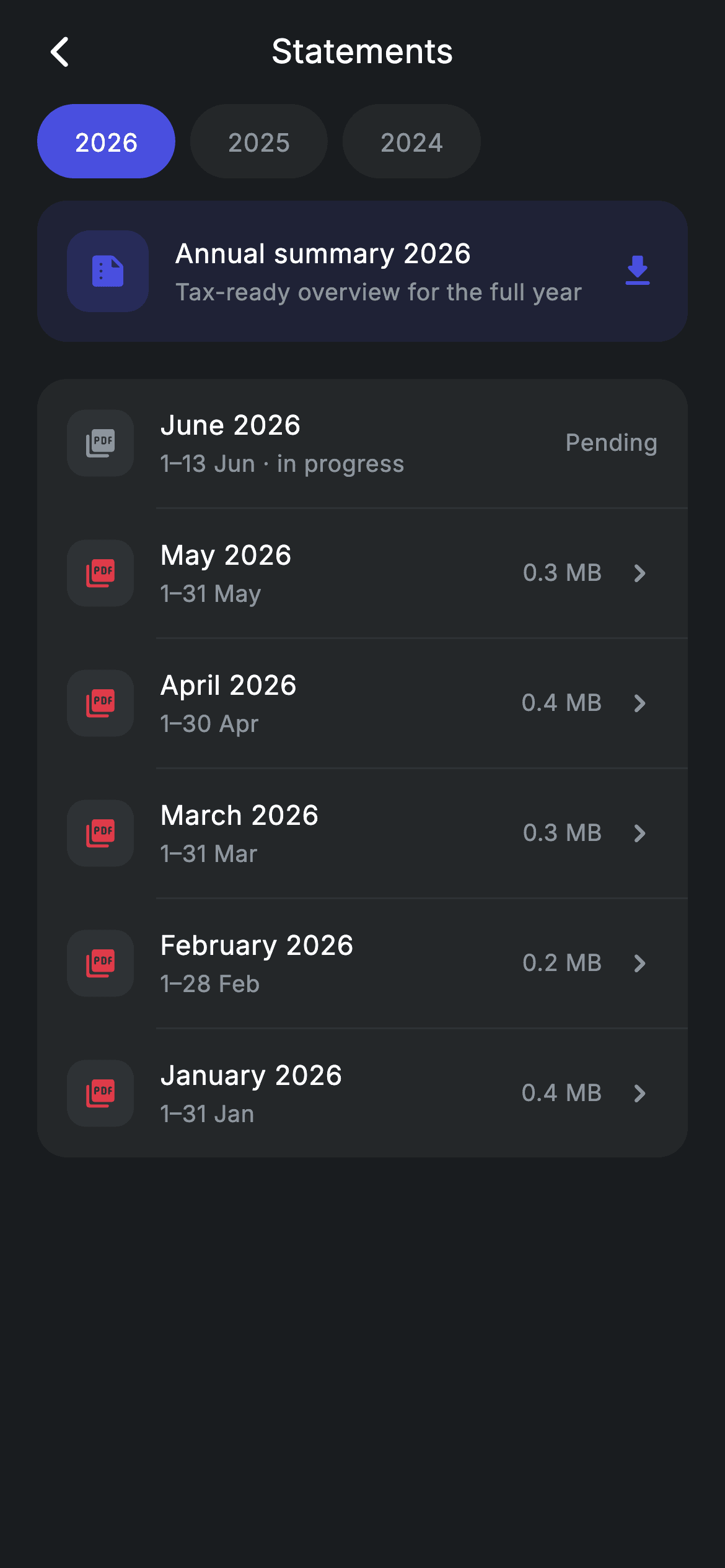
Watch the Flutter UI walkthrough
A short screen recording of Statements running, if you'd rather see it before you read the code. The written tutorial below covers everything in it.
Can't see the video? Watch it on YouTube.
What you'll build
- ✓A pill year switcher built from a horizontal ListView.separated, where the selected index re-renders the whole list
- ✓A tinted annual-summary card whose title tracks the selected year and offers a full-year download
- ✓A rounded surface of monthly rows joined by 1px indented dividers, each with a PDF tile, period and file size
- ✓A disabled 'Pending' state for the in-progress month that swallows the tap and hides the chevron
- ✓A screen that forces its own dark theme and design tokens so it looks identical inside a light-themed app
Step-by-step build
Create the file
Add a new file at lib/fintech_statements/fintech_statements_screen.dart in your Flutter project.
Register the bundled fonts
No external packages — this is pure Flutter. It does bundle its design font (Inter), so drop the font file into fonts/ and declare it in pubspec.yaml:
flutter:
  fonts:
    - family: Inter
      fonts:
- asset: fonts/Inter-Regular.ttfBuild it, piece by piece
Here's how the screen goes together. Each block below is a real slice of the code with a plain-English explanation — paste them in order, or grab the whole file from the next section.
The widget, its callbacks, and the design tokens
import 'package:flutter/material.dart';

/// Statements — monthly statement list (Revolut-inspired design system).
///
/// Self-contained per CONVENTIONS.md: pure Flutter only, the exact design font
/// (Inter) is bundled under `fonts/`, no network images, and the screen forces
/// its own dark theme. A year switcher filters the list and each row shows the
/// period, document size and a quick export action.
class FintechStatementsScreen extends StatefulWidget {
  const FintechStatementsScreen({
    super.key,
    this.onBack,
    this.onStatementTap,
  });

  final VoidCallback? onBack;
  final VoidCallback? onStatementTap;

  @override
  State<FintechStatementsScreen> createState() =>
      _FintechStatementsScreenState();
}

class _FintechStatementsScreenState extends State<FintechStatementsScreen> {
  static const String _font = 'Inter';
  static const Color _bg = Color(0xFF191C1F);
  static const Color _surface = Color(0xFF242729);
  static const Color _brand = Color(0xFF494FDF);
  static const Color _muted = Color(0xFF8D969E);
  static const Color _hairline = Color(0xFF2E3235);

  static const List<int> _years = <int>[2026, 2025, 2024];
  int _year = 0;
FintechStatementsScreen is a StatefulWidget because one thing changes at runtime: which year tab is selected. It takes two optional callbacks — onBack for the app-bar arrow and onStatementTap for a row — so the screen never imports a router and drops into any navigation stack. Inside the state, the palette is a set of private static consts: _bg (#191C1F) is the near-black canvas, _surface (#242729) is the raised card colour, _brand (#494FDF) is the indigo accent, _muted (#8D969E) is secondary text, and _hairline (#2E3235) is the divider. _font holds 'Inter', the bundled family. _years lists [2026, 2025, 2024] and _year is the selected index, starting at 0.
Mock statement data, grouped by year
  static const Map<int, List<_Statement>> _byYear = <int, List<_Statement>>{
    2026: <_Statement>[
      _Statement('June 2026', '1–13 Jun · in progress', '—', true),
      _Statement('May 2026', '1–31 May', '0.3 MB', false),
      _Statement('April 2026', '1–30 Apr', '0.4 MB', false),
      _Statement('March 2026', '1–31 Mar', '0.3 MB', false),
      _Statement('February 2026', '1–28 Feb', '0.2 MB', false),
      _Statement('January 2026', '1–31 Jan', '0.4 MB', false),
    ],
    2025: <_Statement>[
      _Statement('December 2025', '1–31 Dec', '0.5 MB', false),
      _Statement('November 2025', '1–30 Nov', '0.3 MB', false),
      _Statement('October 2025', '1–31 Oct', '0.4 MB', false),
    ],
    2024: <_Statement>[
      _Statement('December 2024', '1–31 Dec', '0.3 MB', false),
      _Statement('November 2024', '1–30 Nov', '0.2 MB', false),
    ],
  };
_byYear is a compile-time const Map<int, List<_Statement>> — the whole data layer of the screen. Each _Statement holds four positional values: the month label ('May 2026'), the covered period ('1–31 May'), a document size ('0.3 MB') and an inProgress flag. Note the very first entry: _Statement('June 2026', '1–13 Jun · in progress', '—', true) is the only one with inProgress: true, and that single bool is what later paints the greyed PDF icon and the 'Pending' label instead of a size and chevron. When you wire a real API, this Map is the one thing you replace — everything below it just renders whatever list it is handed.
Forcing dark mode and assembling the page
  @override
  Widget build(BuildContext context) {
    final List<_Statement> list = _byYear[_years[_year]] ?? const <_Statement>[];
    return Theme(
      data: ThemeData.dark(useMaterial3: true),
      child: Scaffold(
        backgroundColor: _bg,
        body: SafeArea(
          child: Column(
            children: <Widget>[
              _buildAppBar(),
              _buildYearTabs(),
              Expanded(
                child: ListView(
                  physics: const BouncingScrollPhysics(),
                  padding: const EdgeInsets.fromLTRB(20, 12, 20, 24),
                  children: <Widget>[
                    _buildAnnualCard(),
                    const SizedBox(height: 20),
                    Container(
                      decoration: BoxDecoration(
                        color: _surface,
                        borderRadius: BorderRadius.circular(16),
                      ),
                      child: Column(
                        children: <Widget>[
                          for (int i = 0; i < list.length; i++) ...<Widget>[
                            if (i != 0)
                              const Divider(
                                  height: 1,
                                  color: _hairline,
                                  indent: 64),
                            _StatementRow(
                              statement: list[i],
                              onTap: widget.onStatementTap,
                            ),
                          ],
                        ],
                      ),
                    ),
                  ],
                ),
              ),
            ],
          ),
        ),
      ),
    );
  }
build() first looks up the current list with _byYear[_years[_year]] ?? const <_Statement>[], so an unknown year degrades to an empty list rather than crashing. Wrapping the Scaffold in Theme(data: ThemeData.dark(useMaterial3: true)) is what makes the screen self-contained: ripples, icon defaults and text colours stay dark even when the host app runs a light theme. A Column pins the app bar and year tabs to the top and gives the rest to an Expanded ListView with BouncingScrollPhysics and 20px side padding. The rows live inside one Container with _surface fill and a 16px radius, and the classic for-loop-with-spread pattern (for (int i = 0; …) …<Widget>[]) emits a Divider before every row except the first — height: 1, colour _hairline, indent: 64 so the line starts after the icon tile rather than running edge to edge.
Centered app bar and the tappable year pills
  Widget _buildAppBar() {
    return Padding(
      padding: const EdgeInsets.fromLTRB(8, 4, 8, 4),
      child: Row(
        children: <Widget>[
          IconButton(
            onPressed: widget.onBack,
            icon: const Icon(Icons.arrow_back_ios_new_rounded,
                size: 20, color: Colors.white),
          ),
          const Expanded(
            child: Text(
              'Statements',
              textAlign: TextAlign.center,
              style: TextStyle(
                fontFamily: _font,
                fontSize: 18,
                fontWeight: FontWeight.w500,
                letterSpacing: 0.24,
                color: Colors.white,
              ),
            ),
          ),
          const SizedBox(width: 48),
        ],
      ),
    );
  }

  Widget _buildYearTabs() {
    return SizedBox(
      height: 40,
      child: ListView.separated(
        scrollDirection: Axis.horizontal,
        padding: const EdgeInsets.symmetric(horizontal: 20),
        physics: const BouncingScrollPhysics(),
        itemCount: _years.length,
        separatorBuilder: (BuildContext context, int i) =>
            const SizedBox(width: 8),
        itemBuilder: (BuildContext context, int i) {
          final bool active = _year == i;
          return GestureDetector(
            onTap: () => setState(() => _year = i),
            child: Container(
              alignment: Alignment.center,
              padding: const EdgeInsets.symmetric(horizontal: 20),
              decoration: BoxDecoration(
                color: active ? _brand : _surface,
                borderRadius: BorderRadius.circular(9999),
              ),
              child: Text(
                '${_years[i]}',
                style: TextStyle(
                  fontFamily: _font,
                  fontSize: 13.5,
                  fontWeight: FontWeight.w500,
                  letterSpacing: 0.24,
                  color: active ? Colors.white : _muted,
                ),
              ),
            ),
          );
        },
      ),
    );
  }
_buildAppBar is a hand-rolled Row rather than an AppBar: a back IconButton using Icons.arrow_back_ios_new_rounded at size 20, an Expanded 'Statements' Text with textAlign: TextAlign.center, and a SizedBox(width: 48) on the right. That empty 48px box is the trick — it mirrors the IconButton's footprint so the title lands optically centered. _buildYearTabs is a 40px-tall horizontal ListView.separated with 8px gaps. For each index it computes final bool active = _year == i, then fills the pill with _brand when active and _surface when not, colouring the 13.5px label white or _muted to match. The BorderRadius.circular(9999) is the usual way to force a fully rounded capsule. Tapping calls setState(() => _year = i), which rebuilds the whole screen and re-reads _byYear — that is the entire filtering mechanism.
The annual summary card and the _Statement model
  Widget _buildAnnualCard() {
    return Container(
      padding: const EdgeInsets.all(16),
      decoration: BoxDecoration(
        color: _brand.withValues(alpha: 0.12),
        borderRadius: BorderRadius.circular(16),
      ),
      child: Row(
        children: <Widget>[
          Container(
            width: 44,
            height: 44,
            alignment: Alignment.center,
            decoration: BoxDecoration(
              color: _brand.withValues(alpha: 0.2),
              borderRadius: BorderRadius.circular(12),
            ),
            child: const Icon(Icons.summarize_rounded, size: 22, color: _brand),
          ),
          const SizedBox(width: 14),
          Expanded(
            child: Column(
              crossAxisAlignment: CrossAxisAlignment.start,
              children: <Widget>[
                Text(
                  'Annual summary ${_years[_year]}',
                  style: const TextStyle(
                    fontFamily: _font,
                    fontSize: 14.5,
                    fontWeight: FontWeight.w500,
                    letterSpacing: 0.24,
                    color: Colors.white,
                  ),
                ),
                const SizedBox(height: 2),
                const Text(
                  'Tax-ready overview for the full year',
                  style: TextStyle(
                    fontFamily: _font,
                    fontSize: 12.5,
                    letterSpacing: 0.24,
                    color: _muted,
                  ),
                ),
              ],
            ),
          ),
          const Icon(Icons.download_rounded, size: 22, color: _brand),
        ],
      ),
    );
  }
}

class _Statement {
  const _Statement(this.month, this.period, this.size, this.inProgress);
  final String month;
  final String period;
  final String size;
  final bool inProgress;
}
_buildAnnualCard is the accent block at the top of the scroll view. Instead of a solid fill it uses _brand.withValues(alpha: 0.12) so the indigo reads as a soft tint on the dark canvas, and the 44×44 leading tile nests a slightly stronger _brand.withValues(alpha: 0.2) behind an Icons.summarize_rounded glyph in full _brand. The title is interpolated — 'Annual summary ${_years[_year]}' — so it updates the moment you tap a different year pill, sitting above the fixed subtitle 'Tax-ready overview for the full year' in 12.5px _muted. A trailing Icons.download_rounded signals the export. Below the state class, _Statement is a tiny immutable model with a const positional constructor and four final fields: month, period, size and inProgress.
Rendering one statement row, pending or ready
class _StatementRow extends StatelessWidget {
  const _StatementRow({required this.statement, this.onTap});

  final _Statement statement;
  final VoidCallback? onTap;

  @override
  Widget build(BuildContext context) {
    final bool prog = statement.inProgress;
    return InkWell(
      onTap: prog ? null : onTap,
      child: Padding(
        padding: const EdgeInsets.symmetric(horizontal: 16, vertical: 14),
        child: Row(
          children: <Widget>[
            Container(
              width: 36,
              height: 36,
              alignment: Alignment.center,
              decoration: BoxDecoration(
                color: const Color(0xFF2E3235),
                borderRadius: BorderRadius.circular(10),
              ),
              child: Icon(
                Icons.picture_as_pdf_rounded,
                size: 18,
                color: prog
                    ? _FintechStatementsScreenState._muted
                    : const Color(0xFFE23B4A),
              ),
            ),
            const SizedBox(width: 14),
            Expanded(
              child: Column(
                crossAxisAlignment: CrossAxisAlignment.start,
                children: <Widget>[
                  Text(
                    statement.month,
                    style: const TextStyle(
                      fontFamily: _FintechStatementsScreenState._font,
                      fontSize: 14.5,
                      fontWeight: FontWeight.w500,
                      letterSpacing: 0.24,
                      color: Colors.white,
                    ),
                  ),
                  const SizedBox(height: 2),
                  Text(
                    statement.period,
                    style: const TextStyle(
                      fontFamily: _FintechStatementsScreenState._font,
                      fontSize: 12.5,
                      letterSpacing: 0.24,
                      color: _FintechStatementsScreenState._muted,
                    ),
                  ),
                ],
              ),
            ),
            if (prog)
              const Text(
                'Pending',
                style: TextStyle(
                  fontFamily: _FintechStatementsScreenState._font,
                  fontSize: 12.5,
                  fontWeight: FontWeight.w500,
                  letterSpacing: 0.24,
                  color: _FintechStatementsScreenState._muted,
                ),
              )
            else ...<Widget>[
              Text(
                statement.size,
                style: const TextStyle(
                  fontFamily: _FintechStatementsScreenState._font,
                  fontSize: 12.5,
                  letterSpacing: 0.24,
                  color: _FintechStatementsScreenState._muted,
                ),
              ),
              const SizedBox(width: 10),
              const Icon(Icons.chevron_right_rounded,
                  size: 20, color: _FintechStatementsScreenState._muted),
            ],
          ],
        ),
      ),
    );
  }
}
_StatementRow is a StatelessWidget that takes a _Statement plus an optional onTap. It caches final bool prog = statement.inProgress and passes onTap: prog ? null : onTap to the InkWell — handing InkWell a null callback is the idiomatic way to disable a row, and it kills the ripple too, so the pending month simply doesn't respond. The leading 36×36 tile holds Icons.picture_as_pdf_rounded, tinted _muted grey while pending and PDF red (#E23B4A) once the document exists. The Expanded Column stacks the month in 14.5px medium white over the period in 12.5px _muted. The trailing area is the real fork: if prog, it prints a single 'Pending' label; otherwise a spread (else ...<Widget>[]) emits the file size, a 10px gap and an Icons.chevron_right_rounded. Because the row is a separate class, it reaches back for shared tokens via _FintechStatementsScreenState._font and ._muted.
Full code
The complete, ready-to-paste source. Free to use in your projects — one click copies it all.
import 'package:flutter/material.dart';

/// Statements — monthly statement list (Revolut-inspired design system).
///
/// Self-contained per CONVENTIONS.md: pure Flutter only, the exact design font
/// (Inter) is bundled under `fonts/`, no network images, and the screen forces
/// its own dark theme. A year switcher filters the list and each row shows the
/// period, document size and a quick export action.
class FintechStatementsScreen extends StatefulWidget {
  const FintechStatementsScreen({
    super.key,
    this.onBack,
    this.onStatementTap,
  });

  final VoidCallback? onBack;
  final VoidCallback? onStatementTap;

  @override
  State<FintechStatementsScreen> createState() =>
      _FintechStatementsScreenState();
}

class _FintechStatementsScreenState extends State<FintechStatementsScreen> {
  static const String _font = 'Inter';
  static const Color _bg = Color(0xFF191C1F);
  static const Color _surface = Color(0xFF242729);
  static const Color _brand = Color(0xFF494FDF);
  static const Color _muted = Color(0xFF8D969E);
  static const Color _hairline = Color(0xFF2E3235);

  static const List<int> _years = <int>[2026, 2025, 2024];
  int _year = 0;

  static const Map<int, List<_Statement>> _byYear = <int, List<_Statement>>{
    2026: <_Statement>[
      _Statement('June 2026', '1–13 Jun · in progress', '—', true),
      _Statement('May 2026', '1–31 May', '0.3 MB', false),
      _Statement('April 2026', '1–30 Apr', '0.4 MB', false),
      _Statement('March 2026', '1–31 Mar', '0.3 MB', false),
      _Statement('February 2026', '1–28 Feb', '0.2 MB', false),
      _Statement('January 2026', '1–31 Jan', '0.4 MB', false),
    ],
    2025: <_Statement>[
      _Statement('December 2025', '1–31 Dec', '0.5 MB', false),
      _Statement('November 2025', '1–30 Nov', '0.3 MB', false),
      _Statement('October 2025', '1–31 Oct', '0.4 MB', false),
    ],
    2024: <_Statement>[
      _Statement('December 2024', '1–31 Dec', '0.3 MB', false),
      _Statement('November 2024', '1–30 Nov', '0.2 MB', false),
    ],
  };

  @override
  Widget build(BuildContext context) {
    final List<_Statement> list = _byYear[_years[_year]] ?? const <_Statement>[];
    return Theme(
      data: ThemeData.dark(useMaterial3: true),
      child: Scaffold(
        backgroundColor: _bg,
        body: SafeArea(
          child: Column(
            children: <Widget>[
              _buildAppBar(),
              _buildYearTabs(),
              Expanded(
                child: ListView(
                  physics: const BouncingScrollPhysics(),
                  padding: const EdgeInsets.fromLTRB(20, 12, 20, 24),
                  children: <Widget>[
                    _buildAnnualCard(),
                    const SizedBox(height: 20),
                    Container(
                      decoration: BoxDecoration(
                        color: _surface,
                        borderRadius: BorderRadius.circular(16),
                      ),
                      child: Column(
                        children: <Widget>[
                          for (int i = 0; i < list.length; i++) ...<Widget>[
                            if (i != 0)
                              const Divider(
                                  height: 1,
                                  color: _hairline,
                                  indent: 64),
                            _StatementRow(
                              statement: list[i],
                              onTap: widget.onStatementTap,
                            ),
                          ],
                        ],
                      ),
                    ),
                  ],
                ),
              ),
            ],
          ),
        ),
      ),
    );
  }

  Widget _buildAppBar() {
    return Padding(
      padding: const EdgeInsets.fromLTRB(8, 4, 8, 4),
      child: Row(
        children: <Widget>[
          IconButton(
            onPressed: widget.onBack,
            icon: const Icon(Icons.arrow_back_ios_new_rounded,
                size: 20, color: Colors.white),
          ),
          const Expanded(
            child: Text(
              'Statements',
              textAlign: TextAlign.center,
              style: TextStyle(
                fontFamily: _font,
                fontSize: 18,
                fontWeight: FontWeight.w500,
                letterSpacing: 0.24,
                color: Colors.white,
              ),
            ),
          ),
          const SizedBox(width: 48),
        ],
      ),
    );
  }

  Widget _buildYearTabs() {
    return SizedBox(
      height: 40,
      child: ListView.separated(
        scrollDirection: Axis.horizontal,
        padding: const EdgeInsets.symmetric(horizontal: 20),
        physics: const BouncingScrollPhysics(),
        itemCount: _years.length,
        separatorBuilder: (BuildContext context, int i) =>
            const SizedBox(width: 8),
        itemBuilder: (BuildContext context, int i) {
          final bool active = _year == i;
          return GestureDetector(
            onTap: () => setState(() => _year = i),
            child: Container(
              alignment: Alignment.center,
              padding: const EdgeInsets.symmetric(horizontal: 20),
              decoration: BoxDecoration(
                color: active ? _brand : _surface,
                borderRadius: BorderRadius.circular(9999),
              ),
              child: Text(
                '${_years[i]}',
                style: TextStyle(
                  fontFamily: _font,
                  fontSize: 13.5,
                  fontWeight: FontWeight.w500,
                  letterSpacing: 0.24,
                  color: active ? Colors.white : _muted,
                ),
              ),
            ),
          );
        },
      ),
    );
  }

  Widget _buildAnnualCard() {
    return Container(
      padding: const EdgeInsets.all(16),
      decoration: BoxDecoration(
        color: _brand.withValues(alpha: 0.12),
        borderRadius: BorderRadius.circular(16),
      ),
      child: Row(
        children: <Widget>[
          Container(
            width: 44,
            height: 44,
            alignment: Alignment.center,
            decoration: BoxDecoration(
              color: _brand.withValues(alpha: 0.2),
              borderRadius: BorderRadius.circular(12),
            ),
            child: const Icon(Icons.summarize_rounded, size: 22, color: _brand),
          ),
          const SizedBox(width: 14),
          Expanded(
            child: Column(
              crossAxisAlignment: CrossAxisAlignment.start,
              children: <Widget>[
                Text(
                  'Annual summary ${_years[_year]}',
                  style: const TextStyle(
                    fontFamily: _font,
                    fontSize: 14.5,
                    fontWeight: FontWeight.w500,
                    letterSpacing: 0.24,
                    color: Colors.white,
                  ),
                ),
                const SizedBox(height: 2),
                const Text(
                  'Tax-ready overview for the full year',
                  style: TextStyle(
                    fontFamily: _font,
                    fontSize: 12.5,
                    letterSpacing: 0.24,
                    color: _muted,
                  ),
                ),
              ],
            ),
          ),
          const Icon(Icons.download_rounded, size: 22, color: _brand),
        ],
      ),
    );
  }
}

class _Statement {
  const _Statement(this.month, this.period, this.size, this.inProgress);
  final String month;
  final String period;
  final String size;
  final bool inProgress;
}

class _StatementRow extends StatelessWidget {
  const _StatementRow({required this.statement, this.onTap});

  final _Statement statement;
  final VoidCallback? onTap;

  @override
  Widget build(BuildContext context) {
    final bool prog = statement.inProgress;
    return InkWell(
      onTap: prog ? null : onTap,
      child: Padding(
        padding: const EdgeInsets.symmetric(horizontal: 16, vertical: 14),
        child: Row(
          children: <Widget>[
            Container(
              width: 36,
              height: 36,
              alignment: Alignment.center,
              decoration: BoxDecoration(
                color: const Color(0xFF2E3235),
                borderRadius: BorderRadius.circular(10),
              ),
              child: Icon(
                Icons.picture_as_pdf_rounded,
                size: 18,
                color: prog
                    ? _FintechStatementsScreenState._muted
                    : const Color(0xFFE23B4A),
              ),
            ),
            const SizedBox(width: 14),
            Expanded(
              child: Column(
                crossAxisAlignment: CrossAxisAlignment.start,
                children: <Widget>[
                  Text(
                    statement.month,
                    style: const TextStyle(
                      fontFamily: _FintechStatementsScreenState._font,
                      fontSize: 14.5,
                      fontWeight: FontWeight.w500,
                      letterSpacing: 0.24,
                      color: Colors.white,
                    ),
                  ),
                  const SizedBox(height: 2),
                  Text(
                    statement.period,
                    style: const TextStyle(
                      fontFamily: _FintechStatementsScreenState._font,
                      fontSize: 12.5,
                      letterSpacing: 0.24,
                      color: _FintechStatementsScreenState._muted,
                    ),
                  ),
                ],
              ),
            ),
            if (prog)
              const Text(
                'Pending',
                style: TextStyle(
                  fontFamily: _FintechStatementsScreenState._font,
                  fontSize: 12.5,
                  fontWeight: FontWeight.w500,
                  letterSpacing: 0.24,
                  color: _FintechStatementsScreenState._muted,
                ),
              )
            else ...<Widget>[
              Text(
                statement.size,
                style: const TextStyle(
                  fontFamily: _FintechStatementsScreenState._font,
                  fontSize: 12.5,
                  letterSpacing: 0.24,
                  color: _FintechStatementsScreenState._muted,
                ),
              ),
              const SizedBox(width: 10),
              const Icon(Icons.chevron_right_rounded,
                  size: 20, color: _FintechStatementsScreenState._muted),
            ],
          ],
        ),
      ),
    );
  }
}
Plus bundled 1 binary asset (fonts/images). The CLI and MCP install those for you automatically.
Two faster ways to add it
Copy-paste works, but you can skip it entirely.
1. FlutterKit CLI
One command drops this screen — and its fonts — straight into your project.
$ flutterkit add fintech-statements2. AI agent (MCP)
Connect FlutterKit's MCP server in Claude or Cursor and just ask your agent to install fintech-statements — it fetches and writes the files for you.
FAQ
Can I ship this statements screen in a commercial banking app?
Yes. The complete Dart for the statements list, year switcher and row widget is free to copy and use in personal or commercial projects. Paste it straight in, run flutterkit add fintech-statements with the CLI, or let an AI agent install it for you over MCP.
Do the PDF icons or the year pills need any plugin?
No — this is pure Flutter. The PDF and download glyphs are Material icons (Icons.picture_as_pdf_rounded, Icons.download_rounded, Icons.summarize_rounded) and the pills are plain Containers, so the packages list is empty. The only asset is the bundled Inter font used by every TextStyle here, registered in pubspec.yaml as shown in step 2; the CLI and MCP copy those font files for you.
What Flutter SDK does the statements screen need?
Flutter 3.22 or newer (Dart 3). It uses super parameters in the constructor and Color.withValues for the tinted annual card. On an older SDK, replace _brand.withValues(alpha: 0.12) and _brand.withValues(alpha: 0.2) with _brand.withOpacity(0.12) and _brand.withOpacity(0.2); ThemeData.dark(useMaterial3: true) and the rest of the file compile unchanged.


