How to Build a Cashback Rewards Screen in Flutter (Full Code + Preview)
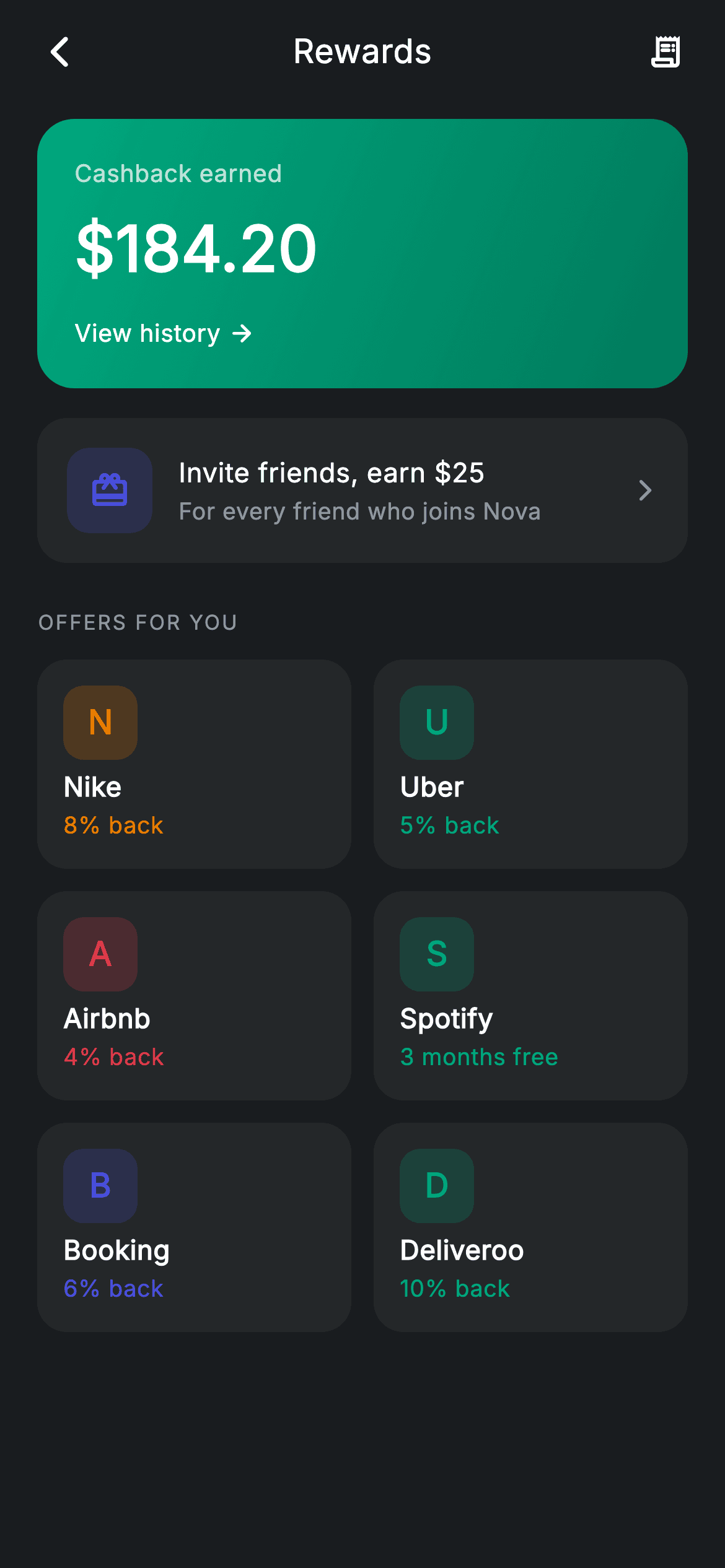
A rewards home built from three components: a teal gradient card holding the cashback total, a tappable referral banner, and a 2-column grid of partner offers. The offer cards are the piece worth copying — each merchant is identified by a monogram tile whose letter and tint both come from one colour on the model, so 'Nike' renders as an amber N and 'Uber' as a teal U with no logo assets, no network requests, and no brand licensing to think about.
Watch the Flutter UI walkthrough
A short screen recording of Rewards running, if you'd rather see it before you read the code. The written tutorial below covers everything in it.
Can't see the video? Watch it on YouTube.
What you'll build
- ✓A teal gradient cashback card with an inline 'View history' link
- ✓A referral banner using the `Material` + `InkWell` pattern so the whole row ripples on tap
- ✓A 2-column offer grid nested inside a `ListView` via `shrinkWrap` and locked physics
- ✓Monogram merchant tiles built with `.characters.first` — safe for names starting with any Unicode character
- ✓Cards whose icon tint and reward text share one colour per merchant
Step-by-step build
Create the file
Add a new file at lib/fintech_rewards/fintech_rewards_screen.dart in your Flutter project.
Register the bundled fonts
No external packages — this is pure Flutter. It does bundle its design font (Inter), so drop the font file into fonts/ and declare it in pubspec.yaml:
flutter:
  fonts:
    - family: Inter
      fonts:
- asset: fonts/Inter-Regular.ttfBuild it, piece by piece
Here's how the screen goes together. Each block below is a real slice of the code with a plain-English explanation — paste them in order, or grab the whole file from the next section.
Offers as a flat list of three fields
class FintechRewardsScreen extends StatelessWidget {
  const FintechRewardsScreen({
    super.key,
    this.onBack,
    this.onOfferTap,
    this.onHistory,
    this.onReferral,
  });

  final VoidCallback? onBack;
  final VoidCallback? onOfferTap;
  final VoidCallback? onHistory;
  final VoidCallback? onReferral;

  static const String _font = 'Inter';
  static const Color _bg = Color(0xFF191C1F);
  static const Color _surface = Color(0xFF242729);
  static const Color _brand = Color(0xFF494FDF);
  static const Color _teal = Color(0xFF00A87E);
  static const Color _amber = Color(0xFFEC7E00);
  static const Color _red = Color(0xFFE23B4A);
  static const Color _muted = Color(0xFF8D969E);

  static const List<_Offer> _offers = <_Offer>[
    _Offer('Nike', '8% back', _amber),
    _Offer('Uber', '5% back', _teal),
    _Offer('Airbnb', '4% back', _red),
    _Offer('Spotify', '3 months free', _teal),
    _Offer('Booking', '6% back', _brand),
    _Offer('Deliveroo', '10% back', _teal),
  ];
Each `_Offer` is only a name, a reward string, and a colour — no logo path, no merchant ID, no category. That minimal shape is what lets the card render entirely from data. The reward is a free-form string rather than a percentage, which is why 'Spotify · 3 months free' fits alongside 'Nike · 8% back' with no special casing; a numeric field would have forced an awkward union type. Colours repeat across the six offers (three use `_teal`), which is fine — they're for visual variety, not identity.
Page shell and section order
  @override
  Widget build(BuildContext context) {
    return Theme(
      data: ThemeData.dark(useMaterial3: true),
      child: Scaffold(
        backgroundColor: _bg,
        body: SafeArea(
          child: Column(
            children: <Widget>[
              _buildAppBar(),
              Expanded(
                child: ListView(
                  physics: const BouncingScrollPhysics(),
                  padding: const EdgeInsets.fromLTRB(20, 8, 20, 24),
                  children: <Widget>[
                    _buildCashbackCard(),
                    const SizedBox(height: 16),
                    _buildReferralBanner(),
                    const SizedBox(height: 24),
                    _sectionLabel('Offers for you'),
                    const SizedBox(height: 12),
                    _buildOfferGrid(),
                  ],
                ),
              ),
            ],
          ),
        ),
      ),
    );
  }

  Widget _buildAppBar() {
    return Padding(
      padding: const EdgeInsets.fromLTRB(8, 4, 8, 4),
      child: Row(
        children: <Widget>[
          IconButton(
            onPressed: onBack,
            icon: const Icon(Icons.arrow_back_ios_new_rounded,
                size: 20, color: Colors.white),
          ),
          const Expanded(
            child: Text(
              'Rewards',
              textAlign: TextAlign.center,
              style: TextStyle(
                fontFamily: _font,
                fontSize: 18,
                fontWeight: FontWeight.w500,
                letterSpacing: 0.24,
                color: Colors.white,
              ),
            ),
          ),
          IconButton(
            onPressed: onHistory,
            icon: const Icon(Icons.receipt_long_rounded,
                size: 20, color: Colors.white),
          ),
        ],
      ),
    );
  }
The body puts the app bar outside the scroll area and hands the rest to a bouncing `ListView`. The children read as the screen's priority order: earnings first, then the referral prompt (the highest-value action for the business), then the offers. The app bar's trailing `receipt_long_rounded` shares the `onHistory` callback with the link inside the cashback card, so the same destination is reachable from both the chrome and the content.
The cashback gradient card
  Widget _buildCashbackCard() {
    return Container(
      padding: const EdgeInsets.all(20),
      decoration: BoxDecoration(
        gradient: const LinearGradient(
          begin: Alignment.topLeft,
          end: Alignment.bottomRight,
          colors: <Color>[Color(0xFF00A87E), Color(0xFF007A5C)],
        ),
        borderRadius: BorderRadius.circular(20),
      ),
      child: Column(
        crossAxisAlignment: CrossAxisAlignment.start,
        children: <Widget>[
          const Text(
            'Cashback earned',
            style: TextStyle(
              fontFamily: _font,
              fontSize: 13,
              letterSpacing: 0.24,
              color: Colors.white70,
            ),
          ),
          const SizedBox(height: 6),
          const Text(
            r'$184.20',
            style: TextStyle(
              fontFamily: _font,
              fontSize: 34,
              fontWeight: FontWeight.w600,
              letterSpacing: 0.24,
              color: Colors.white,
            ),
          ),
          const SizedBox(height: 12),
          GestureDetector(
            onTap: onHistory,
            child: Row(
              children: const <Widget>[
                Text(
                  'View history',
                  style: TextStyle(
                    fontFamily: _font,
                    fontSize: 13,
                    fontWeight: FontWeight.w500,
                    letterSpacing: 0.24,
                    color: Colors.white,
                  ),
                ),
                SizedBox(width: 4),
                Icon(Icons.arrow_forward_rounded, size: 15, color: Colors.white),
              ],
            ),
          ),
        ],
      ),
    );
  }
A `LinearGradient` from `topLeft` to `bottomRight` between #00A87E and the darker #007A5C — a single hue fading into itself, which reads as depth rather than as two colours fighting. The label and body text use `Colors.white70`; on a saturated background, dropping secondary text to 70% opacity is more reliable than picking a grey, because it holds up wherever the gradient lands beneath it. The 'View history' link is a `GestureDetector` around a text-plus-arrow `Row` rather than a `TextButton`, which avoids Material's default padding and lets the link sit flush with the amount above it.
The referral banner
  Widget _buildReferralBanner() {
    return Material(
      color: _surface,
      borderRadius: BorderRadius.circular(16),
      child: InkWell(
        borderRadius: BorderRadius.circular(16),
        onTap: onReferral,
        child: Padding(
          padding: const EdgeInsets.all(16),
          child: Row(
            children: <Widget>[
              Container(
                width: 46,
                height: 46,
                decoration: BoxDecoration(
                  color: _brand.withValues(alpha: 0.18),
                  borderRadius: BorderRadius.circular(12),
                ),
                child: const Icon(Icons.card_giftcard_rounded,
                    size: 22, color: _brand),
              ),
              const SizedBox(width: 14),
              const Expanded(
                child: Column(
                  crossAxisAlignment: CrossAxisAlignment.start,
                  children: <Widget>[
                    Text(
                      r'Invite friends, earn $25',
                      style: TextStyle(
                        fontFamily: _font,
                        fontSize: 14.5,
                        fontWeight: FontWeight.w500,
                        letterSpacing: 0.24,
                        color: Colors.white,
                      ),
                    ),
                    SizedBox(height: 2),
                    Text(
                      'For every friend who joins Nova',
                      style: TextStyle(
                        fontFamily: _font,
                        fontSize: 12.5,
                        letterSpacing: 0.24,
                        color: _muted,
                      ),
                    ),
                  ],
                ),
              ),
              const Icon(Icons.arrow_forward_ios_rounded,
                  size: 14, color: _muted),
            ],
          ),
        ),
      ),
    );
  }
This is the correct way to make an entire card tappable with feedback: `Material` supplies the `_surface` colour and the 16px radius, `InkWell` sits inside carrying the *same* radius so the ripple is clipped to the rounded rectangle, and the padding goes on a child of the `InkWell` rather than outside it — put the padding on the outside and the ripple would stop short of the card's edges. The leading tile uses the tint recipe (`_brand.withValues(alpha: 0.18)` behind a full-strength brand icon), the text column is `Expanded` so the chevron stays pinned right, and the copy leads with the reward — 'Invite friends, earn \$25' — rather than the mechanism.
Nesting the offer grid
  Widget _buildOfferGrid() {
    return GridView.count(
      crossAxisCount: 2,
      shrinkWrap: true,
      physics: const NeverScrollableScrollPhysics(),
      mainAxisSpacing: 12,
      crossAxisSpacing: 12,
      childAspectRatio: 1.5,
      children: <Widget>[
        for (final _Offer o in _offers)
          _OfferCard(offer: o, onTap: onOfferTap),
      ],
    );
  }
`GridView.count` inside a `ListView` needs the two properties on lines 239–240: `shrinkWrap: true` so the grid sizes to its content rather than demanding unbounded height, and `NeverScrollableScrollPhysics` so it doesn't compete with the parent for scroll gestures — the page then scrolls as one surface. `childAspectRatio: 1.5` makes each cell half again as wide as it is tall, which suits a card holding a 40px tile and two short lines; if you add a third line, lower that number or the content will overflow, since grid cells have a fixed height.
The monogram offer card
class _OfferCard extends StatelessWidget {
  const _OfferCard({required this.offer, this.onTap});

  final _Offer offer;
  final VoidCallback? onTap;

  @override
  Widget build(BuildContext context) {
    return Material(
      color: FintechRewardsScreen._surface,
      borderRadius: BorderRadius.circular(16),
      child: InkWell(
        borderRadius: BorderRadius.circular(16),
        onTap: onTap,
        child: Padding(
          padding: const EdgeInsets.all(14),
          child: Column(
            crossAxisAlignment: CrossAxisAlignment.start,
            children: <Widget>[
              Container(
                width: 40,
                height: 40,
                alignment: Alignment.center,
                decoration: BoxDecoration(
                  color: offer.color.withValues(alpha: 0.2),
                  borderRadius: BorderRadius.circular(11),
                ),
                child: Text(
                  offer.name.characters.first,
                  style: TextStyle(
                    fontFamily: FintechRewardsScreen._font,
                    fontSize: 18,
                    fontWeight: FontWeight.w700,
                    color: offer.color,
                  ),
                ),
              ),
              const Spacer(),
              Text(
                offer.name,
                style: const TextStyle(
                  fontFamily: FintechRewardsScreen._font,
                  fontSize: 14.5,
                  fontWeight: FontWeight.w600,
                  letterSpacing: 0.24,
                  color: Colors.white,
                ),
              ),
              const SizedBox(height: 2),
              Text(
                offer.reward,
                style: TextStyle(
                  fontFamily: FintechRewardsScreen._font,
                  fontSize: 12.5,
                  fontWeight: FontWeight.w500,
                  letterSpacing: 0.24,
                  color: offer.color,
                ),
              ),
            ],
          ),
        ),
      ),
    );
  }
}
`offer.name.characters.first` is the detail to note — `.characters` comes from Dart's grapheme-cluster support, and unlike `name[0]` it returns a complete user-perceived character rather than a single UTF-16 code unit, so a merchant name starting with an emoji or an accented letter won't render as half a symbol. The tile is a rounded square (11px radius) rather than a circle, differentiating a brand mark from the person-shaped circular avatars used elsewhere. `Spacer()` between the tile and the text pushes them to opposite ends of the card, so all six cards align regardless of name length, and `offer.color` tints both the monogram and the reward line — one value, two touchpoints, which is what makes each card feel branded.
Full code
The complete, ready-to-paste source. Free to use in your projects — one click copies it all.
import 'package:flutter/material.dart';

/// Rewards — cashback home + partner offers (Revolut-inspired design system).
///
/// Self-contained per CONVENTIONS.md: pure Flutter only, the exact design font
/// (Inter) is bundled under `fonts/`, merchant marks are painted monograms (no
/// network/emoji), and the screen forces its own dark theme. A cashback header
/// sits above a grid of activatable offers.
class FintechRewardsScreen extends StatelessWidget {
  const FintechRewardsScreen({
    super.key,
    this.onBack,
    this.onOfferTap,
    this.onHistory,
    this.onReferral,
  });

  final VoidCallback? onBack;
  final VoidCallback? onOfferTap;
  final VoidCallback? onHistory;
  final VoidCallback? onReferral;

  static const String _font = 'Inter';
  static const Color _bg = Color(0xFF191C1F);
  static const Color _surface = Color(0xFF242729);
  static const Color _brand = Color(0xFF494FDF);
  static const Color _teal = Color(0xFF00A87E);
  static const Color _amber = Color(0xFFEC7E00);
  static const Color _red = Color(0xFFE23B4A);
  static const Color _muted = Color(0xFF8D969E);

  static const List<_Offer> _offers = <_Offer>[
    _Offer('Nike', '8% back', _amber),
    _Offer('Uber', '5% back', _teal),
    _Offer('Airbnb', '4% back', _red),
    _Offer('Spotify', '3 months free', _teal),
    _Offer('Booking', '6% back', _brand),
    _Offer('Deliveroo', '10% back', _teal),
  ];

  @override
  Widget build(BuildContext context) {
    return Theme(
      data: ThemeData.dark(useMaterial3: true),
      child: Scaffold(
        backgroundColor: _bg,
        body: SafeArea(
          child: Column(
            children: <Widget>[
              _buildAppBar(),
              Expanded(
                child: ListView(
                  physics: const BouncingScrollPhysics(),
                  padding: const EdgeInsets.fromLTRB(20, 8, 20, 24),
                  children: <Widget>[
                    _buildCashbackCard(),
                    const SizedBox(height: 16),
                    _buildReferralBanner(),
                    const SizedBox(height: 24),
                    _sectionLabel('Offers for you'),
                    const SizedBox(height: 12),
                    _buildOfferGrid(),
                  ],
                ),
              ),
            ],
          ),
        ),
      ),
    );
  }

  Widget _buildAppBar() {
    return Padding(
      padding: const EdgeInsets.fromLTRB(8, 4, 8, 4),
      child: Row(
        children: <Widget>[
          IconButton(
            onPressed: onBack,
            icon: const Icon(Icons.arrow_back_ios_new_rounded,
                size: 20, color: Colors.white),
          ),
          const Expanded(
            child: Text(
              'Rewards',
              textAlign: TextAlign.center,
              style: TextStyle(
                fontFamily: _font,
                fontSize: 18,
                fontWeight: FontWeight.w500,
                letterSpacing: 0.24,
                color: Colors.white,
              ),
            ),
          ),
          IconButton(
            onPressed: onHistory,
            icon: const Icon(Icons.receipt_long_rounded,
                size: 20, color: Colors.white),
          ),
        ],
      ),
    );
  }

  Widget _buildCashbackCard() {
    return Container(
      padding: const EdgeInsets.all(20),
      decoration: BoxDecoration(
        gradient: const LinearGradient(
          begin: Alignment.topLeft,
          end: Alignment.bottomRight,
          colors: <Color>[Color(0xFF00A87E), Color(0xFF007A5C)],
        ),
        borderRadius: BorderRadius.circular(20),
      ),
      child: Column(
        crossAxisAlignment: CrossAxisAlignment.start,
        children: <Widget>[
          const Text(
            'Cashback earned',
            style: TextStyle(
              fontFamily: _font,
              fontSize: 13,
              letterSpacing: 0.24,
              color: Colors.white70,
            ),
          ),
          const SizedBox(height: 6),
          const Text(
            r'$184.20',
            style: TextStyle(
              fontFamily: _font,
              fontSize: 34,
              fontWeight: FontWeight.w600,
              letterSpacing: 0.24,
              color: Colors.white,
            ),
          ),
          const SizedBox(height: 12),
          GestureDetector(
            onTap: onHistory,
            child: Row(
              children: const <Widget>[
                Text(
                  'View history',
                  style: TextStyle(
                    fontFamily: _font,
                    fontSize: 13,
                    fontWeight: FontWeight.w500,
                    letterSpacing: 0.24,
                    color: Colors.white,
                  ),
                ),
                SizedBox(width: 4),
                Icon(Icons.arrow_forward_rounded, size: 15, color: Colors.white),
              ],
            ),
          ),
        ],
      ),
    );
  }

  Widget _buildReferralBanner() {
    return Material(
      color: _surface,
      borderRadius: BorderRadius.circular(16),
      child: InkWell(
        borderRadius: BorderRadius.circular(16),
        onTap: onReferral,
        child: Padding(
          padding: const EdgeInsets.all(16),
          child: Row(
            children: <Widget>[
              Container(
                width: 46,
                height: 46,
                decoration: BoxDecoration(
                  color: _brand.withValues(alpha: 0.18),
                  borderRadius: BorderRadius.circular(12),
                ),
                child: const Icon(Icons.card_giftcard_rounded,
                    size: 22, color: _brand),
              ),
              const SizedBox(width: 14),
              const Expanded(
                child: Column(
                  crossAxisAlignment: CrossAxisAlignment.start,
                  children: <Widget>[
                    Text(
                      r'Invite friends, earn $25',
                      style: TextStyle(
                        fontFamily: _font,
                        fontSize: 14.5,
                        fontWeight: FontWeight.w500,
                        letterSpacing: 0.24,
                        color: Colors.white,
                      ),
                    ),
                    SizedBox(height: 2),
                    Text(
                      'For every friend who joins Nova',
                      style: TextStyle(
                        fontFamily: _font,
                        fontSize: 12.5,
                        letterSpacing: 0.24,
                        color: _muted,
                      ),
                    ),
                  ],
                ),
              ),
              const Icon(Icons.arrow_forward_ios_rounded,
                  size: 14, color: _muted),
            ],
          ),
        ),
      ),
    );
  }

  Widget _sectionLabel(String text) {
    return Text(
      text.toUpperCase(),
      style: const TextStyle(
        fontFamily: _font,
        fontSize: 11,
        fontWeight: FontWeight.w500,
        letterSpacing: 1.0,
        color: _muted,
      ),
    );
  }

  Widget _buildOfferGrid() {
    return GridView.count(
      crossAxisCount: 2,
      shrinkWrap: true,
      physics: const NeverScrollableScrollPhysics(),
      mainAxisSpacing: 12,
      crossAxisSpacing: 12,
      childAspectRatio: 1.5,
      children: <Widget>[
        for (final _Offer o in _offers)
          _OfferCard(offer: o, onTap: onOfferTap),
      ],
    );
  }
}

class _Offer {
  const _Offer(this.name, this.reward, this.color);
  final String name;
  final String reward;
  final Color color;
}

class _OfferCard extends StatelessWidget {
  const _OfferCard({required this.offer, this.onTap});

  final _Offer offer;
  final VoidCallback? onTap;

  @override
  Widget build(BuildContext context) {
    return Material(
      color: FintechRewardsScreen._surface,
      borderRadius: BorderRadius.circular(16),
      child: InkWell(
        borderRadius: BorderRadius.circular(16),
        onTap: onTap,
        child: Padding(
          padding: const EdgeInsets.all(14),
          child: Column(
            crossAxisAlignment: CrossAxisAlignment.start,
            children: <Widget>[
              Container(
                width: 40,
                height: 40,
                alignment: Alignment.center,
                decoration: BoxDecoration(
                  color: offer.color.withValues(alpha: 0.2),
                  borderRadius: BorderRadius.circular(11),
                ),
                child: Text(
                  offer.name.characters.first,
                  style: TextStyle(
                    fontFamily: FintechRewardsScreen._font,
                    fontSize: 18,
                    fontWeight: FontWeight.w700,
                    color: offer.color,
                  ),
                ),
              ),
              const Spacer(),
              Text(
                offer.name,
                style: const TextStyle(
                  fontFamily: FintechRewardsScreen._font,
                  fontSize: 14.5,
                  fontWeight: FontWeight.w600,
                  letterSpacing: 0.24,
                  color: Colors.white,
                ),
              ),
              const SizedBox(height: 2),
              Text(
                offer.reward,
                style: TextStyle(
                  fontFamily: FintechRewardsScreen._font,
                  fontSize: 12.5,
                  fontWeight: FontWeight.w500,
                  letterSpacing: 0.24,
                  color: offer.color,
                ),
              ),
            ],
          ),
        ),
      ),
    );
  }
}
Plus bundled 1 binary asset (fonts/images). The CLI and MCP install those for you automatically.
Two faster ways to add it
Copy-paste works, but you can skip it entirely.
1. FlutterKit CLI
One command drops this screen — and its fonts — straight into your project.
$ flutterkit add fintech-rewards2. AI agent (MCP)
Connect FlutterKit's MCP server in Claude or Cursor and just ask your agent to install fintech-rewards — it fetches and writes the files for you.
FAQ
Is this rewards screen free to use?
Yes. The full Dart source on this page is free for personal and commercial apps. Copy it from the code block, install it with the FlutterKit CLI (flutterkit add fintech-rewards), or add it via an AI agent over MCP.
Does it need any packages or logo assets?
No — it's pure Flutter, and the merchant marks are painted monograms rather than downloaded logos, so there's no network call, no image bundle, and no brand-asset licensing to manage. The only thing to register in pubspec.yaml is the bundled Inter font family.
How do I use real merchant logos instead?
Swap the Text inside the 40px tile for an Image.network or Image.asset, keeping the tinted rounded container as the backdrop so it still looks right while the image loads or if it fails. Everything else on the card stays as-is.
Why .characters.first instead of name[0]?
name[0] returns one UTF-16 code unit, which can split an emoji or a composed character in half and render as garbage. .characters.first returns a full grapheme cluster, so any merchant name produces a valid single character.
Which Flutter version does it target?
It uses Color.withValues(alpha:) and Material 3, so it targets Flutter 3.27+. On an older SDK, replace the two withValues(alpha: x) calls with withOpacity(x) and it compiles back to Flutter 3.10.


