How to Build a Referral Invite Sent Screen in Flutter (Full Code + Preview)
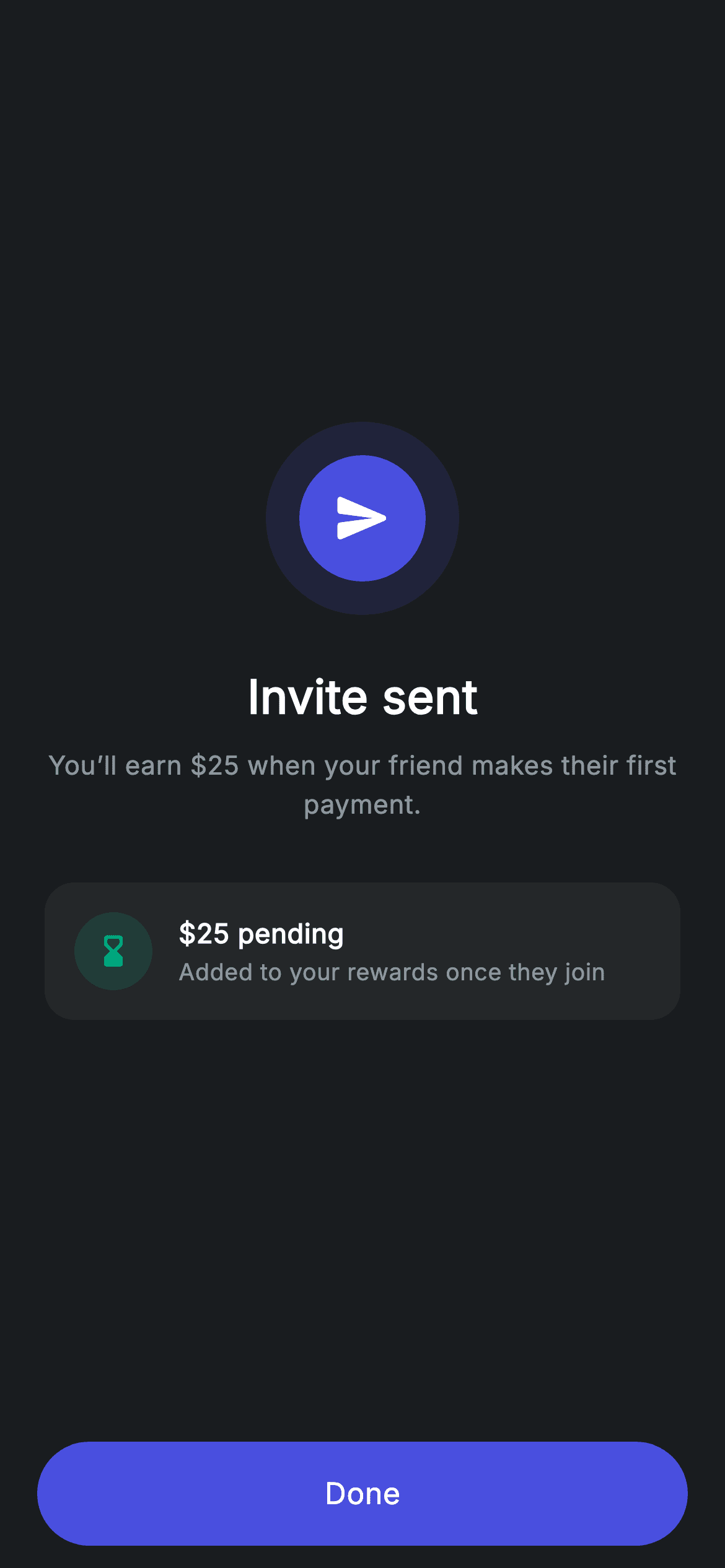
A referral confirmation has an awkward job: the invite is sent, but the reward has not been earned yet. This tutorial builds Nova's invite-sent screen in Flutter, which handles that by splitting the message in two — an indigo send badge and headline confirming what happened, then a separate card carrying an hourglass icon and the words '$25 pending' with the condition spelled out beneath it. Claiming the reward outright would be a lie; this layout promises it honestly instead.
Watch the Flutter UI walkthrough
A short screen recording of Referral Success running, if you'd rather see it before you read the code. The written tutorial below covers everything in it.
Can't see the video? Watch it on YouTube.
What you'll build
- ✓A send-action badge in brand indigo rather than the usual success teal
- ✓A pending-reward card that states the amount and the condition attached to it
- ✓Centred body copy at height 1.5 with a raw-string dollar amount across two lines
- ✓A confirmation layout that separates what happened from what is still owed
Step-by-step build
Create the file
Add a new file at lib/fintech_referral_success/fintech_referral_success_screen.dart in your Flutter project.
Register the bundled fonts
No external packages — this is pure Flutter. It does bundle its design font (Inter), so drop the font file into fonts/ and declare it in pubspec.yaml:
flutter:
  fonts:
    - family: Inter
      fonts:
- asset: fonts/Inter-Regular.ttfBuild it, piece by piece
Here's how the screen goes together. Each block below is a real slice of the code with a plain-English explanation — paste them in order, or grab the whole file from the next section.
Choosing colours that match a half-finished action
import 'package:flutter/material.dart';

/// Referral success — invite shared confirmation (Revolut-inspired design).
///
/// Self-contained per CONVENTIONS.md: pure Flutter only, the exact design font
/// (Inter) is bundled under `fonts/`, the badge is painted (no emoji/network),
/// and the screen forces its own dark theme.
class FintechReferralSuccessScreen extends StatelessWidget {
  const FintechReferralSuccessScreen({super.key, this.onDone});

  final VoidCallback? onDone;

  static const String _font = 'Inter';
  static const Color _bg = Color(0xFF191C1F);
  static const Color _surface = Color(0xFF242729);
  static const Color _brand = Color(0xFF494FDF);
  static const Color _teal = Color(0xFF00A87E);
  static const Color _muted = Color(0xFF8D969E);

  @override
  Widget build(BuildContext context) {
    return Theme(
      data: ThemeData.dark(useMaterial3: true),
      child: Scaffold(
        backgroundColor: _bg,
        body: SafeArea(
          child: Column(
            children: <Widget>[
              Expanded(
                child: Padding(
                  padding: const EdgeInsets.symmetric(horizontal: 24),
                  child: Column(
                    mainAxisAlignment: MainAxisAlignment.center,
                    children: <Widget>[
                      _buildBadge(),
                      const SizedBox(height: 26),
                      const Text(
                        'Invite sent',
                        style: TextStyle(
                          fontFamily: _font,
                          fontSize: 25,
                          fontWeight: FontWeight.w600,
                          letterSpacing: 0.24,
                          color: Colors.white,
                        ),
                      ),
                      const SizedBox(height: 8),
                      const Text(
                        r'You’ll earn $25 when your friend makes their first '
                        'payment.',
                        textAlign: TextAlign.center,
                        style: TextStyle(
                          fontFamily: _font,
                          fontSize: 14,
                          height: 1.5,
                          letterSpacing: 0.24,
                          color: _muted,
                        ),
                      ),
                      const SizedBox(height: 32),
                      _buildPending(),
                    ],
                  ),
                ),
              ),
              _buildButton(),
            ],
          ),
        ),
      ),
    );
  }
This is a `StatelessWidget` with a single `onDone`. Its palette choice is the design decision worth noticing: `_brand` indigo carries the badge and headline because sending an invite is a neutral action, and `_teal` — this app's success colour — is held back for the pending card below. The support line is split across two Dart string literals that Dart concatenates automatically, with the first carrying an `r` prefix so `$25` is a literal rather than an interpolation. Only the first needs it: the raw marker applies per literal, and the second half contains no dollar sign. `height: 1.5` with `textAlign: TextAlign.center` keeps that two-line sentence readable.
The send badge
  Widget _buildBadge() {
    return Container(
      width: 104,
      height: 104,
      decoration: BoxDecoration(
        color: _brand.withValues(alpha: 0.14),
        shape: BoxShape.circle,
      ),
      child: Center(
        child: Container(
          width: 68,
          height: 68,
          decoration: const BoxDecoration(color: _brand, shape: BoxShape.circle),
          child: const Icon(Icons.send_rounded, size: 32, color: Colors.white),
        ),
      ),
    );
  }
The badge is the app's two-circle construction — a 104px outer Container at `_brand.withValues(alpha: 0.14)` with a solid 68px `_brand` circle centred inside — but tuned for this screen. The glyph is `Icons.send_rounded` at 32px rather than a check, because nothing has completed yet; something has departed. Deriving the halo from the same constant as the core means the whole badge restyles from one value, which is what lets the same construction serve as success, pending or error simply by swapping the colour and the icon.
The pending reward card
  Widget _buildPending() {
    return Container(
      padding: const EdgeInsets.all(16),
      decoration: BoxDecoration(
        color: _surface,
        borderRadius: BorderRadius.circular(16),
      ),
      child: Row(
        children: <Widget>[
          Container(
            width: 42,
            height: 42,
            decoration: BoxDecoration(
              color: _teal.withValues(alpha: 0.16),
              shape: BoxShape.circle,
            ),
            child: const Icon(Icons.hourglass_bottom_rounded,
                size: 20, color: _teal),
          ),
          const SizedBox(width: 14),
          const Expanded(
            child: Column(
              crossAxisAlignment: CrossAxisAlignment.start,
              children: <Widget>[
                Text(
                  r'$25 pending',
                  style: TextStyle(
                    fontFamily: _font,
                    fontSize: 14.5,
                    fontWeight: FontWeight.w600,
                    letterSpacing: 0.24,
                    color: Colors.white,
                  ),
                ),
                SizedBox(height: 2),
                Text(
                  'Added to your rewards once they join',
                  style: TextStyle(
                    fontFamily: _font,
                    fontSize: 12.5,
                    letterSpacing: 0.24,
                    color: _muted,
                  ),
                ),
              ],
            ),
          ),
        ],
      ),
    );
  }
This card is what stops the screen overpromising. A 42px circle tinted `_teal.withValues(alpha: 0.16)` holds an `hourglass_bottom_rounded` icon — a waiting glyph, not a check — beside a two-line block: `r'$25 pending'` at 14.5px `w600`, and a 12.5px `_muted` line reading 'Added to your rewards once they join'. Stating both the amount and the condition in the same card is the honest pattern for any conditional reward; showing '$25 earned' here would be wrong, and showing nothing would waste the moment. The text Column sits in an `Expanded` so a longer condition wraps rather than overflowing past the card edge.
The Done button
  Widget _buildButton() {
    return Padding(
      padding: const EdgeInsets.fromLTRB(20, 0, 20, 12),
      child: SizedBox(
        width: double.infinity,
        height: 56,
        child: Material(
          color: _brand,
          borderRadius: BorderRadius.circular(9999),
          child: InkWell(
            borderRadius: BorderRadius.circular(9999),
            onTap: onDone,
            child: const Center(
              child: Text(
                'Done',
                style: TextStyle(
                  fontFamily: _font,
                  fontSize: 16,
                  fontWeight: FontWeight.w500,
                  letterSpacing: 0.24,
                  color: Colors.white,
                ),
              ),
            ),
          ),
        ),
      ),
    );
  }
The button lives outside the `Expanded` in the outer Column, anchoring it to the bottom while the badge and cards centre themselves in the space above. It is the app's standard pill — a 56px `Material` filled `_brand` at `BorderRadius.circular(9999)`, with the `InkWell` repeating the radius so the ripple is clipped to the shape rather than splashing into square corners. Its `onTap` takes `onDone` directly, so a null callback yields an inert button instead of an exception while you wire the flow together.
Full code
The complete, ready-to-paste source. Free to use in your projects — one click copies it all.
import 'package:flutter/material.dart';

/// Referral success — invite shared confirmation (Revolut-inspired design).
///
/// Self-contained per CONVENTIONS.md: pure Flutter only, the exact design font
/// (Inter) is bundled under `fonts/`, the badge is painted (no emoji/network),
/// and the screen forces its own dark theme.
class FintechReferralSuccessScreen extends StatelessWidget {
  const FintechReferralSuccessScreen({super.key, this.onDone});

  final VoidCallback? onDone;

  static const String _font = 'Inter';
  static const Color _bg = Color(0xFF191C1F);
  static const Color _surface = Color(0xFF242729);
  static const Color _brand = Color(0xFF494FDF);
  static const Color _teal = Color(0xFF00A87E);
  static const Color _muted = Color(0xFF8D969E);

  @override
  Widget build(BuildContext context) {
    return Theme(
      data: ThemeData.dark(useMaterial3: true),
      child: Scaffold(
        backgroundColor: _bg,
        body: SafeArea(
          child: Column(
            children: <Widget>[
              Expanded(
                child: Padding(
                  padding: const EdgeInsets.symmetric(horizontal: 24),
                  child: Column(
                    mainAxisAlignment: MainAxisAlignment.center,
                    children: <Widget>[
                      _buildBadge(),
                      const SizedBox(height: 26),
                      const Text(
                        'Invite sent',
                        style: TextStyle(
                          fontFamily: _font,
                          fontSize: 25,
                          fontWeight: FontWeight.w600,
                          letterSpacing: 0.24,
                          color: Colors.white,
                        ),
                      ),
                      const SizedBox(height: 8),
                      const Text(
                        r'You’ll earn $25 when your friend makes their first '
                        'payment.',
                        textAlign: TextAlign.center,
                        style: TextStyle(
                          fontFamily: _font,
                          fontSize: 14,
                          height: 1.5,
                          letterSpacing: 0.24,
                          color: _muted,
                        ),
                      ),
                      const SizedBox(height: 32),
                      _buildPending(),
                    ],
                  ),
                ),
              ),
              _buildButton(),
            ],
          ),
        ),
      ),
    );
  }

  Widget _buildBadge() {
    return Container(
      width: 104,
      height: 104,
      decoration: BoxDecoration(
        color: _brand.withValues(alpha: 0.14),
        shape: BoxShape.circle,
      ),
      child: Center(
        child: Container(
          width: 68,
          height: 68,
          decoration: const BoxDecoration(color: _brand, shape: BoxShape.circle),
          child: const Icon(Icons.send_rounded, size: 32, color: Colors.white),
        ),
      ),
    );
  }

  Widget _buildPending() {
    return Container(
      padding: const EdgeInsets.all(16),
      decoration: BoxDecoration(
        color: _surface,
        borderRadius: BorderRadius.circular(16),
      ),
      child: Row(
        children: <Widget>[
          Container(
            width: 42,
            height: 42,
            decoration: BoxDecoration(
              color: _teal.withValues(alpha: 0.16),
              shape: BoxShape.circle,
            ),
            child: const Icon(Icons.hourglass_bottom_rounded,
                size: 20, color: _teal),
          ),
          const SizedBox(width: 14),
          const Expanded(
            child: Column(
              crossAxisAlignment: CrossAxisAlignment.start,
              children: <Widget>[
                Text(
                  r'$25 pending',
                  style: TextStyle(
                    fontFamily: _font,
                    fontSize: 14.5,
                    fontWeight: FontWeight.w600,
                    letterSpacing: 0.24,
                    color: Colors.white,
                  ),
                ),
                SizedBox(height: 2),
                Text(
                  'Added to your rewards once they join',
                  style: TextStyle(
                    fontFamily: _font,
                    fontSize: 12.5,
                    letterSpacing: 0.24,
                    color: _muted,
                  ),
                ),
              ],
            ),
          ),
        ],
      ),
    );
  }

  Widget _buildButton() {
    return Padding(
      padding: const EdgeInsets.fromLTRB(20, 0, 20, 12),
      child: SizedBox(
        width: double.infinity,
        height: 56,
        child: Material(
          color: _brand,
          borderRadius: BorderRadius.circular(9999),
          child: InkWell(
            borderRadius: BorderRadius.circular(9999),
            onTap: onDone,
            child: const Center(
              child: Text(
                'Done',
                style: TextStyle(
                  fontFamily: _font,
                  fontSize: 16,
                  fontWeight: FontWeight.w500,
                  letterSpacing: 0.24,
                  color: Colors.white,
                ),
              ),
            ),
          ),
        ),
      ),
    );
  }
}
Plus bundled 1 binary asset (fonts/images). The CLI and MCP install those for you automatically.
Two faster ways to add it
Copy-paste works, but you can skip it entirely.
1. FlutterKit CLI
One command drops this screen — and its fonts — straight into your project.
$ flutterkit add fintech-referral-success2. AI agent (MCP)
Connect FlutterKit's MCP server in Claude or Cursor and just ask your agent to install fintech-referral-success — it fetches and writes the files for you.
FAQ
Is this referral screen free for commercial use?
Yes — FlutterKit is free and stays free. Copy the code from this page, install it with the CLI, or pull it through MCP in your AI editor, then use it in a paid app or client project. No sign-up, no licence key, no attribution.
How do I show a different reward amount?
Add the amount as a constructor parameter and interpolate it into the support line and the pending card. Remember that once you interpolate you no longer want the raw-string prefix — write `'\$$amount pending'`, escaping the literal dollar sign while letting the variable expand.
Why is the badge indigo instead of the usual success green?
Because nothing has succeeded yet — an invite has been sent and the reward is still conditional. Reserving the teal for the pending card, where it sits behind an hourglass rather than a check, keeps the screen honest about what has and has not happened.
Does it need any packages or assets?
No. The only import is `package:flutter/material.dart` and both badges are Containers rather than illustrations. The bundled Inter font is the sole asset — declare it in your pubspec's `fonts:` block, or remove the `fontFamily` lines to use the system face.
Which Flutter version does this require?
Flutter 3.22 or newer, because the badge and the reward icon use `Color.withValues(alpha: ...)`. On an older SDK replace those with `withOpacity(...)` and expand the constructor to `const FintechReferralSuccessScreen({Key? key, this.onDone}) : super(key: key);`.


