How to Build a Referral Invite Screen in Flutter (Full Code + Preview)
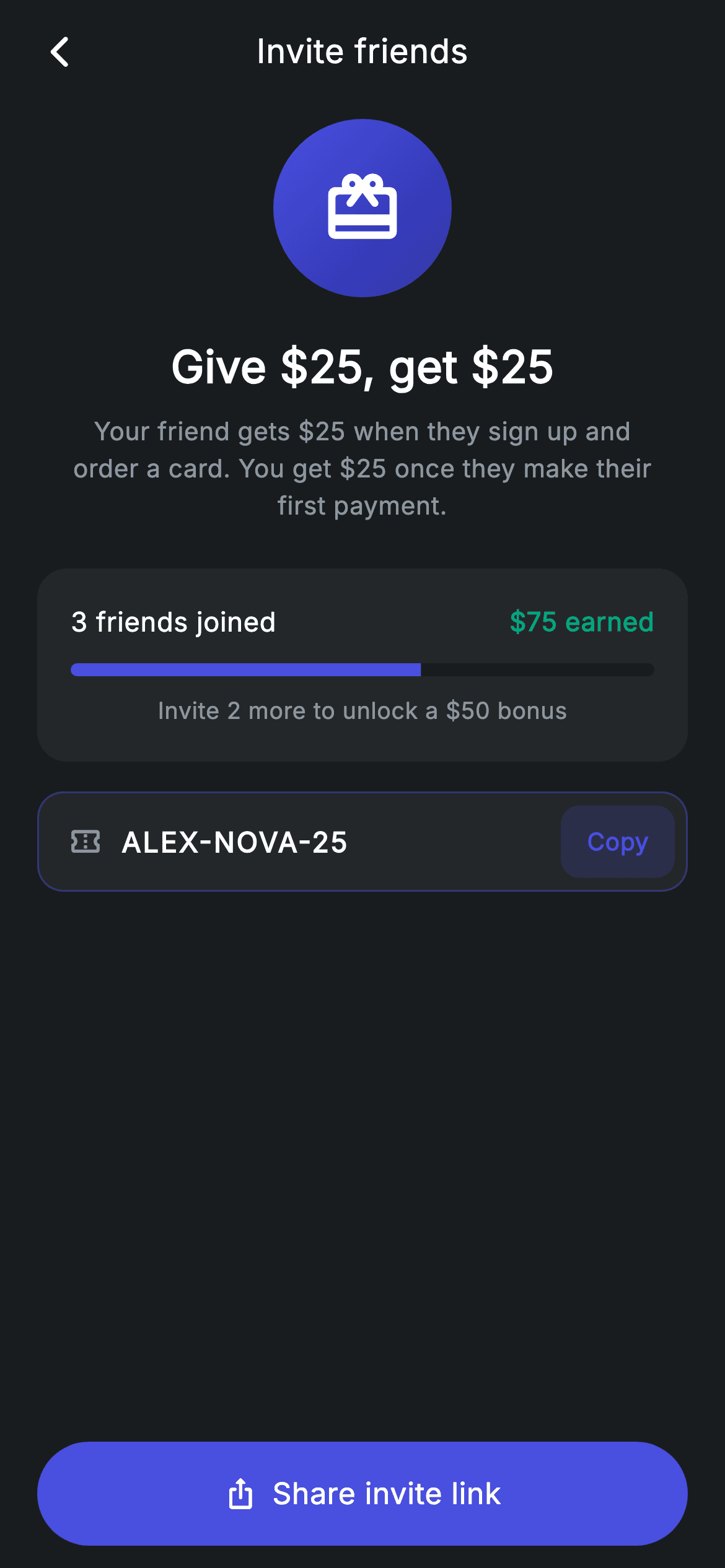
A referral screen has to do three jobs in one scroll: state the offer, prove it's working, and make sharing one tap away. This build does each with a distinct component — a gradient hero circle with the 'Give $25, get $25' promise and the fine print in plain English, a progress card showing friends joined against a bonus threshold, and a code field with an inline Copy chip above a pinned share CTA. Roughly 280 lines of pure Flutter, no packages.
Watch the Flutter UI walkthrough
A short screen recording of Referral running, if you'd rather see it before you read the code. The written tutorial below covers everything in it.
Can't see the video? Watch it on YouTube.
What you'll build
- ✓A 96px gradient circle hero with a centred headline and a width-constrained explainer
- ✓A progress card pairing a stat row with a `LinearProgressIndicator` rounded via `ClipRRect`
- ✓A referral code field with a brand-tinted border and an inline Copy chip that ripples
- ✓A pinned share CTA combining an icon and label inside one `InkWell`
- ✓The `Material` + `InkWell` matched-radius pattern used at three different scales
Step-by-step build
Create the file
Add a new file at lib/fintech_referral/fintech_referral_screen.dart in your Flutter project.
Register the bundled fonts
No external packages — this is pure Flutter. It does bundle its design font (Inter), so drop the font file into fonts/ and declare it in pubspec.yaml:
flutter:
  fonts:
    - family: Inter
      fonts:
- asset: fonts/Inter-Regular.ttfBuild it, piece by piece
Here's how the screen goes together. Each block below is a real slice of the code with a plain-English explanation — paste them in order, or grab the whole file from the next section.
A stateless screen with one constant
class FintechReferralScreen extends StatelessWidget {
  const FintechReferralScreen({super.key, this.onBack, this.onInvite});

  final VoidCallback? onBack;
  final VoidCallback? onInvite;

  static const String _font = 'Inter';
  static const Color _bg = Color(0xFF191C1F);
  static const Color _surface = Color(0xFF242729);
  static const Color _brand = Color(0xFF494FDF);
  static const Color _teal = Color(0xFF00A87E);
  static const Color _muted = Color(0xFF8D969E);

  static const String _code = 'ALEX-NOVA-25';

  @override
  Widget build(BuildContext context) {
    return Theme(
      data: ThemeData.dark(useMaterial3: true),
      child: Scaffold(
        backgroundColor: _bg,
        body: SafeArea(
          child: Column(
            children: <Widget>[
              _buildAppBar(),
              Expanded(
                child: ListView(
                  physics: const BouncingScrollPhysics(),
                  padding: const EdgeInsets.fromLTRB(20, 8, 20, 24),
                  children: <Widget>[
                    _buildHero(),
                    const SizedBox(height: 24),
                    _buildProgress(),
                    const SizedBox(height: 16),
                    _buildCode(),
                  ],
                ),
              ),
              _buildButton(),
            ],
          ),
        ),
      ),
    );
  }
The entire screen holds one piece of data — `_code = 'ALEX-NOVA-25'` — and two callbacks. Everything else is copy, which is appropriate: a referral screen is mostly a pitch. The layout is `Expanded(child: ListView(...))` above a fixed `_buildButton()`, so the share CTA stays pinned while the hero and progress card scroll. That ordering is deliberate; the CTA is the entire point of the screen and should never require scrolling to reach.
The gradient hero
  Widget _buildHero() {
    return Column(
      children: <Widget>[
        Container(
          width: 96,
          height: 96,
          decoration: BoxDecoration(
            gradient: const LinearGradient(
              begin: Alignment.topLeft,
              end: Alignment.bottomRight,
              colors: <Color>[Color(0xFF494FDF), Color(0xFF2D31A6)],
            ),
            shape: BoxShape.circle,
          ),
          child: const Icon(Icons.card_giftcard_rounded,
              size: 44, color: Colors.white),
        ),
        const SizedBox(height: 20),
        const Text(
          r'Give $25, get $25',
          style: TextStyle(
            fontFamily: _font,
            fontSize: 24,
            fontWeight: FontWeight.w600,
            letterSpacing: 0.24,
            color: Colors.white,
          ),
        ),
        const SizedBox(height: 8),
        const Padding(
          padding: EdgeInsets.symmetric(horizontal: 16),
          child: Text(
            'Your friend gets \$25 when they sign up and order a card. '
            'You get \$25 once they make their first payment.',
            textAlign: TextAlign.center,
            style: TextStyle(
              fontFamily: _font,
              fontSize: 13.5,
              height: 1.5,
              letterSpacing: 0.24,
              color: _muted,
            ),
          ),
        ),
      ],
    );
  }
A 96px `Container` with `shape: BoxShape.circle` and a `LinearGradient` running `topLeft` to `bottomRight` from #494FDF to the darker #2D31A6 — note that `gradient` and `shape` coexist happily in a `BoxDecoration`, so you get a gradient-filled circle without a `ClipOval`. The headline states the offer symmetrically ('Give \$25, get \$25'), and the explainer below is constrained by `EdgeInsets.symmetric(horizontal: 16)` with `height: 1.5` and `textAlign: TextAlign.center`. That padding is doing typographic work: it sets a comfortable measure so the two-sentence terms wrap into a tidy block rather than running the full screen width.
The progress card
  Widget _buildProgress() {
    return Container(
      padding: const EdgeInsets.all(18),
      decoration: BoxDecoration(
        color: _surface,
        borderRadius: BorderRadius.circular(16),
      ),
      child: Column(
        children: <Widget>[
          Row(
            mainAxisAlignment: MainAxisAlignment.spaceBetween,
            children: const <Widget>[
              Text(
                '3 friends joined',
                style: TextStyle(
                  fontFamily: _font,
                  fontSize: 14.5,
                  fontWeight: FontWeight.w500,
                  letterSpacing: 0.24,
                  color: Colors.white,
                ),
              ),
              Text(
                r'$75 earned',
                style: TextStyle(
                  fontFamily: _font,
                  fontSize: 14,
                  fontWeight: FontWeight.w600,
                  letterSpacing: 0.24,
                  color: _teal,
                ),
              ),
            ],
          ),
          const SizedBox(height: 12),
          ClipRRect(
            borderRadius: BorderRadius.circular(9999),
            child: const LinearProgressIndicator(
              value: 0.6,
              minHeight: 7,
              backgroundColor: _bg,
              valueColor: AlwaysStoppedAnimation<Color>(_brand),
            ),
          ),
          const SizedBox(height: 10),
          const Text(
            'Invite 2 more to unlock a \$50 bonus',
            style: TextStyle(
              fontFamily: _font,
              fontSize: 12.5,
              letterSpacing: 0.24,
              color: _muted,
            ),
          ),
        ],
      ),
    );
  }
Three stacked elements make this card persuasive. The stat row uses `MainAxisAlignment.spaceBetween` to push '3 friends joined' and a teal '\$75 earned' to opposite edges. The bar is Flutter's `LinearProgressIndicator` at `value: 0.6` and `minHeight: 7`, wrapped in a `ClipRRect(borderRadius: 9999)` — that wrapper is required, because the indicator itself has square ends and no radius property. `backgroundColor: _bg` makes the unfilled track the page colour rather than a grey, so the bar reads as carved into the card, and `AlwaysStoppedAnimation<Color>(_brand)` pins the fill instead of letting it animate. The closing line converts the bar into a call to action: 'Invite 2 more to unlock a \$50 bonus'.
The code field with an inline Copy chip
  Widget _buildCode() {
    return Container(
      height: 54,
      padding: const EdgeInsets.fromLTRB(16, 0, 6, 0),
      decoration: BoxDecoration(
        color: _surface,
        borderRadius: BorderRadius.circular(14),
        border: Border.all(color: _brand.withValues(alpha: 0.4)),
      ),
      child: Row(
        children: <Widget>[
          const Icon(Icons.confirmation_number_outlined,
              size: 18, color: _muted),
          const SizedBox(width: 10),
          const Expanded(
            child: Text(
              _code,
              style: TextStyle(
                fontFamily: _font,
                fontSize: 15,
                fontWeight: FontWeight.w600,
                letterSpacing: 1.0,
                color: Colors.white,
              ),
            ),
          ),
          Material(
            color: _brand.withValues(alpha: 0.18),
            borderRadius: BorderRadius.circular(10),
            child: InkWell(
              borderRadius: BorderRadius.circular(10),
              onTap: () {},
              child: const Padding(
                padding: EdgeInsets.symmetric(horizontal: 14, vertical: 10),
                child: Text(
                  'Copy',
                  style: TextStyle(
                    fontFamily: _font,
                    fontSize: 13,
                    fontWeight: FontWeight.w600,
                    letterSpacing: 0.24,
                    color: _brand,
                  ),
                ),
              ),
            ),
          ),
        ],
      ),
    );
  }
Two details worth stealing. First, the padding is asymmetric — `EdgeInsets.fromLTRB(16, 0, 6, 0)` — because the right side holds a chip that carries its own padding; a symmetric inset would leave the chip floating too far from the edge. Second, the code is styled with `letterSpacing: 1.0`, which is what makes an alphanumeric code scannable character by character rather than reading as a word. The border uses `_brand.withValues(alpha: 0.4)`, a half-strength accent that marks the field as interactive without competing with the CTA below. The Copy chip is the `Material` + `InkWell` pattern at chip scale, both carrying a matching 10px radius so the ripple clips correctly; its `onTap: () {}` is a stub — see the FAQ for wiring the clipboard.
The pinned share CTA
  Widget _buildButton() {
    return Padding(
      padding: const EdgeInsets.fromLTRB(20, 0, 20, 12),
      child: SizedBox(
        width: double.infinity,
        height: 56,
        child: Material(
          color: _brand,
          borderRadius: BorderRadius.circular(9999),
          child: InkWell(
            borderRadius: BorderRadius.circular(9999),
            onTap: onInvite,
            child: Row(
              mainAxisAlignment: MainAxisAlignment.center,
              children: const <Widget>[
                Icon(Icons.ios_share_rounded, size: 18, color: Colors.white),
                SizedBox(width: 8),
                Text(
                  'Share invite link',
                  style: TextStyle(
                    fontFamily: _font,
                    fontSize: 16,
                    fontWeight: FontWeight.w500,
                    letterSpacing: 0.24,
                    color: Colors.white,
                  ),
                ),
              ],
            ),
          ),
        ),
      ),
    );
  }
The same `Material` + `InkWell` pattern at full-button scale, with matched 9999 radii so the ripple is clipped to the pill. Putting a `Row` with `MainAxisAlignment.center` inside the `InkWell` — rather than reaching for a Material button with an `icon:` parameter — gives you exact control over the 18px icon, the 8px gap, and the 16px `w500` label. The `ios_share_rounded` glyph is the platform-neutral share symbol, and pairing it with 'Share invite link' tells the user a system share sheet is coming rather than an in-app step.
Full code
The complete, ready-to-paste source. Free to use in your projects — one click copies it all.
import 'package:flutter/material.dart';

/// Referral — invite friends to earn rewards (Revolut-inspired design system).
///
/// Self-contained per CONVENTIONS.md: pure Flutter only, the exact design font
/// (Inter) is bundled under `fonts/`, no network/emoji images, and the screen
/// forces its own dark theme. A reward hero, progress tracker and copyable code
/// sit above the share CTA.
class FintechReferralScreen extends StatelessWidget {
  const FintechReferralScreen({super.key, this.onBack, this.onInvite});

  final VoidCallback? onBack;
  final VoidCallback? onInvite;

  static const String _font = 'Inter';
  static const Color _bg = Color(0xFF191C1F);
  static const Color _surface = Color(0xFF242729);
  static const Color _brand = Color(0xFF494FDF);
  static const Color _teal = Color(0xFF00A87E);
  static const Color _muted = Color(0xFF8D969E);

  static const String _code = 'ALEX-NOVA-25';

  @override
  Widget build(BuildContext context) {
    return Theme(
      data: ThemeData.dark(useMaterial3: true),
      child: Scaffold(
        backgroundColor: _bg,
        body: SafeArea(
          child: Column(
            children: <Widget>[
              _buildAppBar(),
              Expanded(
                child: ListView(
                  physics: const BouncingScrollPhysics(),
                  padding: const EdgeInsets.fromLTRB(20, 8, 20, 24),
                  children: <Widget>[
                    _buildHero(),
                    const SizedBox(height: 24),
                    _buildProgress(),
                    const SizedBox(height: 16),
                    _buildCode(),
                  ],
                ),
              ),
              _buildButton(),
            ],
          ),
        ),
      ),
    );
  }

  Widget _buildAppBar() {
    return Padding(
      padding: const EdgeInsets.fromLTRB(8, 4, 8, 4),
      child: Row(
        children: <Widget>[
          IconButton(
            onPressed: onBack,
            icon: const Icon(Icons.arrow_back_ios_new_rounded,
                size: 20, color: Colors.white),
          ),
          const Expanded(
            child: Text(
              'Invite friends',
              textAlign: TextAlign.center,
              style: TextStyle(
                fontFamily: _font,
                fontSize: 18,
                fontWeight: FontWeight.w500,
                letterSpacing: 0.24,
                color: Colors.white,
              ),
            ),
          ),
          const SizedBox(width: 48),
        ],
      ),
    );
  }

  Widget _buildHero() {
    return Column(
      children: <Widget>[
        Container(
          width: 96,
          height: 96,
          decoration: BoxDecoration(
            gradient: const LinearGradient(
              begin: Alignment.topLeft,
              end: Alignment.bottomRight,
              colors: <Color>[Color(0xFF494FDF), Color(0xFF2D31A6)],
            ),
            shape: BoxShape.circle,
          ),
          child: const Icon(Icons.card_giftcard_rounded,
              size: 44, color: Colors.white),
        ),
        const SizedBox(height: 20),
        const Text(
          r'Give $25, get $25',
          style: TextStyle(
            fontFamily: _font,
            fontSize: 24,
            fontWeight: FontWeight.w600,
            letterSpacing: 0.24,
            color: Colors.white,
          ),
        ),
        const SizedBox(height: 8),
        const Padding(
          padding: EdgeInsets.symmetric(horizontal: 16),
          child: Text(
            'Your friend gets \$25 when they sign up and order a card. '
            'You get \$25 once they make their first payment.',
            textAlign: TextAlign.center,
            style: TextStyle(
              fontFamily: _font,
              fontSize: 13.5,
              height: 1.5,
              letterSpacing: 0.24,
              color: _muted,
            ),
          ),
        ),
      ],
    );
  }

  Widget _buildProgress() {
    return Container(
      padding: const EdgeInsets.all(18),
      decoration: BoxDecoration(
        color: _surface,
        borderRadius: BorderRadius.circular(16),
      ),
      child: Column(
        children: <Widget>[
          Row(
            mainAxisAlignment: MainAxisAlignment.spaceBetween,
            children: const <Widget>[
              Text(
                '3 friends joined',
                style: TextStyle(
                  fontFamily: _font,
                  fontSize: 14.5,
                  fontWeight: FontWeight.w500,
                  letterSpacing: 0.24,
                  color: Colors.white,
                ),
              ),
              Text(
                r'$75 earned',
                style: TextStyle(
                  fontFamily: _font,
                  fontSize: 14,
                  fontWeight: FontWeight.w600,
                  letterSpacing: 0.24,
                  color: _teal,
                ),
              ),
            ],
          ),
          const SizedBox(height: 12),
          ClipRRect(
            borderRadius: BorderRadius.circular(9999),
            child: const LinearProgressIndicator(
              value: 0.6,
              minHeight: 7,
              backgroundColor: _bg,
              valueColor: AlwaysStoppedAnimation<Color>(_brand),
            ),
          ),
          const SizedBox(height: 10),
          const Text(
            'Invite 2 more to unlock a \$50 bonus',
            style: TextStyle(
              fontFamily: _font,
              fontSize: 12.5,
              letterSpacing: 0.24,
              color: _muted,
            ),
          ),
        ],
      ),
    );
  }

  Widget _buildCode() {
    return Container(
      height: 54,
      padding: const EdgeInsets.fromLTRB(16, 0, 6, 0),
      decoration: BoxDecoration(
        color: _surface,
        borderRadius: BorderRadius.circular(14),
        border: Border.all(color: _brand.withValues(alpha: 0.4)),
      ),
      child: Row(
        children: <Widget>[
          const Icon(Icons.confirmation_number_outlined,
              size: 18, color: _muted),
          const SizedBox(width: 10),
          const Expanded(
            child: Text(
              _code,
              style: TextStyle(
                fontFamily: _font,
                fontSize: 15,
                fontWeight: FontWeight.w600,
                letterSpacing: 1.0,
                color: Colors.white,
              ),
            ),
          ),
          Material(
            color: _brand.withValues(alpha: 0.18),
            borderRadius: BorderRadius.circular(10),
            child: InkWell(
              borderRadius: BorderRadius.circular(10),
              onTap: () {},
              child: const Padding(
                padding: EdgeInsets.symmetric(horizontal: 14, vertical: 10),
                child: Text(
                  'Copy',
                  style: TextStyle(
                    fontFamily: _font,
                    fontSize: 13,
                    fontWeight: FontWeight.w600,
                    letterSpacing: 0.24,
                    color: _brand,
                  ),
                ),
              ),
            ),
          ),
        ],
      ),
    );
  }

  Widget _buildButton() {
    return Padding(
      padding: const EdgeInsets.fromLTRB(20, 0, 20, 12),
      child: SizedBox(
        width: double.infinity,
        height: 56,
        child: Material(
          color: _brand,
          borderRadius: BorderRadius.circular(9999),
          child: InkWell(
            borderRadius: BorderRadius.circular(9999),
            onTap: onInvite,
            child: Row(
              mainAxisAlignment: MainAxisAlignment.center,
              children: const <Widget>[
                Icon(Icons.ios_share_rounded, size: 18, color: Colors.white),
                SizedBox(width: 8),
                Text(
                  'Share invite link',
                  style: TextStyle(
                    fontFamily: _font,
                    fontSize: 16,
                    fontWeight: FontWeight.w500,
                    letterSpacing: 0.24,
                    color: Colors.white,
                  ),
                ),
              ],
            ),
          ),
        ),
      ),
    );
  }
}
Plus bundled 1 binary asset (fonts/images). The CLI and MCP install those for you automatically.
Two faster ways to add it
Copy-paste works, but you can skip it entirely.
1. FlutterKit CLI
One command drops this screen — and its fonts — straight into your project.
$ flutterkit add fintech-referral2. AI agent (MCP)
Connect FlutterKit's MCP server in Claude or Cursor and just ask your agent to install fintech-referral — it fetches and writes the files for you.
FAQ
Is this referral screen free to use?
Yes. The full Dart source on this page is free for personal and commercial apps. Copy it from the code block, install it with the FlutterKit CLI (flutterkit add fintech-referral), or add it via an AI agent over MCP.
Does it need any packages?
No — it's pure Flutter on material.dart. The only asset to register in pubspec.yaml is the bundled Inter font family, which the CLI and MCP install for you.
How do I make the Copy button actually copy?
Import 'package:flutter/services.dart' and replace the empty onTap with Clipboard.setData(const ClipboardData(text: _code)), then show a SnackBar or brief confirmation. That's one import and two lines — Clipboard is part of Flutter, so no package is needed.
How do I open a real share sheet?
The onInvite callback is the hook. Wire it to the share_plus package (Share.share('Join Nova with my code $_code …')) or to your own deep-link builder. Keeping it as a callback means the screen has no platform dependency of its own.
Which Flutter version does it target?
It uses Color.withValues(alpha:) and Material 3, so it targets Flutter 3.27+. On an older SDK, replace the two withValues(alpha: x) calls — on the code field's border and the Copy chip — with withOpacity(x), and it compiles back to Flutter 3.10.


