How to Build a Premium Plan Detail Page in Flutter (Full Code + Preview)
A paid-plan page has to sell before it asks. This tutorial builds one in Flutter: a gradient hero holding the plan name, positioning line and price, then benefits grouped under Everyday / Travel / Lifestyle headings, a trial reassurance note, and a pinned 'Start free trial' button. The part worth studying is `_buildBenefits`, which turns a flat list of `[group, benefit]` pairs into grouped sections by tracking the last group seen — no nested data structure and no `groupBy` helper required.
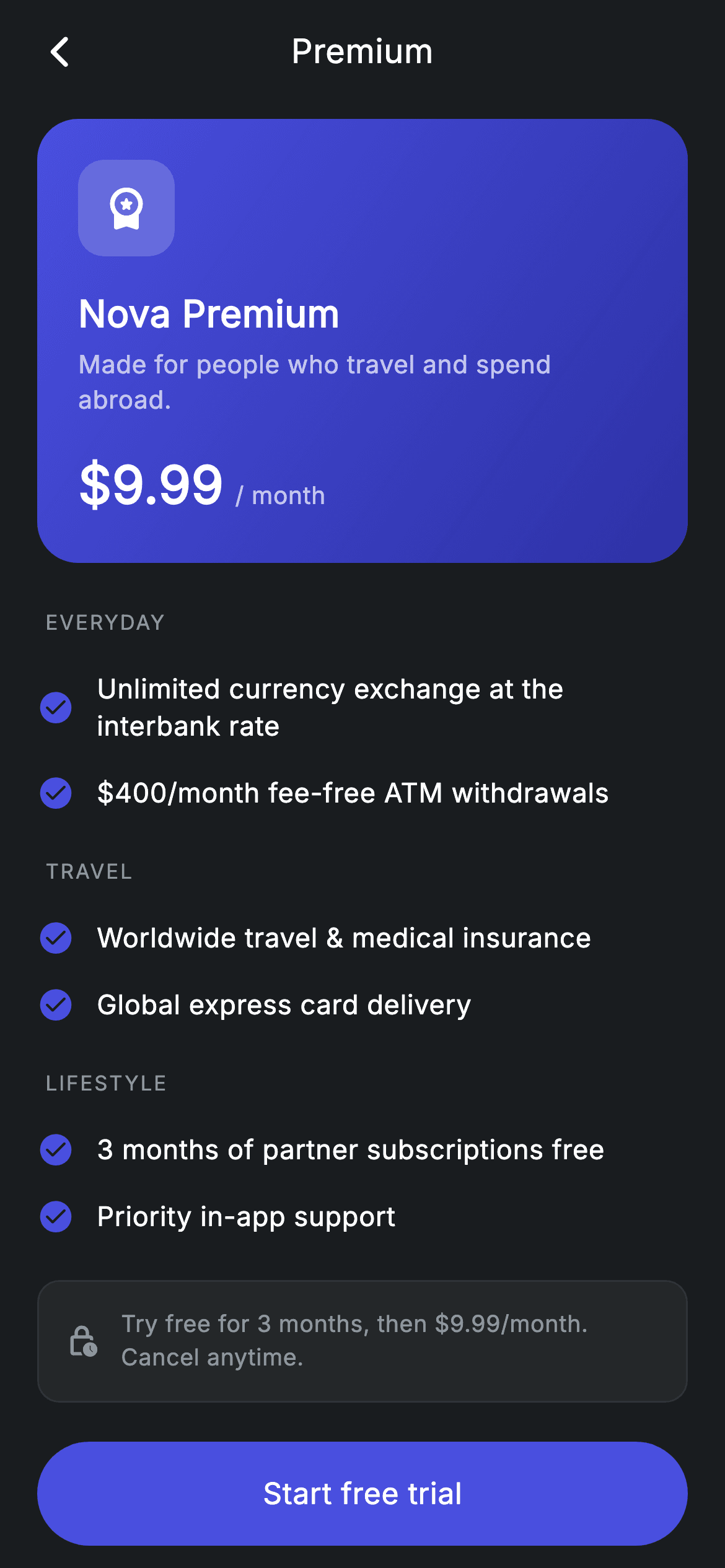
Watch the Flutter UI walkthrough
A short screen recording of Plan Detail running, if you'd rather see it before you read the code. The written tutorial below covers everything in it.
Can't see the video? Watch it on YouTube.
What you'll build
- ✓A gradient plan hero with a frosted icon tile and a baseline-aligned price
- ✓Benefits grouped into labelled sections from a flat `List<List<String>>`
- ✓A run-length grouping loop that inserts a heading only when the group changes
- ✓Correct baseline alignment so '$9.99' and '/ month' sit on the same text baseline
- ✓An outlined trial-terms note that states the price again before the CTA
- ✓A pinned upgrade button that never scrolls out of reach
Step-by-step build
Create the file
Add a new file at lib/fintech_plan_detail/fintech_plan_detail_screen.dart in your Flutter project.
Register the bundled fonts
No external packages — this is pure Flutter. It does bundle its design font (Inter), so drop the font file into fonts/ and declare it in pubspec.yaml:
flutter:
  fonts:
    - family: Inter
      fonts:
- asset: fonts/Inter-Regular.ttfBuild it, piece by piece
Here's how the screen goes together. Each block below is a real slice of the code with a plain-English explanation — paste them in order, or grab the whole file from the next section.
Benefits as flat [group, text] pairs
class FintechPlanDetailScreen extends StatelessWidget {
  const FintechPlanDetailScreen({super.key, this.onBack, this.onUpgrade});

  final VoidCallback? onBack;
  final VoidCallback? onUpgrade;

  static const String _font = 'Inter';
  static const Color _bg = Color(0xFF191C1F);
  static const Color _surface = Color(0xFF242729);
  static const Color _brand = Color(0xFF494FDF);
  static const Color _muted = Color(0xFF8D969E);
  static const Color _hairline = Color(0xFF2E3235);

  static const List<List<String>> _groups = <List<String>>[
    <String>['Everyday', 'Unlimited currency exchange at the interbank rate'],
    <String>['Everyday', r'$400/month fee-free ATM withdrawals'],
    <String>['Travel', 'Worldwide travel & medical insurance'],
    <String>['Travel', 'Global express card delivery'],
    <String>['Lifestyle', '3 months of partner subscriptions free'],
    <String>['Lifestyle', 'Priority in-app support'],
  ];
`_groups` is a `const List<List<String>>` where every entry is exactly two strings: the section it belongs to and the benefit itself. That flat shape is deliberate — it stays `const`, it's trivial to reorder, and adding a benefit means adding one line rather than finding the right nested list. The ordering *is* the grouping: 'Everyday' entries come first, then 'Travel', then 'Lifestyle'. Note `r'$400/month fee-free ATM withdrawals'` uses a raw string so the `$4` isn't parsed as Dart interpolation.
Hero, benefits, trial note, CTA
  @override
  Widget build(BuildContext context) {
    return Theme(
      data: ThemeData.dark(useMaterial3: true),
      child: Scaffold(
        backgroundColor: _bg,
        body: SafeArea(
          child: Column(
            children: <Widget>[
              _buildAppBar(),
              Expanded(
                child: ListView(
                  physics: const BouncingScrollPhysics(),
                  padding: const EdgeInsets.fromLTRB(20, 8, 20, 24),
                  children: <Widget>[
                    _buildHero(),
                    const SizedBox(height: 24),
                    _buildBenefits(),
                    const SizedBox(height: 16),
                    _buildTrial(),
                  ],
                ),
              ),
              _buildButton(),
            ],
          ),
        ),
      ),
    );
  }
The screen is a `StatelessWidget` — nothing here changes at runtime — wrapped in `Theme(data: ThemeData.dark(useMaterial3: true))` so it renders standalone regardless of the host app's theme. The `Column` places the app bar and the upgrade button outside the scroll area, with an `Expanded` `ListView` between them holding the hero, benefits and trial note. Keeping the CTA out of the `ListView` is what guarantees 'Start free trial' is always on screen, however long the benefits list grows.
The gradient plan hero
  Widget _buildHero() {
    return Container(
      padding: const EdgeInsets.all(22),
      decoration: BoxDecoration(
        gradient: const LinearGradient(
          begin: Alignment.topLeft,
          end: Alignment.bottomRight,
          colors: <Color>[Color(0xFF494FDF), Color(0xFF2D31A6)],
        ),
        borderRadius: BorderRadius.circular(22),
      ),
      child: Column(
        crossAxisAlignment: CrossAxisAlignment.start,
        children: <Widget>[
          Container(
            width: 52,
            height: 52,
            decoration: BoxDecoration(
              color: Colors.white.withValues(alpha: 0.18),
              borderRadius: BorderRadius.circular(14),
            ),
            child: const Icon(Icons.workspace_premium_rounded,
                size: 26, color: Colors.white),
          ),
          const SizedBox(height: 16),
          const Text(
            'Nova Premium',
            style: TextStyle(
              fontFamily: _font,
              fontSize: 20,
              fontWeight: FontWeight.w600,
              letterSpacing: 0.24,
              color: Colors.white,
            ),
          ),
          const SizedBox(height: 4),
          const Text(
            'Made for people who travel and spend abroad.',
            style: TextStyle(
              fontFamily: _font,
              fontSize: 13.5,
              height: 1.4,
              letterSpacing: 0.24,
              color: Colors.white70,
            ),
          ),
          const SizedBox(height: 16),
          Row(
            crossAxisAlignment: CrossAxisAlignment.baseline,
            textBaseline: TextBaseline.alphabetic,
            children: const <Widget>[
              Text(
                r'$9.99',
                style: TextStyle(
                  fontFamily: _font,
                  fontSize: 28,
                  fontWeight: FontWeight.w700,
                  letterSpacing: 0.24,
                  color: Colors.white,
                ),
              ),
              SizedBox(width: 6),
              Text(
                '/ month',
                style: TextStyle(
                  fontFamily: _font,
                  fontSize: 13,
                  letterSpacing: 0.24,
                  color: Colors.white70,
                ),
              ),
            ],
          ),
        ],
      ),
    );
  }
A 22px-radius `Container` filled with a `topLeft`→`bottomRight` `LinearGradient` from #494FDF to #2D31A6 — one hue deepening into itself, which reads as premium rather than as two competing colours. The 52px icon tile is `Colors.white.withValues(alpha: 0.18)`, a translucent white rather than a solid, so the gradient shows through and the tile feels part of the card. The price `Row` sets `crossAxisAlignment: CrossAxisAlignment.baseline` *and* `textBaseline: TextBaseline.alphabetic` — you need both, since Flutter throws if you ask for baseline alignment without naming the baseline. That's what puts the 28px '$9.99' and the 13px '/ month' on the same line rather than centring the small text against the big one.
Grouping benefits with a run-length loop
  Widget _buildBenefits() {
    String? lastGroup;
    final List<Widget> children = <Widget>[];
    for (final List<String> g in _groups) {
      if (g[0] != lastGroup) {
        lastGroup = g[0];
        children.add(Padding(
          padding: EdgeInsets.fromLTRB(4, children.isEmpty ? 0 : 16, 4, 10),
          child: Text(
            g[0].toUpperCase(),
            style: const TextStyle(
              fontFamily: _font,
              fontSize: 11,
              fontWeight: FontWeight.w500,
              letterSpacing: 1.0,
              color: _muted,
            ),
          ),
        ));
      }
      children.add(Padding(
        padding: const EdgeInsets.symmetric(vertical: 8),
        child: Row(
          children: <Widget>[
            const Icon(Icons.check_circle_rounded, size: 20, color: _brand),
            const SizedBox(width: 12),
            Expanded(
              child: Text(
                g[1],
                style: const TextStyle(
                  fontFamily: _font,
                  fontSize: 14.5,
                  height: 1.35,
                  letterSpacing: 0.24,
                  color: Colors.white,
                ),
              ),
            ),
          ],
        ),
      ));
    }
    return Column(crossAxisAlignment: CrossAxisAlignment.start, children: children);
  }
This builder converts the flat pair list into sections without restructuring the data. It keeps a `String? lastGroup`, and on each iteration compares `g[0]` against it — when they differ, it appends an uppercase 11px heading with `letterSpacing: 1.0` and updates `lastGroup`. The neat touch is `children.isEmpty ? 0 : 16` in the heading's top padding: the very first heading gets no top gap (the hero already provides it), while every later heading gets 16px of separation. Then each benefit is a `Row` with a brand `check_circle_rounded` and an `Expanded` `Text` at `height: 1.35`, so a long benefit wraps under itself rather than under the tick.
The trial note and upgrade button
  Widget _buildTrial() {
    return Container(
      padding: const EdgeInsets.all(14),
      decoration: BoxDecoration(
        color: _surface,
        borderRadius: BorderRadius.circular(12),
        border: Border.all(color: _hairline),
      ),
      child: Row(
        children: const <Widget>[
          Icon(Icons.lock_clock_outlined, size: 18, color: _muted),
          SizedBox(width: 12),
          Expanded(
            child: Text(
              'Try free for 3 months, then \$9.99/month. Cancel anytime.',
              style: TextStyle(
                fontFamily: _font,
                fontSize: 12.5,
                height: 1.4,
                letterSpacing: 0.24,
                color: _muted,
              ),
            ),
          ),
        ],
      ),
    );
  }

  Widget _buildButton() {
    return Padding(
      padding: const EdgeInsets.fromLTRB(20, 0, 20, 12),
      child: SizedBox(
        width: double.infinity,
        height: 56,
        child: Material(
          color: _brand,
          borderRadius: BorderRadius.circular(9999),
          child: InkWell(
            borderRadius: BorderRadius.circular(9999),
            onTap: onUpgrade,
            child: const Center(
              child: Text(
                'Start free trial',
                style: TextStyle(
                  fontFamily: _font,
                  fontSize: 16,
                  fontWeight: FontWeight.w500,
                  letterSpacing: 0.24,
                  color: Colors.white,
                ),
              ),
            ),
          ),
        ),
      ),
    );
  }
The trial block is the only *outlined* container on the page — `_surface` fill plus a `_hairline` border — which visually separates terms from benefits without adding colour. Its whole content is muted grey including the icon, because this is fine print that should be findable, not attention-grabbing; restating '$9.99/month' here is what makes the free trial honest. The button is the `Material` + `InkWell` pair sharing `BorderRadius.circular(9999)`: `Material` paints the brand pill, and the identical radius on `InkWell` clips the tap ripple to the pill instead of letting it bleed into a rectangle.
Full code
The complete, ready-to-paste source. Free to use in your projects — one click copies it all.
import 'package:flutter/material.dart';

/// Plan detail — a single plan's benefits (Revolut-inspired design system).
///
/// Self-contained per CONVENTIONS.md: pure Flutter only, the exact design font
/// (Inter) is bundled under `fonts/`, no network/emoji images, and the screen
/// forces its own dark theme. A plan hero, grouped benefits and a trial note
/// sit above the upgrade CTA.
class FintechPlanDetailScreen extends StatelessWidget {
  const FintechPlanDetailScreen({super.key, this.onBack, this.onUpgrade});

  final VoidCallback? onBack;
  final VoidCallback? onUpgrade;

  static const String _font = 'Inter';
  static const Color _bg = Color(0xFF191C1F);
  static const Color _surface = Color(0xFF242729);
  static const Color _brand = Color(0xFF494FDF);
  static const Color _muted = Color(0xFF8D969E);
  static const Color _hairline = Color(0xFF2E3235);

  static const List<List<String>> _groups = <List<String>>[
    <String>['Everyday', 'Unlimited currency exchange at the interbank rate'],
    <String>['Everyday', r'$400/month fee-free ATM withdrawals'],
    <String>['Travel', 'Worldwide travel & medical insurance'],
    <String>['Travel', 'Global express card delivery'],
    <String>['Lifestyle', '3 months of partner subscriptions free'],
    <String>['Lifestyle', 'Priority in-app support'],
  ];

  @override
  Widget build(BuildContext context) {
    return Theme(
      data: ThemeData.dark(useMaterial3: true),
      child: Scaffold(
        backgroundColor: _bg,
        body: SafeArea(
          child: Column(
            children: <Widget>[
              _buildAppBar(),
              Expanded(
                child: ListView(
                  physics: const BouncingScrollPhysics(),
                  padding: const EdgeInsets.fromLTRB(20, 8, 20, 24),
                  children: <Widget>[
                    _buildHero(),
                    const SizedBox(height: 24),
                    _buildBenefits(),
                    const SizedBox(height: 16),
                    _buildTrial(),
                  ],
                ),
              ),
              _buildButton(),
            ],
          ),
        ),
      ),
    );
  }

  Widget _buildAppBar() {
    return Padding(
      padding: const EdgeInsets.fromLTRB(8, 4, 8, 4),
      child: Row(
        children: <Widget>[
          IconButton(
            onPressed: onBack,
            icon: const Icon(Icons.arrow_back_ios_new_rounded,
                size: 20, color: Colors.white),
          ),
          const Expanded(
            child: Text(
              'Premium',
              textAlign: TextAlign.center,
              style: TextStyle(
                fontFamily: _font,
                fontSize: 18,
                fontWeight: FontWeight.w500,
                letterSpacing: 0.24,
                color: Colors.white,
              ),
            ),
          ),
          const SizedBox(width: 48),
        ],
      ),
    );
  }

  Widget _buildHero() {
    return Container(
      padding: const EdgeInsets.all(22),
      decoration: BoxDecoration(
        gradient: const LinearGradient(
          begin: Alignment.topLeft,
          end: Alignment.bottomRight,
          colors: <Color>[Color(0xFF494FDF), Color(0xFF2D31A6)],
        ),
        borderRadius: BorderRadius.circular(22),
      ),
      child: Column(
        crossAxisAlignment: CrossAxisAlignment.start,
        children: <Widget>[
          Container(
            width: 52,
            height: 52,
            decoration: BoxDecoration(
              color: Colors.white.withValues(alpha: 0.18),
              borderRadius: BorderRadius.circular(14),
            ),
            child: const Icon(Icons.workspace_premium_rounded,
                size: 26, color: Colors.white),
          ),
          const SizedBox(height: 16),
          const Text(
            'Nova Premium',
            style: TextStyle(
              fontFamily: _font,
              fontSize: 20,
              fontWeight: FontWeight.w600,
              letterSpacing: 0.24,
              color: Colors.white,
            ),
          ),
          const SizedBox(height: 4),
          const Text(
            'Made for people who travel and spend abroad.',
            style: TextStyle(
              fontFamily: _font,
              fontSize: 13.5,
              height: 1.4,
              letterSpacing: 0.24,
              color: Colors.white70,
            ),
          ),
          const SizedBox(height: 16),
          Row(
            crossAxisAlignment: CrossAxisAlignment.baseline,
            textBaseline: TextBaseline.alphabetic,
            children: const <Widget>[
              Text(
                r'$9.99',
                style: TextStyle(
                  fontFamily: _font,
                  fontSize: 28,
                  fontWeight: FontWeight.w700,
                  letterSpacing: 0.24,
                  color: Colors.white,
                ),
              ),
              SizedBox(width: 6),
              Text(
                '/ month',
                style: TextStyle(
                  fontFamily: _font,
                  fontSize: 13,
                  letterSpacing: 0.24,
                  color: Colors.white70,
                ),
              ),
            ],
          ),
        ],
      ),
    );
  }

  Widget _buildBenefits() {
    String? lastGroup;
    final List<Widget> children = <Widget>[];
    for (final List<String> g in _groups) {
      if (g[0] != lastGroup) {
        lastGroup = g[0];
        children.add(Padding(
          padding: EdgeInsets.fromLTRB(4, children.isEmpty ? 0 : 16, 4, 10),
          child: Text(
            g[0].toUpperCase(),
            style: const TextStyle(
              fontFamily: _font,
              fontSize: 11,
              fontWeight: FontWeight.w500,
              letterSpacing: 1.0,
              color: _muted,
            ),
          ),
        ));
      }
      children.add(Padding(
        padding: const EdgeInsets.symmetric(vertical: 8),
        child: Row(
          children: <Widget>[
            const Icon(Icons.check_circle_rounded, size: 20, color: _brand),
            const SizedBox(width: 12),
            Expanded(
              child: Text(
                g[1],
                style: const TextStyle(
                  fontFamily: _font,
                  fontSize: 14.5,
                  height: 1.35,
                  letterSpacing: 0.24,
                  color: Colors.white,
                ),
              ),
            ),
          ],
        ),
      ));
    }
    return Column(crossAxisAlignment: CrossAxisAlignment.start, children: children);
  }

  Widget _buildTrial() {
    return Container(
      padding: const EdgeInsets.all(14),
      decoration: BoxDecoration(
        color: _surface,
        borderRadius: BorderRadius.circular(12),
        border: Border.all(color: _hairline),
      ),
      child: Row(
        children: const <Widget>[
          Icon(Icons.lock_clock_outlined, size: 18, color: _muted),
          SizedBox(width: 12),
          Expanded(
            child: Text(
              'Try free for 3 months, then \$9.99/month. Cancel anytime.',
              style: TextStyle(
                fontFamily: _font,
                fontSize: 12.5,
                height: 1.4,
                letterSpacing: 0.24,
                color: _muted,
              ),
            ),
          ),
        ],
      ),
    );
  }

  Widget _buildButton() {
    return Padding(
      padding: const EdgeInsets.fromLTRB(20, 0, 20, 12),
      child: SizedBox(
        width: double.infinity,
        height: 56,
        child: Material(
          color: _brand,
          borderRadius: BorderRadius.circular(9999),
          child: InkWell(
            borderRadius: BorderRadius.circular(9999),
            onTap: onUpgrade,
            child: const Center(
              child: Text(
                'Start free trial',
                style: TextStyle(
                  fontFamily: _font,
                  fontSize: 16,
                  fontWeight: FontWeight.w500,
                  letterSpacing: 0.24,
                  color: Colors.white,
                ),
              ),
            ),
          ),
        ),
      ),
    );
  }
}
Plus bundled 1 binary asset (fonts/images). The CLI and MCP install those for you automatically.
Two faster ways to add it
Copy-paste works, but you can skip it entirely.
1. FlutterKit CLI
One command drops this screen — and its fonts — straight into your project.
$ flutterkit add fintech-plan-detail2. AI agent (MCP)
Connect FlutterKit's MCP server in Claude or Cursor and just ask your agent to install fintech-plan-detail — it fetches and writes the files for you.
FAQ
Is this plan detail screen free to use?
Yes. The full Dart source on this page is free for personal and commercial apps. Copy it from the code block, install it with the FlutterKit CLI (flutterkit add fintech-plan-detail), or add it via an AI agent over MCP.
How do I add a new benefit group?
Add entries to _groups with a new first element, keeping same-group rows adjacent — for example ['Security', 'Virtual cards for every subscription']. _buildBenefits inserts the heading automatically the first time it sees a new group name, so no other code changes.
Why does the price row need textBaseline set?
CrossAxisAlignment.baseline tells Flutter to align children on a text baseline, but it can't guess which one — asking for baseline alignment without also setting textBaseline throws an assertion in debug builds. TextBaseline.alphabetic is correct for Latin scripts.
Does it need any packages?
No — it's pure Flutter on the material library, with no third-party dependencies. The only asset is the bundled Inter font family, which you register in pubspec.yaml (the CLI and MCP handle that for you).
Which Flutter version does it target?
It uses Color.withValues(alpha:), super parameters and Material 3, so it targets Flutter 3.27+ (Dart 3). On an older SDK, replace the single withValues(alpha: 0.18) call with withOpacity(0.18) and it compiles back to Flutter 3.10.


