How to Build a Subscription Plan Checkout Screen in Flutter (Full Code + Preview)
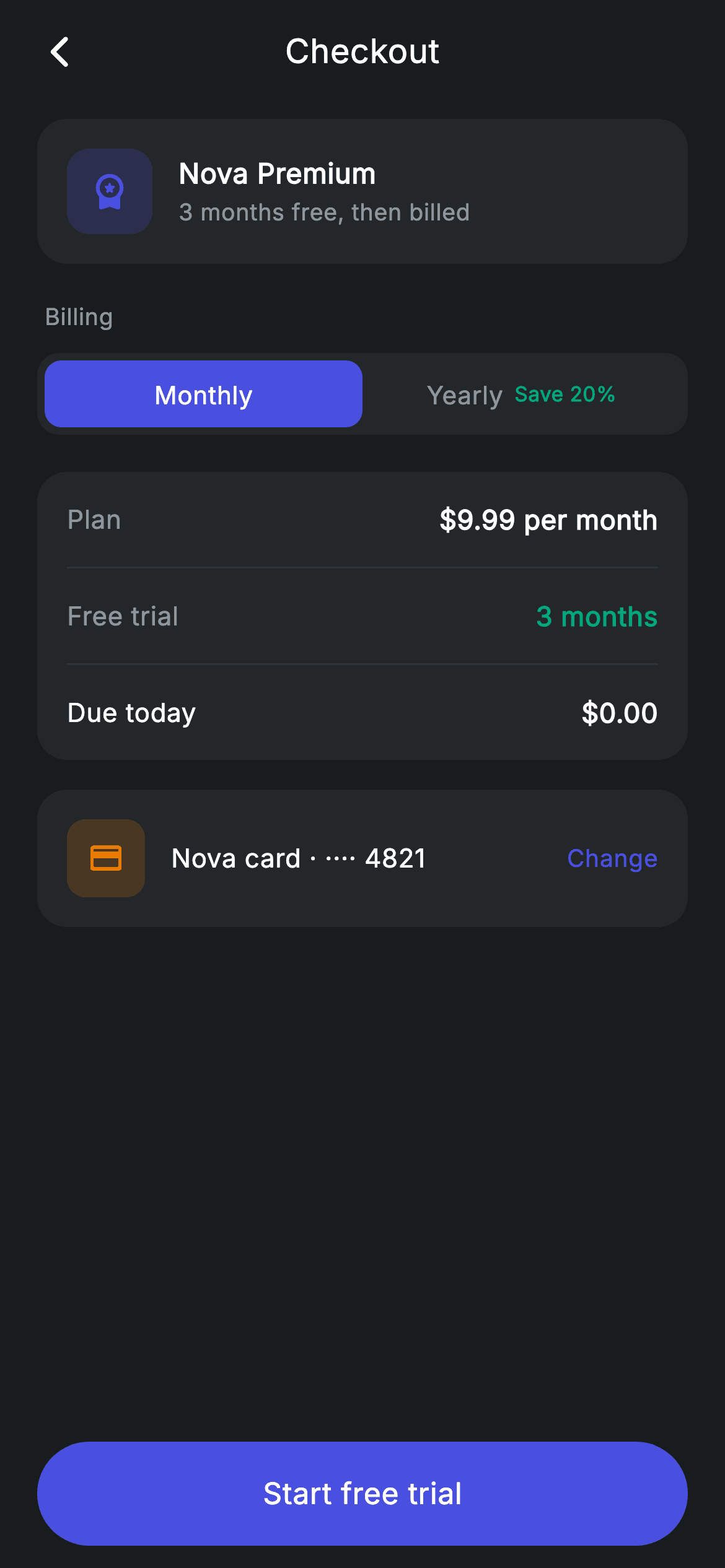
Subscription checkouts live or die on one question: what am I actually charged today? This tutorial builds Nova's plan checkout in Flutter — a segmented Monthly/Yearly control with a Save 20% badge that inverts when selected, a breakdown whose Plan line rewrites itself from two getters as you switch billing, a Due today row reading $0.00 because of the trial, and a payment-method row with a Change affordance. One int of state drives the entire screen.
Watch the Flutter UI walkthrough
A short screen recording of Plan Checkout running, if you'd rather see it before you read the code. The written tutorial below covers everything in it.
Can't see the video? Watch it on YouTube.
What you'll build
- ✓A segmented billing toggle built from a padded container and two Expanded segments
- ✓An inline savings badge whose colour inverts when its segment becomes active
- ✓Price and period getters so the breakdown can never disagree with the toggle
- ✓A Due today line that stays honest during a free trial, plus a payment-method row
Step-by-step build
Create the file
Add a new file at lib/fintech_plan_checkout/fintech_plan_checkout_screen.dart in your Flutter project.
Register the bundled fonts
No external packages — this is pure Flutter. It does bundle its design font (Inter), so drop the font file into fonts/ and declare it in pubspec.yaml:
flutter:
  fonts:
    - family: Inter
      fonts:
- asset: fonts/Inter-Regular.ttfBuild it, piece by piece
Here's how the screen goes together. Each block below is a real slice of the code with a plain-English explanation — paste them in order, or grab the whole file from the next section.
One int, two derived strings
import 'package:flutter/material.dart';

/// Plan checkout — confirm a plan upgrade (Revolut-inspired design system).
///
/// Self-contained per CONVENTIONS.md: pure Flutter only, the exact design font
/// (Inter) is bundled under `fonts/`, no network/emoji images, and the screen
/// forces its own dark theme. A monthly/yearly billing toggle updates the
/// breakdown live; a payment-method row precedes confirm.
class FintechPlanCheckoutScreen extends StatefulWidget {
  const FintechPlanCheckoutScreen({super.key, this.onBack, this.onConfirm});

  final VoidCallback? onBack;
  final VoidCallback? onConfirm;

  @override
  State<FintechPlanCheckoutScreen> createState() =>
      _FintechPlanCheckoutScreenState();
}

class _FintechPlanCheckoutScreenState extends State<FintechPlanCheckoutScreen> {
  static const String _font = 'Inter';
  static const Color _bg = Color(0xFF191C1F);
  static const Color _surface = Color(0xFF242729);
  static const Color _brand = Color(0xFF494FDF);
  static const Color _teal = Color(0xFF00A87E);
  static const Color _amber = Color(0xFFEC7E00);
  static const Color _muted = Color(0xFF8D969E);
  static const Color _hairline = Color(0xFF2E3235);

  int _billing = 0; // 0 = monthly, 1 = yearly

  String get _price => _billing == 0 ? r'$9.99' : r'$95.90';
  String get _period => _billing == 0 ? 'per month' : 'per year';
The whole screen turns on `int _billing`, 0 for monthly and 1 for yearly. Rather than storing the price alongside it, two getters derive it: `_price` returns `r'$9.99'` or `r'$95.90'`, and `_period` returns 'per month' or 'per year'. Deriving means the toggle and the breakdown physically cannot disagree — a real risk when a price is copied into two widgets and only one gets updated. Both use raw strings so the `$` is not read as interpolation. The palette adds `_teal` for the savings badge and `_amber` for the card icon, keeping `_brand` for the active states.
Scrolling content, pinned commitment
  @override
  Widget build(BuildContext context) {
    return Theme(
      data: ThemeData.dark(useMaterial3: true),
      child: Scaffold(
        backgroundColor: _bg,
        body: SafeArea(
          child: Column(
            children: <Widget>[
              _buildAppBar(),
              Expanded(
                child: ListView(
                  physics: const BouncingScrollPhysics(),
                  padding: const EdgeInsets.fromLTRB(20, 8, 20, 24),
                  children: <Widget>[
                    _buildPlanRow(),
                    const SizedBox(height: 20),
                    _label('Billing'),
                    _buildBillingToggle(),
                    const SizedBox(height: 20),
                    _buildBreakdown(),
                    const SizedBox(height: 16),
                    _buildPayment(),
                  ],
                ),
              ),
              _buildButton(),
            ],
          ),
        ),
      ),
    );
  }

  Widget _buildAppBar() {
    return Padding(
      padding: const EdgeInsets.fromLTRB(8, 4, 8, 4),
      child: Row(
        children: <Widget>[
          IconButton(
            onPressed: widget.onBack,
            icon: const Icon(Icons.arrow_back_ios_new_rounded,
                size: 20, color: Colors.white),
          ),
          const Expanded(
            child: Text(
              'Checkout',
              textAlign: TextAlign.center,
              style: TextStyle(
                fontFamily: _font,
                fontSize: 18,
                fontWeight: FontWeight.w500,
                letterSpacing: 0.24,
                color: Colors.white,
              ),
            ),
          ),
          const SizedBox(width: 48),
        ],
      ),
    );
  }
The body is a `ListView` holding the plan row, the billing section, the breakdown and the payment method, with `_buildButton()` outside it in the parent Column. That separation is the standard checkout shape: the details can scroll to any length while the thing you press to be charged never leaves the bottom of the screen. Because `setState` on `_billing` rebuilds the whole list, the breakdown updates in place with no controller or listener anywhere. The back bar underneath is the app's usual Row — IconButton, `Expanded` centred title, and a trailing `SizedBox(width: 48)` to counterweight the icon.
The plan identity row
  Widget _buildPlanRow() {
    return Container(
      padding: const EdgeInsets.all(16),
      decoration: BoxDecoration(
        color: _surface,
        borderRadius: BorderRadius.circular(16),
      ),
      child: Row(
        children: <Widget>[
          Container(
            width: 46,
            height: 46,
            decoration: BoxDecoration(
              color: _brand.withValues(alpha: 0.2),
              borderRadius: BorderRadius.circular(12),
            ),
            child: const Icon(Icons.workspace_premium_rounded,
                size: 22, color: _brand),
          ),
          const SizedBox(width: 14),
          const Expanded(
            child: Column(
              crossAxisAlignment: CrossAxisAlignment.start,
              children: <Widget>[
                Text(
                  'Nova Premium',
                  style: TextStyle(
                    fontFamily: _font,
                    fontSize: 15,
                    fontWeight: FontWeight.w600,
                    letterSpacing: 0.24,
                    color: Colors.white,
                  ),
                ),
                SizedBox(height: 2),
                Text(
                  '3 months free, then billed',
                  style: TextStyle(
                    fontFamily: _font,
                    fontSize: 12.5,
                    letterSpacing: 0.24,
                    color: _muted,
                  ),
                ),
              ],
            ),
          ),
        ],
      ),
    );
  }
`_buildPlanRow` states what is being bought before any numbers appear. It is a `_surface` card holding a 46px rounded-square tile filled `_brand.withValues(alpha: 0.2)` with a `workspace_premium_rounded` icon in full `_brand`, then the plan name at 15px `w600` with a `_muted` caption reading '3 months free, then billed'. Putting the trial in the caption rather than burying it in fine print is deliberate — the reader learns the shape of the deal in the first card, before the toggle asks them to choose a billing period.
A segmented control from scratch
  Widget _buildBillingToggle() {
    return Container(
      height: 44,
      padding: const EdgeInsets.all(4),
      decoration: BoxDecoration(
        color: _surface,
        borderRadius: BorderRadius.circular(12),
      ),
      child: Row(
        children: <Widget>[
          _seg('Monthly', 0, null),
          _seg('Yearly', 1, 'Save 20%'),
        ],
      ),
    );
  }

  Widget _seg(String label, int index, String? badge) {
    final bool active = _billing == index;
    return Expanded(
      child: GestureDetector(
        onTap: () => setState(() => _billing = index),
        behavior: HitTestBehavior.opaque,
        child: Container(
          alignment: Alignment.center,
          decoration: BoxDecoration(
            color: active ? _brand : Colors.transparent,
            borderRadius: BorderRadius.circular(9),
          ),
          child: Row(
            mainAxisAlignment: MainAxisAlignment.center,
            children: <Widget>[
              Text(
                label,
                style: TextStyle(
                  fontFamily: _font,
                  fontSize: 13.5,
                  fontWeight: FontWeight.w500,
                  letterSpacing: 0.24,
                  color: active ? Colors.white : _muted,
                ),
              ),
              if (badge != null) ...<Widget>[
                const SizedBox(width: 6),
                Text(
                  badge,
                  style: TextStyle(
                    fontFamily: _font,
                    fontSize: 11,
                    fontWeight: FontWeight.w600,
                    letterSpacing: 0.24,
                    color: active ? Colors.white : _teal,
                  ),
                ),
              ],
            ],
          ),
        ),
      ),
    );
  }
The toggle is a 44px `_surface` Container with `EdgeInsets.all(4)`, and `_seg` fills it with two `Expanded` children. That 4px of padding is what creates the inset look: the active segment paints `_brand` at `BorderRadius.circular(9)` inside a container rounded to 12, so the selected pill floats within the track rather than touching its edges. `HitTestBehavior.opaque` makes the whole segment tappable including its empty space. The badge is the clever part — 'Save 20%' is passed only to the Yearly segment and rendered through a conditional spread, and its colour flips with the segment: `_teal` while inactive so it advertises the saving against the dark track, white once selected so it does not vibrate against the indigo fill.
A breakdown that answers 'what do I pay now'
  Widget _label(String text) {
    return Padding(
      padding: const EdgeInsets.only(left: 4, bottom: 10),
      child: Text(
        text,
        style: const TextStyle(
          fontFamily: _font,
          fontSize: 12.5,
          fontWeight: FontWeight.w500,
          letterSpacing: 0.24,
          color: _muted,
        ),
      ),
    );
  }

  Widget _buildBreakdown() {
    return Container(
      padding: const EdgeInsets.symmetric(horizontal: 16),
      decoration: BoxDecoration(
        color: _surface,
        borderRadius: BorderRadius.circular(16),
      ),
      child: Column(
        children: <Widget>[
          _row('Plan', '$_price $_period'),
          const Divider(height: 1, color: _hairline),
          _row('Free trial', '3 months', valueColor: _teal),
          const Divider(height: 1, color: _hairline),
          _row('Due today', r'$0.00', bold: true),
        ],
      ),
    );
  }

  Widget _row(String label, String value, {bool bold = false, Color? valueColor}) {
    return Padding(
      padding: const EdgeInsets.symmetric(vertical: 15),
      child: Row(
        mainAxisAlignment: MainAxisAlignment.spaceBetween,
        children: <Widget>[
          Text(
            label,
            style: TextStyle(
              fontFamily: _font,
              fontSize: 14,
              fontWeight: bold ? FontWeight.w500 : FontWeight.w400,
              letterSpacing: 0.24,
              color: bold ? Colors.white : _muted,
            ),
          ),
          Text(
            value,
            style: TextStyle(
              fontFamily: _font,
              fontSize: 14.5,
              fontWeight: FontWeight.w600,
              letterSpacing: 0.24,
              color: valueColor ?? Colors.white,
            ),
          ),
        ],
      ),
    );
  }
`_buildBreakdown` is a `_surface` Container with horizontal padding only, its rhythm set by each `_row`'s own `vertical: 15` so the hairline `Divider(height: 1)` lands centred between lines. The Plan row interpolates both getters — `'$_price $_period'` — so it reads '$9.99 per month' or '$95.90 per year' with no branching at the call site. 'Free trial' is tinted `_teal` via `valueColor` to mark it as the good news, and 'Due today' uses `bold: true`, which flips its label from `_muted` w400 to white w500. That last line reading `$0.00` is the one the reader is looking for, and giving it the only white label on the card is what makes it findable in a glance.
Payment method and the honest CTA
  Widget _buildPayment() {
    return Container(
      padding: const EdgeInsets.all(16),
      decoration: BoxDecoration(
        color: _surface,
        borderRadius: BorderRadius.circular(16),
      ),
      child: Row(
        children: <Widget>[
          Container(
            width: 42,
            height: 42,
            alignment: Alignment.center,
            decoration: BoxDecoration(
              color: _amber.withValues(alpha: 0.18),
              borderRadius: BorderRadius.circular(10),
            ),
            child: const Icon(Icons.credit_card_rounded, size: 20, color: _amber),
          ),
          const SizedBox(width: 14),
          const Expanded(
            child: Text(
              'Nova card · ···· 4821',
              style: TextStyle(
                fontFamily: _font,
                fontSize: 14,
                fontWeight: FontWeight.w500,
                letterSpacing: 0.24,
                color: Colors.white,
              ),
            ),
          ),
          const Text(
            'Change',
            style: TextStyle(
              fontFamily: _font,
              fontSize: 13,
              fontWeight: FontWeight.w500,
              letterSpacing: 0.24,
              color: _brand,
            ),
          ),
        ],
      ),
    );
  }

  Widget _buildButton() {
    return Padding(
      padding: const EdgeInsets.fromLTRB(20, 0, 20, 12),
      child: SizedBox(
        width: double.infinity,
        height: 56,
        child: Material(
          color: _brand,
          borderRadius: BorderRadius.circular(9999),
          child: InkWell(
            borderRadius: BorderRadius.circular(9999),
            onTap: widget.onConfirm,
            child: const Center(
              child: Text(
                'Start free trial',
                style: TextStyle(
                  fontFamily: _font,
                  fontSize: 16,
                  fontWeight: FontWeight.w500,
                  letterSpacing: 0.24,
                  color: Colors.white,
                ),
              ),
            ),
          ),
        ),
      ),
    );
  }
`_buildPayment` follows the same tile-plus-label pattern as the plan row but tints amber, so the two cards do not read as a set — one is what you are buying, the other is how you are paying. The trailing 'Change' in `_brand` marks it as editable without spending a whole button on it. The final CTA says 'Start free trial' rather than 'Pay' or 'Subscribe', which is the accurate label given the Due today line reads $0.00; a checkout button that overstates what is about to happen is the fastest route to a chargeback. Mechanically it is the app's standard pill, `Material` filled `_brand` with an `InkWell` sharing its 9999 radius so the ripple stays clipped.
Full code
The complete, ready-to-paste source. Free to use in your projects — one click copies it all.
import 'package:flutter/material.dart';

/// Plan checkout — confirm a plan upgrade (Revolut-inspired design system).
///
/// Self-contained per CONVENTIONS.md: pure Flutter only, the exact design font
/// (Inter) is bundled under `fonts/`, no network/emoji images, and the screen
/// forces its own dark theme. A monthly/yearly billing toggle updates the
/// breakdown live; a payment-method row precedes confirm.
class FintechPlanCheckoutScreen extends StatefulWidget {
  const FintechPlanCheckoutScreen({super.key, this.onBack, this.onConfirm});

  final VoidCallback? onBack;
  final VoidCallback? onConfirm;

  @override
  State<FintechPlanCheckoutScreen> createState() =>
      _FintechPlanCheckoutScreenState();
}

class _FintechPlanCheckoutScreenState extends State<FintechPlanCheckoutScreen> {
  static const String _font = 'Inter';
  static const Color _bg = Color(0xFF191C1F);
  static const Color _surface = Color(0xFF242729);
  static const Color _brand = Color(0xFF494FDF);
  static const Color _teal = Color(0xFF00A87E);
  static const Color _amber = Color(0xFFEC7E00);
  static const Color _muted = Color(0xFF8D969E);
  static const Color _hairline = Color(0xFF2E3235);

  int _billing = 0; // 0 = monthly, 1 = yearly

  String get _price => _billing == 0 ? r'$9.99' : r'$95.90';
  String get _period => _billing == 0 ? 'per month' : 'per year';

  @override
  Widget build(BuildContext context) {
    return Theme(
      data: ThemeData.dark(useMaterial3: true),
      child: Scaffold(
        backgroundColor: _bg,
        body: SafeArea(
          child: Column(
            children: <Widget>[
              _buildAppBar(),
              Expanded(
                child: ListView(
                  physics: const BouncingScrollPhysics(),
                  padding: const EdgeInsets.fromLTRB(20, 8, 20, 24),
                  children: <Widget>[
                    _buildPlanRow(),
                    const SizedBox(height: 20),
                    _label('Billing'),
                    _buildBillingToggle(),
                    const SizedBox(height: 20),
                    _buildBreakdown(),
                    const SizedBox(height: 16),
                    _buildPayment(),
                  ],
                ),
              ),
              _buildButton(),
            ],
          ),
        ),
      ),
    );
  }

  Widget _buildAppBar() {
    return Padding(
      padding: const EdgeInsets.fromLTRB(8, 4, 8, 4),
      child: Row(
        children: <Widget>[
          IconButton(
            onPressed: widget.onBack,
            icon: const Icon(Icons.arrow_back_ios_new_rounded,
                size: 20, color: Colors.white),
          ),
          const Expanded(
            child: Text(
              'Checkout',
              textAlign: TextAlign.center,
              style: TextStyle(
                fontFamily: _font,
                fontSize: 18,
                fontWeight: FontWeight.w500,
                letterSpacing: 0.24,
                color: Colors.white,
              ),
            ),
          ),
          const SizedBox(width: 48),
        ],
      ),
    );
  }

  Widget _buildPlanRow() {
    return Container(
      padding: const EdgeInsets.all(16),
      decoration: BoxDecoration(
        color: _surface,
        borderRadius: BorderRadius.circular(16),
      ),
      child: Row(
        children: <Widget>[
          Container(
            width: 46,
            height: 46,
            decoration: BoxDecoration(
              color: _brand.withValues(alpha: 0.2),
              borderRadius: BorderRadius.circular(12),
            ),
            child: const Icon(Icons.workspace_premium_rounded,
                size: 22, color: _brand),
          ),
          const SizedBox(width: 14),
          const Expanded(
            child: Column(
              crossAxisAlignment: CrossAxisAlignment.start,
              children: <Widget>[
                Text(
                  'Nova Premium',
                  style: TextStyle(
                    fontFamily: _font,
                    fontSize: 15,
                    fontWeight: FontWeight.w600,
                    letterSpacing: 0.24,
                    color: Colors.white,
                  ),
                ),
                SizedBox(height: 2),
                Text(
                  '3 months free, then billed',
                  style: TextStyle(
                    fontFamily: _font,
                    fontSize: 12.5,
                    letterSpacing: 0.24,
                    color: _muted,
                  ),
                ),
              ],
            ),
          ),
        ],
      ),
    );
  }

  Widget _buildBillingToggle() {
    return Container(
      height: 44,
      padding: const EdgeInsets.all(4),
      decoration: BoxDecoration(
        color: _surface,
        borderRadius: BorderRadius.circular(12),
      ),
      child: Row(
        children: <Widget>[
          _seg('Monthly', 0, null),
          _seg('Yearly', 1, 'Save 20%'),
        ],
      ),
    );
  }

  Widget _seg(String label, int index, String? badge) {
    final bool active = _billing == index;
    return Expanded(
      child: GestureDetector(
        onTap: () => setState(() => _billing = index),
        behavior: HitTestBehavior.opaque,
        child: Container(
          alignment: Alignment.center,
          decoration: BoxDecoration(
            color: active ? _brand : Colors.transparent,
            borderRadius: BorderRadius.circular(9),
          ),
          child: Row(
            mainAxisAlignment: MainAxisAlignment.center,
            children: <Widget>[
              Text(
                label,
                style: TextStyle(
                  fontFamily: _font,
                  fontSize: 13.5,
                  fontWeight: FontWeight.w500,
                  letterSpacing: 0.24,
                  color: active ? Colors.white : _muted,
                ),
              ),
              if (badge != null) ...<Widget>[
                const SizedBox(width: 6),
                Text(
                  badge,
                  style: TextStyle(
                    fontFamily: _font,
                    fontSize: 11,
                    fontWeight: FontWeight.w600,
                    letterSpacing: 0.24,
                    color: active ? Colors.white : _teal,
                  ),
                ),
              ],
            ],
          ),
        ),
      ),
    );
  }

  Widget _label(String text) {
    return Padding(
      padding: const EdgeInsets.only(left: 4, bottom: 10),
      child: Text(
        text,
        style: const TextStyle(
          fontFamily: _font,
          fontSize: 12.5,
          fontWeight: FontWeight.w500,
          letterSpacing: 0.24,
          color: _muted,
        ),
      ),
    );
  }

  Widget _buildBreakdown() {
    return Container(
      padding: const EdgeInsets.symmetric(horizontal: 16),
      decoration: BoxDecoration(
        color: _surface,
        borderRadius: BorderRadius.circular(16),
      ),
      child: Column(
        children: <Widget>[
          _row('Plan', '$_price $_period'),
          const Divider(height: 1, color: _hairline),
          _row('Free trial', '3 months', valueColor: _teal),
          const Divider(height: 1, color: _hairline),
          _row('Due today', r'$0.00', bold: true),
        ],
      ),
    );
  }

  Widget _row(String label, String value, {bool bold = false, Color? valueColor}) {
    return Padding(
      padding: const EdgeInsets.symmetric(vertical: 15),
      child: Row(
        mainAxisAlignment: MainAxisAlignment.spaceBetween,
        children: <Widget>[
          Text(
            label,
            style: TextStyle(
              fontFamily: _font,
              fontSize: 14,
              fontWeight: bold ? FontWeight.w500 : FontWeight.w400,
              letterSpacing: 0.24,
              color: bold ? Colors.white : _muted,
            ),
          ),
          Text(
            value,
            style: TextStyle(
              fontFamily: _font,
              fontSize: 14.5,
              fontWeight: FontWeight.w600,
              letterSpacing: 0.24,
              color: valueColor ?? Colors.white,
            ),
          ),
        ],
      ),
    );
  }

  Widget _buildPayment() {
    return Container(
      padding: const EdgeInsets.all(16),
      decoration: BoxDecoration(
        color: _surface,
        borderRadius: BorderRadius.circular(16),
      ),
      child: Row(
        children: <Widget>[
          Container(
            width: 42,
            height: 42,
            alignment: Alignment.center,
            decoration: BoxDecoration(
              color: _amber.withValues(alpha: 0.18),
              borderRadius: BorderRadius.circular(10),
            ),
            child: const Icon(Icons.credit_card_rounded, size: 20, color: _amber),
          ),
          const SizedBox(width: 14),
          const Expanded(
            child: Text(
              'Nova card · ···· 4821',
              style: TextStyle(
                fontFamily: _font,
                fontSize: 14,
                fontWeight: FontWeight.w500,
                letterSpacing: 0.24,
                color: Colors.white,
              ),
            ),
          ),
          const Text(
            'Change',
            style: TextStyle(
              fontFamily: _font,
              fontSize: 13,
              fontWeight: FontWeight.w500,
              letterSpacing: 0.24,
              color: _brand,
            ),
          ),
        ],
      ),
    );
  }

  Widget _buildButton() {
    return Padding(
      padding: const EdgeInsets.fromLTRB(20, 0, 20, 12),
      child: SizedBox(
        width: double.infinity,
        height: 56,
        child: Material(
          color: _brand,
          borderRadius: BorderRadius.circular(9999),
          child: InkWell(
            borderRadius: BorderRadius.circular(9999),
            onTap: widget.onConfirm,
            child: const Center(
              child: Text(
                'Start free trial',
                style: TextStyle(
                  fontFamily: _font,
                  fontSize: 16,
                  fontWeight: FontWeight.w500,
                  letterSpacing: 0.24,
                  color: Colors.white,
                ),
              ),
            ),
          ),
        ),
      ),
    );
  }
}
Plus bundled 1 binary asset (fonts/images). The CLI and MCP install those for you automatically.
Two faster ways to add it
Copy-paste works, but you can skip it entirely.
1. FlutterKit CLI
One command drops this screen — and its fonts — straight into your project.
$ flutterkit add fintech-plan-checkout2. AI agent (MCP)
Connect FlutterKit's MCP server in Claude or Cursor and just ask your agent to install fintech-plan-checkout — it fetches and writes the files for you.
FAQ
Is this checkout screen free to use in a commercial app?
Yes — FlutterKit is free permanently. Copy the Dart from this page, install it with the CLI, or pull it over MCP in your AI editor, then ship it in a paid product or client project. No account, licence or attribution required.
Does it process payments?
No. It is the checkout UI only, with no payment SDK and no network calls — `onConfirm` simply hands control back to you. Wire that callback to your Stripe, RevenueCat or in-app-purchase flow, and replace the hard-coded prices with values from your product catalogue.
Why use getters for the price instead of storing it in state?
Because a stored price is a second source of truth that can fall out of step with the toggle. `_price` and `_period` are computed from `_billing` on every build, so switching the segment updates the breakdown automatically and there is no way to change one without the other.
How do I add a third billing option, like quarterly?
Add a `_seg('Quarterly', 2, null)` to the toggle Row and extend the two getters to handle index 2. Since the segments are `Expanded`, the track redistributes the width itself — no layout maths needed. The breakdown picks up the new price with no changes at all.
Which Flutter version does this need?
Flutter 3.22 or newer, because the plan and payment tiles use `Color.withValues(alpha: ...)`. On an older SDK swap those for `withOpacity(...)` and expand the constructor to `const FintechPlanCheckoutScreen({Key? key, this.onBack, this.onConfirm}) : super(key: key);`.


