How to Build a Personal Details KYC Screen in Flutter (Full Code + Preview)
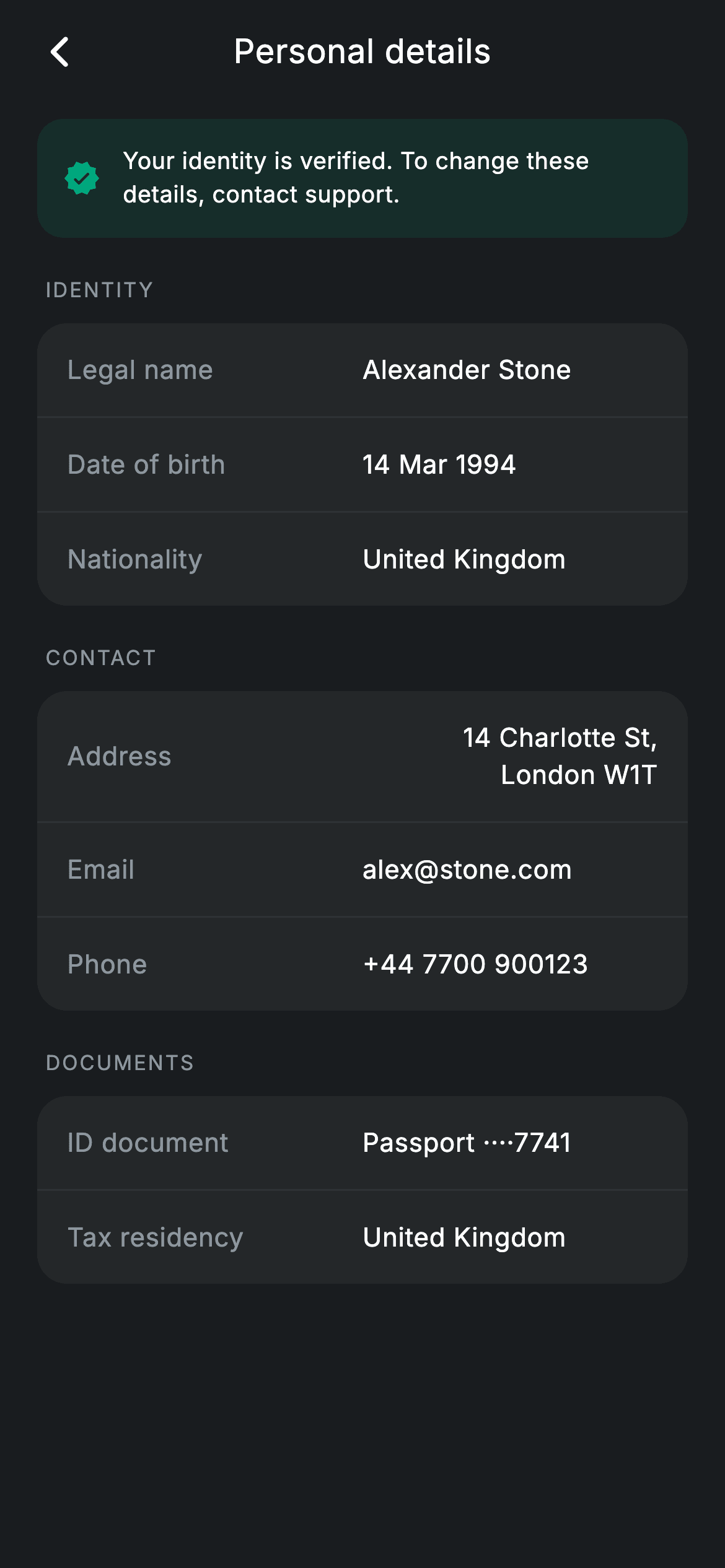
Once a bank has verified you, your identity details become read-only — and the screen has to say so without feeling broken. This tutorial builds a KYC personal-details view in Flutter — a teal verified banner explaining why nothing is editable, then three grouped cards covering identity, contact and documents, with the passport number partly masked. It's the shortest screen in this set at under 200 lines, and it shows a clean way to build divider-separated groups from plain data.
Watch the Flutter UI walkthrough
A short screen recording of Personal Details running, if you'd rather see it before you read the code. The written tutorial below covers everything in it.
Can't see the video? Watch it on YouTube.
What you'll build
- ✓A tinted verified banner that explains up front why the fields below can't be edited
- ✓Three grouped cards built by one helper that takes a list of label-value pairs
- ✓Divider insertion driven by index, so no group ever ends with a trailing rule
- ✓Right-aligned values using Flexible so a long address wraps instead of overflowing
Step-by-step build
Create the file
Add a new file at lib/fintech_personal_details/fintech_personal_details_screen.dart in your Flutter project.
Register the bundled fonts
No external packages — this is pure Flutter. It does bundle its design font (Inter), so drop the font file into fonts/ and declare it in pubspec.yaml:
flutter:
  fonts:
    - family: Inter
      fonts:
- asset: fonts/Inter-Regular.ttfBuild it, piece by piece
Here's how the screen goes together. Each block below is a real slice of the code with a plain-English explanation — paste them in order, or grab the whole file from the next section.
Three groups of data as label-value pairs
import 'package:flutter/material.dart';

/// Personal details — read-only KYC information (Revolut-inspired design).
///
/// Self-contained per CONVENTIONS.md: pure Flutter only, the exact design font
/// (Inter) is bundled under `fonts/`, no network/emoji images, and the screen
/// forces its own dark theme. A verified banner sits above grouped identity
/// rows; sensitive fields are partly masked.
class FintechPersonalDetailsScreen extends StatelessWidget {
  const FintechPersonalDetailsScreen({super.key, this.onBack});

  final VoidCallback? onBack;

  static const String _font = 'Inter';
  static const Color _bg = Color(0xFF191C1F);
  static const Color _surface = Color(0xFF242729);
  static const Color _teal = Color(0xFF00A87E);
  static const Color _muted = Color(0xFF8D969E);
  static const Color _hairline = Color(0xFF2E3235);

  static const List<List<String>> _identity = <List<String>>[
    <String>['Legal name', 'Alexander Stone'],
    <String>['Date of birth', '14 Mar 1994'],
    <String>['Nationality', 'United Kingdom'],
  ];
  static const List<List<String>> _contact = <List<String>>[
    <String>['Address', '14 Charlotte St, London W1T'],
    <String>['Email', 'alex@stone.com'],
    <String>['Phone', '+44 7700 900123'],
  ];
  static const List<List<String>> _docs = <List<String>>[
    <String>['ID document', 'Passport ····7741'],
    <String>['Tax residency', 'United Kingdom'],
  ];
The screen is stateless with a single `onBack` — a verified KYC record has nothing to mutate. The data is three `static const List<List<String>>` constants, each a list of two-element [label, value] pairs. Using nested lists rather than a record class is a reasonable trade at this size: every entry has exactly the same shape, nothing is typed differently, and it keeps the whole data model readable in a dozen lines. Note the palette is trimmed to five tokens — there's no `_brand` indigo here at all, because the only accent this screen needs is `_teal` for the verified state.
Alternating labels and groups
  @override
  Widget build(BuildContext context) {
    return Theme(
      data: ThemeData.dark(useMaterial3: true),
      child: Scaffold(
        backgroundColor: _bg,
        body: SafeArea(
          child: Column(
            children: <Widget>[
              _buildAppBar(),
              Expanded(
                child: ListView(
                  physics: const BouncingScrollPhysics(),
                  padding: const EdgeInsets.fromLTRB(20, 8, 20, 24),
                  children: <Widget>[
                    _buildVerified(),
                    const SizedBox(height: 20),
                    _label('Identity'),
                    _group(_identity),
                    const SizedBox(height: 20),
                    _label('Contact'),
                    _group(_contact),
                    const SizedBox(height: 20),
                    _label('Documents'),
                    _group(_docs),
                  ],
                ),
              ),
            ],
          ),
        ),
      ),
    );
  }
The body is an app bar over an `Expanded` ListView whose children alternate section label and group card, three times over, with 20px between sections. Because both `_label` and `_group` are single-argument helpers, the entire page structure reads as six lines that map exactly to what you see. Adding a fourth section — 'Employment', say — means declaring one more const list and adding two lines here. `BouncingScrollPhysics` gives the iOS-style overscroll used consistently across this fintech set.
The verified banner
  Widget _buildVerified() {
    return Container(
      padding: const EdgeInsets.all(14),
      decoration: BoxDecoration(
        color: _teal.withValues(alpha: 0.12),
        borderRadius: BorderRadius.circular(14),
      ),
      child: Row(
        children: const <Widget>[
          Icon(Icons.verified_rounded, size: 20, color: _teal),
          SizedBox(width: 12),
          Expanded(
            child: Text(
              'Your identity is verified. To change these details, contact '
              'support.',
              style: TextStyle(
                fontFamily: _font,
                fontSize: 12.5,
                height: 1.4,
                letterSpacing: 0.24,
                color: Colors.white,
              ),
            ),
          ),
        ],
      ),
    );
  }
The banner is a Container filled with `_teal.withValues(alpha: 0.12)` — a 12% wash of the success colour, light enough that white body text stays perfectly readable on top, which a solid teal fill would not allow. It pairs a `verified_rounded` icon with the sentence 'Your identity is verified. To change these details, contact support.' That second half is the part that matters: a screen full of uneditable fields reads as a bug unless something explains why, and pointing to support in the same breath gives the user their next step. The copy is written as two adjacent string literals that Dart joins at compile time.
The uppercase section label
  Widget _label(String text) {
    return Padding(
      padding: const EdgeInsets.only(left: 4, bottom: 10),
      child: Text(
        text.toUpperCase(),
        style: const TextStyle(
          fontFamily: _font,
          fontSize: 11,
          fontWeight: FontWeight.w500,
          letterSpacing: 1.0,
          color: _muted,
        ),
      ),
    );
  }
`_label` uppercases its argument in code rather than storing shouty strings, so the call sites read as 'Identity', 'Contact', 'Documents'. It's styled at 11px w500 with `letterSpacing: 1.0` in `_muted` — the wide tracking is what keeps small uppercase text legible instead of collapsing into a grey smudge. The padding is asymmetric: `EdgeInsets.only(left: 4, bottom: 10)`. That 4px left inset is a small optical adjustment that nudges the label to sit visually over the group card below, whose own content is inset 16px inside a rounded container.
Building a group with interleaved dividers
  Widget _group(List<List<String>> rows) {
    final List<Widget> children = <Widget>[];
    for (int i = 0; i < rows.length; i++) {
      if (i != 0) {
        children.add(const Divider(height: 1, color: _hairline));
      }
      children.add(Padding(
        padding: const EdgeInsets.symmetric(horizontal: 16, vertical: 15),
        child: Row(
          children: <Widget>[
            Expanded(
              child: Text(
                rows[i][0],
                style: const TextStyle(
                  fontFamily: _font,
                  fontSize: 14,
                  letterSpacing: 0.24,
                  color: _muted,
                ),
              ),
            ),
            Flexible(
              child: Text(
                rows[i][1],
                textAlign: TextAlign.right,
                style: const TextStyle(
                  fontFamily: _font,
                  fontSize: 14,
                  fontWeight: FontWeight.w500,
                  letterSpacing: 0.24,
                  color: Colors.white,
                ),
              ),
            ),
          ],
        ),
      ));
    }
    return Container(
      decoration: BoxDecoration(
        color: _surface,
        borderRadius: BorderRadius.circular(16),
      ),
      child: Column(children: children),
    );
  }
`_group` builds its children imperatively rather than with a collection-for, and the reason is the divider logic: `if (i != 0) children.add(const Divider(...))` adds a rule *before* every row except the first. That's the cleanest way to get N rows separated by N−1 dividers, with no trailing rule butting against the card's rounded bottom. Each row is a Row of an `Expanded` muted label and a `Flexible` white value with `textAlign: TextAlign.right`. The Expanded/Flexible pairing is the key detail — Expanded forces the label to take all spare width, while Flexible lets the value take only what it needs but still shrink and wrap when it's long, which is what stops '14 Charlotte St, London W1T' from overflowing the row. Note the ID document value is stored pre-masked as 'Passport ····7741', so the full number never reaches the widget tree.
Full code
The complete, ready-to-paste source. Free to use in your projects — one click copies it all.
import 'package:flutter/material.dart';

/// Personal details — read-only KYC information (Revolut-inspired design).
///
/// Self-contained per CONVENTIONS.md: pure Flutter only, the exact design font
/// (Inter) is bundled under `fonts/`, no network/emoji images, and the screen
/// forces its own dark theme. A verified banner sits above grouped identity
/// rows; sensitive fields are partly masked.
class FintechPersonalDetailsScreen extends StatelessWidget {
  const FintechPersonalDetailsScreen({super.key, this.onBack});

  final VoidCallback? onBack;

  static const String _font = 'Inter';
  static const Color _bg = Color(0xFF191C1F);
  static const Color _surface = Color(0xFF242729);
  static const Color _teal = Color(0xFF00A87E);
  static const Color _muted = Color(0xFF8D969E);
  static const Color _hairline = Color(0xFF2E3235);

  static const List<List<String>> _identity = <List<String>>[
    <String>['Legal name', 'Alexander Stone'],
    <String>['Date of birth', '14 Mar 1994'],
    <String>['Nationality', 'United Kingdom'],
  ];
  static const List<List<String>> _contact = <List<String>>[
    <String>['Address', '14 Charlotte St, London W1T'],
    <String>['Email', 'alex@stone.com'],
    <String>['Phone', '+44 7700 900123'],
  ];
  static const List<List<String>> _docs = <List<String>>[
    <String>['ID document', 'Passport ····7741'],
    <String>['Tax residency', 'United Kingdom'],
  ];

  @override
  Widget build(BuildContext context) {
    return Theme(
      data: ThemeData.dark(useMaterial3: true),
      child: Scaffold(
        backgroundColor: _bg,
        body: SafeArea(
          child: Column(
            children: <Widget>[
              _buildAppBar(),
              Expanded(
                child: ListView(
                  physics: const BouncingScrollPhysics(),
                  padding: const EdgeInsets.fromLTRB(20, 8, 20, 24),
                  children: <Widget>[
                    _buildVerified(),
                    const SizedBox(height: 20),
                    _label('Identity'),
                    _group(_identity),
                    const SizedBox(height: 20),
                    _label('Contact'),
                    _group(_contact),
                    const SizedBox(height: 20),
                    _label('Documents'),
                    _group(_docs),
                  ],
                ),
              ),
            ],
          ),
        ),
      ),
    );
  }

  Widget _buildAppBar() {
    return Padding(
      padding: const EdgeInsets.fromLTRB(8, 4, 8, 4),
      child: Row(
        children: <Widget>[
          IconButton(
            onPressed: onBack,
            icon: const Icon(Icons.arrow_back_ios_new_rounded,
                size: 20, color: Colors.white),
          ),
          const Expanded(
            child: Text(
              'Personal details',
              textAlign: TextAlign.center,
              style: TextStyle(
                fontFamily: _font,
                fontSize: 18,
                fontWeight: FontWeight.w500,
                letterSpacing: 0.24,
                color: Colors.white,
              ),
            ),
          ),
          const SizedBox(width: 48),
        ],
      ),
    );
  }

  Widget _buildVerified() {
    return Container(
      padding: const EdgeInsets.all(14),
      decoration: BoxDecoration(
        color: _teal.withValues(alpha: 0.12),
        borderRadius: BorderRadius.circular(14),
      ),
      child: Row(
        children: const <Widget>[
          Icon(Icons.verified_rounded, size: 20, color: _teal),
          SizedBox(width: 12),
          Expanded(
            child: Text(
              'Your identity is verified. To change these details, contact '
              'support.',
              style: TextStyle(
                fontFamily: _font,
                fontSize: 12.5,
                height: 1.4,
                letterSpacing: 0.24,
                color: Colors.white,
              ),
            ),
          ),
        ],
      ),
    );
  }

  Widget _label(String text) {
    return Padding(
      padding: const EdgeInsets.only(left: 4, bottom: 10),
      child: Text(
        text.toUpperCase(),
        style: const TextStyle(
          fontFamily: _font,
          fontSize: 11,
          fontWeight: FontWeight.w500,
          letterSpacing: 1.0,
          color: _muted,
        ),
      ),
    );
  }

  Widget _group(List<List<String>> rows) {
    final List<Widget> children = <Widget>[];
    for (int i = 0; i < rows.length; i++) {
      if (i != 0) {
        children.add(const Divider(height: 1, color: _hairline));
      }
      children.add(Padding(
        padding: const EdgeInsets.symmetric(horizontal: 16, vertical: 15),
        child: Row(
          children: <Widget>[
            Expanded(
              child: Text(
                rows[i][0],
                style: const TextStyle(
                  fontFamily: _font,
                  fontSize: 14,
                  letterSpacing: 0.24,
                  color: _muted,
                ),
              ),
            ),
            Flexible(
              child: Text(
                rows[i][1],
                textAlign: TextAlign.right,
                style: const TextStyle(
                  fontFamily: _font,
                  fontSize: 14,
                  fontWeight: FontWeight.w500,
                  letterSpacing: 0.24,
                  color: Colors.white,
                ),
              ),
            ),
          ],
        ),
      ));
    }
    return Container(
      decoration: BoxDecoration(
        color: _surface,
        borderRadius: BorderRadius.circular(16),
      ),
      child: Column(children: children),
    );
  }
}
Plus bundled 1 binary asset (fonts/images). The CLI and MCP install those for you automatically.
Two faster ways to add it
Copy-paste works, but you can skip it entirely.
1. FlutterKit CLI
One command drops this screen — and its fonts — straight into your project.
$ flutterkit add fintech-personal-details2. AI agent (MCP)
Connect FlutterKit's MCP server in Claude or Cursor and just ask your agent to install fintech-personal-details — it fetches and writes the files for you.
FAQ
Is this Flutter personal details screen free to use?
Yes. The complete Dart source on this page is free for personal and commercial projects. Copy it directly, install it with the FlutterKit CLI (flutterkit add fintech-personal-details), or have an AI agent add it for you over MCP.
How do I make some rows editable and others locked?
Contact details are usually editable even when identity is not. Widen the data from a two-element list to a three-element one with an 'editable' flag, or move to a small record class, then in `_group` wrap the row in an InkWell and append a chevron when the flag is set. Keep the verified banner's copy accurate — if some fields can be changed, it should say which ones cannot.
Does it need any external packages or images?
No to both. It's pure Flutter on the material library, uses one built-in Material icon for the verified badge, and ships no images. The only bundled asset is the Inter font, registered in pubspec.yaml as shown in step 2, which the CLI and MCP install for you.
Which Flutter version does it target?
It uses Color.withValues() and super parameters, so Flutter 3.22+ (Dart 3). On an older SDK, change the single withValues(alpha: 0.12) call on the verified banner to withOpacity(0.12) and the whole file compiles unchanged.


