How to Build a Linked Devices and Active Sessions Screen in Flutter (Full Code + Preview)
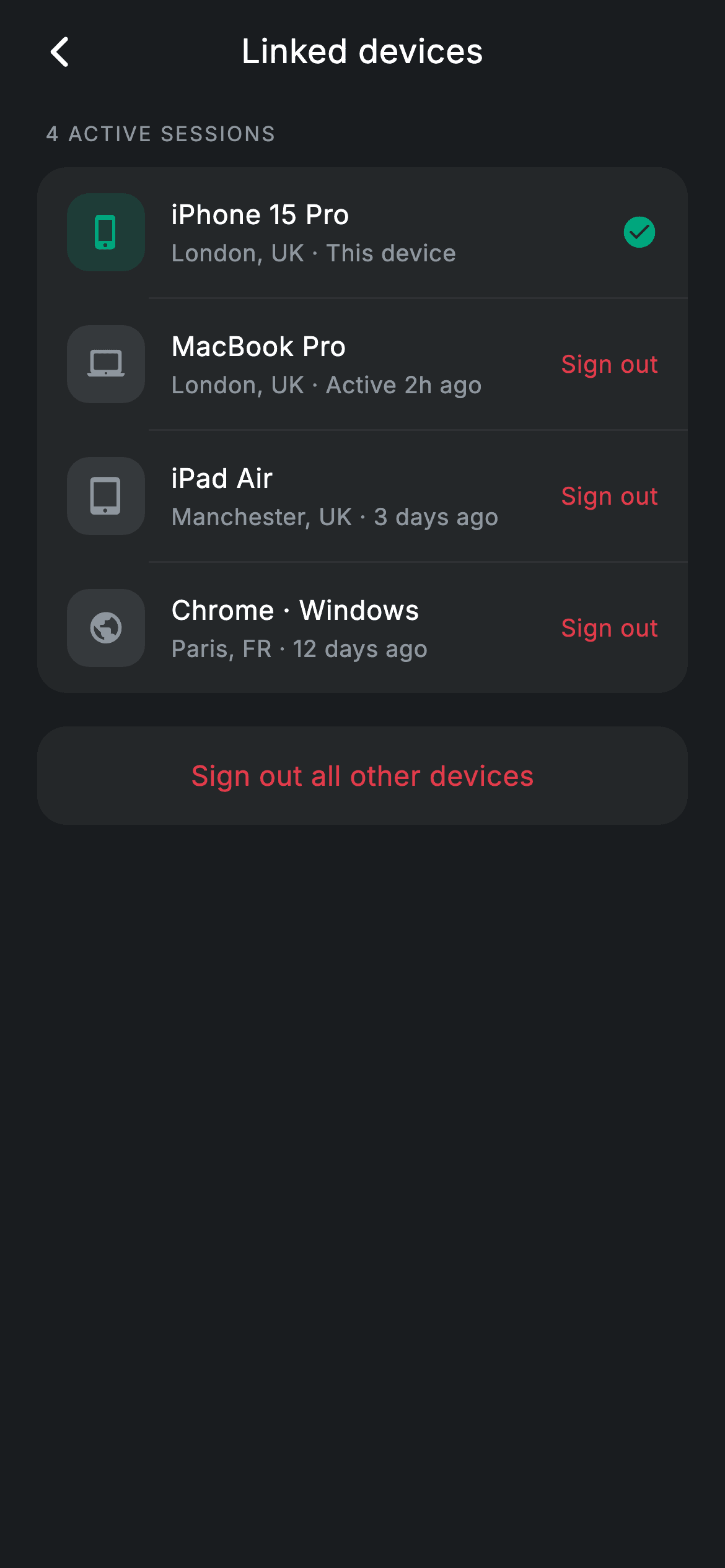
A linked-devices screen answers one question: is anything signed into my account that shouldn't be? This one lists four active sessions — phone, laptop, tablet and a browser — each with a location and a last-seen time, marks the device you are holding in teal so you cannot sign yourself out by mistake, and puts a single red sign-out-all card underneath. You'll build it as a stateless widget where one bool on each entry decides its tile colour and whether that row offers an exit at all.
Watch the Flutter UI walkthrough
A short screen recording of Linked Devices running, if you'd rather see it before you read the code. The written tutorial below covers everything in it.
Can't see the video? Watch it on YouTube.
What you'll build
- ✓A session list where the current device is visually distinct and has no sign-out action
- ✓Device tiles that colour themselves from a single `current` flag
- ✓A metadata line that packs location and last-seen time into one string
- ✓A section count interpolated from the list, so it can never disagree with what is shown
- ✓A destructive bulk action styled as red text on a card rather than a filled button
Step-by-step build
Create the file
Add a new file at lib/fintech_linked_devices/fintech_linked_devices_screen.dart in your Flutter project.
Register the bundled fonts
No external packages — this is pure Flutter. It does bundle its design font (Inter), so drop the font file into fonts/ and declare it in pubspec.yaml:
flutter:
  fonts:
    - family: Inter
      fonts:
- asset: fonts/Inter-Regular.ttfBuild it, piece by piece
Here's how the screen goes together. Each block below is a real slice of the code with a plain-English explanation — paste them in order, or grab the whole file from the next section.
Four sessions and one flag
import 'package:flutter/material.dart';

/// Linked devices — active sessions list (Revolut-inspired design system).
///
/// Self-contained per CONVENTIONS.md: pure Flutter only, the exact design font
/// (Inter) is bundled under `fonts/`, no network/emoji images, and the screen
/// forces its own dark theme. The current device is marked; others can be
/// signed out individually or all at once.
class FintechLinkedDevicesScreen extends StatelessWidget {
  const FintechLinkedDevicesScreen({super.key, this.onBack});

  final VoidCallback? onBack;

  static const String _font = 'Inter';
  static const Color _bg = Color(0xFF191C1F);
  static const Color _surface = Color(0xFF242729);
  static const Color _teal = Color(0xFF00A87E);
  static const Color _red = Color(0xFFE23B4A);
  static const Color _muted = Color(0xFF8D969E);
  static const Color _hairline = Color(0xFF2E3235);

  static const List<_Device> _devices = <_Device>[
    _Device('iPhone 15 Pro', 'London, UK · This device', Icons.phone_iphone_rounded, true),
    _Device('MacBook Pro', 'London, UK · Active 2h ago', Icons.laptop_mac_rounded, false),
    _Device('iPad Air', 'Manchester, UK · 3 days ago', Icons.tablet_mac_rounded, false),
    _Device('Chrome · Windows', 'Paris, FR · 12 days ago', Icons.public_rounded, false),
  ];
Each `_Device` is a name, a metadata string, an icon and a `current` bool — four fields, and only the last one carries any behaviour. The sample data is chosen to cover the real cases: a phone in London marked 'This device', a laptop active two hours ago, a tablet in another city three days ago, and `Chrome · Windows` on `Icons.public_rounded` in Paris twelve days ago. That last row is the one that matters in practice; a browser session in a different country is exactly the entry a user is scanning this screen to find.
The list, and a count that cannot drift
  @override
  Widget build(BuildContext context) {
    return Theme(
      data: ThemeData.dark(useMaterial3: true),
      child: Scaffold(
        backgroundColor: _bg,
        body: SafeArea(
          child: Column(
            children: <Widget>[
              _buildAppBar(),
              Expanded(
                child: ListView(
                  physics: const BouncingScrollPhysics(),
                  padding: const EdgeInsets.fromLTRB(20, 8, 20, 24),
                  children: <Widget>[
                    _label('${_devices.length} active sessions'),
                    Container(
                      decoration: BoxDecoration(
                        color: _surface,
                        borderRadius: BorderRadius.circular(16),
                      ),
                      child: Column(
                        children: <Widget>[
                          for (int i = 0; i < _devices.length; i++) ...<Widget>[
                            if (i != 0)
                              const Divider(height: 1, color: _hairline, indent: 60),
                            _DeviceRow(device: _devices[i]),
                          ],
                        ],
                      ),
                    ),
                    const SizedBox(height: 18),
                    _buildSignOutAll(),
                  ],
                ),
              ),
            ],
          ),
        ),
      ),
    );
  }
The section label is built with `_label('${_devices.length} active sessions')`, so the heading is derived from the list rather than typed alongside it — remove a device and the count follows. The card itself uses the same guarded collection-for pattern as the rest of this settings family: `if (i != 0)` before each `Divider` so hairlines fall strictly between rows. Here the divider takes `indent: 60`, which clears the 42px icon tile (it ends at 58) and stops short of the text column at 72, so the line starts in the small gap between them.
The label and the bulk sign-out
  Widget _label(String text) {
    return Padding(
      padding: const EdgeInsets.only(left: 4, bottom: 10),
      child: Text(
        text.toUpperCase(),
        style: const TextStyle(
          fontFamily: _font,
          fontSize: 11,
          fontWeight: FontWeight.w500,
          letterSpacing: 1.0,
          color: _muted,
        ),
      ),
    );
  }

  Widget _buildSignOutAll() {
    return Container(
      decoration: BoxDecoration(
        color: _surface,
        borderRadius: BorderRadius.circular(16),
      ),
      child: InkWell(
        onTap: () {},
        borderRadius: BorderRadius.circular(16),
        child: const Padding(
          padding: EdgeInsets.symmetric(vertical: 16),
          child: Center(
            child: Text(
              'Sign out all other devices',
              style: TextStyle(
                fontFamily: _font,
                fontSize: 15,
                fontWeight: FontWeight.w500,
                letterSpacing: 0.24,
                color: _red,
              ),
            ),
          ),
        ),
      ),
    );
  }
`_label` upper-cases at 11px with `letterSpacing: 1.0`, the tracking all-caps needs at that size. `_buildSignOutAll` is the screen's only destructive control, and it is deliberately understated: a `_surface` card the same width and radius as the list above it, with the text 'Sign out all other devices' centred in `_red`. Red text on a neutral card reads as available-but-serious, where a filled red button would shout from the moment the screen opens. The `InkWell` carries its own `borderRadius: BorderRadius.circular(16)` so the ripple is clipped to the card's corners instead of splashing square.
A tile that colours itself
class _Device {
  const _Device(this.name, this.meta, this.icon, this.current);
  final String name;
  final String meta;
  final IconData icon;
  final bool current;
}

class _DeviceRow extends StatelessWidget {
  const _DeviceRow({required this.device});

  final _Device device;

  @override
  Widget build(BuildContext context) {
    return Padding(
      padding: const EdgeInsets.symmetric(horizontal: 16, vertical: 14),
      child: Row(
        children: <Widget>[
          Container(
            width: 42,
            height: 42,
            alignment: Alignment.center,
            decoration: BoxDecoration(
              color: (device.current
                      ? FintechLinkedDevicesScreen._teal
                      : FintechLinkedDevicesScreen._muted)
                  .withValues(alpha: 0.16),
              borderRadius: BorderRadius.circular(12),
            ),
            child: Icon(device.icon,
                size: 20,
                color: device.current
                    ? FintechLinkedDevicesScreen._teal
                    : FintechLinkedDevicesScreen._muted),
          ),
`_DeviceRow` picks one colour — `_teal` when `device.current`, `_muted` otherwise — and uses it twice: at `withValues(alpha: 0.16)` for the 42px rounded tile behind the icon, and at full strength for the glyph itself. That is the whole visual language of the row, driven by a single bool. Because the ternary sits inside the `.withValues(...)` call rather than around two complete colour constants, the tint and the icon can never fall out of sync. The tile uses a 12px radius rather than a circle, which keeps a laptop or tablet glyph from looking cramped inside it.
One line of metadata, and the trailing branch
          Expanded(
            child: Column(
              crossAxisAlignment: CrossAxisAlignment.start,
              children: <Widget>[
                Text(
                  device.name,
                  style: const TextStyle(
                    fontFamily: FintechLinkedDevicesScreen._font,
                    fontSize: 14.5,
                    fontWeight: FontWeight.w500,
                    letterSpacing: 0.24,
                    color: Colors.white,
                  ),
                ),
                const SizedBox(height: 2),
                Text(
                  device.meta,
                  style: const TextStyle(
                    fontFamily: FintechLinkedDevicesScreen._font,
                    fontSize: 12.5,
                    letterSpacing: 0.24,
                    color: FintechLinkedDevicesScreen._muted,
                  ),
                ),
              ],
            ),
          ),
          if (device.current)
            const Icon(Icons.check_circle_rounded,
                size: 20, color: FintechLinkedDevicesScreen._teal)
          else
            const Text(
              'Sign out',
              style: TextStyle(
                fontFamily: FintechLinkedDevicesScreen._font,
                fontSize: 13,
                fontWeight: FontWeight.w500,
                letterSpacing: 0.24,
                color: FintechLinkedDevicesScreen._red,
              ),
            ),
        ],
      ),
    );
  }
}
The centre column stacks the device name at 14.5px `w500` over `device.meta` at 12.5px in grey. The metadata is one pre-joined string — `'Manchester, UK · 3 days ago'` — with a middot separator, so place and recency read as one fact on one line instead of two stacked rows. The trailing slot is where `current` pays off again: `if (device.current)` renders a teal check, `else` a red 'Sign out'. The device you are holding is simply not offered the action, which is better than showing a disabled control and making the user work out why it is greyed.
Full code
The complete, ready-to-paste source. Free to use in your projects — one click copies it all.
import 'package:flutter/material.dart';

/// Linked devices — active sessions list (Revolut-inspired design system).
///
/// Self-contained per CONVENTIONS.md: pure Flutter only, the exact design font
/// (Inter) is bundled under `fonts/`, no network/emoji images, and the screen
/// forces its own dark theme. The current device is marked; others can be
/// signed out individually or all at once.
class FintechLinkedDevicesScreen extends StatelessWidget {
  const FintechLinkedDevicesScreen({super.key, this.onBack});

  final VoidCallback? onBack;

  static const String _font = 'Inter';
  static const Color _bg = Color(0xFF191C1F);
  static const Color _surface = Color(0xFF242729);
  static const Color _teal = Color(0xFF00A87E);
  static const Color _red = Color(0xFFE23B4A);
  static const Color _muted = Color(0xFF8D969E);
  static const Color _hairline = Color(0xFF2E3235);

  static const List<_Device> _devices = <_Device>[
    _Device('iPhone 15 Pro', 'London, UK · This device', Icons.phone_iphone_rounded, true),
    _Device('MacBook Pro', 'London, UK · Active 2h ago', Icons.laptop_mac_rounded, false),
    _Device('iPad Air', 'Manchester, UK · 3 days ago', Icons.tablet_mac_rounded, false),
    _Device('Chrome · Windows', 'Paris, FR · 12 days ago', Icons.public_rounded, false),
  ];

  @override
  Widget build(BuildContext context) {
    return Theme(
      data: ThemeData.dark(useMaterial3: true),
      child: Scaffold(
        backgroundColor: _bg,
        body: SafeArea(
          child: Column(
            children: <Widget>[
              _buildAppBar(),
              Expanded(
                child: ListView(
                  physics: const BouncingScrollPhysics(),
                  padding: const EdgeInsets.fromLTRB(20, 8, 20, 24),
                  children: <Widget>[
                    _label('${_devices.length} active sessions'),
                    Container(
                      decoration: BoxDecoration(
                        color: _surface,
                        borderRadius: BorderRadius.circular(16),
                      ),
                      child: Column(
                        children: <Widget>[
                          for (int i = 0; i < _devices.length; i++) ...<Widget>[
                            if (i != 0)
                              const Divider(height: 1, color: _hairline, indent: 60),
                            _DeviceRow(device: _devices[i]),
                          ],
                        ],
                      ),
                    ),
                    const SizedBox(height: 18),
                    _buildSignOutAll(),
                  ],
                ),
              ),
            ],
          ),
        ),
      ),
    );
  }

  Widget _buildAppBar() {
    return Padding(
      padding: const EdgeInsets.fromLTRB(8, 4, 8, 4),
      child: Row(
        children: <Widget>[
          IconButton(
            onPressed: onBack,
            icon: const Icon(Icons.arrow_back_ios_new_rounded,
                size: 20, color: Colors.white),
          ),
          const Expanded(
            child: Text(
              'Linked devices',
              textAlign: TextAlign.center,
              style: TextStyle(
                fontFamily: _font,
                fontSize: 18,
                fontWeight: FontWeight.w500,
                letterSpacing: 0.24,
                color: Colors.white,
              ),
            ),
          ),
          const SizedBox(width: 48),
        ],
      ),
    );
  }

  Widget _label(String text) {
    return Padding(
      padding: const EdgeInsets.only(left: 4, bottom: 10),
      child: Text(
        text.toUpperCase(),
        style: const TextStyle(
          fontFamily: _font,
          fontSize: 11,
          fontWeight: FontWeight.w500,
          letterSpacing: 1.0,
          color: _muted,
        ),
      ),
    );
  }

  Widget _buildSignOutAll() {
    return Container(
      decoration: BoxDecoration(
        color: _surface,
        borderRadius: BorderRadius.circular(16),
      ),
      child: InkWell(
        onTap: () {},
        borderRadius: BorderRadius.circular(16),
        child: const Padding(
          padding: EdgeInsets.symmetric(vertical: 16),
          child: Center(
            child: Text(
              'Sign out all other devices',
              style: TextStyle(
                fontFamily: _font,
                fontSize: 15,
                fontWeight: FontWeight.w500,
                letterSpacing: 0.24,
                color: _red,
              ),
            ),
          ),
        ),
      ),
    );
  }
}

class _Device {
  const _Device(this.name, this.meta, this.icon, this.current);
  final String name;
  final String meta;
  final IconData icon;
  final bool current;
}

class _DeviceRow extends StatelessWidget {
  const _DeviceRow({required this.device});

  final _Device device;

  @override
  Widget build(BuildContext context) {
    return Padding(
      padding: const EdgeInsets.symmetric(horizontal: 16, vertical: 14),
      child: Row(
        children: <Widget>[
          Container(
            width: 42,
            height: 42,
            alignment: Alignment.center,
            decoration: BoxDecoration(
              color: (device.current
                      ? FintechLinkedDevicesScreen._teal
                      : FintechLinkedDevicesScreen._muted)
                  .withValues(alpha: 0.16),
              borderRadius: BorderRadius.circular(12),
            ),
            child: Icon(device.icon,
                size: 20,
                color: device.current
                    ? FintechLinkedDevicesScreen._teal
                    : FintechLinkedDevicesScreen._muted),
          ),
          const SizedBox(width: 14),
          Expanded(
            child: Column(
              crossAxisAlignment: CrossAxisAlignment.start,
              children: <Widget>[
                Text(
                  device.name,
                  style: const TextStyle(
                    fontFamily: FintechLinkedDevicesScreen._font,
                    fontSize: 14.5,
                    fontWeight: FontWeight.w500,
                    letterSpacing: 0.24,
                    color: Colors.white,
                  ),
                ),
                const SizedBox(height: 2),
                Text(
                  device.meta,
                  style: const TextStyle(
                    fontFamily: FintechLinkedDevicesScreen._font,
                    fontSize: 12.5,
                    letterSpacing: 0.24,
                    color: FintechLinkedDevicesScreen._muted,
                  ),
                ),
              ],
            ),
          ),
          if (device.current)
            const Icon(Icons.check_circle_rounded,
                size: 20, color: FintechLinkedDevicesScreen._teal)
          else
            const Text(
              'Sign out',
              style: TextStyle(
                fontFamily: FintechLinkedDevicesScreen._font,
                fontSize: 13,
                fontWeight: FontWeight.w500,
                letterSpacing: 0.24,
                color: FintechLinkedDevicesScreen._red,
              ),
            ),
        ],
      ),
    );
  }
}
Plus bundled 1 binary asset (fonts/images). The CLI and MCP install those for you automatically.
Two faster ways to add it
Copy-paste works, but you can skip it entirely.
1. FlutterKit CLI
One command drops this screen — and its fonts — straight into your project.
$ flutterkit add fintech-linked-devices2. AI agent (MCP)
Connect FlutterKit's MCP server in Claude or Cursor and just ask your agent to install fintech-linked-devices — it fetches and writes the files for you.
FAQ
Is the per-row 'Sign out' actually tappable in this code?
Not yet — in the demo it is a `Text`, and `_DeviceRow` has no `onTap` of its own. Wrap it in an `InkWell` or `GestureDetector` and pass a callback down through the `_DeviceRow` constructor. The bulk 'Sign out all other devices' card is already an `InkWell`, with an empty handler for you to fill in.
How do I feed this real session data?
Swap the `_devices` constant for a list you pass into the widget. Map each session from your backend into a `_Device`, formatting the location and relative time into the single `meta` string before it reaches the row — the layout expects one line there, not two fields.
Why can't the current device be signed out from this list?
Because the result would be confusing: tapping it would end the session you are looking at and drop you to a login screen with no explanation. Ending your own session belongs on the sign-out control in settings, so this screen marks the current device and leaves it alone.
Does it need any packages or fonts?
No packages — `material.dart` only, and every device glyph comes from the built-in Material icon set, so there are no images to ship. Inter is bundled with the screen and registered under `fonts:` in your pubspec.
Which Flutter version does this need?
Flutter 3.22 or newer, since the tile tint calls `Color.withValues(alpha: 0.16)`. On an older SDK swap in `withOpacity(0.16)` and rewrite both `super.key` constructors in the `{Key? key}) : super(key: key)` style.


