How to Build a Live Exchange Rates Screen in Flutter (Full Code + Preview)
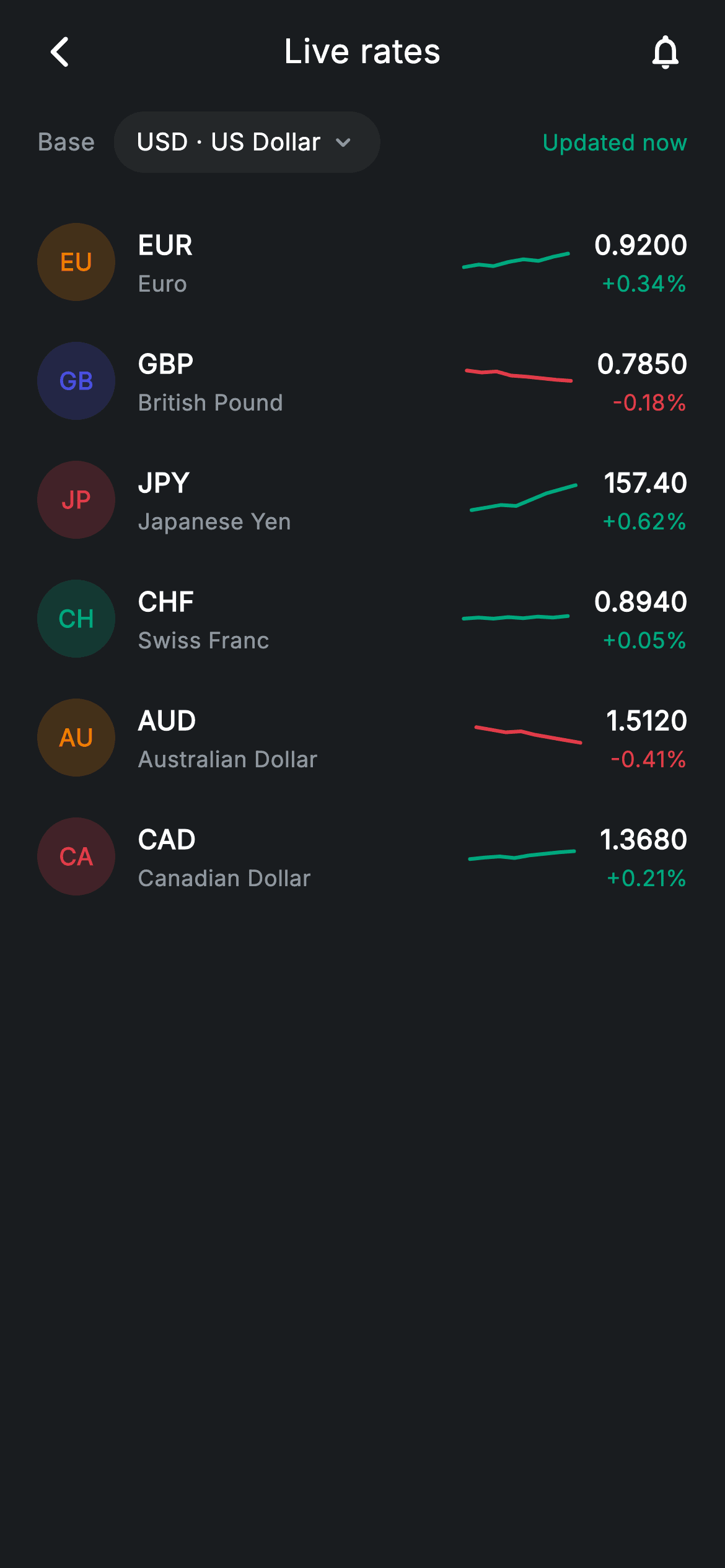
Six currency pairs, each with a rate, a daily change, and a sparkline showing the day's shape — plus a base-currency selector and an 'Updated now' freshness cue. This is a data-density exercise: the row has to fit five pieces of information at a glance without feeling cramped. The answer is a `Spacer` between the identity block and the numbers, a fixed-width chart so every sparkline aligns, and one direction boolean colouring the chart and the percentage together.
Watch the Flutter UI walkthrough
A short screen recording of Exchange Rates running, if you'd rather see it before you read the code. The written tutorial below covers everything in it.
Can't see the video? Watch it on YouTube.
What you'll build
- ✓Rate rows packing badge, code, name, sparkline, rate, and daily change into one legible line
- ✓A `Spacer`-based layout that keeps every sparkline on the same vertical axis regardless of currency name length
- ✓Direction-aware colouring where the sign of `change` picks teal or red for both the chart and the number
- ✓Currency badges from `code.substring(0, 2)` tinted at 20% — no flag images, no network
- ✓A base-currency pill and an 'Updated now' freshness indicator above the list
Step-by-step build
Create the file
Add a new file at lib/fintech_exchange_rates/fintech_exchange_rates_screen.dart in your Flutter project.
Register the bundled fonts
No external packages — this is pure Flutter. It does bundle its design font (Inter), so drop the font file into fonts/ and declare it in pubspec.yaml:
flutter:
  fonts:
    - family: Inter
      fonts:
- asset: fonts/Inter-Regular.ttfBuild it, piece by piece
Here's how the screen goes together. Each block below is a real slice of the code with a plain-English explanation — paste them in order, or grab the whole file from the next section.
Six pairs as constant data
class FintechExchangeRatesScreen extends StatelessWidget {
  const FintechExchangeRatesScreen({super.key, this.onBack, this.onSetAlert});

  final VoidCallback? onBack;
  final VoidCallback? onSetAlert;

  static const String _font = 'Inter';
  static const Color _bg = Color(0xFF191C1F);
  static const Color _surface = Color(0xFF242729);
  static const Color _brand = Color(0xFF494FDF);
  static const Color _teal = Color(0xFF00A87E);
  static const Color _amber = Color(0xFFEC7E00);
  static const Color _red = Color(0xFFE23B4A);
  static const Color _muted = Color(0xFF8D969E);

  static const List<_Rate> _rates = <_Rate>[
    _Rate('EUR', 'Euro', '0.9200', 0.34, _amber,
        <double>[0.4, 0.45, 0.42, 0.5, 0.55, 0.52, 0.6, 0.66]),
    _Rate('GBP', 'British Pound', '0.7850', -0.18, _brand,
        <double>[0.7, 0.66, 0.68, 0.6, 0.58, 0.55, 0.52, 0.5]),
    _Rate('JPY', 'Japanese Yen', '157.40', 0.62, _red,
        <double>[0.3, 0.35, 0.4, 0.38, 0.5, 0.62, 0.7, 0.78]),
    _Rate('CHF', 'Swiss Franc', '0.8940', 0.05, _teal,
        <double>[0.5, 0.52, 0.5, 0.53, 0.51, 0.54, 0.52, 0.55]),
    _Rate('AUD', 'Australian Dollar', '1.5120', -0.41, _amber,
        <double>[0.7, 0.65, 0.6, 0.62, 0.55, 0.5, 0.45, 0.4]),
    _Rate('CAD', 'Canadian Dollar', '1.3680', 0.21, _red,
        <double>[0.45, 0.48, 0.5, 0.47, 0.52, 0.55, 0.58, 0.6]),
  ];
A `StatelessWidget` — rates come from a feed, so there's nothing to hold locally. Each `_Rate` carries a code, a display name, a *pre-formatted* rate string, a signed `change` double, an identity colour, and an eight-point normalised `spark` list. The rate is a string deliberately: JPY needs '157.40' while CHF needs '0.8940', and different pairs conventionally show different precision, which is a formatting decision better made before the widget layer. `change` stays numeric because its sign drives colours downstream, and the sparkline lists are shaped to match — CHF's barely moves at 0.05%, AUD's slides steadily at -0.41%.
Shell and the base-currency row
  @override
  Widget build(BuildContext context) {
    return Theme(
      data: ThemeData.dark(useMaterial3: true),
      child: Scaffold(
        backgroundColor: _bg,
        body: SafeArea(
          child: Column(
            children: <Widget>[
              _buildAppBar(),
              _buildBaseRow(),
              Expanded(
                child: ListView(
                  physics: const BouncingScrollPhysics(),
                  padding: const EdgeInsets.fromLTRB(20, 8, 20, 24),
                  children: <Widget>[
                    for (final _Rate r in _rates)
                      _RateRow(rate: r, onSetAlert: onSetAlert),
                  ],
                ),
              ),
            ],
          ),
        ),
      ),
    );
  }

  Widget _buildAppBar() {
    return Padding(
      padding: const EdgeInsets.fromLTRB(8, 4, 8, 4),
      child: Row(
        children: <Widget>[
          IconButton(
            onPressed: onBack,
            icon: const Icon(Icons.arrow_back_ios_new_rounded,
                size: 20, color: Colors.white),
          ),
          const Expanded(
            child: Text(
              'Live rates',
              textAlign: TextAlign.center,
              style: TextStyle(
                fontFamily: _font,
                fontSize: 18,
                fontWeight: FontWeight.w500,
                letterSpacing: 0.24,
                color: Colors.white,
              ),
            ),
          ),
          IconButton(
            onPressed: onSetAlert,
            icon: const Icon(Icons.notifications_none_rounded,
                size: 22, color: Colors.white),
          ),
        ],
      ),
    );
  }
The body is a fixed app bar and base row above `Expanded(child: ListView(...))`, with `BouncingScrollPhysics` for the iOS rubber-band scroll. Rows are emitted by a collection-for over `_rates` straight into the children list — fine for six entries; a full currency list would want `ListView.builder`. The trailing bell icon in the app bar shares the `onSetAlert` callback with every row, so both the header action and a row tap lead to the same rate-alert flow.
Base pill and freshness cue
  Widget _buildBaseRow() {
    return Padding(
      padding: const EdgeInsets.fromLTRB(20, 4, 20, 8),
      child: Row(
        children: <Widget>[
          const Text(
            'Base',
            style: TextStyle(
              fontFamily: _font,
              fontSize: 13,
              letterSpacing: 0.24,
              color: _muted,
            ),
          ),
          const SizedBox(width: 10),
          Container(
            padding: const EdgeInsets.symmetric(horizontal: 12, vertical: 7),
            decoration: BoxDecoration(
              color: _surface,
              borderRadius: BorderRadius.circular(9999),
            ),
            child: Row(
              mainAxisSize: MainAxisSize.min,
              children: const <Widget>[
                Text(
                  'USD · US Dollar',
                  style: TextStyle(
                    fontFamily: _font,
                    fontSize: 13,
                    fontWeight: FontWeight.w500,
                    letterSpacing: 0.24,
                    color: Colors.white,
                  ),
                ),
                SizedBox(width: 4),
                Icon(Icons.keyboard_arrow_down_rounded,
                    size: 16, color: _muted),
              ],
            ),
          ),
          const Spacer(),
          const Text(
            'Updated now',
            style: TextStyle(
              fontFamily: _font,
              fontSize: 12,
              letterSpacing: 0.24,
              color: _teal,
            ),
          ),
        ],
      ),
    );
  }
The base selector is a pill — a `_surface` container at radius 9999 with `MainAxisSize.min` so it hugs 'USD · US Dollar' plus a chevron rather than stretching. Combining code and name in one string keeps the pill compact while still being unambiguous. A `Spacer()` then pushes 'Updated now' to the trailing edge in teal; that colour choice is doing real work on a rates screen, where the user's first question is whether the numbers are stale. Swap the string for a relative timestamp and change the colour to `_muted` once the data ages, and you have a complete freshness indicator.
Row setup: one boolean picks the colour
class _RateRow extends StatelessWidget {
  const _RateRow({required this.rate, this.onSetAlert});

  final _Rate rate;
  final VoidCallback? onSetAlert;

  @override
  Widget build(BuildContext context) {
    final bool up = rate.change >= 0;
    final Color trend = up
        ? FintechExchangeRatesScreen._teal
        : FintechExchangeRatesScreen._red;
    return InkWell(
      onTap: onSetAlert,
      child: Padding(
        padding: const EdgeInsets.symmetric(vertical: 11),
        child: Row(
          children: <Widget>[
`_RateRow` is stateless and takes the model plus the shared `onSetAlert` callback. The two lines that matter are 175–178: `up = rate.change >= 0` is computed once, and `trend` resolves to `_teal` or `_red` from it. That single colour is then handed to the sparkline painter *and* used for the percentage text further down, so the chart’s direction and the number beside it can never contradict each other. The whole row is wrapped in an `InkWell` with 11px symmetric vertical padding, which sets the list rhythm without needing dividers.
The currency badge
            Container(
              width: 42,
              height: 42,
              alignment: Alignment.center,
              decoration: BoxDecoration(
                color: rate.color.withValues(alpha: 0.2),
                shape: BoxShape.circle,
              ),
              child: Text(
                rate.code.substring(0, 2),
                style: TextStyle(
                  fontFamily: FintechExchangeRatesScreen._font,
                  fontSize: 13,
                  fontWeight: FontWeight.w700,
                  color: rate.color,
                ),
              ),
            ),
Each badge is a 42px circle filled `rate.color.withValues(alpha: 0.2)` with `rate.code.substring(0, 2)` in the same colour at full strength — ‘EU’, ‘GB’, ‘JP’. One value per currency produces a matched fill-and-text pair, which is why six differently-coloured badges still read as one set. This is also a deliberate alternative to flag emoji or flag images: emoji render inconsistently across platforms and will not appear in golden screenshot tests, while flag assets add weight and raise territorial questions. Two letters sidestep all of it.
Identity, sparkline, and the value column
            const SizedBox(width: 12),
            Column(
              crossAxisAlignment: CrossAxisAlignment.start,
              children: <Widget>[
                Text(
                  rate.code,
                  style: const TextStyle(
                    fontFamily: FintechExchangeRatesScreen._font,
                    fontSize: 14.5,
                    fontWeight: FontWeight.w600,
                    letterSpacing: 0.24,
                    color: Colors.white,
                  ),
                ),
                const SizedBox(height: 2),
                Text(
                  rate.name,
                  style: const TextStyle(
                    fontFamily: FintechExchangeRatesScreen._font,
                    fontSize: 12,
                    letterSpacing: 0.24,
                    color: FintechExchangeRatesScreen._muted,
                  ),
                ),
              ],
            ),
            const Spacer(),
            SizedBox(
              width: 56,
              height: 28,
              child: CustomPaint(
                painter: _SparkPainter(points: rate.spark, color: trend),
              ),
            ),
            const SizedBox(width: 14),
            Column(
              crossAxisAlignment: CrossAxisAlignment.end,
              children: <Widget>[
                Text(
                  rate.rate,
                  style: const TextStyle(
                    fontFamily: FintechExchangeRatesScreen._font,
                    fontSize: 14.5,
                    fontWeight: FontWeight.w600,
                    letterSpacing: 0.24,
                    color: Colors.white,
                  ),
                ),
                const SizedBox(height: 2),
                Text(
                  '${up ? '+' : ''}${rate.change.toStringAsFixed(2)}%',
                  style: TextStyle(
                    fontFamily: FintechExchangeRatesScreen._font,
                    fontSize: 12,
                    fontWeight: FontWeight.w500,
                    letterSpacing: 0.24,
                    color: trend,
                  ),
                ),
              ],
            ),
          ],
        ),
      ),
    );
  }
The rest of the row is four zones held apart by a `Spacer()` rather than an `Expanded` text column: the code and name take their natural width, the spacer eats the slack, and the fixed 56×28 `CustomPaint` plus the right-aligned value column (`crossAxisAlignment: CrossAxisAlignment.end`) therefore land at the same x-position on every row — which is what keeps the six sparklines vertically aligned. The rate string is printed as-is from the model, and the percentage prepends its sign conditionally with `'${up ? '+' : ''}'`, since `toStringAsFixed` already emits the minus for negatives. Two decimals is the right precision for FX, where a 0.05% move is meaningful.
The sparkline painter
class _SparkPainter extends CustomPainter {
  _SparkPainter({required this.points, required this.color});

  final List<double> points;
  final Color color;

  @override
  void paint(Canvas canvas, Size size) {
    if (points.length < 2) return;
    final Paint line = Paint()
      ..color = color
      ..strokeWidth = 2
      ..style = PaintingStyle.stroke
      ..strokeCap = StrokeCap.round
      ..strokeJoin = StrokeJoin.round;
    final double dx = size.width / (points.length - 1);
    final Path path = Path();
    for (int i = 0; i < points.length; i++) {
      final double x = dx * i;
      final double y = size.height - points[i].clamp(0, 1) * size.height;
      if (i == 0) {
        path.moveTo(x, y);
      } else {
        path.lineTo(x, y);
      }
    }
    canvas.drawPath(path, line);
  }

  @override
  bool shouldRepaint(covariant _SparkPainter oldDelegate) =>
      oldDelegate.points != points || oldDelegate.color != color;
}
Because points arrive normalised to 0–1, the painter needs no min/max scan — it spaces them with `dx = size.width / (points.length - 1)` and maps each value with `size.height - points[i].clamp(0, 1) * size.height`, inverting because canvas Y grows downward while a rising line should climb. The `clamp` is a safety net against out-of-range input. `StrokeCap.round` and `StrokeJoin.round` on a 2px stroke are what keep an eight-point zigzag looking smooth at 56px wide. `shouldRepaint` takes a `covariant` parameter so it can compare the concrete painter's fields, and checks both `points` and `color` — meaning a row whose data hasn't changed is never repainted.
Full code
The complete, ready-to-paste source. Free to use in your projects — one click copies it all.
import 'package:flutter/material.dart';

/// Exchange rates — live rates with sparklines & alerts (Revolut-inspired).
///
/// Self-contained per CONVENTIONS.md: pure Flutter only, the exact design font
/// (Inter) is bundled under `fonts/`, every sparkline is custom-painted and the
/// currency chips are painted code badges (no charting package, no network), and
/// the screen forces its own dark theme. Each pair shows its daily change.
class FintechExchangeRatesScreen extends StatelessWidget {
  const FintechExchangeRatesScreen({super.key, this.onBack, this.onSetAlert});

  final VoidCallback? onBack;
  final VoidCallback? onSetAlert;

  static const String _font = 'Inter';
  static const Color _bg = Color(0xFF191C1F);
  static const Color _surface = Color(0xFF242729);
  static const Color _brand = Color(0xFF494FDF);
  static const Color _teal = Color(0xFF00A87E);
  static const Color _amber = Color(0xFFEC7E00);
  static const Color _red = Color(0xFFE23B4A);
  static const Color _muted = Color(0xFF8D969E);

  static const List<_Rate> _rates = <_Rate>[
    _Rate('EUR', 'Euro', '0.9200', 0.34, _amber,
        <double>[0.4, 0.45, 0.42, 0.5, 0.55, 0.52, 0.6, 0.66]),
    _Rate('GBP', 'British Pound', '0.7850', -0.18, _brand,
        <double>[0.7, 0.66, 0.68, 0.6, 0.58, 0.55, 0.52, 0.5]),
    _Rate('JPY', 'Japanese Yen', '157.40', 0.62, _red,
        <double>[0.3, 0.35, 0.4, 0.38, 0.5, 0.62, 0.7, 0.78]),
    _Rate('CHF', 'Swiss Franc', '0.8940', 0.05, _teal,
        <double>[0.5, 0.52, 0.5, 0.53, 0.51, 0.54, 0.52, 0.55]),
    _Rate('AUD', 'Australian Dollar', '1.5120', -0.41, _amber,
        <double>[0.7, 0.65, 0.6, 0.62, 0.55, 0.5, 0.45, 0.4]),
    _Rate('CAD', 'Canadian Dollar', '1.3680', 0.21, _red,
        <double>[0.45, 0.48, 0.5, 0.47, 0.52, 0.55, 0.58, 0.6]),
  ];

  @override
  Widget build(BuildContext context) {
    return Theme(
      data: ThemeData.dark(useMaterial3: true),
      child: Scaffold(
        backgroundColor: _bg,
        body: SafeArea(
          child: Column(
            children: <Widget>[
              _buildAppBar(),
              _buildBaseRow(),
              Expanded(
                child: ListView(
                  physics: const BouncingScrollPhysics(),
                  padding: const EdgeInsets.fromLTRB(20, 8, 20, 24),
                  children: <Widget>[
                    for (final _Rate r in _rates)
                      _RateRow(rate: r, onSetAlert: onSetAlert),
                  ],
                ),
              ),
            ],
          ),
        ),
      ),
    );
  }

  Widget _buildAppBar() {
    return Padding(
      padding: const EdgeInsets.fromLTRB(8, 4, 8, 4),
      child: Row(
        children: <Widget>[
          IconButton(
            onPressed: onBack,
            icon: const Icon(Icons.arrow_back_ios_new_rounded,
                size: 20, color: Colors.white),
          ),
          const Expanded(
            child: Text(
              'Live rates',
              textAlign: TextAlign.center,
              style: TextStyle(
                fontFamily: _font,
                fontSize: 18,
                fontWeight: FontWeight.w500,
                letterSpacing: 0.24,
                color: Colors.white,
              ),
            ),
          ),
          IconButton(
            onPressed: onSetAlert,
            icon: const Icon(Icons.notifications_none_rounded,
                size: 22, color: Colors.white),
          ),
        ],
      ),
    );
  }

  Widget _buildBaseRow() {
    return Padding(
      padding: const EdgeInsets.fromLTRB(20, 4, 20, 8),
      child: Row(
        children: <Widget>[
          const Text(
            'Base',
            style: TextStyle(
              fontFamily: _font,
              fontSize: 13,
              letterSpacing: 0.24,
              color: _muted,
            ),
          ),
          const SizedBox(width: 10),
          Container(
            padding: const EdgeInsets.symmetric(horizontal: 12, vertical: 7),
            decoration: BoxDecoration(
              color: _surface,
              borderRadius: BorderRadius.circular(9999),
            ),
            child: Row(
              mainAxisSize: MainAxisSize.min,
              children: const <Widget>[
                Text(
                  'USD · US Dollar',
                  style: TextStyle(
                    fontFamily: _font,
                    fontSize: 13,
                    fontWeight: FontWeight.w500,
                    letterSpacing: 0.24,
                    color: Colors.white,
                  ),
                ),
                SizedBox(width: 4),
                Icon(Icons.keyboard_arrow_down_rounded,
                    size: 16, color: _muted),
              ],
            ),
          ),
          const Spacer(),
          const Text(
            'Updated now',
            style: TextStyle(
              fontFamily: _font,
              fontSize: 12,
              letterSpacing: 0.24,
              color: _teal,
            ),
          ),
        ],
      ),
    );
  }
}

class _Rate {
  const _Rate(this.code, this.name, this.rate, this.change, this.color,
      this.spark);
  final String code;
  final String name;
  final String rate;
  final double change; // % daily
  final Color color;
  final List<double> spark;
}

class _RateRow extends StatelessWidget {
  const _RateRow({required this.rate, this.onSetAlert});

  final _Rate rate;
  final VoidCallback? onSetAlert;

  @override
  Widget build(BuildContext context) {
    final bool up = rate.change >= 0;
    final Color trend = up
        ? FintechExchangeRatesScreen._teal
        : FintechExchangeRatesScreen._red;
    return InkWell(
      onTap: onSetAlert,
      child: Padding(
        padding: const EdgeInsets.symmetric(vertical: 11),
        child: Row(
          children: <Widget>[
            Container(
              width: 42,
              height: 42,
              alignment: Alignment.center,
              decoration: BoxDecoration(
                color: rate.color.withValues(alpha: 0.2),
                shape: BoxShape.circle,
              ),
              child: Text(
                rate.code.substring(0, 2),
                style: TextStyle(
                  fontFamily: FintechExchangeRatesScreen._font,
                  fontSize: 13,
                  fontWeight: FontWeight.w700,
                  color: rate.color,
                ),
              ),
            ),
            const SizedBox(width: 12),
            Column(
              crossAxisAlignment: CrossAxisAlignment.start,
              children: <Widget>[
                Text(
                  rate.code,
                  style: const TextStyle(
                    fontFamily: FintechExchangeRatesScreen._font,
                    fontSize: 14.5,
                    fontWeight: FontWeight.w600,
                    letterSpacing: 0.24,
                    color: Colors.white,
                  ),
                ),
                const SizedBox(height: 2),
                Text(
                  rate.name,
                  style: const TextStyle(
                    fontFamily: FintechExchangeRatesScreen._font,
                    fontSize: 12,
                    letterSpacing: 0.24,
                    color: FintechExchangeRatesScreen._muted,
                  ),
                ),
              ],
            ),
            const Spacer(),
            SizedBox(
              width: 56,
              height: 28,
              child: CustomPaint(
                painter: _SparkPainter(points: rate.spark, color: trend),
              ),
            ),
            const SizedBox(width: 14),
            Column(
              crossAxisAlignment: CrossAxisAlignment.end,
              children: <Widget>[
                Text(
                  rate.rate,
                  style: const TextStyle(
                    fontFamily: FintechExchangeRatesScreen._font,
                    fontSize: 14.5,
                    fontWeight: FontWeight.w600,
                    letterSpacing: 0.24,
                    color: Colors.white,
                  ),
                ),
                const SizedBox(height: 2),
                Text(
                  '${up ? '+' : ''}${rate.change.toStringAsFixed(2)}%',
                  style: TextStyle(
                    fontFamily: FintechExchangeRatesScreen._font,
                    fontSize: 12,
                    fontWeight: FontWeight.w500,
                    letterSpacing: 0.24,
                    color: trend,
                  ),
                ),
              ],
            ),
          ],
        ),
      ),
    );
  }
}

/// Paints a smooth-ish sparkline from normalised 0–1 points.
class _SparkPainter extends CustomPainter {
  _SparkPainter({required this.points, required this.color});

  final List<double> points;
  final Color color;

  @override
  void paint(Canvas canvas, Size size) {
    if (points.length < 2) return;
    final Paint line = Paint()
      ..color = color
      ..strokeWidth = 2
      ..style = PaintingStyle.stroke
      ..strokeCap = StrokeCap.round
      ..strokeJoin = StrokeJoin.round;
    final double dx = size.width / (points.length - 1);
    final Path path = Path();
    for (int i = 0; i < points.length; i++) {
      final double x = dx * i;
      final double y = size.height - points[i].clamp(0, 1) * size.height;
      if (i == 0) {
        path.moveTo(x, y);
      } else {
        path.lineTo(x, y);
      }
    }
    canvas.drawPath(path, line);
  }

  @override
  bool shouldRepaint(covariant _SparkPainter oldDelegate) =>
      oldDelegate.points != points || oldDelegate.color != color;
}
Plus bundled 1 binary asset (fonts/images). The CLI and MCP install those for you automatically.
Two faster ways to add it
Copy-paste works, but you can skip it entirely.
1. FlutterKit CLI
One command drops this screen — and its fonts — straight into your project.
$ flutterkit add fintech-exchange-rates2. AI agent (MCP)
Connect FlutterKit's MCP server in Claude or Cursor and just ask your agent to install fintech-exchange-rates — it fetches and writes the files for you.
FAQ
Is this exchange rates screen free to use?
Yes. The full Dart source on this page is free for personal and commercial apps. Copy it from the code block, install it with the FlutterKit CLI (flutterkit add fintech-exchange-rates), or add it via an AI agent over MCP.
Does it need a charting package?
No. Every sparkline is the single _SparkPainter at the bottom of the file, built from Canvas, Path, and Paint — no fl_chart, no network requests, and no flag image assets. The only thing to register in pubspec.yaml is the bundled Inter font family.
How do I connect it to a live rates API?
Convert the screen to a StatefulWidget (or feed it from your store) and build the _rates list from the response: format the rate to the precision each pair needs, keep change as a signed double, and normalise each intraday price series to 0–1 with (p - min) / (max - min) before assigning it to spark. The badge tint, sparkline colour, and percentage colour all follow from those fields.
Why two-letter badges instead of flag emoji?
Emoji flags render differently on each platform, are missing entirely on some Android builds, and don't show up in golden screenshot tests. The painted two-letter badge is consistent everywhere, needs no asset, and takes its colour from the same data that drives the rest of the row.
Which Flutter version does it target?
It uses Color.withValues(alpha:) and Material 3, so it targets Flutter 3.27+. On an older SDK, replace rate.color.withValues(alpha: 0.2) with withOpacity(0.2) and it compiles back to Flutter 3.10.


