How to Build a Currency Exchange Screen in Flutter (Full Code + Preview)
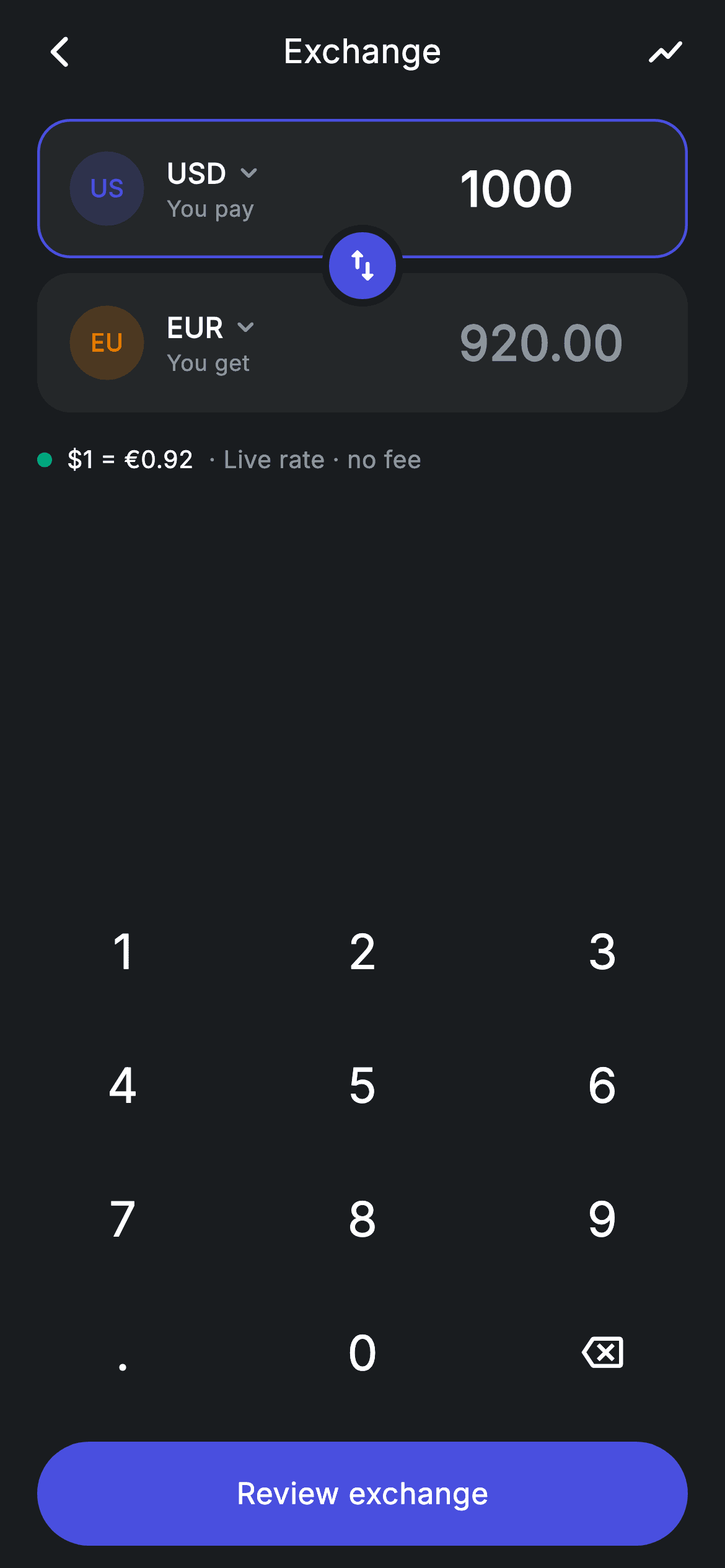
Two stacked currency cards with a swap button floating on the seam between them — that's the shape every exchange screen in every banking app takes, and this tutorial builds it properly. The overlap is a `Stack` with a border in the *background* colour, which fakes a cut-out where the button sits. Above the numpad, the 'You get' amount is never stored: it's a getter multiplying the typed amount by the rate, so the conversion is always in step with the keypad.
Watch the Flutter UI walkthrough
A short screen recording of Exchange running, if you'd rather see it before you read the code. The written tutorial below covers everything in it.
Can't see the video? Watch it on YouTube.
What you'll build
- ✓Two currency cards overlapped by a floating swap button that appears to punch through both
- ✓A converted amount derived through a getter, so it can never lag behind the input
- ✓Currency cards where an `active` flag drives both the border and the amount's colour
- ✓A `FittedBox` inside `Flexible` so long amounts shrink rather than overflow the card
- ✓A reusable numpad emitting key strings, with digit, decimal, and length rules in one switch
Step-by-step build
Create the file
Add a new file at lib/fintech_exchange/fintech_exchange_screen.dart in your Flutter project.
Register the bundled fonts
No external packages — this is pure Flutter. It does bundle its design font (Inter), so drop the font file into fonts/ and declare it in pubspec.yaml:
flutter:
  fonts:
    - family: Inter
      fonts:
- asset: fonts/Inter-Regular.ttfBuild it, piece by piece
Here's how the screen goes together. Each block below is a real slice of the code with a plain-English explanation — paste them in order, or grab the whole file from the next section.
One string in, one getter out
class FintechExchangeScreen extends StatefulWidget {
  const FintechExchangeScreen({
    super.key,
    this.onBack,
    this.onSelectFrom,
    this.onSelectTo,
    this.onReview,
    this.onRates,
  });

  final VoidCallback? onBack;
  final VoidCallback? onSelectFrom;
  final VoidCallback? onSelectTo;
  final VoidCallback? onReview;
  final VoidCallback? onRates;

  @override
  State<FintechExchangeScreen> createState() => _FintechExchangeScreenState();
}

class _FintechExchangeScreenState extends State<FintechExchangeScreen> {
  static const String _font = 'Inter';
  static const Color _bg = Color(0xFF191C1F);
  static const Color _surface = Color(0xFF242729);
  static const Color _brand = Color(0xFF494FDF);
  static const Color _teal = Color(0xFF00A87E);
  static const Color _amber = Color(0xFFEC7E00);
  static const Color _muted = Color(0xFF8D969E);

  static const double _rate = 0.92; // USD → EUR
  String _from = '1000';

  double get _fromVal => double.tryParse(_from) ?? 0;
  double get _toVal => _fromVal * _rate;
Only the 'from' amount is state — it's a `String` rather than a number because keypad entry passes through intermediate forms like '1000.' that no numeric type can hold. `_fromVal` parses it defensively with `double.tryParse(_from) ?? 0`, so a trailing dot or an emptied field reads as zero instead of throwing, and `_toVal` is simply `_fromVal * _rate`. Making the target amount a getter rather than a second field is the whole trick: there is no second value to keep in sync, so the conversion cannot drift from what's on screen.
Keypad input rules
  void _onKey(String key) {
    setState(() {
      switch (key) {
        case '⌫':
          _from = _from.length <= 1 ? '0' : _from.substring(0, _from.length - 1);
        case '.':
          if (!_from.contains('.')) _from = '$_from.';
        default:
          if (_from == '0') {
            _from = key;
          } else if (_from.length < 9) {
            final int dot = _from.indexOf('.');
            if (dot == -1 || _from.length - dot <= 2) _from = '$_from$key';
          }
      }
    });
  }
`_onKey` is a Dart 3 switch with no `break`s. Backspace trims the last character but floors at `'0'` so the field is never blank. The `'.'` case is guarded by `if (!_from.contains('.'))`, which prevents '1.0.5'. The default case enforces three rules for digits: a lone leading zero is replaced rather than appended to, the string caps at nine characters (larger than the crypto screen's seven, since fiat amounts run bigger), and `final int dot = _from.indexOf('.')` with `_from.length - dot <= 2` allows at most two decimal places. Those few lines are the difference between a money field that behaves and one that doesn't.
The screen's vertical rhythm
  @override
  Widget build(BuildContext context) {
    return Theme(
      data: ThemeData.dark(useMaterial3: true),
      child: Scaffold(
        backgroundColor: _bg,
        body: SafeArea(
          child: Column(
            children: <Widget>[
              _buildAppBar(),
              const SizedBox(height: 8),
              _buildConverter(),
              _buildRate(),
              const Spacer(),
              _Numpad(onKey: _onKey),
              const SizedBox(height: 12),
              _buildButton(),
            ],
          ),
        ),
      ),
    );
  }

  Widget _buildAppBar() {
    return Padding(
      padding: const EdgeInsets.fromLTRB(8, 4, 8, 4),
      child: Row(
        children: <Widget>[
          IconButton(
            onPressed: widget.onBack,
            icon: const Icon(Icons.arrow_back_ios_new_rounded,
                size: 20, color: Colors.white),
          ),
          const Expanded(
            child: Text(
              'Exchange',
              textAlign: TextAlign.center,
              style: TextStyle(
                fontFamily: _font,
                fontSize: 18,
                fontWeight: FontWeight.w500,
                letterSpacing: 0.24,
                color: Colors.white,
              ),
            ),
          ),
          IconButton(
            onPressed: widget.onRates,
            icon: const Icon(Icons.show_chart_rounded,
                size: 22, color: Colors.white),
          ),
        ],
      ),
    );
  }
The `Column` has exactly one flexible element — a bare `Spacer()` between the rate line and the numpad. Everything else keeps its natural height, so the converter sits under the app bar, the keypad anchors to the bottom near the thumbs, and the `Spacer` absorbs whatever's left on any screen size. The app bar's centred title works because the leading back button and the trailing chart button have equal intrinsic widths; that trailing `show_chart_rounded` icon routes to the historical-rates screen.
Overlapping two cards with a swap button
  Widget _buildConverter() {
    return Padding(
      padding: const EdgeInsets.symmetric(horizontal: 20),
      child: Stack(
        alignment: Alignment.center,
        children: <Widget>[
          Column(
            children: <Widget>[
              _CurrencyCard(
                label: 'You pay',
                code: 'USD',
                name: 'US Dollar',
                badge: _brand,
                amount: _from,
                active: true,
                onTapCurrency: widget.onSelectFrom,
              ),
              const SizedBox(height: 8),
              _CurrencyCard(
                label: 'You get',
                code: 'EUR',
                name: 'Euro',
                badge: _amber,
                amount: _toVal.toStringAsFixed(2),
                active: false,
                onTapCurrency: widget.onSelectTo,
              ),
            ],
          ),
          Positioned(
            child: Container(
              width: 44,
              height: 44,
              decoration: BoxDecoration(
                color: _brand,
                shape: BoxShape.circle,
                border: Border.all(color: _bg, width: 4),
              ),
              child: const Icon(Icons.swap_vert_rounded,
                  size: 22, color: Colors.white),
            ),
          ),
        ],
      ),
    );
  }
This is the piece worth studying. A `Stack` with `alignment: Alignment.center` holds a `Column` of the two cards separated by an 8px gap, plus a `Positioned` 44px circle. Because the stack centres its children, the button lands exactly on the seam with no offsets to compute. The illusion comes from `border: Border.all(color: _bg, width: 4)` — a 4px ring in the *page background colour*, which reads as a gap punched through both cards rather than a border on the button. That's a general technique: to make a floating element look cut out of what's beneath it, outline it in the background colour.
The live rate line and the conditional CTA
  Widget _buildRate() {
    return Padding(
      padding: const EdgeInsets.fromLTRB(20, 16, 20, 0),
      child: Row(
        children: <Widget>[
          Container(
            width: 8,
            height: 8,
            decoration: const BoxDecoration(
              color: _teal,
              shape: BoxShape.circle,
            ),
          ),
          const SizedBox(width: 8),
          const Text(
            r'$1 = €0.92',
            style: TextStyle(
              fontFamily: _font,
              fontSize: 13,
              fontWeight: FontWeight.w500,
              letterSpacing: 0.24,
              color: Colors.white,
            ),
          ),
          const SizedBox(width: 8),
          const Text(
            '· Live rate · no fee',
            style: TextStyle(
              fontFamily: _font,
              fontSize: 13,
              letterSpacing: 0.24,
              color: _muted,
            ),
          ),
        ],
      ),
    );
  }

  Widget _buildButton() {
    final bool valid = _fromVal > 0;
    return Padding(
      padding: const EdgeInsets.fromLTRB(20, 0, 20, 12),
      child: SizedBox(
        width: double.infinity,
        height: 56,
        child: Material(
          color: valid ? _brand : _surface,
          borderRadius: BorderRadius.circular(9999),
          child: InkWell(
            borderRadius: BorderRadius.circular(9999),
            onTap: valid ? widget.onReview : null,
            child: Center(
              child: Text(
                'Review exchange',
                style: TextStyle(
                  fontFamily: _font,
                  fontSize: 16,
                  fontWeight: FontWeight.w500,
                  letterSpacing: 0.24,
                  color: valid ? Colors.white : _muted,
                ),
              ),
            ),
          ),
        ),
      ),
    );
  }
The rate row is three elements: an 8px teal dot signalling 'live', the rate in white, and the qualifier '· Live rate · no fee' in muted grey. Splitting one sentence across two `Text` widgets is how you get the important half at full contrast and the caveat receding, without a `Text.rich`. The CTA computes `valid = _fromVal > 0` and uses it three ways — the `Material` colour (brand versus inert `_surface`), the `InkWell`'s `onTap` (callback or `null`), and the label colour. Passing `null` also suppresses the ripple, so a disabled button gives no touch feedback at all.
The currency card
class _CurrencyCard extends StatelessWidget {
  const _CurrencyCard({
    required this.label,
    required this.code,
    required this.name,
    required this.badge,
    required this.amount,
    required this.active,
    this.onTapCurrency,
  });

  final String label;
  final String code;
  final String name;
  final Color badge;
  final String amount;
  final bool active;
  final VoidCallback? onTapCurrency;

  @override
  Widget build(BuildContext context) {
    return Container(
      padding: const EdgeInsets.symmetric(horizontal: 16, vertical: 16),
      decoration: BoxDecoration(
        color: _FintechExchangeScreenState._surface,
        borderRadius: BorderRadius.circular(18),
        border: Border.all(
          color: active
              ? _FintechExchangeScreenState._brand
              : Colors.transparent,
          width: 1.5,
        ),
      ),
      child: Row(
        children: <Widget>[
          GestureDetector(
            onTap: onTapCurrency,
            child: Row(
              children: <Widget>[
                _CurrencyBadge(code: code, color: badge),
                const SizedBox(width: 12),
                Column(
                  crossAxisAlignment: CrossAxisAlignment.start,
                  children: <Widget>[
                    Row(
                      children: <Widget>[
                        Text(
                          code,
                          style: const TextStyle(
                            fontFamily: _FintechExchangeScreenState._font,
                            fontSize: 15,
                            fontWeight: FontWeight.w600,
                            letterSpacing: 0.24,
                            color: Colors.white,
                          ),
                        ),
                        const SizedBox(width: 3),
                        const Icon(Icons.keyboard_arrow_down_rounded,
                            size: 18, color: _FintechExchangeScreenState._muted),
                      ],
                    ),
                    Text(
                      label,
                      style: const TextStyle(
                        fontFamily: _FintechExchangeScreenState._font,
                        fontSize: 12,
                        letterSpacing: 0.24,
                        color: _FintechExchangeScreenState._muted,
                      ),
                    ),
                  ],
                ),
              ],
            ),
          ),
          const Spacer(),
          Flexible(
            child: FittedBox(
              fit: BoxFit.scaleDown,
              alignment: Alignment.centerRight,
              child: Text(
                amount,
                style: TextStyle(
                  fontFamily: _FintechExchangeScreenState._font,
                  fontSize: 26,
                  fontWeight: FontWeight.w600,
                  letterSpacing: 0.24,
                  color: active ? Colors.white : _FintechExchangeScreenState._muted,
                ),
              ),
            ),
          ),
        ],
      ),
    );
  }
}
`_CurrencyCard` is presentational and takes an `active` flag that drives two things: the border, which is `_brand` when active and `Colors.transparent` otherwise (always 1.5px, so the card's footprint never shifts), and the amount's colour, white when active and `_muted` when it's a computed output. The badge, code, chevron, and label are wrapped in their own `GestureDetector` so tapping *that* group opens the currency picker while the rest of the card doesn't. On the right, `Flexible` around a `FittedBox(fit: BoxFit.scaleDown, alignment: Alignment.centerRight)` is what keeps a nine-digit amount inside the card — it shrinks the 26px type only as far as needed and stays right-aligned while doing it.
Currency badges and the numpad
class _CurrencyBadge extends StatelessWidget {
  const _CurrencyBadge({required this.code, required this.color});

  final String code;
  final Color color;

  @override
  Widget build(BuildContext context) {
    return Container(
      width: 40,
      height: 40,
      alignment: Alignment.center,
      decoration: BoxDecoration(
        color: color.withValues(alpha: 0.2),
        shape: BoxShape.circle,
      ),
      child: Text(
        code.substring(0, 2),
        style: TextStyle(
          fontFamily: _FintechExchangeScreenState._font,
          fontSize: 13,
          fontWeight: FontWeight.w700,
          letterSpacing: 0.24,
          color: color,
        ),
      ),
    );
  }
}

class _Numpad extends StatelessWidget {
  const _Numpad({required this.onKey});

  final ValueChanged<String> onKey;

  static const List<List<String>> _rows = <List<String>>[
    <String>['1', '2', '3'],
    <String>['4', '5', '6'],
    <String>['7', '8', '9'],
    <String>['.', '0', '⌫'],
  ];

  @override
  Widget build(BuildContext context) {
    return Padding(
      padding: const EdgeInsets.symmetric(horizontal: 32),
      child: Column(
        mainAxisSize: MainAxisSize.min,
        children: <Widget>[
          for (final List<String> row in _rows)
            Padding(
              padding: const EdgeInsets.symmetric(vertical: 6),
              child: Row(
                mainAxisAlignment: MainAxisAlignment.spaceBetween,
                children: <Widget>[
                  for (final String key in row)
                    GestureDetector(
                      onTap: () => onKey(key),
                      behavior: HitTestBehavior.opaque,
                      child: Container(
                        width: 68,
                        height: 60,
                        alignment: Alignment.center,
                        child: key == '⌫'
                            ? const Icon(Icons.backspace_outlined,
                                size: 22, color: Colors.white)
                            : Text(
                                key,
                                style: const TextStyle(
                                  fontFamily: _FintechExchangeScreenState._font,
                                  fontSize: 26,
                                  fontWeight: FontWeight.w500,
                                  letterSpacing: 0.24,
                                  color: Colors.white,
                                ),
                              ),
                      ),
                    ),
                ],
              ),
            ),
        ],
      ),
    );
  }
}
`_CurrencyBadge` renders `code.substring(0, 2)` — 'US', 'EU' — in a 40px circle tinted `color.withValues(alpha: 0.2)` with the text at full strength: a flag-free identity mark that needs no image asset and no network. `_Numpad` is fully decoupled, communicating only through `ValueChanged<String> onKey`, so it knows nothing about currencies and can be lifted into any amount screen. Its grid is two nested collection-for loops over a `List<List<String>>`, so the layout is data rather than twelve hand-written widgets, and each 68×60 key uses `HitTestBehavior.opaque` to make the whole cell tappable rather than just the glyph.
Full code
The complete, ready-to-paste source. Free to use in your projects — one click copies it all.
import 'package:flutter/material.dart';

/// Exchange — convert between currencies (Revolut-inspired design system).
///
/// Self-contained per CONVENTIONS.md: pure Flutter only, the exact design font
/// (Inter) is bundled under `fonts/`, currency badges are painted code chips (no
/// emoji/flag images, no network), and the screen forces its own dark theme. A
/// numpad drives the "from" amount; the "to" amount and rate update live.
class FintechExchangeScreen extends StatefulWidget {
  const FintechExchangeScreen({
    super.key,
    this.onBack,
    this.onSelectFrom,
    this.onSelectTo,
    this.onReview,
    this.onRates,
  });

  final VoidCallback? onBack;
  final VoidCallback? onSelectFrom;
  final VoidCallback? onSelectTo;
  final VoidCallback? onReview;
  final VoidCallback? onRates;

  @override
  State<FintechExchangeScreen> createState() => _FintechExchangeScreenState();
}

class _FintechExchangeScreenState extends State<FintechExchangeScreen> {
  static const String _font = 'Inter';
  static const Color _bg = Color(0xFF191C1F);
  static const Color _surface = Color(0xFF242729);
  static const Color _brand = Color(0xFF494FDF);
  static const Color _teal = Color(0xFF00A87E);
  static const Color _amber = Color(0xFFEC7E00);
  static const Color _muted = Color(0xFF8D969E);

  static const double _rate = 0.92; // USD → EUR
  String _from = '1000';

  double get _fromVal => double.tryParse(_from) ?? 0;
  double get _toVal => _fromVal * _rate;

  void _onKey(String key) {
    setState(() {
      switch (key) {
        case '⌫':
          _from = _from.length <= 1 ? '0' : _from.substring(0, _from.length - 1);
        case '.':
          if (!_from.contains('.')) _from = '$_from.';
        default:
          if (_from == '0') {
            _from = key;
          } else if (_from.length < 9) {
            final int dot = _from.indexOf('.');
            if (dot == -1 || _from.length - dot <= 2) _from = '$_from$key';
          }
      }
    });
  }

  @override
  Widget build(BuildContext context) {
    return Theme(
      data: ThemeData.dark(useMaterial3: true),
      child: Scaffold(
        backgroundColor: _bg,
        body: SafeArea(
          child: Column(
            children: <Widget>[
              _buildAppBar(),
              const SizedBox(height: 8),
              _buildConverter(),
              _buildRate(),
              const Spacer(),
              _Numpad(onKey: _onKey),
              const SizedBox(height: 12),
              _buildButton(),
            ],
          ),
        ),
      ),
    );
  }

  Widget _buildAppBar() {
    return Padding(
      padding: const EdgeInsets.fromLTRB(8, 4, 8, 4),
      child: Row(
        children: <Widget>[
          IconButton(
            onPressed: widget.onBack,
            icon: const Icon(Icons.arrow_back_ios_new_rounded,
                size: 20, color: Colors.white),
          ),
          const Expanded(
            child: Text(
              'Exchange',
              textAlign: TextAlign.center,
              style: TextStyle(
                fontFamily: _font,
                fontSize: 18,
                fontWeight: FontWeight.w500,
                letterSpacing: 0.24,
                color: Colors.white,
              ),
            ),
          ),
          IconButton(
            onPressed: widget.onRates,
            icon: const Icon(Icons.show_chart_rounded,
                size: 22, color: Colors.white),
          ),
        ],
      ),
    );
  }

  Widget _buildConverter() {
    return Padding(
      padding: const EdgeInsets.symmetric(horizontal: 20),
      child: Stack(
        alignment: Alignment.center,
        children: <Widget>[
          Column(
            children: <Widget>[
              _CurrencyCard(
                label: 'You pay',
                code: 'USD',
                name: 'US Dollar',
                badge: _brand,
                amount: _from,
                active: true,
                onTapCurrency: widget.onSelectFrom,
              ),
              const SizedBox(height: 8),
              _CurrencyCard(
                label: 'You get',
                code: 'EUR',
                name: 'Euro',
                badge: _amber,
                amount: _toVal.toStringAsFixed(2),
                active: false,
                onTapCurrency: widget.onSelectTo,
              ),
            ],
          ),
          Positioned(
            child: Container(
              width: 44,
              height: 44,
              decoration: BoxDecoration(
                color: _brand,
                shape: BoxShape.circle,
                border: Border.all(color: _bg, width: 4),
              ),
              child: const Icon(Icons.swap_vert_rounded,
                  size: 22, color: Colors.white),
            ),
          ),
        ],
      ),
    );
  }

  Widget _buildRate() {
    return Padding(
      padding: const EdgeInsets.fromLTRB(20, 16, 20, 0),
      child: Row(
        children: <Widget>[
          Container(
            width: 8,
            height: 8,
            decoration: const BoxDecoration(
              color: _teal,
              shape: BoxShape.circle,
            ),
          ),
          const SizedBox(width: 8),
          const Text(
            r'$1 = €0.92',
            style: TextStyle(
              fontFamily: _font,
              fontSize: 13,
              fontWeight: FontWeight.w500,
              letterSpacing: 0.24,
              color: Colors.white,
            ),
          ),
          const SizedBox(width: 8),
          const Text(
            '· Live rate · no fee',
            style: TextStyle(
              fontFamily: _font,
              fontSize: 13,
              letterSpacing: 0.24,
              color: _muted,
            ),
          ),
        ],
      ),
    );
  }

  Widget _buildButton() {
    final bool valid = _fromVal > 0;
    return Padding(
      padding: const EdgeInsets.fromLTRB(20, 0, 20, 12),
      child: SizedBox(
        width: double.infinity,
        height: 56,
        child: Material(
          color: valid ? _brand : _surface,
          borderRadius: BorderRadius.circular(9999),
          child: InkWell(
            borderRadius: BorderRadius.circular(9999),
            onTap: valid ? widget.onReview : null,
            child: Center(
              child: Text(
                'Review exchange',
                style: TextStyle(
                  fontFamily: _font,
                  fontSize: 16,
                  fontWeight: FontWeight.w500,
                  letterSpacing: 0.24,
                  color: valid ? Colors.white : _muted,
                ),
              ),
            ),
          ),
        ),
      ),
    );
  }
}

class _CurrencyCard extends StatelessWidget {
  const _CurrencyCard({
    required this.label,
    required this.code,
    required this.name,
    required this.badge,
    required this.amount,
    required this.active,
    this.onTapCurrency,
  });

  final String label;
  final String code;
  final String name;
  final Color badge;
  final String amount;
  final bool active;
  final VoidCallback? onTapCurrency;

  @override
  Widget build(BuildContext context) {
    return Container(
      padding: const EdgeInsets.symmetric(horizontal: 16, vertical: 16),
      decoration: BoxDecoration(
        color: _FintechExchangeScreenState._surface,
        borderRadius: BorderRadius.circular(18),
        border: Border.all(
          color: active
              ? _FintechExchangeScreenState._brand
              : Colors.transparent,
          width: 1.5,
        ),
      ),
      child: Row(
        children: <Widget>[
          GestureDetector(
            onTap: onTapCurrency,
            child: Row(
              children: <Widget>[
                _CurrencyBadge(code: code, color: badge),
                const SizedBox(width: 12),
                Column(
                  crossAxisAlignment: CrossAxisAlignment.start,
                  children: <Widget>[
                    Row(
                      children: <Widget>[
                        Text(
                          code,
                          style: const TextStyle(
                            fontFamily: _FintechExchangeScreenState._font,
                            fontSize: 15,
                            fontWeight: FontWeight.w600,
                            letterSpacing: 0.24,
                            color: Colors.white,
                          ),
                        ),
                        const SizedBox(width: 3),
                        const Icon(Icons.keyboard_arrow_down_rounded,
                            size: 18, color: _FintechExchangeScreenState._muted),
                      ],
                    ),
                    Text(
                      label,
                      style: const TextStyle(
                        fontFamily: _FintechExchangeScreenState._font,
                        fontSize: 12,
                        letterSpacing: 0.24,
                        color: _FintechExchangeScreenState._muted,
                      ),
                    ),
                  ],
                ),
              ],
            ),
          ),
          const Spacer(),
          Flexible(
            child: FittedBox(
              fit: BoxFit.scaleDown,
              alignment: Alignment.centerRight,
              child: Text(
                amount,
                style: TextStyle(
                  fontFamily: _FintechExchangeScreenState._font,
                  fontSize: 26,
                  fontWeight: FontWeight.w600,
                  letterSpacing: 0.24,
                  color: active ? Colors.white : _FintechExchangeScreenState._muted,
                ),
              ),
            ),
          ),
        ],
      ),
    );
  }
}

class _CurrencyBadge extends StatelessWidget {
  const _CurrencyBadge({required this.code, required this.color});

  final String code;
  final Color color;

  @override
  Widget build(BuildContext context) {
    return Container(
      width: 40,
      height: 40,
      alignment: Alignment.center,
      decoration: BoxDecoration(
        color: color.withValues(alpha: 0.2),
        shape: BoxShape.circle,
      ),
      child: Text(
        code.substring(0, 2),
        style: TextStyle(
          fontFamily: _FintechExchangeScreenState._font,
          fontSize: 13,
          fontWeight: FontWeight.w700,
          letterSpacing: 0.24,
          color: color,
        ),
      ),
    );
  }
}

class _Numpad extends StatelessWidget {
  const _Numpad({required this.onKey});

  final ValueChanged<String> onKey;

  static const List<List<String>> _rows = <List<String>>[
    <String>['1', '2', '3'],
    <String>['4', '5', '6'],
    <String>['7', '8', '9'],
    <String>['.', '0', '⌫'],
  ];

  @override
  Widget build(BuildContext context) {
    return Padding(
      padding: const EdgeInsets.symmetric(horizontal: 32),
      child: Column(
        mainAxisSize: MainAxisSize.min,
        children: <Widget>[
          for (final List<String> row in _rows)
            Padding(
              padding: const EdgeInsets.symmetric(vertical: 6),
              child: Row(
                mainAxisAlignment: MainAxisAlignment.spaceBetween,
                children: <Widget>[
                  for (final String key in row)
                    GestureDetector(
                      onTap: () => onKey(key),
                      behavior: HitTestBehavior.opaque,
                      child: Container(
                        width: 68,
                        height: 60,
                        alignment: Alignment.center,
                        child: key == '⌫'
                            ? const Icon(Icons.backspace_outlined,
                                size: 22, color: Colors.white)
                            : Text(
                                key,
                                style: const TextStyle(
                                  fontFamily: _FintechExchangeScreenState._font,
                                  fontSize: 26,
                                  fontWeight: FontWeight.w500,
                                  letterSpacing: 0.24,
                                  color: Colors.white,
                                ),
                              ),
                      ),
                    ),
                ],
              ),
            ),
        ],
      ),
    );
  }
}
Plus bundled 1 binary asset (fonts/images). The CLI and MCP install those for you automatically.
Two faster ways to add it
Copy-paste works, but you can skip it entirely.
1. FlutterKit CLI
One command drops this screen — and its fonts — straight into your project.
$ flutterkit add fintech-exchange2. AI agent (MCP)
Connect FlutterKit's MCP server in Claude or Cursor and just ask your agent to install fintech-exchange — it fetches and writes the files for you.
FAQ
Is this currency exchange screen free to use?
Yes. The full Dart source on this page is free for personal and commercial apps. Copy it from the code block, install it with the FlutterKit CLI (flutterkit add fintech-exchange), or add it via an AI agent over MCP.
Does it need any packages?
No — it's pure Flutter on material.dart. The currency badges are painted text chips rather than flag images, so there's no asset pack and no network call. The only thing to register in pubspec.yaml is the bundled Inter font family.
How do I use live exchange rates?
Replace the _rate constant with a value from your rates API held in state. _toVal already multiplies through it, so refreshing the rate re-renders the converted amount with no other changes. Update the '$1 = €0.92' string from the same source so the displayed rate and the maths stay consistent.
How do I make the swap button actually swap currencies?
Right now it's presentational. Hold the from/to currency codes in state, wrap the circle in a GestureDetector, and on tap swap the two codes and set _from to the previously converted amount — then invert the rate (1 / _rate) so the direction follows.
Which Flutter version does it target?
It uses Color.withValues(alpha:) and Dart 3 switch statements without break, so it targets Flutter 3.27+ with Dart 3. On an older SDK, swap color.withValues(alpha: 0.2) for withOpacity(0.2) and add explicit breaks to the switch cases.


