How to Build an Edit Profile Screen with Prefilled Fields in Flutter (Full Code + Preview)
An edit screen is different from a signup form in one important way: the fields arrive already full. This tutorial builds Nova's edit-profile screen in Flutter using four TextEditingControllers seeded with the current values, a painted monogram avatar with a camera badge clipped to its corner, and a reusable `_Field` widget that can carry an inline prefix such as the @ on a username. It also shows the disposal step that separates a leak-free form from one that quietly accumulates controllers.
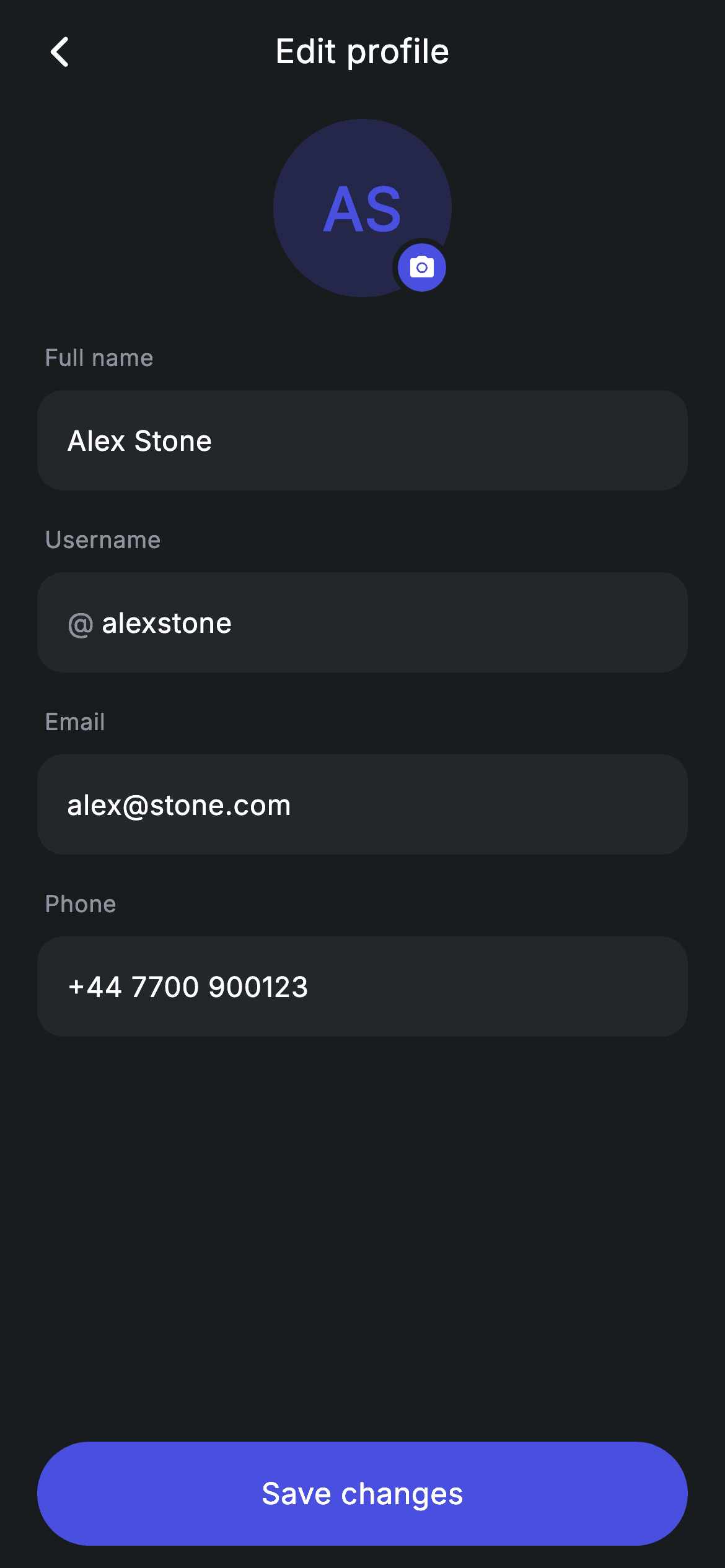
Watch the Flutter UI walkthrough
A short screen recording of Edit Profile running, if you'd rather see it before you read the code. The written tutorial below covers everything in it.
Can't see the video? Watch it on YouTube.
What you'll build
- ✓Four TextEditingControllers seeded with existing values and disposed correctly
- ✓A monogram avatar drawn from initials on a tinted circle, with no image asset
- ✓A camera badge ringed in the page background colour so it reads as cut out
- ✓A reusable borderless field widget with an optional inline prefix character
Step-by-step build
Create the file
Add a new file at lib/fintech_edit_profile/fintech_edit_profile_screen.dart in your Flutter project.
Register the bundled fonts
No external packages — this is pure Flutter. It does bundle its design font (Inter), so drop the font file into fonts/ and declare it in pubspec.yaml:
flutter:
  fonts:
    - family: Inter
      fonts:
- asset: fonts/Inter-Regular.ttfBuild it, piece by piece
Here's how the screen goes together. Each block below is a real slice of the code with a plain-English explanation — paste them in order, or grab the whole file from the next section.
Prefilled controllers, and the dispose that must go with them
import 'package:flutter/material.dart';

/// Edit profile — change name / photo / contact (Revolut-inspired design).
///
/// Self-contained per CONVENTIONS.md: pure Flutter only, the exact design font
/// (Inter) is bundled under `fonts/`, the avatar is a painted monogram (no
/// network/emoji), and the screen forces its own dark theme. Editable fields
/// drive live state; Save commits.
class FintechEditProfileScreen extends StatefulWidget {
  const FintechEditProfileScreen({super.key, this.onBack, this.onSave});

  final VoidCallback? onBack;
  final VoidCallback? onSave;

  @override
  State<FintechEditProfileScreen> createState() =>
      _FintechEditProfileScreenState();
}

class _FintechEditProfileScreenState extends State<FintechEditProfileScreen> {
  static const String _font = 'Inter';
  static const Color _bg = Color(0xFF191C1F);
  static const Color _surface = Color(0xFF242729);
  static const Color _brand = Color(0xFF494FDF);
  static const Color _muted = Color(0xFF8D969E);

  final TextEditingController _name = TextEditingController(text: 'Alex Stone');
  final TextEditingController _user = TextEditingController(text: 'alexstone');
  final TextEditingController _email =
      TextEditingController(text: 'alex@stone.com');
  final TextEditingController _phone =
      TextEditingController(text: '+44 7700 900123');

  @override
  void dispose() {
    _name.dispose();
    _user.dispose();
    _email.dispose();
    _phone.dispose();
    super.dispose();
  }
The four fields are backed by `TextEditingController(text: '...')` — passing `text:` to the constructor is what makes the form open already filled, which is the whole difference between an edit screen and a blank signup. Controllers hold native resources and listeners, so the `dispose()` override releasing all four before `super.dispose()` is not optional; skip it and every visit to this screen leaks. This is also why the screen is stateful at all: it owns objects with a lifecycle, even though none of its own values are read during build.
Label-and-field pairs in a scrolling list
  @override
  Widget build(BuildContext context) {
    return Theme(
      data: ThemeData.dark(useMaterial3: true),
      child: Scaffold(
        backgroundColor: _bg,
        body: SafeArea(
          child: Column(
            children: <Widget>[
              _buildAppBar(),
              Expanded(
                child: ListView(
                  physics: const BouncingScrollPhysics(),
                  padding: const EdgeInsets.fromLTRB(20, 8, 20, 24),
                  children: <Widget>[
                    Center(child: _buildAvatar()),
                    const SizedBox(height: 24),
                    _label('Full name'),
                    _Field(controller: _name),
                    const SizedBox(height: 18),
                    _label('Username'),
                    _Field(controller: _user, prefix: '@'),
                    const SizedBox(height: 18),
                    _label('Email'),
                    _Field(controller: _email),
                    const SizedBox(height: 18),
                    _label('Phone'),
                    _Field(controller: _phone),
                  ],
                ),
              ),
              _buildSave(),
            ],
          ),
        ),
      ),
    );
  }
The body alternates `_label('Full name')` with `_Field(controller: _name)` and repeats that four times with 18px gaps, so adding a fifth field later is two lines. Using a `ListView` rather than a Column matters here specifically because of the keyboard — when it opens, the available height halves, and a ListView scrolls the focused field into view instead of overflowing. The username row is the only one passing a second argument, `prefix: '@'`. Below the list, `_buildSave()` sits outside the `Expanded` so the Save button stays pinned above the keyboard rather than scrolling away with the fields.
A monogram avatar with a corner badge
  Widget _buildAppBar() {
    return Padding(
      padding: const EdgeInsets.fromLTRB(8, 4, 8, 4),
      child: Row(
        children: <Widget>[
          IconButton(
            onPressed: widget.onBack,
            icon: const Icon(Icons.arrow_back_ios_new_rounded,
                size: 20, color: Colors.white),
          ),
          const Expanded(
            child: Text(
              'Edit profile',
              textAlign: TextAlign.center,
              style: TextStyle(
                fontFamily: _font,
                fontSize: 18,
                fontWeight: FontWeight.w500,
                letterSpacing: 0.24,
                color: Colors.white,
              ),
            ),
          ),
          const SizedBox(width: 48),
        ],
      ),
    );
  }

  Widget _buildAvatar() {
    return SizedBox(
      width: 96,
      height: 96,
      child: Stack(
        children: <Widget>[
          Container(
            width: 96,
            height: 96,
            alignment: Alignment.center,
            decoration: BoxDecoration(
              color: _brand.withValues(alpha: 0.22),
              shape: BoxShape.circle,
            ),
            child: const Text(
              'AS',
              style: TextStyle(
                fontFamily: _font,
                fontSize: 32,
                fontWeight: FontWeight.w600,
                color: _brand,
              ),
            ),
          ),
          Positioned(
            right: 0,
            bottom: 0,
            child: Container(
              width: 32,
              height: 32,
              decoration: BoxDecoration(
                color: _brand,
                shape: BoxShape.circle,
                border: Border.all(color: _bg, width: 3),
              ),
              child: const Icon(Icons.camera_alt_rounded,
                  size: 15, color: Colors.white),
            ),
          ),
        ],
      ),
    );
  }
After the standard back-bar Row, `_buildAvatar` draws the profile picture without a profile picture: a 96px circle filled `_brand.withValues(alpha: 0.22)` with the initials 'AS' at 32px `w600` in full `_brand`. Deriving the tint from the same colour as the text is what makes it look designed rather than assembled, and `alignment: Alignment.center` on the Container is what centres the letters. The camera affordance is a `Positioned(right: 0, bottom: 0)` 32px circle carrying `Border.all(color: _bg, width: 3)` — painting that ring in the page background rather than a grey is the trick that makes the badge look punched through the avatar beneath it. Because the offsets are zero rather than negative, no `clipBehavior` change is needed.
Field labels and the pinned Save bar
  Widget _label(String text) {
    return Padding(
      padding: const EdgeInsets.only(left: 4, bottom: 8),
      child: Text(
        text,
        style: const TextStyle(
          fontFamily: _font,
          fontSize: 12.5,
          fontWeight: FontWeight.w500,
          letterSpacing: 0.24,
          color: _muted,
        ),
      ),
    );
  }

  Widget _buildSave() {
    return Padding(
      padding: const EdgeInsets.fromLTRB(20, 0, 20, 12),
      child: SizedBox(
        width: double.infinity,
        height: 56,
        child: Material(
          color: _brand,
          borderRadius: BorderRadius.circular(9999),
          child: InkWell(
            borderRadius: BorderRadius.circular(9999),
            onTap: widget.onSave,
            child: const Center(
              child: Text(
                'Save changes',
                style: TextStyle(
                  fontFamily: _font,
                  fontSize: 16,
                  fontWeight: FontWeight.w500,
                  letterSpacing: 0.24,
                  color: Colors.white,
                ),
              ),
            ),
          ),
        ),
      ),
    );
  }
`_label` is four lines that set the form's whole tone: 12.5px `w500` in `_muted` with 8px of space beneath it and 4px of left inset, so each caption sits just inside the field below rather than flush with the screen edge. Keeping labels visibly lighter than the values inside the fields is what lets someone scan their own data down the page without the captions competing. `_buildSave` is the app's standard 56px pill — `Material` filled `_brand` at `BorderRadius.circular(9999)` with an `InkWell` repeating the radius so the ripple stays clipped — and it lives outside the `Expanded` in the parent Column. That placement is what keeps it above the keyboard while the fields scroll behind it.
The reusable field widget
class _Field extends StatelessWidget {
  const _Field({required this.controller, this.prefix});

  final TextEditingController controller;
  final String? prefix;

  @override
  Widget build(BuildContext context) {
    return Container(
      height: 54,
      padding: const EdgeInsets.symmetric(horizontal: 16),
      decoration: BoxDecoration(
        color: _FintechEditProfileScreenState._surface,
        borderRadius: BorderRadius.circular(14),
      ),
      child: Row(
        children: <Widget>[
          if (prefix != null) ...<Widget>[
            Text(
              prefix!,
              style: const TextStyle(
                fontFamily: _FintechEditProfileScreenState._font,
                fontSize: 15,
                color: _FintechEditProfileScreenState._muted,
              ),
            ),
            const SizedBox(width: 4),
          ],
          Expanded(
            child: TextField(
              controller: controller,
              cursorColor: _FintechEditProfileScreenState._brand,
              style: const TextStyle(
                fontFamily: _FintechEditProfileScreenState._font,
                fontSize: 15,
                letterSpacing: 0.24,
                color: Colors.white,
              ),
              decoration: const InputDecoration(
                isDense: true,
                border: InputBorder.none,
              ),
            ),
          ),
        ],
      ),
    );
  }
}
`_Field` is a small `StatelessWidget` taking a controller and an optional prefix. Like the search field elsewhere in this app, it inverts the usual approach: the visible box is a 54px Container with `_surface` fill and `BorderRadius.circular(14)`, and the `TextField` inside is stripped bare with `border: InputBorder.none` and `isDense: true` so Material's own padding does not fight the Container's. The prefix uses a conditional spread — `if (prefix != null) ...<Widget>[Text(prefix!), SizedBox(width: 4)]` — which contributes both the character and its gap or nothing at all, so the plain fields have no leftover spacing. Rendering '@' as a sibling Text rather than as `InputDecoration.prefixText` keeps it visible when the field is empty and unfocused, which is exactly when a username hint is most useful. The widget reaches into `_FintechEditProfileScreenState` for the shared colour constants, legal because both classes sit in the same file.
Full code
The complete, ready-to-paste source. Free to use in your projects — one click copies it all.
import 'package:flutter/material.dart';

/// Edit profile — change name / photo / contact (Revolut-inspired design).
///
/// Self-contained per CONVENTIONS.md: pure Flutter only, the exact design font
/// (Inter) is bundled under `fonts/`, the avatar is a painted monogram (no
/// network/emoji), and the screen forces its own dark theme. Editable fields
/// drive live state; Save commits.
class FintechEditProfileScreen extends StatefulWidget {
  const FintechEditProfileScreen({super.key, this.onBack, this.onSave});

  final VoidCallback? onBack;
  final VoidCallback? onSave;

  @override
  State<FintechEditProfileScreen> createState() =>
      _FintechEditProfileScreenState();
}

class _FintechEditProfileScreenState extends State<FintechEditProfileScreen> {
  static const String _font = 'Inter';
  static const Color _bg = Color(0xFF191C1F);
  static const Color _surface = Color(0xFF242729);
  static const Color _brand = Color(0xFF494FDF);
  static const Color _muted = Color(0xFF8D969E);

  final TextEditingController _name = TextEditingController(text: 'Alex Stone');
  final TextEditingController _user = TextEditingController(text: 'alexstone');
  final TextEditingController _email =
      TextEditingController(text: 'alex@stone.com');
  final TextEditingController _phone =
      TextEditingController(text: '+44 7700 900123');

  @override
  void dispose() {
    _name.dispose();
    _user.dispose();
    _email.dispose();
    _phone.dispose();
    super.dispose();
  }

  @override
  Widget build(BuildContext context) {
    return Theme(
      data: ThemeData.dark(useMaterial3: true),
      child: Scaffold(
        backgroundColor: _bg,
        body: SafeArea(
          child: Column(
            children: <Widget>[
              _buildAppBar(),
              Expanded(
                child: ListView(
                  physics: const BouncingScrollPhysics(),
                  padding: const EdgeInsets.fromLTRB(20, 8, 20, 24),
                  children: <Widget>[
                    Center(child: _buildAvatar()),
                    const SizedBox(height: 24),
                    _label('Full name'),
                    _Field(controller: _name),
                    const SizedBox(height: 18),
                    _label('Username'),
                    _Field(controller: _user, prefix: '@'),
                    const SizedBox(height: 18),
                    _label('Email'),
                    _Field(controller: _email),
                    const SizedBox(height: 18),
                    _label('Phone'),
                    _Field(controller: _phone),
                  ],
                ),
              ),
              _buildSave(),
            ],
          ),
        ),
      ),
    );
  }

  Widget _buildAppBar() {
    return Padding(
      padding: const EdgeInsets.fromLTRB(8, 4, 8, 4),
      child: Row(
        children: <Widget>[
          IconButton(
            onPressed: widget.onBack,
            icon: const Icon(Icons.arrow_back_ios_new_rounded,
                size: 20, color: Colors.white),
          ),
          const Expanded(
            child: Text(
              'Edit profile',
              textAlign: TextAlign.center,
              style: TextStyle(
                fontFamily: _font,
                fontSize: 18,
                fontWeight: FontWeight.w500,
                letterSpacing: 0.24,
                color: Colors.white,
              ),
            ),
          ),
          const SizedBox(width: 48),
        ],
      ),
    );
  }

  Widget _buildAvatar() {
    return SizedBox(
      width: 96,
      height: 96,
      child: Stack(
        children: <Widget>[
          Container(
            width: 96,
            height: 96,
            alignment: Alignment.center,
            decoration: BoxDecoration(
              color: _brand.withValues(alpha: 0.22),
              shape: BoxShape.circle,
            ),
            child: const Text(
              'AS',
              style: TextStyle(
                fontFamily: _font,
                fontSize: 32,
                fontWeight: FontWeight.w600,
                color: _brand,
              ),
            ),
          ),
          Positioned(
            right: 0,
            bottom: 0,
            child: Container(
              width: 32,
              height: 32,
              decoration: BoxDecoration(
                color: _brand,
                shape: BoxShape.circle,
                border: Border.all(color: _bg, width: 3),
              ),
              child: const Icon(Icons.camera_alt_rounded,
                  size: 15, color: Colors.white),
            ),
          ),
        ],
      ),
    );
  }

  Widget _label(String text) {
    return Padding(
      padding: const EdgeInsets.only(left: 4, bottom: 8),
      child: Text(
        text,
        style: const TextStyle(
          fontFamily: _font,
          fontSize: 12.5,
          fontWeight: FontWeight.w500,
          letterSpacing: 0.24,
          color: _muted,
        ),
      ),
    );
  }

  Widget _buildSave() {
    return Padding(
      padding: const EdgeInsets.fromLTRB(20, 0, 20, 12),
      child: SizedBox(
        width: double.infinity,
        height: 56,
        child: Material(
          color: _brand,
          borderRadius: BorderRadius.circular(9999),
          child: InkWell(
            borderRadius: BorderRadius.circular(9999),
            onTap: widget.onSave,
            child: const Center(
              child: Text(
                'Save changes',
                style: TextStyle(
                  fontFamily: _font,
                  fontSize: 16,
                  fontWeight: FontWeight.w500,
                  letterSpacing: 0.24,
                  color: Colors.white,
                ),
              ),
            ),
          ),
        ),
      ),
    );
  }
}

class _Field extends StatelessWidget {
  const _Field({required this.controller, this.prefix});

  final TextEditingController controller;
  final String? prefix;

  @override
  Widget build(BuildContext context) {
    return Container(
      height: 54,
      padding: const EdgeInsets.symmetric(horizontal: 16),
      decoration: BoxDecoration(
        color: _FintechEditProfileScreenState._surface,
        borderRadius: BorderRadius.circular(14),
      ),
      child: Row(
        children: <Widget>[
          if (prefix != null) ...<Widget>[
            Text(
              prefix!,
              style: const TextStyle(
                fontFamily: _FintechEditProfileScreenState._font,
                fontSize: 15,
                color: _FintechEditProfileScreenState._muted,
              ),
            ),
            const SizedBox(width: 4),
          ],
          Expanded(
            child: TextField(
              controller: controller,
              cursorColor: _FintechEditProfileScreenState._brand,
              style: const TextStyle(
                fontFamily: _FintechEditProfileScreenState._font,
                fontSize: 15,
                letterSpacing: 0.24,
                color: Colors.white,
              ),
              decoration: const InputDecoration(
                isDense: true,
                border: InputBorder.none,
              ),
            ),
          ),
        ],
      ),
    );
  }
}
Plus bundled 1 binary asset (fonts/images). The CLI and MCP install those for you automatically.
Two faster ways to add it
Copy-paste works, but you can skip it entirely.
1. FlutterKit CLI
One command drops this screen — and its fonts — straight into your project.
$ flutterkit add fintech-edit-profile2. AI agent (MCP)
Connect FlutterKit's MCP server in Claude or Cursor and just ask your agent to install fintech-edit-profile — it fetches and writes the files for you.
FAQ
Is this edit profile screen free to use commercially?
Yes. FlutterKit is free and always will be — copy the code from this page, install it with the CLI, or pull it through MCP in your AI editor, then ship it in client work or a paid app. No account, no licence key, no attribution.
Why does the screen override dispose()?
Because it creates four `TextEditingController`s, and each one holds listeners and platform resources that are not released automatically. Disposing them in `dispose()` before calling `super.dispose()` prevents a leak every time the screen is opened and closed. Any State that constructs a controller, animation or stream subscription needs the same treatment.
How do I prefill the fields with real user data?
Pass the values into the widget and seed the controllers from them in `initState`, or add them as constructor parameters and use `TextEditingController(text: widget.name)` at the field declarations. To read the edits back out on save, call `_name.text` and friends inside your `onSave` handler.
Does it validate the email or phone number?
No — the fields are plain `TextField`s with no `Form` or validators, which keeps the screen small and unopinionated. To add validation, wrap the list in a `Form`, swap `_Field`'s TextField for a `TextFormField` with a `validator`, and call `formKey.currentState!.validate()` before running your save.
Which Flutter version does this need?
Flutter 3.22 or newer, because the avatar uses `Color.withValues(alpha: 0.22)`. On an older SDK replace that with `withOpacity(0.22)` and expand the constructor to `const FintechEditProfileScreen({Key? key, this.onBack, this.onSave}) : super(key: key);`.


