How to Build a Currency Picker with Live Search in Flutter (Full Code + Preview)
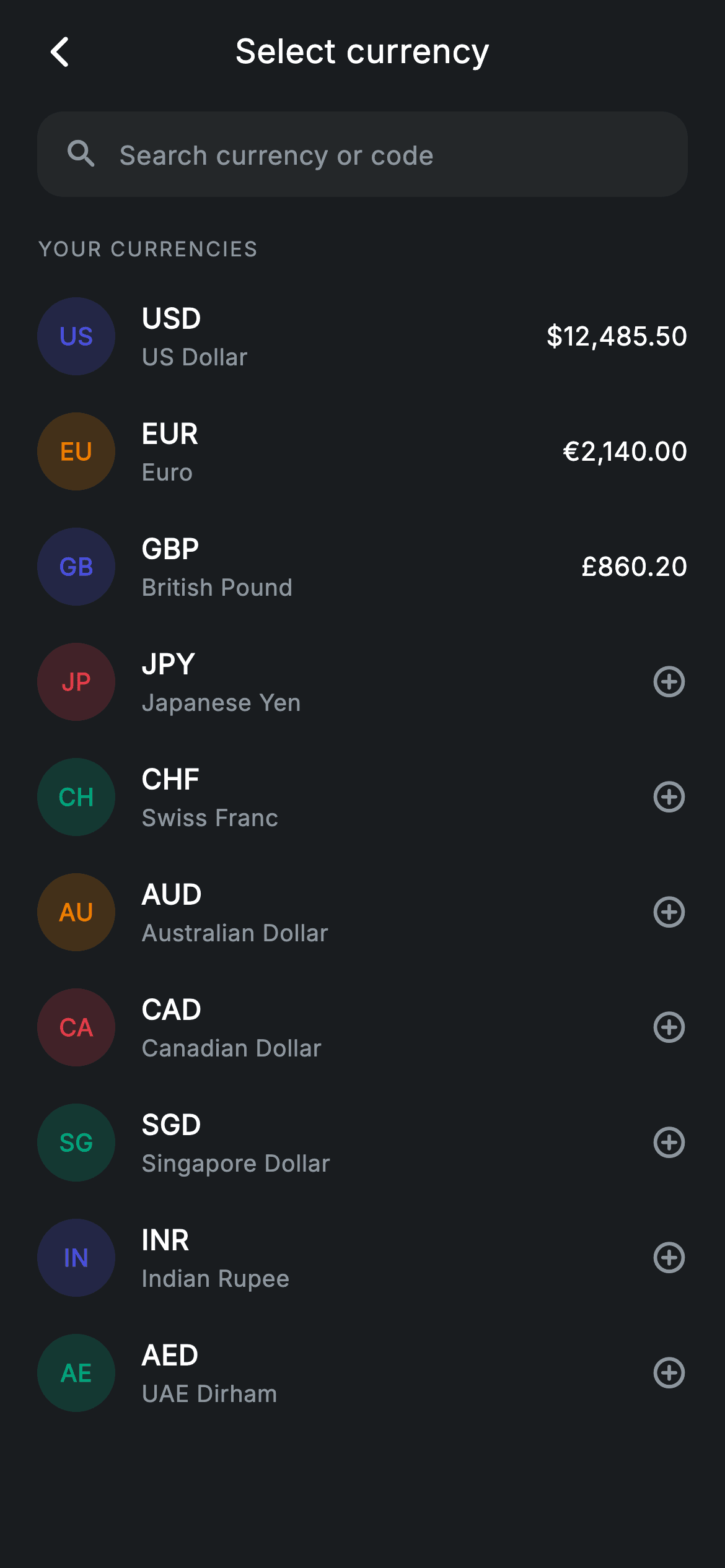
A currency picker looks trivial until you try it with a long list and no flag images to lean on. This screen is Nova's: a live search that matches either the code or the full name, a painted two-letter badge standing in for a flag, and a trailing slot that shows a balance for currencies you already hold and an add icon for the rest. You'll build the filter as a getter, the badge as a tinted circle, and an empty state that quotes back exactly what was typed.
Watch the Flutter UI walkthrough
A short screen recording of Currency Select running, if you'd rather see it before you read the code. The written tutorial below covers everything in it.
Can't see the video? Watch it on YouTube.
What you'll build
- ✓A live filter that matches on both the currency code and its full name
- ✓Flag-free currency badges: the first two letters tinted with a per-currency colour
- ✓A row whose trailing slot switches between a balance and an add icon
- ✓A section header that hides itself the moment the list is filtered
- ✓An empty state that echoes the search term back to the user
Step-by-step build
Create the file
Add a new file at lib/fintech_currency_select/fintech_currency_select_screen.dart in your Flutter project.
Register the bundled fonts
No external packages — this is pure Flutter. It does bundle its design font (Inter), so drop the font file into fonts/ and declare it in pubspec.yaml:
flutter:
  fonts:
    - family: Inter
      fonts:
- asset: fonts/Inter-Regular.ttfBuild it, piece by piece
Here's how the screen goes together. Each block below is a real slice of the code with a plain-English explanation — paste them in order, or grab the whole file from the next section.
The currency table and its colours
import 'package:flutter/material.dart';

/// Currency select — pick a currency with search (Revolut-inspired design).
///
/// Self-contained per CONVENTIONS.md: pure Flutter only, the exact design font
/// (Inter) is bundled under `fonts/`, currency badges are painted code chips (no
/// emoji/flag images, no network), and the screen forces its own dark theme. A
/// live search filters the list; balances are shown where the user holds one.
class FintechCurrencySelectScreen extends StatefulWidget {
  const FintechCurrencySelectScreen({super.key, this.onBack, this.onSelect});

  final VoidCallback? onBack;
  final VoidCallback? onSelect;

  @override
  State<FintechCurrencySelectScreen> createState() =>
      _FintechCurrencySelectScreenState();
}

class _FintechCurrencySelectScreenState
    extends State<FintechCurrencySelectScreen> {
  static const String _font = 'Inter';
  static const Color _bg = Color(0xFF191C1F);
  static const Color _surface = Color(0xFF242729);
  static const Color _brand = Color(0xFF494FDF);
  static const Color _teal = Color(0xFF00A87E);
  static const Color _amber = Color(0xFFEC7E00);
  static const Color _red = Color(0xFFE23B4A);
  static const Color _muted = Color(0xFF8D969E);

  static const List<_Cur> _all = <_Cur>[
    _Cur('USD', 'US Dollar', r'$12,485.50', _brand),
    _Cur('EUR', 'Euro', '€2,140.00', _amber),
    _Cur('GBP', 'British Pound', '£860.20', _brand),
    _Cur('JPY', 'Japanese Yen', '', _red),
    _Cur('CHF', 'Swiss Franc', '', _teal),
    _Cur('AUD', 'Australian Dollar', '', _amber),
    _Cur('CAD', 'Canadian Dollar', '', _red),
    _Cur('SGD', 'Singapore Dollar', '', _teal),
    _Cur('INR', 'Indian Rupee', '', _brand),
    _Cur('AED', 'UAE Dirham', '', _teal),
  ];
Each entry is a `_Cur` — code, display name, balance and a colour — and the ten of them sit in one `static const` list. Two details are worth copying. The balance is a plain `String`, and an *empty* string is the sentinel for 'you don't hold this one', which is what the row later branches on. And the USD amount is written `r'$12,485.50'`: an `r` prefix makes it a raw string so the `$` is not read as the start of an interpolation. The per-currency colours are pulled from a four-colour palette rather than being unique, so the list stays varied without inventing ten hues.
Filtering as a getter
  String _query = '';

  List<_Cur> get _filtered {
    if (_query.isEmpty) return _all;
    final String q = _query.toLowerCase();
    return _all
        .where((_Cur c) =>
            c.code.toLowerCase().contains(q) ||
            c.name.toLowerCase().contains(q))
        .toList();
  }
`_filtered` is a getter, not cached state: it short-circuits to `_all` when the query is empty, otherwise lowercases the query once and keeps any currency whose `code` or `name` contains it. Matching both fields is what lets 'pound' and 'GBP' find the same row — code-only matching is the usual bug in a picker like this. Recomputing on every build is fine at this size; the cost is one pass over a ten-item list, and the alternative is keeping a second list in sync with the text field.
Filter once, then branch
  @override
  Widget build(BuildContext context) {
    final List<_Cur> list = _filtered;
    return Theme(
      data: ThemeData.dark(useMaterial3: true),
      child: Scaffold(
        backgroundColor: _bg,
        body: SafeArea(
          child: Column(
            children: <Widget>[
              _buildAppBar(),
              _buildSearch(),
              Expanded(
                child: list.isEmpty
                    ? _buildEmpty()
                    : ListView(
                        physics: const BouncingScrollPhysics(),
                        padding: const EdgeInsets.fromLTRB(20, 8, 20, 24),
                        children: <Widget>[
                          if (_query.isEmpty)
                            _sectionLabel('Your currencies'),
                          for (final _Cur c in list)
                            _CurRow(cur: c, onTap: widget.onSelect),
                        ],
                      ),
              ),
            ],
          ),
        ),
      ),
    );
  }
`build` calls the getter once into `final List<_Cur> list` rather than reading `_filtered` repeatedly — the same result, with the filter running a single time per frame. `Expanded` then branches on `list.isEmpty` to swap the whole `ListView` for the empty state. Inside the list, `if (_query.isEmpty) _sectionLabel('Your currencies')` hides the header as soon as anything is typed, because 'Your currencies' is a lie once the list is a search result. The search field sits outside the `Expanded`, so it stays fixed while results scroll under it.
A search field built from scratch
  Widget _buildSearch() {
    return Padding(
      padding: const EdgeInsets.fromLTRB(20, 4, 20, 8),
      child: Container(
        height: 46,
        padding: const EdgeInsets.symmetric(horizontal: 14),
        decoration: BoxDecoration(
          color: _surface,
          borderRadius: BorderRadius.circular(14),
        ),
        child: Row(
          children: <Widget>[
            const Icon(Icons.search_rounded, size: 20, color: _muted),
            const SizedBox(width: 10),
            Expanded(
              child: TextField(
                onChanged: (String v) => setState(() => _query = v),
                cursorColor: _brand,
                style: const TextStyle(
                  fontFamily: _font,
                  fontSize: 14,
                  letterSpacing: 0.24,
                  color: Colors.white,
                ),
                decoration: const InputDecoration(
                  isDense: true,
                  border: InputBorder.none,
                  hintText: 'Search currency or code',
                  hintStyle: TextStyle(
                    fontFamily: _font,
                    fontSize: 14,
                    letterSpacing: 0.24,
                    color: _muted,
                  ),
                ),
              ),
            ),
          ],
        ),
      ),
    );
  }
The search box is a 46px `Container` on `_surface` with a 14px radius, holding a magnifier icon and a `TextField` whose decoration is stripped to nothing: `border: InputBorder.none` and `isDense: true` remove Material's underline and its default 48px vertical padding, so the field sits inside the container's own geometry instead of fighting it. `onChanged` writes straight to `_query` through `setState`, which is why filtering feels instant — there is no submit, no debounce, and at ten items none is needed.
The section label and the empty state
  Widget _sectionLabel(String text) {
    return Padding(
      padding: const EdgeInsets.only(top: 4, bottom: 8),
      child: Text(
        text.toUpperCase(),
        style: const TextStyle(
          fontFamily: _font,
          fontSize: 11,
          fontWeight: FontWeight.w500,
          letterSpacing: 1.0,
          color: _muted,
        ),
      ),
    );
  }

  Widget _buildEmpty() {
    return Center(
      child: Text(
        'No currency matches "$_query"',
        style: const TextStyle(
          fontFamily: _font,
          fontSize: 14,
          letterSpacing: 0.24,
          color: _muted,
        ),
      ),
    );
  }
`_sectionLabel` upper-cases at runtime and opens the tracking to `letterSpacing: 1.0`, the standard fix for all-caps at small sizes. `_buildEmpty` is more interesting than it looks: it interpolates the query into the message — `'No currency matches "$_query"'` — so the user sees their own typo in quotes. A bare 'No results' leaves them wondering whether the search or the data is at fault; showing the term makes a typo obvious at a glance.
The model and the flag-free badge
class _Cur {
  const _Cur(this.code, this.name, this.balance, this.color);
  final String code;
  final String name;
  final String balance;
  final Color color;
}

class _CurRow extends StatelessWidget {
  const _CurRow({required this.cur, this.onTap});

  final _Cur cur;
  final VoidCallback? onTap;

  @override
  Widget build(BuildContext context) {
    return InkWell(
      onTap: onTap,
      child: Padding(
        padding: const EdgeInsets.symmetric(vertical: 10),
        child: Row(
          children: <Widget>[
            Container(
              width: 42,
              height: 42,
              alignment: Alignment.center,
              decoration: BoxDecoration(
                color: cur.color.withValues(alpha: 0.2),
                shape: BoxShape.circle,
              ),
              child: Text(
                cur.code.substring(0, 2),
                style: TextStyle(
                  fontFamily: _FintechCurrencySelectScreenState._font,
                  fontSize: 13,
                  fontWeight: FontWeight.w700,
                  letterSpacing: 0.24,
                  color: cur.color,
                ),
              ),
            ),
`_Cur` is a four-field const class — small enough to justify positional parameters. `_CurRow` then draws the badge: a 42px circle tinted `cur.color.withValues(alpha: 0.2)` with `cur.code.substring(0, 2)` at `w700` in the full-strength colour. Two letters from a three-letter code is the trick that makes this work without flag assets: 'US', 'EU', 'GB' are instantly readable, there is nothing to license, nothing to download, and no politically awkward flag mapping for currencies used by several countries.
Balance or add, in one slot
            Expanded(
              child: Column(
                crossAxisAlignment: CrossAxisAlignment.start,
                children: <Widget>[
                  Text(
                    cur.code,
                    style: const TextStyle(
                      fontFamily: _FintechCurrencySelectScreenState._font,
                      fontSize: 15,
                      fontWeight: FontWeight.w600,
                      letterSpacing: 0.24,
                      color: Colors.white,
                    ),
                  ),
                  const SizedBox(height: 2),
                  Text(
                    cur.name,
                    style: const TextStyle(
                      fontFamily: _FintechCurrencySelectScreenState._font,
                      fontSize: 12.5,
                      letterSpacing: 0.24,
                      color: _FintechCurrencySelectScreenState._muted,
                    ),
                  ),
                ],
              ),
            ),
            if (cur.balance.isNotEmpty)
              Text(
                cur.balance,
                style: const TextStyle(
                  fontFamily: _FintechCurrencySelectScreenState._font,
                  fontSize: 14,
                  fontWeight: FontWeight.w500,
                  letterSpacing: 0.24,
                  color: Colors.white,
                ),
              )
            else
              const Icon(Icons.add_circle_outline_rounded,
                  size: 20, color: _FintechCurrencySelectScreenState._muted),
          ],
        ),
      ),
    );
  }
The middle column stacks the code at 15px `w600` over the name at 12.5px in muted grey, wrapped in `Expanded` so it takes the space the badge and trailing widget leave. The trailing slot is an `if (cur.balance.isNotEmpty) ... else ...` written directly in the children list — a balance when the user holds the currency, `Icons.add_circle_outline_rounded` when they don't. One row layout serves both states, so a currency the user opens an account in simply changes what its trailing slot renders. Note the static references like `_FintechCurrencySelectScreenState._font`: `_CurRow` is a separate widget but lives in the same file, and Dart privacy is per-library, so it can reach the state class's constants.
Full code
The complete, ready-to-paste source. Free to use in your projects — one click copies it all.
import 'package:flutter/material.dart';

/// Currency select — pick a currency with search (Revolut-inspired design).
///
/// Self-contained per CONVENTIONS.md: pure Flutter only, the exact design font
/// (Inter) is bundled under `fonts/`, currency badges are painted code chips (no
/// emoji/flag images, no network), and the screen forces its own dark theme. A
/// live search filters the list; balances are shown where the user holds one.
class FintechCurrencySelectScreen extends StatefulWidget {
  const FintechCurrencySelectScreen({super.key, this.onBack, this.onSelect});

  final VoidCallback? onBack;
  final VoidCallback? onSelect;

  @override
  State<FintechCurrencySelectScreen> createState() =>
      _FintechCurrencySelectScreenState();
}

class _FintechCurrencySelectScreenState
    extends State<FintechCurrencySelectScreen> {
  static const String _font = 'Inter';
  static const Color _bg = Color(0xFF191C1F);
  static const Color _surface = Color(0xFF242729);
  static const Color _brand = Color(0xFF494FDF);
  static const Color _teal = Color(0xFF00A87E);
  static const Color _amber = Color(0xFFEC7E00);
  static const Color _red = Color(0xFFE23B4A);
  static const Color _muted = Color(0xFF8D969E);

  static const List<_Cur> _all = <_Cur>[
    _Cur('USD', 'US Dollar', r'$12,485.50', _brand),
    _Cur('EUR', 'Euro', '€2,140.00', _amber),
    _Cur('GBP', 'British Pound', '£860.20', _brand),
    _Cur('JPY', 'Japanese Yen', '', _red),
    _Cur('CHF', 'Swiss Franc', '', _teal),
    _Cur('AUD', 'Australian Dollar', '', _amber),
    _Cur('CAD', 'Canadian Dollar', '', _red),
    _Cur('SGD', 'Singapore Dollar', '', _teal),
    _Cur('INR', 'Indian Rupee', '', _brand),
    _Cur('AED', 'UAE Dirham', '', _teal),
  ];

  String _query = '';

  List<_Cur> get _filtered {
    if (_query.isEmpty) return _all;
    final String q = _query.toLowerCase();
    return _all
        .where((_Cur c) =>
            c.code.toLowerCase().contains(q) ||
            c.name.toLowerCase().contains(q))
        .toList();
  }

  @override
  Widget build(BuildContext context) {
    final List<_Cur> list = _filtered;
    return Theme(
      data: ThemeData.dark(useMaterial3: true),
      child: Scaffold(
        backgroundColor: _bg,
        body: SafeArea(
          child: Column(
            children: <Widget>[
              _buildAppBar(),
              _buildSearch(),
              Expanded(
                child: list.isEmpty
                    ? _buildEmpty()
                    : ListView(
                        physics: const BouncingScrollPhysics(),
                        padding: const EdgeInsets.fromLTRB(20, 8, 20, 24),
                        children: <Widget>[
                          if (_query.isEmpty)
                            _sectionLabel('Your currencies'),
                          for (final _Cur c in list)
                            _CurRow(cur: c, onTap: widget.onSelect),
                        ],
                      ),
              ),
            ],
          ),
        ),
      ),
    );
  }

  Widget _buildAppBar() {
    return Padding(
      padding: const EdgeInsets.fromLTRB(8, 4, 8, 4),
      child: Row(
        children: <Widget>[
          IconButton(
            onPressed: widget.onBack,
            icon: const Icon(Icons.arrow_back_ios_new_rounded,
                size: 20, color: Colors.white),
          ),
          const Expanded(
            child: Text(
              'Select currency',
              textAlign: TextAlign.center,
              style: TextStyle(
                fontFamily: _font,
                fontSize: 18,
                fontWeight: FontWeight.w500,
                letterSpacing: 0.24,
                color: Colors.white,
              ),
            ),
          ),
          const SizedBox(width: 48),
        ],
      ),
    );
  }

  Widget _buildSearch() {
    return Padding(
      padding: const EdgeInsets.fromLTRB(20, 4, 20, 8),
      child: Container(
        height: 46,
        padding: const EdgeInsets.symmetric(horizontal: 14),
        decoration: BoxDecoration(
          color: _surface,
          borderRadius: BorderRadius.circular(14),
        ),
        child: Row(
          children: <Widget>[
            const Icon(Icons.search_rounded, size: 20, color: _muted),
            const SizedBox(width: 10),
            Expanded(
              child: TextField(
                onChanged: (String v) => setState(() => _query = v),
                cursorColor: _brand,
                style: const TextStyle(
                  fontFamily: _font,
                  fontSize: 14,
                  letterSpacing: 0.24,
                  color: Colors.white,
                ),
                decoration: const InputDecoration(
                  isDense: true,
                  border: InputBorder.none,
                  hintText: 'Search currency or code',
                  hintStyle: TextStyle(
                    fontFamily: _font,
                    fontSize: 14,
                    letterSpacing: 0.24,
                    color: _muted,
                  ),
                ),
              ),
            ),
          ],
        ),
      ),
    );
  }

  Widget _sectionLabel(String text) {
    return Padding(
      padding: const EdgeInsets.only(top: 4, bottom: 8),
      child: Text(
        text.toUpperCase(),
        style: const TextStyle(
          fontFamily: _font,
          fontSize: 11,
          fontWeight: FontWeight.w500,
          letterSpacing: 1.0,
          color: _muted,
        ),
      ),
    );
  }

  Widget _buildEmpty() {
    return Center(
      child: Text(
        'No currency matches "$_query"',
        style: const TextStyle(
          fontFamily: _font,
          fontSize: 14,
          letterSpacing: 0.24,
          color: _muted,
        ),
      ),
    );
  }
}

class _Cur {
  const _Cur(this.code, this.name, this.balance, this.color);
  final String code;
  final String name;
  final String balance;
  final Color color;
}

class _CurRow extends StatelessWidget {
  const _CurRow({required this.cur, this.onTap});

  final _Cur cur;
  final VoidCallback? onTap;

  @override
  Widget build(BuildContext context) {
    return InkWell(
      onTap: onTap,
      child: Padding(
        padding: const EdgeInsets.symmetric(vertical: 10),
        child: Row(
          children: <Widget>[
            Container(
              width: 42,
              height: 42,
              alignment: Alignment.center,
              decoration: BoxDecoration(
                color: cur.color.withValues(alpha: 0.2),
                shape: BoxShape.circle,
              ),
              child: Text(
                cur.code.substring(0, 2),
                style: TextStyle(
                  fontFamily: _FintechCurrencySelectScreenState._font,
                  fontSize: 13,
                  fontWeight: FontWeight.w700,
                  letterSpacing: 0.24,
                  color: cur.color,
                ),
              ),
            ),
            const SizedBox(width: 14),
            Expanded(
              child: Column(
                crossAxisAlignment: CrossAxisAlignment.start,
                children: <Widget>[
                  Text(
                    cur.code,
                    style: const TextStyle(
                      fontFamily: _FintechCurrencySelectScreenState._font,
                      fontSize: 15,
                      fontWeight: FontWeight.w600,
                      letterSpacing: 0.24,
                      color: Colors.white,
                    ),
                  ),
                  const SizedBox(height: 2),
                  Text(
                    cur.name,
                    style: const TextStyle(
                      fontFamily: _FintechCurrencySelectScreenState._font,
                      fontSize: 12.5,
                      letterSpacing: 0.24,
                      color: _FintechCurrencySelectScreenState._muted,
                    ),
                  ),
                ],
              ),
            ),
            if (cur.balance.isNotEmpty)
              Text(
                cur.balance,
                style: const TextStyle(
                  fontFamily: _FintechCurrencySelectScreenState._font,
                  fontSize: 14,
                  fontWeight: FontWeight.w500,
                  letterSpacing: 0.24,
                  color: Colors.white,
                ),
              )
            else
              const Icon(Icons.add_circle_outline_rounded,
                  size: 20, color: _FintechCurrencySelectScreenState._muted),
          ],
        ),
      ),
    );
  }
}
Plus bundled 1 binary asset (fonts/images). The CLI and MCP install those for you automatically.
Two faster ways to add it
Copy-paste works, but you can skip it entirely.
1. FlutterKit CLI
One command drops this screen — and its fonts — straight into your project.
$ flutterkit add fintech-currency-select2. AI agent (MCP)
Connect FlutterKit's MCP server in Claude or Cursor and just ask your agent to install fintech-currency-select — it fetches and writes the files for you.
FAQ
How do I plug in a real list of currencies?
Replace the `_all` constant with your own `List<_Cur>`, or pass one into the widget as a parameter. Nothing below it assumes a fixed length — the filter, the empty state and the row layout all work off whatever list they are given, and the badge is derived from the code so new entries need no extra assets.
Will the search stay fast with two hundred currencies?
A `contains` pass over a few hundred short strings runs in well under a frame, so yes. The change worth making at that size is swapping the `ListView` for `ListView.builder` so rows are built lazily, and adding a short debounce if you move filtering to a network call.
Why two letters instead of a flag emoji?
Flag emoji render differently on every platform and are missing entirely on some Android builds, and several currencies have no single country behind them. A tinted two-letter chip is drawn by Flutter itself, so it looks identical everywhere and adds no asset weight.
Does it need any packages or fonts?
No packages, only `material.dart`. Inter ships bundled with the screen — register it under `fonts:` in your pubspec. If you skip the font the layout still holds, since every size is fixed and the two-letter badge is centred rather than measured.
Which Flutter version does this need?
Flutter 3.22 or newer, because the badge tint calls `Color.withValues(alpha: 0.2)`. On an older SDK use `withOpacity(0.2)` instead and expand `super.key` in both constructors to the older `{Key? key}) : super(key: key)` form.


