How to Build a Crypto Receive Screen with a Painted QR Code in Flutter (Full Code + Preview)
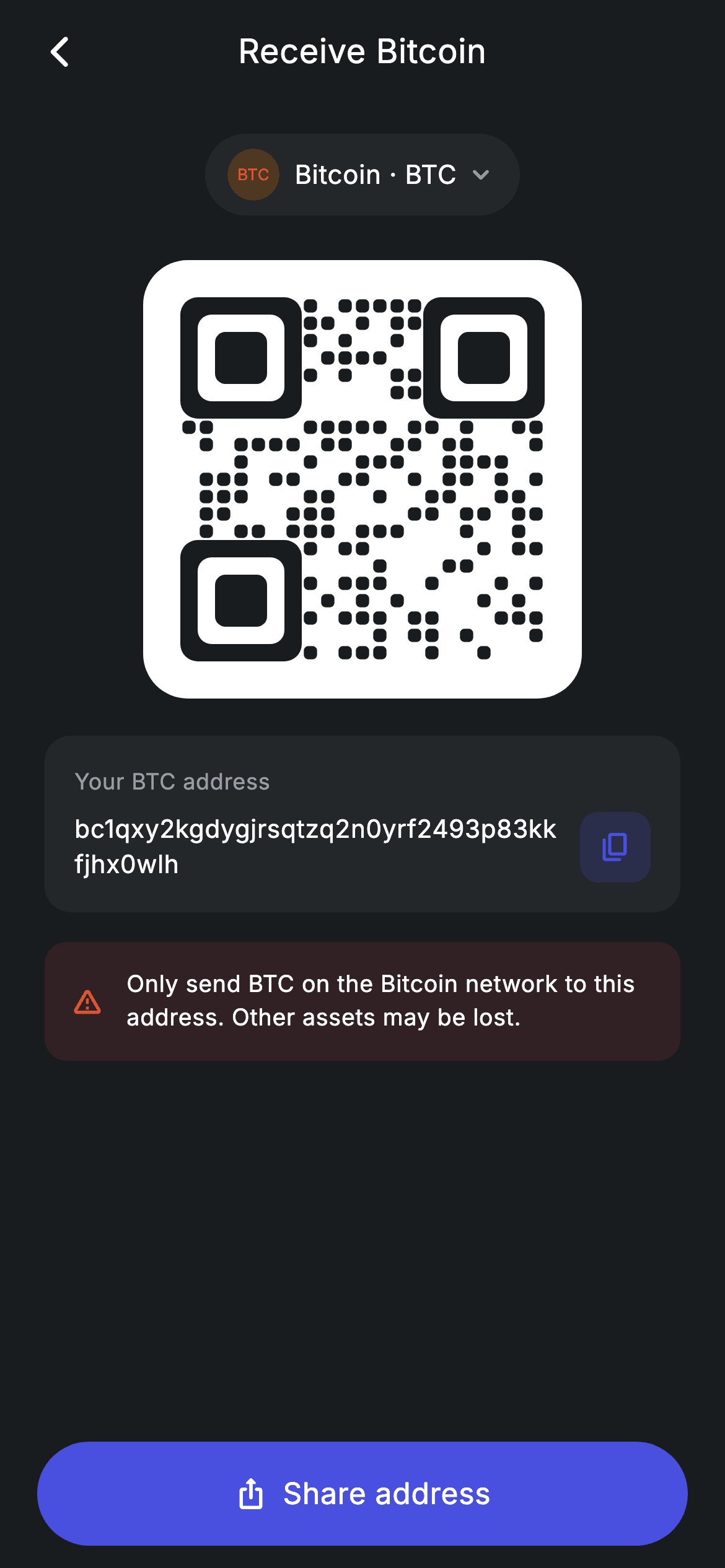
A deposit screen is mostly one job — show an address people can scan or copy — plus one warning that stops them losing money on the wrong network. This tutorial builds that screen in Flutter with a QR code drawn entirely by a `CustomPainter`: three rounded finder squares and a 21×21 module grid generated by a seeded linear-congruential generator, so it looks convincing, renders identically every build, and needs no QR package. Below it sit a copy-to-clipboard address card and a red network warning.
Watch the Flutter UI walkthrough
A short screen recording of Crypto Receive running, if you'd rather see it before you read the code. The written tutorial below covers everything in it.
Can't see the video? Watch it on YouTube.
What you'll build
- ✓A QR-style code painted from scratch — deterministic, dependency-free, and asset-free
- ✓The three rounded finder squares that make a code read as a QR at a glance
- ✓A monospace-ish address card with a tinted, ripple-clipped copy button
- ✓A red network warning block using the low-alpha-fill + full-strength-icon recipe
- ✓A pinned 'Share address' pill button with an icon and label centred together
- ✓A painted coin chip (BTC in a tinted circle) instead of an emoji or network logo
Step-by-step build
Create the file
Add a new file at lib/fintech_crypto_receive/fintech_crypto_receive_screen.dart in your Flutter project.
Register the bundled fonts
No external packages — this is pure Flutter. It does bundle its design font (Inter), so drop the font file into fonts/ and declare it in pubspec.yaml:
flutter:
  fonts:
    - family: Inter
      fonts:
- asset: fonts/Inter-Regular.ttfBuild it, piece by piece
Here's how the screen goes together. Each block below is a real slice of the code with a plain-English explanation — paste them in order, or grab the whole file from the next section.
Tokens, the address constant, and the page skeleton
class FintechCryptoReceiveScreen extends StatelessWidget {
  const FintechCryptoReceiveScreen({super.key, this.onBack});

  final VoidCallback? onBack;

  static const String _font = 'Inter';
  static const Color _bg = Color(0xFF191C1F);
  static const Color _surface = Color(0xFF242729);
  static const Color _brand = Color(0xFF494FDF);
  static const Color _amber = Color(0xFFEC7E00);
  static const Color _red = Color(0xFFE23B4A);
  static const Color _muted = Color(0xFF8D969E);

  static const String _address = 'bc1qxy2kgdygjrsqtzq2n0yrf2493p83kkfjhx0wlh';

  @override
  Widget build(BuildContext context) {
    return Theme(
      data: ThemeData.dark(useMaterial3: true),
      child: Scaffold(
        backgroundColor: _bg,
        body: SafeArea(
          child: Column(
            children: <Widget>[
              _buildAppBar(),
              Expanded(
                child: SingleChildScrollView(
                  physics: const BouncingScrollPhysics(),
                  padding: const EdgeInsets.fromLTRB(24, 8, 24, 24),
                  child: Column(
                    children: <Widget>[
                      const SizedBox(height: 8),
                      _buildCoinChip(),
                      const SizedBox(height: 24),
                      _buildQr(),
                      const SizedBox(height: 20),
                      _buildAddress(),
                      const SizedBox(height: 16),
                      _buildWarning(),
                    ],
                  ),
                ),
              ),
              _buildShare(),
            ],
          ),
        ),
      ),
    );
  }
The screen is stateless — nothing here changes at runtime — with the deposit address held as `static const String _address`. `build` forces `ThemeData.dark(useMaterial3: true)` so it renders correctly as a standalone route, then splits the body three ways: the app bar and the 'Share address' button sit outside the scroll area, and everything between them lives in an `Expanded` `SingleChildScrollView`. That split is what keeps the CTA glued to the bottom while the QR and warning can still scroll on short devices.
The coin chip and the white QR plate
  Widget _buildCoinChip() {
    return Container(
      padding: const EdgeInsets.symmetric(horizontal: 12, vertical: 8),
      decoration: BoxDecoration(
        color: _surface,
        borderRadius: BorderRadius.circular(9999),
      ),
      child: Row(
        mainAxisSize: MainAxisSize.min,
        children: <Widget>[
          Container(
            width: 28,
            height: 28,
            alignment: Alignment.center,
            decoration: BoxDecoration(
              color: _amber.withValues(alpha: 0.2),
              shape: BoxShape.circle,
            ),
            child: const Text('BTC',
                style: TextStyle(
                  fontFamily: _font,
                  fontSize: 8.5,
                  fontWeight: FontWeight.w700,
                  color: _amber,
                )),
          ),
          const SizedBox(width: 8),
          const Text(
            'Bitcoin · BTC',
            style: TextStyle(
              fontFamily: _font,
              fontSize: 14,
              fontWeight: FontWeight.w500,
              letterSpacing: 0.24,
              color: Colors.white,
            ),
          ),
          const SizedBox(width: 4),
          const Icon(Icons.keyboard_arrow_down_rounded,
              size: 18, color: _muted),
        ],
      ),
    );
  }

  Widget _buildQr() {
    return Container(
      padding: const EdgeInsets.all(20),
      decoration: BoxDecoration(
        color: Colors.white,
        borderRadius: BorderRadius.circular(24),
      ),
      child: SizedBox(
        width: 196,
        height: 196,
        child: CustomPaint(painter: _QrPainter(seed: 7741920)),
      ),
    );
  }
The chip is a fully rounded (`9999` radius) `Container` with `mainAxisSize: MainAxisSize.min` on its `Row` — that's what makes it hug its content instead of stretching across the column. Inside, a 28px circle tinted `_amber.withValues(alpha: 0.2)` holds 'BTC' at 8.5px bold, giving a coin mark with no image. The QR sits on a deliberately *white* 24px-radius plate even though the screen is dark: scanners need the light quiet zone, so the plate is functional, not decorative. The code itself is a 196×196 `CustomPaint` — a fixed size, because `CustomPaint` has no intrinsic dimensions.
Address card with a clipped copy button
  Widget _buildAddress() {
    return Container(
      padding: const EdgeInsets.all(16),
      decoration: BoxDecoration(
        color: _surface,
        borderRadius: BorderRadius.circular(14),
      ),
      child: Column(
        crossAxisAlignment: CrossAxisAlignment.start,
        children: <Widget>[
          const Text(
            'Your BTC address',
            style: TextStyle(
              fontFamily: _font,
              fontSize: 12,
              letterSpacing: 0.24,
              color: _muted,
            ),
          ),
          const SizedBox(height: 8),
          Row(
            children: <Widget>[
              const Expanded(
                child: Text(
                  _address,
                  style: TextStyle(
                    fontFamily: _font,
                    fontSize: 13.5,
                    height: 1.4,
                    letterSpacing: 0.24,
                    color: Colors.white,
                  ),
                ),
              ),
              const SizedBox(width: 12),
              Material(
                color: _brand.withValues(alpha: 0.18),
                borderRadius: BorderRadius.circular(10),
                child: InkWell(
                  borderRadius: BorderRadius.circular(10),
                  onTap: () {},
                  child: const Padding(
                    padding: EdgeInsets.all(10),
                    child: Icon(Icons.copy_rounded, size: 18, color: _brand),
                  ),
                ),
              ),
            ],
          ),
        ],
      ),
    );
  }
The address is an `Expanded` `Text` with `height: 1.4`, so a 42-character bech32 string wraps to two comfortable lines instead of being ellipsised — you want the whole address visible for manual verification. Beside it, the copy affordance is the `Material` + `InkWell` pair with `BorderRadius.circular(10)` on *both*: `Material` paints the 18%-alpha brand square and the matching radius on `InkWell` clips the ripple to those rounded corners. The padding sits inside the `InkWell`, which is what makes the full 38px square tappable rather than just the icon glyph.
The network warning
  Widget _buildWarning() {
    return Container(
      padding: const EdgeInsets.all(14),
      decoration: BoxDecoration(
        color: _red.withValues(alpha: 0.12),
        borderRadius: BorderRadius.circular(12),
      ),
      child: Row(
        children: const <Widget>[
          Icon(Icons.warning_amber_rounded, size: 18, color: _red),
          SizedBox(width: 12),
          Expanded(
            child: Text(
              'Only send BTC on the Bitcoin network to this address. Other '
              'assets may be lost.',
              style: TextStyle(
                fontFamily: _font,
                fontSize: 12.5,
                height: 1.4,
                letterSpacing: 0.24,
                color: Colors.white,
              ),
            ),
          ),
        ],
      ),
    );
  }
A 12%-alpha red fill behind a full-strength `_red` `warning_amber_rounded` icon — the same tint recipe used elsewhere in the screen, tuned so the block reads as a caution without shouting. The message text is `Expanded` so it wraps rather than overflowing, and it's written as two adjacent string literals ('Only send BTC…' 'assets may be lost.'), which Dart concatenates at compile time; that's the idiomatic way to keep a long sentence inside the line limit without a `+` at runtime.
Painting a QR code with finders and a seeded grid
/// Deterministic QR-style painter — finder squares + a seeded module grid.
/// Decorative (not a scannable code) but convincing and dependency-free.
class _QrPainter extends CustomPainter {
  _QrPainter({required this.seed});

  final int seed;

  @override
  void paint(Canvas canvas, Size size) {
    const int n = 21;
    final double cell = size.width / n;
    final Paint dark = Paint()..color = const Color(0xFF191C1F);

    bool isFinder(int r, int c) {
      bool inBox(int br, int bc) =>
          r >= br && r < br + 7 && c >= bc && c < bc + 7;
      return inBox(0, 0) || inBox(0, n - 7) || inBox(n - 7, 0);
    }

    void finder(int br, int bc) {
      canvas.drawRRect(
        RRect.fromRectAndRadius(
          Rect.fromLTWH(bc * cell, br * cell, 7 * cell, 7 * cell),
          Radius.circular(cell),
        ),
        dark,
      );
      canvas.drawRRect(
        RRect.fromRectAndRadius(
          Rect.fromLTWH((bc + 1) * cell, (br + 1) * cell, 5 * cell, 5 * cell),
          Radius.circular(cell * 0.8),
        ),
        Paint()..color = Colors.white,
      );
      canvas.drawRRect(
        RRect.fromRectAndRadius(
          Rect.fromLTWH((bc + 2) * cell, (br + 2) * cell, 3 * cell, 3 * cell),
          Radius.circular(cell * 0.6),
        ),
        dark,
      );
    }

    int state = seed == 0 ? 1 : seed;
    int next() {
      state = (state * 1103515245 + 12345) & 0x7fffffff;
      return state;
    }

    for (int r = 0; r < n; r++) {
      for (int c = 0; c < n; c++) {
        if (isFinder(r, c)) continue;
        if (next() % 100 < 46) {
          canvas.drawRRect(
            RRect.fromRectAndRadius(
              Rect.fromLTWH(c * cell + cell * 0.12, r * cell + cell * 0.12,
                  cell * 0.76, cell * 0.76),
              Radius.circular(cell * 0.25),
            ),
            dark,
          );
        }
      }
    }

    finder(0, 0);
    finder(0, n - 7);
    finder(n - 7, 0);
  }

  @override
  bool shouldRepaint(covariant _QrPainter oldDelegate) => oldDelegate.seed != seed;
}
`n = 21` sets a 21-module grid (the real Version-1 QR size) and `cell = size.width / n` scales every module to the box. The local `isFinder` helper reports whether a cell falls inside any of the three 7×7 corner boxes, and `finder()` draws each as three nested `RRect`s — dark, white, dark — which is the recognisable bullseye. The randomness is a hand-rolled LCG: `state = (state * 1103515245 + 12345) & 0x7fffffff`, the classic glibc constants. Because it's seeded with a fixed `7741920`, the pattern is identical on every rebuild and every device — no `Random()`, no flicker. Modules fill at a 46% rate, inset by `cell * 0.12` with rounded corners for the soft modern look, and the finders are painted *last* so they sit cleanly on top.
Full code
The complete, ready-to-paste source. Free to use in your projects — one click copies it all.
import 'package:flutter/material.dart';

/// Crypto receive — deposit address + QR (Revolut-inspired design system).
///
/// Self-contained per CONVENTIONS.md: pure Flutter only, the exact design font
/// (Inter) is bundled under `fonts/`, the QR is fully custom-painted and the
/// coin chip is painted (no emoji/network), and the screen forces its own dark
/// theme. A network warning keeps the deposit flow realistic.
class FintechCryptoReceiveScreen extends StatelessWidget {
  const FintechCryptoReceiveScreen({super.key, this.onBack});

  final VoidCallback? onBack;

  static const String _font = 'Inter';
  static const Color _bg = Color(0xFF191C1F);
  static const Color _surface = Color(0xFF242729);
  static const Color _brand = Color(0xFF494FDF);
  static const Color _amber = Color(0xFFEC7E00);
  static const Color _red = Color(0xFFE23B4A);
  static const Color _muted = Color(0xFF8D969E);

  static const String _address = 'bc1qxy2kgdygjrsqtzq2n0yrf2493p83kkfjhx0wlh';

  @override
  Widget build(BuildContext context) {
    return Theme(
      data: ThemeData.dark(useMaterial3: true),
      child: Scaffold(
        backgroundColor: _bg,
        body: SafeArea(
          child: Column(
            children: <Widget>[
              _buildAppBar(),
              Expanded(
                child: SingleChildScrollView(
                  physics: const BouncingScrollPhysics(),
                  padding: const EdgeInsets.fromLTRB(24, 8, 24, 24),
                  child: Column(
                    children: <Widget>[
                      const SizedBox(height: 8),
                      _buildCoinChip(),
                      const SizedBox(height: 24),
                      _buildQr(),
                      const SizedBox(height: 20),
                      _buildAddress(),
                      const SizedBox(height: 16),
                      _buildWarning(),
                    ],
                  ),
                ),
              ),
              _buildShare(),
            ],
          ),
        ),
      ),
    );
  }

  Widget _buildAppBar() {
    return Padding(
      padding: const EdgeInsets.fromLTRB(8, 4, 8, 4),
      child: Row(
        children: <Widget>[
          IconButton(
            onPressed: onBack,
            icon: const Icon(Icons.arrow_back_ios_new_rounded,
                size: 20, color: Colors.white),
          ),
          const Expanded(
            child: Text(
              'Receive Bitcoin',
              textAlign: TextAlign.center,
              style: TextStyle(
                fontFamily: _font,
                fontSize: 18,
                fontWeight: FontWeight.w500,
                letterSpacing: 0.24,
                color: Colors.white,
              ),
            ),
          ),
          const SizedBox(width: 48),
        ],
      ),
    );
  }

  Widget _buildCoinChip() {
    return Container(
      padding: const EdgeInsets.symmetric(horizontal: 12, vertical: 8),
      decoration: BoxDecoration(
        color: _surface,
        borderRadius: BorderRadius.circular(9999),
      ),
      child: Row(
        mainAxisSize: MainAxisSize.min,
        children: <Widget>[
          Container(
            width: 28,
            height: 28,
            alignment: Alignment.center,
            decoration: BoxDecoration(
              color: _amber.withValues(alpha: 0.2),
              shape: BoxShape.circle,
            ),
            child: const Text('BTC',
                style: TextStyle(
                  fontFamily: _font,
                  fontSize: 8.5,
                  fontWeight: FontWeight.w700,
                  color: _amber,
                )),
          ),
          const SizedBox(width: 8),
          const Text(
            'Bitcoin · BTC',
            style: TextStyle(
              fontFamily: _font,
              fontSize: 14,
              fontWeight: FontWeight.w500,
              letterSpacing: 0.24,
              color: Colors.white,
            ),
          ),
          const SizedBox(width: 4),
          const Icon(Icons.keyboard_arrow_down_rounded,
              size: 18, color: _muted),
        ],
      ),
    );
  }

  Widget _buildQr() {
    return Container(
      padding: const EdgeInsets.all(20),
      decoration: BoxDecoration(
        color: Colors.white,
        borderRadius: BorderRadius.circular(24),
      ),
      child: SizedBox(
        width: 196,
        height: 196,
        child: CustomPaint(painter: _QrPainter(seed: 7741920)),
      ),
    );
  }

  Widget _buildAddress() {
    return Container(
      padding: const EdgeInsets.all(16),
      decoration: BoxDecoration(
        color: _surface,
        borderRadius: BorderRadius.circular(14),
      ),
      child: Column(
        crossAxisAlignment: CrossAxisAlignment.start,
        children: <Widget>[
          const Text(
            'Your BTC address',
            style: TextStyle(
              fontFamily: _font,
              fontSize: 12,
              letterSpacing: 0.24,
              color: _muted,
            ),
          ),
          const SizedBox(height: 8),
          Row(
            children: <Widget>[
              const Expanded(
                child: Text(
                  _address,
                  style: TextStyle(
                    fontFamily: _font,
                    fontSize: 13.5,
                    height: 1.4,
                    letterSpacing: 0.24,
                    color: Colors.white,
                  ),
                ),
              ),
              const SizedBox(width: 12),
              Material(
                color: _brand.withValues(alpha: 0.18),
                borderRadius: BorderRadius.circular(10),
                child: InkWell(
                  borderRadius: BorderRadius.circular(10),
                  onTap: () {},
                  child: const Padding(
                    padding: EdgeInsets.all(10),
                    child: Icon(Icons.copy_rounded, size: 18, color: _brand),
                  ),
                ),
              ),
            ],
          ),
        ],
      ),
    );
  }

  Widget _buildWarning() {
    return Container(
      padding: const EdgeInsets.all(14),
      decoration: BoxDecoration(
        color: _red.withValues(alpha: 0.12),
        borderRadius: BorderRadius.circular(12),
      ),
      child: Row(
        children: const <Widget>[
          Icon(Icons.warning_amber_rounded, size: 18, color: _red),
          SizedBox(width: 12),
          Expanded(
            child: Text(
              'Only send BTC on the Bitcoin network to this address. Other '
              'assets may be lost.',
              style: TextStyle(
                fontFamily: _font,
                fontSize: 12.5,
                height: 1.4,
                letterSpacing: 0.24,
                color: Colors.white,
              ),
            ),
          ),
        ],
      ),
    );
  }

  Widget _buildShare() {
    return Padding(
      padding: const EdgeInsets.fromLTRB(20, 0, 20, 12),
      child: SizedBox(
        width: double.infinity,
        height: 56,
        child: Material(
          color: _brand,
          borderRadius: BorderRadius.circular(9999),
          child: InkWell(
            borderRadius: BorderRadius.circular(9999),
            onTap: () {},
            child: Row(
              mainAxisAlignment: MainAxisAlignment.center,
              children: const <Widget>[
                Icon(Icons.ios_share_rounded, size: 18, color: Colors.white),
                SizedBox(width: 8),
                Text(
                  'Share address',
                  style: TextStyle(
                    fontFamily: _font,
                    fontSize: 16,
                    fontWeight: FontWeight.w500,
                    letterSpacing: 0.24,
                    color: Colors.white,
                  ),
                ),
              ],
            ),
          ),
        ),
      ),
    );
  }
}

/// Deterministic QR-style painter — finder squares + a seeded module grid.
/// Decorative (not a scannable code) but convincing and dependency-free.
class _QrPainter extends CustomPainter {
  _QrPainter({required this.seed});

  final int seed;

  @override
  void paint(Canvas canvas, Size size) {
    const int n = 21;
    final double cell = size.width / n;
    final Paint dark = Paint()..color = const Color(0xFF191C1F);

    bool isFinder(int r, int c) {
      bool inBox(int br, int bc) =>
          r >= br && r < br + 7 && c >= bc && c < bc + 7;
      return inBox(0, 0) || inBox(0, n - 7) || inBox(n - 7, 0);
    }

    void finder(int br, int bc) {
      canvas.drawRRect(
        RRect.fromRectAndRadius(
          Rect.fromLTWH(bc * cell, br * cell, 7 * cell, 7 * cell),
          Radius.circular(cell),
        ),
        dark,
      );
      canvas.drawRRect(
        RRect.fromRectAndRadius(
          Rect.fromLTWH((bc + 1) * cell, (br + 1) * cell, 5 * cell, 5 * cell),
          Radius.circular(cell * 0.8),
        ),
        Paint()..color = Colors.white,
      );
      canvas.drawRRect(
        RRect.fromRectAndRadius(
          Rect.fromLTWH((bc + 2) * cell, (br + 2) * cell, 3 * cell, 3 * cell),
          Radius.circular(cell * 0.6),
        ),
        dark,
      );
    }

    int state = seed == 0 ? 1 : seed;
    int next() {
      state = (state * 1103515245 + 12345) & 0x7fffffff;
      return state;
    }

    for (int r = 0; r < n; r++) {
      for (int c = 0; c < n; c++) {
        if (isFinder(r, c)) continue;
        if (next() % 100 < 46) {
          canvas.drawRRect(
            RRect.fromRectAndRadius(
              Rect.fromLTWH(c * cell + cell * 0.12, r * cell + cell * 0.12,
                  cell * 0.76, cell * 0.76),
              Radius.circular(cell * 0.25),
            ),
            dark,
          );
        }
      }
    }

    finder(0, 0);
    finder(0, n - 7);
    finder(n - 7, 0);
  }

  @override
  bool shouldRepaint(covariant _QrPainter oldDelegate) => oldDelegate.seed != seed;
}
Plus bundled 1 binary asset (fonts/images). The CLI and MCP install those for you automatically.
Two faster ways to add it
Copy-paste works, but you can skip it entirely.
1. FlutterKit CLI
One command drops this screen — and its fonts — straight into your project.
$ flutterkit add fintech-crypto-receive2. AI agent (MCP)
Connect FlutterKit's MCP server in Claude or Cursor and just ask your agent to install fintech-crypto-receive — it fetches and writes the files for you.
FAQ
Is this receive screen free to use?
Yes. The full Dart source is free for personal and commercial projects. Copy it from the code block, install it with the FlutterKit CLI (flutterkit add fintech-crypto-receive), or add it through an AI agent over MCP.
Is the painted QR code actually scannable?
No — it's decorative. _QrPainter reproduces the look of a QR (finder squares plus a plausible module grid) but encodes nothing. For a real scannable code, keep this layout and drop a genuine QR widget into the white plate; the surrounding screen needs no changes.
How do I make the copy button actually copy?
Import 'package:flutter/services.dart' and change the InkWell's empty onTap to Clipboard.setData(const ClipboardData(text: _address)), then show a SnackBar for confirmation. Clipboard is part of Flutter — no package required.
Does it need any packages?
No. It's pure Flutter on the material library — the QR, the coin chip and the warning are all painted or composed from built-in widgets. The only asset is the bundled Inter font family, registered in pubspec.yaml.
Which Flutter version does it target?
It uses Color.withValues(alpha:), super parameters and Material 3, so it targets Flutter 3.27+ (Dart 3). On an older SDK, replace the withValues(alpha: x) calls with withOpacity(x) and it compiles back to Flutter 3.10.


