How to Build a Crypto Order Review Screen in Flutter (Full Code + Preview)
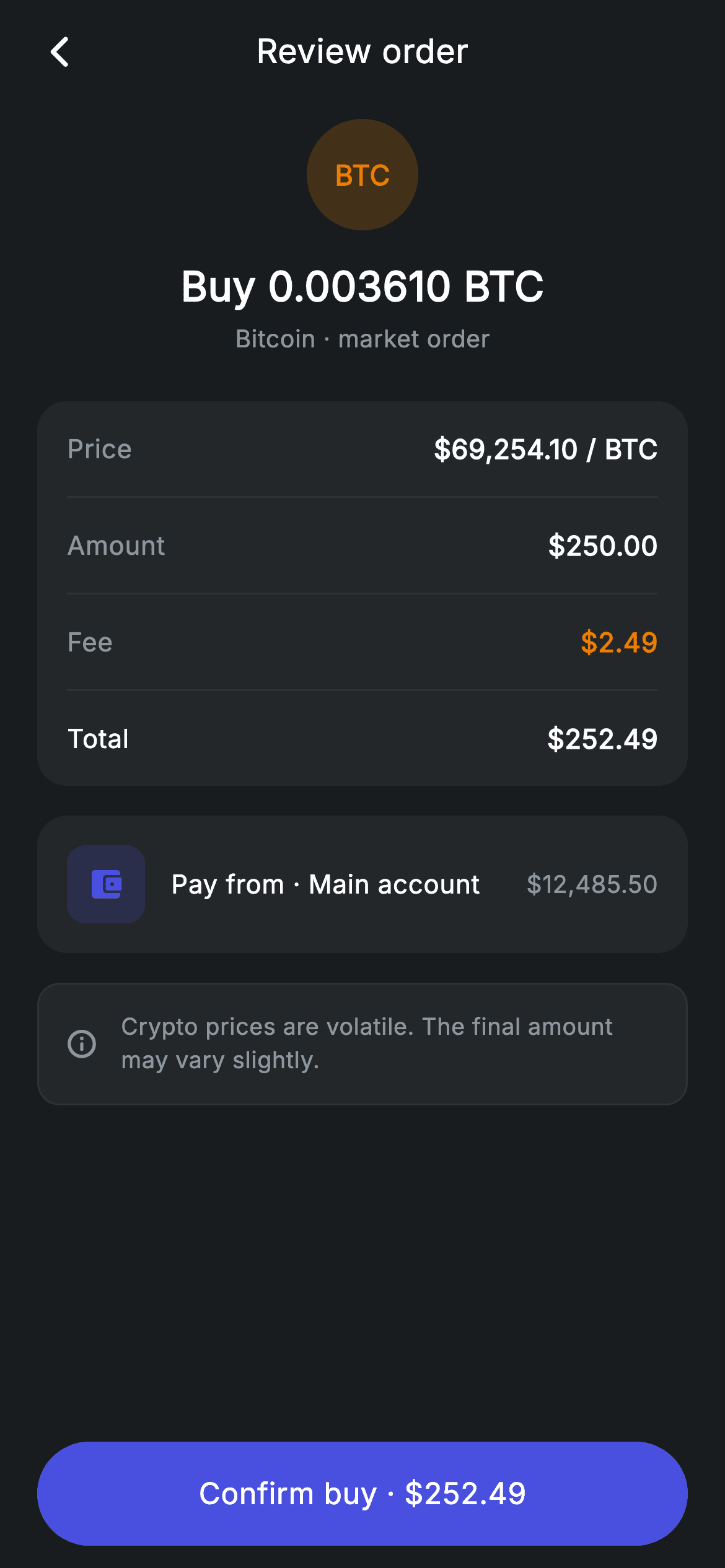
The last screen before money moves has one job: make the numbers checkable. This tutorial builds Nova's crypto order review in Flutter — a painted BTC badge, a four-line price/amount/fee/total breakdown separated by hairlines, the funding account with its balance, and a volatility note above a confirm button that repeats the total in its own label. It is a StatelessWidget with no state at all, and one small `_row` helper renders every line of the breakdown with the fee and total styled differently.
Watch the Flutter UI walkthrough
A short screen recording of Crypto Order Review running, if you'd rather see it before you read the code. The written tutorial below covers everything in it.
Can't see the video? Watch it on YouTube.
What you'll build
- ✓A coin badge painted from text on a tinted circle, with no image or emoji asset
- ✓An itemised breakdown card where a single row builder handles muted, accented and bold lines
- ✓A funding-source row pairing a rounded-square icon tile with a right-aligned balance
- ✓A confirm button that restates the exact amount being charged
Step-by-step build
Create the file
Add a new file at lib/fintech_crypto_order_review/fintech_crypto_order_review_screen.dart in your Flutter project.
Register the bundled fonts
No external packages — this is pure Flutter. It does bundle its design font (Inter), so drop the font file into fonts/ and declare it in pubspec.yaml:
flutter:
  fonts:
    - family: Inter
      fonts:
- asset: fonts/Inter-Regular.ttfBuild it, piece by piece
Here's how the screen goes together. Each block below is a real slice of the code with a plain-English explanation — paste them in order, or grab the whole file from the next section.
Why this screen holds no state
import 'package:flutter/material.dart';

/// Crypto order review — confirm a buy/sell order (Revolut-inspired design).
///
/// Self-contained per CONVENTIONS.md: pure Flutter only, the exact design font
/// (Inter) is bundled under `fonts/`, the coin badge is painted (no emoji/
/// network), and the screen forces its own dark theme. An itemised price/amount
/// /fee breakdown and source row precede confirm.
class FintechCryptoOrderReviewScreen extends StatelessWidget {
  const FintechCryptoOrderReviewScreen({super.key, this.onBack, this.onConfirm});

  final VoidCallback? onBack;
  final VoidCallback? onConfirm;

  static const String _font = 'Inter';
  static const Color _bg = Color(0xFF191C1F);
  static const Color _surface = Color(0xFF242729);
  static const Color _brand = Color(0xFF494FDF);
  static const Color _amber = Color(0xFFEC7E00);
  static const Color _muted = Color(0xFF8D969E);
  static const Color _hairline = Color(0xFF2E3235);

  @override
  Widget build(BuildContext context) {
    return Theme(
      data: ThemeData.dark(useMaterial3: true),
      child: Scaffold(
        backgroundColor: _bg,
        body: SafeArea(
          child: Column(
            children: <Widget>[
              _buildAppBar(),
              Expanded(
                child: ListView(
                  physics: const BouncingScrollPhysics(),
                  padding: const EdgeInsets.fromLTRB(20, 8, 20, 24),
                  children: <Widget>[
                    _buildHeader(),
                    const SizedBox(height: 24),
                    _buildBreakdown(),
                    const SizedBox(height: 16),
                    _buildSource(),
                    const SizedBox(height: 16),
                    _buildNote(),
                  ],
                ),
              ),
              _buildConfirm(),
            ],
          ),
        ),
      ),
    );
  }
A review screen is a snapshot of a decision already made, so `FintechCryptoOrderReviewScreen` is a `StatelessWidget` — nothing here can change without going back a step. It exposes `onBack` and `onConfirm` and nothing else. The palette adds `_amber` (#EC7E00) to the standard set; amber is used only twice, on the BTC badge and on the fee value, which quietly links 'this is the Bitcoin part' and 'this is the cost' without a legend. The body is a `ListView` — the breakdown, source and note stack vertically and scroll on a short device — with the confirm button held outside it in the Column so it never scrolls out of reach.
A coin badge made from text, and the order summary
  Widget _buildAppBar() {
    return Padding(
      padding: const EdgeInsets.fromLTRB(8, 4, 8, 4),
      child: Row(
        children: <Widget>[
          IconButton(
            onPressed: onBack,
            icon: const Icon(Icons.arrow_back_ios_new_rounded,
                size: 20, color: Colors.white),
          ),
          const Expanded(
            child: Text(
              'Review order',
              textAlign: TextAlign.center,
              style: TextStyle(
                fontFamily: _font,
                fontSize: 18,
                fontWeight: FontWeight.w500,
                letterSpacing: 0.24,
                color: Colors.white,
              ),
            ),
          ),
          const SizedBox(width: 48),
        ],
      ),
    );
  }

  Widget _buildHeader() {
    return Column(
      children: <Widget>[
        Container(
          width: 60,
          height: 60,
          alignment: Alignment.center,
          decoration: BoxDecoration(
            color: _amber.withValues(alpha: 0.2),
            shape: BoxShape.circle,
          ),
          child: const Text('BTC',
              style: TextStyle(
                fontFamily: _font,
                fontSize: 15,
                fontWeight: FontWeight.w700,
                color: _amber,
              )),
        ),
        const SizedBox(height: 14),
        const Text(
          'Buy 0.003610 BTC',
          style: TextStyle(
            fontFamily: _font,
            fontSize: 22,
            fontWeight: FontWeight.w600,
            letterSpacing: 0.24,
            color: Colors.white,
          ),
        ),
        const SizedBox(height: 4),
        const Text(
          'Bitcoin · market order',
          style: TextStyle(
            fontFamily: _font,
            fontSize: 13,
            letterSpacing: 0.24,
            color: _muted,
          ),
        ),
      ],
    );
  }
After the usual back-bar Row, `_buildHeader` builds the identity block. The coin badge is a 60px circle filled with `_amber.withValues(alpha: 0.2)` containing the literal string 'BTC' at `FontWeight.w700` in full `_amber` — no logo file, no emoji, nothing to license, and it works for any ticker by swapping three characters. `alignment: Alignment.center` on the Container is what centres that text; without it the Text would sit top-left. Below sits the order in one 22px line, 'Buy 0.003610 BTC', with the order type demoted to a 13px `_muted` line beneath. Putting quantity in the headline and 'market order' in the subline matches how someone actually re-checks a trade.
The breakdown card and its one row builder
  Widget _buildBreakdown() {
    return Container(
      padding: const EdgeInsets.symmetric(horizontal: 16),
      decoration: BoxDecoration(
        color: _surface,
        borderRadius: BorderRadius.circular(16),
      ),
      child: Column(
        children: <Widget>[
          _row('Price', r'$69,254.10 / BTC'),
          const Divider(height: 1, color: _hairline),
          _row('Amount', r'$250.00'),
          const Divider(height: 1, color: _hairline),
          _row('Fee', r'$2.49', valueColor: _amber),
          const Divider(height: 1, color: _hairline),
          _row('Total', r'$252.49', bold: true),
        ],
      ),
    );
  }

  Widget _row(String label, String value, {bool bold = false, Color? valueColor}) {
    return Padding(
      padding: const EdgeInsets.symmetric(vertical: 15),
      child: Row(
        mainAxisAlignment: MainAxisAlignment.spaceBetween,
        children: <Widget>[
          Text(
            label,
            style: TextStyle(
              fontFamily: _font,
              fontSize: 14,
              fontWeight: bold ? FontWeight.w500 : FontWeight.w400,
              letterSpacing: 0.24,
              color: bold ? Colors.white : _muted,
            ),
          ),
          Text(
            value,
            style: TextStyle(
              fontFamily: _font,
              fontSize: 14.5,
              fontWeight: FontWeight.w600,
              letterSpacing: 0.24,
              color: valueColor ?? Colors.white,
            ),
          ),
        ],
      ),
    );
  }
`_buildBreakdown` is a `_surface` Container with horizontal padding only — the vertical rhythm comes from each row's own `EdgeInsets.symmetric(vertical: 15)`, which is why the hairline `Divider(height: 1)` between rows sits exactly halfway between them. `_row` takes two optional named arguments that produce all three line styles from one function: default rows get a `_muted` w400 label, `bold: true` flips the Total's label to white w500, and `valueColor: _amber` tints just the fee. Values are always w600 and slightly larger than labels at 14.5 against 14, so the numbers read as the content and the labels as chrome. Note the `r'$69,254.10 / BTC'` raw strings — the `r` prefix stops Dart treating `$` as string interpolation, which is the usual cause of a mysterious compile error in currency literals.
The funding source row
  Widget _buildSource() {
    return Container(
      padding: const EdgeInsets.all(16),
      decoration: BoxDecoration(
        color: _surface,
        borderRadius: BorderRadius.circular(16),
      ),
      child: Row(
        children: <Widget>[
          Container(
            width: 42,
            height: 42,
            alignment: Alignment.center,
            decoration: BoxDecoration(
              color: _brand.withValues(alpha: 0.18),
              borderRadius: BorderRadius.circular(10),
            ),
            child: const Icon(Icons.account_balance_wallet_rounded,
                size: 20, color: _brand),
          ),
          const SizedBox(width: 14),
          const Expanded(
            child: Text(
              'Pay from · Main account',
              style: TextStyle(
                fontFamily: _font,
                fontSize: 14,
                fontWeight: FontWeight.w500,
                letterSpacing: 0.24,
                color: Colors.white,
              ),
            ),
          ),
          const Text(
            r'$12,485.50',
            style: TextStyle(
              fontFamily: _font,
              fontSize: 13,
              letterSpacing: 0.24,
              color: _muted,
            ),
          ),
        ],
      ),
    );
  }
`_buildSource` answers 'where is this money coming from' in a single row: a 42px tile with `BorderRadius.circular(10)` filled `_brand.withValues(alpha: 0.18)` and a wallet icon in full `_brand`, then an `Expanded` label, then the account balance. Using a rounded square here rather than the circle used for the coin badge is deliberate — different shapes for different kinds of thing keeps the two tinted icons from reading as a set. Showing `$12,485.50` at 13px `_muted` is what makes the row useful rather than decorative: the reader can confirm the account actually covers the $252.49 total two rows above.
The volatility note and the amount-bearing CTA
  Widget _buildNote() {
    return Container(
      padding: const EdgeInsets.all(14),
      decoration: BoxDecoration(
        color: _surface,
        borderRadius: BorderRadius.circular(12),
        border: Border.all(color: _hairline),
      ),
      child: Row(
        children: const <Widget>[
          Icon(Icons.info_outline_rounded, size: 18, color: _muted),
          SizedBox(width: 12),
          Expanded(
            child: Text(
              'Crypto prices are volatile. The final amount may vary slightly.',
              style: TextStyle(
                fontFamily: _font,
                fontSize: 12.5,
                height: 1.4,
                letterSpacing: 0.24,
                color: _muted,
              ),
            ),
          ),
        ],
      ),
    );
  }

  Widget _buildConfirm() {
    return Padding(
      padding: const EdgeInsets.fromLTRB(20, 0, 20, 12),
      child: SizedBox(
        width: double.infinity,
        height: 56,
        child: Material(
          color: _brand,
          borderRadius: BorderRadius.circular(9999),
          child: InkWell(
            borderRadius: BorderRadius.circular(9999),
            onTap: onConfirm,
            child: const Center(
              child: Text(
                r'Confirm buy · $252.49',
                style: TextStyle(
                  fontFamily: _font,
                  fontSize: 16,
                  fontWeight: FontWeight.w500,
                  letterSpacing: 0.24,
                  color: Colors.white,
                ),
              ),
            ),
          ),
        ),
      ),
    );
  }
`_buildNote` is the only container on the screen with a visible `Border.all(color: _hairline)`, which is what separates an advisory from the data cards around it. Its icon and text sit in a Row with the text `Expanded` so the sentence wraps at `height: 1.4` instead of overflowing. The confirm button then repeats the figure: `r'Confirm buy · $252.49'`. Restating the amount on the button rather than labelling it 'Confirm' is a small, high-value habit for payment flows — the number is under the thumb at the moment of commitment, so there is no scrolling back to check. Mechanically it is the same `Material` + `InkWell` pill used across the app, both sharing `BorderRadius.circular(9999)` so the ripple stays inside the shape.
Full code
The complete, ready-to-paste source. Free to use in your projects — one click copies it all.
import 'package:flutter/material.dart';

/// Crypto order review — confirm a buy/sell order (Revolut-inspired design).
///
/// Self-contained per CONVENTIONS.md: pure Flutter only, the exact design font
/// (Inter) is bundled under `fonts/`, the coin badge is painted (no emoji/
/// network), and the screen forces its own dark theme. An itemised price/amount
/// /fee breakdown and source row precede confirm.
class FintechCryptoOrderReviewScreen extends StatelessWidget {
  const FintechCryptoOrderReviewScreen({super.key, this.onBack, this.onConfirm});

  final VoidCallback? onBack;
  final VoidCallback? onConfirm;

  static const String _font = 'Inter';
  static const Color _bg = Color(0xFF191C1F);
  static const Color _surface = Color(0xFF242729);
  static const Color _brand = Color(0xFF494FDF);
  static const Color _amber = Color(0xFFEC7E00);
  static const Color _muted = Color(0xFF8D969E);
  static const Color _hairline = Color(0xFF2E3235);

  @override
  Widget build(BuildContext context) {
    return Theme(
      data: ThemeData.dark(useMaterial3: true),
      child: Scaffold(
        backgroundColor: _bg,
        body: SafeArea(
          child: Column(
            children: <Widget>[
              _buildAppBar(),
              Expanded(
                child: ListView(
                  physics: const BouncingScrollPhysics(),
                  padding: const EdgeInsets.fromLTRB(20, 8, 20, 24),
                  children: <Widget>[
                    _buildHeader(),
                    const SizedBox(height: 24),
                    _buildBreakdown(),
                    const SizedBox(height: 16),
                    _buildSource(),
                    const SizedBox(height: 16),
                    _buildNote(),
                  ],
                ),
              ),
              _buildConfirm(),
            ],
          ),
        ),
      ),
    );
  }

  Widget _buildAppBar() {
    return Padding(
      padding: const EdgeInsets.fromLTRB(8, 4, 8, 4),
      child: Row(
        children: <Widget>[
          IconButton(
            onPressed: onBack,
            icon: const Icon(Icons.arrow_back_ios_new_rounded,
                size: 20, color: Colors.white),
          ),
          const Expanded(
            child: Text(
              'Review order',
              textAlign: TextAlign.center,
              style: TextStyle(
                fontFamily: _font,
                fontSize: 18,
                fontWeight: FontWeight.w500,
                letterSpacing: 0.24,
                color: Colors.white,
              ),
            ),
          ),
          const SizedBox(width: 48),
        ],
      ),
    );
  }

  Widget _buildHeader() {
    return Column(
      children: <Widget>[
        Container(
          width: 60,
          height: 60,
          alignment: Alignment.center,
          decoration: BoxDecoration(
            color: _amber.withValues(alpha: 0.2),
            shape: BoxShape.circle,
          ),
          child: const Text('BTC',
              style: TextStyle(
                fontFamily: _font,
                fontSize: 15,
                fontWeight: FontWeight.w700,
                color: _amber,
              )),
        ),
        const SizedBox(height: 14),
        const Text(
          'Buy 0.003610 BTC',
          style: TextStyle(
            fontFamily: _font,
            fontSize: 22,
            fontWeight: FontWeight.w600,
            letterSpacing: 0.24,
            color: Colors.white,
          ),
        ),
        const SizedBox(height: 4),
        const Text(
          'Bitcoin · market order',
          style: TextStyle(
            fontFamily: _font,
            fontSize: 13,
            letterSpacing: 0.24,
            color: _muted,
          ),
        ),
      ],
    );
  }

  Widget _buildBreakdown() {
    return Container(
      padding: const EdgeInsets.symmetric(horizontal: 16),
      decoration: BoxDecoration(
        color: _surface,
        borderRadius: BorderRadius.circular(16),
      ),
      child: Column(
        children: <Widget>[
          _row('Price', r'$69,254.10 / BTC'),
          const Divider(height: 1, color: _hairline),
          _row('Amount', r'$250.00'),
          const Divider(height: 1, color: _hairline),
          _row('Fee', r'$2.49', valueColor: _amber),
          const Divider(height: 1, color: _hairline),
          _row('Total', r'$252.49', bold: true),
        ],
      ),
    );
  }

  Widget _row(String label, String value, {bool bold = false, Color? valueColor}) {
    return Padding(
      padding: const EdgeInsets.symmetric(vertical: 15),
      child: Row(
        mainAxisAlignment: MainAxisAlignment.spaceBetween,
        children: <Widget>[
          Text(
            label,
            style: TextStyle(
              fontFamily: _font,
              fontSize: 14,
              fontWeight: bold ? FontWeight.w500 : FontWeight.w400,
              letterSpacing: 0.24,
              color: bold ? Colors.white : _muted,
            ),
          ),
          Text(
            value,
            style: TextStyle(
              fontFamily: _font,
              fontSize: 14.5,
              fontWeight: FontWeight.w600,
              letterSpacing: 0.24,
              color: valueColor ?? Colors.white,
            ),
          ),
        ],
      ),
    );
  }

  Widget _buildSource() {
    return Container(
      padding: const EdgeInsets.all(16),
      decoration: BoxDecoration(
        color: _surface,
        borderRadius: BorderRadius.circular(16),
      ),
      child: Row(
        children: <Widget>[
          Container(
            width: 42,
            height: 42,
            alignment: Alignment.center,
            decoration: BoxDecoration(
              color: _brand.withValues(alpha: 0.18),
              borderRadius: BorderRadius.circular(10),
            ),
            child: const Icon(Icons.account_balance_wallet_rounded,
                size: 20, color: _brand),
          ),
          const SizedBox(width: 14),
          const Expanded(
            child: Text(
              'Pay from · Main account',
              style: TextStyle(
                fontFamily: _font,
                fontSize: 14,
                fontWeight: FontWeight.w500,
                letterSpacing: 0.24,
                color: Colors.white,
              ),
            ),
          ),
          const Text(
            r'$12,485.50',
            style: TextStyle(
              fontFamily: _font,
              fontSize: 13,
              letterSpacing: 0.24,
              color: _muted,
            ),
          ),
        ],
      ),
    );
  }

  Widget _buildNote() {
    return Container(
      padding: const EdgeInsets.all(14),
      decoration: BoxDecoration(
        color: _surface,
        borderRadius: BorderRadius.circular(12),
        border: Border.all(color: _hairline),
      ),
      child: Row(
        children: const <Widget>[
          Icon(Icons.info_outline_rounded, size: 18, color: _muted),
          SizedBox(width: 12),
          Expanded(
            child: Text(
              'Crypto prices are volatile. The final amount may vary slightly.',
              style: TextStyle(
                fontFamily: _font,
                fontSize: 12.5,
                height: 1.4,
                letterSpacing: 0.24,
                color: _muted,
              ),
            ),
          ),
        ],
      ),
    );
  }

  Widget _buildConfirm() {
    return Padding(
      padding: const EdgeInsets.fromLTRB(20, 0, 20, 12),
      child: SizedBox(
        width: double.infinity,
        height: 56,
        child: Material(
          color: _brand,
          borderRadius: BorderRadius.circular(9999),
          child: InkWell(
            borderRadius: BorderRadius.circular(9999),
            onTap: onConfirm,
            child: const Center(
              child: Text(
                r'Confirm buy · $252.49',
                style: TextStyle(
                  fontFamily: _font,
                  fontSize: 16,
                  fontWeight: FontWeight.w500,
                  letterSpacing: 0.24,
                  color: Colors.white,
                ),
              ),
            ),
          ),
        ),
      ),
    );
  }
}
Plus bundled 1 binary asset (fonts/images). The CLI and MCP install those for you automatically.
Two faster ways to add it
Copy-paste works, but you can skip it entirely.
1. FlutterKit CLI
One command drops this screen — and its fonts — straight into your project.
$ flutterkit add fintech-crypto-order-review2. AI agent (MCP)
Connect FlutterKit's MCP server in Claude or Cursor and just ask your agent to install fintech-crypto-order-review — it fetches and writes the files for you.
FAQ
Is this crypto order review screen free to use?
Yes — FlutterKit is free permanently. Copy the Dart from this page, install it with the CLI, or pull it over MCP in your AI editor, then ship it in a commercial app or client project. No sign-up, no licence key, no attribution.
Does it fetch live crypto prices?
No, every figure is a hard-coded string so the screen has no network dependency. To make it live, replace the literals in `_buildHeader`, `_buildBreakdown` and `_buildConfirm` with values passed into the constructor, and convert the class to accept an order model — it is stateless, so nothing else needs to change.
Why do the dollar amounts have an `r` in front of the string?
Because `$` starts string interpolation in Dart. `r'$252.49'` is a raw string, so the dollar sign is treated as a literal character. Without the `r` you would need to escape it as `'\$252.49'`, and forgetting either is what produces a confusing 'undefined name' error on a price literal.
Does the screen need any packages or image assets?
Neither. It imports only `package:flutter/material.dart`, and the BTC badge is text on a tinted circle rather than a logo file. The bundled Inter font is the one asset — register it in your pubspec's `fonts:` block, or delete the `fontFamily` lines to use the system face.
Which Flutter version does this need?
Flutter 3.22 or newer, because the badge and icon tile use `Color.withValues(alpha: ...)`. On an older SDK swap those for `withOpacity(0.2)` and `withOpacity(0.18)`, and expand the `super.key` constructor to the `{Key? key} : super(key: key)` form.


