How to Build a Crypto Portfolio Screen in Flutter (Full Code + Preview)
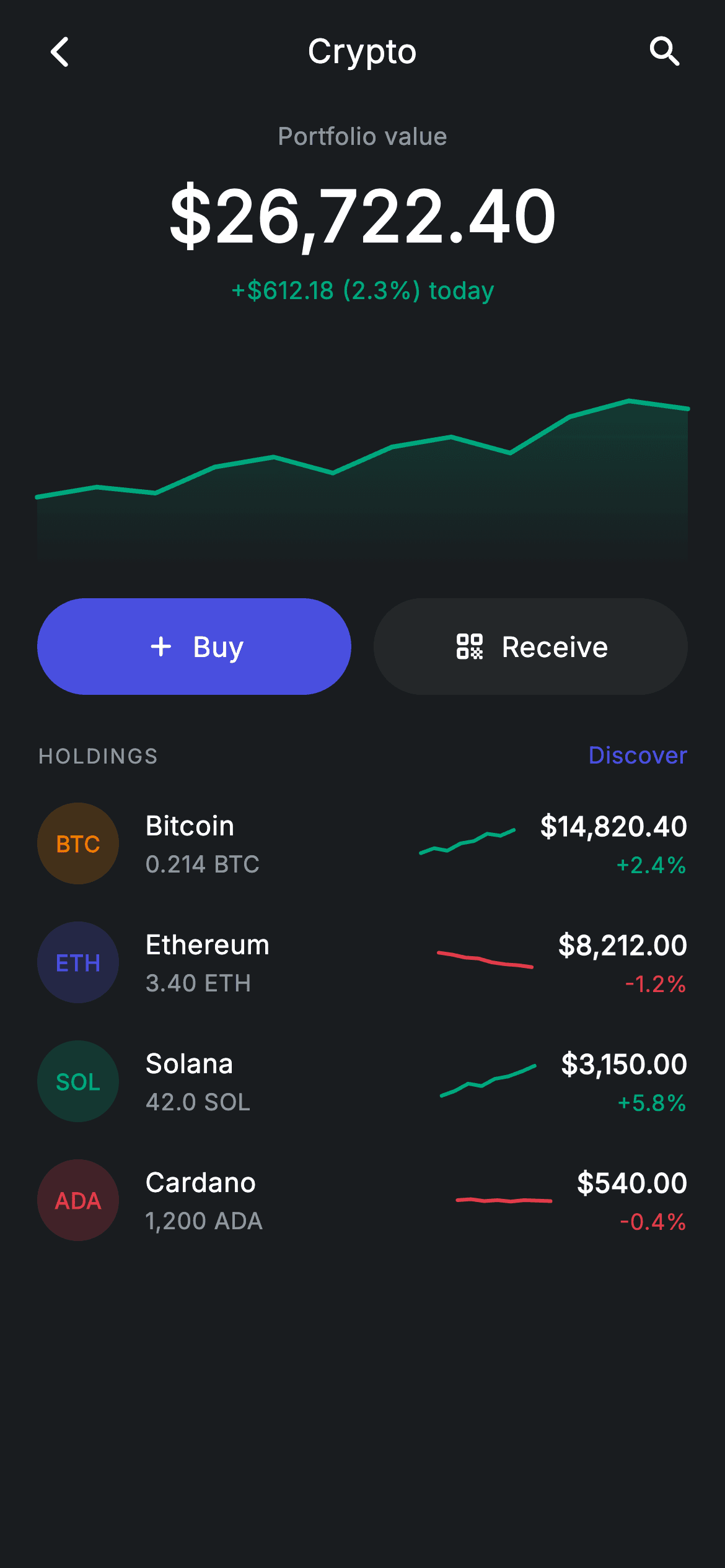
A crypto portfolio screen is a chart problem wearing a list's clothes. This build gives you both halves without a charting package: a 120px gradient-filled area chart for the whole portfolio, and a 50×26 sparkline on every holding row that colours itself from that coin's own 24-hour direction. Around them sit a dark Revolut-style canvas, tinted ticker badges built from one colour per coin, and a filled/outlined action pair — roughly 470 lines, two painters, no dependencies.
Watch the Flutter UI walkthrough
A short screen recording of Crypto Home running, if you'd rather see it before you read the code. The written tutorial below covers everything in it.
Can't see the video? Watch it on YouTube.
What you'll build
- ✓A portfolio area chart with a vertical gradient fill fading from 28% alpha to fully transparent
- ✓Per-coin sparklines whose colour is derived from the sign of the 24h change
- ✓Circular ticker badges that tint their own background at 20% of the coin's colour
- ✓Holding rows laid out in four zones — badge, flexible name block, fixed sparkline, right-aligned values
- ✓A Buy/Receive action pair sharing one widget, switched between filled and surface styles by a single `bool`
Step-by-step build
Create the file
Add a new file at lib/fintech_crypto_home/fintech_crypto_home_screen.dart in your Flutter project.
Register the bundled fonts
No external packages — this is pure Flutter. It does bundle its design font (Inter), so drop the font file into fonts/ and declare it in pubspec.yaml:
flutter:
  fonts:
    - family: Inter
      fonts:
- asset: fonts/Inter-Regular.ttfBuild it, piece by piece
Here's how the screen goes together. Each block below is a real slice of the code with a plain-English explanation — paste them in order, or grab the whole file from the next section.
A stateless portfolio and its holdings data
class FintechCryptoHomeScreen extends StatelessWidget {
  const FintechCryptoHomeScreen({
    super.key,
    this.onBack,
    this.onAssetTap,
    this.onDiscover,
    this.onReceive,
  });

  final VoidCallback? onBack;
  final VoidCallback? onAssetTap;
  final VoidCallback? onDiscover;
  final VoidCallback? onReceive;

  static const String _font = 'Inter';
  static const Color _bg = Color(0xFF191C1F);
  static const Color _surface = Color(0xFF242729);
  static const Color _brand = Color(0xFF494FDF);
  static const Color _teal = Color(0xFF00A87E);
  static const Color _amber = Color(0xFFEC7E00);
  static const Color _red = Color(0xFFE23B4A);
  static const Color _muted = Color(0xFF8D969E);

  static const List<_Holding> _holdings = <_Holding>[
    _Holding('BTC', 'Bitcoin', _amber, '0.214 BTC', r'$14,820.40', 2.4,
        <double>[0.3, 0.4, 0.35, 0.5, 0.55, 0.7, 0.66, 0.78]),
    _Holding('ETH', 'Ethereum', _brand, '3.40 ETH', r'$8,212.00', -1.2,
        <double>[0.7, 0.66, 0.6, 0.58, 0.5, 0.46, 0.44, 0.4]),
    _Holding('SOL', 'Solana', _teal, '42.0 SOL', r'$3,150.00', 5.8,
        <double>[0.2, 0.3, 0.45, 0.4, 0.55, 0.6, 0.7, 0.82]),
    _Holding('ADA', 'Cardano', _red, '1,200 ADA', r'$540.00', -0.4,
        <double>[0.5, 0.52, 0.48, 0.5, 0.47, 0.5, 0.49, 0.48]),
  ];
The screen is a `StatelessWidget` — market data belongs upstream, so there's nothing local to mutate. The dark tokens (`_bg` #191C1F, `_surface` #242729, `_brand` indigo) set the Revolut-style canvas, and the three status colours matter: `_teal` for gains, `_red` for losses, `_amber` as Bitcoin's brand tint. Each `_Holding` carries a ticker, display name, its own colour, a formatted amount and value, a signed `change` double, and an eight-point `spark` list normalised to 0–1. Note the `r'$14,820.40'` raw strings — the `r` prefix is what lets a `$` sit in a Dart string without being read as interpolation.
The page shell and holdings header
  @override
  Widget build(BuildContext context) {
    return Theme(
      data: ThemeData.dark(useMaterial3: true),
      child: Scaffold(
        backgroundColor: _bg,
        body: SafeArea(
          child: Column(
            children: <Widget>[
              _buildAppBar(),
              Expanded(
                child: ListView(
                  physics: const BouncingScrollPhysics(),
                  padding: const EdgeInsets.fromLTRB(20, 8, 20, 24),
                  children: <Widget>[
                    _buildHeader(),
                    const SizedBox(height: 20),
                    _buildChart(),
                    const SizedBox(height: 16),
                    _buildActions(),
                    const SizedBox(height: 24),
                    Row(
                      mainAxisAlignment: MainAxisAlignment.spaceBetween,
                      children: <Widget>[
                        const Text(
                          'HOLDINGS',
                          style: TextStyle(
                            fontFamily: _font,
                            fontSize: 11,
                            fontWeight: FontWeight.w500,
                            letterSpacing: 1.0,
                            color: _muted,
                          ),
                        ),
                        GestureDetector(
                          onTap: onDiscover,
                          child: const Text(
                            'Discover',
                            style: TextStyle(
                              fontFamily: _font,
                              fontSize: 12.5,
                              fontWeight: FontWeight.w500,
                              letterSpacing: 0.24,
                              color: _brand,
                            ),
                          ),
                        ),
                      ],
                    ),
                    const SizedBox(height: 6),
                    for (final _Holding h in _holdings)
                      _HoldingRow(holding: h, onTap: onAssetTap),
                  ],
                ),
              ),
            ],
          ),
        ),
      ),
    );
  }

  Widget _buildAppBar() {
    return Padding(
      padding: const EdgeInsets.fromLTRB(8, 4, 8, 4),
      child: Row(
        children: <Widget>[
          IconButton(
            onPressed: onBack,
            icon: const Icon(Icons.arrow_back_ios_new_rounded,
                size: 20, color: Colors.white),
          ),
          const Expanded(
            child: Text(
              'Crypto',
              textAlign: TextAlign.center,
              style: TextStyle(
                fontFamily: _font,
                fontSize: 18,
                fontWeight: FontWeight.w500,
                letterSpacing: 0.24,
                color: Colors.white,
              ),
            ),
          ),
          IconButton(
            onPressed: onDiscover,
            icon: const Icon(Icons.search_rounded, size: 22, color: Colors.white),
          ),
        ],
      ),
    );
  }
`ThemeData.dark(useMaterial3: true)` forces the dark rendering regardless of the host app, and `BouncingScrollPhysics` gives the list the iOS-style rubber-band that suits a finance app. The holdings section header uses the small-caps convention — 'HOLDINGS' at 11px with `letterSpacing: 1.0` in `_muted` — paired with a brand-coloured 'Discover' link via `MainAxisAlignment.spaceBetween`. Rows are emitted with a collection-for over `_holdings` directly inside the `ListView` children, which is fine for a fixed handful; swap to `ListView.builder` if the list ever gets long. In the app bar, the centred title works because the two `IconButton`s on either side have equal intrinsic widths.
The portfolio header and chart
  Widget _buildHeader() {
    return Column(
      children: const <Widget>[
        Text(
          'Portfolio value',
          style: TextStyle(
            fontFamily: _font,
            fontSize: 13,
            letterSpacing: 0.24,
            color: _muted,
          ),
        ),
        SizedBox(height: 6),
        Text(
          r'$26,722.40',
          style: TextStyle(
            fontFamily: _font,
            fontSize: 38,
            fontWeight: FontWeight.w600,
            letterSpacing: 0.24,
            color: Colors.white,
          ),
        ),
        SizedBox(height: 4),
        Text(
          r'+$612.18 (2.3%) today',
          style: TextStyle(
            fontFamily: _font,
            fontSize: 13,
            fontWeight: FontWeight.w500,
            letterSpacing: 0.24,
            color: _teal,
          ),
        ),
      ],
    );
  }

  Widget _buildChart() {
    return SizedBox(
      height: 120,
      child: CustomPaint(
        size: Size.infinite,
        painter: _AreaChartPainter(
          points: const <double>[
            0.3, 0.35, 0.32, 0.45, 0.5, 0.42, 0.55, 0.6, 0.52, 0.7, 0.78, 0.74
          ],
          color: _teal,
        ),
      ),
    );
  }

  Widget _buildActions() {
    return Row(
      children: <Widget>[
        Expanded(
          child: _ActionBtn(
            label: 'Buy',
            icon: Icons.add_rounded,
            filled: true,
            onTap: onAssetTap,
          ),
        ),
        const SizedBox(width: 12),
        Expanded(
          child: _ActionBtn(
            label: 'Receive',
            icon: Icons.qr_code_rounded,
            filled: false,
            onTap: onReceive,
          ),
        ),
      ],
    );
  }
The header is a plain three-line `Column`: a muted label, the value at 38px `w600`, and the day's change in `_teal`. Every text style repeats `letterSpacing: 0.24`, the design system's tracking value, applied consistently rather than left to Flutter's default. The chart is a 120px `SizedBox` with `size: Size.infinite`, telling the `CustomPaint` to fill its box, and it's handed twelve normalised points plus the teal accent. The actions row wraps both buttons in `Expanded` so they split the width evenly, differing only by `filled: true/false` and their icon.
The four-zone holding row
class _HoldingRow extends StatelessWidget {
  const _HoldingRow({required this.holding, this.onTap});

  final _Holding holding;
  final VoidCallback? onTap;

  @override
  Widget build(BuildContext context) {
    final bool up = holding.change >= 0;
    final Color trend = up
        ? FintechCryptoHomeScreen._teal
        : FintechCryptoHomeScreen._red;
    return InkWell(
      onTap: onTap,
      child: Padding(
        padding: const EdgeInsets.symmetric(vertical: 10),
        child: Row(
          children: <Widget>[
            _CoinBadge(ticker: holding.ticker, color: holding.color),
            const SizedBox(width: 14),
            Expanded(
              child: Column(
                crossAxisAlignment: CrossAxisAlignment.start,
                children: <Widget>[
                  Text(
                    holding.name,
                    style: const TextStyle(
                      fontFamily: FintechCryptoHomeScreen._font,
                      fontSize: 14.5,
                      fontWeight: FontWeight.w500,
                      letterSpacing: 0.24,
                      color: Colors.white,
                    ),
                  ),
                  const SizedBox(height: 2),
                  Text(
                    holding.amount,
                    style: const TextStyle(
                      fontFamily: FintechCryptoHomeScreen._font,
                      fontSize: 12.5,
                      letterSpacing: 0.24,
                      color: FintechCryptoHomeScreen._muted,
                    ),
                  ),
                ],
              ),
            ),
            SizedBox(
              width: 50,
              height: 26,
              child: CustomPaint(
                painter: _SparkPainter(points: holding.spark, color: trend),
              ),
            ),
            const SizedBox(width: 14),
            Column(
              crossAxisAlignment: CrossAxisAlignment.end,
              children: <Widget>[
                Text(
                  holding.value,
                  style: const TextStyle(
                    fontFamily: FintechCryptoHomeScreen._font,
                    fontSize: 14.5,
                    fontWeight: FontWeight.w600,
                    letterSpacing: 0.24,
                    color: Colors.white,
                  ),
                ),
                const SizedBox(height: 2),
                Text(
                  '${up ? '+' : ''}${holding.change.toStringAsFixed(1)}%',
                  style: TextStyle(
                    fontFamily: FintechCryptoHomeScreen._font,
                    fontSize: 12,
                    fontWeight: FontWeight.w500,
                    letterSpacing: 0.24,
                    color: trend,
                  ),
                ),
              ],
            ),
          ],
        ),
      ),
    );
  }
}
`up = holding.change >= 0` is computed once and drives everything downstream: `trend` picks teal or red, and that single colour is passed to the sparkline *and* used for the percentage text, so the mini-chart and the number can never disagree. The row has four zones — a 44px badge, an `Expanded` name/amount column that absorbs slack, a fixed 50×26 sparkline, and a right-aligned value column using `crossAxisAlignment: CrossAxisAlignment.end`. Fixing the sparkline's width while flexing the text is what keeps every chart in the list vertically aligned. The percentage prepends its sign conditionally with `'${up ? '+' : ''}'` because `toStringAsFixed` already carries the minus for negatives.
Coin badges and the dual-style action button
class _CoinBadge extends StatelessWidget {
  const _CoinBadge({required this.ticker, required this.color});

  final String ticker;
  final Color color;

  @override
  Widget build(BuildContext context) {
    return Container(
      width: 44,
      height: 44,
      alignment: Alignment.center,
      decoration: BoxDecoration(
        color: color.withValues(alpha: 0.2),
        shape: BoxShape.circle,
      ),
      child: Text(
        ticker,
        style: TextStyle(
          fontFamily: FintechCryptoHomeScreen._font,
          fontSize: 12,
          fontWeight: FontWeight.w700,
          letterSpacing: 0.24,
          color: color,
        ),
      ),
    );
  }
}

class _ActionBtn extends StatelessWidget {
  const _ActionBtn({
    required this.label,
    required this.icon,
    required this.filled,
    this.onTap,
  });

  final String label;
  final IconData icon;
  final bool filled;
  final VoidCallback? onTap;

  @override
  Widget build(BuildContext context) {
    return SizedBox(
      height: 52,
      child: Material(
        color: filled
            ? FintechCryptoHomeScreen._brand
            : FintechCryptoHomeScreen._surface,
        borderRadius: BorderRadius.circular(9999),
        child: InkWell(
          borderRadius: BorderRadius.circular(9999),
          onTap: onTap,
          child: Row(
            mainAxisAlignment: MainAxisAlignment.center,
            children: <Widget>[
              Icon(icon, size: 18, color: Colors.white),
              const SizedBox(width: 8),
              Text(
                label,
                style: const TextStyle(
                  fontFamily: FintechCryptoHomeScreen._font,
                  fontSize: 15,
                  fontWeight: FontWeight.w500,
                  letterSpacing: 0.24,
                  color: Colors.white,
                ),
              ),
            ],
          ),
        ),
      ),
    );
  }
}
`_CoinBadge` is the tint recipe again: a circle filled with `color.withValues(alpha: 0.2)` and the ticker text in the same colour at full strength, so one value per coin yields a matched pair and four coins still look like one set. `_ActionBtn` shows the correct way to get a Material ripple on a coloured pill — `Material` supplies the colour and the 9999 radius, `InkWell` sits inside it with the *same* radius so the splash is clipped to the pill rather than painting square corners. The `filled` flag swaps only the `Material` colour, between `_brand` indigo and `_surface`, which is enough to distinguish a primary from a secondary action.
The gradient area chart
class _AreaChartPainter extends CustomPainter {
  _AreaChartPainter({required this.points, required this.color});

  final List<double> points;
  final Color color;

  @override
  void paint(Canvas canvas, Size size) {
    if (points.length < 2) return;
    final double dx = size.width / (points.length - 1);
    double x(int i) => dx * i;
    double y(int i) => size.height - points[i].clamp(0, 1) * size.height * 0.9 - 6;

    final Path line = Path()..moveTo(x(0), y(0));
    for (int i = 1; i < points.length; i++) {
      line.lineTo(x(i), y(i));
    }

    final Path area = Path.from(line)
      ..lineTo(size.width, size.height)
      ..lineTo(0, size.height)
      ..close();
    canvas.drawPath(
      area,
      Paint()
        ..shader = LinearGradient(
          begin: Alignment.topCenter,
          end: Alignment.bottomCenter,
          colors: <Color>[color.withValues(alpha: 0.28), color.withValues(alpha: 0)],
        ).createShader(Offset.zero & size),
    );
    canvas.drawPath(
      line,
      Paint()
        ..color = color
        ..strokeWidth = 2.5
        ..style = PaintingStyle.stroke
        ..strokeCap = StrokeCap.round
        ..strokeJoin = StrokeJoin.round,
    );
  }

  @override
  bool shouldRepaint(covariant _AreaChartPainter oldDelegate) =>
      oldDelegate.points != points || oldDelegate.color != color;
}
`_AreaChartPainter` takes points already normalised to 0–1, so there's no min/max pass. The `y(i)` helper is worth reading: `size.height - points[i].clamp(0, 1) * size.height * 0.9 - 6` inverts the value for canvas coordinates, then scales it to 90% of the height and lifts it 6px, reserving headroom so the peak never clips against the top edge. The area path is cloned from the line with `Path.from(line)` and closed down to the bottom corners — deriving it from the line guarantees the fill traces the stroke exactly. The fill is painted with a `shader` rather than a colour: a `LinearGradient` running top-to-bottom from 28% alpha to fully transparent, turned into a shader by `createShader(Offset.zero & size)`.
The per-row sparkline
class _SparkPainter extends CustomPainter {
  _SparkPainter({required this.points, required this.color});

  final List<double> points;
  final Color color;

  @override
  void paint(Canvas canvas, Size size) {
    if (points.length < 2) return;
    final Paint line = Paint()
      ..color = color
      ..strokeWidth = 2
      ..style = PaintingStyle.stroke
      ..strokeCap = StrokeCap.round
      ..strokeJoin = StrokeJoin.round;
    final double dx = size.width / (points.length - 1);
    final Path path = Path();
    for (int i = 0; i < points.length; i++) {
      final double px = dx * i;
      final double py = size.height - points[i].clamp(0, 1) * size.height;
      i == 0 ? path.moveTo(px, py) : path.lineTo(px, py);
    }
    canvas.drawPath(path, line);
  }

  @override
  bool shouldRepaint(covariant _SparkPainter oldDelegate) =>
      oldDelegate.points != points || oldDelegate.color != color;
}
`_SparkPainter` is the stripped-down sibling: no fill, no gradient, no headroom — just a 2px stroke with rounded caps and joins across the full height. It uses the same `dx = size.width / (points.length - 1)` spacing and the same y-inversion, and picks `moveTo` versus `lineTo` inline with a ternary on `i == 0`. Because it takes both points and colour as parameters, the same class renders a rising teal line for SOL and a falling red one for ETH with no branching inside the painter. Both painters implement `shouldRepaint` against their actual inputs, so Flutter skips redundant repaints.
Full code
The complete, ready-to-paste source. Free to use in your projects — one click copies it all.
import 'package:flutter/material.dart';

/// Crypto home — portfolio overview (Revolut-inspired design system).
///
/// Self-contained per CONVENTIONS.md: pure Flutter only, the exact design font
/// (Inter) is bundled under `fonts/`, the portfolio area chart and coin badges
/// are custom-painted (no charting package, no network/emoji), and the screen
/// forces its own dark theme. Holdings carry per-coin sparklines + 24h change.
class FintechCryptoHomeScreen extends StatelessWidget {
  const FintechCryptoHomeScreen({
    super.key,
    this.onBack,
    this.onAssetTap,
    this.onDiscover,
    this.onReceive,
  });

  final VoidCallback? onBack;
  final VoidCallback? onAssetTap;
  final VoidCallback? onDiscover;
  final VoidCallback? onReceive;

  static const String _font = 'Inter';
  static const Color _bg = Color(0xFF191C1F);
  static const Color _surface = Color(0xFF242729);
  static const Color _brand = Color(0xFF494FDF);
  static const Color _teal = Color(0xFF00A87E);
  static const Color _amber = Color(0xFFEC7E00);
  static const Color _red = Color(0xFFE23B4A);
  static const Color _muted = Color(0xFF8D969E);

  static const List<_Holding> _holdings = <_Holding>[
    _Holding('BTC', 'Bitcoin', _amber, '0.214 BTC', r'$14,820.40', 2.4,
        <double>[0.3, 0.4, 0.35, 0.5, 0.55, 0.7, 0.66, 0.78]),
    _Holding('ETH', 'Ethereum', _brand, '3.40 ETH', r'$8,212.00', -1.2,
        <double>[0.7, 0.66, 0.6, 0.58, 0.5, 0.46, 0.44, 0.4]),
    _Holding('SOL', 'Solana', _teal, '42.0 SOL', r'$3,150.00', 5.8,
        <double>[0.2, 0.3, 0.45, 0.4, 0.55, 0.6, 0.7, 0.82]),
    _Holding('ADA', 'Cardano', _red, '1,200 ADA', r'$540.00', -0.4,
        <double>[0.5, 0.52, 0.48, 0.5, 0.47, 0.5, 0.49, 0.48]),
  ];

  @override
  Widget build(BuildContext context) {
    return Theme(
      data: ThemeData.dark(useMaterial3: true),
      child: Scaffold(
        backgroundColor: _bg,
        body: SafeArea(
          child: Column(
            children: <Widget>[
              _buildAppBar(),
              Expanded(
                child: ListView(
                  physics: const BouncingScrollPhysics(),
                  padding: const EdgeInsets.fromLTRB(20, 8, 20, 24),
                  children: <Widget>[
                    _buildHeader(),
                    const SizedBox(height: 20),
                    _buildChart(),
                    const SizedBox(height: 16),
                    _buildActions(),
                    const SizedBox(height: 24),
                    Row(
                      mainAxisAlignment: MainAxisAlignment.spaceBetween,
                      children: <Widget>[
                        const Text(
                          'HOLDINGS',
                          style: TextStyle(
                            fontFamily: _font,
                            fontSize: 11,
                            fontWeight: FontWeight.w500,
                            letterSpacing: 1.0,
                            color: _muted,
                          ),
                        ),
                        GestureDetector(
                          onTap: onDiscover,
                          child: const Text(
                            'Discover',
                            style: TextStyle(
                              fontFamily: _font,
                              fontSize: 12.5,
                              fontWeight: FontWeight.w500,
                              letterSpacing: 0.24,
                              color: _brand,
                            ),
                          ),
                        ),
                      ],
                    ),
                    const SizedBox(height: 6),
                    for (final _Holding h in _holdings)
                      _HoldingRow(holding: h, onTap: onAssetTap),
                  ],
                ),
              ),
            ],
          ),
        ),
      ),
    );
  }

  Widget _buildAppBar() {
    return Padding(
      padding: const EdgeInsets.fromLTRB(8, 4, 8, 4),
      child: Row(
        children: <Widget>[
          IconButton(
            onPressed: onBack,
            icon: const Icon(Icons.arrow_back_ios_new_rounded,
                size: 20, color: Colors.white),
          ),
          const Expanded(
            child: Text(
              'Crypto',
              textAlign: TextAlign.center,
              style: TextStyle(
                fontFamily: _font,
                fontSize: 18,
                fontWeight: FontWeight.w500,
                letterSpacing: 0.24,
                color: Colors.white,
              ),
            ),
          ),
          IconButton(
            onPressed: onDiscover,
            icon: const Icon(Icons.search_rounded, size: 22, color: Colors.white),
          ),
        ],
      ),
    );
  }

  Widget _buildHeader() {
    return Column(
      children: const <Widget>[
        Text(
          'Portfolio value',
          style: TextStyle(
            fontFamily: _font,
            fontSize: 13,
            letterSpacing: 0.24,
            color: _muted,
          ),
        ),
        SizedBox(height: 6),
        Text(
          r'$26,722.40',
          style: TextStyle(
            fontFamily: _font,
            fontSize: 38,
            fontWeight: FontWeight.w600,
            letterSpacing: 0.24,
            color: Colors.white,
          ),
        ),
        SizedBox(height: 4),
        Text(
          r'+$612.18 (2.3%) today',
          style: TextStyle(
            fontFamily: _font,
            fontSize: 13,
            fontWeight: FontWeight.w500,
            letterSpacing: 0.24,
            color: _teal,
          ),
        ),
      ],
    );
  }

  Widget _buildChart() {
    return SizedBox(
      height: 120,
      child: CustomPaint(
        size: Size.infinite,
        painter: _AreaChartPainter(
          points: const <double>[
            0.3, 0.35, 0.32, 0.45, 0.5, 0.42, 0.55, 0.6, 0.52, 0.7, 0.78, 0.74
          ],
          color: _teal,
        ),
      ),
    );
  }

  Widget _buildActions() {
    return Row(
      children: <Widget>[
        Expanded(
          child: _ActionBtn(
            label: 'Buy',
            icon: Icons.add_rounded,
            filled: true,
            onTap: onAssetTap,
          ),
        ),
        const SizedBox(width: 12),
        Expanded(
          child: _ActionBtn(
            label: 'Receive',
            icon: Icons.qr_code_rounded,
            filled: false,
            onTap: onReceive,
          ),
        ),
      ],
    );
  }
}

class _Holding {
  const _Holding(this.ticker, this.name, this.color, this.amount, this.value,
      this.change, this.spark);
  final String ticker;
  final String name;
  final Color color;
  final String amount;
  final String value;
  final double change;
  final List<double> spark;
}

class _HoldingRow extends StatelessWidget {
  const _HoldingRow({required this.holding, this.onTap});

  final _Holding holding;
  final VoidCallback? onTap;

  @override
  Widget build(BuildContext context) {
    final bool up = holding.change >= 0;
    final Color trend = up
        ? FintechCryptoHomeScreen._teal
        : FintechCryptoHomeScreen._red;
    return InkWell(
      onTap: onTap,
      child: Padding(
        padding: const EdgeInsets.symmetric(vertical: 10),
        child: Row(
          children: <Widget>[
            _CoinBadge(ticker: holding.ticker, color: holding.color),
            const SizedBox(width: 14),
            Expanded(
              child: Column(
                crossAxisAlignment: CrossAxisAlignment.start,
                children: <Widget>[
                  Text(
                    holding.name,
                    style: const TextStyle(
                      fontFamily: FintechCryptoHomeScreen._font,
                      fontSize: 14.5,
                      fontWeight: FontWeight.w500,
                      letterSpacing: 0.24,
                      color: Colors.white,
                    ),
                  ),
                  const SizedBox(height: 2),
                  Text(
                    holding.amount,
                    style: const TextStyle(
                      fontFamily: FintechCryptoHomeScreen._font,
                      fontSize: 12.5,
                      letterSpacing: 0.24,
                      color: FintechCryptoHomeScreen._muted,
                    ),
                  ),
                ],
              ),
            ),
            SizedBox(
              width: 50,
              height: 26,
              child: CustomPaint(
                painter: _SparkPainter(points: holding.spark, color: trend),
              ),
            ),
            const SizedBox(width: 14),
            Column(
              crossAxisAlignment: CrossAxisAlignment.end,
              children: <Widget>[
                Text(
                  holding.value,
                  style: const TextStyle(
                    fontFamily: FintechCryptoHomeScreen._font,
                    fontSize: 14.5,
                    fontWeight: FontWeight.w600,
                    letterSpacing: 0.24,
                    color: Colors.white,
                  ),
                ),
                const SizedBox(height: 2),
                Text(
                  '${up ? '+' : ''}${holding.change.toStringAsFixed(1)}%',
                  style: TextStyle(
                    fontFamily: FintechCryptoHomeScreen._font,
                    fontSize: 12,
                    fontWeight: FontWeight.w500,
                    letterSpacing: 0.24,
                    color: trend,
                  ),
                ),
              ],
            ),
          ],
        ),
      ),
    );
  }
}

class _CoinBadge extends StatelessWidget {
  const _CoinBadge({required this.ticker, required this.color});

  final String ticker;
  final Color color;

  @override
  Widget build(BuildContext context) {
    return Container(
      width: 44,
      height: 44,
      alignment: Alignment.center,
      decoration: BoxDecoration(
        color: color.withValues(alpha: 0.2),
        shape: BoxShape.circle,
      ),
      child: Text(
        ticker,
        style: TextStyle(
          fontFamily: FintechCryptoHomeScreen._font,
          fontSize: 12,
          fontWeight: FontWeight.w700,
          letterSpacing: 0.24,
          color: color,
        ),
      ),
    );
  }
}

class _ActionBtn extends StatelessWidget {
  const _ActionBtn({
    required this.label,
    required this.icon,
    required this.filled,
    this.onTap,
  });

  final String label;
  final IconData icon;
  final bool filled;
  final VoidCallback? onTap;

  @override
  Widget build(BuildContext context) {
    return SizedBox(
      height: 52,
      child: Material(
        color: filled
            ? FintechCryptoHomeScreen._brand
            : FintechCryptoHomeScreen._surface,
        borderRadius: BorderRadius.circular(9999),
        child: InkWell(
          borderRadius: BorderRadius.circular(9999),
          onTap: onTap,
          child: Row(
            mainAxisAlignment: MainAxisAlignment.center,
            children: <Widget>[
              Icon(icon, size: 18, color: Colors.white),
              const SizedBox(width: 8),
              Text(
                label,
                style: const TextStyle(
                  fontFamily: FintechCryptoHomeScreen._font,
                  fontSize: 15,
                  fontWeight: FontWeight.w500,
                  letterSpacing: 0.24,
                  color: Colors.white,
                ),
              ),
            ],
          ),
        ),
      ),
    );
  }
}

/// Paints a filled area chart from normalised 0–1 points.
class _AreaChartPainter extends CustomPainter {
  _AreaChartPainter({required this.points, required this.color});

  final List<double> points;
  final Color color;

  @override
  void paint(Canvas canvas, Size size) {
    if (points.length < 2) return;
    final double dx = size.width / (points.length - 1);
    double x(int i) => dx * i;
    double y(int i) => size.height - points[i].clamp(0, 1) * size.height * 0.9 - 6;

    final Path line = Path()..moveTo(x(0), y(0));
    for (int i = 1; i < points.length; i++) {
      line.lineTo(x(i), y(i));
    }

    final Path area = Path.from(line)
      ..lineTo(size.width, size.height)
      ..lineTo(0, size.height)
      ..close();
    canvas.drawPath(
      area,
      Paint()
        ..shader = LinearGradient(
          begin: Alignment.topCenter,
          end: Alignment.bottomCenter,
          colors: <Color>[color.withValues(alpha: 0.28), color.withValues(alpha: 0)],
        ).createShader(Offset.zero & size),
    );
    canvas.drawPath(
      line,
      Paint()
        ..color = color
        ..strokeWidth = 2.5
        ..style = PaintingStyle.stroke
        ..strokeCap = StrokeCap.round
        ..strokeJoin = StrokeJoin.round,
    );
  }

  @override
  bool shouldRepaint(covariant _AreaChartPainter oldDelegate) =>
      oldDelegate.points != points || oldDelegate.color != color;
}

/// Paints a simple sparkline from normalised 0–1 points.
class _SparkPainter extends CustomPainter {
  _SparkPainter({required this.points, required this.color});

  final List<double> points;
  final Color color;

  @override
  void paint(Canvas canvas, Size size) {
    if (points.length < 2) return;
    final Paint line = Paint()
      ..color = color
      ..strokeWidth = 2
      ..style = PaintingStyle.stroke
      ..strokeCap = StrokeCap.round
      ..strokeJoin = StrokeJoin.round;
    final double dx = size.width / (points.length - 1);
    final Path path = Path();
    for (int i = 0; i < points.length; i++) {
      final double px = dx * i;
      final double py = size.height - points[i].clamp(0, 1) * size.height;
      i == 0 ? path.moveTo(px, py) : path.lineTo(px, py);
    }
    canvas.drawPath(path, line);
  }

  @override
  bool shouldRepaint(covariant _SparkPainter oldDelegate) =>
      oldDelegate.points != points || oldDelegate.color != color;
}
Plus bundled 1 binary asset (fonts/images). The CLI and MCP install those for you automatically.
Two faster ways to add it
Copy-paste works, but you can skip it entirely.
1. FlutterKit CLI
One command drops this screen — and its fonts — straight into your project.
$ flutterkit add fintech-crypto-home2. AI agent (MCP)
Connect FlutterKit's MCP server in Claude or Cursor and just ask your agent to install fintech-crypto-home — it fetches and writes the files for you.
FAQ
Is this crypto portfolio screen free to use?
Yes. The complete Dart source on this page is free for personal and commercial apps. Copy it from the code block, install it with the FlutterKit CLI (flutterkit add fintech-crypto-home), or add it via an AI agent over MCP.
Does the chart need fl_chart or another charting package?
No. Both the portfolio area chart and the per-row sparklines are CustomPainters in the same file, using only Canvas, Path, and Paint. The screen is pure Flutter; the only asset to register is the bundled Inter font family.
How do I feed it real price data?
The painters expect points already normalised to 0–1, so map your price series with (p - min) / (max - min) before passing it in. Everything else follows: set change from the 24h percentage and the sparkline colour, the percentage text, and its sign all update together, because they're derived from that one field.
Which Flutter version does it target?
It uses Color.withValues(alpha:) and Material 3, so it targets Flutter 3.27+. On an older SDK, replace each withValues(alpha: x) call with withOpacity(x) — including the two inside the chart's gradient — and it compiles back to Flutter 3.10.


