How to Build a Crypto Buy Screen with a Custom Numpad in Flutter (Full Code + Preview)
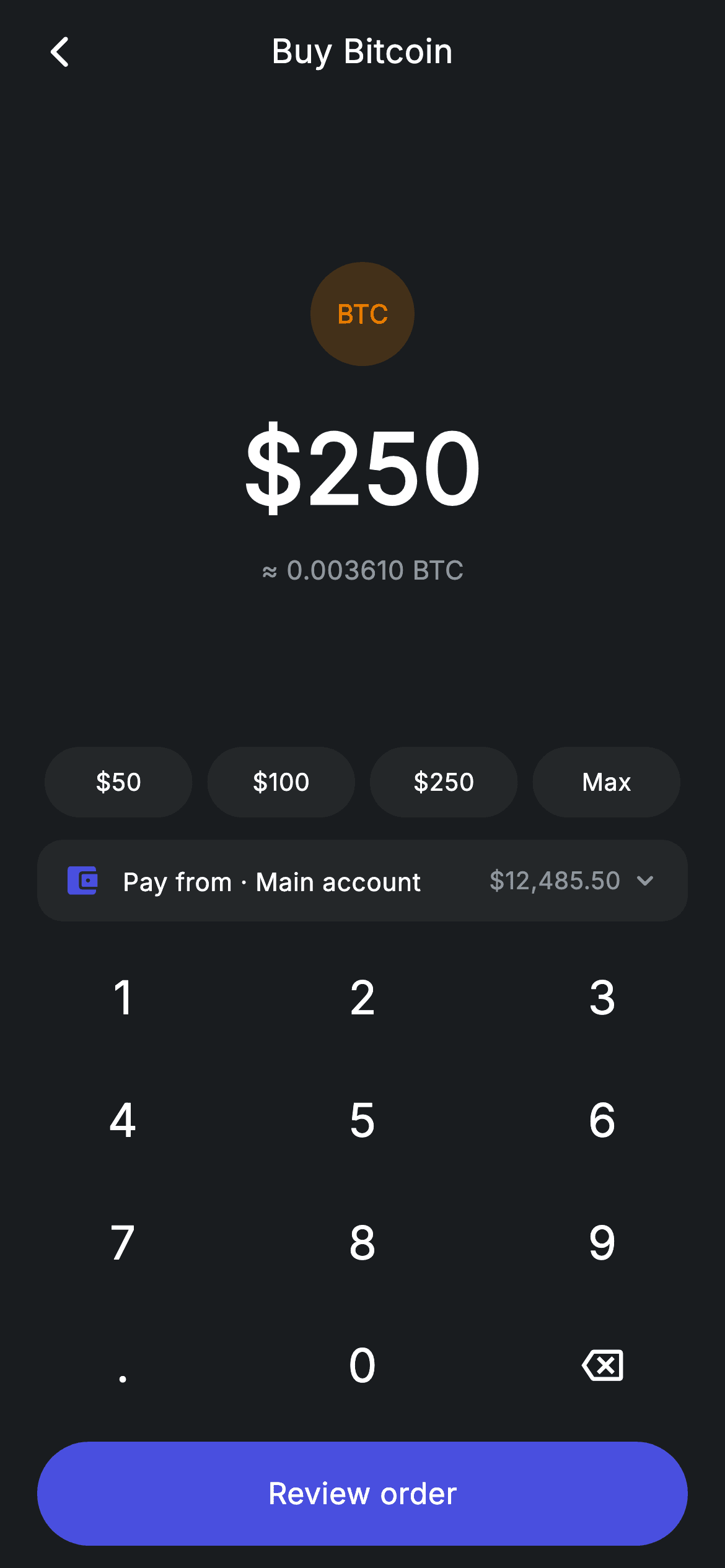
Money entry screens don't use the system keyboard — they use a custom numpad, because you need exact control over decimals, digit limits, and layout. This screen is the whole pattern: a 4×3 numpad driving a single `String` of state, a live BTC conversion under a 52px amount, quick-fill chips, a pay-from row, and a CTA that stays disabled while the amount is zero. The input logic is one `switch` handling backspace, a single decimal point, a 7-character cap, and a 2-decimal limit.
Watch the Flutter UI walkthrough
A short screen recording of Crypto Buy running, if you'd rather see it before you read the code. The written tutorial below covers everything in it.
Can't see the video? Watch it on YouTube.
What you'll build
- ✓A custom 4×3 numpad built from nested collection-for loops over a `List<List<String>>`
- ✓Amount input logic that permits only one decimal point and at most two digits after it
- ✓A live crypto conversion computed through getters, so the display can never lag the input
- ✓A `FittedBox`-wrapped 52px amount that shrinks itself instead of overflowing on long numbers
- ✓A CTA that switches between brand-indigo and inert surface grey based on whether the amount is valid
Step-by-step build
Create the file
Add a new file at lib/fintech_crypto_buy/fintech_crypto_buy_screen.dart in your Flutter project.
Register the bundled fonts
No external packages — this is pure Flutter. It does bundle its design font (Inter), so drop the font file into fonts/ and declare it in pubspec.yaml:
flutter:
  fonts:
    - family: Inter
      fonts:
- asset: fonts/Inter-Regular.ttfBuild it, piece by piece
Here's how the screen goes together. Each block below is a real slice of the code with a plain-English explanation — paste them in order, or grab the whole file from the next section.
One string of state and two derived values
class FintechCryptoBuyScreen extends StatefulWidget {
  const FintechCryptoBuyScreen({super.key, this.onBack, this.onReview});

  final VoidCallback? onBack;
  final VoidCallback? onReview;

  @override
  State<FintechCryptoBuyScreen> createState() => _FintechCryptoBuyScreenState();
}

class _FintechCryptoBuyScreenState extends State<FintechCryptoBuyScreen> {
  static const String _font = 'Inter';
  static const Color _bg = Color(0xFF191C1F);
  static const Color _surface = Color(0xFF242729);
  static const Color _brand = Color(0xFF494FDF);
  static const Color _amber = Color(0xFFEC7E00);
  static const Color _muted = Color(0xFF8D969E);

  static const double _price = 69254.10;
  String _amount = '250';

  double get _usd => double.tryParse(_amount) ?? 0;
  double get _coin => _usd / _price;
The entire amount is held as a `String`, not a `double` — which is the right choice for keypad entry, because a string can represent the intermediate state '250.' that a number can't. The two getters convert on demand: `_usd` uses `double.tryParse(_amount) ?? 0`, so a trailing dot or an empty field safely reads as zero rather than throwing, and `_coin` divides that by the `_price` constant. Because both are getters rather than stored fields, the BTC equivalent is recomputed every build and can never fall out of sync with what's on screen.
The keypad input rules
  void _onKey(String key) {
    setState(() {
      switch (key) {
        case '⌫':
          _amount = _amount.length <= 1 ? '0' : _amount.substring(0, _amount.length - 1);
        case '.':
          if (!_amount.contains('.')) _amount = '$_amount.';
        default:
          if (_amount == '0') {
            _amount = key;
          } else if (_amount.length < 7) {
            final int dot = _amount.indexOf('.');
            if (dot == -1 || _amount.length - dot <= 2) _amount = '$_amount$key';
          }
      }
    });
  }
`_onKey` is the whole input engine, written as a modern Dart switch with no `break` statements. The `'⌫'` case deletes the last character but floors at `'0'` when one digit remains, so the field is never empty. The `'.'` case is guarded by `if (!_amount.contains('.'))`, which is what stops a user typing '2.5.3'. The default case handles digits with three rules: replace a lone leading zero rather than producing '0250', stop at seven characters overall, and — via `final int dot = _amount.indexOf('.')` plus `_amount.length - dot <= 2` — allow at most two digits after the decimal point. Those four lines are what separate a working money field from a broken one.
The screen's vertical rhythm
  @override
  Widget build(BuildContext context) {
    return Theme(
      data: ThemeData.dark(useMaterial3: true),
      child: Scaffold(
        backgroundColor: _bg,
        body: SafeArea(
          child: Column(
            children: <Widget>[
              _buildAppBar(),
              Expanded(child: _buildAmount()),
              _buildQuick(),
              const SizedBox(height: 12),
              _buildPayFrom(),
              const SizedBox(height: 8),
              _Numpad(onKey: _onKey),
              const SizedBox(height: 8),
              _buildButton(),
            ],
          ),
        ),
      ),
    );
  }

  Widget _buildAppBar() {
    return Padding(
      padding: const EdgeInsets.fromLTRB(8, 4, 8, 4),
      child: Row(
        children: <Widget>[
          IconButton(
            onPressed: widget.onBack,
            icon: const Icon(Icons.arrow_back_ios_new_rounded,
                size: 20, color: Colors.white),
          ),
          const Expanded(
            child: Text(
              'Buy Bitcoin',
              textAlign: TextAlign.center,
              style: TextStyle(
                fontFamily: _font,
                fontSize: 18,
                fontWeight: FontWeight.w500,
                letterSpacing: 0.24,
                color: Colors.white,
              ),
            ),
          ),
          const SizedBox(width: 48),
        ],
      ),
    );
  }
The `Column` is a fixed stack with exactly one flexible element: `Expanded(child: _buildAmount())`. Everything below — quick chips, pay-from row, numpad, and CTA — keeps its natural height, so the amount block absorbs all the slack and stays optically centred on any screen size, with the numpad anchored to the bottom where thumbs are. The app bar uses `const SizedBox(width: 48)` on the trailing side to balance the leading `IconButton`, which is what actually centres the title — a common trick when only one side has an action.
The amount display and conversion line
  Widget _buildAmount() {
    return Center(
      child: Column(
        mainAxisAlignment: MainAxisAlignment.center,
        mainAxisSize: MainAxisSize.min,
        children: <Widget>[
          Container(
            width: 56,
            height: 56,
            alignment: Alignment.center,
            decoration: BoxDecoration(
              color: _amber.withValues(alpha: 0.2),
              shape: BoxShape.circle,
            ),
            child: const Text('BTC',
                style: TextStyle(
                  fontFamily: _font,
                  fontSize: 14,
                  fontWeight: FontWeight.w700,
                  color: _amber,
                )),
          ),
          const SizedBox(height: 18),
          FittedBox(
            fit: BoxFit.scaleDown,
            child: Text(
              '\$$_amount',
              style: const TextStyle(
                fontFamily: _font,
                fontSize: 52,
                fontWeight: FontWeight.w600,
                letterSpacing: 0.24,
                color: Colors.white,
              ),
            ),
          ),
          const SizedBox(height: 8),
          Text(
            '≈ ${_coin.toStringAsFixed(6)} BTC',
            style: const TextStyle(
              fontFamily: _font,
              fontSize: 14,
              letterSpacing: 0.24,
              color: _muted,
            ),
          ),
        ],
      ),
    );
  }
The BTC badge repeats the tint recipe: an amber circle at 20% alpha with the ticker in full-strength amber. The amount itself is wrapped in `FittedBox(fit: BoxFit.scaleDown)` — a crucial guard, because 52px type plus seven digits will exceed a phone's width, and `scaleDown` shrinks the text to fit while never enlarging it below its natural size. Underneath, `'≈ ${_coin.toStringAsFixed(6)} BTC'` shows six decimals, appropriate for a coin priced in the tens of thousands, with the approximation sign making clear this is an estimate rather than a locked rate.
Quick chips and the pay-from row
  Widget _buildQuick() {
    return Padding(
      padding: const EdgeInsets.symmetric(horizontal: 20),
      child: Row(
        children: <Widget>[
          for (final String v in <String>['50', '100', '250', 'Max'])
            Expanded(
              child: Padding(
                padding: const EdgeInsets.symmetric(horizontal: 4),
                child: GestureDetector(
                  onTap: () => setState(
                      () => _amount = v == 'Max' ? '12485' : v),
                  child: Container(
                    height: 38,
                    alignment: Alignment.center,
                    decoration: BoxDecoration(
                      color: _surface,
                      borderRadius: BorderRadius.circular(9999),
                    ),
                    child: Text(
                      v == 'Max' ? 'Max' : '\$$v',
                      style: const TextStyle(
                        fontFamily: _font,
                        fontSize: 13,
                        fontWeight: FontWeight.w500,
                        letterSpacing: 0.24,
                        color: Colors.white,
                      ),
                    ),
                  ),
                ),
              ),
            ),
        ],
      ),
    );
  }

  Widget _buildPayFrom() {
    return Padding(
      padding: const EdgeInsets.symmetric(horizontal: 20),
      child: Container(
        padding: const EdgeInsets.symmetric(horizontal: 14, vertical: 12),
        decoration: BoxDecoration(
          color: _surface,
          borderRadius: BorderRadius.circular(14),
        ),
        child: Row(
          children: const <Widget>[
            Icon(Icons.account_balance_wallet_rounded, size: 20, color: _brand),
            SizedBox(width: 12),
            Text(
              'Pay from · Main account',
              style: TextStyle(
                fontFamily: _font,
                fontSize: 13.5,
                fontWeight: FontWeight.w500,
                letterSpacing: 0.24,
                color: Colors.white,
              ),
            ),
            Spacer(),
            Text(
              r'$12,485.50',
              style: TextStyle(
                fontFamily: _font,
                fontSize: 13,
                letterSpacing: 0.24,
                color: _muted,
              ),
            ),
            SizedBox(width: 4),
            Icon(Icons.keyboard_arrow_down_rounded, size: 18, color: _muted),
          ],
        ),
      ),
    );
  }
The quick-fill chips are generated by a collection-for over four literal strings, each in an `Expanded` so they divide the width evenly. 'Max' is special-cased twice — once to set `_amount` to the balance ('12485') and once to render its label without a dollar sign — which is why the list holds display values rather than a model. The pay-from row is presentational: a `_surface` card with a brand-tinted wallet icon, a `Spacer()` pushing the balance right, and a chevron implying it opens an account picker.
The conditional CTA
  Widget _buildButton() {
    final bool valid = _usd > 0;
    return Padding(
      padding: const EdgeInsets.fromLTRB(20, 0, 20, 12),
      child: SizedBox(
        width: double.infinity,
        height: 56,
        child: Material(
          color: valid ? _brand : _surface,
          borderRadius: BorderRadius.circular(9999),
          child: InkWell(
            borderRadius: BorderRadius.circular(9999),
            onTap: valid ? widget.onReview : null,
            child: Center(
              child: Text(
                'Review order',
                style: TextStyle(
                  fontFamily: _font,
                  fontSize: 16,
                  fontWeight: FontWeight.w500,
                  letterSpacing: 0.24,
                  color: valid ? Colors.white : _muted,
                ),
              ),
            ),
          ),
        ),
      ),
    );
  }
`valid` is `_usd > 0`, and it drives three things at once: the `Material` colour (brand indigo versus inert `_surface`), the `InkWell`'s `onTap` (the callback or `null`), and the label's colour (white versus `_muted`). Passing `null` to `onTap` also suppresses the ripple, so a disabled button gives no touch feedback at all — the correct behaviour. Note the `Material`/`InkWell` pairing with matching 9999 radii, which is how you get a ripple properly clipped to a pill shape.
Building the numpad
class _Numpad extends StatelessWidget {
  const _Numpad({required this.onKey});

  final ValueChanged<String> onKey;

  static const List<List<String>> _rows = <List<String>>[
    <String>['1', '2', '3'],
    <String>['4', '5', '6'],
    <String>['7', '8', '9'],
    <String>['.', '0', '⌫'],
  ];

  @override
  Widget build(BuildContext context) {
    return Padding(
      padding: const EdgeInsets.symmetric(horizontal: 32),
      child: Column(
        mainAxisSize: MainAxisSize.min,
        children: <Widget>[
          for (final List<String> row in _rows)
            Padding(
              padding: const EdgeInsets.symmetric(vertical: 5),
              child: Row(
                mainAxisAlignment: MainAxisAlignment.spaceBetween,
                children: <Widget>[
                  for (final String key in row)
                    GestureDetector(
                      onTap: () => onKey(key),
                      behavior: HitTestBehavior.opaque,
                      child: Container(
                        width: 68,
                        height: 56,
                        alignment: Alignment.center,
                        child: key == '⌫'
                            ? const Icon(Icons.backspace_outlined,
                                size: 22, color: Colors.white)
                            : Text(
                                key,
                                style: const TextStyle(
                                  fontFamily: _FintechCryptoBuyScreenState._font,
                                  fontSize: 25,
                                  fontWeight: FontWeight.w500,
                                  letterSpacing: 0.24,
                                  color: Colors.white,
                                ),
                              ),
                      ),
                    ),
                ],
              ),
            ),
        ],
      ),
    );
  }
}
`_Numpad` is stateless and communicates purely through a `ValueChanged<String> onKey` — it has no idea an amount exists, which is what makes it droppable into any screen. The layout is two nested collection-for loops over `_rows`, a `List<List<String>>`, so the grid is data rather than twelve hand-written widgets. Each key is a 68×56 `Container` with `HitTestBehavior.opaque`, meaning the whole rectangle is tappable and not just the glyph — essential for a numpad, where near-misses are constant. The `'⌫'` key renders a `backspace_outlined` icon rather than the character, so the string stays a convenient sentinel in the data while the UI shows a proper glyph.
Full code
The complete, ready-to-paste source. Free to use in your projects — one click copies it all.
import 'package:flutter/material.dart';

/// Crypto buy — buy a coin with a numpad amount (Revolut-inspired design).
///
/// Self-contained per CONVENTIONS.md: pure Flutter only, the exact design font
/// (Inter) is bundled under `fonts/`, no network/emoji images, and the screen
/// forces its own dark theme. The numpad drives the USD amount; the coin
/// equivalent and quick-percent chips update live.
class FintechCryptoBuyScreen extends StatefulWidget {
  const FintechCryptoBuyScreen({super.key, this.onBack, this.onReview});

  final VoidCallback? onBack;
  final VoidCallback? onReview;

  @override
  State<FintechCryptoBuyScreen> createState() => _FintechCryptoBuyScreenState();
}

class _FintechCryptoBuyScreenState extends State<FintechCryptoBuyScreen> {
  static const String _font = 'Inter';
  static const Color _bg = Color(0xFF191C1F);
  static const Color _surface = Color(0xFF242729);
  static const Color _brand = Color(0xFF494FDF);
  static const Color _amber = Color(0xFFEC7E00);
  static const Color _muted = Color(0xFF8D969E);

  static const double _price = 69254.10;
  String _amount = '250';

  double get _usd => double.tryParse(_amount) ?? 0;
  double get _coin => _usd / _price;

  void _onKey(String key) {
    setState(() {
      switch (key) {
        case '⌫':
          _amount = _amount.length <= 1 ? '0' : _amount.substring(0, _amount.length - 1);
        case '.':
          if (!_amount.contains('.')) _amount = '$_amount.';
        default:
          if (_amount == '0') {
            _amount = key;
          } else if (_amount.length < 7) {
            final int dot = _amount.indexOf('.');
            if (dot == -1 || _amount.length - dot <= 2) _amount = '$_amount$key';
          }
      }
    });
  }

  @override
  Widget build(BuildContext context) {
    return Theme(
      data: ThemeData.dark(useMaterial3: true),
      child: Scaffold(
        backgroundColor: _bg,
        body: SafeArea(
          child: Column(
            children: <Widget>[
              _buildAppBar(),
              Expanded(child: _buildAmount()),
              _buildQuick(),
              const SizedBox(height: 12),
              _buildPayFrom(),
              const SizedBox(height: 8),
              _Numpad(onKey: _onKey),
              const SizedBox(height: 8),
              _buildButton(),
            ],
          ),
        ),
      ),
    );
  }

  Widget _buildAppBar() {
    return Padding(
      padding: const EdgeInsets.fromLTRB(8, 4, 8, 4),
      child: Row(
        children: <Widget>[
          IconButton(
            onPressed: widget.onBack,
            icon: const Icon(Icons.arrow_back_ios_new_rounded,
                size: 20, color: Colors.white),
          ),
          const Expanded(
            child: Text(
              'Buy Bitcoin',
              textAlign: TextAlign.center,
              style: TextStyle(
                fontFamily: _font,
                fontSize: 18,
                fontWeight: FontWeight.w500,
                letterSpacing: 0.24,
                color: Colors.white,
              ),
            ),
          ),
          const SizedBox(width: 48),
        ],
      ),
    );
  }

  Widget _buildAmount() {
    return Center(
      child: Column(
        mainAxisAlignment: MainAxisAlignment.center,
        mainAxisSize: MainAxisSize.min,
        children: <Widget>[
          Container(
            width: 56,
            height: 56,
            alignment: Alignment.center,
            decoration: BoxDecoration(
              color: _amber.withValues(alpha: 0.2),
              shape: BoxShape.circle,
            ),
            child: const Text('BTC',
                style: TextStyle(
                  fontFamily: _font,
                  fontSize: 14,
                  fontWeight: FontWeight.w700,
                  color: _amber,
                )),
          ),
          const SizedBox(height: 18),
          FittedBox(
            fit: BoxFit.scaleDown,
            child: Text(
              '\$$_amount',
              style: const TextStyle(
                fontFamily: _font,
                fontSize: 52,
                fontWeight: FontWeight.w600,
                letterSpacing: 0.24,
                color: Colors.white,
              ),
            ),
          ),
          const SizedBox(height: 8),
          Text(
            '≈ ${_coin.toStringAsFixed(6)} BTC',
            style: const TextStyle(
              fontFamily: _font,
              fontSize: 14,
              letterSpacing: 0.24,
              color: _muted,
            ),
          ),
        ],
      ),
    );
  }

  Widget _buildQuick() {
    return Padding(
      padding: const EdgeInsets.symmetric(horizontal: 20),
      child: Row(
        children: <Widget>[
          for (final String v in <String>['50', '100', '250', 'Max'])
            Expanded(
              child: Padding(
                padding: const EdgeInsets.symmetric(horizontal: 4),
                child: GestureDetector(
                  onTap: () => setState(
                      () => _amount = v == 'Max' ? '12485' : v),
                  child: Container(
                    height: 38,
                    alignment: Alignment.center,
                    decoration: BoxDecoration(
                      color: _surface,
                      borderRadius: BorderRadius.circular(9999),
                    ),
                    child: Text(
                      v == 'Max' ? 'Max' : '\$$v',
                      style: const TextStyle(
                        fontFamily: _font,
                        fontSize: 13,
                        fontWeight: FontWeight.w500,
                        letterSpacing: 0.24,
                        color: Colors.white,
                      ),
                    ),
                  ),
                ),
              ),
            ),
        ],
      ),
    );
  }

  Widget _buildPayFrom() {
    return Padding(
      padding: const EdgeInsets.symmetric(horizontal: 20),
      child: Container(
        padding: const EdgeInsets.symmetric(horizontal: 14, vertical: 12),
        decoration: BoxDecoration(
          color: _surface,
          borderRadius: BorderRadius.circular(14),
        ),
        child: Row(
          children: const <Widget>[
            Icon(Icons.account_balance_wallet_rounded, size: 20, color: _brand),
            SizedBox(width: 12),
            Text(
              'Pay from · Main account',
              style: TextStyle(
                fontFamily: _font,
                fontSize: 13.5,
                fontWeight: FontWeight.w500,
                letterSpacing: 0.24,
                color: Colors.white,
              ),
            ),
            Spacer(),
            Text(
              r'$12,485.50',
              style: TextStyle(
                fontFamily: _font,
                fontSize: 13,
                letterSpacing: 0.24,
                color: _muted,
              ),
            ),
            SizedBox(width: 4),
            Icon(Icons.keyboard_arrow_down_rounded, size: 18, color: _muted),
          ],
        ),
      ),
    );
  }

  Widget _buildButton() {
    final bool valid = _usd > 0;
    return Padding(
      padding: const EdgeInsets.fromLTRB(20, 0, 20, 12),
      child: SizedBox(
        width: double.infinity,
        height: 56,
        child: Material(
          color: valid ? _brand : _surface,
          borderRadius: BorderRadius.circular(9999),
          child: InkWell(
            borderRadius: BorderRadius.circular(9999),
            onTap: valid ? widget.onReview : null,
            child: Center(
              child: Text(
                'Review order',
                style: TextStyle(
                  fontFamily: _font,
                  fontSize: 16,
                  fontWeight: FontWeight.w500,
                  letterSpacing: 0.24,
                  color: valid ? Colors.white : _muted,
                ),
              ),
            ),
          ),
        ),
      ),
    );
  }
}

class _Numpad extends StatelessWidget {
  const _Numpad({required this.onKey});

  final ValueChanged<String> onKey;

  static const List<List<String>> _rows = <List<String>>[
    <String>['1', '2', '3'],
    <String>['4', '5', '6'],
    <String>['7', '8', '9'],
    <String>['.', '0', '⌫'],
  ];

  @override
  Widget build(BuildContext context) {
    return Padding(
      padding: const EdgeInsets.symmetric(horizontal: 32),
      child: Column(
        mainAxisSize: MainAxisSize.min,
        children: <Widget>[
          for (final List<String> row in _rows)
            Padding(
              padding: const EdgeInsets.symmetric(vertical: 5),
              child: Row(
                mainAxisAlignment: MainAxisAlignment.spaceBetween,
                children: <Widget>[
                  for (final String key in row)
                    GestureDetector(
                      onTap: () => onKey(key),
                      behavior: HitTestBehavior.opaque,
                      child: Container(
                        width: 68,
                        height: 56,
                        alignment: Alignment.center,
                        child: key == '⌫'
                            ? const Icon(Icons.backspace_outlined,
                                size: 22, color: Colors.white)
                            : Text(
                                key,
                                style: const TextStyle(
                                  fontFamily: _FintechCryptoBuyScreenState._font,
                                  fontSize: 25,
                                  fontWeight: FontWeight.w500,
                                  letterSpacing: 0.24,
                                  color: Colors.white,
                                ),
                              ),
                      ),
                    ),
                ],
              ),
            ),
        ],
      ),
    );
  }
}
Plus bundled 1 binary asset (fonts/images). The CLI and MCP install those for you automatically.
Two faster ways to add it
Copy-paste works, but you can skip it entirely.
1. FlutterKit CLI
One command drops this screen — and its fonts — straight into your project.
$ flutterkit add fintech-crypto-buy2. AI agent (MCP)
Connect FlutterKit's MCP server in Claude or Cursor and just ask your agent to install fintech-crypto-buy — it fetches and writes the files for you.
FAQ
Is this crypto buy screen free to use?
Yes. The full Dart source on this page is free for personal and commercial apps. Copy it from the code block, install it with the FlutterKit CLI (flutterkit add fintech-crypto-buy), or add it via an AI agent over MCP.
Does it need any packages?
No — it's pure Flutter on material.dart, with no keyboard, numpad, or currency package. The only asset to register in pubspec.yaml is the bundled Inter font family, which the CLI and MCP install for you.
Can I reuse the numpad in other screens?
Yes — that's how it's designed. _Numpad is stateless and only emits key strings through onKey, so you can lift the class into a shared file and drive any amount field with it. Make it public by dropping the leading underscore, and pass in your own handler.
How do I change the number of decimal places?
Two places: the guard `_amount.length - dot <= 2` in _onKey controls how many digits can be typed after the point, and toStringAsFixed(6) controls how many decimals the coin estimate shows. For a two-decimal fiat field, leave the first and change the second.
Which Flutter version does it target?
It uses Color.withValues(alpha:) plus switch statements without break (Dart 3 pattern-style switches), so it targets Flutter 3.27+ with Dart 3. On an older SDK, swap _amber.withValues(alpha: 0.2) for withOpacity(0.2) and add explicit breaks to the switch cases.


