How to Build a Crypto Asset Detail Screen with a Price Chart in Flutter (Full Code + Preview)
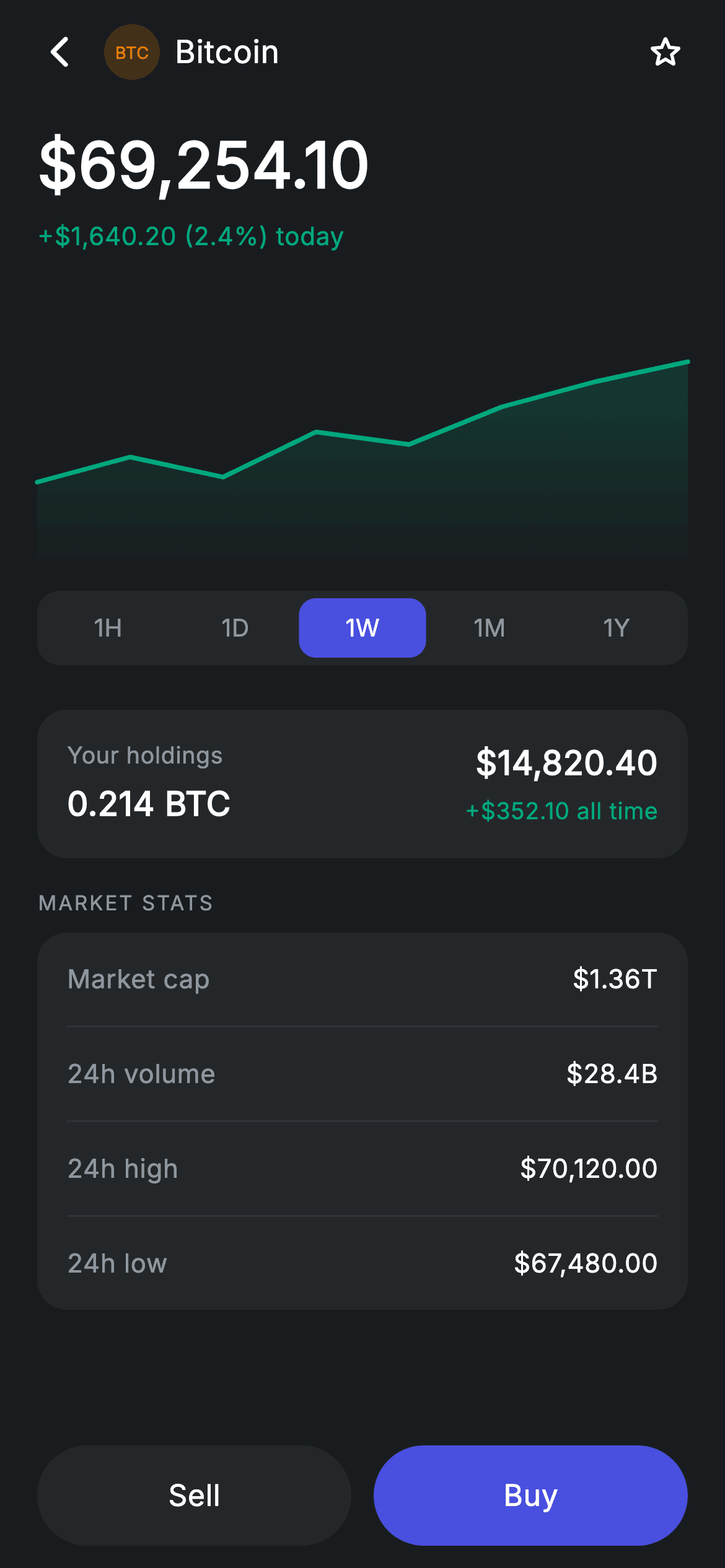
Coin detail screens need a chart, and reaching for a charting package is usually overkill. This tutorial builds a Bitcoin asset screen in Flutter — a dark layout with a 34px price, a gradient-filled area chart painted from scratch, five timeframe tabs that swap the series live, a holdings card, a market-stats table and a pinned Sell/Buy pair. The chart is about forty lines of CustomPainter over normalised 0–1 values. No dependencies, no network, no chart library.
Watch the Flutter UI walkthrough
A short screen recording of Crypto Asset running, if you'd rather see it before you read the code. The written tutorial below covers everything in it.
Can't see the video? Watch it on YouTube.
What you'll build
- ✓An area chart with a stroked line and a fading gradient fill, drawn entirely with Path and a shader
- ✓Five timeframe tabs that swap the chart's data set on tap and repaint only when the points change
- ✓A holdings card that puts coin quantity and fiat value on opposite edges of one row
- ✓A pinned two-button footer where a pill shape comes from a deliberately oversized corner radius
Step-by-step build
Create the file
Add a new file at lib/fintech_crypto_asset/fintech_crypto_asset_screen.dart in your Flutter project.
Register the bundled fonts
No external packages — this is pure Flutter. It does bundle its design font (Inter), so drop the font file into fonts/ and declare it in pubspec.yaml:
flutter:
  fonts:
    - family: Inter
      fonts:
- asset: fonts/Inter-Regular.ttfBuild it, piece by piece
Here's how the screen goes together. Each block below is a real slice of the code with a plain-English explanation — paste them in order, or grab the whole file from the next section.
Timeframes and the normalised chart data
import 'package:flutter/material.dart';

/// Crypto asset — coin detail with price chart (Revolut-inspired design).
///
/// Self-contained per CONVENTIONS.md: pure Flutter only, the exact design font
/// (Inter) is bundled under `fonts/`, the price chart is custom-painted (no
/// charting package, no network), and the screen forces its own dark theme.
/// Timeframe tabs swap the chart data live; Buy/Sell are pinned at the bottom.
class FintechCryptoAssetScreen extends StatefulWidget {
  const FintechCryptoAssetScreen({
    super.key,
    this.onBack,
    this.onBuy,
    this.onSell,
  });

  final VoidCallback? onBack;
  final VoidCallback? onBuy;
  final VoidCallback? onSell;

  @override
  State<FintechCryptoAssetScreen> createState() =>
      _FintechCryptoAssetScreenState();
}

class _FintechCryptoAssetScreenState extends State<FintechCryptoAssetScreen> {
  static const String _font = 'Inter';
  static const Color _bg = Color(0xFF191C1F);
  static const Color _surface = Color(0xFF242729);
  static const Color _brand = Color(0xFF494FDF);
  static const Color _teal = Color(0xFF00A87E);
  static const Color _amber = Color(0xFFEC7E00);
  static const Color _muted = Color(0xFF8D969E);
  static const Color _hairline = Color(0xFF2E3235);

  static const List<String> _frames = <String>['1H', '1D', '1W', '1M', '1Y'];
  int _frame = 2;

  static const Map<int, List<double>> _series = <int, List<double>>{
    0: <double>[0.5, 0.55, 0.52, 0.6, 0.58, 0.64, 0.62, 0.68],
    1: <double>[0.4, 0.45, 0.5, 0.43, 0.55, 0.6, 0.52, 0.66],
    2: <double>[0.3, 0.4, 0.32, 0.5, 0.45, 0.6, 0.7, 0.78],
    3: <double>[0.2, 0.35, 0.3, 0.45, 0.55, 0.5, 0.65, 0.82],
    4: <double>[0.15, 0.3, 0.25, 0.5, 0.4, 0.6, 0.75, 0.95],
  };
The screen is stateful to hold one int, `_frame`, initialised to 2 so '1W' is the default view. `_frames` lists the five labels. The data is a `Map<int, List<double>>` keyed by that same index, and every series is normalised to 0–1 rather than stored as dollar prices. That's the key decision: because the values are already relative, the painter never has to find a min and max or scale anything — it just multiplies by the available height. The five series also get progressively steeper, so switching from 1H to 1Y visibly shows a longer, stronger climb.
The scrolling body and the chart slot
  @override
  Widget build(BuildContext context) {
    return Theme(
      data: ThemeData.dark(useMaterial3: true),
      child: Scaffold(
        backgroundColor: _bg,
        body: SafeArea(
          child: Column(
            children: <Widget>[
              _buildAppBar(),
              Expanded(
                child: ListView(
                  physics: const BouncingScrollPhysics(),
                  padding: const EdgeInsets.fromLTRB(20, 8, 20, 24),
                  children: <Widget>[
                    _buildHeader(),
                    const SizedBox(height: 20),
                    SizedBox(
                      height: 150,
                      child: CustomPaint(
                        size: Size.infinite,
                        painter: _AreaChartPainter(
                          points: _series[_frame]!,
                          color: _teal,
                        ),
                      ),
                    ),
                    const SizedBox(height: 12),
                    _buildFrameTabs(),
                    const SizedBox(height: 24),
                    _buildHoldingCard(),
                    const SizedBox(height: 16),
                    _sectionLabel('Market stats'),
                    const SizedBox(height: 8),
                    _buildStats(),
                  ],
                ),
              ),
              _buildButtons(),
            ],
          ),
        ),
      ),
    );
  }
Everything is wrapped in `ThemeData.dark(useMaterial3: true)` so the screen renders correctly standalone. The body is an app bar, an `Expanded` ListView, and a pinned button row — so Buy and Sell never scroll away. The chart lives in a `SizedBox(height: 150)` wrapping a `CustomPaint(size: Size.infinite, ...)`. `Size.infinite` there tells the CustomPaint to take whatever its parent gives it, which is the full list width by 150px; without it a CustomPaint with no child collapses to zero. The painter is rebuilt with `_series[_frame]!` each time, which is what makes the tabs work.
A coin badge built from text
  Widget _buildAppBar() {
    return Padding(
      padding: const EdgeInsets.fromLTRB(8, 4, 8, 4),
      child: Row(
        children: <Widget>[
          IconButton(
            onPressed: widget.onBack,
            icon: const Icon(Icons.arrow_back_ios_new_rounded,
                size: 20, color: Colors.white),
          ),
          Row(
            children: <Widget>[
              Container(
                width: 30,
                height: 30,
                alignment: Alignment.center,
                decoration: BoxDecoration(
                  color: _amber.withValues(alpha: 0.2),
                  shape: BoxShape.circle,
                ),
                child: const Text('BTC',
                    style: TextStyle(
                      fontFamily: _font,
                      fontSize: 9,
                      fontWeight: FontWeight.w700,
                      color: _amber,
                    )),
              ),
              const SizedBox(width: 8),
              const Text(
                'Bitcoin',
                style: TextStyle(
                  fontFamily: _font,
                  fontSize: 17,
                  fontWeight: FontWeight.w500,
                  letterSpacing: 0.24,
                  color: Colors.white,
                ),
              ),
            ],
          ),
          const Spacer(),
          IconButton(
            onPressed: () {},
            icon: const Icon(Icons.star_border_rounded,
                size: 22, color: Colors.white),
          ),
        ],
      ),
    );
  }
The app bar puts the coin identity next to the back button rather than centring a title. The coin badge needs no image: it's a 30px circle filled with `_amber.withValues(alpha: 0.2)` containing the letters 'BTC' at 9px w700 in solid amber. That's a genuinely useful trick for a crypto or stock list — ticker symbols are short by definition, so a tinted circle plus the symbol gives you a recognisable, asset-free logo for any instrument. A `Spacer()` then pushes the watchlist star to the far right.
Price, change, and the timeframe tabs
  Widget _buildHeader() {
    return Column(
      crossAxisAlignment: CrossAxisAlignment.start,
      children: const <Widget>[
        Text(
          r'$69,254.10',
          style: TextStyle(
            fontFamily: _font,
            fontSize: 34,
            fontWeight: FontWeight.w600,
            letterSpacing: 0.24,
            color: Colors.white,
          ),
        ),
        SizedBox(height: 4),
        Text(
          r'+$1,640.20 (2.4%) today',
          style: TextStyle(
            fontFamily: _font,
            fontSize: 13.5,
            fontWeight: FontWeight.w500,
            letterSpacing: 0.24,
            color: _teal,
          ),
        ),
      ],
    );
  }

  Widget _buildFrameTabs() {
    return Container(
      height: 40,
      padding: const EdgeInsets.all(4),
      decoration: BoxDecoration(
        color: _surface,
        borderRadius: BorderRadius.circular(12),
      ),
      child: Row(
        children: <Widget>[
          for (int i = 0; i < _frames.length; i++)
            Expanded(
              child: GestureDetector(
                onTap: () => setState(() => _frame = i),
                behavior: HitTestBehavior.opaque,
                child: Container(
                  alignment: Alignment.center,
                  decoration: BoxDecoration(
                    color: _frame == i ? _brand : Colors.transparent,
                    borderRadius: BorderRadius.circular(9),
                  ),
                  child: Text(
                    _frames[i],
                    style: TextStyle(
                      fontFamily: _font,
                      fontSize: 13,
                      fontWeight: FontWeight.w500,
                      letterSpacing: 0.24,
                      color: _frame == i ? Colors.white : _muted,
                    ),
                  ),
                ),
              ),
            ),
        ],
      ),
    );
  }
The header is a const Column with the price at 34px w600 above the day's change in `_teal`, both written as raw strings so the `$` isn't treated as interpolation. The tabs below use the same segmented-control pattern seen elsewhere in this kit: a 40px `_surface` track with `EdgeInsets.all(4)` creating the gutter, and each tab wrapped in `Expanded` so all five split the width evenly. The selected tab gets a solid `_brand` fill with a 9px radius and white text; the rest are transparent with `_muted` text. One detail matters here — `behavior: HitTestBehavior.opaque` on the GestureDetector. Without it, taps landing on the transparent part of an unselected tab would fall through and do nothing.
Holdings and market stats
  Widget _buildHoldingCard() {
    return Container(
      padding: const EdgeInsets.all(16),
      decoration: BoxDecoration(
        color: _surface,
        borderRadius: BorderRadius.circular(16),
      ),
      child: Row(
        children: <Widget>[
          const Expanded(
            child: Column(
              crossAxisAlignment: CrossAxisAlignment.start,
              children: <Widget>[
                Text(
                  'Your holdings',
                  style: TextStyle(
                    fontFamily: _font,
                    fontSize: 12.5,
                    letterSpacing: 0.24,
                    color: _muted,
                  ),
                ),
                SizedBox(height: 4),
                Text(
                  '0.214 BTC',
                  style: TextStyle(
                    fontFamily: _font,
                    fontSize: 18,
                    fontWeight: FontWeight.w600,
                    letterSpacing: 0.24,
                    color: Colors.white,
                  ),
                ),
              ],
            ),
          ),
          const Column(
            crossAxisAlignment: CrossAxisAlignment.end,
            children: <Widget>[
              Text(
                r'$14,820.40',
                style: TextStyle(
                  fontFamily: _font,
                  fontSize: 18,
                  fontWeight: FontWeight.w600,
                  letterSpacing: 0.24,
                  color: Colors.white,
                ),
              ),
              SizedBox(height: 4),
              Text(
                r'+$352.10 all time',
                style: TextStyle(
                  fontFamily: _font,
                  fontSize: 12.5,
                  letterSpacing: 0.24,
                  color: _teal,
                ),
              ),
            ],
          ),
        ],
      ),
    );
  }

  Widget _buildStats() {
    return Container(
      padding: const EdgeInsets.symmetric(horizontal: 16),
      decoration: BoxDecoration(
        color: _surface,
        borderRadius: BorderRadius.circular(16),
      ),
      child: Column(
        children: <Widget>[
          _statRow('Market cap', r'$1.36T'),
          const Divider(height: 1, color: _hairline),
          _statRow('24h volume', r'$28.4B'),
          const Divider(height: 1, color: _hairline),
          _statRow('24h high', r'$70,120.00'),
          const Divider(height: 1, color: _hairline),
          _statRow('24h low', r'$67,480.00'),
        ],
      ),
    );
  }
The holdings card is a single Row with an `Expanded` left column and a right column set to `CrossAxisAlignment.end` — that combination pins the labels to the left edge and the values to the right without any Spacer, and it stays correct however long the numbers get. It pairs the coin amount ('0.214 BTC') with its fiat value, which is the pair a holder actually wants. The stats block uses only horizontal padding on its container, letting each `_statRow` supply its own 15px vertical inset so the `Divider(height: 1)` rules sit flush between rows. Each stat row uses `MainAxisAlignment.spaceBetween`, the simplest way to push a label and value apart.
The pinned Sell and Buy buttons
  Widget _buildButtons() {
    return Padding(
      padding: const EdgeInsets.fromLTRB(20, 0, 20, 12),
      child: Row(
        children: <Widget>[
          Expanded(
            child: SizedBox(
              height: 54,
              child: Material(
                color: _surface,
                borderRadius: BorderRadius.circular(9999),
                child: InkWell(
                  borderRadius: BorderRadius.circular(9999),
                  onTap: widget.onSell,
                  child: const Center(
                    child: Text(
                      'Sell',
                      style: TextStyle(
                        fontFamily: _font,
                        fontSize: 16,
                        fontWeight: FontWeight.w500,
                        letterSpacing: 0.24,
                        color: Colors.white,
                      ),
                    ),
                  ),
                ),
              ),
            ),
          ),
          const SizedBox(width: 12),
          Expanded(
            child: SizedBox(
              height: 54,
              child: Material(
                color: _brand,
                borderRadius: BorderRadius.circular(9999),
                child: InkWell(
                  borderRadius: BorderRadius.circular(9999),
                  onTap: widget.onBuy,
                  child: const Center(
                    child: Text(
                      'Buy',
                      style: TextStyle(
                        fontFamily: _font,
                        fontSize: 16,
                        fontWeight: FontWeight.w500,
                        letterSpacing: 0.24,
                        color: Colors.white,
                      ),
                    ),
                  ),
                ),
              ),
            ),
          ),
        ],
      ),
    );
  }
}
Both buttons are built from Material + InkWell rather than FilledButton, which gives full control over the surface colour while keeping a properly clipped ripple. Each is wrapped in `Expanded` inside a 54px-tall Row, so they split the width evenly with a 12px gap. The radius is `BorderRadius.circular(9999)` — deliberately far larger than half the height, a common shorthand meaning 'as round as possible' that stays correct if the height ever changes. The hierarchy is carried by colour alone: Sell uses the same `_surface` grey as the cards, Buy uses solid `_brand` indigo, so the primary action is obvious without differing sizes.
Painting the area chart
/// Paints a filled area chart from normalised 0–1 points.
class _AreaChartPainter extends CustomPainter {
  _AreaChartPainter({required this.points, required this.color});

  final List<double> points;
  final Color color;

  @override
  void paint(Canvas canvas, Size size) {
    if (points.length < 2) return;
    final double dx = size.width / (points.length - 1);
    double x(int i) => dx * i;
    double y(int i) => size.height - points[i].clamp(0, 1) * size.height * 0.9 - 6;

    final Path line = Path()..moveTo(x(0), y(0));
    for (int i = 1; i < points.length; i++) {
      line.lineTo(x(i), y(i));
    }
    final Path area = Path.from(line)
      ..lineTo(size.width, size.height)
      ..lineTo(0, size.height)
      ..close();
    canvas.drawPath(
      area,
      Paint()
        ..shader = LinearGradient(
          begin: Alignment.topCenter,
          end: Alignment.bottomCenter,
          colors: <Color>[color.withValues(alpha: 0.3), color.withValues(alpha: 0)],
        ).createShader(Offset.zero & size),
    );
    canvas.drawPath(
      line,
      Paint()
        ..color = color
        ..strokeWidth = 2.5
        ..style = PaintingStyle.stroke
        ..strokeCap = StrokeCap.round
        ..strokeJoin = StrokeJoin.round,
    );
  }

  @override
  bool shouldRepaint(covariant _AreaChartPainter oldDelegate) =>
      oldDelegate.points != points || oldDelegate.color != color;
}
This is the whole chart. It guards on `points.length < 2`, then defines two local functions: `x(i)` spaces points evenly across the width, and `y(i)` converts a 0–1 value to a canvas coordinate — inverted, because canvas y grows downward, scaled to 90% of the height and offset 6px so the peak never touches the top edge. The line Path is built with a moveTo and a loop of lineTo calls. The fill is then made with `Path.from(line)` — a copy, so the original stroke path isn't mutated — extended down to the bottom-right and bottom-left corners and closed. That closed shape is filled with a LinearGradient shader running from the colour at 30% alpha down to fully transparent, giving the classic fade. Finally the line itself is stroked at 2.5px with round caps and joins. `shouldRepaint` compares the points list, so changing timeframe repaints and scrolling doesn't.
Full code
The complete, ready-to-paste source. Free to use in your projects — one click copies it all.
import 'package:flutter/material.dart';

/// Crypto asset — coin detail with price chart (Revolut-inspired design).
///
/// Self-contained per CONVENTIONS.md: pure Flutter only, the exact design font
/// (Inter) is bundled under `fonts/`, the price chart is custom-painted (no
/// charting package, no network), and the screen forces its own dark theme.
/// Timeframe tabs swap the chart data live; Buy/Sell are pinned at the bottom.
class FintechCryptoAssetScreen extends StatefulWidget {
  const FintechCryptoAssetScreen({
    super.key,
    this.onBack,
    this.onBuy,
    this.onSell,
  });

  final VoidCallback? onBack;
  final VoidCallback? onBuy;
  final VoidCallback? onSell;

  @override
  State<FintechCryptoAssetScreen> createState() =>
      _FintechCryptoAssetScreenState();
}

class _FintechCryptoAssetScreenState extends State<FintechCryptoAssetScreen> {
  static const String _font = 'Inter';
  static const Color _bg = Color(0xFF191C1F);
  static const Color _surface = Color(0xFF242729);
  static const Color _brand = Color(0xFF494FDF);
  static const Color _teal = Color(0xFF00A87E);
  static const Color _amber = Color(0xFFEC7E00);
  static const Color _muted = Color(0xFF8D969E);
  static const Color _hairline = Color(0xFF2E3235);

  static const List<String> _frames = <String>['1H', '1D', '1W', '1M', '1Y'];
  int _frame = 2;

  static const Map<int, List<double>> _series = <int, List<double>>{
    0: <double>[0.5, 0.55, 0.52, 0.6, 0.58, 0.64, 0.62, 0.68],
    1: <double>[0.4, 0.45, 0.5, 0.43, 0.55, 0.6, 0.52, 0.66],
    2: <double>[0.3, 0.4, 0.32, 0.5, 0.45, 0.6, 0.7, 0.78],
    3: <double>[0.2, 0.35, 0.3, 0.45, 0.55, 0.5, 0.65, 0.82],
    4: <double>[0.15, 0.3, 0.25, 0.5, 0.4, 0.6, 0.75, 0.95],
  };

  @override
  Widget build(BuildContext context) {
    return Theme(
      data: ThemeData.dark(useMaterial3: true),
      child: Scaffold(
        backgroundColor: _bg,
        body: SafeArea(
          child: Column(
            children: <Widget>[
              _buildAppBar(),
              Expanded(
                child: ListView(
                  physics: const BouncingScrollPhysics(),
                  padding: const EdgeInsets.fromLTRB(20, 8, 20, 24),
                  children: <Widget>[
                    _buildHeader(),
                    const SizedBox(height: 20),
                    SizedBox(
                      height: 150,
                      child: CustomPaint(
                        size: Size.infinite,
                        painter: _AreaChartPainter(
                          points: _series[_frame]!,
                          color: _teal,
                        ),
                      ),
                    ),
                    const SizedBox(height: 12),
                    _buildFrameTabs(),
                    const SizedBox(height: 24),
                    _buildHoldingCard(),
                    const SizedBox(height: 16),
                    _sectionLabel('Market stats'),
                    const SizedBox(height: 8),
                    _buildStats(),
                  ],
                ),
              ),
              _buildButtons(),
            ],
          ),
        ),
      ),
    );
  }

  Widget _buildAppBar() {
    return Padding(
      padding: const EdgeInsets.fromLTRB(8, 4, 8, 4),
      child: Row(
        children: <Widget>[
          IconButton(
            onPressed: widget.onBack,
            icon: const Icon(Icons.arrow_back_ios_new_rounded,
                size: 20, color: Colors.white),
          ),
          Row(
            children: <Widget>[
              Container(
                width: 30,
                height: 30,
                alignment: Alignment.center,
                decoration: BoxDecoration(
                  color: _amber.withValues(alpha: 0.2),
                  shape: BoxShape.circle,
                ),
                child: const Text('BTC',
                    style: TextStyle(
                      fontFamily: _font,
                      fontSize: 9,
                      fontWeight: FontWeight.w700,
                      color: _amber,
                    )),
              ),
              const SizedBox(width: 8),
              const Text(
                'Bitcoin',
                style: TextStyle(
                  fontFamily: _font,
                  fontSize: 17,
                  fontWeight: FontWeight.w500,
                  letterSpacing: 0.24,
                  color: Colors.white,
                ),
              ),
            ],
          ),
          const Spacer(),
          IconButton(
            onPressed: () {},
            icon: const Icon(Icons.star_border_rounded,
                size: 22, color: Colors.white),
          ),
        ],
      ),
    );
  }

  Widget _buildHeader() {
    return Column(
      crossAxisAlignment: CrossAxisAlignment.start,
      children: const <Widget>[
        Text(
          r'$69,254.10',
          style: TextStyle(
            fontFamily: _font,
            fontSize: 34,
            fontWeight: FontWeight.w600,
            letterSpacing: 0.24,
            color: Colors.white,
          ),
        ),
        SizedBox(height: 4),
        Text(
          r'+$1,640.20 (2.4%) today',
          style: TextStyle(
            fontFamily: _font,
            fontSize: 13.5,
            fontWeight: FontWeight.w500,
            letterSpacing: 0.24,
            color: _teal,
          ),
        ),
      ],
    );
  }

  Widget _buildFrameTabs() {
    return Container(
      height: 40,
      padding: const EdgeInsets.all(4),
      decoration: BoxDecoration(
        color: _surface,
        borderRadius: BorderRadius.circular(12),
      ),
      child: Row(
        children: <Widget>[
          for (int i = 0; i < _frames.length; i++)
            Expanded(
              child: GestureDetector(
                onTap: () => setState(() => _frame = i),
                behavior: HitTestBehavior.opaque,
                child: Container(
                  alignment: Alignment.center,
                  decoration: BoxDecoration(
                    color: _frame == i ? _brand : Colors.transparent,
                    borderRadius: BorderRadius.circular(9),
                  ),
                  child: Text(
                    _frames[i],
                    style: TextStyle(
                      fontFamily: _font,
                      fontSize: 13,
                      fontWeight: FontWeight.w500,
                      letterSpacing: 0.24,
                      color: _frame == i ? Colors.white : _muted,
                    ),
                  ),
                ),
              ),
            ),
        ],
      ),
    );
  }

  Widget _buildHoldingCard() {
    return Container(
      padding: const EdgeInsets.all(16),
      decoration: BoxDecoration(
        color: _surface,
        borderRadius: BorderRadius.circular(16),
      ),
      child: Row(
        children: <Widget>[
          const Expanded(
            child: Column(
              crossAxisAlignment: CrossAxisAlignment.start,
              children: <Widget>[
                Text(
                  'Your holdings',
                  style: TextStyle(
                    fontFamily: _font,
                    fontSize: 12.5,
                    letterSpacing: 0.24,
                    color: _muted,
                  ),
                ),
                SizedBox(height: 4),
                Text(
                  '0.214 BTC',
                  style: TextStyle(
                    fontFamily: _font,
                    fontSize: 18,
                    fontWeight: FontWeight.w600,
                    letterSpacing: 0.24,
                    color: Colors.white,
                  ),
                ),
              ],
            ),
          ),
          const Column(
            crossAxisAlignment: CrossAxisAlignment.end,
            children: <Widget>[
              Text(
                r'$14,820.40',
                style: TextStyle(
                  fontFamily: _font,
                  fontSize: 18,
                  fontWeight: FontWeight.w600,
                  letterSpacing: 0.24,
                  color: Colors.white,
                ),
              ),
              SizedBox(height: 4),
              Text(
                r'+$352.10 all time',
                style: TextStyle(
                  fontFamily: _font,
                  fontSize: 12.5,
                  letterSpacing: 0.24,
                  color: _teal,
                ),
              ),
            ],
          ),
        ],
      ),
    );
  }

  Widget _buildStats() {
    return Container(
      padding: const EdgeInsets.symmetric(horizontal: 16),
      decoration: BoxDecoration(
        color: _surface,
        borderRadius: BorderRadius.circular(16),
      ),
      child: Column(
        children: <Widget>[
          _statRow('Market cap', r'$1.36T'),
          const Divider(height: 1, color: _hairline),
          _statRow('24h volume', r'$28.4B'),
          const Divider(height: 1, color: _hairline),
          _statRow('24h high', r'$70,120.00'),
          const Divider(height: 1, color: _hairline),
          _statRow('24h low', r'$67,480.00'),
        ],
      ),
    );
  }

  Widget _statRow(String label, String value) {
    return Padding(
      padding: const EdgeInsets.symmetric(vertical: 15),
      child: Row(
        mainAxisAlignment: MainAxisAlignment.spaceBetween,
        children: <Widget>[
          Text(
            label,
            style: const TextStyle(
              fontFamily: _font,
              fontSize: 14,
              letterSpacing: 0.24,
              color: _muted,
            ),
          ),
          Text(
            value,
            style: const TextStyle(
              fontFamily: _font,
              fontSize: 14,
              fontWeight: FontWeight.w500,
              letterSpacing: 0.24,
              color: Colors.white,
            ),
          ),
        ],
      ),
    );
  }

  Widget _sectionLabel(String text) {
    return Text(
      text.toUpperCase(),
      style: const TextStyle(
        fontFamily: _font,
        fontSize: 11,
        fontWeight: FontWeight.w500,
        letterSpacing: 1.0,
        color: _muted,
      ),
    );
  }

  Widget _buildButtons() {
    return Padding(
      padding: const EdgeInsets.fromLTRB(20, 0, 20, 12),
      child: Row(
        children: <Widget>[
          Expanded(
            child: SizedBox(
              height: 54,
              child: Material(
                color: _surface,
                borderRadius: BorderRadius.circular(9999),
                child: InkWell(
                  borderRadius: BorderRadius.circular(9999),
                  onTap: widget.onSell,
                  child: const Center(
                    child: Text(
                      'Sell',
                      style: TextStyle(
                        fontFamily: _font,
                        fontSize: 16,
                        fontWeight: FontWeight.w500,
                        letterSpacing: 0.24,
                        color: Colors.white,
                      ),
                    ),
                  ),
                ),
              ),
            ),
          ),
          const SizedBox(width: 12),
          Expanded(
            child: SizedBox(
              height: 54,
              child: Material(
                color: _brand,
                borderRadius: BorderRadius.circular(9999),
                child: InkWell(
                  borderRadius: BorderRadius.circular(9999),
                  onTap: widget.onBuy,
                  child: const Center(
                    child: Text(
                      'Buy',
                      style: TextStyle(
                        fontFamily: _font,
                        fontSize: 16,
                        fontWeight: FontWeight.w500,
                        letterSpacing: 0.24,
                        color: Colors.white,
                      ),
                    ),
                  ),
                ),
              ),
            ),
          ),
        ],
      ),
    );
  }
}

/// Paints a filled area chart from normalised 0–1 points.
class _AreaChartPainter extends CustomPainter {
  _AreaChartPainter({required this.points, required this.color});

  final List<double> points;
  final Color color;

  @override
  void paint(Canvas canvas, Size size) {
    if (points.length < 2) return;
    final double dx = size.width / (points.length - 1);
    double x(int i) => dx * i;
    double y(int i) => size.height - points[i].clamp(0, 1) * size.height * 0.9 - 6;

    final Path line = Path()..moveTo(x(0), y(0));
    for (int i = 1; i < points.length; i++) {
      line.lineTo(x(i), y(i));
    }
    final Path area = Path.from(line)
      ..lineTo(size.width, size.height)
      ..lineTo(0, size.height)
      ..close();
    canvas.drawPath(
      area,
      Paint()
        ..shader = LinearGradient(
          begin: Alignment.topCenter,
          end: Alignment.bottomCenter,
          colors: <Color>[color.withValues(alpha: 0.3), color.withValues(alpha: 0)],
        ).createShader(Offset.zero & size),
    );
    canvas.drawPath(
      line,
      Paint()
        ..color = color
        ..strokeWidth = 2.5
        ..style = PaintingStyle.stroke
        ..strokeCap = StrokeCap.round
        ..strokeJoin = StrokeJoin.round,
    );
  }

  @override
  bool shouldRepaint(covariant _AreaChartPainter oldDelegate) =>
      oldDelegate.points != points || oldDelegate.color != color;
}
Plus bundled 1 binary asset (fonts/images). The CLI and MCP install those for you automatically.
Two faster ways to add it
Copy-paste works, but you can skip it entirely.
1. FlutterKit CLI
One command drops this screen — and its fonts — straight into your project.
$ flutterkit add fintech-crypto-asset2. AI agent (MCP)
Connect FlutterKit's MCP server in Claude or Cursor and just ask your agent to install fintech-crypto-asset — it fetches and writes the files for you.
FAQ
Is this Flutter crypto chart screen free to use?
Yes. The complete Dart source on this page is free for personal and commercial projects. Copy it directly, install it with the FlutterKit CLI (flutterkit add fintech-crypto-asset), or have an AI agent add it for you over MCP.
How do I plot real prices instead of normalised 0–1 values?
Normalise them before they reach the painter: take your list of prices, find the min and max, and map each value to `(price - min) / (max - min)`. That keeps _AreaChartPainter unchanged and means the chart always fills its box regardless of whether the asset trades at $0.40 or $69,000. If you'd rather the painter do it, compute min and max inside paint() and use them in the `y(i)` helper.
Does it need a charting package?
No. The chart is _AreaChartPainter, about forty lines of Path and shader work on Flutter's own Canvas — no fl_chart, no syncfusion, no network. The whole screen is pure Flutter on the material library; the only bundled asset is the Inter font, registered in pubspec.yaml as shown in step 2.
Which Flutter version does it target?
It uses Color.withValues() and super parameters, so Flutter 3.22+ (Dart 3). On an older SDK, replace the withValues(alpha: ...) calls — the coin badge and the two gradient stops in the painter — with withOpacity(...), noting that the fully transparent stop becomes withOpacity(0).


