How to Build a Cashback History List in Flutter (Full Code + Preview)
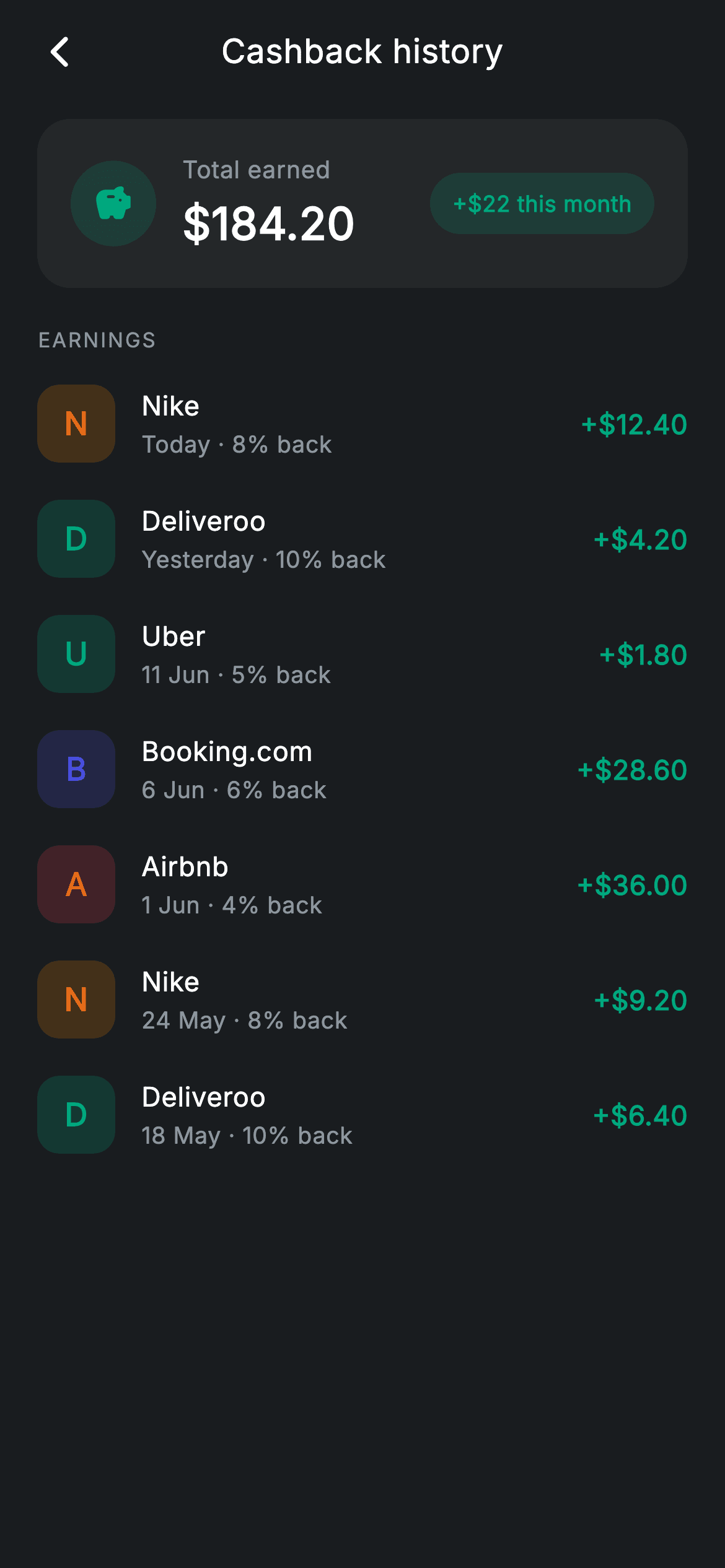
Rewards only feel real when you can see every payout that made up the total. This tutorial builds a cashback history in Flutter: a summary card with the lifetime figure and a 'this month' pill, then seven dated earning rows. Each merchant is identified by a painted monogram — the first grapheme of its name, tinted with a colour stored on the row — so Nike renders as an amber N and Airbnb as a red A with no logo files, no network requests, and nothing to license.
Watch the Flutter UI walkthrough
A short screen recording of Cashback History running, if you'd rather see it before you read the code. The written tutorial below covers everything in it.
Can't see the video? Watch it on YouTube.
What you'll build
- ✓A teal summary card pairing the lifetime total with a 'this month' pill
- ✓Monogram merchant tiles built from `.characters.first` — Unicode-safe, asset-free
- ✓A date-and-rate meta line ('Yesterday · 10% back') packed into one string field
- ✓Consistently teal, always-positive amounts, since a cashback row can only be a credit
- ✓Rounded-square merchant tiles that read differently from circular person avatars
- ✓A four-field `_Earn` model driving every row from one const list
Step-by-step build
Create the file
Add a new file at lib/fintech_cashback_history/fintech_cashback_history_screen.dart in your Flutter project.
Register the bundled fonts
No external packages — this is pure Flutter. It does bundle its design font (Inter), so drop the font file into fonts/ and declare it in pubspec.yaml:
flutter:
  fonts:
    - family: Inter
      fonts:
- asset: fonts/Inter-Regular.ttfBuild it, piece by piece
Here's how the screen goes together. Each block below is a real slice of the code with a plain-English explanation — paste them in order, or grab the whole file from the next section.
Earnings as four fields per row
class FintechCashbackHistoryScreen extends StatelessWidget {
  const FintechCashbackHistoryScreen({super.key, this.onBack});

  final VoidCallback? onBack;

  static const String _font = 'Inter';
  static const Color _bg = Color(0xFF191C1F);
  static const Color _surface = Color(0xFF242729);
  static const Color _teal = Color(0xFF00A87E);
  static const Color _amber = Color(0xFFEC7E00);
  static const Color _red = Color(0xFFE23B4A);
  static const Color _brand = Color(0xFF494FDF);
  static const Color _muted = Color(0xFF8D969E);

  static const List<_Earn> _earnings = <_Earn>[
    _Earn('Nike', 'Today · 8% back', 12.40, _amber),
    _Earn('Deliveroo', 'Yesterday · 10% back', 4.20, _teal),
    _Earn('Uber', '11 Jun · 5% back', 1.80, _teal),
    _Earn('Booking.com', '6 Jun · 6% back', 28.60, _brand),
    _Earn('Airbnb', '1 Jun · 4% back', 36.00, _red),
    _Earn('Nike', '24 May · 8% back', 9.20, _amber),
    _Earn('Deliveroo', '18 May · 10% back', 6.40, _teal),
  ];
`_Earn` is deliberately minimal: merchant, a free-form `meta` string, an amount and a colour. Bundling the date and the rate into one `meta` string — 'Today · 8% back' — instead of separate `date` and `rate` fields is what lets the list mix relative dates ('Today', 'Yesterday') with absolute ones ('11 Jun') without any formatting logic; the row just prints it. Merchants repeat (Nike and Deliveroo each appear twice) with the *same* colour each time, so the tint behaves like a stable identity rather than random decoration.
Total card, section label, rows
  @override
  Widget build(BuildContext context) {
    return Theme(
      data: ThemeData.dark(useMaterial3: true),
      child: Scaffold(
        backgroundColor: _bg,
        body: SafeArea(
          child: Column(
            children: <Widget>[
              _buildAppBar(),
              Expanded(
                child: ListView(
                  physics: const BouncingScrollPhysics(),
                  padding: const EdgeInsets.fromLTRB(20, 8, 20, 24),
                  children: <Widget>[
                    _buildTotal(),
                    const SizedBox(height: 20),
                    _sectionLabel('Earnings'),
                    const SizedBox(height: 6),
                    for (final _Earn e in _earnings) _EarnRow(earn: e),
                  ],
                ),
              ),
            ],
          ),
        ),
      ),
    );
  }
The whole screen is a `StatelessWidget` inside a forced `ThemeData.dark(useMaterial3: true)`, so it renders correctly as a standalone route. The `ListView` reads in priority order: the total first, then an uppercase 'EARNINGS' label, then the rows emitted by a bare collection-for. There's no `ListView.builder` here because the list is a fixed seven items — `builder` earns its complexity on long or unbounded lists, and using it for seven const rows would just add indirection.
The summary card and its pill
  Widget _buildTotal() {
    return Container(
      padding: const EdgeInsets.all(18),
      decoration: BoxDecoration(
        color: _surface,
        borderRadius: BorderRadius.circular(18),
      ),
      child: Row(
        children: <Widget>[
          Container(
            width: 46,
            height: 46,
            decoration: BoxDecoration(
              color: _teal.withValues(alpha: 0.18),
              shape: BoxShape.circle,
            ),
            child: const Icon(Icons.savings_rounded, size: 22, color: _teal),
          ),
          const SizedBox(width: 14),
          const Column(
            crossAxisAlignment: CrossAxisAlignment.start,
            children: <Widget>[
              Text(
                'Total earned',
                style: TextStyle(
                  fontFamily: _font,
                  fontSize: 13,
                  letterSpacing: 0.24,
                  color: _muted,
                ),
              ),
              SizedBox(height: 2),
              Text(
                r'$184.20',
                style: TextStyle(
                  fontFamily: _font,
                  fontSize: 24,
                  fontWeight: FontWeight.w600,
                  letterSpacing: 0.24,
                  color: Colors.white,
                ),
              ),
            ],
          ),
          const Spacer(),
          Container(
            padding: const EdgeInsets.symmetric(horizontal: 12, vertical: 8),
            decoration: BoxDecoration(
              color: _teal.withValues(alpha: 0.16),
              borderRadius: BorderRadius.circular(9999),
            ),
            child: const Text(
              '+\$22 this month',
              style: TextStyle(
                fontFamily: _font,
                fontSize: 12,
                fontWeight: FontWeight.w600,
                letterSpacing: 0.24,
                color: _teal,
              ),
            ),
          ),
        ],
      ),
    );
  }
A `_surface` container with an 18px radius holding three parts: a 46px teal-tinted circle with `savings_rounded`, the label-and-figure `Column`, and — after a `Spacer()` — the '+$22 this month' pill. `Spacer` is what pushes the pill hard right without wrapping the middle column in `Expanded`. The two teal alphas are doing different jobs: 0.18 on the icon circle and 0.16 on the pill, both light enough to sit quietly on the dark card while keeping the full-strength `_teal` text and icon fully legible. Everything here is `const` except the two tinted containers, so the card costs almost nothing to rebuild.
The monogram merchant row
class _EarnRow extends StatelessWidget {
  const _EarnRow({required this.earn});

  final _Earn earn;

  @override
  Widget build(BuildContext context) {
    return Padding(
      padding: const EdgeInsets.symmetric(vertical: 10),
      child: Row(
        children: <Widget>[
          Container(
            width: 42,
            height: 42,
            alignment: Alignment.center,
            decoration: BoxDecoration(
              color: earn.color.withValues(alpha: 0.2),
              borderRadius: BorderRadius.circular(12),
            ),
            child: Text(
              earn.merchant.characters.first,
              style: TextStyle(
                fontFamily: FintechCashbackHistoryScreen._font,
                fontSize: 17,
                fontWeight: FontWeight.w700,
                color: earn.color,
              ),
            ),
          ),
          const SizedBox(width: 14),
          Expanded(
            child: Column(
              crossAxisAlignment: CrossAxisAlignment.start,
              children: <Widget>[
                Text(
                  earn.merchant,
                  style: const TextStyle(
                    fontFamily: FintechCashbackHistoryScreen._font,
                    fontSize: 14.5,
                    fontWeight: FontWeight.w500,
                    letterSpacing: 0.24,
                    color: Colors.white,
                  ),
                ),
                const SizedBox(height: 2),
                Text(
                  earn.meta,
                  style: const TextStyle(
                    fontFamily: FintechCashbackHistoryScreen._font,
                    fontSize: 12.5,
                    letterSpacing: 0.24,
                    color: FintechCashbackHistoryScreen._muted,
                  ),
                ),
              ],
            ),
          ),
          Text(
            '+\$${earn.amount.toStringAsFixed(2)}',
            style: const TextStyle(
              fontFamily: FintechCashbackHistoryScreen._font,
              fontSize: 14.5,
              fontWeight: FontWeight.w600,
              letterSpacing: 0.24,
              color: FintechCashbackHistoryScreen._teal,
            ),
          ),
        ],
      ),
    );
  }
}
`earn.merchant.characters.first` is the line to note. `.characters` comes from Dart's grapheme-cluster support, and unlike `merchant[0]` it returns a complete user-perceived character rather than a single UTF-16 code unit — so a merchant name starting with an emoji or an accented letter renders whole instead of as half a symbol. The tile is a 42px *rounded square* (12px radius), not a circle, which is how brand marks stay visually distinct from the circular avatars used for people elsewhere in the app. The middle column is `Expanded` so the amount stays pinned right, and that amount is always `'+\$'` in `_teal`: a cashback row can only ever be a credit, so there's no sign or colour logic to write.
Full code
The complete, ready-to-paste source. Free to use in your projects — one click copies it all.
import 'package:flutter/material.dart';

/// Cashback history — earned cashback list (Revolut-inspired design system).
///
/// Self-contained per CONVENTIONS.md: pure Flutter only, the exact design font
/// (Inter) is bundled under `fonts/`, merchant marks are painted monograms (no
/// network/emoji), and the screen forces its own dark theme. A total header
/// sits above the dated list of earnings.
class FintechCashbackHistoryScreen extends StatelessWidget {
  const FintechCashbackHistoryScreen({super.key, this.onBack});

  final VoidCallback? onBack;

  static const String _font = 'Inter';
  static const Color _bg = Color(0xFF191C1F);
  static const Color _surface = Color(0xFF242729);
  static const Color _teal = Color(0xFF00A87E);
  static const Color _amber = Color(0xFFEC7E00);
  static const Color _red = Color(0xFFE23B4A);
  static const Color _brand = Color(0xFF494FDF);
  static const Color _muted = Color(0xFF8D969E);

  static const List<_Earn> _earnings = <_Earn>[
    _Earn('Nike', 'Today · 8% back', 12.40, _amber),
    _Earn('Deliveroo', 'Yesterday · 10% back', 4.20, _teal),
    _Earn('Uber', '11 Jun · 5% back', 1.80, _teal),
    _Earn('Booking.com', '6 Jun · 6% back', 28.60, _brand),
    _Earn('Airbnb', '1 Jun · 4% back', 36.00, _red),
    _Earn('Nike', '24 May · 8% back', 9.20, _amber),
    _Earn('Deliveroo', '18 May · 10% back', 6.40, _teal),
  ];

  @override
  Widget build(BuildContext context) {
    return Theme(
      data: ThemeData.dark(useMaterial3: true),
      child: Scaffold(
        backgroundColor: _bg,
        body: SafeArea(
          child: Column(
            children: <Widget>[
              _buildAppBar(),
              Expanded(
                child: ListView(
                  physics: const BouncingScrollPhysics(),
                  padding: const EdgeInsets.fromLTRB(20, 8, 20, 24),
                  children: <Widget>[
                    _buildTotal(),
                    const SizedBox(height: 20),
                    _sectionLabel('Earnings'),
                    const SizedBox(height: 6),
                    for (final _Earn e in _earnings) _EarnRow(earn: e),
                  ],
                ),
              ),
            ],
          ),
        ),
      ),
    );
  }

  Widget _buildAppBar() {
    return Padding(
      padding: const EdgeInsets.fromLTRB(8, 4, 8, 4),
      child: Row(
        children: <Widget>[
          IconButton(
            onPressed: onBack,
            icon: const Icon(Icons.arrow_back_ios_new_rounded,
                size: 20, color: Colors.white),
          ),
          const Expanded(
            child: Text(
              'Cashback history',
              textAlign: TextAlign.center,
              style: TextStyle(
                fontFamily: _font,
                fontSize: 18,
                fontWeight: FontWeight.w500,
                letterSpacing: 0.24,
                color: Colors.white,
              ),
            ),
          ),
          const SizedBox(width: 48),
        ],
      ),
    );
  }

  Widget _buildTotal() {
    return Container(
      padding: const EdgeInsets.all(18),
      decoration: BoxDecoration(
        color: _surface,
        borderRadius: BorderRadius.circular(18),
      ),
      child: Row(
        children: <Widget>[
          Container(
            width: 46,
            height: 46,
            decoration: BoxDecoration(
              color: _teal.withValues(alpha: 0.18),
              shape: BoxShape.circle,
            ),
            child: const Icon(Icons.savings_rounded, size: 22, color: _teal),
          ),
          const SizedBox(width: 14),
          const Column(
            crossAxisAlignment: CrossAxisAlignment.start,
            children: <Widget>[
              Text(
                'Total earned',
                style: TextStyle(
                  fontFamily: _font,
                  fontSize: 13,
                  letterSpacing: 0.24,
                  color: _muted,
                ),
              ),
              SizedBox(height: 2),
              Text(
                r'$184.20',
                style: TextStyle(
                  fontFamily: _font,
                  fontSize: 24,
                  fontWeight: FontWeight.w600,
                  letterSpacing: 0.24,
                  color: Colors.white,
                ),
              ),
            ],
          ),
          const Spacer(),
          Container(
            padding: const EdgeInsets.symmetric(horizontal: 12, vertical: 8),
            decoration: BoxDecoration(
              color: _teal.withValues(alpha: 0.16),
              borderRadius: BorderRadius.circular(9999),
            ),
            child: const Text(
              '+\$22 this month',
              style: TextStyle(
                fontFamily: _font,
                fontSize: 12,
                fontWeight: FontWeight.w600,
                letterSpacing: 0.24,
                color: _teal,
              ),
            ),
          ),
        ],
      ),
    );
  }

  Widget _sectionLabel(String text) {
    return Text(
      text.toUpperCase(),
      style: const TextStyle(
        fontFamily: _font,
        fontSize: 11,
        fontWeight: FontWeight.w500,
        letterSpacing: 1.0,
        color: _muted,
      ),
    );
  }
}

class _Earn {
  const _Earn(this.merchant, this.meta, this.amount, this.color);
  final String merchant;
  final String meta;
  final double amount;
  final Color color;
}

class _EarnRow extends StatelessWidget {
  const _EarnRow({required this.earn});

  final _Earn earn;

  @override
  Widget build(BuildContext context) {
    return Padding(
      padding: const EdgeInsets.symmetric(vertical: 10),
      child: Row(
        children: <Widget>[
          Container(
            width: 42,
            height: 42,
            alignment: Alignment.center,
            decoration: BoxDecoration(
              color: earn.color.withValues(alpha: 0.2),
              borderRadius: BorderRadius.circular(12),
            ),
            child: Text(
              earn.merchant.characters.first,
              style: TextStyle(
                fontFamily: FintechCashbackHistoryScreen._font,
                fontSize: 17,
                fontWeight: FontWeight.w700,
                color: earn.color,
              ),
            ),
          ),
          const SizedBox(width: 14),
          Expanded(
            child: Column(
              crossAxisAlignment: CrossAxisAlignment.start,
              children: <Widget>[
                Text(
                  earn.merchant,
                  style: const TextStyle(
                    fontFamily: FintechCashbackHistoryScreen._font,
                    fontSize: 14.5,
                    fontWeight: FontWeight.w500,
                    letterSpacing: 0.24,
                    color: Colors.white,
                  ),
                ),
                const SizedBox(height: 2),
                Text(
                  earn.meta,
                  style: const TextStyle(
                    fontFamily: FintechCashbackHistoryScreen._font,
                    fontSize: 12.5,
                    letterSpacing: 0.24,
                    color: FintechCashbackHistoryScreen._muted,
                  ),
                ),
              ],
            ),
          ),
          Text(
            '+\$${earn.amount.toStringAsFixed(2)}',
            style: const TextStyle(
              fontFamily: FintechCashbackHistoryScreen._font,
              fontSize: 14.5,
              fontWeight: FontWeight.w600,
              letterSpacing: 0.24,
              color: FintechCashbackHistoryScreen._teal,
            ),
          ),
        ],
      ),
    );
  }
}
Plus bundled 1 binary asset (fonts/images). The CLI and MCP install those for you automatically.
Two faster ways to add it
Copy-paste works, but you can skip it entirely.
1. FlutterKit CLI
One command drops this screen — and its fonts — straight into your project.
$ flutterkit add fintech-cashback-history2. AI agent (MCP)
Connect FlutterKit's MCP server in Claude or Cursor and just ask your agent to install fintech-cashback-history — it fetches and writes the files for you.
FAQ
Is this cashback history screen free to use?
Yes. The complete Dart source on this page is free for personal and commercial apps. Copy it from the code block, install it with the FlutterKit CLI (flutterkit add fintech-cashback-history), or add it via an AI agent over MCP.
Why .characters.first instead of merchant[0]?
merchant[0] returns one UTF-16 code unit, which can split an emoji or a composed character in half and render as garbage. .characters.first returns a full grapheme cluster, so any merchant name produces one valid character. It comes from dart:core via the characters package that ships with Flutter — no extra dependency.
How do I use real merchant logos instead?
Swap the Text inside the 42px tile for an Image.network or Image.asset, keeping the tinted rounded container as the backdrop so the tile still looks right while the image loads or if it fails. Nothing else in the row changes.
Does it need any packages?
No third-party packages at all. Everything on screen — the tinted circle, the summary pill, the monogram tiles — is composed from built-in material widgets, so there is no image bundle to ship and no logo files to keep in sync with your merchant list. Register the bundled Inter font in pubspec.yaml and you're done; the CLI and MCP do that step for you.
Which Flutter version does it target?
It uses Color.withValues(alpha:), const Column children and Material 3, so it targets Flutter 3.27+ (Dart 3). On an older SDK, replace each withValues(alpha: x) call with withOpacity(x).


