How to Build a Multi-Currency Accounts Screen in Flutter (Full Code + Preview)
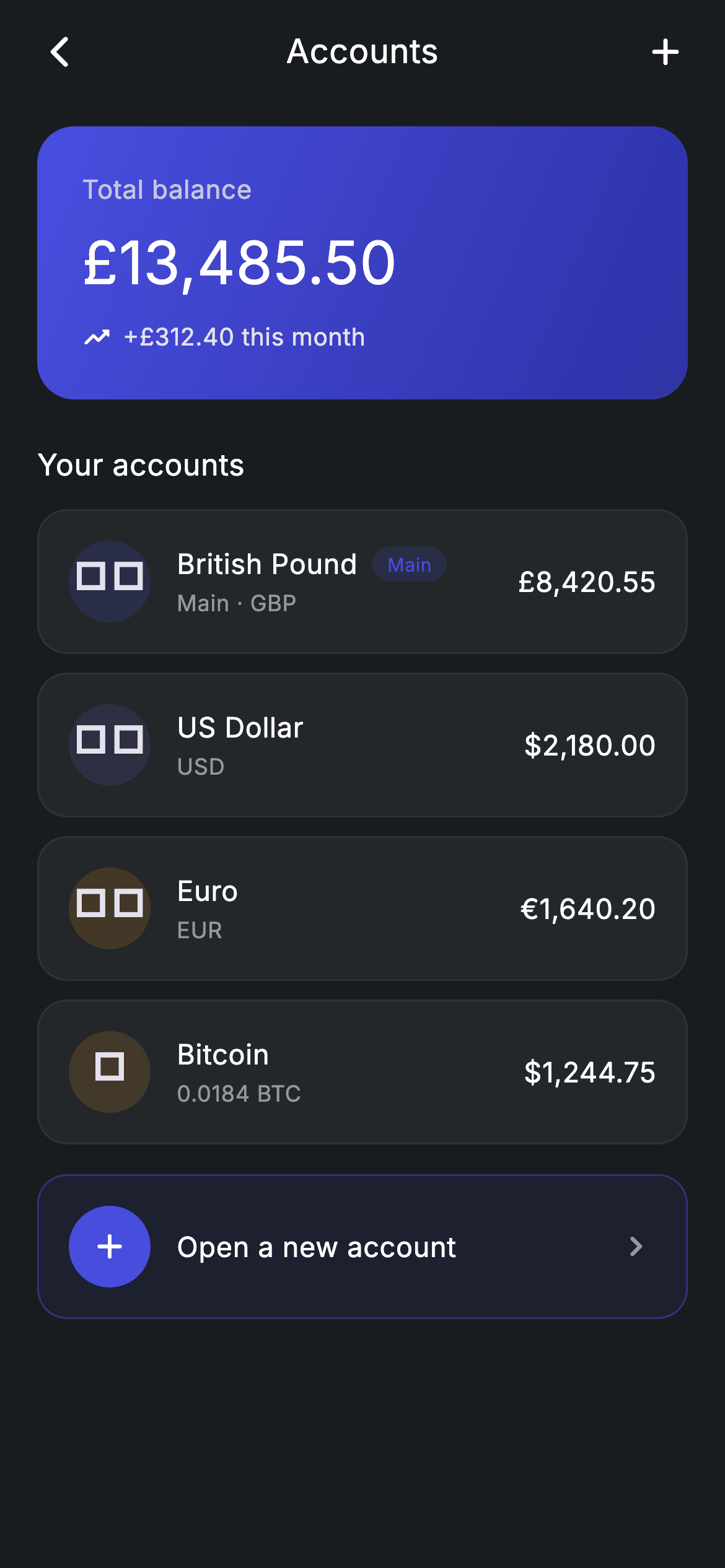
Multi-currency banking apps show one number first and the pockets behind it second. This tutorial rebuilds that screen in Flutter: an indigo gradient card carrying a combined £13,485.50 total, then a stack of per-currency rows where each account is a flag emoji, a name, a sub-label and a balance. You'll see how emoji flags replace image assets entirely, how a 'Main' pill is conditionally spliced into a Row, and how the closing 'Open a new account' row reuses the same layout with an inverted, brand-tinted skin.
Watch the Flutter UI walkthrough
A short screen recording of Fintech · Accounts running, if you'd rather see it before you read the code. The written tutorial below covers everything in it.
Can't see the video? Watch it on YouTube.
What you'll build
- ✓An indigo gradient total-balance card with a trending-up delta line
- ✓Per-currency account rows whose avatar is a flag emoji in a tinted circle — zero image assets
- ✓A conditional 'Main' pill that only renders for the primary account
- ✓An 'Open a new account' affordance built from the same row skeleton, inverted to a tinted outline
- ✓A tiny immutable `_Account` model that drives every row from one const list
Step-by-step build
Create the file
Add a new file at lib/fintech_accounts/fintech_accounts_screen.dart in your Flutter project.
Register the bundled fonts
No external packages — this is pure Flutter. It does bundle its design font (Inter), so drop the font file into fonts/ and declare it in pubspec.yaml:
flutter:
  fonts:
    - family: Inter
      fonts:
- asset: fonts/Inter-Regular.ttfBuild it, piece by piece
Here's how the screen goes together. Each block below is a real slice of the code with a plain-English explanation — paste them in order, or grab the whole file from the next section.
Design tokens and the account list as const data
class FintechAccountsScreen extends StatelessWidget {
  const FintechAccountsScreen({super.key, this.onBack, this.onAccountTap, this.onAdd});

  final VoidCallback? onBack;
  final VoidCallback? onAccountTap;
  final VoidCallback? onAdd;

  static const String _font = 'Inter';
  static const Color _bg = Color(0xFF191C1F);
  static const Color _surface = Color(0xFF242729);
  static const Color _brand = Color(0xFF494FDF);
  static const Color _teal = Color(0xFF00A87E);
  static const Color _amber = Color(0xFFEC7E00);
  static const Color _muted = Color(0xFF8D969E);
  static const Color _hairline = Color(0xFF2E3235);

  static const List<_Account> _accounts = <_Account>[
    _Account('🇬🇧', 'British Pound', 'Main · GBP', r'£8,420.55', _brand, true),
    _Account('🇺🇸', 'US Dollar', 'USD', r'$2,180.00', _teal, false),
    _Account('🇪🇺', 'Euro', 'EUR', '€1,640.20', _amber, false),
    _Account('🪙', 'Bitcoin', '0.0184 BTC', r'$1,244.75', Color(0xFFE2A33B), false),
  ];
The screen is a `StatelessWidget` with three optional callbacks (`onBack`, `onAccountTap`, `onAdd`) so the caller decides where taps go — the screen itself never navigates except as a fallback. Seven private `static const Color` tokens define the palette, and `_accounts` is a `const List<_Account>` holding the four pockets. Note the `r'£8,420.55'` raw strings: `$` is Dart's interpolation marker, so `r'$2,180.00'` is the safe way to write a dollar amount without escaping. Each account also carries its own `tint`, which the row reuses for the avatar circle.
Forced dark theme and the scrolling body
  @override
  Widget build(BuildContext context) {
    return Theme(
      data: ThemeData.dark(useMaterial3: true),
      child: Scaffold(
        backgroundColor: _bg,
        body: SafeArea(
          child: Column(
            crossAxisAlignment: CrossAxisAlignment.stretch,
            children: <Widget>[
              _appBar(context),
              Expanded(
                child: ListView(
                  physics: const BouncingScrollPhysics(),
                  padding: const EdgeInsets.fromLTRB(20, 8, 20, 24),
                  children: <Widget>[
                    _totalCard(),
                    const SizedBox(height: 24),
                    const Text(
                      'Your accounts',
                      style: TextStyle(
                        fontFamily: _font,
                        fontSize: 16,
                        fontWeight: FontWeight.w500,
                        letterSpacing: 0.24,
                        color: Colors.white,
                      ),
                    ),
                    const SizedBox(height: 12),
                    for (final _Account a in _accounts) ...<Widget>[
                      _accountRow(a),
                      const SizedBox(height: 10),
                    ],
                    const SizedBox(height: 6),
                    _addRow(),
                  ],
                ),
              ),
            ],
          ),
        ),
      ),
    );
  }
`Theme(data: ThemeData.dark(useMaterial3: true))` wraps the `Scaffold` so this screen renders correctly as a standalone route even if the host app is light-themed — a self-containment trick worth copying. Inside, a `Column` pins the hand-rolled app bar at the top and gives the rest to an `Expanded` `ListView` with `BouncingScrollPhysics`. The account rows are emitted with a collection-for plus spread — `for (final _Account a in _accounts) ...<Widget>[_accountRow(a), const SizedBox(height: 10)]` — which interleaves a 10px gap after every row without building an intermediate list or reaching for `ListView.separated`.
A hand-built app bar with a centred title
  Widget _appBar(BuildContext context) {
    return Padding(
      padding: const EdgeInsets.fromLTRB(8, 4, 8, 8),
      child: Row(
        children: <Widget>[
          IconButton(
            onPressed: onBack ?? () => Navigator.of(context).maybePop(),
            icon: const Icon(Icons.arrow_back_ios_new_rounded,
                size: 20, color: Colors.white),
          ),
          const Expanded(
            child: Text(
              'Accounts',
              textAlign: TextAlign.center,
              style: TextStyle(
                fontFamily: _font,
                fontSize: 18,
                fontWeight: FontWeight.w500,
                letterSpacing: 0.24,
                color: Colors.white,
              ),
            ),
          ),
          IconButton(
            onPressed: onAdd,
            icon: const Icon(Icons.add_rounded, size: 24, color: Colors.white),
          ),
        ],
      ),
    );
  }
Rather than `AppBar`, this is a plain `Row`: a back `IconButton`, an `Expanded` centred title, and an add `IconButton`. Because both ends are `IconButton`s of equal width, the `Expanded` title lands optically centred. The back button uses `onBack ?? () => Navigator.of(context).maybePop()` — the injected callback wins, otherwise it falls back to popping; `maybePop` is the safe variant that does nothing when there is no route below, so the screen can also be used as a root without crashing.
The gradient total-balance card
  Widget _totalCard() {
    return Container(
      width: double.infinity,
      padding: const EdgeInsets.all(24),
      decoration: BoxDecoration(
        borderRadius: BorderRadius.circular(20),
        gradient: const LinearGradient(
          begin: Alignment.topLeft,
          end: Alignment.bottomRight,
          colors: <Color>[_brand, Color(0xFF2D31A6)],
        ),
      ),
      child: Column(
        crossAxisAlignment: CrossAxisAlignment.start,
        children: <Widget>[
          Text(
            'Total balance',
            style: TextStyle(
              fontFamily: _font,
              fontSize: 14,
              letterSpacing: 0.24,
              color: Colors.white.withValues(alpha: 0.70),
            ),
          ),
          const SizedBox(height: 6),
          const Text(
            r'£13,485.50',
            style: TextStyle(
              fontFamily: _font,
              fontSize: 32,
              fontWeight: FontWeight.w500,
              letterSpacing: 0.24,
              color: Colors.white,
            ),
          ),
          const SizedBox(height: 8),
          Row(
            children: <Widget>[
              const Icon(Icons.trending_up_rounded,
                  size: 16, color: Colors.white),
              const SizedBox(width: 6),
              Text(
                '+£312.40 this month',
                style: TextStyle(
                  fontFamily: _font,
                  fontSize: 13,
                  letterSpacing: 0.24,
                  color: Colors.white.withValues(alpha: 0.85),
                ),
              ),
            ],
          ),
        ],
      ),
    );
  }
A `Container` with a 20px radius and a `LinearGradient` running `topLeft` → `bottomRight` from `_brand` (#494FDF) to the darker #2D31A6 — the same hue darkened rather than a second colour, which reads as depth instead of a two-tone block. The hierarchy inside is done purely with opacity and size: the 'Total balance' label sits at 70% white and 14px, the £13,485.50 figure at full white and 32px, and the '+£312.40 this month' delta at 85% white beside a `trending_up_rounded` icon. Using white-with-alpha rather than grey is what keeps the secondary text legible everywhere along the gradient.
The account row and its conditional 'Main' pill
  Widget _accountRow(_Account a) {
    return GestureDetector(
      onTap: onAccountTap,
      behavior: HitTestBehavior.opaque,
      child: Container(
        padding: const EdgeInsets.all(16),
        decoration: BoxDecoration(
          color: _surface,
          borderRadius: BorderRadius.circular(16),
          border: Border.all(color: _hairline),
        ),
        child: Row(
          children: <Widget>[
            Container(
              width: 44,
              height: 44,
              alignment: Alignment.center,
              decoration: BoxDecoration(
                shape: BoxShape.circle,
                color: a.tint.withValues(alpha: 0.16),
              ),
              child: Text(a.flag, style: const TextStyle(fontSize: 20)),
            ),
            const SizedBox(width: 14),
            Expanded(
              child: Column(
                crossAxisAlignment: CrossAxisAlignment.start,
                children: <Widget>[
                  Row(
                    children: <Widget>[
                      Text(
                        a.name,
                        style: const TextStyle(
                          fontFamily: _font,
                          fontSize: 15,
                          fontWeight: FontWeight.w500,
                          letterSpacing: 0.24,
                          color: Colors.white,
                        ),
                      ),
                      if (a.main) ...<Widget>[
                        const SizedBox(width: 8),
                        Container(
                          padding: const EdgeInsets.symmetric(
                              horizontal: 8, vertical: 2),
                          decoration: BoxDecoration(
                            color: _brand.withValues(alpha: 0.18),
                            borderRadius: BorderRadius.circular(9999),
                          ),
                          child: const Text(
                            'Main',
                            style: TextStyle(
                              fontFamily: _font,
                              fontSize: 10,
                              fontWeight: FontWeight.w500,
                              letterSpacing: 0.24,
                              color: _brand,
                            ),
                          ),
                        ),
                      ],
                    ],
                  ),
                  const SizedBox(height: 2),
                  Text(
                    a.sub,
                    style: const TextStyle(
                      fontFamily: _font,
                      fontSize: 12,
                      letterSpacing: 0.24,
                      color: _muted,
                    ),
                  ),
                ],
              ),
            ),
            const SizedBox(width: 12),
            Text(
              a.balance,
              style: const TextStyle(
                fontFamily: _font,
                fontSize: 15,
                fontWeight: FontWeight.w500,
                letterSpacing: 0.24,
                color: Colors.white,
              ),
            ),
          ],
        ),
      ),
    );
  }
Each row is a `GestureDetector` with `behavior: HitTestBehavior.opaque` so the padding between the avatar and the balance is tappable too, not just the painted children. The avatar is a 44px circle filled with `a.tint.withValues(alpha: 0.16)` holding the flag emoji as 20px `Text` — an emoji flag needs no asset, no network fetch, and scales with the text engine. The `Main` badge is spliced in with `if (a.main) ...<Widget>[SizedBox, Container]`, so it costs nothing on the other three rows. The middle column is `Expanded`, which lets the balance stay hard-right no matter how long the currency name gets.
The 'Open a new account' row and the model
  Widget _addRow() {
    return GestureDetector(
      onTap: onAdd,
      behavior: HitTestBehavior.opaque,
      child: Container(
        padding: const EdgeInsets.all(16),
        decoration: BoxDecoration(
          color: _brand.withValues(alpha: 0.08),
          borderRadius: BorderRadius.circular(16),
          border: Border.all(color: _brand.withValues(alpha: 0.4)),
        ),
        child: Row(
          children: <Widget>[
            Container(
              width: 44,
              height: 44,
              decoration: const BoxDecoration(
                shape: BoxShape.circle,
                color: _brand,
              ),
              child: const Icon(Icons.add_rounded, size: 22, color: Colors.white),
            ),
            const SizedBox(width: 14),
            const Expanded(
              child: Text(
                'Open a new account',
                style: TextStyle(
                  fontFamily: _font,
                  fontSize: 15,
                  fontWeight: FontWeight.w500,
                  letterSpacing: 0.24,
                  color: Colors.white,
                ),
              ),
            ),
            const Icon(Icons.chevron_right_rounded, size: 22, color: _muted),
          ],
        ),
      ),
    );
  }
}

class _Account {
  const _Account(
      this.flag, this.name, this.sub, this.balance, this.tint, this.main);

  final String flag;
  final String name;
  final String sub;
  final String balance;
  final Color tint;
  final bool main;
}
The add affordance deliberately mirrors the account row's skeleton — 44px leading circle, `Expanded` label, trailing icon — but inverts the skin: an 8%-alpha brand fill with a 40%-alpha brand border instead of the solid `_surface` and hairline. That similarity is the point; it reads as 'one more account' rather than as a button bolted on the end. At the bottom, `_Account` is a six-field immutable class with a `const` constructor, which is what allows the whole `_accounts` list to be `const` and therefore built once at compile time rather than on every rebuild.
Full code
The complete, ready-to-paste source. Free to use in your projects — one click copies it all.
import 'package:flutter/material.dart';

/// Accounts — multi-currency accounts (pockets) overview. Self-contained per
/// CONVENTIONS.md: pure Flutter, bundled Inter font, forced dark theme so it
/// renders standalone as a route.
class FintechAccountsScreen extends StatelessWidget {
  const FintechAccountsScreen({super.key, this.onBack, this.onAccountTap, this.onAdd});

  final VoidCallback? onBack;
  final VoidCallback? onAccountTap;
  final VoidCallback? onAdd;

  static const String _font = 'Inter';
  static const Color _bg = Color(0xFF191C1F);
  static const Color _surface = Color(0xFF242729);
  static const Color _brand = Color(0xFF494FDF);
  static const Color _teal = Color(0xFF00A87E);
  static const Color _amber = Color(0xFFEC7E00);
  static const Color _muted = Color(0xFF8D969E);
  static const Color _hairline = Color(0xFF2E3235);

  static const List<_Account> _accounts = <_Account>[
    _Account('🇬🇧', 'British Pound', 'Main · GBP', r'£8,420.55', _brand, true),
    _Account('🇺🇸', 'US Dollar', 'USD', r'$2,180.00', _teal, false),
    _Account('🇪🇺', 'Euro', 'EUR', '€1,640.20', _amber, false),
    _Account('🪙', 'Bitcoin', '0.0184 BTC', r'$1,244.75', Color(0xFFE2A33B), false),
  ];

  @override
  Widget build(BuildContext context) {
    return Theme(
      data: ThemeData.dark(useMaterial3: true),
      child: Scaffold(
        backgroundColor: _bg,
        body: SafeArea(
          child: Column(
            crossAxisAlignment: CrossAxisAlignment.stretch,
            children: <Widget>[
              _appBar(context),
              Expanded(
                child: ListView(
                  physics: const BouncingScrollPhysics(),
                  padding: const EdgeInsets.fromLTRB(20, 8, 20, 24),
                  children: <Widget>[
                    _totalCard(),
                    const SizedBox(height: 24),
                    const Text(
                      'Your accounts',
                      style: TextStyle(
                        fontFamily: _font,
                        fontSize: 16,
                        fontWeight: FontWeight.w500,
                        letterSpacing: 0.24,
                        color: Colors.white,
                      ),
                    ),
                    const SizedBox(height: 12),
                    for (final _Account a in _accounts) ...<Widget>[
                      _accountRow(a),
                      const SizedBox(height: 10),
                    ],
                    const SizedBox(height: 6),
                    _addRow(),
                  ],
                ),
              ),
            ],
          ),
        ),
      ),
    );
  }

  Widget _appBar(BuildContext context) {
    return Padding(
      padding: const EdgeInsets.fromLTRB(8, 4, 8, 8),
      child: Row(
        children: <Widget>[
          IconButton(
            onPressed: onBack ?? () => Navigator.of(context).maybePop(),
            icon: const Icon(Icons.arrow_back_ios_new_rounded,
                size: 20, color: Colors.white),
          ),
          const Expanded(
            child: Text(
              'Accounts',
              textAlign: TextAlign.center,
              style: TextStyle(
                fontFamily: _font,
                fontSize: 18,
                fontWeight: FontWeight.w500,
                letterSpacing: 0.24,
                color: Colors.white,
              ),
            ),
          ),
          IconButton(
            onPressed: onAdd,
            icon: const Icon(Icons.add_rounded, size: 24, color: Colors.white),
          ),
        ],
      ),
    );
  }

  Widget _totalCard() {
    return Container(
      width: double.infinity,
      padding: const EdgeInsets.all(24),
      decoration: BoxDecoration(
        borderRadius: BorderRadius.circular(20),
        gradient: const LinearGradient(
          begin: Alignment.topLeft,
          end: Alignment.bottomRight,
          colors: <Color>[_brand, Color(0xFF2D31A6)],
        ),
      ),
      child: Column(
        crossAxisAlignment: CrossAxisAlignment.start,
        children: <Widget>[
          Text(
            'Total balance',
            style: TextStyle(
              fontFamily: _font,
              fontSize: 14,
              letterSpacing: 0.24,
              color: Colors.white.withValues(alpha: 0.70),
            ),
          ),
          const SizedBox(height: 6),
          const Text(
            r'£13,485.50',
            style: TextStyle(
              fontFamily: _font,
              fontSize: 32,
              fontWeight: FontWeight.w500,
              letterSpacing: 0.24,
              color: Colors.white,
            ),
          ),
          const SizedBox(height: 8),
          Row(
            children: <Widget>[
              const Icon(Icons.trending_up_rounded,
                  size: 16, color: Colors.white),
              const SizedBox(width: 6),
              Text(
                '+£312.40 this month',
                style: TextStyle(
                  fontFamily: _font,
                  fontSize: 13,
                  letterSpacing: 0.24,
                  color: Colors.white.withValues(alpha: 0.85),
                ),
              ),
            ],
          ),
        ],
      ),
    );
  }

  Widget _accountRow(_Account a) {
    return GestureDetector(
      onTap: onAccountTap,
      behavior: HitTestBehavior.opaque,
      child: Container(
        padding: const EdgeInsets.all(16),
        decoration: BoxDecoration(
          color: _surface,
          borderRadius: BorderRadius.circular(16),
          border: Border.all(color: _hairline),
        ),
        child: Row(
          children: <Widget>[
            Container(
              width: 44,
              height: 44,
              alignment: Alignment.center,
              decoration: BoxDecoration(
                shape: BoxShape.circle,
                color: a.tint.withValues(alpha: 0.16),
              ),
              child: Text(a.flag, style: const TextStyle(fontSize: 20)),
            ),
            const SizedBox(width: 14),
            Expanded(
              child: Column(
                crossAxisAlignment: CrossAxisAlignment.start,
                children: <Widget>[
                  Row(
                    children: <Widget>[
                      Text(
                        a.name,
                        style: const TextStyle(
                          fontFamily: _font,
                          fontSize: 15,
                          fontWeight: FontWeight.w500,
                          letterSpacing: 0.24,
                          color: Colors.white,
                        ),
                      ),
                      if (a.main) ...<Widget>[
                        const SizedBox(width: 8),
                        Container(
                          padding: const EdgeInsets.symmetric(
                              horizontal: 8, vertical: 2),
                          decoration: BoxDecoration(
                            color: _brand.withValues(alpha: 0.18),
                            borderRadius: BorderRadius.circular(9999),
                          ),
                          child: const Text(
                            'Main',
                            style: TextStyle(
                              fontFamily: _font,
                              fontSize: 10,
                              fontWeight: FontWeight.w500,
                              letterSpacing: 0.24,
                              color: _brand,
                            ),
                          ),
                        ),
                      ],
                    ],
                  ),
                  const SizedBox(height: 2),
                  Text(
                    a.sub,
                    style: const TextStyle(
                      fontFamily: _font,
                      fontSize: 12,
                      letterSpacing: 0.24,
                      color: _muted,
                    ),
                  ),
                ],
              ),
            ),
            const SizedBox(width: 12),
            Text(
              a.balance,
              style: const TextStyle(
                fontFamily: _font,
                fontSize: 15,
                fontWeight: FontWeight.w500,
                letterSpacing: 0.24,
                color: Colors.white,
              ),
            ),
          ],
        ),
      ),
    );
  }

  Widget _addRow() {
    return GestureDetector(
      onTap: onAdd,
      behavior: HitTestBehavior.opaque,
      child: Container(
        padding: const EdgeInsets.all(16),
        decoration: BoxDecoration(
          color: _brand.withValues(alpha: 0.08),
          borderRadius: BorderRadius.circular(16),
          border: Border.all(color: _brand.withValues(alpha: 0.4)),
        ),
        child: Row(
          children: <Widget>[
            Container(
              width: 44,
              height: 44,
              decoration: const BoxDecoration(
                shape: BoxShape.circle,
                color: _brand,
              ),
              child: const Icon(Icons.add_rounded, size: 22, color: Colors.white),
            ),
            const SizedBox(width: 14),
            const Expanded(
              child: Text(
                'Open a new account',
                style: TextStyle(
                  fontFamily: _font,
                  fontSize: 15,
                  fontWeight: FontWeight.w500,
                  letterSpacing: 0.24,
                  color: Colors.white,
                ),
              ),
            ),
            const Icon(Icons.chevron_right_rounded, size: 22, color: _muted),
          ],
        ),
      ),
    );
  }
}

class _Account {
  const _Account(
      this.flag, this.name, this.sub, this.balance, this.tint, this.main);

  final String flag;
  final String name;
  final String sub;
  final String balance;
  final Color tint;
  final bool main;
}
Plus bundled 1 binary asset (fonts/images). The CLI and MCP install those for you automatically.
Two faster ways to add it
Copy-paste works, but you can skip it entirely.
1. FlutterKit CLI
One command drops this screen — and its fonts — straight into your project.
$ flutterkit add fintech-accounts2. AI agent (MCP)
Connect FlutterKit's MCP server in Claude or Cursor and just ask your agent to install fintech-accounts — it fetches and writes the files for you.
FAQ
Is this accounts screen free to use?
Yes. The full Dart source on this page is free to copy into personal or commercial apps. Paste it from the code block, install it with the FlutterKit CLI (flutterkit add fintech-accounts), or let an AI agent add it for you over MCP.
Do the flag icons need an image pack?
No. The flags are plain emoji characters ('🇬🇧', '🇺🇸', '🇪🇺') rendered as Text, so there is no asset bundle and no network call. On platforms without colour flag glyphs (some Windows builds) they fall back to two-letter region indicators — swap the Text for an Image.asset there if you need exact parity.
How do I wire real balances into it?
Replace the const _accounts list with data from your API and make the widget stateful (or feed it a List<_Account> through the constructor). Nothing in _accountRow reads global state — it takes an _Account and renders it — so only the source of the list changes.
Which Flutter version does it target?
It uses Color.withValues(alpha:), super parameters and Material 3, so it targets Flutter 3.27+ (Dart 3). On an older SDK, replace each withValues(alpha: x) call with withOpacity(x) and it compiles back to Flutter 3.10.


