How to Build an Add Currency Account Screen in Flutter (Full Code + Preview)
Multi-currency banking apps all need the same screen: pick a currency, open the account. This tutorial builds Nova's version in Flutter — a searchable list of seven currencies modelled with Dart 3 records, rows that thicken their border to a 2px brand outline when chosen, and an Open account button that stays grey and unpressable until a selection exists. The interesting detail is how selection is stored against the original list rather than the filtered one, so typing in the search box never loses what you already picked.
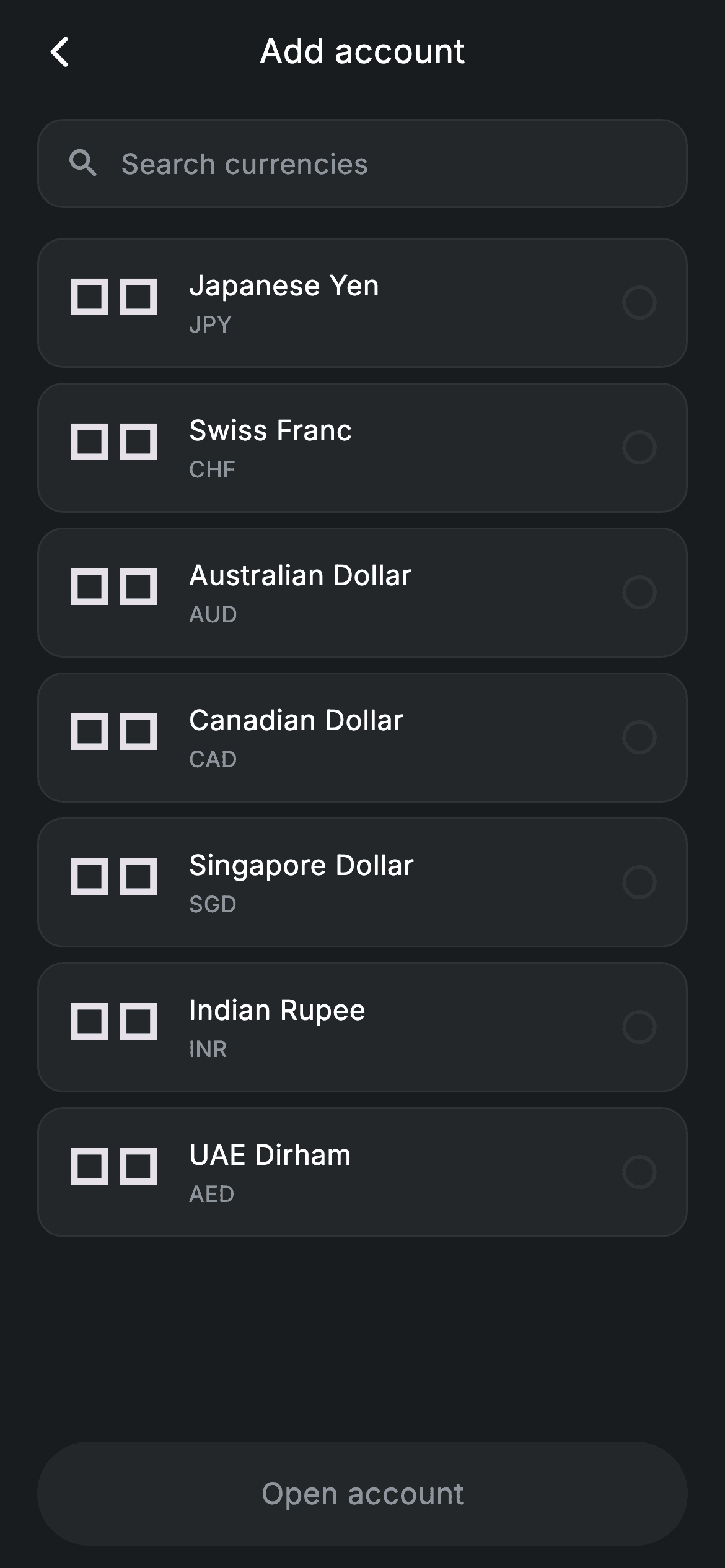
Watch the Flutter UI walkthrough
A short screen recording of Fintech · Add Account running, if you'd rather see it before you read the code. The written tutorial below covers everything in it.
Can't see the video? Watch it on YouTube.
What you'll build
- ✓A currency dataset modelled with Dart 3 inline records instead of a hand-written class
- ✓A live search filter that matches on both the currency name and its ISO code
- ✓Selectable rows whose border swaps colour and width together to show state
- ✓A validation-gated CTA that turns itself off by passing null to onTap
Step-by-step build
Create the file
Add a new file at lib/fintech_add_account/fintech_add_account_screen.dart in your Flutter project.
Register the bundled fonts
No external packages — this is pure Flutter. It does bundle its design font (Inter), so drop the font file into fonts/ and declare it in pubspec.yaml:
flutter:
  fonts:
    - family: Inter
      fonts:
- asset: fonts/Inter-Regular.ttfBuild it, piece by piece
Here's how the screen goes together. Each block below is a real slice of the code with a plain-English explanation — paste them in order, or grab the whole file from the next section.
Records for the currency list and two pieces of state
import 'package:flutter/material.dart';

/// Add Account — open a new currency account. Self-contained per CONVENTIONS.md:
/// pure Flutter, bundled Inter font, forced dark theme. Stateful: selecting a
/// currency enables the Open account CTA.
class FintechAddAccountScreen extends StatefulWidget {
  const FintechAddAccountScreen({super.key, this.onBack, this.onOpen});

  final VoidCallback? onBack;
  final VoidCallback? onOpen;

  @override
  State<FintechAddAccountScreen> createState() =>
      _FintechAddAccountScreenState();
}

class _FintechAddAccountScreenState extends State<FintechAddAccountScreen> {
  static const String _font = 'Inter';
  static const Color _bg = Color(0xFF191C1F);
  static const Color _surface = Color(0xFF242729);
  static const Color _brand = Color(0xFF494FDF);
  static const Color _muted = Color(0xFF8D969E);
  static const Color _hairline = Color(0xFF2E3235);

  static const List<({String flag, String name, String code})> _currencies =
      <({String flag, String name, String code})>[
    (flag: '🇯🇵', name: 'Japanese Yen', code: 'JPY'),
    (flag: '🇨🇭', name: 'Swiss Franc', code: 'CHF'),
    (flag: '🇦🇺', name: 'Australian Dollar', code: 'AUD'),
    (flag: '🇨🇦', name: 'Canadian Dollar', code: 'CAD'),
    (flag: '🇸🇬', name: 'Singapore Dollar', code: 'SGD'),
    (flag: '🇮🇳', name: 'Indian Rupee', code: 'INR'),
    (flag: '🇦🇪', name: 'UAE Dirham', code: 'AED'),
  ];

  int _selected = -1;
  String _query = '';
`_currencies` is typed `List<({String flag, String name, String code})>` — a Dart 3 record with named fields. For a fixed lookup list like this, a record saves writing a whole model class while still giving you `c.name` and `c.code` with full type safety. The flags are plain emoji characters, so there are no image assets to ship. State is just two fields: `_query`, the current search text, and `_selected`, an int initialised to `-1`. Using `-1` rather than `null` as the 'nothing chosen' sentinel means the later validity check is a simple `>= 0` comparison with no null handling anywhere.
Filtering in build, and the selection trap it avoids
  @override
  Widget build(BuildContext context) {
    final List<({String flag, String name, String code})> filtered = _currencies
        .where((c) =>
            _query.isEmpty ||
            c.name.toLowerCase().contains(_query.toLowerCase()) ||
            c.code.toLowerCase().contains(_query.toLowerCase()))
        .toList();
    return Theme(
      data: ThemeData.dark(useMaterial3: true),
      child: Scaffold(
        backgroundColor: _bg,
        body: SafeArea(
          child: Column(
            crossAxisAlignment: CrossAxisAlignment.stretch,
            children: <Widget>[
              _appBar(context),
              Padding(
                padding: const EdgeInsets.fromLTRB(20, 8, 20, 12),
                child: _searchField(),
              ),
              Expanded(
                child: ListView.separated(
                  physics: const BouncingScrollPhysics(),
                  padding: const EdgeInsets.fromLTRB(20, 4, 20, 12),
                  itemCount: filtered.length,
                  separatorBuilder: (BuildContext context, int index) =>
                      const SizedBox(height: 8),
                  itemBuilder: (BuildContext context, int i) {
                    final ({String flag, String name, String code}) c =
                        filtered[i];
                    final bool active = _currencies.indexOf(c) == _selected;
                    return _currencyRow(c, active);
                  },
                ),
              ),
              Padding(
                padding: const EdgeInsets.fromLTRB(20, 4, 20, 12),
                child: _openButton(),
              ),
            ],
          ),
        ),
      ),
    );
  }
`filtered` is computed at the top of `build`, so every keystroke that calls `setState` recomputes it — no separate cached list to keep in sync. The `where` clause passes anything through when `_query` is empty, and otherwise lowercases both sides so 'inr', 'INR' and 'rupee' all hit. The list itself is a `ListView.separated` with `BouncingScrollPhysics` and a fixed 8px `SizedBox` separator, which is cleaner than putting bottom margins on every row. The important line is inside `itemBuilder`: `final bool active = _currencies.indexOf(c) == _selected`. The index compared is into the **original** `_currencies` list, not into `filtered`. Store the filtered index instead and your highlight jumps to the wrong row the moment the user types.
A centred title without an AppBar
  Widget _appBar(BuildContext context) {
    return Padding(
      padding: const EdgeInsets.fromLTRB(8, 4, 8, 4),
      child: Row(
        children: <Widget>[
          IconButton(
            onPressed: widget.onBack ?? () => Navigator.of(context).maybePop(),
            icon: const Icon(Icons.arrow_back_ios_new_rounded,
                size: 20, color: Colors.white),
          ),
          const Expanded(
            child: Text(
              'Add account',
              textAlign: TextAlign.center,
              style: TextStyle(
                fontFamily: _font,
                fontSize: 18,
                fontWeight: FontWeight.w500,
                letterSpacing: 0.24,
                color: Colors.white,
              ),
            ),
          ),
          const SizedBox(width: 48),
        ],
      ),
    );
  }
Rather than a Material `AppBar`, this is a plain `Row` so the height and padding match the design exactly. The back `IconButton` falls back to `Navigator.of(context).maybePop()` when no `onBack` is supplied, meaning the screen still behaves sensibly if you drop it straight into a route. The title sits in an `Expanded` with `textAlign: TextAlign.center`, and the trailing `SizedBox(width: 48)` exists purely to counterweight the leading IconButton — without it the Expanded would start right after the icon and the title would drift left of true centre.
A search field with the Material chrome stripped off
  Widget _searchField() {
    return Container(
      height: 48,
      decoration: BoxDecoration(
        color: _surface,
        borderRadius: BorderRadius.circular(14),
        border: Border.all(color: _hairline),
      ),
      padding: const EdgeInsets.symmetric(horizontal: 14),
      child: Row(
        children: <Widget>[
          const Icon(Icons.search_rounded, size: 20, color: _muted),
          const SizedBox(width: 10),
          Expanded(
            child: TextField(
              onChanged: (String v) => setState(() => _query = v),
              cursorColor: _brand,
              style: const TextStyle(
                fontFamily: _font,
                fontSize: 15,
                color: Colors.white,
                letterSpacing: 0.24,
              ),
              decoration: const InputDecoration(
                isCollapsed: true,
                border: InputBorder.none,
                hintText: 'Search currencies',
                hintStyle: TextStyle(
                  fontFamily: _font,
                  fontSize: 15,
                  color: _muted,
                  letterSpacing: 0.24,
                ),
              ),
            ),
          ),
        ],
      ),
    );
  }
The search box is a styled `Container` (48px tall, `BorderRadius.circular(14)`, `_surface` fill, `_hairline` border) that happens to contain a `TextField`, rather than a TextField decorated to look like a box. That inversion is why the decoration sets `isCollapsed: true` and `border: InputBorder.none` — together they remove Material's built-in vertical padding and underline so the caret lines up with the search icon beside it. `onChanged` calls `setState(() => _query = v)` directly; there is no `TextEditingController`, because nothing in the screen ever needs to read or reset the text programmatically.
Rows that show selection through their border
  Widget _currencyRow(({String flag, String name, String code}) c, bool active) {
    return GestureDetector(
      onTap: () => setState(() => _selected = _currencies.indexOf(c)),
      behavior: HitTestBehavior.opaque,
      child: Container(
        padding: const EdgeInsets.all(14),
        decoration: BoxDecoration(
          color: _surface,
          borderRadius: BorderRadius.circular(14),
          border: Border.all(
            color: active ? _brand : _hairline,
            width: active ? 2 : 1,
          ),
        ),
        child: Row(
          children: <Widget>[
            Text(c.flag, style: const TextStyle(fontSize: 26)),
            const SizedBox(width: 14),
            Expanded(
              child: Column(
                crossAxisAlignment: CrossAxisAlignment.start,
                children: <Widget>[
                  Text(
                    c.name,
                    style: const TextStyle(
                      fontFamily: _font,
                      fontSize: 15,
                      fontWeight: FontWeight.w500,
                      letterSpacing: 0.24,
                      color: Colors.white,
                    ),
                  ),
                  const SizedBox(height: 2),
                  Text(
                    c.code,
                    style: const TextStyle(
                      fontFamily: _font,
                      fontSize: 12,
                      letterSpacing: 0.24,
                      color: _muted,
                    ),
                  ),
                ],
              ),
            ),
            Icon(
              active
                  ? Icons.radio_button_checked_rounded
                  : Icons.radio_button_unchecked_rounded,
              size: 22,
              color: active ? _brand : _hairline,
            ),
          ],
        ),
      ),
    );
  }
Each row is a `GestureDetector` with `behavior: HitTestBehavior.opaque`, which matters here: without it, taps landing on the row's 14px padding rather than on the text or icon would fall through and do nothing. The selected state changes two things on the same `Border.all` — `color: active ? _brand : _hairline` and `width: active ? 2 : 1`. Changing width as well as colour makes selection legible even to someone who cannot separate the indigo from the grey. The flag renders at 26px with no `fontFamily`, so the platform emoji font handles it, and the trailing icon flips between `radio_button_checked_rounded` and `radio_button_unchecked_rounded`.
Disabling the CTA by passing null
  Widget _openButton() {
    final bool valid = _selected >= 0;
    return SizedBox(
      height: 56,
      child: Material(
        color: valid ? _brand : _surface,
        borderRadius: BorderRadius.circular(9999),
        child: InkWell(
          borderRadius: BorderRadius.circular(9999),
          onTap: valid ? widget.onOpen : null,
          child: Center(
            child: Text(
              'Open account',
              style: TextStyle(
                fontFamily: _font,
                fontSize: 16,
                fontWeight: FontWeight.w500,
                letterSpacing: 0.24,
                color: valid ? Colors.white : _muted,
              ),
            ),
          ),
        ),
      ),
    );
  }
`_openButton` derives `valid` from `_selected >= 0` and then lets that single boolean drive three properties at once: the `Material` colour (brand indigo or flat `_surface`), the label colour (white or `_muted`), and `onTap`. Handing `InkWell` a literal `null` for `onTap` is what genuinely disables it — the widget stops responding and stops drawing a ripple, so there is no misleading press feedback on a button that will not act. Guarding inside the callback with an `if (!valid) return;` would look identical but still flash a ripple, which teaches the user the wrong thing.
Full code
The complete, ready-to-paste source. Free to use in your projects — one click copies it all.
import 'package:flutter/material.dart';

/// Add Account — open a new currency account. Self-contained per CONVENTIONS.md:
/// pure Flutter, bundled Inter font, forced dark theme. Stateful: selecting a
/// currency enables the Open account CTA.
class FintechAddAccountScreen extends StatefulWidget {
  const FintechAddAccountScreen({super.key, this.onBack, this.onOpen});

  final VoidCallback? onBack;
  final VoidCallback? onOpen;

  @override
  State<FintechAddAccountScreen> createState() =>
      _FintechAddAccountScreenState();
}

class _FintechAddAccountScreenState extends State<FintechAddAccountScreen> {
  static const String _font = 'Inter';
  static const Color _bg = Color(0xFF191C1F);
  static const Color _surface = Color(0xFF242729);
  static const Color _brand = Color(0xFF494FDF);
  static const Color _muted = Color(0xFF8D969E);
  static const Color _hairline = Color(0xFF2E3235);

  static const List<({String flag, String name, String code})> _currencies =
      <({String flag, String name, String code})>[
    (flag: '🇯🇵', name: 'Japanese Yen', code: 'JPY'),
    (flag: '🇨🇭', name: 'Swiss Franc', code: 'CHF'),
    (flag: '🇦🇺', name: 'Australian Dollar', code: 'AUD'),
    (flag: '🇨🇦', name: 'Canadian Dollar', code: 'CAD'),
    (flag: '🇸🇬', name: 'Singapore Dollar', code: 'SGD'),
    (flag: '🇮🇳', name: 'Indian Rupee', code: 'INR'),
    (flag: '🇦🇪', name: 'UAE Dirham', code: 'AED'),
  ];

  int _selected = -1;
  String _query = '';

  @override
  Widget build(BuildContext context) {
    final List<({String flag, String name, String code})> filtered = _currencies
        .where((c) =>
            _query.isEmpty ||
            c.name.toLowerCase().contains(_query.toLowerCase()) ||
            c.code.toLowerCase().contains(_query.toLowerCase()))
        .toList();
    return Theme(
      data: ThemeData.dark(useMaterial3: true),
      child: Scaffold(
        backgroundColor: _bg,
        body: SafeArea(
          child: Column(
            crossAxisAlignment: CrossAxisAlignment.stretch,
            children: <Widget>[
              _appBar(context),
              Padding(
                padding: const EdgeInsets.fromLTRB(20, 8, 20, 12),
                child: _searchField(),
              ),
              Expanded(
                child: ListView.separated(
                  physics: const BouncingScrollPhysics(),
                  padding: const EdgeInsets.fromLTRB(20, 4, 20, 12),
                  itemCount: filtered.length,
                  separatorBuilder: (BuildContext context, int index) =>
                      const SizedBox(height: 8),
                  itemBuilder: (BuildContext context, int i) {
                    final ({String flag, String name, String code}) c =
                        filtered[i];
                    final bool active = _currencies.indexOf(c) == _selected;
                    return _currencyRow(c, active);
                  },
                ),
              ),
              Padding(
                padding: const EdgeInsets.fromLTRB(20, 4, 20, 12),
                child: _openButton(),
              ),
            ],
          ),
        ),
      ),
    );
  }

  Widget _appBar(BuildContext context) {
    return Padding(
      padding: const EdgeInsets.fromLTRB(8, 4, 8, 4),
      child: Row(
        children: <Widget>[
          IconButton(
            onPressed: widget.onBack ?? () => Navigator.of(context).maybePop(),
            icon: const Icon(Icons.arrow_back_ios_new_rounded,
                size: 20, color: Colors.white),
          ),
          const Expanded(
            child: Text(
              'Add account',
              textAlign: TextAlign.center,
              style: TextStyle(
                fontFamily: _font,
                fontSize: 18,
                fontWeight: FontWeight.w500,
                letterSpacing: 0.24,
                color: Colors.white,
              ),
            ),
          ),
          const SizedBox(width: 48),
        ],
      ),
    );
  }

  Widget _searchField() {
    return Container(
      height: 48,
      decoration: BoxDecoration(
        color: _surface,
        borderRadius: BorderRadius.circular(14),
        border: Border.all(color: _hairline),
      ),
      padding: const EdgeInsets.symmetric(horizontal: 14),
      child: Row(
        children: <Widget>[
          const Icon(Icons.search_rounded, size: 20, color: _muted),
          const SizedBox(width: 10),
          Expanded(
            child: TextField(
              onChanged: (String v) => setState(() => _query = v),
              cursorColor: _brand,
              style: const TextStyle(
                fontFamily: _font,
                fontSize: 15,
                color: Colors.white,
                letterSpacing: 0.24,
              ),
              decoration: const InputDecoration(
                isCollapsed: true,
                border: InputBorder.none,
                hintText: 'Search currencies',
                hintStyle: TextStyle(
                  fontFamily: _font,
                  fontSize: 15,
                  color: _muted,
                  letterSpacing: 0.24,
                ),
              ),
            ),
          ),
        ],
      ),
    );
  }

  Widget _currencyRow(({String flag, String name, String code}) c, bool active) {
    return GestureDetector(
      onTap: () => setState(() => _selected = _currencies.indexOf(c)),
      behavior: HitTestBehavior.opaque,
      child: Container(
        padding: const EdgeInsets.all(14),
        decoration: BoxDecoration(
          color: _surface,
          borderRadius: BorderRadius.circular(14),
          border: Border.all(
            color: active ? _brand : _hairline,
            width: active ? 2 : 1,
          ),
        ),
        child: Row(
          children: <Widget>[
            Text(c.flag, style: const TextStyle(fontSize: 26)),
            const SizedBox(width: 14),
            Expanded(
              child: Column(
                crossAxisAlignment: CrossAxisAlignment.start,
                children: <Widget>[
                  Text(
                    c.name,
                    style: const TextStyle(
                      fontFamily: _font,
                      fontSize: 15,
                      fontWeight: FontWeight.w500,
                      letterSpacing: 0.24,
                      color: Colors.white,
                    ),
                  ),
                  const SizedBox(height: 2),
                  Text(
                    c.code,
                    style: const TextStyle(
                      fontFamily: _font,
                      fontSize: 12,
                      letterSpacing: 0.24,
                      color: _muted,
                    ),
                  ),
                ],
              ),
            ),
            Icon(
              active
                  ? Icons.radio_button_checked_rounded
                  : Icons.radio_button_unchecked_rounded,
              size: 22,
              color: active ? _brand : _hairline,
            ),
          ],
        ),
      ),
    );
  }

  Widget _openButton() {
    final bool valid = _selected >= 0;
    return SizedBox(
      height: 56,
      child: Material(
        color: valid ? _brand : _surface,
        borderRadius: BorderRadius.circular(9999),
        child: InkWell(
          borderRadius: BorderRadius.circular(9999),
          onTap: valid ? widget.onOpen : null,
          child: Center(
            child: Text(
              'Open account',
              style: TextStyle(
                fontFamily: _font,
                fontSize: 16,
                fontWeight: FontWeight.w500,
                letterSpacing: 0.24,
                color: valid ? Colors.white : _muted,
              ),
            ),
          ),
        ),
      ),
    );
  }
}
Plus bundled 1 binary asset (fonts/images). The CLI and MCP install those for you automatically.
Two faster ways to add it
Copy-paste works, but you can skip it entirely.
1. FlutterKit CLI
One command drops this screen — and its fonts — straight into your project.
$ flutterkit add fintech-add-account2. AI agent (MCP)
Connect FlutterKit's MCP server in Claude or Cursor and just ask your agent to install fintech-add-account — it fetches and writes the files for you.
FAQ
Is this add-account screen free for commercial projects?
Yes — FlutterKit is free, permanently. Copy the code off this page, run the CLI command, or install it through MCP from your AI editor, then use it in client work or a commercial app. No account, no licence key, no attribution required.
What is the `({String flag, String name, String code})` syntax?
That is a Dart 3 record type with named fields — an anonymous, immutable tuple. It gives you `c.name` and `c.code` with compile-time checking without declaring a `Currency` class. If you are on Dart 2 you would need to replace it with a small class or a `Map<String, String>`.
Does it need any packages or assets?
None. It imports only `package:flutter/material.dart`, and the country flags are Unicode emoji rather than image files. The bundled Inter font is the one extra — declare it in your pubspec's `fonts:` block, or drop the `fontFamily: _font` lines to use the system typeface.
Why does my selection jump to a different currency when I search?
Because the selected index is being stored against the filtered list. This screen avoids that by calling `_currencies.indexOf(c)` — the position in the full, unfiltered list — both when setting `_selected` and when comparing it, so filtering never renumbers what is already chosen.
Which Flutter version does this require?
Flutter 3.10 or newer for the record types, and the constructors use Dart 3's `super.key` shorthand. There is no `withValues` call in this file, so 3.10+ is genuinely enough; on anything older you would rewrite the records as a class and expand `super.key` to `{Key? key} : super(key: key)`.


