How to Build a Bank Account Detail Screen in Flutter (Full Code + Preview)
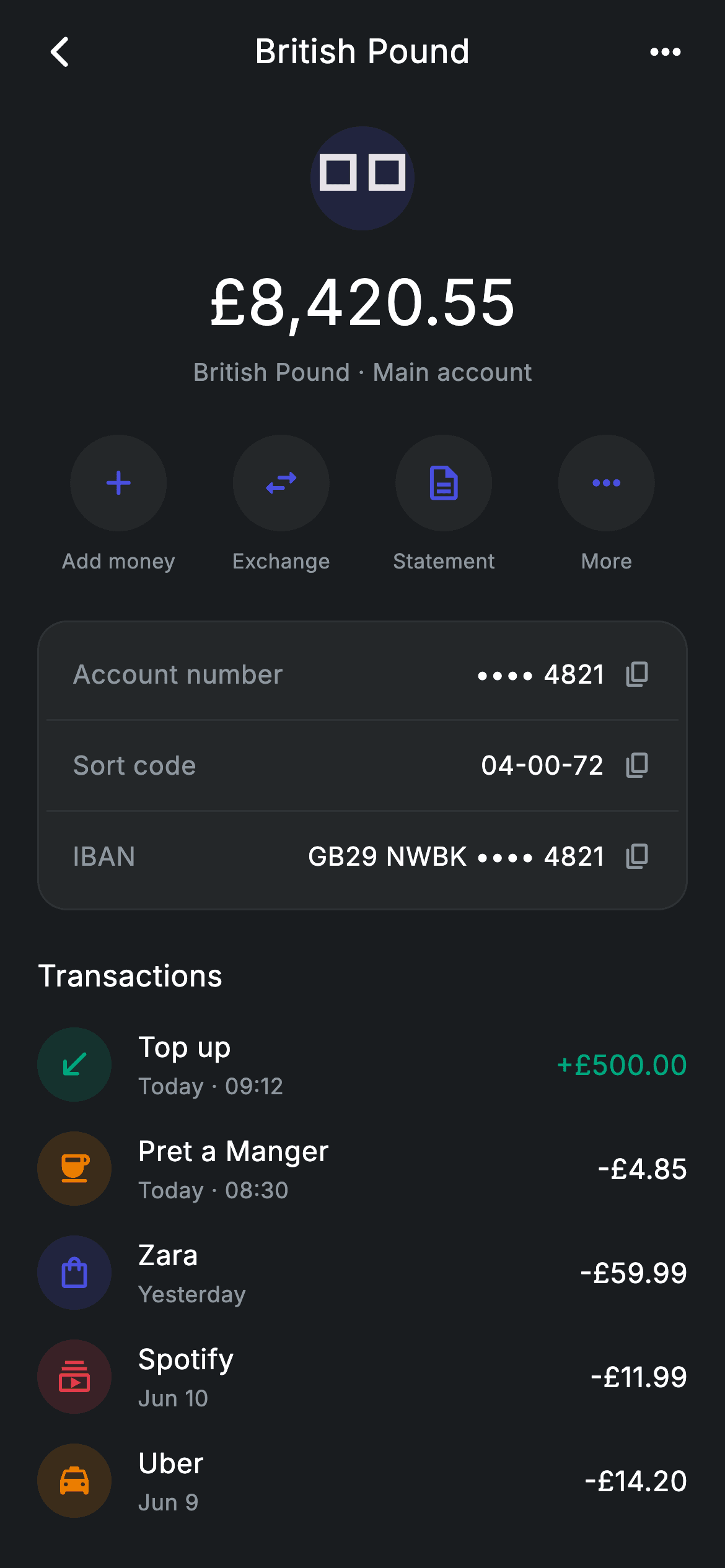
Multi-currency banking apps need a per-account view that answers 'how much, what are my details, what happened' in one scroll. This tutorial builds a dark-theme GBP account screen in Flutter — a flag badge over a 34px balance, four circular quick actions, a grouped card of account number, sort code and IBAN, and a colour-tinted transaction list. You'll see how a private static token is shared across two classes, and how one boolean turns a debit into a credit.
Watch the Flutter UI walkthrough
A short screen recording of Fintech · Account Detail running, if you'd rather see it before you read the code. The written tutorial below covers everything in it.
Can't see the video? Watch it on YouTube.
What you'll build
- ✓A dark, self-theming account screen that renders standalone as a route with no app-level theme setup
- ✓A four-up quick-action row where each item claims exactly a quarter of the width using Expanded
- ✓A grouped details card with masked values and per-row copy affordances separated by hairlines
- ✓A transaction list where each row's icon tint comes from its own record and credits render in teal
Step-by-step build
Create the file
Add a new file at lib/fintech_account_detail/fintech_account_detail_screen.dart in your Flutter project.
Register the bundled fonts
No external packages — this is pure Flutter. It does bundle its design font (Inter), so drop the font file into fonts/ and declare it in pubspec.yaml:
flutter:
  fonts:
    - family: Inter
      fonts:
- asset: fonts/Inter-Regular.ttfBuild it, piece by piece
Here's how the screen goes together. Each block below is a real slice of the code with a plain-English explanation — paste them in order, or grab the whole file from the next section.
The dark palette and the transaction data
import 'package:flutter/material.dart';

/// Account Detail — a single currency account: balance, details, quick actions
/// and its transactions. Self-contained per CONVENTIONS.md: pure Flutter,
/// bundled Inter font, forced dark theme so it renders standalone as a route.
class FintechAccountDetailScreen extends StatelessWidget {
  const FintechAccountDetailScreen({super.key, this.onBack});

  final VoidCallback? onBack;

  static const String _font = 'Inter';
  static const Color _bg = Color(0xFF191C1F);
  static const Color _surface = Color(0xFF242729);
  static const Color _brand = Color(0xFF494FDF);
  static const Color _teal = Color(0xFF00A87E);
  static const Color _red = Color(0xFFE23B4A);
  static const Color _amber = Color(0xFFEC7E00);
  static const Color _muted = Color(0xFF8D969E);
  static const Color _hairline = Color(0xFF2E3235);

  static const List<_Txn> _txns = <_Txn>[
    _Txn(Icons.south_west_rounded, _teal, 'Top up', 'Today · 09:12', r'+£500.00', true),
    _Txn(Icons.coffee_rounded, _amber, 'Pret a Manger', 'Today · 08:30', r'-£4.85', false),
    _Txn(Icons.shopping_bag_outlined, _brand, 'Zara', 'Yesterday', r'-£59.99', false),
    _Txn(Icons.subscriptions_outlined, _red, 'Spotify', 'Jun 10', r'-£11.99', false),
    _Txn(Icons.local_taxi_rounded, _amber, 'Uber', 'Jun 9', r'-£14.20', false),
  ];
The screen is stateless and takes a single optional `onBack`. Its palette is a full dark set: `_bg` (#191C1F) as the page, `_surface` (#242729) one step lighter for cards, `_hairline` (#2E3235) for dividers, and four semantic accents — `_brand` indigo, `_teal` for money in, `_red` and `_amber`. `_txns` holds five `_Txn` records, and each one carries its own `tint` colour plus a `credit` boolean. Storing the tint on the record rather than deriving it from a category means the list has no switch statement and any new merchant type just supplies its own colour.
The balance block and page structure
  @override
  Widget build(BuildContext context) {
    return Theme(
      data: ThemeData.dark(useMaterial3: true),
      child: Scaffold(
        backgroundColor: _bg,
        body: SafeArea(
          child: Column(
            crossAxisAlignment: CrossAxisAlignment.stretch,
            children: <Widget>[
              _appBar(context),
              Expanded(
                child: ListView(
                  physics: const BouncingScrollPhysics(),
                  padding: const EdgeInsets.fromLTRB(20, 8, 20, 24),
                  children: <Widget>[
                    Center(
                      child: Column(
                        children: <Widget>[
                          Container(
                            width: 56,
                            height: 56,
                            alignment: Alignment.center,
                            decoration: BoxDecoration(
                              shape: BoxShape.circle,
                              color: _brand.withValues(alpha: 0.16),
                            ),
                            child: const Text('🇬🇧',
                                style: TextStyle(fontSize: 26)),
                          ),
                          const SizedBox(height: 14),
                          const Text(
                            r'£8,420.55',
                            style: TextStyle(
                              fontFamily: _font,
                              fontSize: 34,
                              fontWeight: FontWeight.w500,
                              letterSpacing: 0.24,
                              color: Colors.white,
                            ),
                          ),
                          const SizedBox(height: 4),
                          const Text(
                            'British Pound · Main account',
                            style: TextStyle(
                              fontFamily: _font,
                              fontSize: 13,
                              letterSpacing: 0.24,
                              color: _muted,
                            ),
                          ),
                        ],
                      ),
                    ),
                    const SizedBox(height: 24),
                    Row(
                      children: const <Widget>[
                        _Action(Icons.add_rounded, 'Add money'),
                        _Action(Icons.swap_horiz_rounded, 'Exchange'),
                        _Action(Icons.description_outlined, 'Statement'),
                        _Action(Icons.more_horiz_rounded, 'More'),
                      ],
                    ),
                    const SizedBox(height: 24),
                    _detailsCard(),
                    const SizedBox(height: 24),
                    const Text(
                      'Transactions',
                      style: TextStyle(
                        fontFamily: _font,
                        fontSize: 16,
                        fontWeight: FontWeight.w500,
                        letterSpacing: 0.24,
                        color: Colors.white,
                      ),
                    ),
                    const SizedBox(height: 8),
                    for (final _Txn t in _txns)
                      Padding(
                        padding: const EdgeInsets.symmetric(vertical: 8),
                        child: _txnRow(t),
                      ),
                  ],
                ),
              ),
            ],
          ),
        ),
      ),
    );
  }
Everything is wrapped in `Theme(data: ThemeData.dark(useMaterial3: true))` so the screen renders correctly as a standalone route even inside a light host app. The body is an app bar above an `Expanded` ListView using `BouncingScrollPhysics` for an iOS-style overscroll. The balance block centres a 56px circle filled with `_brand` at 16% opacity holding the 🇬🇧 flag, then the amount at 34px w500 and a 'British Pound · Main account' caption. Note the amount uses a raw string, `r'£8,420.55'` — the `r` prefix stops Dart interpreting characters like `$` in currency literals, which is why every money value in this file is written that way. The transaction rows are emitted with a `for (final _Txn t in _txns)` loop directly inside the children list.
An app bar with a safe back fallback
  Widget _appBar(BuildContext context) {
    return Padding(
      padding: const EdgeInsets.fromLTRB(8, 4, 8, 8),
      child: Row(
        children: <Widget>[
          IconButton(
            onPressed: onBack ?? () => Navigator.of(context).maybePop(),
            icon: const Icon(Icons.arrow_back_ios_new_rounded,
                size: 20, color: Colors.white),
          ),
          const Expanded(
            child: Text(
              'British Pound',
              textAlign: TextAlign.center,
              style: TextStyle(
                fontFamily: _font,
                fontSize: 18,
                fontWeight: FontWeight.w500,
                letterSpacing: 0.24,
                color: Colors.white,
              ),
            ),
          ),
          IconButton(
            onPressed: () {},
            icon: const Icon(Icons.more_horiz_rounded,
                size: 24, color: Colors.white),
          ),
        ],
      ),
    );
  }
The app bar is hand-built rather than a real AppBar, giving full control over the centred title. The detail worth copying is the back button's handler: `onPressed: onBack ?? () => Navigator.of(context).maybePop()`. If the host passes a callback it wins; if not, the screen falls back to popping itself, so the back arrow is never dead even when the widget is dropped in with no wiring. `maybePop` rather than `pop` is the safe choice — it does nothing when there's no route to pop instead of throwing. The title sits in an `Expanded` with `textAlign: TextAlign.center`, and the trailing icon button balances the leading one so the title lands optically centred.
The grouped details card
  Widget _detailsCard() {
    return Container(
      padding: const EdgeInsets.all(4),
      decoration: BoxDecoration(
        color: _surface,
        borderRadius: BorderRadius.circular(16),
        border: Border.all(color: _hairline),
      ),
      child: Column(
        children: <Widget>[
          _detailRow('Account number', '•••• 4821', Icons.copy_rounded),
          const Divider(color: _hairline, height: 1),
          _detailRow('Sort code', '04-00-72', Icons.copy_rounded),
          const Divider(color: _hairline, height: 1),
          _detailRow('IBAN', 'GB29 NWBK •••• 4821', Icons.copy_rounded),
        ],
      ),
    );
  }

  Widget _detailRow(String label, String value, IconData icon) {
    return Padding(
      padding: const EdgeInsets.symmetric(horizontal: 14, vertical: 14),
      child: Row(
        children: <Widget>[
          Expanded(
            child: Text(
              label,
              style: const TextStyle(
                fontFamily: _font,
                fontSize: 14,
                letterSpacing: 0.24,
                color: _muted,
              ),
            ),
          ),
          Text(
            value,
            style: const TextStyle(
              fontFamily: _font,
              fontSize: 14,
              fontWeight: FontWeight.w500,
              letterSpacing: 0.24,
              color: Colors.white,
            ),
          ),
          const SizedBox(width: 10),
          Icon(icon, size: 16, color: _muted),
        ],
      ),
    );
  }
The card is a `_surface` Container with a 16px radius, a `_hairline` border and — unusually — only `EdgeInsets.all(4)` of padding. The tight outer padding is intentional: each `_detailRow` supplies its own 14px inset, so the dividers between rows can run nearly the full card width while the text still sits comfortably inside. Rows are separated by `Divider(color: _hairline, height: 1)`, with `height: 1` making the divider occupy exactly its own thickness and add no vertical space of its own. Each row is a Row of an `Expanded` muted label, a white value, and a copy icon — and the values are shown masked ('•••• 4821', 'GB29 NWBK •••• 4821'), which is what you want on a screen someone might read in public.
The transaction row
  Widget _txnRow(_Txn t) {
    return Row(
      children: <Widget>[
        Container(
          width: 40,
          height: 40,
          decoration: BoxDecoration(
            shape: BoxShape.circle,
            color: t.tint.withValues(alpha: 0.16),
          ),
          child: Icon(t.icon, size: 20, color: t.tint),
        ),
        const SizedBox(width: 14),
        Expanded(
          child: Column(
            crossAxisAlignment: CrossAxisAlignment.start,
            children: <Widget>[
              Text(
                t.name,
                style: const TextStyle(
                  fontFamily: _font,
                  fontSize: 15,
                  fontWeight: FontWeight.w500,
                  letterSpacing: 0.24,
                  color: Colors.white,
                ),
              ),
              const SizedBox(height: 2),
              Text(
                t.date,
                style: const TextStyle(
                  fontFamily: _font,
                  fontSize: 12,
                  letterSpacing: 0.24,
                  color: _muted,
                ),
              ),
            ],
          ),
        ),
        const SizedBox(width: 12),
        Text(
          t.amount,
          style: TextStyle(
            fontFamily: _font,
            fontSize: 15,
            fontWeight: FontWeight.w500,
            letterSpacing: 0.24,
            color: t.credit ? _teal : Colors.white,
          ),
        ),
      ],
    );
  }
}
Each row is a 40px circular icon tile, an `Expanded` name-over-date column, and a trailing amount. The tile's fill is `t.tint.withValues(alpha: 0.16)` with the icon itself at full `t.tint` — a 16%-opacity wash of the same hue behind a solid glyph is the standard way to get a tinted avatar that stays legible on a dark surface, and because the tint travels on the record every row gets its own without any branching. The amount is the only place `credit` is read: `color: t.credit ? _teal : Colors.white`. Debits stay plain white rather than red, so the eye is drawn to money arriving; the sign in the string itself already marks the direction.
The quick action and the transaction record
class _Action extends StatelessWidget {
  const _Action(this.icon, this.label);

  final IconData icon;
  final String label;

  @override
  Widget build(BuildContext context) {
    return Expanded(
      child: Column(
        children: <Widget>[
          Container(
            width: 52,
            height: 52,
            decoration: const BoxDecoration(
              shape: BoxShape.circle,
              color: FintechAccountDetailScreen._surface,
            ),
            child: Icon(icon,
                size: 22, color: FintechAccountDetailScreen._brand),
          ),
          const SizedBox(height: 8),
          Text(
            label,
            style: const TextStyle(
              fontFamily: FintechAccountDetailScreen._font,
              fontSize: 11,
              letterSpacing: 0.24,
              color: FintechAccountDetailScreen._muted,
            ),
          ),
        ],
      ),
    );
  }
}

class _Txn {
  const _Txn(this.icon, this.tint, this.name, this.date, this.amount, this.credit);

  final IconData icon;
  final Color tint;
  final String name;
  final String date;
  final String amount;
  final bool credit;
}
_Action is a separate StatelessWidget that returns an `Expanded` from its own build method — that's what makes the four actions in the parent Row split the width evenly without the parent wrapping each one. Notice how it reaches its colours: `FintechAccountDetailScreen._surface` and `._brand`. Dart's privacy is per-library, not per-class, so a private static on one class is visible to any other class in the same file, which lets the helper share the screen's tokens without duplicating them or passing them in. Each action is a 52px circle over an 11px caption. `_Txn` at the bottom is the six-field immutable record backing the list.
Full code
The complete, ready-to-paste source. Free to use in your projects — one click copies it all.
import 'package:flutter/material.dart';

/// Account Detail — a single currency account: balance, details, quick actions
/// and its transactions. Self-contained per CONVENTIONS.md: pure Flutter,
/// bundled Inter font, forced dark theme so it renders standalone as a route.
class FintechAccountDetailScreen extends StatelessWidget {
  const FintechAccountDetailScreen({super.key, this.onBack});

  final VoidCallback? onBack;

  static const String _font = 'Inter';
  static const Color _bg = Color(0xFF191C1F);
  static const Color _surface = Color(0xFF242729);
  static const Color _brand = Color(0xFF494FDF);
  static const Color _teal = Color(0xFF00A87E);
  static const Color _red = Color(0xFFE23B4A);
  static const Color _amber = Color(0xFFEC7E00);
  static const Color _muted = Color(0xFF8D969E);
  static const Color _hairline = Color(0xFF2E3235);

  static const List<_Txn> _txns = <_Txn>[
    _Txn(Icons.south_west_rounded, _teal, 'Top up', 'Today · 09:12', r'+£500.00', true),
    _Txn(Icons.coffee_rounded, _amber, 'Pret a Manger', 'Today · 08:30', r'-£4.85', false),
    _Txn(Icons.shopping_bag_outlined, _brand, 'Zara', 'Yesterday', r'-£59.99', false),
    _Txn(Icons.subscriptions_outlined, _red, 'Spotify', 'Jun 10', r'-£11.99', false),
    _Txn(Icons.local_taxi_rounded, _amber, 'Uber', 'Jun 9', r'-£14.20', false),
  ];

  @override
  Widget build(BuildContext context) {
    return Theme(
      data: ThemeData.dark(useMaterial3: true),
      child: Scaffold(
        backgroundColor: _bg,
        body: SafeArea(
          child: Column(
            crossAxisAlignment: CrossAxisAlignment.stretch,
            children: <Widget>[
              _appBar(context),
              Expanded(
                child: ListView(
                  physics: const BouncingScrollPhysics(),
                  padding: const EdgeInsets.fromLTRB(20, 8, 20, 24),
                  children: <Widget>[
                    Center(
                      child: Column(
                        children: <Widget>[
                          Container(
                            width: 56,
                            height: 56,
                            alignment: Alignment.center,
                            decoration: BoxDecoration(
                              shape: BoxShape.circle,
                              color: _brand.withValues(alpha: 0.16),
                            ),
                            child: const Text('🇬🇧',
                                style: TextStyle(fontSize: 26)),
                          ),
                          const SizedBox(height: 14),
                          const Text(
                            r'£8,420.55',
                            style: TextStyle(
                              fontFamily: _font,
                              fontSize: 34,
                              fontWeight: FontWeight.w500,
                              letterSpacing: 0.24,
                              color: Colors.white,
                            ),
                          ),
                          const SizedBox(height: 4),
                          const Text(
                            'British Pound · Main account',
                            style: TextStyle(
                              fontFamily: _font,
                              fontSize: 13,
                              letterSpacing: 0.24,
                              color: _muted,
                            ),
                          ),
                        ],
                      ),
                    ),
                    const SizedBox(height: 24),
                    Row(
                      children: const <Widget>[
                        _Action(Icons.add_rounded, 'Add money'),
                        _Action(Icons.swap_horiz_rounded, 'Exchange'),
                        _Action(Icons.description_outlined, 'Statement'),
                        _Action(Icons.more_horiz_rounded, 'More'),
                      ],
                    ),
                    const SizedBox(height: 24),
                    _detailsCard(),
                    const SizedBox(height: 24),
                    const Text(
                      'Transactions',
                      style: TextStyle(
                        fontFamily: _font,
                        fontSize: 16,
                        fontWeight: FontWeight.w500,
                        letterSpacing: 0.24,
                        color: Colors.white,
                      ),
                    ),
                    const SizedBox(height: 8),
                    for (final _Txn t in _txns)
                      Padding(
                        padding: const EdgeInsets.symmetric(vertical: 8),
                        child: _txnRow(t),
                      ),
                  ],
                ),
              ),
            ],
          ),
        ),
      ),
    );
  }

  Widget _appBar(BuildContext context) {
    return Padding(
      padding: const EdgeInsets.fromLTRB(8, 4, 8, 8),
      child: Row(
        children: <Widget>[
          IconButton(
            onPressed: onBack ?? () => Navigator.of(context).maybePop(),
            icon: const Icon(Icons.arrow_back_ios_new_rounded,
                size: 20, color: Colors.white),
          ),
          const Expanded(
            child: Text(
              'British Pound',
              textAlign: TextAlign.center,
              style: TextStyle(
                fontFamily: _font,
                fontSize: 18,
                fontWeight: FontWeight.w500,
                letterSpacing: 0.24,
                color: Colors.white,
              ),
            ),
          ),
          IconButton(
            onPressed: () {},
            icon: const Icon(Icons.more_horiz_rounded,
                size: 24, color: Colors.white),
          ),
        ],
      ),
    );
  }

  Widget _detailsCard() {
    return Container(
      padding: const EdgeInsets.all(4),
      decoration: BoxDecoration(
        color: _surface,
        borderRadius: BorderRadius.circular(16),
        border: Border.all(color: _hairline),
      ),
      child: Column(
        children: <Widget>[
          _detailRow('Account number', '•••• 4821', Icons.copy_rounded),
          const Divider(color: _hairline, height: 1),
          _detailRow('Sort code', '04-00-72', Icons.copy_rounded),
          const Divider(color: _hairline, height: 1),
          _detailRow('IBAN', 'GB29 NWBK •••• 4821', Icons.copy_rounded),
        ],
      ),
    );
  }

  Widget _detailRow(String label, String value, IconData icon) {
    return Padding(
      padding: const EdgeInsets.symmetric(horizontal: 14, vertical: 14),
      child: Row(
        children: <Widget>[
          Expanded(
            child: Text(
              label,
              style: const TextStyle(
                fontFamily: _font,
                fontSize: 14,
                letterSpacing: 0.24,
                color: _muted,
              ),
            ),
          ),
          Text(
            value,
            style: const TextStyle(
              fontFamily: _font,
              fontSize: 14,
              fontWeight: FontWeight.w500,
              letterSpacing: 0.24,
              color: Colors.white,
            ),
          ),
          const SizedBox(width: 10),
          Icon(icon, size: 16, color: _muted),
        ],
      ),
    );
  }

  Widget _txnRow(_Txn t) {
    return Row(
      children: <Widget>[
        Container(
          width: 40,
          height: 40,
          decoration: BoxDecoration(
            shape: BoxShape.circle,
            color: t.tint.withValues(alpha: 0.16),
          ),
          child: Icon(t.icon, size: 20, color: t.tint),
        ),
        const SizedBox(width: 14),
        Expanded(
          child: Column(
            crossAxisAlignment: CrossAxisAlignment.start,
            children: <Widget>[
              Text(
                t.name,
                style: const TextStyle(
                  fontFamily: _font,
                  fontSize: 15,
                  fontWeight: FontWeight.w500,
                  letterSpacing: 0.24,
                  color: Colors.white,
                ),
              ),
              const SizedBox(height: 2),
              Text(
                t.date,
                style: const TextStyle(
                  fontFamily: _font,
                  fontSize: 12,
                  letterSpacing: 0.24,
                  color: _muted,
                ),
              ),
            ],
          ),
        ),
        const SizedBox(width: 12),
        Text(
          t.amount,
          style: TextStyle(
            fontFamily: _font,
            fontSize: 15,
            fontWeight: FontWeight.w500,
            letterSpacing: 0.24,
            color: t.credit ? _teal : Colors.white,
          ),
        ),
      ],
    );
  }
}

class _Action extends StatelessWidget {
  const _Action(this.icon, this.label);

  final IconData icon;
  final String label;

  @override
  Widget build(BuildContext context) {
    return Expanded(
      child: Column(
        children: <Widget>[
          Container(
            width: 52,
            height: 52,
            decoration: const BoxDecoration(
              shape: BoxShape.circle,
              color: FintechAccountDetailScreen._surface,
            ),
            child: Icon(icon,
                size: 22, color: FintechAccountDetailScreen._brand),
          ),
          const SizedBox(height: 8),
          Text(
            label,
            style: const TextStyle(
              fontFamily: FintechAccountDetailScreen._font,
              fontSize: 11,
              letterSpacing: 0.24,
              color: FintechAccountDetailScreen._muted,
            ),
          ),
        ],
      ),
    );
  }
}

class _Txn {
  const _Txn(this.icon, this.tint, this.name, this.date, this.amount, this.credit);

  final IconData icon;
  final Color tint;
  final String name;
  final String date;
  final String amount;
  final bool credit;
}
Plus bundled 1 binary asset (fonts/images). The CLI and MCP install those for you automatically.
Two faster ways to add it
Copy-paste works, but you can skip it entirely.
1. FlutterKit CLI
One command drops this screen — and its fonts — straight into your project.
$ flutterkit add fintech-account-detail2. AI agent (MCP)
Connect FlutterKit's MCP server in Claude or Cursor and just ask your agent to install fintech-account-detail — it fetches and writes the files for you.
FAQ
Is this Flutter account detail screen free to use?
Yes. The complete Dart source on this page is free for personal and commercial projects. Copy it directly, install it with the FlutterKit CLI (flutterkit add fintech-account-detail), or have an AI agent add it for you over MCP.
Why is the flag an emoji instead of an image?
The 🇬🇧 in the balance circle is a plain Text widget at fontSize 26, which keeps the screen asset-free and works for any currency by swapping the character. The trade-off is that regional-indicator emoji render differently across platforms and don't appear at all on some older Windows builds — if you need pixel-identical flags everywhere, replace that Text with a small asset or a CustomPainter.
Do the copy icons on the details card work?
They're static icons as written — the rows have no tap handler. To make them live, wrap the Icon in `_detailRow` with a GestureDetector and call `Clipboard.setData(ClipboardData(text: value))` from `package:flutter/services.dart`, which ships with Flutter and needs no dependency. You'll want to pass the unmasked value in as a separate argument, since the displayed string is redacted.
Which Flutter version does it target?
It uses Color.withValues() and super parameters, so Flutter 3.22+ (Dart 3). On an older SDK, change the two withValues(alpha: 0.16) calls — the balance circle and the transaction tiles — to withOpacity(0.16). The only bundled asset is the Inter font, registered in pubspec.yaml as shown in step 2.


