How to Build a Wishlist Share Bottom Sheet in Flutter (Full Code + Preview)
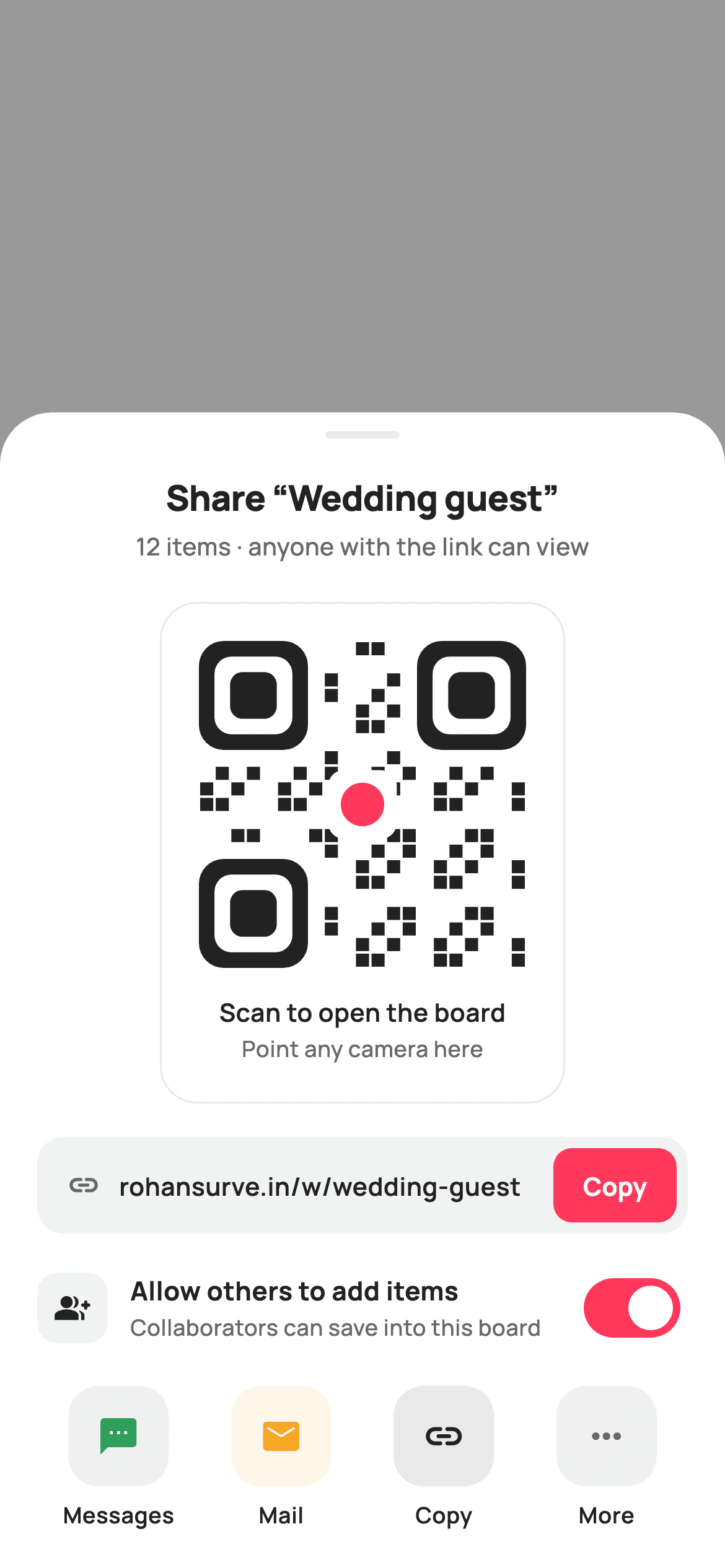
Sharing a wishlist usually means handing someone a link, but in person the fastest handoff is a camera pointed at a QR code. This tutorial builds StyleCart's share sheet in Flutter: a bottom sheet over a tappable `0x66000000` scrim, a QR card painted entirely by `_QrPainter` from a deterministic bit formula, a copy-link row whose `FilledButton` flips from coral 'Copy' to ink 'Copied' via `_copied`, an 'Allow others to add items' `Switch` bound to `_allowAdds`, and four tinted channel tiles that report their label through `onChannel`. No pub packages, no network, no image assets.
Watch the Flutter UI walkthrough
A short screen recording of Share Wishlist running, if you'd rather see it before you read the code. The written tutorial below covers everything in it.
Can't see the video? Watch it on YouTube.
What you'll build
- ✓A dismissable bottom sheet layered over a 40% black scrim with a `Positioned.fill` `GestureDetector` wired to `onClose`
- ✓A 176px QR card drawn by `_QrPainter` — three rounded finder squares, a hash-driven 21×21 module grid and a heart-red centre dot
- ✓A copy-link row whose button swaps colour and label the moment `_copied` becomes true
- ✓A collaborator `Switch` styled with a coral track and transparent outline, held in `_allowAdds`
- ✓A four-up channel row built from a `static const List<_Channel>` with 10% tinted icon tiles
Step-by-step build
Create the file
Add a new file at lib/ecom_wishlist_share/ecom_wishlist_share_screen.dart in your Flutter project.
Register the bundled fonts
No external packages — this is pure Flutter. It does bundle its design font (Manrope), so drop the font file into fonts/ and declare it in pubspec.yaml:
flutter:
  fonts:
    - family: Manrope
      fonts:
- asset: fonts/Manrope-Regular.ttfBuild it, piece by piece
Here's how the screen goes together. Each block below is a real slice of the code with a plain-English explanation — paste them in order, or grab the whole file from the next section.
Callbacks, tokens and the channel table
import 'package:flutter/material.dart';

/// StyleCart — Share Wishlist.
///
/// A dimmed-scrim bottom sheet to share a wishlist board: a painted QR card a
/// friend can scan, a copy-link row, and a row of share channels. Toggles let
/// the owner allow others to add items or keep the board view-only.
///
/// Self-contained per CONVENTIONS.md: pure Flutter, bundled Manrope, inline
/// Airbnb-style tokens, own light theme + SafeArea. The QR is a CustomPainter
/// (deterministic module grid — no emoji glyph, no network). Exposes callbacks
/// only.
class EcomWishlistShareScreen extends StatefulWidget {
  const EcomWishlistShareScreen({
    super.key,
    this.onClose,
    this.onCopyLink,
    this.onChannel,
  });

  final VoidCallback? onClose;
  final VoidCallback? onCopyLink;
  final ValueChanged<String>? onChannel;

  @override
  State<EcomWishlistShareScreen> createState() =>
      _EcomWishlistShareScreenState();
}

class _EcomWishlistShareScreenState extends State<EcomWishlistShareScreen> {
  static const String _font = 'Manrope';
  static const Color _canvas = Color(0xFFFFFFFF);
  static const Color _ink = Color(0xFF222222);
  static const Color _muted = Color(0xFF6A6A6A);
  static const Color _faint = Color(0xFFC1C1C1);
  static const Color _brand = Color(0xFFFF385C);
  static const Color _surface = Color(0xFFF2F2F2);
  static const Color _hairline = Color(0xFFEBEBEB);

  static const String _link = 'rohansurve.in/w/wedding-guest';

  bool _allowAdds = true;
  bool _copied = false;

  static const List<_Channel> _channels = <_Channel>[
    _Channel('Messages', Icons.sms_rounded, Color(0xFF2E9E5B)),
    _Channel('Mail', Icons.mail_rounded, Color(0xFFF5A623)),
    _Channel('Copy', Icons.link_rounded, Color(0xFF222222)),
    _Channel('More', Icons.more_horiz_rounded, Color(0xFF6A6A6A)),
  ];
`EcomWishlistShareScreen` is a `StatefulWidget` exposing exactly three callbacks: `onClose` for the scrim tap, `onCopyLink` for the copy button, and `onChannel`, a `ValueChanged<String>` that hands back the tapped channel's label rather than an index, so the host can switch on 'Messages' or 'Mail' without knowing tile order. The state class carries Airbnb-style tokens — `_ink` `#222222`, `_muted` `#6A6A6A`, `_faint` `#C1C1C1` for the off switch track, coral `_brand` `#FF385C`, `_surface` `#F2F2F2` for the link pill and `_hairline` `#EBEBEB`. The shareable URL is a `static const _link` string and two mutable flags drive the UI: `_allowAdds` (defaults to true) and `_copied` (false). The four channels are a `static const List<_Channel>` pairing a label, an `Icons.*_rounded` glyph and a tint — green for Messages, amber for Mail, ink for Copy, muted grey for More — so adding WhatsApp later is a one-line data change.
Scrim, stack and a bottom-aligned sheet
  @override
  Widget build(BuildContext context) {
    return Theme(
      data: ThemeData.light(useMaterial3: true),
      child: Scaffold(
        backgroundColor: Colors.transparent,
        body: Stack(
          children: <Widget>[
            // Dimmed scrim — tap to dismiss.
            Positioned.fill(
              child: GestureDetector(
                onTap: widget.onClose,
                child: const ColoredBox(color: Color(0x66000000)),
              ),
            ),
            Align(
              alignment: Alignment.bottomCenter,
              child: _sheet(),
            ),
          ],
        ),
      ),
    );
  }
`build` wraps everything in `Theme(data: ThemeData.light(useMaterial3: true))` so the sheet renders identically regardless of the host app's theme. The `Scaffold` gets `backgroundColor: Colors.transparent`, which matters because the widget is meant to sit on top of whatever screen opened it; a default white scaffold would hide it. Inside a `Stack`, `Positioned.fill` holds a `GestureDetector` around a `ColoredBox` of `0x66000000` — 40% black — and its `onTap` is simply `widget.onClose`, so tapping anywhere outside the sheet dismisses it without the sheet needing its own close button. `Align(alignment: Alignment.bottomCenter)` then pins `_sheet()` to the bottom edge, leaving the top of the screen as scrim.
The sheet body: handle, title and section stack
  Widget _sheet() {
    return Container(
      decoration: const BoxDecoration(
        color: _canvas,
        borderRadius: BorderRadius.vertical(top: Radius.circular(28)),
      ),
      child: SafeArea(
        top: false,
        child: SingleChildScrollView(
          child: Padding(
            padding: const EdgeInsets.fromLTRB(20, 10, 20, 20),
            child: Column(
              mainAxisSize: MainAxisSize.min,
              children: <Widget>[
                Container(
                  width: 40,
                  height: 4,
                  decoration: BoxDecoration(
                    color: _hairline,
                    borderRadius: BorderRadius.circular(2),
                  ),
                ),
                const SizedBox(height: 18),
                const Text(
                  'Share “Wedding guest”',
                  style: TextStyle(
                    fontFamily: _font,
                    fontSize: 19,
                    fontWeight: FontWeight.w800,
                    letterSpacing: -0.3,
                    color: _ink,
                  ),
                ),
                const SizedBox(height: 4),
                const Text(
                  '12 items · anyone with the link can view',
                  style: TextStyle(
                    fontFamily: _font,
                    fontSize: 13,
                    fontWeight: FontWeight.w500,
                    color: _muted,
                  ),
                ),
                const SizedBox(height: 20),
                _qrCard(),
                const SizedBox(height: 18),
                _linkRow(),
                const SizedBox(height: 16),
                _allowRow(),
                const SizedBox(height: 18),
                _channelRow(),
              ],
            ),
          ),
        ),
      ),
    );
  }
`_sheet` is a white `Container` with `BorderRadius.vertical(top: Radius.circular(28))`, so only the top corners round — the bottom sits flush with the device edge. `SafeArea(top: false)` is placed inside the container rather than outside, which keeps the white background extending under the home indicator while padding the content above it. A `SingleChildScrollView` guards against short phones, and the `Column` uses `mainAxisSize: MainAxisSize.min` so the sheet hugs its content instead of filling the screen. The 40×4 grab handle is a `_hairline` pill with radius 2, followed by the 19px `w800` title 'Share “Wedding guest”' with `letterSpacing: -0.3` and a 13px muted line stating the item count and current visibility. The four sections — `_qrCard`, `_linkRow`, `_allowRow`, `_channelRow` — are separated by 18/16/18px gaps, slightly tighter around the toggle to group it with the link.
The QR card container
  Widget _qrCard() {
    return Container(
      padding: const EdgeInsets.all(20),
      decoration: BoxDecoration(
        color: _canvas,
        borderRadius: BorderRadius.circular(20),
        border: Border.all(color: _hairline),
      ),
      child: Column(
        children: <Widget>[
          SizedBox(
            width: 176,
            height: 176,
            child: CustomPaint(painter: const _QrPainter()),
          ),
          const SizedBox(height: 14),
          const Text(
            'Scan to open the board',
            style: TextStyle(
              fontFamily: _font,
              fontSize: 13.5,
              fontWeight: FontWeight.w600,
              color: _ink,
            ),
          ),
          const SizedBox(height: 2),
          const Text(
            'Point any camera here',
            style: TextStyle(
              fontFamily: _font,
              fontSize: 12,
              fontWeight: FontWeight.w500,
              color: _muted,
            ),
          ),
        ],
      ),
    );
  }
`_qrCard` is a bordered white panel (radius 20, `_hairline` border, 20px padding) rather than a filled grey one, because the QR needs maximum contrast around it to scan reliably — a tinted background would reduce the quiet zone. The code itself is a fixed `SizedBox(width: 176, height: 176)` around `CustomPaint(painter: const _QrPainter())`; the painter is `const` because it takes no parameters, so Flutter can reuse the same instance every rebuild. Fixed square dimensions matter here: the painter divides `size.width` by 21 to get its module size, so a non-square box would produce stretched modules. Two captions follow — 'Scan to open the board' at 13.5px `w600` in ink and 'Point any camera here' at 12px muted — spaced only 2px apart so they read as one instruction.
Copy-link row with a Copied state
  Widget _linkRow() {
    return Container(
      padding: const EdgeInsets.fromLTRB(16, 6, 6, 6),
      decoration: BoxDecoration(
        color: _surface,
        borderRadius: BorderRadius.circular(14),
      ),
      child: Row(
        children: <Widget>[
          const Icon(Icons.link_rounded, size: 18, color: _muted),
          const SizedBox(width: 10),
          const Expanded(
            child: Text(
              _link,
              maxLines: 1,
              overflow: TextOverflow.ellipsis,
              style: TextStyle(
                fontFamily: _font,
                fontSize: 13.5,
                fontWeight: FontWeight.w600,
                color: _ink,
              ),
            ),
          ),
          const SizedBox(width: 8),
          SizedBox(
            height: 40,
            child: FilledButton(
              onPressed: () {
                setState(() => _copied = true);
                widget.onCopyLink?.call();
              },
              style: FilledButton.styleFrom(
                backgroundColor: _copied ? _ink : _brand,
                foregroundColor: _canvas,
                padding: const EdgeInsets.symmetric(horizontal: 16),
                shape: RoundedRectangleBorder(
                  borderRadius: BorderRadius.circular(10),
                ),
              ),
              child: Text(
                _copied ? 'Copied' : 'Copy',
                style: const TextStyle(
                  fontFamily: _font,
                  fontSize: 13.5,
                  fontWeight: FontWeight.w700,
                ),
              ),
            ),
          ),
        ],
      ),
    );
  }
The link row is a `_surface` pill with asymmetric padding `fromLTRB(16, 6, 6, 6)` — 16px on the left for the text, 6px on the right so the button sits nearly flush inside the pill. A link icon, then the URL in an `Expanded` `Text` with `maxLines: 1` and `TextOverflow.ellipsis` so a long slug truncates rather than pushing the button off-screen. The 40px-tall `FilledButton` is where the state lives: its `onPressed` calls `setState(() => _copied = true)` and then `widget.onCopyLink?.call()`, so the host does the actual clipboard write while the widget handles feedback. `backgroundColor` reads `_copied ? _ink : _brand` and the label reads `_copied ? 'Copied' : 'Copy'`, so one boolean drives both the colour shift from coral to near-black and the text. Note `_copied` never resets — the sheet is short-lived, so once copied it stays confirmed.
The collaborator toggle
  Widget _allowRow() {
    return Row(
      children: <Widget>[
        Container(
          width: 38,
          height: 38,
          decoration: BoxDecoration(
            color: _surface,
            borderRadius: BorderRadius.circular(11),
          ),
          child: const Icon(Icons.group_add_rounded, size: 19, color: _ink),
        ),
        const SizedBox(width: 12),
        const Expanded(
          child: Column(
            crossAxisAlignment: CrossAxisAlignment.start,
            children: <Widget>[
              Text(
                'Allow others to add items',
                style: TextStyle(
                  fontFamily: _font,
                  fontSize: 14,
                  fontWeight: FontWeight.w700,
                  color: _ink,
                ),
              ),
              SizedBox(height: 1),
              Text(
                'Collaborators can save into this board',
                style: TextStyle(
                  fontFamily: _font,
                  fontSize: 12,
                  fontWeight: FontWeight.w500,
                  color: _muted,
                ),
              ),
            ],
          ),
        ),
        Switch(
          value: _allowAdds,
          onChanged: (bool v) => setState(() => _allowAdds = v),
          activeThumbColor: _canvas,
          activeTrackColor: _brand,
          inactiveThumbColor: _canvas,
          inactiveTrackColor: _faint,
          trackOutlineColor: WidgetStateProperty.all(Colors.transparent),
        ),
      ],
    );
  }
`_allowRow` is a three-part `Row`: a 38×38 `_surface` tile (radius 11) holding a 19px `Icons.group_add_rounded`, an `Expanded` two-line label column, and a `Switch`. The title 'Allow others to add items' sits at 14px `w700` and the description 'Collaborators can save into this board' at 12px muted, with just 1px between them so they stack tightly. The `Switch` is fully restyled: `activeTrackColor: _brand` gives the on state a coral track, `inactiveTrackColor: _faint` uses the light grey `#C1C1C1`, both thumbs stay white via `activeThumbColor` and `inactiveThumbColor`, and `trackOutlineColor: WidgetStateProperty.all(Colors.transparent)` removes the Material 3 track border, which would otherwise draw a dark ring around the grey track. `onChanged` just writes `_allowAdds` through `setState`; there is no callback for it, so a host that needs to persist the value should add one alongside `onCopyLink`.
Four channel tiles from one data list
  Widget _channelRow() {
    return Row(
      mainAxisAlignment: MainAxisAlignment.spaceBetween,
      children: <Widget>[
        for (final _Channel c in _channels)
          Expanded(
            child: GestureDetector(
              onTap: () => widget.onChannel?.call(c.label),
              behavior: HitTestBehavior.opaque,
              child: Column(
                children: <Widget>[
                  Container(
                    width: 54,
                    height: 54,
                    decoration: BoxDecoration(
                      color: c.tint.withValues(alpha: 0.10),
                      borderRadius: BorderRadius.circular(16),
                    ),
                    child: Icon(c.icon, size: 23, color: c.tint),
                  ),
                  const SizedBox(height: 7),
                  Text(
                    c.label,
                    style: const TextStyle(
                      fontFamily: _font,
                      fontSize: 12,
                      fontWeight: FontWeight.w600,
                      color: _ink,
                    ),
                  ),
                ],
              ),
            ),
          ),
      ],
    );
  }
}

class _Channel {
  const _Channel(this.label, this.icon, this.tint);
  final String label;
  final IconData icon;
  final Color tint;
}
`_channelRow` builds its tiles with a collection-for over `_channels`, each wrapped in `Expanded` so the four take equal width and `mainAxisAlignment.spaceBetween` becomes a no-op safety net. Each tile is a `GestureDetector` with `behavior: HitTestBehavior.opaque`, which is essential: without it, taps on the empty space between the icon and its label would fall through to the scrim and dismiss the sheet. The `onTap` fires `widget.onChannel?.call(c.label)`. The icon sits in a 54×54 box (radius 16) filled with `c.tint.withValues(alpha: 0.10)` — the same colour at 10% — so Messages gets a pale green tile with a green icon, Mail pale amber, and so on, the two-layer accent pattern that keeps tiles distinct without heavy colour. Labels are 12px `w600` ink. The `_Channel` class is a three-field const holder — `label`, `icon`, `tint` — which is what lets the whole list be `static const`.
Painting a stylised QR code
/// Paints a stylised QR code: three finder squares plus a deterministic module
/// grid driven by a fixed bit table (no randomness, no network) so it renders
/// identically every frame and in the golden harness.
class _QrPainter extends CustomPainter {
  const _QrPainter();

  // 21×21 module field. Finder patterns are drawn separately; the data area is
  // filled from this hand-authored bit table so the result looks like a real
  // QR without encoding anything scannable.
  static const int _n = 21;

  @override
  void paint(Canvas canvas, Size size) {
    final double m = size.width / _n; // module size
    final Paint dark = Paint()..color = const Color(0xFF222222);

    // Quiet-zone background.
    canvas.drawRRect(
      RRect.fromRectAndRadius(
        Rect.fromLTWH(0, 0, size.width, size.height),
        const Radius.circular(8),
      ),
      Paint()..color = const Color(0xFFFFFFFF),
    );

    // Data modules: a fixed pseudo-pattern (avoid the finder corners).
    for (int y = 0; y < _n; y++) {
      for (int x = 0; x < _n; x++) {
        if (_inFinder(x, y)) continue;
        // Deterministic checker-ish hash — stable across frames.
        final int h = (x * 7 + y * 13 + x * y * 3) % 5;
        if (h == 0 || h == 2) {
          canvas.drawRect(
            Rect.fromLTWH(x * m + m * 0.08, y * m + m * 0.08, m * 0.84, m * 0.84),
            dark,
          );
        }
      }
    }

    // Three finder patterns (top-left, top-right, bottom-left).
    _finder(canvas, 0, 0, m, dark);
    _finder(canvas, (_n - 7) * m, 0, m, dark);
    _finder(canvas, 0, (_n - 7) * m, m, dark);

    // Brand centre dot — the StyleCart heart accent inside the QR.
    final double cx = size.width / 2;
    final double cy = size.height / 2;
    canvas.drawRRect(
      RRect.fromRectAndRadius(
        Rect.fromCenter(center: Offset(cx, cy), width: m * 4.4, height: m * 4.4),
        Radius.circular(m),
      ),
      Paint()..color = const Color(0xFFFFFFFF),
    );
    canvas.drawCircle(Offset(cx, cy), m * 1.4, Paint()..color = _brandRed);
  }

  static const Color _brandRed = Color(0xFFFF385C);

  bool _inFinder(int x, int y) {
    const int f = 8; // 7-module finder + 1 separator
    final bool tl = x < f && y < f;
    final bool tr = x >= _n - f && y < f;
    final bool bl = x < f && y >= _n - f;
    return tl || tr || bl;
  }

  void _finder(Canvas canvas, double left, double top, double m, Paint dark) {
    // Outer 7×7 ring.
    canvas.drawRRect(
      RRect.fromRectAndRadius(
        Rect.fromLTWH(left, top, m * 7, m * 7),
        Radius.circular(m * 1.6),
      ),
      dark,
    );
    // Punch the white gap.
    canvas.drawRRect(
      RRect.fromRectAndRadius(
        Rect.fromLTWH(left + m, top + m, m * 5, m * 5),
        Radius.circular(m * 1.1),
      ),
      Paint()..color = const Color(0xFFFFFFFF),
    );
    // Solid inner 3×3.
    canvas.drawRRect(
      RRect.fromRectAndRadius(
        Rect.fromLTWH(left + m * 2, top + m * 2, m * 3, m * 3),
        Radius.circular(m * 0.8),
      ),
      dark,
    );
  }

  @override
  bool shouldRepaint(_QrPainter oldDelegate) => false;
}
`_QrPainter` fakes a QR convincingly without encoding data. The module size is `size.width / 21`. After painting a white rounded quiet zone it loops a 21×21 grid, skipping any cell where `_inFinder` is true (an 8-module square in three corners — 7 for the finder plus 1 separator). Remaining cells are filled when `(x * 7 + y * 13 + x * y * 3) % 5` equals 0 or 2, giving roughly 40% density with a pseudo-random look that is fully deterministic — identical every frame and in golden tests. Each module is inset 8% per side (`m * 0.84` wide) so dots stay separate. `_finder` stacks three `RRect`s per corner: a 7×7 dark ring, a 5×5 white punch, then a solid 3×3 core, radii scaling from `m * 1.6` down to `m * 0.8`. Finally a white `m * 4.4` square is cleared in the centre and a coral circle of radius `m * 1.4` becomes the brand mark. `shouldRepaint` returns false since nothing changes.
Full code
The complete, ready-to-paste source. Free to use in your projects — one click copies it all.
import 'package:flutter/material.dart';

/// StyleCart — Share Wishlist.
///
/// A dimmed-scrim bottom sheet to share a wishlist board: a painted QR card a
/// friend can scan, a copy-link row, and a row of share channels. Toggles let
/// the owner allow others to add items or keep the board view-only.
///
/// Self-contained per CONVENTIONS.md: pure Flutter, bundled Manrope, inline
/// Airbnb-style tokens, own light theme + SafeArea. The QR is a CustomPainter
/// (deterministic module grid — no emoji glyph, no network). Exposes callbacks
/// only.
class EcomWishlistShareScreen extends StatefulWidget {
  const EcomWishlistShareScreen({
    super.key,
    this.onClose,
    this.onCopyLink,
    this.onChannel,
  });

  final VoidCallback? onClose;
  final VoidCallback? onCopyLink;
  final ValueChanged<String>? onChannel;

  @override
  State<EcomWishlistShareScreen> createState() =>
      _EcomWishlistShareScreenState();
}

class _EcomWishlistShareScreenState extends State<EcomWishlistShareScreen> {
  static const String _font = 'Manrope';
  static const Color _canvas = Color(0xFFFFFFFF);
  static const Color _ink = Color(0xFF222222);
  static const Color _muted = Color(0xFF6A6A6A);
  static const Color _faint = Color(0xFFC1C1C1);
  static const Color _brand = Color(0xFFFF385C);
  static const Color _surface = Color(0xFFF2F2F2);
  static const Color _hairline = Color(0xFFEBEBEB);

  static const String _link = 'rohansurve.in/w/wedding-guest';

  bool _allowAdds = true;
  bool _copied = false;

  static const List<_Channel> _channels = <_Channel>[
    _Channel('Messages', Icons.sms_rounded, Color(0xFF2E9E5B)),
    _Channel('Mail', Icons.mail_rounded, Color(0xFFF5A623)),
    _Channel('Copy', Icons.link_rounded, Color(0xFF222222)),
    _Channel('More', Icons.more_horiz_rounded, Color(0xFF6A6A6A)),
  ];

  @override
  Widget build(BuildContext context) {
    return Theme(
      data: ThemeData.light(useMaterial3: true),
      child: Scaffold(
        backgroundColor: Colors.transparent,
        body: Stack(
          children: <Widget>[
            // Dimmed scrim — tap to dismiss.
            Positioned.fill(
              child: GestureDetector(
                onTap: widget.onClose,
                child: const ColoredBox(color: Color(0x66000000)),
              ),
            ),
            Align(
              alignment: Alignment.bottomCenter,
              child: _sheet(),
            ),
          ],
        ),
      ),
    );
  }

  Widget _sheet() {
    return Container(
      decoration: const BoxDecoration(
        color: _canvas,
        borderRadius: BorderRadius.vertical(top: Radius.circular(28)),
      ),
      child: SafeArea(
        top: false,
        child: SingleChildScrollView(
          child: Padding(
            padding: const EdgeInsets.fromLTRB(20, 10, 20, 20),
            child: Column(
              mainAxisSize: MainAxisSize.min,
              children: <Widget>[
                Container(
                  width: 40,
                  height: 4,
                  decoration: BoxDecoration(
                    color: _hairline,
                    borderRadius: BorderRadius.circular(2),
                  ),
                ),
                const SizedBox(height: 18),
                const Text(
                  'Share “Wedding guest”',
                  style: TextStyle(
                    fontFamily: _font,
                    fontSize: 19,
                    fontWeight: FontWeight.w800,
                    letterSpacing: -0.3,
                    color: _ink,
                  ),
                ),
                const SizedBox(height: 4),
                const Text(
                  '12 items · anyone with the link can view',
                  style: TextStyle(
                    fontFamily: _font,
                    fontSize: 13,
                    fontWeight: FontWeight.w500,
                    color: _muted,
                  ),
                ),
                const SizedBox(height: 20),
                _qrCard(),
                const SizedBox(height: 18),
                _linkRow(),
                const SizedBox(height: 16),
                _allowRow(),
                const SizedBox(height: 18),
                _channelRow(),
              ],
            ),
          ),
        ),
      ),
    );
  }

  Widget _qrCard() {
    return Container(
      padding: const EdgeInsets.all(20),
      decoration: BoxDecoration(
        color: _canvas,
        borderRadius: BorderRadius.circular(20),
        border: Border.all(color: _hairline),
      ),
      child: Column(
        children: <Widget>[
          SizedBox(
            width: 176,
            height: 176,
            child: CustomPaint(painter: const _QrPainter()),
          ),
          const SizedBox(height: 14),
          const Text(
            'Scan to open the board',
            style: TextStyle(
              fontFamily: _font,
              fontSize: 13.5,
              fontWeight: FontWeight.w600,
              color: _ink,
            ),
          ),
          const SizedBox(height: 2),
          const Text(
            'Point any camera here',
            style: TextStyle(
              fontFamily: _font,
              fontSize: 12,
              fontWeight: FontWeight.w500,
              color: _muted,
            ),
          ),
        ],
      ),
    );
  }

  Widget _linkRow() {
    return Container(
      padding: const EdgeInsets.fromLTRB(16, 6, 6, 6),
      decoration: BoxDecoration(
        color: _surface,
        borderRadius: BorderRadius.circular(14),
      ),
      child: Row(
        children: <Widget>[
          const Icon(Icons.link_rounded, size: 18, color: _muted),
          const SizedBox(width: 10),
          const Expanded(
            child: Text(
              _link,
              maxLines: 1,
              overflow: TextOverflow.ellipsis,
              style: TextStyle(
                fontFamily: _font,
                fontSize: 13.5,
                fontWeight: FontWeight.w600,
                color: _ink,
              ),
            ),
          ),
          const SizedBox(width: 8),
          SizedBox(
            height: 40,
            child: FilledButton(
              onPressed: () {
                setState(() => _copied = true);
                widget.onCopyLink?.call();
              },
              style: FilledButton.styleFrom(
                backgroundColor: _copied ? _ink : _brand,
                foregroundColor: _canvas,
                padding: const EdgeInsets.symmetric(horizontal: 16),
                shape: RoundedRectangleBorder(
                  borderRadius: BorderRadius.circular(10),
                ),
              ),
              child: Text(
                _copied ? 'Copied' : 'Copy',
                style: const TextStyle(
                  fontFamily: _font,
                  fontSize: 13.5,
                  fontWeight: FontWeight.w700,
                ),
              ),
            ),
          ),
        ],
      ),
    );
  }

  Widget _allowRow() {
    return Row(
      children: <Widget>[
        Container(
          width: 38,
          height: 38,
          decoration: BoxDecoration(
            color: _surface,
            borderRadius: BorderRadius.circular(11),
          ),
          child: const Icon(Icons.group_add_rounded, size: 19, color: _ink),
        ),
        const SizedBox(width: 12),
        const Expanded(
          child: Column(
            crossAxisAlignment: CrossAxisAlignment.start,
            children: <Widget>[
              Text(
                'Allow others to add items',
                style: TextStyle(
                  fontFamily: _font,
                  fontSize: 14,
                  fontWeight: FontWeight.w700,
                  color: _ink,
                ),
              ),
              SizedBox(height: 1),
              Text(
                'Collaborators can save into this board',
                style: TextStyle(
                  fontFamily: _font,
                  fontSize: 12,
                  fontWeight: FontWeight.w500,
                  color: _muted,
                ),
              ),
            ],
          ),
        ),
        Switch(
          value: _allowAdds,
          onChanged: (bool v) => setState(() => _allowAdds = v),
          activeThumbColor: _canvas,
          activeTrackColor: _brand,
          inactiveThumbColor: _canvas,
          inactiveTrackColor: _faint,
          trackOutlineColor: WidgetStateProperty.all(Colors.transparent),
        ),
      ],
    );
  }

  Widget _channelRow() {
    return Row(
      mainAxisAlignment: MainAxisAlignment.spaceBetween,
      children: <Widget>[
        for (final _Channel c in _channels)
          Expanded(
            child: GestureDetector(
              onTap: () => widget.onChannel?.call(c.label),
              behavior: HitTestBehavior.opaque,
              child: Column(
                children: <Widget>[
                  Container(
                    width: 54,
                    height: 54,
                    decoration: BoxDecoration(
                      color: c.tint.withValues(alpha: 0.10),
                      borderRadius: BorderRadius.circular(16),
                    ),
                    child: Icon(c.icon, size: 23, color: c.tint),
                  ),
                  const SizedBox(height: 7),
                  Text(
                    c.label,
                    style: const TextStyle(
                      fontFamily: _font,
                      fontSize: 12,
                      fontWeight: FontWeight.w600,
                      color: _ink,
                    ),
                  ),
                ],
              ),
            ),
          ),
      ],
    );
  }
}

class _Channel {
  const _Channel(this.label, this.icon, this.tint);
  final String label;
  final IconData icon;
  final Color tint;
}

/// Paints a stylised QR code: three finder squares plus a deterministic module
/// grid driven by a fixed bit table (no randomness, no network) so it renders
/// identically every frame and in the golden harness.
class _QrPainter extends CustomPainter {
  const _QrPainter();

  // 21×21 module field. Finder patterns are drawn separately; the data area is
  // filled from this hand-authored bit table so the result looks like a real
  // QR without encoding anything scannable.
  static const int _n = 21;

  @override
  void paint(Canvas canvas, Size size) {
    final double m = size.width / _n; // module size
    final Paint dark = Paint()..color = const Color(0xFF222222);

    // Quiet-zone background.
    canvas.drawRRect(
      RRect.fromRectAndRadius(
        Rect.fromLTWH(0, 0, size.width, size.height),
        const Radius.circular(8),
      ),
      Paint()..color = const Color(0xFFFFFFFF),
    );

    // Data modules: a fixed pseudo-pattern (avoid the finder corners).
    for (int y = 0; y < _n; y++) {
      for (int x = 0; x < _n; x++) {
        if (_inFinder(x, y)) continue;
        // Deterministic checker-ish hash — stable across frames.
        final int h = (x * 7 + y * 13 + x * y * 3) % 5;
        if (h == 0 || h == 2) {
          canvas.drawRect(
            Rect.fromLTWH(x * m + m * 0.08, y * m + m * 0.08, m * 0.84, m * 0.84),
            dark,
          );
        }
      }
    }

    // Three finder patterns (top-left, top-right, bottom-left).
    _finder(canvas, 0, 0, m, dark);
    _finder(canvas, (_n - 7) * m, 0, m, dark);
    _finder(canvas, 0, (_n - 7) * m, m, dark);

    // Brand centre dot — the StyleCart heart accent inside the QR.
    final double cx = size.width / 2;
    final double cy = size.height / 2;
    canvas.drawRRect(
      RRect.fromRectAndRadius(
        Rect.fromCenter(center: Offset(cx, cy), width: m * 4.4, height: m * 4.4),
        Radius.circular(m),
      ),
      Paint()..color = const Color(0xFFFFFFFF),
    );
    canvas.drawCircle(Offset(cx, cy), m * 1.4, Paint()..color = _brandRed);
  }

  static const Color _brandRed = Color(0xFFFF385C);

  bool _inFinder(int x, int y) {
    const int f = 8; // 7-module finder + 1 separator
    final bool tl = x < f && y < f;
    final bool tr = x >= _n - f && y < f;
    final bool bl = x < f && y >= _n - f;
    return tl || tr || bl;
  }

  void _finder(Canvas canvas, double left, double top, double m, Paint dark) {
    // Outer 7×7 ring.
    canvas.drawRRect(
      RRect.fromRectAndRadius(
        Rect.fromLTWH(left, top, m * 7, m * 7),
        Radius.circular(m * 1.6),
      ),
      dark,
    );
    // Punch the white gap.
    canvas.drawRRect(
      RRect.fromRectAndRadius(
        Rect.fromLTWH(left + m, top + m, m * 5, m * 5),
        Radius.circular(m * 1.1),
      ),
      Paint()..color = const Color(0xFFFFFFFF),
    );
    // Solid inner 3×3.
    canvas.drawRRect(
      RRect.fromRectAndRadius(
        Rect.fromLTWH(left + m * 2, top + m * 2, m * 3, m * 3),
        Radius.circular(m * 0.8),
      ),
      dark,
    );
  }

  @override
  bool shouldRepaint(_QrPainter oldDelegate) => false;
}
Plus bundled 5 binary assets (fonts/images). The CLI and MCP install those for you automatically.
Two faster ways to add it
Copy-paste works, but you can skip it entirely.
1. FlutterKit CLI
One command drops this screen — and its fonts — straight into your project.
$ flutterkit add ecom-wishlist-share2. AI agent (MCP)
Connect FlutterKit's MCP server in Claude or Cursor and just ask your agent to install ecom-wishlist-share — it fetches and writes the files for you.
FAQ
Can I use this share sheet in a commercial app?
Yes. FlutterKit screens are free for personal and commercial projects under an MIT-style licence. There is no key to enter — run `flutterkit add ecom-wishlist-share`, drop the file into your project and ship it, with or without attribution.
Does it need any pub packages or a QR library?
No. The file is pure Flutter with no pub dependencies — the QR is drawn by `_QrPainter` using nothing but `Canvas` calls. The only asset is the Manrope font, which `flutterkit add` bundles and registers in your pubspec for you.
Which Flutter version does this require?
Flutter 3.22 or newer. The code uses `super.key` in the constructor, `Color.withValues(alpha: 0.10)` on the channel tiles and `WidgetStateProperty` on the switch. On an older 3.x SDK swap `withValues(alpha: x)` for `withOpacity(x)`, `WidgetStateProperty` for `MaterialStateProperty`, and `activeThumbColor` for `activeColor`.
The QR is decorative — how do I make it actually scannable?
`_QrPainter` fills modules from the hash `(x * 7 + y * 13 + x * y * 3) % 5`, so it looks right but encodes nothing. To make it real, add the `qr_flutter` package and replace the `CustomPaint(painter: const _QrPainter())` inside `_qrCard` with `QrImageView(data: _link, size: 176)`. Keep the white bordered card around it for contrast, and drop the centre dot unless you use a high error-correction level, since covering modules breaks decoding.
Why does the Copy button never go back to 'Copy'?
`_copied` is set to true in `onPressed` and never reset, because the sheet is dismissed shortly after and a permanent 'Copied' state is clearer than a flash. If you want it to revert, start a `Future.delayed(const Duration(seconds: 2))` after the `setState` call and set `_copied = false` inside it, guarding with `if (mounted)`.


